
Amazon Affiliate Link Not Working? 9 Causes and Fixes
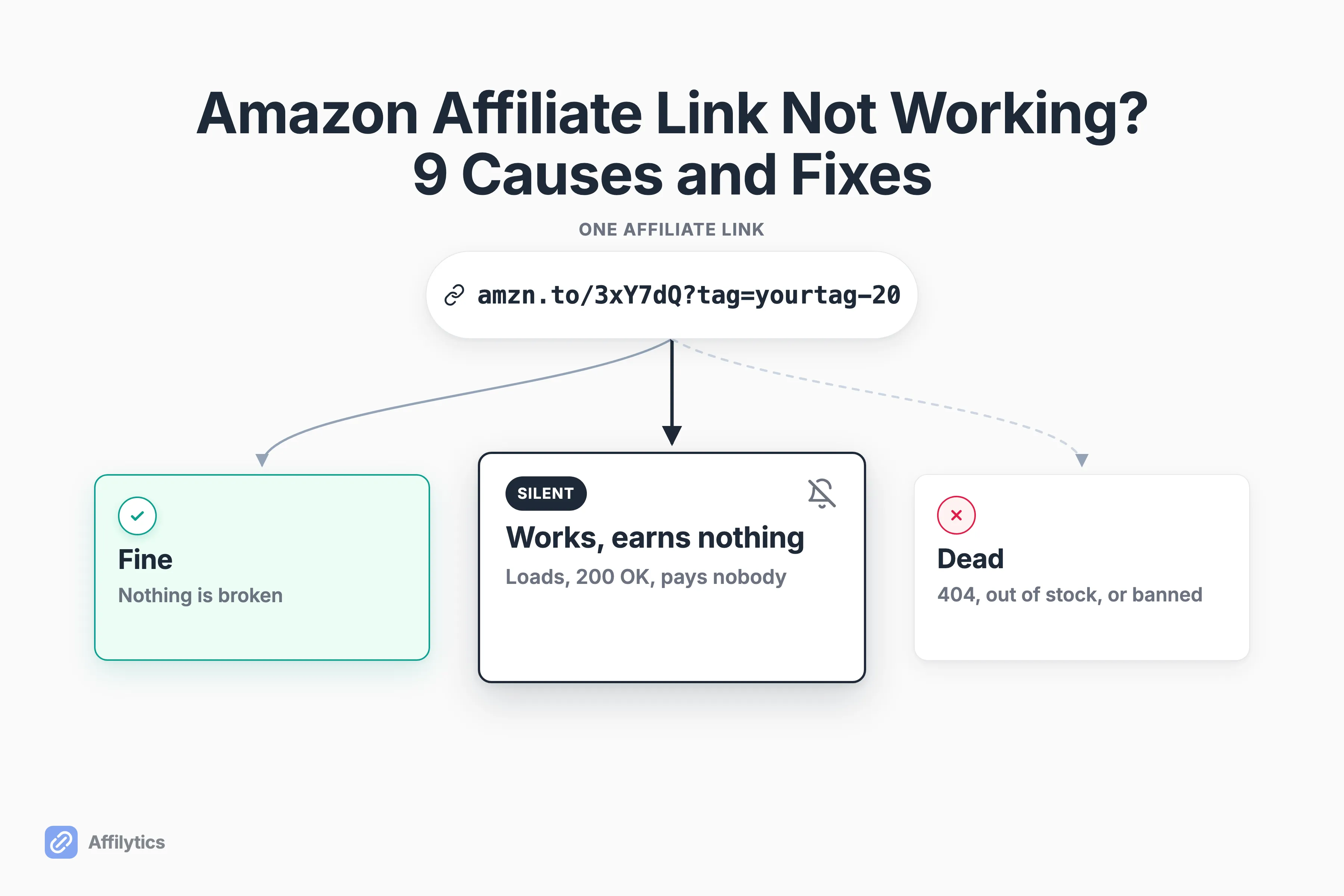
Most of the time, an Amazon affiliate link that is not working is doing exactly what it was built to do. It loads the product page, it looks perfectly healthy, and it earns you nothing. That is why a broken link can still look healthy to a status checker: a 200 OK confirms the page loaded, not that you still get paid.
At Affilytics we build the health checker that follows these links hop by hop, so we spend a lot of time watching exactly where an affiliate tag falls off.
That gap between “looks fine” and “actually pays you” is the whole story here, and it is also why how geo-routing sends each click to the right storefront matters more than most creators expect.
This guide sorts the nine reasons into three buckets, gives you a one-minute check to find which bucket you are in, and tells you honestly which ones no tool can fix for you. If the link itself checks out and you are still stuck on clicks but still no commission, the companion guide walks the six reasons a perfectly healthy link still earns nothing.
Start Here: Which Kind of “Not Working” Do You Have?
Section titled “Start Here: Which Kind of “Not Working” Do You Have?”Before you fix anything, work out which kind of broken you are dealing with. If you landed here asking whether do Amazon affiliate links expire, the short answer is no, they rot instead of expiring on a clock. An Amazon affiliate link can fail in three very different ways, and each one asks something different from you.
- A link that is fine. Nothing is wrong. You are misreading a dashboard or a checker tool.
- A link that works but earns nothing. It loads, the product is in stock, and your commission quietly goes to nobody.
- A link that is genuinely dead. The product is gone, the URL changed, or your account got shut off.
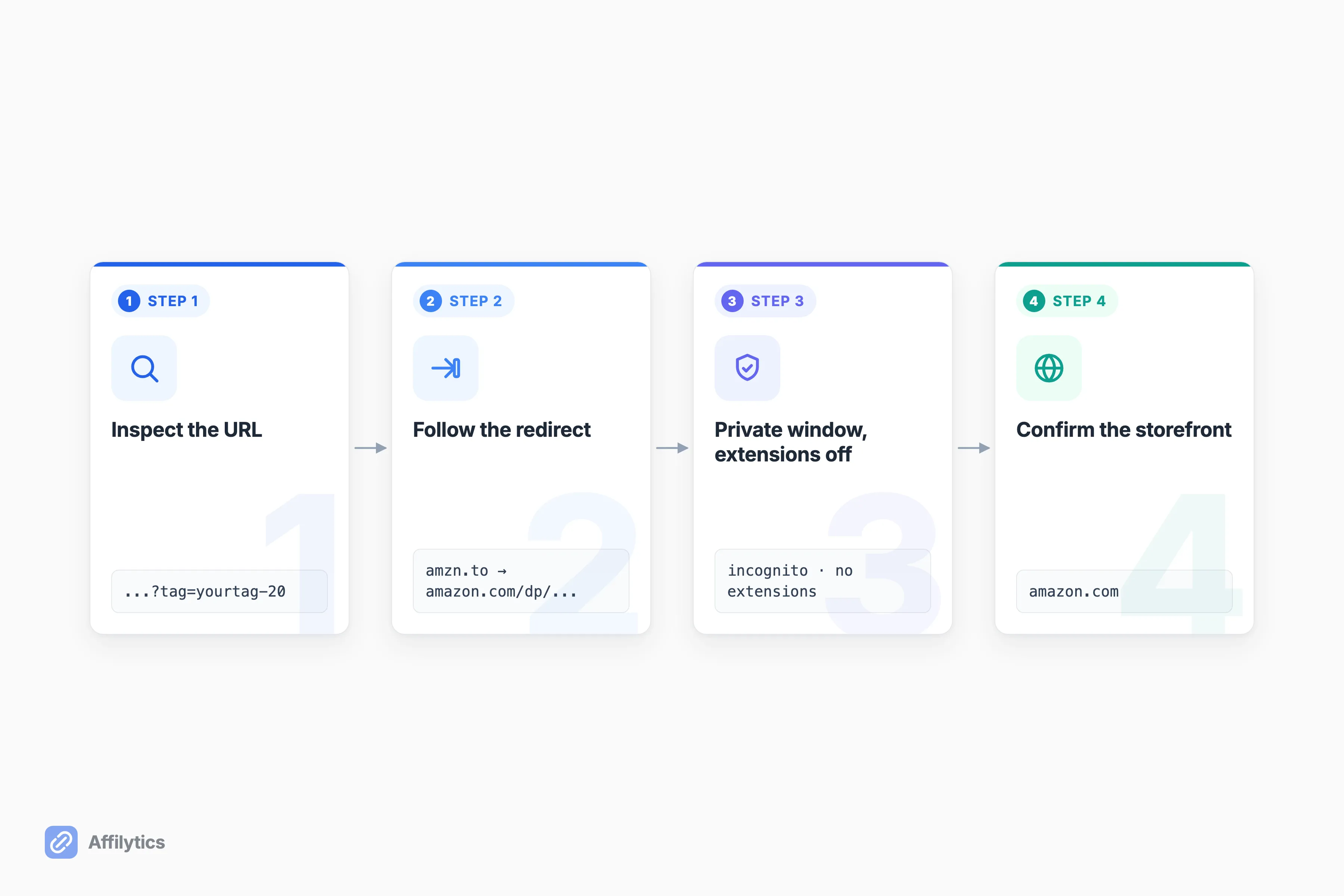
The middle one is the dangerous one, because it hides. So which one do you have? Run this on a single link before you touch anything else:
- Look at the URL and check for
&tag=. Amazon’s own guidance is to look for your Store ID or Tracking ID in the URL, which usually appears as&tag=followed by your ID. - Click it, and watch the address bar on the final page after every redirect settles.
- Open the same link in a private window with your browser extensions turned off.
- Note which storefront you actually landed on: amazon.com, amazon.co.uk, or somewhere else.
Four steps, one link, about a minute. The rest of this post is what each result means.
Bucket 1: The Link Is Fine and You Are Reading It Wrong
Section titled “Bucket 1: The Link Is Fine and You Are Reading It Wrong”Start here, because it is the most common outcome and the most reassuring one. Three of the nine reasons are not breakage at all. Nothing is wrong with your link. Something is wrong with what you are looking at.
Amazon’s Reporting Just Hasn’t Caught Up
Section titled “Amazon’s Reporting Just Hasn’t Caught Up”The most common false alarm: a click happened, the dashboard shows nothing, and you decide the link is dead. It usually is not. Amazon’s two reports move at different speeds. Ordered items update hourly, and Amazon says most orders will be reported within three hours of being placed. Earnings are slower: that report is current only as of the previous day, so checking it on Tuesday shows you Monday. A sale you made this morning can be real, tracked, and absent from the screen you are staring at. One associate whose SiteStripe short links stopped generating for a day put it plainly: “It came back for me out of nowhere the next day.”
Amazon’s Link Checker Says It Failed (and It’s Wrong)
Section titled “Amazon’s Link Checker Says It Failed (and It’s Wrong)”Amazon gives you a Link Checker inside Associates Central, and it is a reliable source of panic. It only validates links you built by hand. Paste in a link you copied from SiteStripe or Associates Central and it reports failure on a perfectly good link. Amazon says so directly: the tool does not work correctly with links copied from Associates Central or SiteStripe. Its own note is blunter still: “the links you create in Associates Central will automatically be coded correctly to the tracking ID you selected so link checker will not work with links created on Associates Central.” It also skips served links entirely, so it will not check Bounty Programme, Recommended Product Links, or other Widgets. If the checker is your only evidence, you have no evidence.
Your Own Browser Is Lying to You
Section titled “Your Own Browser Is Lying to You”Sometimes the only broken click is yours. Ad blockers, privacy extensions, and Safari’s tracking protection can interfere with the exact click you are using to test, while every real reader’s click goes through fine. This is why step 3 of the check matters: open the link in a clean private window with extensions off. If it works there, the link was never the problem. Your browser was.
Bucket 2: The Link Works and Earns You Nothing
Section titled “Bucket 2: The Link Works and Earns You Nothing”This is the bucket nobody searches for, because you do not know it is happening. The link works. The page loads. The product is in stock. And your commission goes to nobody.
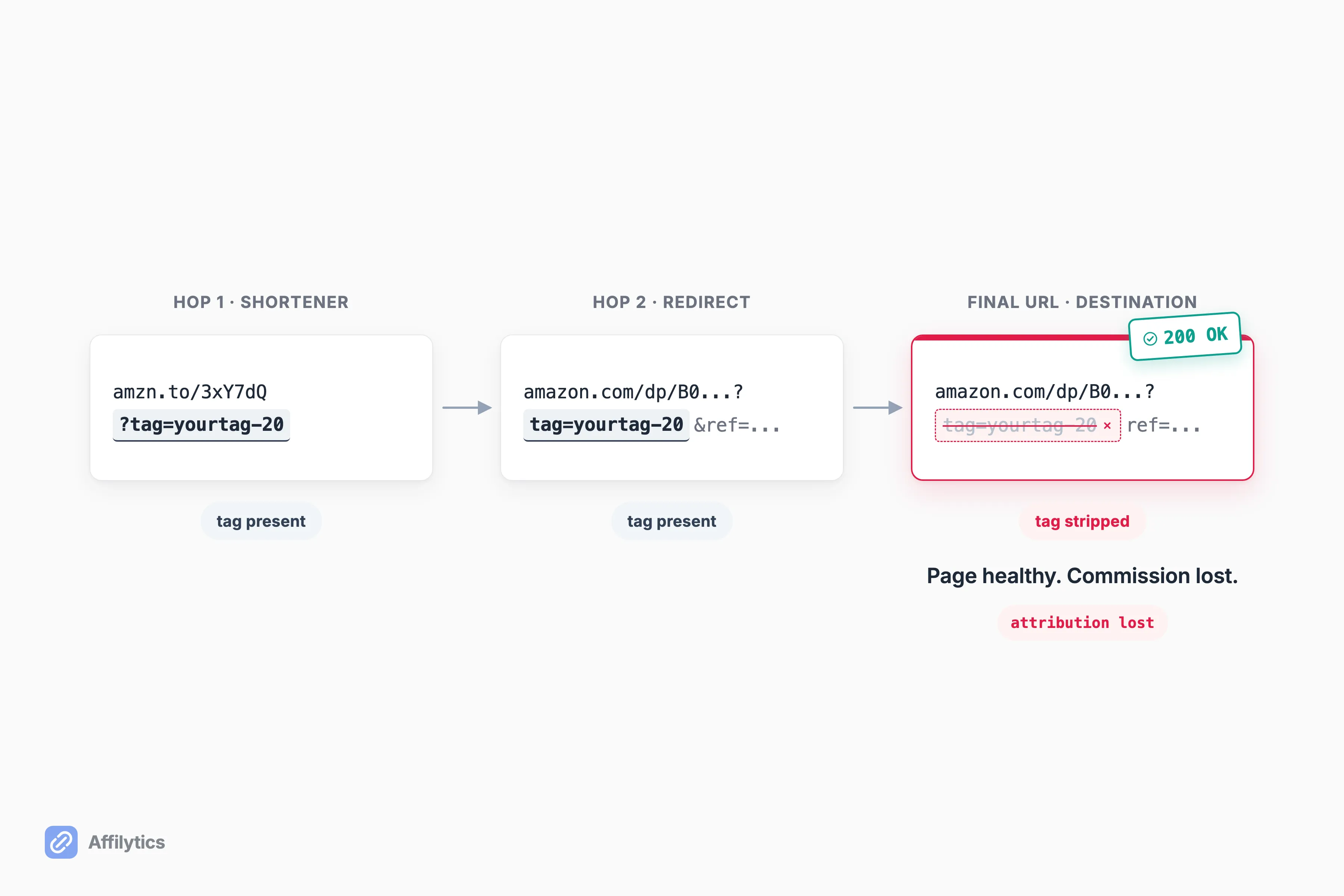
One associate who ran automated audits on a large publisher described it exactly: “Page returns 200, product is in stock, but your tag didnt survive the last hop so you just don’t get credit. Looks healthy in every dashboard.” Another named the reason you never notice: “Affiliate dashboards lie by omission. They show you clicks-that-converted. They never show clicks-that-hit-a-404.”
So where does the money leak?
The Tag Is Missing or Misspelled
Section titled “The Tag Is Missing or Misspelled”The simplest version: the tag was never there, or it is the wrong one. A hand-edited URL, a tag copied from a different storefront’s tracking ID, a copy-paste that dropped the query string. This is exactly what step 1 of the check catches, so if you already eyeballed the final URL for &tag=, you have ruled it out.
The Tag Doesn’t Survive the Redirect Chain
Section titled “The Tag Doesn’t Survive the Redirect Chain”Here is the invisible one. Your tag is right there when the reader clicks. Then a shortener, a CDN, an app deep-link, or the merchant’s own redirect drops the tag parameter somewhere between the click and the destination. The final page returns a clean 200. The product is in stock. Nobody gets paid.
One example creators report: on an iPhone, an Amazon link that deep-links into the Amazon app instead of staying in Safari can lose the tag, and whether it happens depends on whether the reader has the app installed. Social apps add their own layer on top of this, and Instagram links specifically hand the shopper to an in-app browser before Amazon ever sees them. None of this shows up in a dashboard. You have to follow the redirect and read the final URL, which is why how affiliate attribution actually gets tracked is worth understanding. It is also worth checking the clock rather than the link, because the 24-hour attribution window closes earlier than most creators expect.
Your Reader Is in the Wrong Country
Section titled “Your Reader Is in the Wrong Country”A lot of “broken” international clicks are not broken at all. Your UK reader clicks your amazon.com link, lands on the US store, cannot check out easily, and your tag has no standing on amazon.co.uk anyway. The link worked perfectly. It just earned nothing.
Amazon’s own fix is OneLink, which Amazon calls its geo-redirection solution to help you monetize your international traffic, free for every Associate. Here is what OneLink actually does, and where it stops (if you’ve already enabled it but it isn’t tagging international sales, work through the OneLink-specific failures and fixes):
- Geo-redirection only. No broken-link detection, no out-of-stock alerts.
- No analytics beyond Associates Central, no non-Amazon destinations, no public API.
- A fixed set of Amazon marketplaces, absent from Mexico, Brazil, India, China, Türkiye, and the UAE.
If your traffic is all domestic, geo-routing does nothing for you, and one creator said so: “Bro I have 150k monthly traffic from USA. Random traffic what can genius link provide me.” But if you do have overseas readers, the counterpoint lands too: “If a free tool is shortening links but costing you commissions, then it ain’t free.”
Affilytics leads with geo-routing here. Our smart links (go.affilytics.io/{slug}) route each click by visitor country: IP, a GeoIP lookup, the first matching country rule, then a redirect, with a default URL as fallback. Unlike OneLink, they are not locked to Amazon’s storefronts.
Bucket 3: The Link Is Genuinely Dead
Section titled “Bucket 3: The Link Is Genuinely Dead”Three causes where something really did break. These are the ones you already understand, so we will keep it short.
The URL Changed or the Product Is Gone
Section titled “The URL Changed or the Product Is Gone”Links rot. Amazon restructures a URL, a product gets discontinued, an ASIN dies, and your reader lands on Amazon’s 404 page with the dog photos. The associate who ran those audits noticed the part that stings most: the dead links cluster on the oldest, highest-earning posts, the ones you assumed were running themselves.
Out of Stock, or the ASIN Got Merged
Section titled “Out of Stock, or the ASIN Got Merged”This one is sneaky because it does not 404. A color or size sells out indefinitely while the parent product still exists, or a variant ASIN gets merged, and the URL keeps returning a healthy 200. The dashboard sees a valid link. The buyer sees “currently unavailable.” The fix is manual and unglamorous: find the live ASIN and repoint the link.
Your Account Is Suspended or Banned
Section titled “Your Account Is Suspended or Banned”Sometimes “not working” means Amazon has decided not to pay you. These are rules worth understanding rather than resenting. Two things get accounts in trouble:
- Purchases from your own link, or by anyone close to you. Amazon’s Program Policies say you will not directly or indirectly purchase any Products through Special Links, for your use or anyone else’s, and will not encourage friends, relatives, or business relations to do it either. One associate’s warning is worth quoting in full: “make sure no one that lives at the same address as you buys from Amazon with your link. They track IP’s. If your Amazon affiliate account gets suspended you will never get it back.”
- Cloaking or otherwise obscuring your links. The same policies cover two things. You will not cloak, hide, spoof, or obscure the URL of the site containing your Special Links, including by using redirecting links, in a way that stops Amazon working out where a customer clicked from. And you will not use a shortener in a manner that makes it unclear you are linking to Amazon. That is narrower than the folklore: the rules are about Amazon seeing the source, and your reader knowing where they are headed.
No tool fixes this one. Not ours, not anyone’s. The only move is to stay inside the rules from the start.
The Nine Causes, Side by Side
Section titled “The Nine Causes, Side by Side”All nine reasons in one place. The last column is the one that matters.
| Cause | Bucket | What you see | Can you spot it by hand? |
|---|---|---|---|
| Tag missing or misspelled | Earns nothing | No &tag= in the URL | Yes |
| Tag stripped in the redirect chain | Earns nothing | Tag gone on the final URL, page still loads | No |
| Reader in the wrong country | Earns nothing | Lands on a foreign storefront | Partly |
| Reporting delay | Fine | Dashboard empty after a click | Yes, wait a few hours |
| Link Checker false positive | Fine | Amazon’s checker says “failed” | Yes |
| Browser extension interference | Fine | Only your own click fails | Yes, private window |
| URL changed or product gone | Dead | The 404 dog page | Yes |
| Out of stock or ASIN merged | Dead | 200 loads, but “currently unavailable” | No |
| Account suspended or banned | Dead | Nothing tracks at all | Yes |
Notice how many rows say no or partly. That is the problem with checking by hand.
What Happens When You Have More Than One Link
Section titled “What Happens When You Have More Than One Link”Everything above runs on one Amazon affiliate link in about a minute. Now do the arithmetic. One minute times 300 posts is not a Tuesday afternoon, it is a second job.
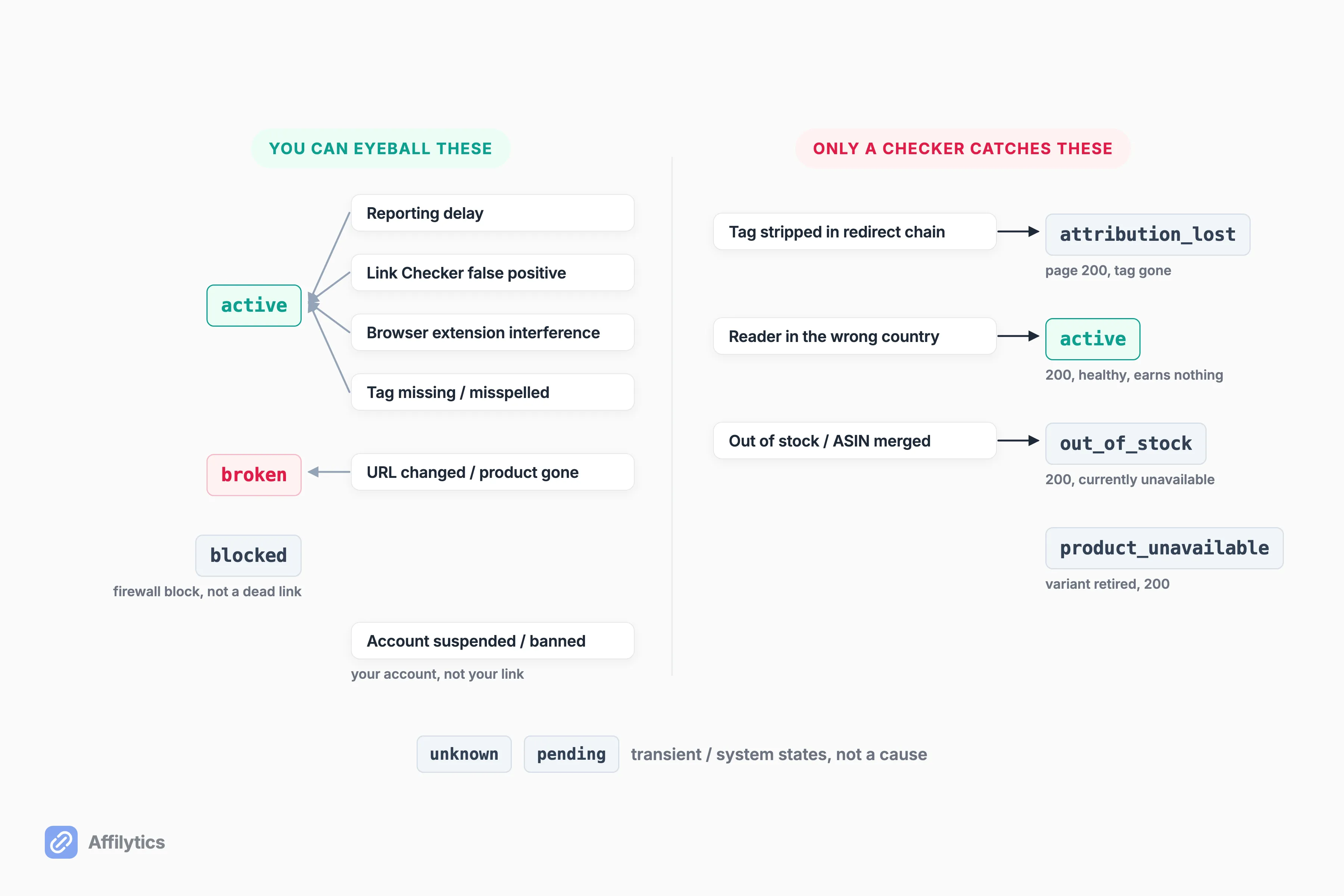
One associate summed up the wall everyone hits: “I have 300+ posts with links across multiple networks. Manually checking each one would take forever.” And a generic broken-link checker only gets you partway. It catches the clean 404s in Bucket 3. It cannot tell you the tag fell off a chain that still returns a healthy 200, which is the entire middle bucket.
So what catches the middle bucket at scale?
This is where a checker built for the job comes in. Affilytics monitors links continuously and sorts each one into a status: active, broken, attribution-lost, out-of-stock, product-unavailable, or blocked (a firewall block, not a dead link). An alert fires when a check detects the change, not on a weekly schedule, and a link has to fail several checks in a row before it is flagged, so you are not paged over a blip.
Two honest limits:
- We scan YouTube video descriptions and crawl blogs and websites, but the blog crawl reads static HTML only, so a fully JavaScript-rendered site may not scan.
- Creating a smart link and swapping it into your content is a manual step. Nothing auto-converts your existing links for you.
If you want the full playbook, here is how to check every affiliate link on a channel at once, or how to audit every affiliate link on your site at once if your links live on a blog. And if every link stopped earning at the same moment rather than one at a time, the cause sits above the individual link: read what happens when your Associates account is suspended.
Run the Check on Your Best Post Today
Section titled “Run the Check on Your Best Post Today”Run the one-minute check on your single best-earning post right now. If what you find makes you nervous about the other 299, that is the moment a tool earns its place. Running it once is a start; the durable fix is to monitor your affiliate links continuously so the next break emails you instead of hiding in an old post.
Create your free account and you get two full weeks with everything unlocked, no credit card. Point it at your channel and let it run the check you do not have time to run 300 times.
Why is my Amazon affiliate link not tracking sales?
Section titled “Why is my Amazon affiliate link not tracking sales?”Either the tag was never in the URL, or it did not survive a redirect hop between the click and the destination. The page returning a healthy 200 tells you nothing about whether you got credit. Run the one-minute check: follow the link through every redirect and read the final URL for your &tag= ID.
How do I know if my Amazon affiliate link is working?
Section titled “How do I know if my Amazon affiliate link is working?”Look for &tag= in the final URL after every redirect settles, not in the URL you pasted. Do not trust Amazon’s own Link Checker on this: it reports failure on links copied from SiteStripe or Associates Central because it only validates links you built by hand.
Do Amazon affiliate links work in other countries?
Section titled “Do Amazon affiliate links work in other countries?”Your amazon.com tag has no standing on amazon.co.uk, so an overseas click usually works fine and simply earns nothing. Amazon OneLink handles a fixed set of Amazon marketplaces for free. Anything outside that set, or outside Amazon entirely, needs country-level routing.
Can friends and family buy through my Amazon affiliate link?
Section titled “Can friends and family buy through my Amazon affiliate link?”No. Purchases by anyone in your household are a known suspension trigger, and Amazon tracks addresses and IPs. The rule exists to stop self-dealing, and a suspension is effectively permanent, so keep friends and family off your own link.