
Amazon Associates Account Suspended? Here's What Broke
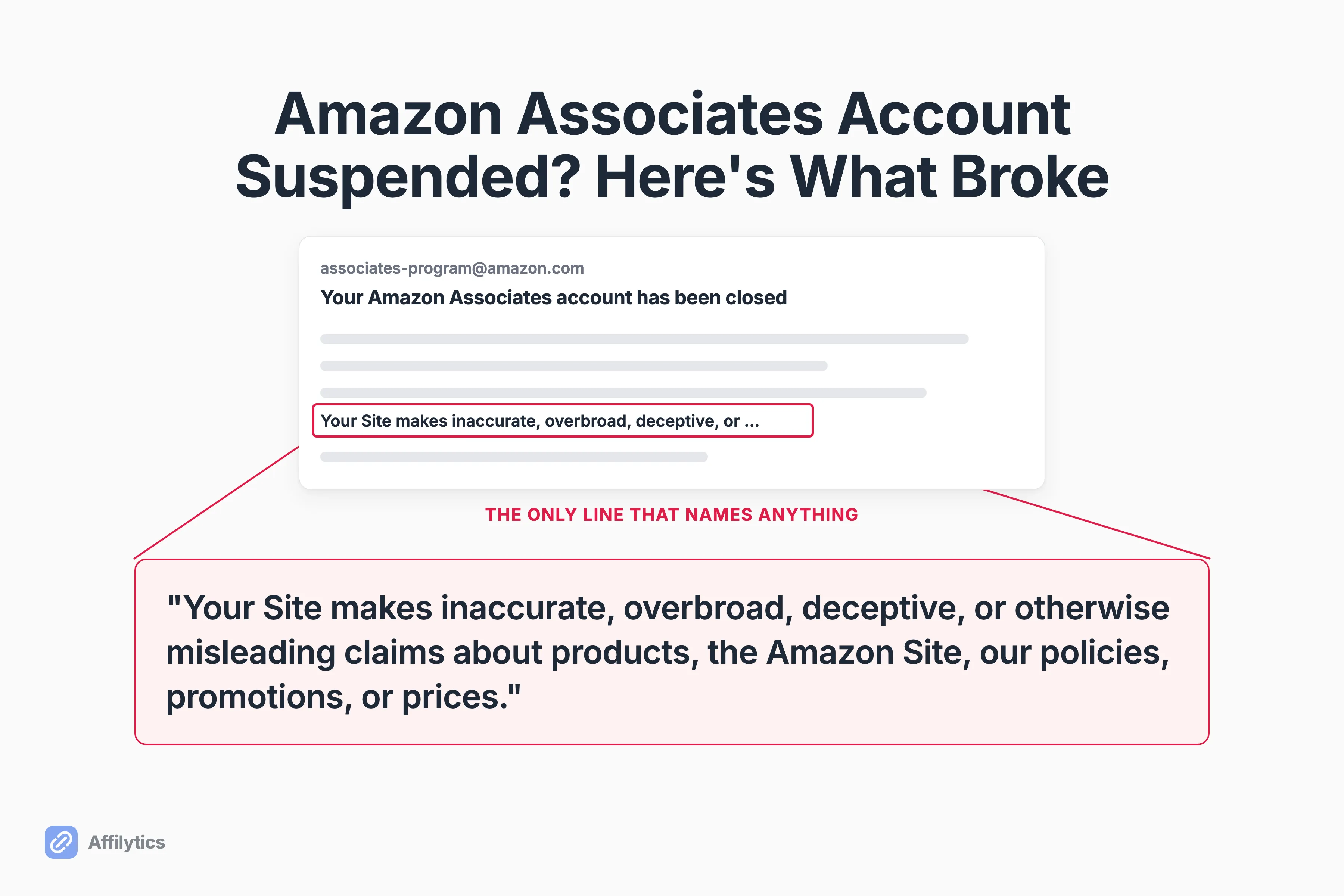
The email that tells you your Amazon Associates account is suspended does not tell you what you did. One creator two years into the program, earning roughly $3-4K a month, got boilerplate language about misleading claims with no example attached, and about $7K in outstanding payments withheld.
At Affilytics we build the thing that routes each affiliate click to the reader’s own country store and then flags the links that quietly stop working, so I spend most of my week looking at how published links drift away from what their owner thinks they do.
That drift is the thread running through half of these closure stories, because Amazon affiliate links do not expire, they rot, and rot stays invisible until something else goes wrong.
This post covers what the notice is actually telling you, the triggers that show up in real closures, how the appeal works and how little time you have, and the routine that keeps you off the list.
What Amazon’s Closure Email Actually Tells You
Section titled “What Amazon’s Closure Email Actually Tells You”The notice names a category. It doesn’t name an incident.
Here is the reason one creator was given, verbatim: “Your Site makes inaccurate, overbroad, deceptive, or otherwise misleading claims about products, the Amazon Site, our policies, promotions, or prices.” He ran two sites, got no warning, and got no example of which page or which claim tripped it.
So what is that sentence for?
It is a bucket, not a diagnosis. Amazon frames the whole program around one thing (“As a program, Associates is obsessed with maintaining customer trust”), and the closure terminates your account along with the Operating Agreement that governs the program. What the notice hands you is short:
- The category your closure was filed under, which is the only signal you get about which appeal bar applies to you.
- No URL, no date, no specific click, no page.
- Sometimes a line saying outstanding fees will not be paid.
That is why the rest of this post works backwards from categories instead of guessing at incidents. You are reverse-engineering the trigger from a label, and so is everyone else in those threads.
One more thing before the trigger list, because it changes how you should read it. A creator in r/juststart was terminated for referring traffic from a site that was not his Site, appealed, and got an email back that said his account and his previous advertising fees had been reinstated: “Please accept our apologies for the closure error.”
A closure notice isn’t proof you did something wrong. It is Amazon’s read of a pattern, and reads can be wrong.
The Triggers That Are Shaped Like Link Problems
Section titled “The Triggers That Are Shaped Like Link Problems”A lot of documented closures aren’t really about intent. They are about links drifting out of the shape Amazon expects them to have.
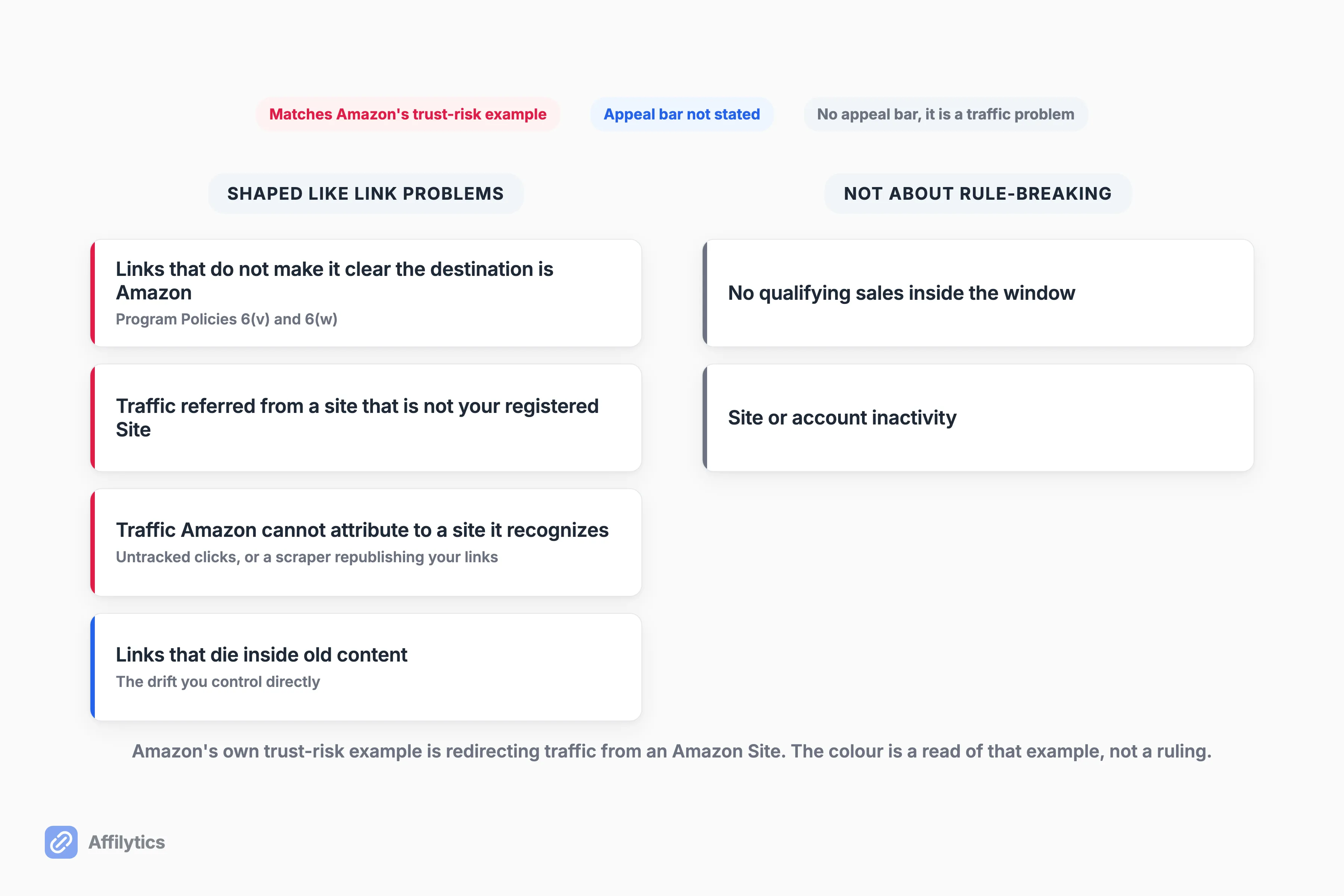
Here are the ones the record actually supports, roughly in order of how well sourced they are:
- Links that do not make it obvious the destination is Amazon. The Program Policies say you will not cloak, hide, spoof, or otherwise obscure the URL of your Site containing Special Links, and that you will not use a link shortening service, button, hyperlink, or other ad placement in a manner that makes it unclear you are linking to an Amazon Site.
- Traffic referred from a site that is not your registered Site. In the reinstated case above, the suspected cause was procedural: a second domain that was never added in the Associates dashboard, running the same tracking setup.
- Traffic Amazon cannot attribute to a site it recognizes. One creator was closed for sending clicks that were not tracked with his affiliate ID and could only speculate about the cause. Another was closed for unusual traffic, then found a spam site that had scraped his content along with his affiliate links.
- Links that die inside old content. This one is entirely yours to control, and it is the one nobody schedules time for.
How many of those look like a decision somebody made on purpose?
None of them. A second domain nobody registered, a scraper you have never heard of, a tag that broke for three days: all of it is drift, and drift is what happens to published links while you are busy publishing new ones. The diagnosis half is why an Amazon affiliate link stops working, and the prerequisite for any of this is to build an inventory of everything you have published, because you can’t audit a list you have never written down.
Disclosure sits in a different place, and I want to be precise about it. Nothing in the closure reports I read shows an account being closed over a missing disclosure, so I am not going to file it next to the cloaking clause, which is written down in black and white. It is still part of what you agreed to, and the FTC publishes what an affiliate disclosure has to look like. Keep yours current because it costs nothing, not because a notice is coming.
The Closures That Are Not About Rule-Breaking at All
Section titled “The Closures That Are Not About Rule-Breaking at All”Two whole families of closure have nothing to do with the rulebook, and page one of Google barely mentions either.
The first is sales volume, and it works differently before and after you are fully accepted. When you apply, you have 180 days to refer a sale, and Amazon evaluates your application once you have referred three qualifying sales. Miss it and your application can be withdrawn, which is worth reading carefully: Amazon says it cannot reinstate an account or Associates ID once it has been rejected, though you are welcome to reapply when your site is more established. Past that stage it can still come for you: one creator posted that he had been given 90 days to drive qualifying purchases or lose the account, with about 50 views a day and 30 affiliate products live.
What did the replies tell him to do? Write a seasonal buying guide and push it. Not appeal, not audit his compliance. His fellow creators read it correctly as a traffic problem wearing a compliance-shaped email.
The second family is inactivity, and Amazon documents this one plainly. If you have earned no commission income in the three years before a given month, Amazon may take an account maintenance fee out of whatever unpaid commission you have left, and your account is closed for dormancy when it does. Creators run into softer versions of the same thing too: one UK Associate asked support for help getting into the platform and had his account closed for site inactivity instead. Amazon’s public support handle replied to him with a link to the appeal page, which he described as no help whatsoever.
So is a quiet account a risk in itself?
On this evidence, yes, in the most boring way possible. An account with no sales and nothing new published is the cheapest kind for Amazon to close, and no appeal argument fixes an empty pipeline. If this is the bucket you are in, the work is traffic and content, not a better-worded email.
How the Appeal Works, and How Little Time You Have
Section titled “How the Appeal Works, and How Little Time You Have”You have five business days. That is the single most actionable fact in this post, and it is the one people miss while they are still writing an angry draft.
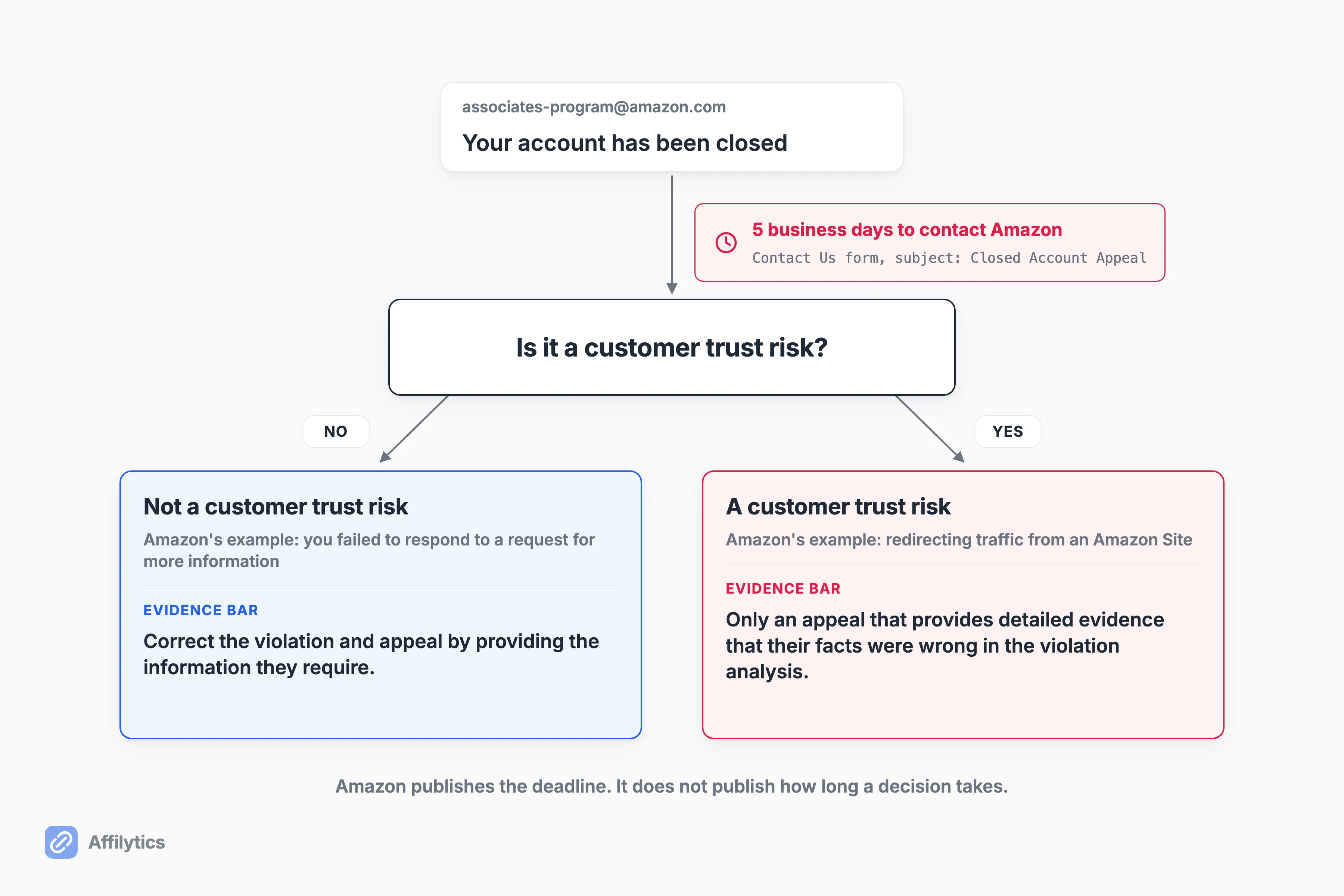
Amazon’s help page says to contact us within 5 business days of your closure using the Contact Us form, choosing “Closed Account Appeal” from the subject dropdown. Same page, two very different bars:
- Not a customer trust risk (its example: you failed to respond to a request for more information). You “may correct the violation and appeal through providing the information we require in a warning response.”
- A customer trust risk (its example: redirecting traffic from an Amazon Site). Amazon “will review only an appeal that provides detailed evidence that our facts were wrong in our violation analysis.”
So what actually goes into that message?
That second bar is the one worth reading twice. It isn’t asking you to be sorry. It’s asking you to prove the analysis was wrong, which means specifics: which domains are yours, which are registered in your dashboard, what that traffic actually was.
One separate case that catches people: a rejected application isn’t a closed account. If your application was rejected, Amazon says you are welcome to reapply once the program requirements are met.
Does appealing ever work? At least once, provably: the reinstatement email in that r/juststart thread apologized for a closure error and restored the previous advertising fees along with the account. One documented case is not a rate, and I am not going to turn it into one.
Here is the honest gap. Amazon publishes the deadline for contacting them and publishes nothing about how long a decision takes, and no creator report I found documents a typical turnaround. Send early, keep it factual, and don’t budget your month around a reply date nobody has.
Does Your Link Tool Put Your Account at Risk?
Section titled “Does Your Link Tool Put Your Account at Risk?”Someone asked this in r/juststart and got zero replies. They had heard secondhand that a popular link tool was being treated as cloaking, and they wanted to know whether the plugin they used was next: “What are the best practices to be compliant?”
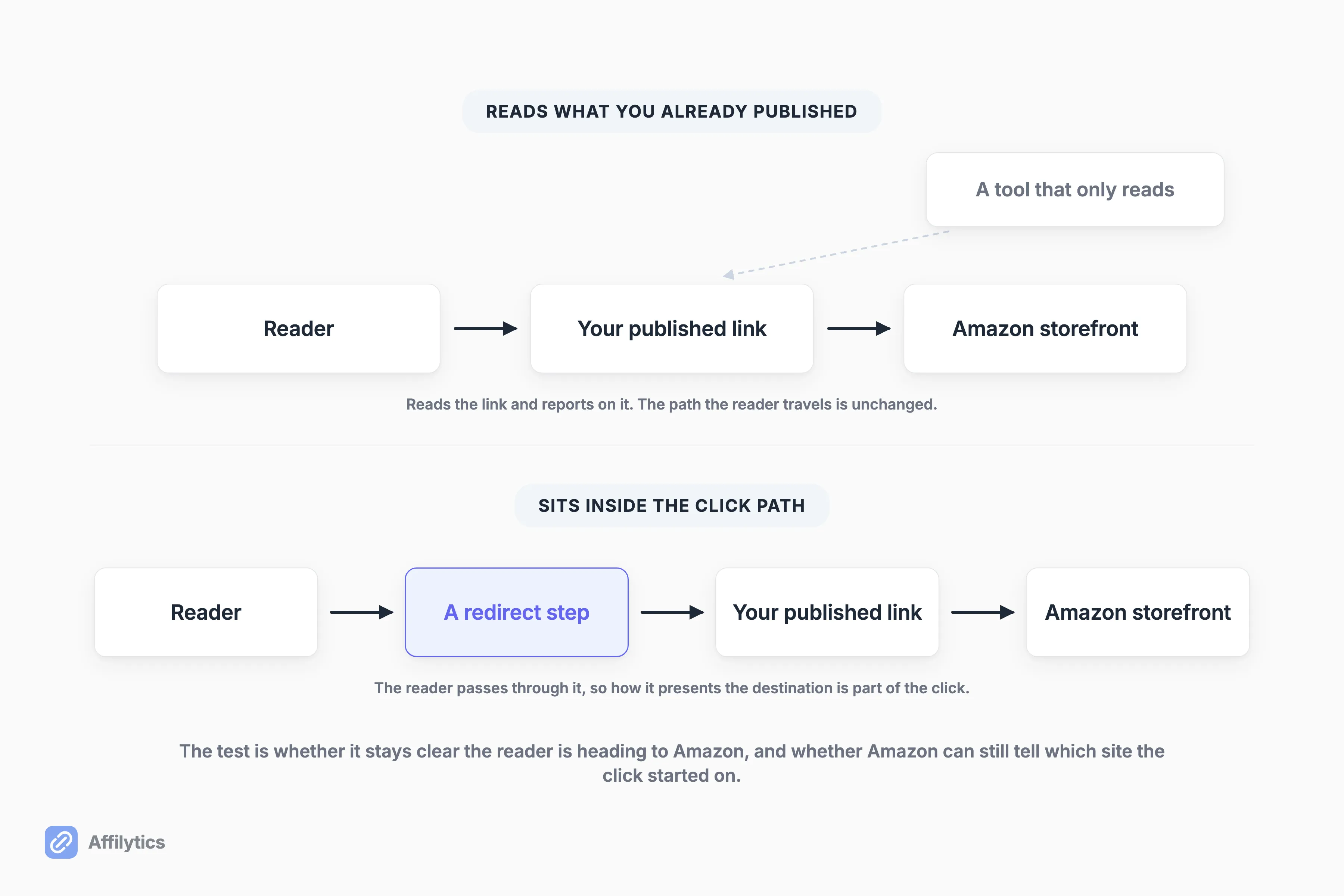
I can’t tell you whether that secondhand claim was ever accurate, and I’m not going to characterize what any named tool does. What I can do is point at the clause everyone in that thread was actually worried about, because it is public and it is short.
The Policies test is about presentation, not vendors. It comes down to two questions:
- Can Amazon still tell which site the click started on?
- Can your reader tell they are heading to Amazon?
Both of those are a property of how you present a link, not of whose logo is on the dashboard behind it.
Where does our own tool sit in that picture?
On the reading side. We pull a YouTube channel’s video descriptions or crawl a site, extract the affiliate URLs already published there, and register each one for health checks. Nothing gets rewritten, and no published link becomes a smart link on its own, because creating a smart link is a manual step you take yourself.
And a smart link is a redirect. Ours, anybody’s. If you publish one, it lives under the same clause as every other redirect you publish, and keeping the destination obviously Amazon is on you. No tool gets an exemption from that, including this one.
Prevention Is a Routine, Not a Checklist
Section titled “Prevention Is a Routine, Not a Checklist”A rulebook you read once can’t catch a link that changed last Tuesday.
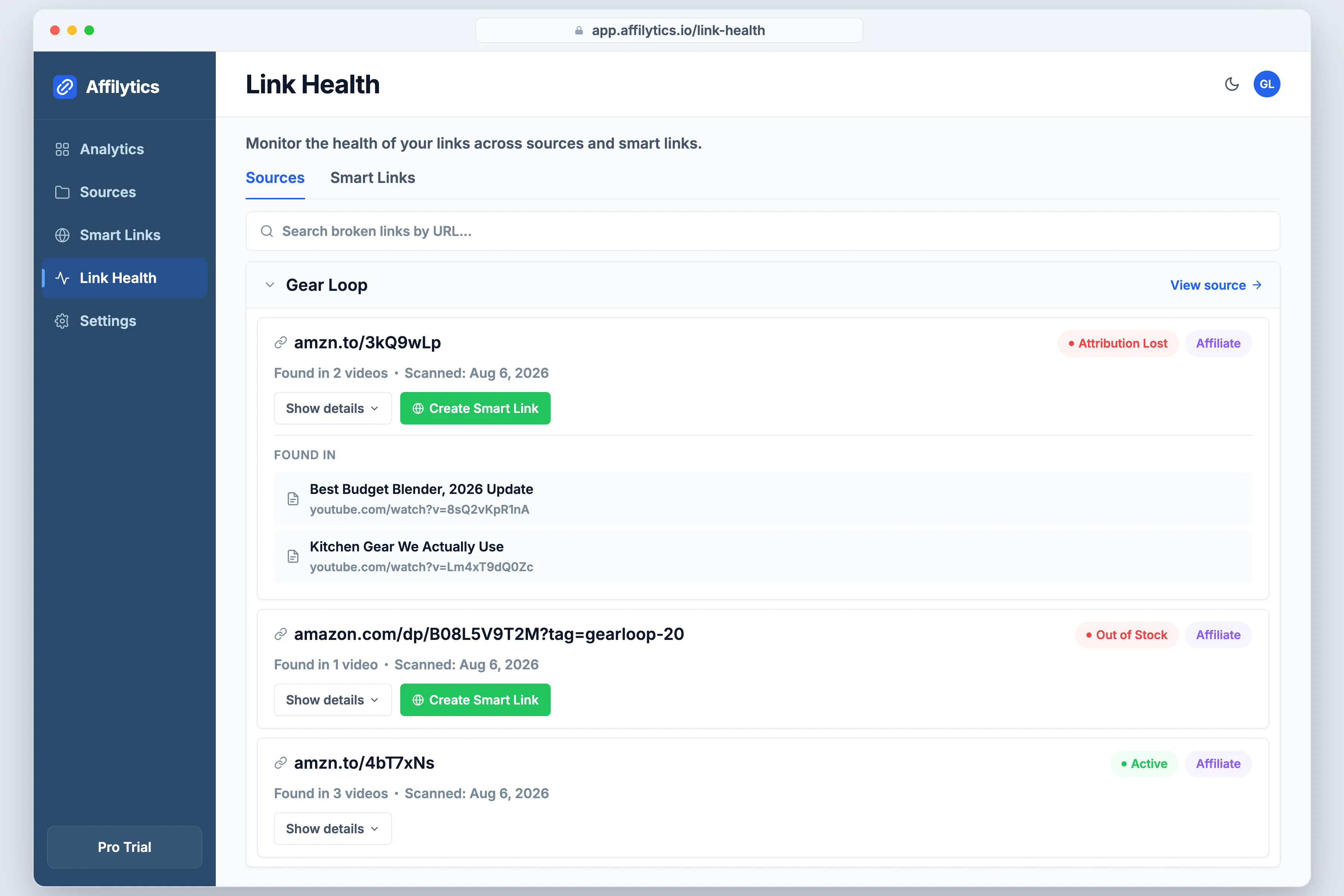
The routine is four moves, and you can run all of it without buying anything:
- List every place you have published an affiliate link: every video description, every post, every show note.
- Check what those links do now, not what they did the day you wrote them.
- Confirm each destination is still the right product and that your tag survives the trip.
- Keep the boring records current: every site you publish from registered in your dashboard, disclosure in place.
The one-pass version of that is how to check every affiliate link on your site in one pass, and the version that keeps running afterwards is monitoring affiliate links continuously.
So how often is often enough?
More often than never, which is where most archives sit. Drift is continuous, so the counter has to be continuous too.
That loop is what we built Affilytics around: it geo-routes each click to the reader’s own Amazon storefront so an international click still earns you something, and it health-checks every link it finds, with alerts firing when a check detects the change instead of landing in a weekly digest. It starts free, with broken-link detection on your first scan and the country breakdown of every click.
To be clear about the routing half: it’s not a compliance feature. Nothing I read ties a wrong-storefront click to a closure, and I’m not going to imply it does. It is the income side of the same habit. Once you are looking at your links regularly anyway, you may as well make each one pay from every country your readers live in.
Find the Drift Before Amazon Does
Section titled “Find the Drift Before Amazon Does”Most of the link-shaped triggers in this post are things you could have seen months earlier by looking. The looking is the whole job, and almost nobody schedules it.
If you would rather find your own drift first, every new account gets two full weeks with everything unlocked, no credit card. Start your free trial, point it at one source you have already published, and read what your oldest links actually do now.
Can I get my Amazon Associates account back after it’s closed?
Section titled “Can I get my Amazon Associates account back after it’s closed?”Sometimes. Amazon accepts appeals, but it applies two very different bars: a violation it does not treat as a customer trust risk can be corrected by supplying the information it asked for, while a closure it does treat as a trust risk gets reviewed only on detailed evidence that its facts were wrong. One creator in the research for this post was reinstated, with Amazon calling it a closure error and restoring the withheld fees. That is one documented case, not a success rate, and nobody publishes a success rate.
How long do I have to appeal an Amazon Associates closure?
Section titled “How long do I have to appeal an Amazon Associates closure?”Five business days from the closure. Amazon’s help page says to use the Contact Us form and pick “Closed Account Appeal” from the subject dropdown. Worth knowing: Amazon publishes the deadline for contacting them but does not publish how long a decision takes afterwards, and no creator account I found documents a typical turnaround either. Send it early rather than polishing it for a week.
Do I lose my unpaid commissions if my Associates account is closed?
Section titled “Do I lose my unpaid commissions if my Associates account is closed?”A closure notice can state that outstanding fees will not be paid, and creators report exactly that happening, including one who had roughly $7K withheld alongside the closure. In the one documented reinstatement, the previous advertising fees came back with the account. Neither of those is a probability, so treat the money as tied to the appeal rather than as separately recoverable.
Does Amazon close Associates accounts for not making sales?
Section titled “Does Amazon close Associates accounts for not making sales?”Yes, and it is a completely separate path from any rule violation. New applicants have 180 days to refer a sale, with the application evaluated once three qualifying sales come in, and an application that misses it can be withdrawn. Established accounts have their own version: no commission income for three years and Amazon closes the account for dormancy, while creators report warning emails giving them 90 days to drive qualifying purchases. There is nothing to appeal here in the usual sense. The fix is traffic and content, not a well-argued email.