
Why Your Affiliate Link Checker Lies About Dead Links
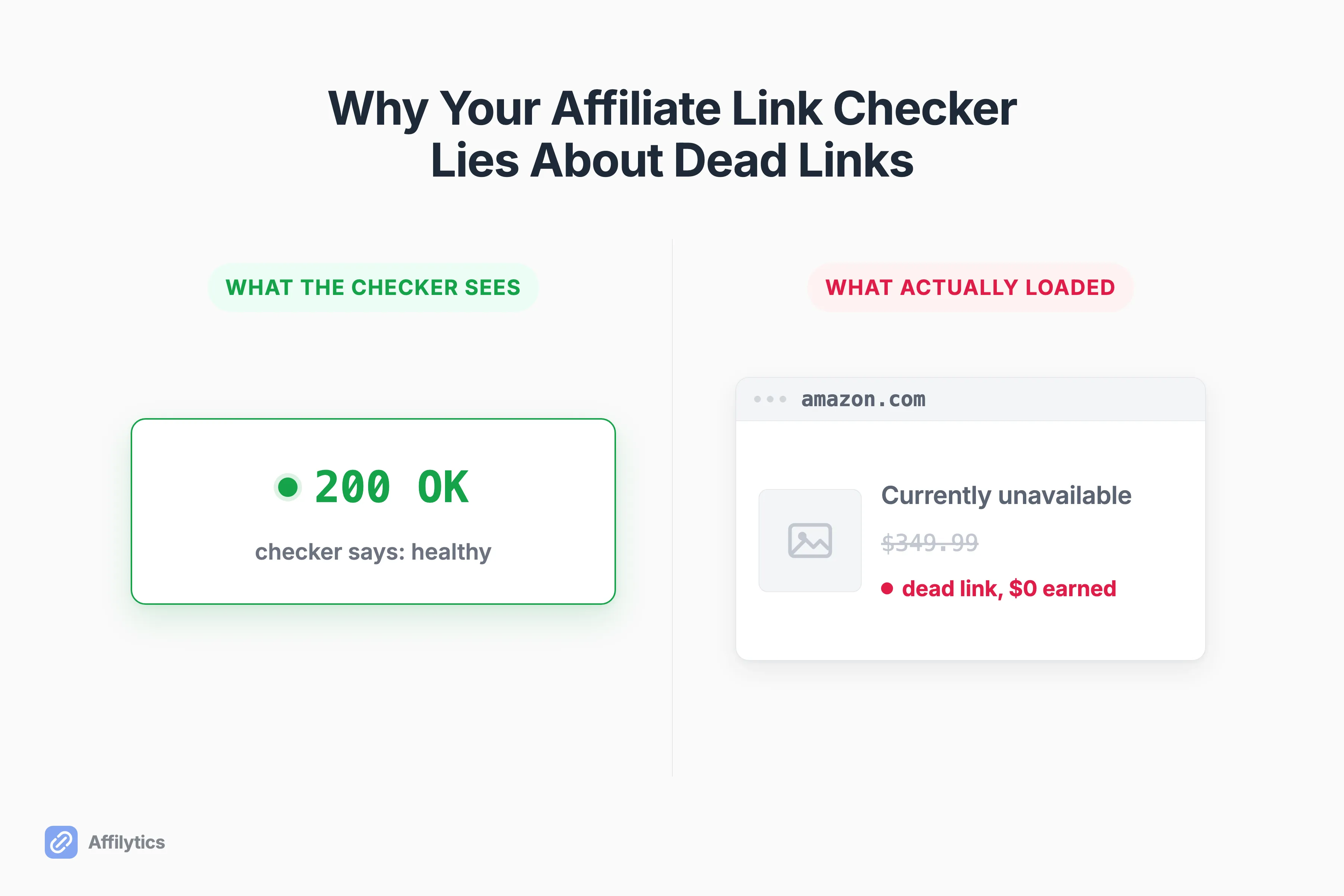
Run your affiliate links through a broken link checker, get back a wall of green 200 OK, and you would swear every link is fine. But a dead affiliate link almost never returns a 404, which is exactly why a status-code checker hands you a false positive.
I build Affilytics’ link-health checker in Rust: a stealth HTTP client that fetches the real destination and reads what the page actually is, not just the number it responds with. So I spend a lot of my time in the gap between “the URL responded” and “the link still earns.”
That gap is the whole reason continuous affiliate link monitoring is worth building at all. The links that look healthy in every dashboard are usually the ones quietly bleeding commission.
This post walks through why a broken affiliate link still returns 200, the four failure modes a status-code checker structurally cannot see, and what a check has to actually do before its green checkmark means anything.
Why a Dead Affiliate Link Returns 200, Not 404
Section titled “Why a Dead Affiliate Link Returns 200, Not 404”Start with what a 404 actually means. It is the server telling you there is no document at that path. A 200, by contrast, means a document was served. That is it. The status code describes whether a page came back, not whether it is the page you wanted.
A dead affiliate link almost always lands somewhere that does exist. The product got pulled and the URL now serves a “currently unavailable” notice. The merchant redesigned their site and bounces you to the homepage. The campaign ended and the landing page is a generic marketing splash. The domain lapsed and a parking service answers instead. Every one of those returns a clean 200, and every naive checker marks them healthy.
One creator in r/juststart put it plainly: “a dead affiliate link mostly doesnt 404. the page loads fine, status 200, checker says youre good.” That is the entire trap in one sentence.
Amazon is the canonical case. A discontinued or pulled product commonly serves a 200 page with a “currently unavailable” or “we couldn’t find that page” placeholder rather than a hard 404. The listing loads, the status is green, and your link earns nothing. This is the same reason an Amazon affiliate link can stop working while looking perfectly alive from the outside.
If you want the precise semantics, it comes down to the difference between what an HTTP 200 and a 404 actually signal at the protocol level. A status code answers a narrow question, and “is this link still commercially alive” is not the question it answers.
The Four Ways a “Healthy” Link Is Actually Dead
Section titled “The Four Ways a “Healthy” Link Is Actually Dead”A commenter in r/SideProject framed the real job better than most tools do. You have to separate “technically reachable” from “commercially broken,” and the list of ways a page can be reachable but broken is longer than it looks: “soft 404, out of stock, login wall, changed canonical URL, blocked by bot protection, or content mismatch.”
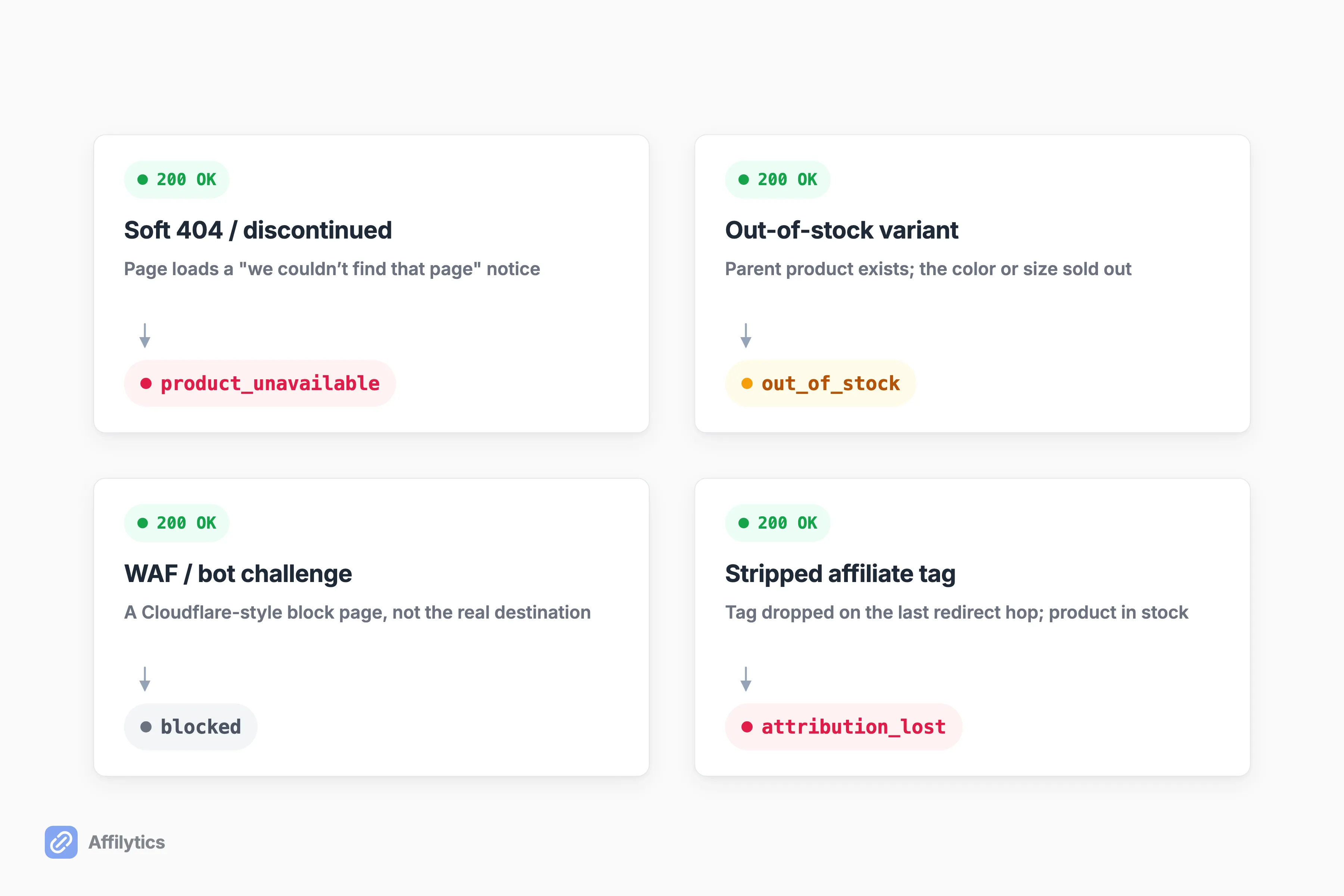
Four of those account for nearly every affiliate link checker false positive I see. Each maps to a distinct signal a status-code check cannot read, and each one deserves its own status rather than a blanket “broken.”
Soft 404s and Discontinued Products
Section titled “Soft 404s and Discontinued Products”The product got discontinued, and the page that replaced it is a 200 that says “we couldn’t find that page” or “this item is no longer available.” The server is happy. The content is a tombstone. This pattern is common enough that search engines gave it a name, the soft 404. A status checker cannot tell a live product page from its tombstone, because both return 200. In our status enum this is product_unavailable, and it earns its own label precisely because “the page loaded” is a lie here.
Out-of-Stock Variants (Sneakier Than a Clean 404)
Section titled “Out-of-Stock Variants (Sneakier Than a Clean 404)”This one is worse. A specific color or size sells out while the parent product still exists, so the page renders fine and returns 200, and nothing about the response says “you can’t buy this.” As one thread OP in r/Affiliatemarketing noted, “Out-of-stock variants are sneakier than discontinued products. Discontinued = clean 404, easy to detect.” A discontinuation eventually breaks something you can measure. A sold-out variant just quietly stops converting. We track this as its own status, out_of_stock, separate from a full discontinuation.
WAF and Bot-Block Pages Misread as the Destination
Section titled “WAF and Bot-Block Pages Misread as the Destination”A WAF, short for web application firewall, is the Cloudflare or Akamai or DataDome layer that decides whether an incoming request looks like a real browser or a bot. When it decides you are a bot, it serves a challenge or interstitial page. That page often returns a 200-ish response, and a naive checker treats the challenge as the live destination. So the link reads healthy when it was never actually checked, or reads broken when the link is genuinely fine and only the checker got blocked. None of the mainstream checkers I have looked at address this at all. We surface it as blocked instead of guessing.
Your Affiliate Tag Stripped on the Last Redirect Hop
Section titled “Your Affiliate Tag Stripped on the Last Redirect Hop”This is the silent killer, and it was the top-voted comment on that r/Affiliatemarketing thread for a reason. “Page returns 200, product is in stock, but your tag didnt survive the last hop so you just don’t get credit. Looks healthy in every dashboard.” The page is alive, the product is buyable, and you earn zero because your affiliate tag got dropped somewhere in the redirect chain. Understanding how affiliate click attribution works is the only way to see why this failure is invisible: nothing about the destination looks wrong, the money just never routes to you. We call this attribution_lost.
”Reachable” Is Not “Earning”: Why HTTP 200 Is a Weak Success Metric
Section titled “”Reachable” Is Not “Earning”: Why HTTP 200 Is a Weak Success Metric”Here is the reframe that matters. A status check answers “did a page load.” The question that actually pays your invoice is “can this click still complete a purchase and credit me.” Those are not the same question, and a 200 only ever answers the first one.
Your affiliate dashboard makes this harder to notice, not easier. As one creator put it, “Affiliate dashboards lie by omission. They show you clicks-that-converted. They never show clicks-that-hit-a-404.” You see the revenue that made it through. You never see the clicks that hit a dead page, because a click that earns nothing leaves almost no trace. The leak is structurally invisible until you go looking for it on purpose.
Another commenter was blunter about the tools: “the status code is useless half the time… most tools just do the 200 check and call it a day.” Link rot is not a rounding error either. Trackonomics has estimated that link rot costs affiliate marketing on the order of $160M a year, affecting close to half of the pages that carry affiliate links. And the decay is gradual: a link can slide from mostly working to mostly broken over a stretch of days while a status check stays green the entire time.
What a Check Has to Do Before Its Green Checkmark Means Anything
Section titled “What a Check Has to Do Before Its Green Checkmark Means Anything”So what does a trustworthy check actually require? Four things, in order:
- Fetch the real destination, not a HEAD request or a ping. You have to pull the actual response body, because the failure lives in the content, not the status line.
- Follow every redirect hop and verify your affiliate tag survived to the final URL. If you stop at the first 200, you cannot see a stripped tag.
- Recognize a WAF or bot challenge for what it is instead of trusting it as the destination.
- Confirm a failure over repeated checks before you call a link dead, so one transient blip does not trigger a false alarm.
That checklist is why we ship eight statuses rather than one: active, broken, attribution_lost, out_of_stock, product_unavailable, blocked, unknown, and pending. The granularity is the point. When that r/SideProject commenter listed “soft 404, out of stock, blocked by bot protection,” they were reaching for exactly this vocabulary in their own words.
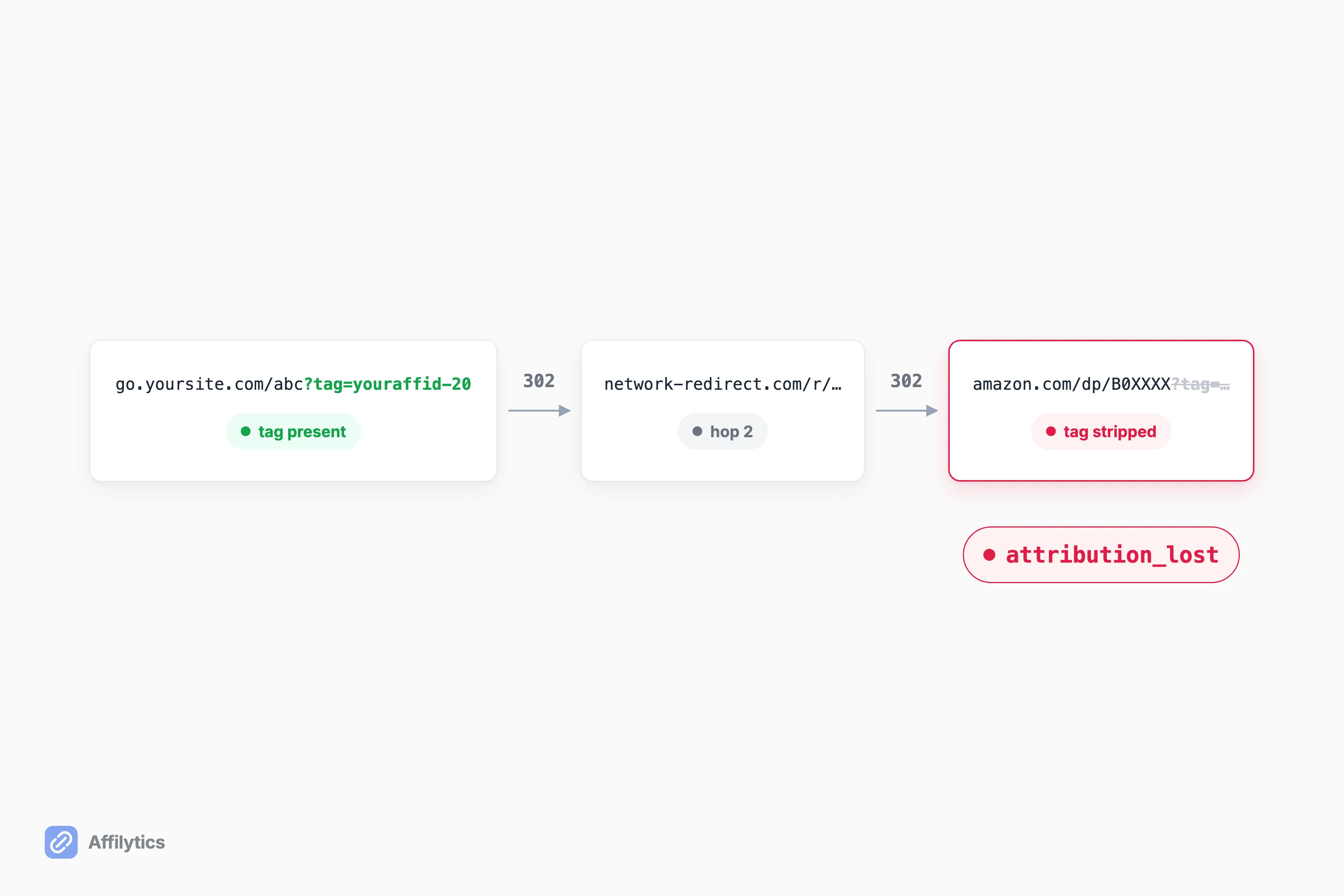
The link-registry does this over stealth HTTP with TLS fingerprinting, meaning the request presents the same TLS handshake a real browser would, so a destination is far less likely to challenge it as an obvious bot. It fetches the destination HTML, follows every hop, and classifies what came back. It checks directly first and only falls back to a residential proxy when the result is not definitive, which keeps the cost down. A status confirmation gate then requires several consecutive non-healthy checks before it degrades a link that was active, while recovery back to active is immediate.
One honest limit: this checker does not execute a page’s client-side JavaScript. It reads the server-rendered HTML and the redirect chain, which is where unavailability notices, tag strips, and challenge pages actually live for the retailers that matter. An availability notice that only paints after JavaScript runs is a case it will miss, and I would rather tell you that than pretend the tool renders every page like a browser. The differentiator is the multi-signal classification and the attribution tracking, not JavaScript rendering.
Why Most Checkers Stop at the Status Code
Section titled “Why Most Checkers Stop at the Status Code”Most “checkers” fall into one of two buckets. The first never loads the destination at all. Post Affiliate Pro’s own free link-checker FAQ openly admits its tool cannot check whether links are live due to browser security restrictions, so it validates the URL string for typos and encoding but never once fetches the page. It is a spellchecker for links, not a health check. The second bucket does fetch the page, then trusts the status code and stops, which is the exact blind spot this whole post is about.
Monitoring does exist further up the market. Lasso, for instance, ships broken-link and out-of-stock detection under “Link Health Alerts,” which starts at its Creator tier ($19/mo). It is a genuinely useful feature for its audience. What Lasso does not publish is how deep that detection goes: whether it handles stealth HTTP, WAF challenges, or soft-404 versus hard-404 cases is simply not disclosed, so I will not speculate about internals I cannot see. The point is not that monitoring is rare. It is that “monitoring” can mean anything from a real destination check to another 200 ping wearing a nicer label.
How to Audit Your Own Links Without Getting Fooled
Section titled “How to Audit Your Own Links Without Getting Fooled”You do not need our tool to sanity-check your own links today. A few habits catch most of the damage:
- Never trust a bare 200. Open a sample of your highest-earning links and confirm a purchase can actually start on the page.
- Watch for homepage bounces and missing tags. If a product link lands on a generic homepage, or your tag is gone from the final URL, that click earns nothing.
- Re-check on a cadence. A link that is fine today rots later, and the failure never announces itself.
The catch is that this stops scaling fast. As one creator in r/juststart admitted, manual auditing “its really only worth it once youve got a few hundred posts deep and physically cannot remember what you linked in 2023.” That is the exact point where spot-checking gives way to something continuous, and where a repeatable way to audit your affiliate links in bulk starts paying for itself.
Stop Trusting the Green Checkmark
Section titled “Stop Trusting the Green Checkmark”A status code was never designed to tell you whether a link still earns, so stop letting one decide. What you want is a checker that fetches the real destination, follows every hop, and tells you which of the four failure modes actually hit, then keeps watching so you find out the day a link goes dark instead of at tax time.
That is what we built. Create your free Affilytics account and get two full weeks of everything unlocked, no credit card required.
Why does a broken affiliate link still return 200 OK?
Section titled “Why does a broken affiliate link still return 200 OK?”A 404 means the server has no page at that path. But a dead affiliate link usually lands on a page that does load: an unavailability notice, a bounce to the merchant homepage, or a parked domain. The server still serves a document, so the status is 200 even though the link no longer earns.
What is a soft 404?
Section titled “What is a soft 404?”A soft 404 is a page that returns a 200 status while its content signals not found or unavailable. Status-code checkers miss it because they only read the response code, never the actual content of the page.
Can a link checker tell if my affiliate tag got stripped?
Section titled “Can a link checker tell if my affiliate tag got stripped?”Only if it follows every redirect hop and inspects the final URL for your tag. A checker that stops at the first 200 cannot see it, which is why attribution loss is the most invisible failure mode of all.
Does a “healthy” status mean I’m still earning commission?
Section titled “Does a “healthy” status mean I’m still earning commission?”No. Healthy usually means a page loaded. Earning requires the right product to still be in stock and your affiliate tag intact on the final hop, two things a status check never verifies.
How often should I recheck my affiliate links?
Section titled “How often should I recheck my affiliate links?”Continuously if you can, because links rot unpredictably. Manual spot-checks work at small scale but stop scaling once you are a few hundred posts deep and cannot remember what you linked two years ago.