
Affiliate Links for Newsletter Creators That Keep Earning
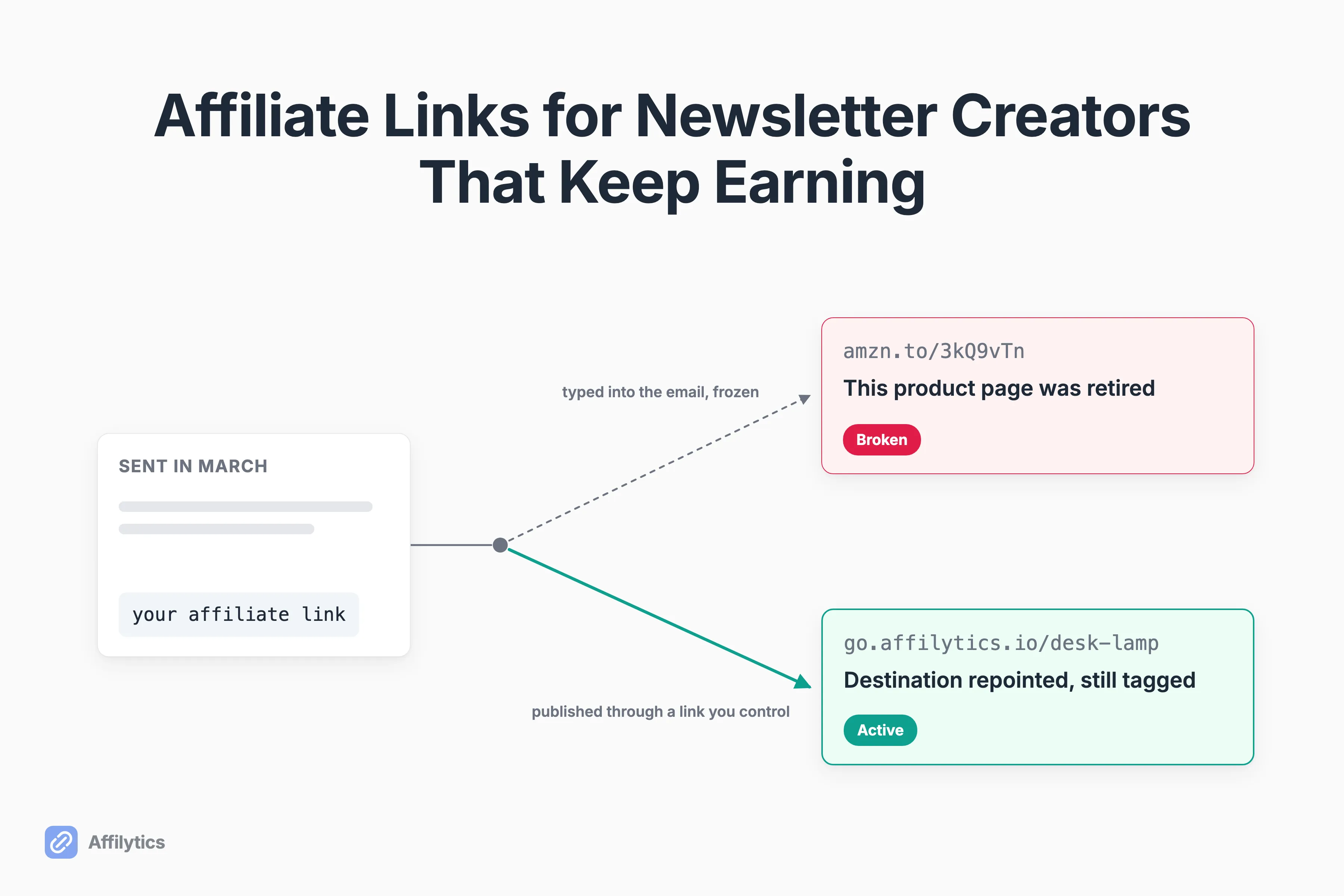
Somewhere in your archive is an issue you sent months ago that still gets opened, still gets clicked, and may have stopped paying you a while back. Affiliate links for newsletter creators have a lifespan that nobody mentions at setup.
We build the redirect and link-health layer creators put behind their affiliate links, which means we spend our days on exactly one question: is this link still sending the click where it is supposed to go, and is it still earning?
You are allowed to do this, by the way. What Amazon’s rules now allow in email settled the permission question, and what nobody settled is the operational one that starts the second you hit send.
This guide covers where a newsletter’s affiliate links actually live, what you can and cannot change once an issue has sent, how those links go quiet without telling you, and the one thing to set up before the next send.
Where your affiliate links actually live (and how long each one keeps earning)
Section titled “Where your affiliate links actually live (and how long each one keeps earning)”Your newsletter is not one surface. It is four, and they age at completely different speeds.
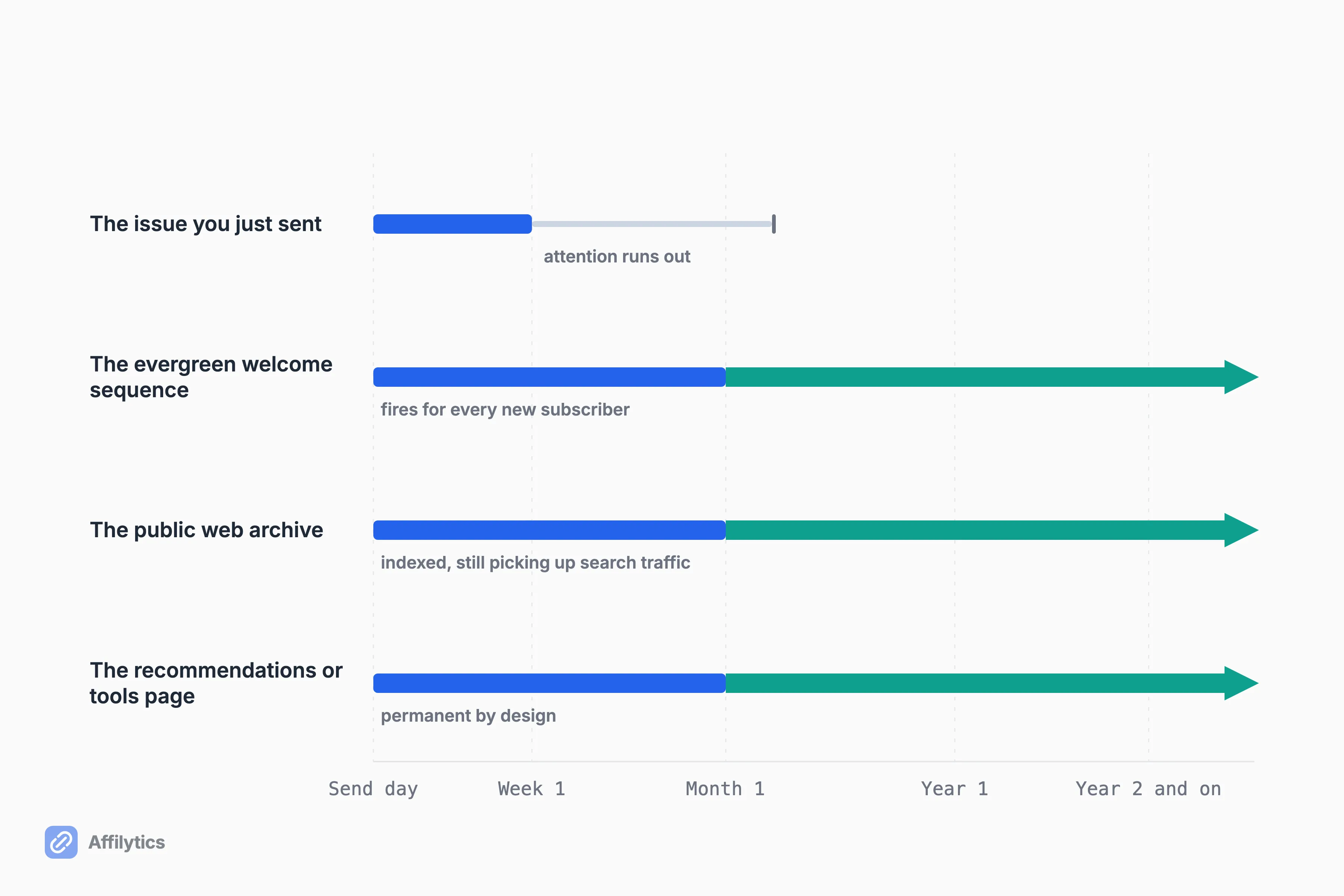
- The issue you just sent. A few days of real attention, then a long tail from whoever opens it late.
- The evergreen welcome sequence. It fires forever, for every single new subscriber, and it is the riskiest placement you own precisely because you never reread it.
- The public web archive. Indexed, linkable, picking up search traffic for years after the send.
- The recommendations or tools page, if you have one. Permanent by design.
Which of those are you actually watching? For most people the honest answer is the first one, on the morning it goes out.
The welcome sequence and the archive keep working long after you stopped thinking about them, and that is exactly why a link that dies in either one dies quietly. Placement decides money too, not just upkeep. Your list is more international than you think, and every open from outside your home country hits a link pointed at a storefront that cannot credit you for the sale.
What you can change after an issue sends, and what you cannot
Section titled “What you can change after an issue sends, and what you cannot”Most of the panic around this collapses three different things into one. They behave nothing alike.
| Surface | Editable after the send? |
|---|---|
| The email sitting in a subscriber’s inbox | No. Delivered is permanent. |
| The public web version of that issue | Usually yes, on platforms that publish one |
| The unsent remainder of an automated sequence | Yes for everyone who has not reached that step, no for everyone who has |
The email is the genuinely permanent one. Once it is delivered it is a file on someone else’s mail server, and nothing in your dashboard reaches back into it. No recall, no edit, no swap. Whatever URL you typed is the URL your reader will click in eighteen months.
But is a bad link in a sent issue a total write-off?
Not quite. The web version is a different animal. On the platforms that publish one, that page is a normal web page and behaves like a normal web page, which means the archive link is often recoverable even when the emailed one is not. Substack states it plainly: changes made to a post after it has been sent by email will not be emailed again, and will only be reflected in the web version of the post. beehiiv draws the same line: edits made after a send appear on your website but will not change the email that was already delivered to inboxes. Read that twice, because it is the good news buried in the bad. The archive copy is a live page you still own.
The third case is the one people forget. A welcome sequence is a queue, and every subscriber sits at a different point in it. Kit works this way by design: subscribers receive only the emails they have not received yet. So editing step four fixes step four for everyone still short of it, and does nothing at all for everyone already past it.
Write that down as your working rule: fix the sequence today and you have fixed most of the future, but the past sends are gone unless the destination itself can move.
How a newsletter affiliate link goes quiet
Section titled “How a newsletter affiliate link goes quiet”Nothing dramatic happens. Ordinary retail housekeeping does it:
- A merchant reorganizes its catalog and retires a product page.
- A program closes, or changes its terms without telling you.
- An item goes out of stock and then quietly stops being restocked.
- A redirect somewhere between your link and the store drops the tracking tag.
- An international subscriber lands on a storefront that will not credit your tag.
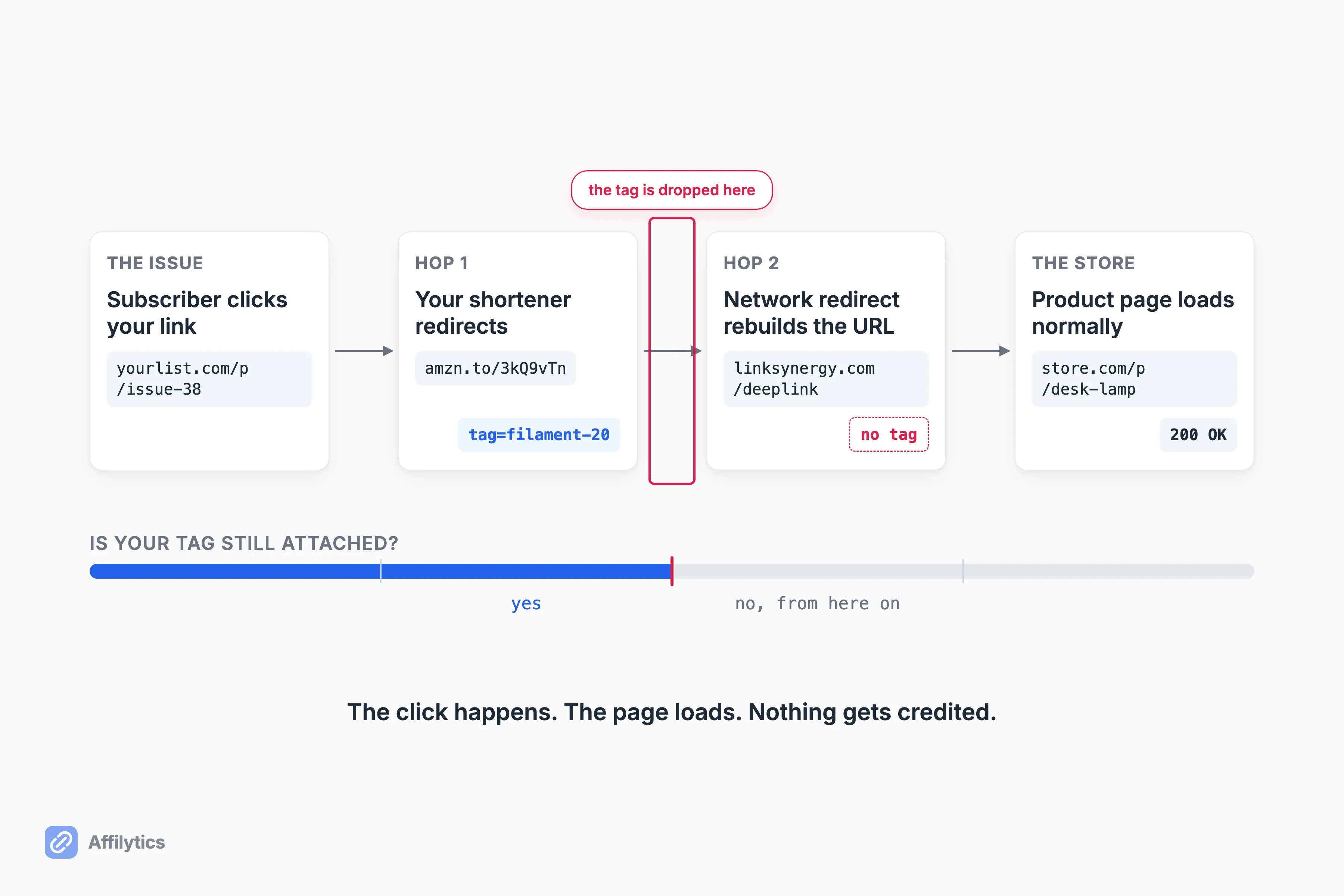
None of those announce themselves. The link still looks fine in the issue, the click still happens, the page still loads. Only the earnings stop.
How would you ever find out, though?
Not from the dashboard. You cannot tell a dead link from a slow payout by staring at a total. A newsletter operator with roughly 3,000 subscribers put it plainly in r/Newsletters: “Affiliate commissions are completely opaque. I can see total clicks per issue in my analytics. I can see total commissions in the affiliate dashboard. There’s no layer that connects the two.”
The reporting lag makes the ambiguity worse. One creator on X said “it took for the most 90 days before I could see the results in my dashboard”, and the thread’s author confirmed that 90 days is standard now. Three months is long enough for a broken link to look exactly like a normal reporting delay.
What that does to people is the part worth sitting with. In a thread about “losing commissions because of tracking issues”, one affiliate described clicks showing while “conversions just disappeared into void,” and added that “you’re basically working for free during that time and have no idea until you check your stats.” The top-voted reply in that thread was not a diagnostic step. It was “They just don’t want to pay you, move on.”
That is what flying blind produces: not a fix, a shrug.
Publish a link whose destination you still control
Section titled “Publish a link whose destination you still control”There is one move that changes the shape of this problem, and the reason to make it is income before it is insurance.
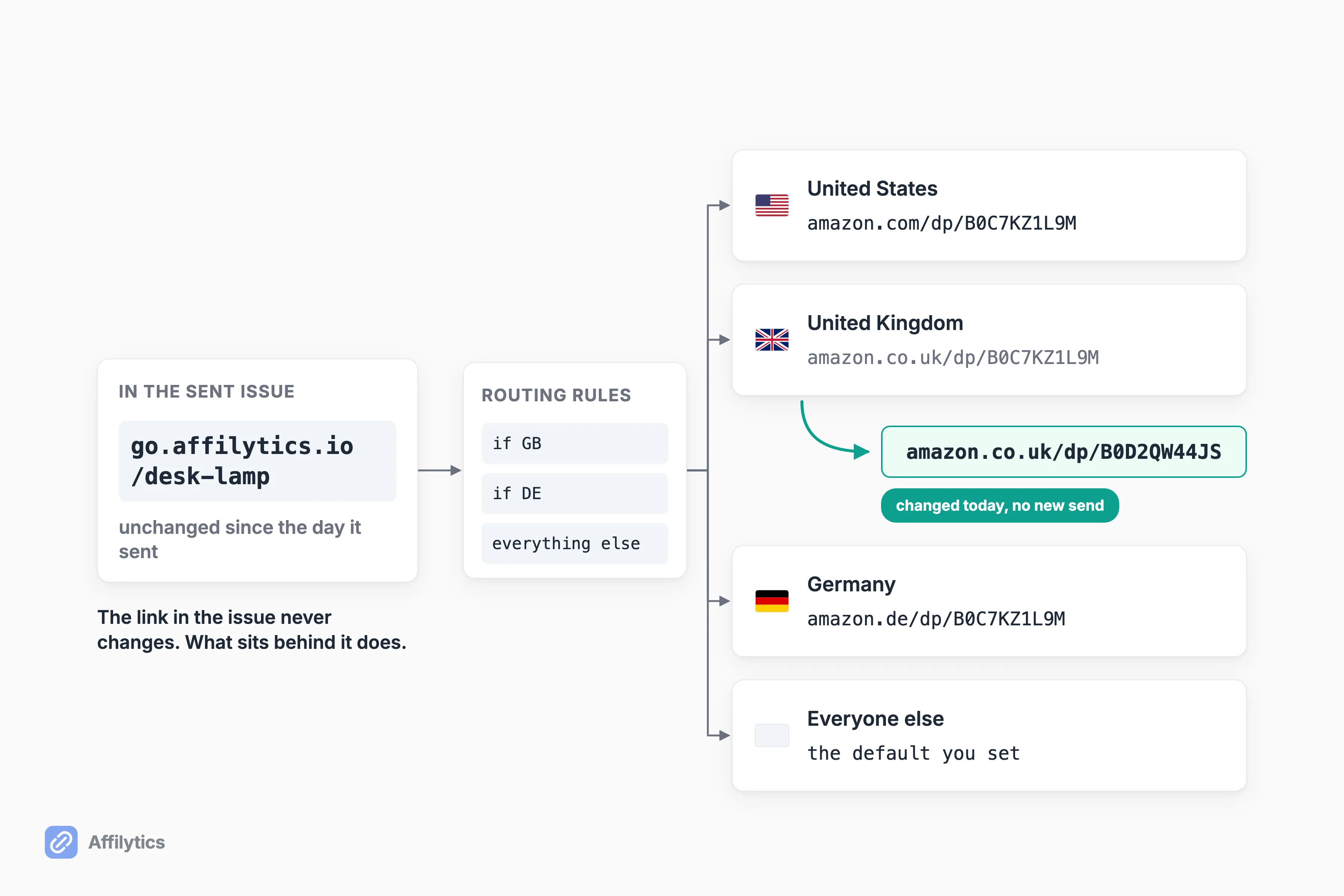
Put one link in the issue and let where it lands depend on where the subscriber opens it. A reader in the UK goes to the UK storefront, a reader in Germany to the German one, everyone else to a default you set. That is what a smart link actually is: a short URL of your own, something like go.affilytics.io/best-desk-lamp, with per-country routing rules behind it. A visitor’s country comes from a lookup on their IP address, the first matching rule wins, and anything unmatched falls through to a destination you are required to set. It works for any merchant, not just Amazon. If a meaningful slice of your list opens from outside your country, you are leaving money on every send, and you can route each subscriber to their own regional storefront without writing a second version of the issue.
Now what happens on the day that destination dies?
Nothing, to your published link. This is the durability half, the same mechanism seen from the other side. If the destination is defined by a rule rather than typed into the email, you can change the rule whenever you like. The published link never changes. What is behind it does. That covers the retired product page, the closed program, the out-of-stock item, and the March issue still pulling search traffic.
One thing I will not fudge, because it is the easiest place for a post like this to become untrue: making a smart link is a manual step you take before you publish. Scanning finds and monitors links that are already out there. It never converts an already-published link into a smart link, and nothing else does either.
This is a decision about your next send, not a repair kit for the last one. It rescues future issues completely, and it rescues past ones only where you can still edit the archive page or the unsent part of a sequence. That is a good enough reason to create the smart link before the issue goes out rather than after.
Finding the dead links you already sent
Section titled “Finding the dead links you already sent”Fine. Which of your old issues are broken right now?
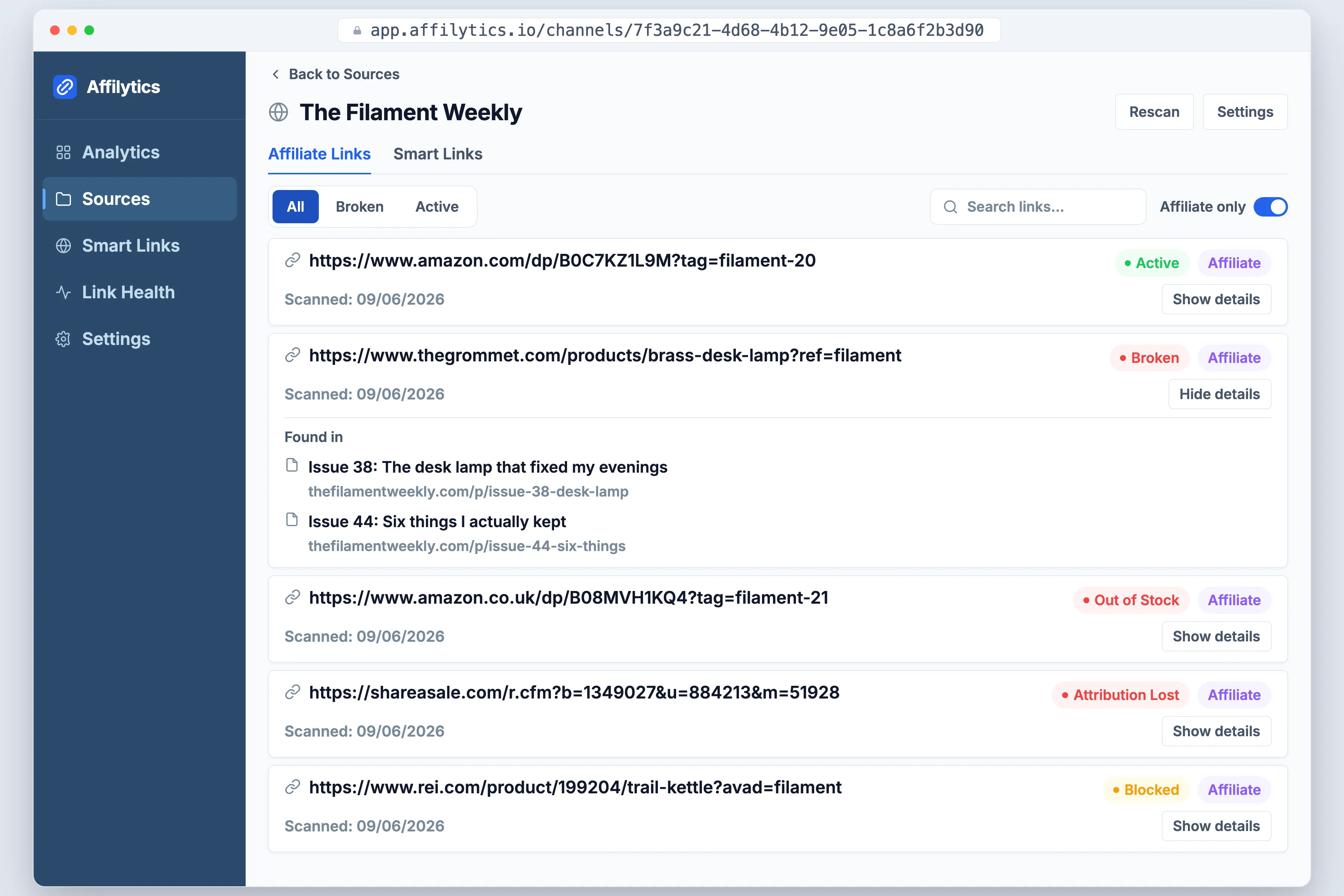
If your archive is small, do it by hand today. Open the last few months of issues, click every affiliate link, and watch for the failure that looks like success: a retired product page redirecting you to a category or search results page instead of showing an obvious error. Your eye reads that as “the site works.” Your commission reads it as nothing.
Past a few dozen issues, clicking stops being a plan. That is the job Affilytics does: continuous health checking on every link it finds and every smart-link destination, alerting when a check detects the change instead of on a weekly schedule. Every link comes back in one of a few plain states:
- Active, still resolving and still carrying your tag.
- Broken, the page is gone.
- Out of stock or product-unavailable, the page loads but the item does not.
- Blocked, a retailer’s bot protection refused the check, which is not the same as dead.
- Tracking tag lost, the click lands but your credit does not.
An active link is never marked broken off a single bad check, which is what keeps false alarms out of your inbox. Our crawler reads a newsletter’s public archive as static HTML, the same mechanism behind affiliate link monitoring on a blog. A JavaScript-rendered archive gets flagged instead of read.
The limit belongs in the same breath: no crawler can read inside an email that has already been delivered. It can read your public archive and check the pages behind your links. Anything sitting only in inboxes is out of reach for every tool, ours included.
Pick programs whose links will outlive the issue
Section titled “Pick programs whose links will outlive the issue”Program choice is usually framed as a commission-rate contest. Framed for durability it looks different, because you are choosing what your archive will be worth in a year.
Which programs actually survive contact with an archive?
Ask four things before you promote anything to your list:
- Does it pay once or recurring? A recurring program keeps an old issue earning. A one-off payout means the archive is decoration.
- Is the product evergreen or seasonal? Seasonal recommendations expire on a schedule you do not control.
- Does this merchant churn its URLs? A store that reorganizes its catalog every year will break your links every year.
- Will the program still exist? Terms change, programs close, and neither event comes with an email to you.
Recurring is where people get burned most often, so read the exact rule, not the headline. Some programs pay recurring only for a fixed period, others tie it to a status tier you have to keep. Rates move too: Amazon Associates commission rates run from 1% to 10% depending on the product category, and a category re-price silently re-prices every issue you have ever sent.
The one thing to do before your next send
Section titled “The one thing to do before your next send”These links fail slowly and quietly, which is exactly why the fix has to be early: put a redirect layer behind the links in your next issue, before it goes out. That single change keeps the issue fixable for as long as it keeps getting opened, and it stops the international part of your list from landing on a storefront that cannot pay you.
Create your free account and you get two full weeks with everything unlocked, no credit card. Point one link through it, send one issue, and see what the country breakdown of those clicks tells you.
Can you edit an affiliate link in a newsletter after you have sent it?
Section titled “Can you edit an affiliate link in a newsletter after you have sent it?”Not in the copy that already landed in inboxes. A delivered email is a file on someone else’s mail server, and nothing you do reaches back into it. The public web version of that issue is a different surface, and on platforms that publish one it can usually be edited after the send. If you published a redirect link you control, the destination behind it can change at any time, including for issues that sent months ago.
How do I know if the affiliate links in my old issues still work?
Section titled “How do I know if the affiliate links in my old issues still work?”Manually, open the last few months of issues and click every affiliate link, watching for the quiet failure where a dead product page redirects to a category or search page instead of showing an error. Automatically, use link health checking that watches every destination and alerts you when a check detects the change. Either way, name the ambiguity: a flat commission dashboard can mean a dead link, or money that has not been reported yet.
Why did my affiliate commissions stop even though people are still clicking?
Section titled “Why did my affiliate commissions stop even though people are still clicking?”Clicks and commissions are measured by two separate systems and nothing joins them for you. The usual causes are a product page that moved or retired, a tracking tag stripped somewhere in the redirect hops, a reader landing on a regional storefront that will not credit your tag, a program that changed its terms, or plain reporting lag. Rule out the boring ones first by clicking the link yourself and checking where you land.
Do I need a smart link for a newsletter, or is a plain affiliate link fine?
Section titled “Do I need a smart link for a newsletter, or is a plain affiliate link fine?”A plain affiliate link is fine if your list is almost entirely domestic and your issues are read once and never opened again. It stops being fine the moment your list is international or your archive and welcome sequence keep earning, because those are the cases where the destination has to change after the send and the published link cannot. If you are not there yet, do not buy a tool for it.