
Amazon Affiliate Clicks but No Sales? The 6 Causes
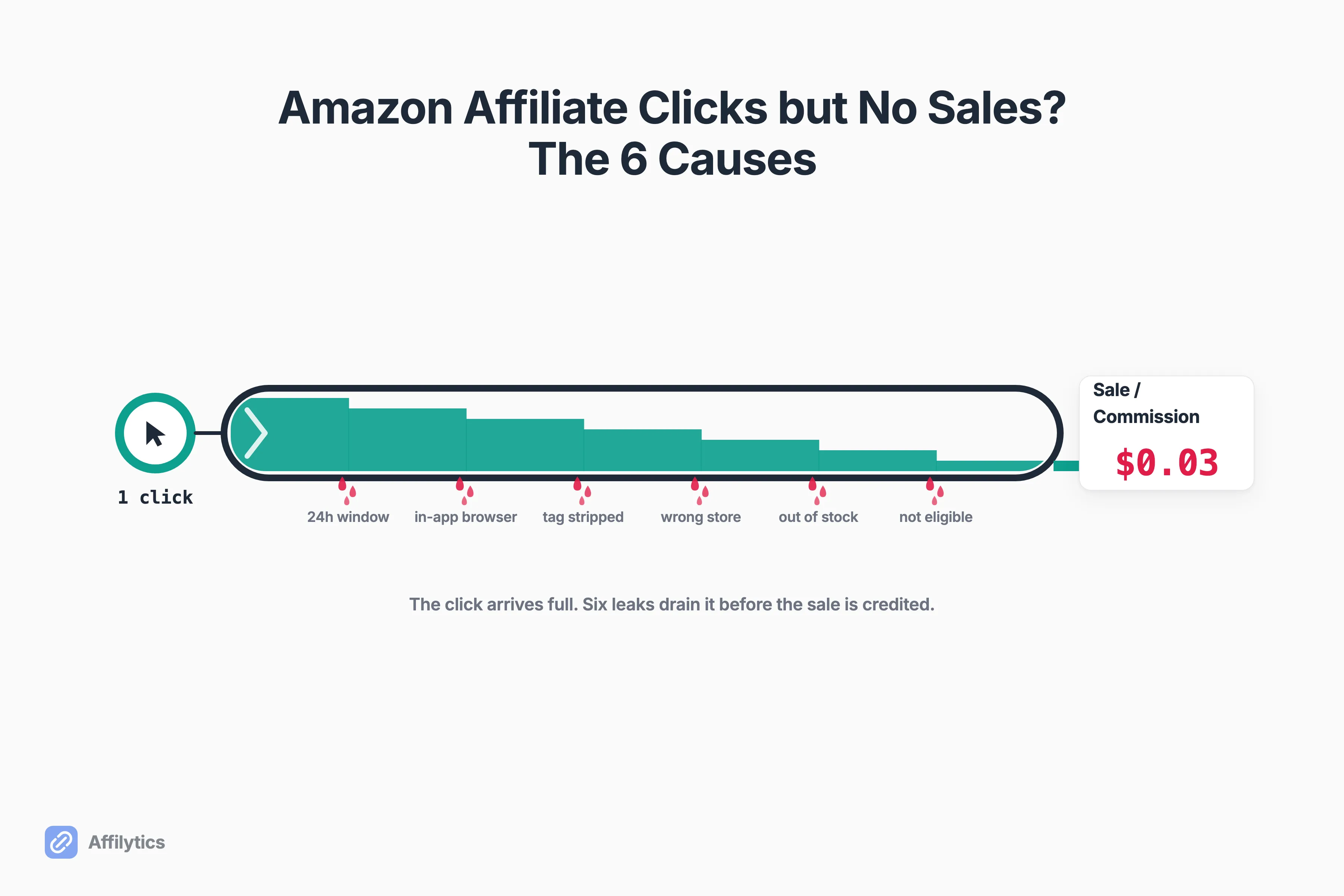
You keep getting Amazon affiliate clicks but no sales, and that empty commission column starts to feel personal, like Amazon is quietly pocketing what should be yours. I get why the conspiracy reflex kicks in. But it’s almost never Amazon stealing from you.
We built Affilytics to health-check affiliate links and route each click to the right regional Amazon store, so we spend our days staring at exactly where commissions leak between a click and a sale.
This is written for Amazon Associates affiliates, not sellers running Sponsored Ads, so you won’t find any bid or listing-image advice here. What you will find is the mechanical truth: a click and a sale are not the same event, and a handful of mundane things can break the chain between them.
This guide walks through the six real reasons your Amazon clicks don’t turn into commissions, then hands you a quick self-test to find which one is eating yours.
First, Rule Out the Boring Answer: Too Few Clicks
Section titled “First, Rule Out the Boring Answer: Too Few Clicks”Before you hunt for an attribution bug, count your clicks honestly. A small number of clicks statistically won’t produce a sale, even when everything is wired correctly.
How small is small? One affiliate, u/aahhii, put it bluntly: “you’ll be lucky to get a purchase on 1 percent of your clicks.” Another, u/aletta, said that on a good day she converts “around 3% of my clicks to Amazon.” Those are individual numbers, not a law of nature, but they set the scale. Two clicks and no sale tells you nothing.
Buyer intent matters as much as volume. Some products just don’t sell online in a day. As u/BusyBusinessPromos said about big-ticket items: “If I asked my wife if she would order a washing machine online she’d say no.” People price-check a washer, then drive to a store.
So before anything else, ask yourself:
- Are your click numbers genuinely large, or just large-for-you?
- Are you sending ready buyers or curious price-checkers?
- Are the products cheap impulse buys or considered purchases?
If your numbers are real and still zero, keep reading. The rest are actual bugs.
Cause 1: The 24-Hour Window Closed Before They Bought
Section titled “Cause 1: The 24-Hour Window Closed Before They Bought”Here’s the rule that trips up almost everyone. Amazon’s affiliate session window is 24 hours. If someone clicks your link today and buys three days later, you earn nothing, even though your link is what introduced them.
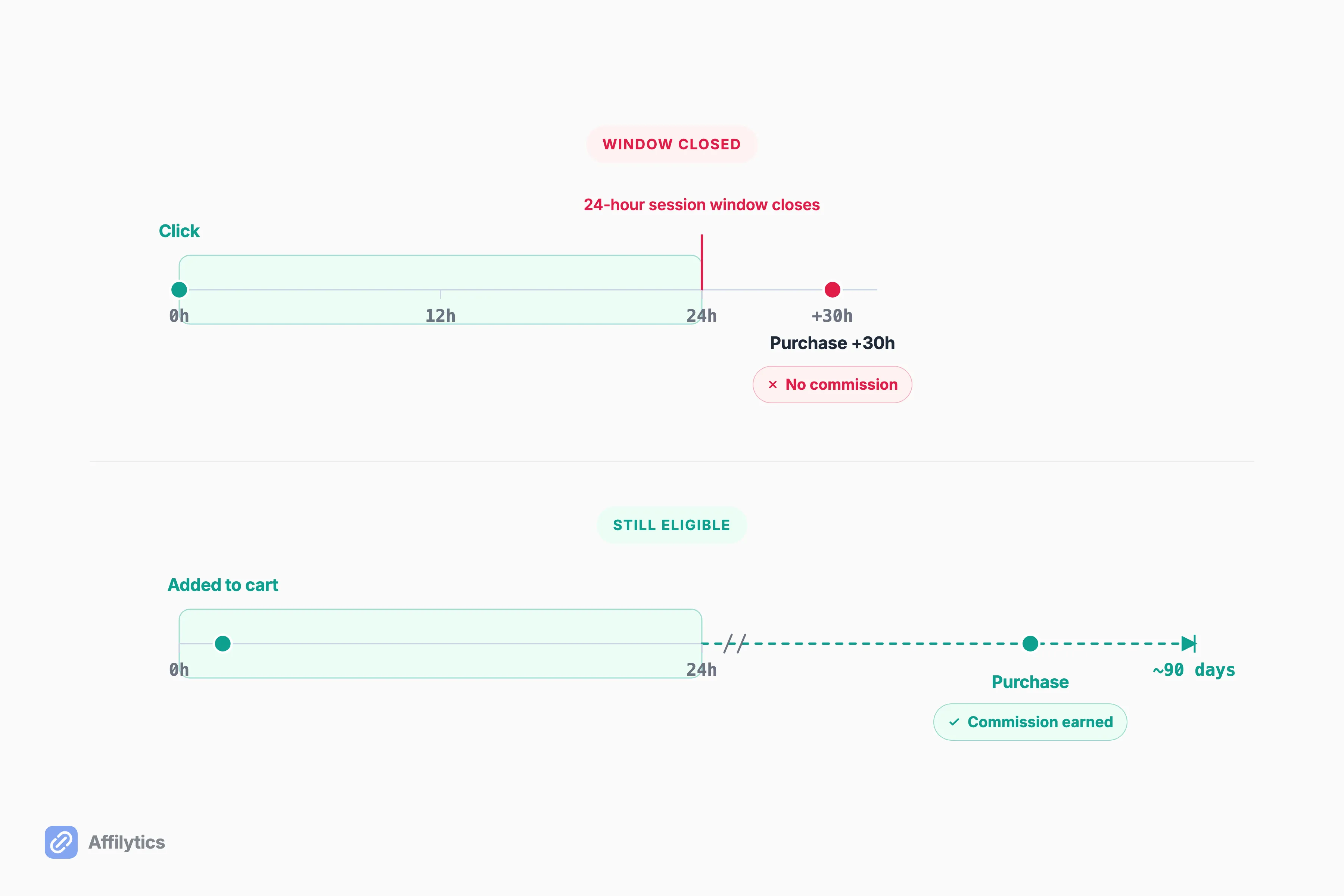
One affiliate summed it up cleanly: “The cookie period is only 24hours. People put items in their cart or wish list and the cookie period comes and goes” (u/Moonbeans62). That lag is invisible in your dashboard. You see the click. You never see the delayed purchase that didn’t count.
There is an upside baked into the same rule, though. Within that window you earn a commission on almost everything the person buys, not just the product you linked. u/steverhoden1 described running “a niche site selling cellphones” and getting “commissions of vitamins and everything else they bought” inside the 24-hour window. One click, a whole cart.
Adding an item to the cart extends things. As Amazon spells out, an item added to the cart during that 24-hour window still earns a commission if the order is placed before the cart expires, usually after 90 days. But the 24-hour session is the default, and it closes fast.
Can a tool fix this? No. This one is human behavior. People browse, they sleep on it, they buy on Friday. Nothing you install changes when a stranger decides to check out.
Cause 2: The Click Opened in a Logged-Out In-App Browser
Section titled “Cause 2: The Click Opened in a Logged-Out In-App Browser”This one is uncommon, sneaky, and widely misdiagnosed. You may have seen the scary version: “the Amazon app steals your sale by dropping your tracking cookie.” A creator recently pasted exactly that claim, generated by ChatGPT, into a Reddit thread. Experienced affiliates corrected it fast.
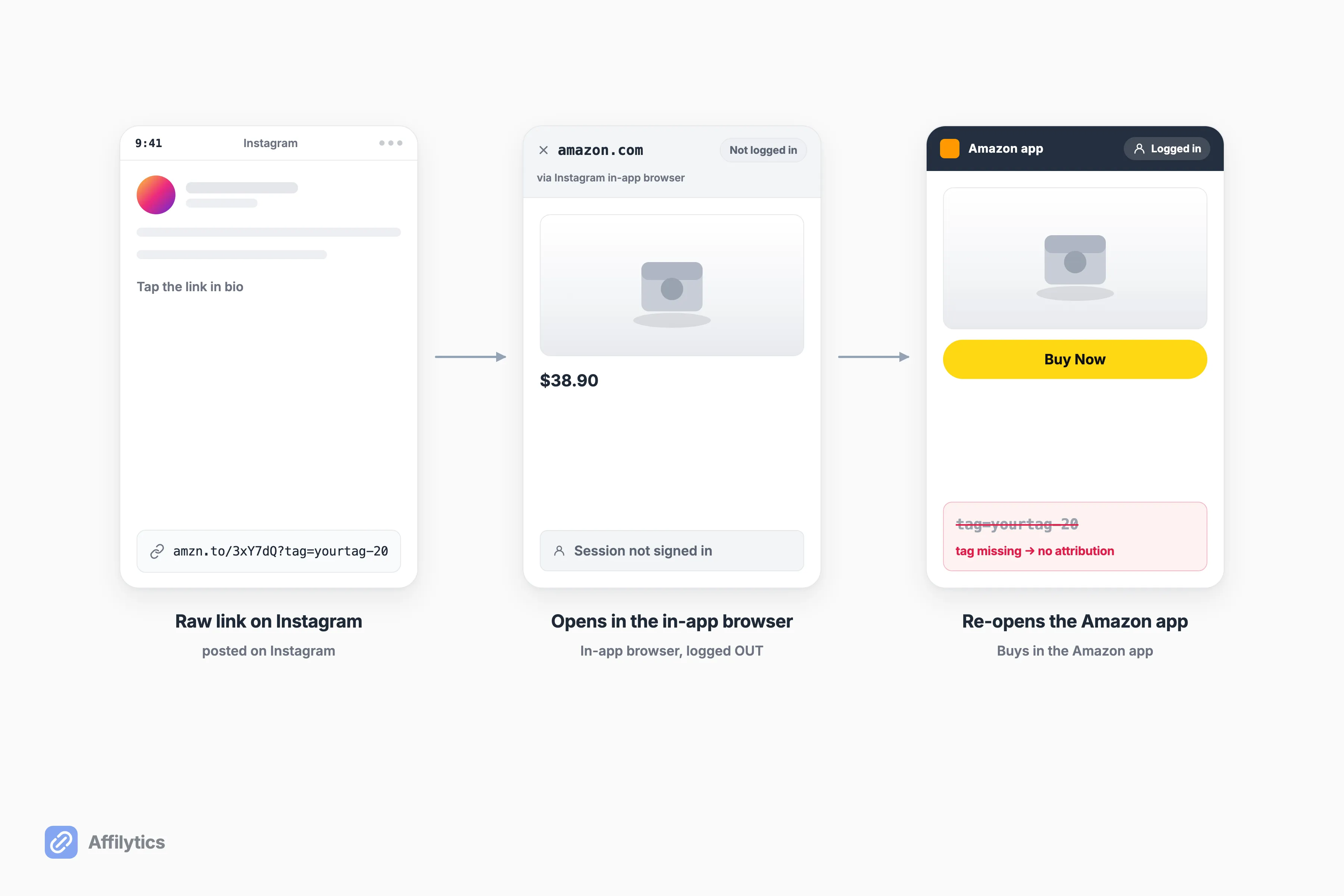
Here’s what actually happens. When you post a raw affiliate link on Instagram or Pinterest, tapping it opens the platform’s own in-app browser, and almost nobody is logged into Amazon inside that little pop-up window. As u/Sea_Somewhere_195 explained: “it opens in the IG browser, which nobody logs in on. They will then go search it in the app, but you lose it because they didn’t log into Amazon after clicking your link.” The shopper likes the product, closes the in-app browser, opens the real Amazon app where they are logged in, and buys, without your tag ever attached.
Notice what did not happen. The Amazon app didn’t steal anything. u/Old_Marzipan6085, correcting the ChatGPT scare directly, wrote: “the cookie/tag is not lost.” There was never a tagged session to lose. The tag simply never rode along into the logged-in purchase.
So what’s the fix? The general category is a deep-link redirect: a smart link that opens the logged-in Amazon app instead of a logged-out in-app browser. That helps. But I’ll be honest, this cause is mostly on the platform and the shopper’s behavior, not something any monitoring tool can fully close. Knowing it’s happening is most of the fix.
Cause 3: The Tag Got Stripped Before It Reached Amazon
Section titled “Cause 3: The Tag Got Stripped Before It Reached Amazon”Now we reach the failure a tool can actually catch. Sometimes your link loads a perfectly normal Amazon product page, but the tag= part, the bit that says the sale is yours, never arrives. The page works. The attribution doesn’t.
This happens for a few mechanical reasons:
- A redirect chain (a cloaking plugin, a URL shortener) drops the parameter along the way.
- A misconfigured WordPress link plugin rewrites the link and strips your ID.
- A shopper’s browser extension quietly overwrites your affiliate tag with someone else’s.
One affiliate hit the maddening version of this. After a plugin started auto-generating grid pages of products, they got thousands of clicks a day and zero sales, then checked a link by hand: “Amazons link checker… says its a valid link associated with my account so I’m very confused” (u/audit157). Valid link, no commission. That combination is the fingerprint of a stripped tag.
This is exactly what continuous affiliate link monitoring catches. When Affilytics health-checks a link and sees the tag getting dropped in the redirect chain, it flags that link as attribution-lost, so you find out on a Tuesday instead of at the end of a dead month.
Cause 4: Your Reader Landed on the Wrong-Country Amazon
Section titled “Cause 4: Your Reader Landed on the Wrong-Country Amazon”Picture a reader in London or Mumbai tapping your amazon.com link. Your link points at the US store. Your tag only works on the US store. So their click lands them somewhere your commission can’t follow: sometimes on a “we don’t ship this to your country” wall, sometimes on a regional Amazon where your US tag is meaningless.
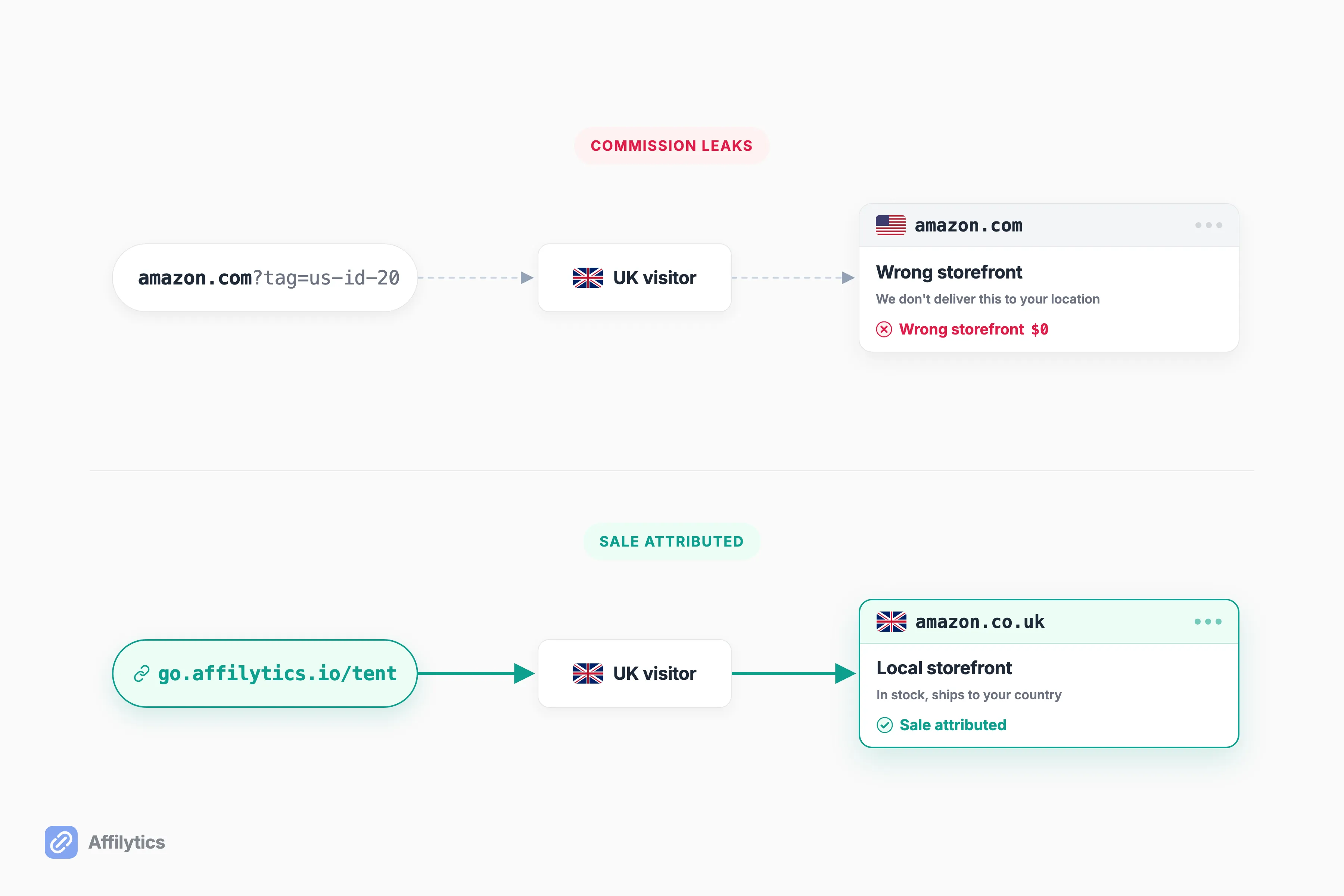
A big share of most creators’ traffic is international, and almost none of them see this leak, because the click still shows up in the dashboard. It just never had a chance to convert for you.
You can watch it happen in the wild. One creator, u/HappyLiberatedSoul, posted that their traffic was “all over the world mainly US and India” on a US affiliate link, and blamed Amazon for the missing sales. Not one commenter connected the dots to the storefront mismatch. It’s an invisible cause precisely because the click looks fine.
This is the leak we built Affilytics to close first. A geo-routing smart link (go.affilytics.io/{slug}) reads each visitor’s country and sends them to their own local Amazon store, so the sale can actually be attributed to you. If you want the mechanics, we wrote up how affiliate geo-routing works and how to send international clicks to the right store separately.
Cause 5: The Product Was Out of Stock or Unavailable
Section titled “Cause 5: The Product Was Out of Stock or Unavailable”You can’t earn a commission on a purchase that can’t happen. If a shopper clicks through and the product is out of stock, delisted, or restricted in their region, there is nothing to buy and nothing to pay you for.
This one hides in old content. A product you featured two years ago sold steadily, then quietly went unavailable, and the affiliate link in that post kept collecting clicks that can never convert. Nobody emails you when a listing dies. The click count keeps ticking. The commission stays at zero.
How many of your older links point at something a shopper can no longer buy? Most creators have no idea, because checking every link across years of posts by hand is nobody’s idea of a good weekend.
That’s the gap health monitoring fills. Affilytics flags a link as out-of-stock or product-unavailable the moment a check finds the destination can’t be bought, which is the whole point of catching a link that stopped working before it costs you a month of traffic.
Cause 6: The Product Never Paid a Commission in the First Place
Section titled “Cause 6: The Product Never Paid a Commission in the First Place”Sometimes the click is real, the purchase is real, and you still earn exactly nothing, by Amazon’s own rules.
Amazon excludes certain products and categories from advertising fees, or pays them a special or zero rate. The usual suspects:
- Some Kindle and KDP titles
- Certain digital products
- Gift cards
- Some subscription and third-party marketplace items
If your reader clicks your link and buys one of these, the sale counts for Amazon and pays you nothing. Even the ChatGPT post that got so much else wrong got this part right, and u/Old_Marzipan6085 confirmed it plainly: “Point 3 is true.”
This isn’t a bug, and no tool can fix it. The fix is knowing the rule: some products are excluded from advertising fees, so check before you build a whole post around them.
How to Tell Which One Is Eating Your Commissions
Section titled “How to Tell Which One Is Eating Your Commissions”Six causes is a lot to hold in your head. Here’s how to figure out which one is actually draining your account, starting with your own links. Once you know which cause applies, the honest math behind your Amazon earnings shows you what closing it is worth.
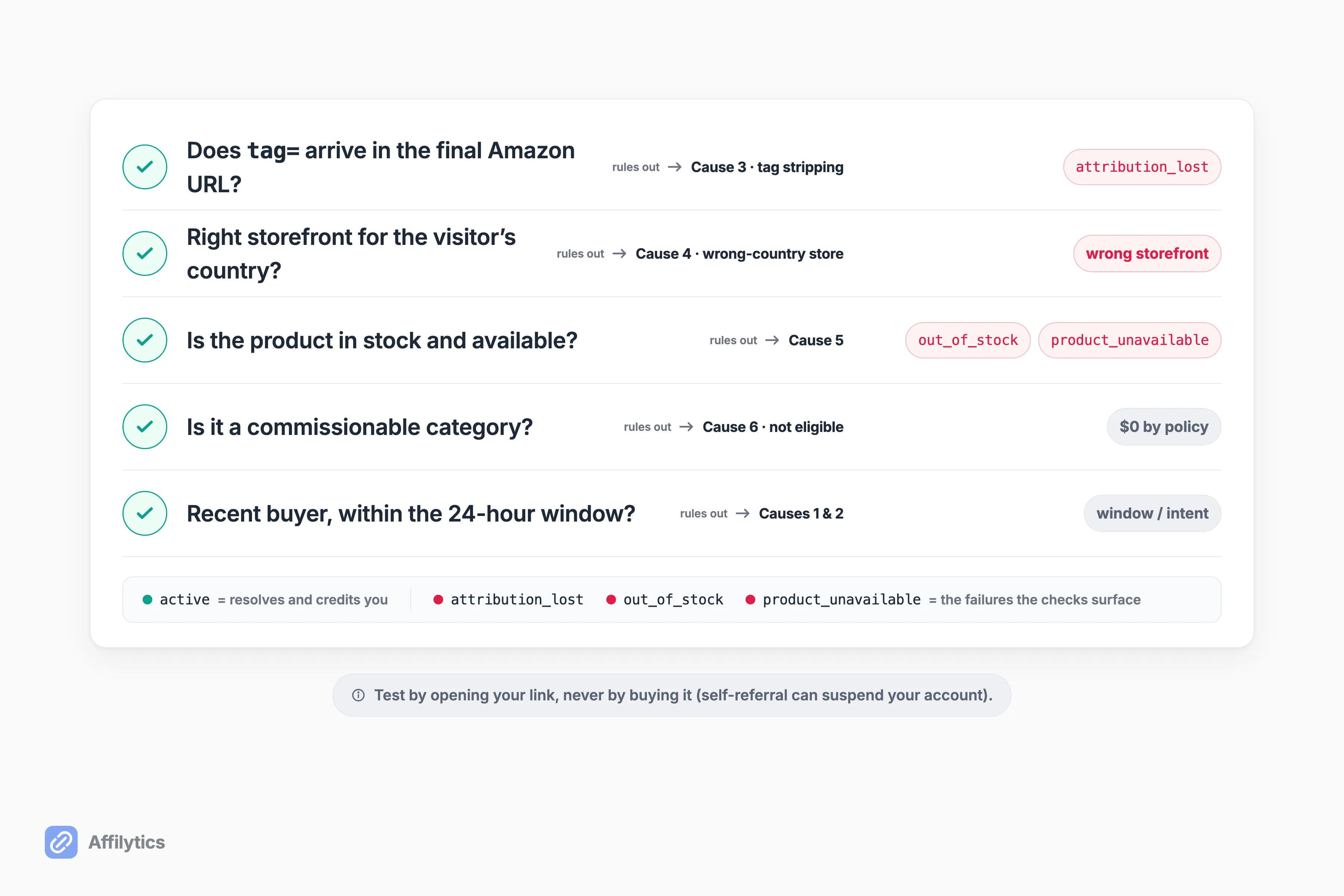
Run this quick self-test:
- Test the tag. Open one of your own affiliate links (don’t buy anything) and check that
tag=yourIDis still in the final Amazon URL. If it’s missing, you’ve found a stripped tag (Cause 3). - Check the storefront. Use a VPN or ask an overseas friend: does an international visitor get bounced to the wrong Amazon or a can’t-ship wall? (Cause 4)
- Check availability and eligibility. Is the product actually in stock, and is it in a category that pays a commission at all? (Causes 5 and 6)
- Mind the window and the intent. Are your clicks coming from ready buyers, or from curious price-checkers who wander off and buy tomorrow? (Causes 1 and 2, plus the reality-check.)
One hard warning on step one: never test by buying through your own link. As u/Dog_Baseball put it after suggesting exactly that, then thinking better of it: “don’t do this! apparently you can get your account suspended.” Buying through your own links is against Amazon’s rules.
The self-test tells you which cause you’re facing on one link. The harder question is which of the dozens or hundreds of links you’ve published, across every video description and blog post, is quietly leaking right now. That’s what a scan is for. Affilytics discovers every affiliate link you’ve published, crawling your YouTube descriptions and your website, then health-checks each one, so you see exactly which links are attribution-lost or out-of-stock instead of guessing.
Stop Guessing Which Links Leak
Section titled “Stop Guessing Which Links Leak”You don’t have to keep staring at a flat commission column and wondering. Create a free Affilytics account, route your international clicks to the right store, and get flagged the moment a link goes attribution-lost or out of stock.
The trial is the whole product for two weeks: full access, no credit card. Create your free account and let the scan tell you where your Amazon affiliate clicks are actually going.
Why do I get Amazon affiliate clicks but no sales?
Section titled “Why do I get Amazon affiliate clicks but no sales?”Almost always the cause is mundane, not Amazon “stealing” from you. The six real reasons are too few or low-intent clicks, the 24-hour cookie window closing before the purchase, a click opening in a logged-out in-app browser, a stripped affiliate tag, an international shopper landing on the wrong-country store, an out-of-stock product, and a category that pays no commission at all. The two most common are simply the 24-hour window expiring and low buyer intent.
Does Amazon really only pay if people buy within 24 hours?
Section titled “Does Amazon really only pay if people buy within 24 hours?”Yes. Amazon’s affiliate session window is 24 hours from the click. If someone clicks your link and buys two days later, you don’t earn the commission. The main exception is the cart: adding an item to the cart during the session extends the eligibility window well beyond a day, so a delayed checkout on a carted item can still pay. Amazon’s own program policies are the source of truth for the exact terms.
Do I lose the commission if my link opens in the Instagram or Amazon app?
Section titled “Do I lose the commission if my link opens in the Instagram or Amazon app?”You don’t lose it because the app “steals” anything. What happens is the raw link opens in a logged-out in-app browser inside Instagram or Pinterest, the shopper sees the product, then re-opens the Amazon app where they’re logged in and buys there without your tag attached. The tag was never in that logged-in session to begin with. A deep-link redirect that opens the logged-in Amazon app helps close the gap.
How do I check whether my affiliate tag is actually working?
Section titled “How do I check whether my affiliate tag is actually working?”Open one of your own affiliate links in a browser, don’t buy anything, and check the final Amazon URL for your tag=yourID parameter. If it’s there, your tag is arriving. If it’s missing, something in the redirect chain is stripping it. One firm warning: never test by actually purchasing through your own link, since self-referral can get your Associates account suspended.
Can a tool fix clicks with no sales?
Section titled “Can a tool fix clicks with no sales?”Partly, and it’s worth being honest about the split. A tool can catch a stripped affiliate tag, route international clicks to the right-country store, and flag a product that’s gone out of stock. It can’t change the 24-hour cookie window, fix in-app browser behavior, or make a zero-commission category pay. Those are on Amazon and the shopper, not something software fixes.