
Affiliate Link Monitoring: Catch Silent Commission Loss
You published the affiliate link, it worked, and you moved on. Months later it still loads fine, still earns you nothing, and no dashboard says a word.
That gap, between a link that looks fine and an affiliate link that quietly stopped working, is what affiliate link monitoring exists to close.
We built Affilytics to keep creators’ affiliate income intact, and to get there we wrote our own link checker that loads every link the way a real shopper’s browser would, because the usual “is the page up?” test misses the exact failures that quietly kill commissions.
This guide draws the line between monitoring and tracking, shows why a link that loads fine can still earn zero, maps every way a link goes quietly dead, and covers how to watch all of them across your whole library at once, then fix them for good.
Affiliate Link Monitoring vs Affiliate Link Tracking (They Are Not the Same Job)
Section titled “Affiliate Link Monitoring vs Affiliate Link Tracking (They Are Not the Same Job)”Search “affiliate link monitoring” and half the results are actually about tracking. The two words get blurred constantly, and the difference is the whole point.
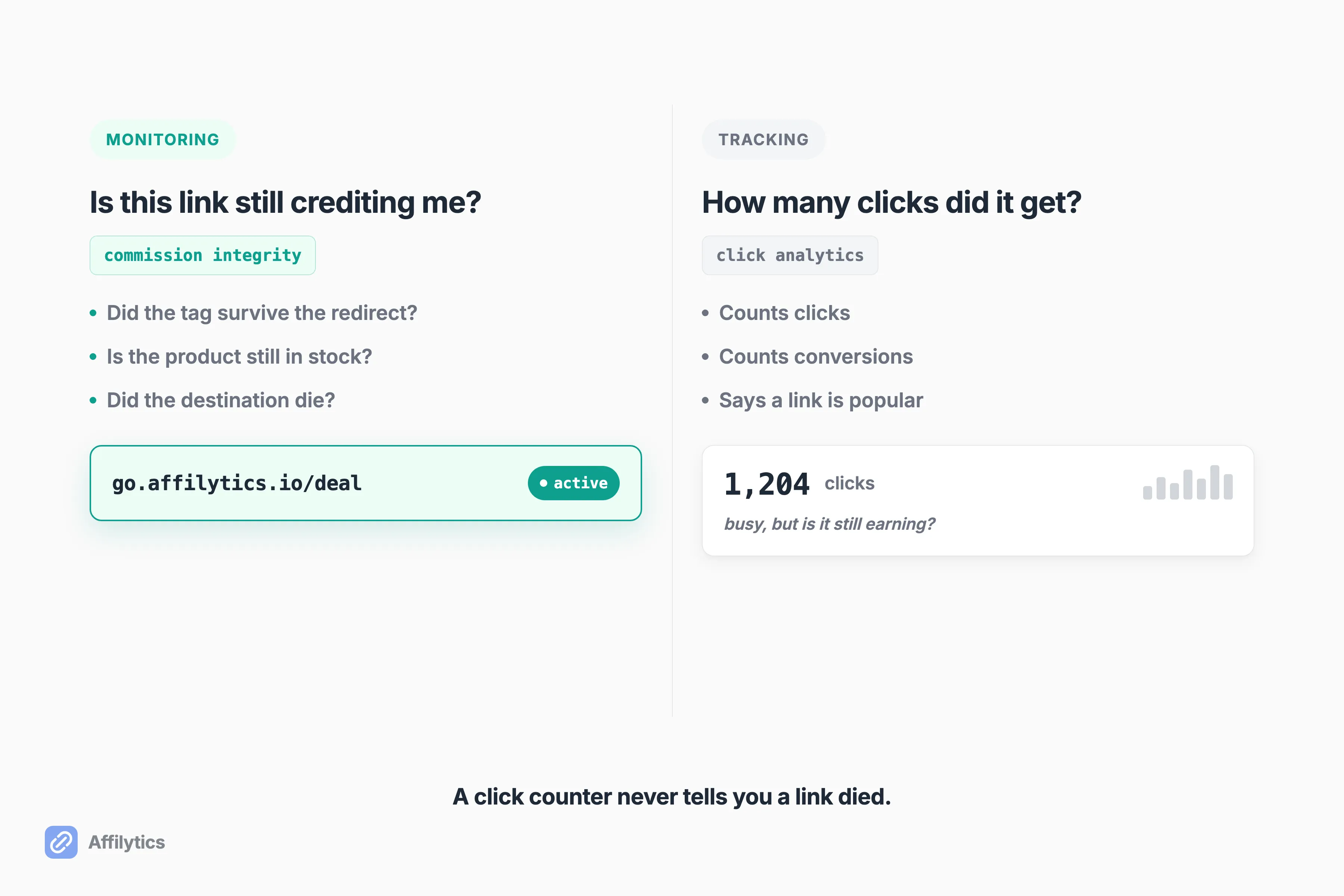
Tracking answers one question: how many clicks and conversions did this link get? It is analytics. It tells you a link is popular.
Monitoring answers a different question: is this link still healthy, and is it still crediting me? It is commission integrity. It tells you a link still works.
One creator on r/Blogging put it better than any product page I have read. He said the gap between “this link looks fine” and “this link still earns commissions” was way bigger than he expected. That gap is real, and most tools sit on the wrong side of it.
Here is why the confusion costs you money:
- A click counter shows a link getting traffic, so you assume it is fine.
- The same link can be sending every one of those clicks into a dead end.
- Cloakers and link shorteners mostly count clicks. As the same creator noted, they do not verify the destination is still healthy.
So you can have a link that is busy and broken at the same time. Popular in your analytics, worth nothing in your bank account. You need both jobs done, but only monitoring catches the silent break.
The 200 OK Problem: Why a “Working” Link Can Earn Nothing
Section titled “The 200 OK Problem: Why a “Working” Link Can Earn Nothing”A web page can tell your browser “200 OK” (everything loaded fine) and still be completely dead for commissions. This is the failure that hides in plain sight.
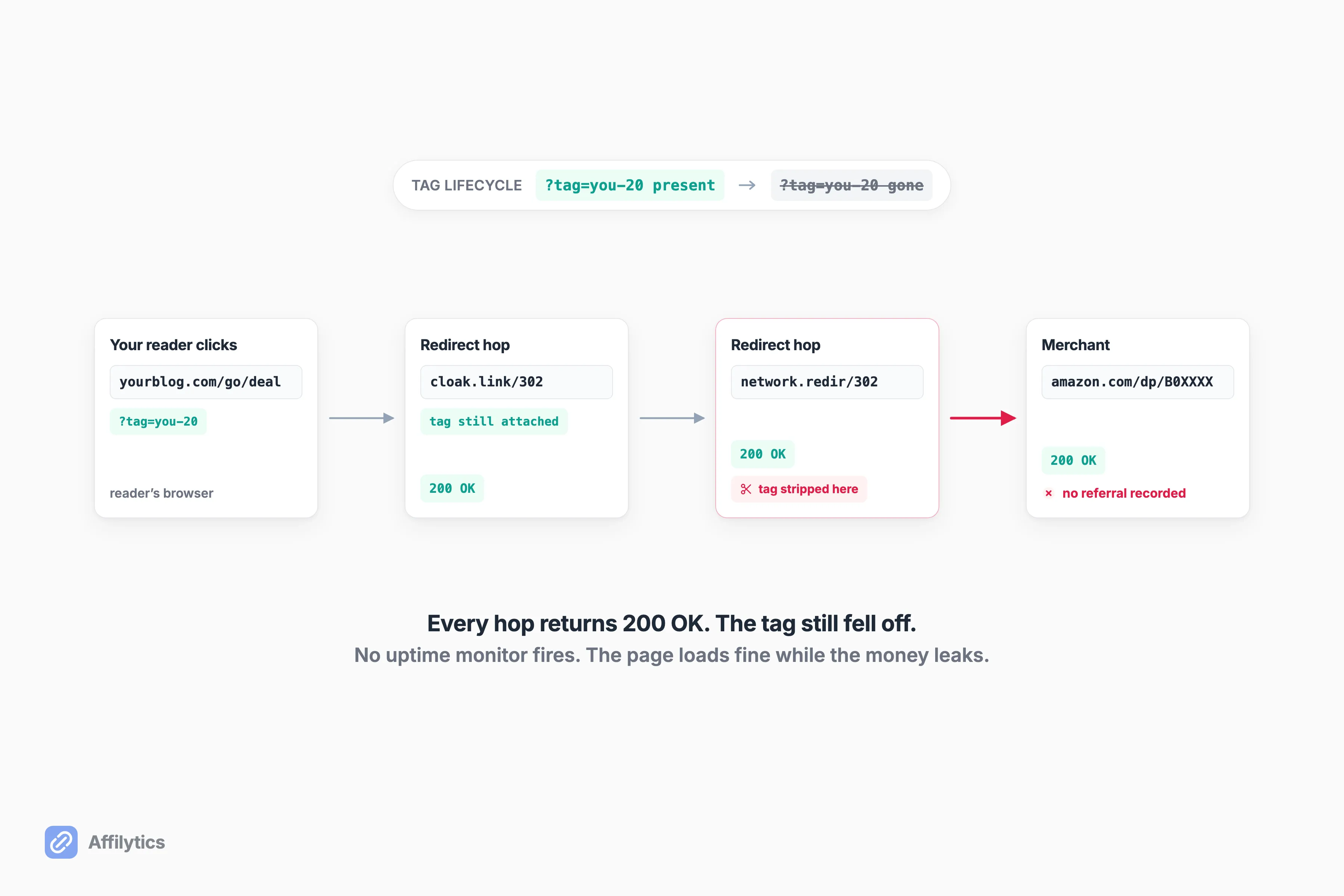
Think about what happens between a click and the sale. Your reader taps your link, and it usually bounces through a few stops before landing on the merchant. That bounce is the redirect chain. Somewhere in that chain, your affiliate tag (the little code that says “this sale came from me”) is supposed to ride along to the end. Sometimes it falls off.
The same r/Blogging creator described it exactly: the page returns 200 OK, but the affiliate tag got stripped somewhere in the redirect chain. You are sending traffic, and the network sees no referral. His summary of the whole category of failure: none of these trigger an alert with normal uptime monitors, because the URLs technically still resolve.
The numbers one creator attached to this are worth repeating, with the caveat that they are his own experience, not an industry law. In that thread, one blogger said he used to lose roughly 30% of potential commissions on a tech blog just from redirect chains swallowing the ID. One person, one blog, one story. But the mechanism behind it is everywhere.
This is the whole reason a status-code check is not enough. A monitor that only asks “did the page load?” will pass a link that loads perfectly and pays you nothing. Real monitoring has to check that your tag survived to the final destination, not just that the destination answered the phone. That tag-survival check is exactly what Affilytics runs, because the loud failures (a dead 404) are the easy ones. The quiet ones drain you for months.
Why does the tag fall off in the first place? A redirect can drop it, a merchant can restructure a URL, and browsers now block the cross-site tracking that affiliate attribution often leans on by default.
The Health States of an Affiliate Link: How a Silent Break Actually Shows Up
Section titled “The Health States of an Affiliate Link: How a Silent Break Actually Shows Up”Not every link that stops earning is “broken” in the same way. A sold-out product, a stripped tag, and a country-specific block page are three different problems, and lumping them together is why so many creators never fix any of them.
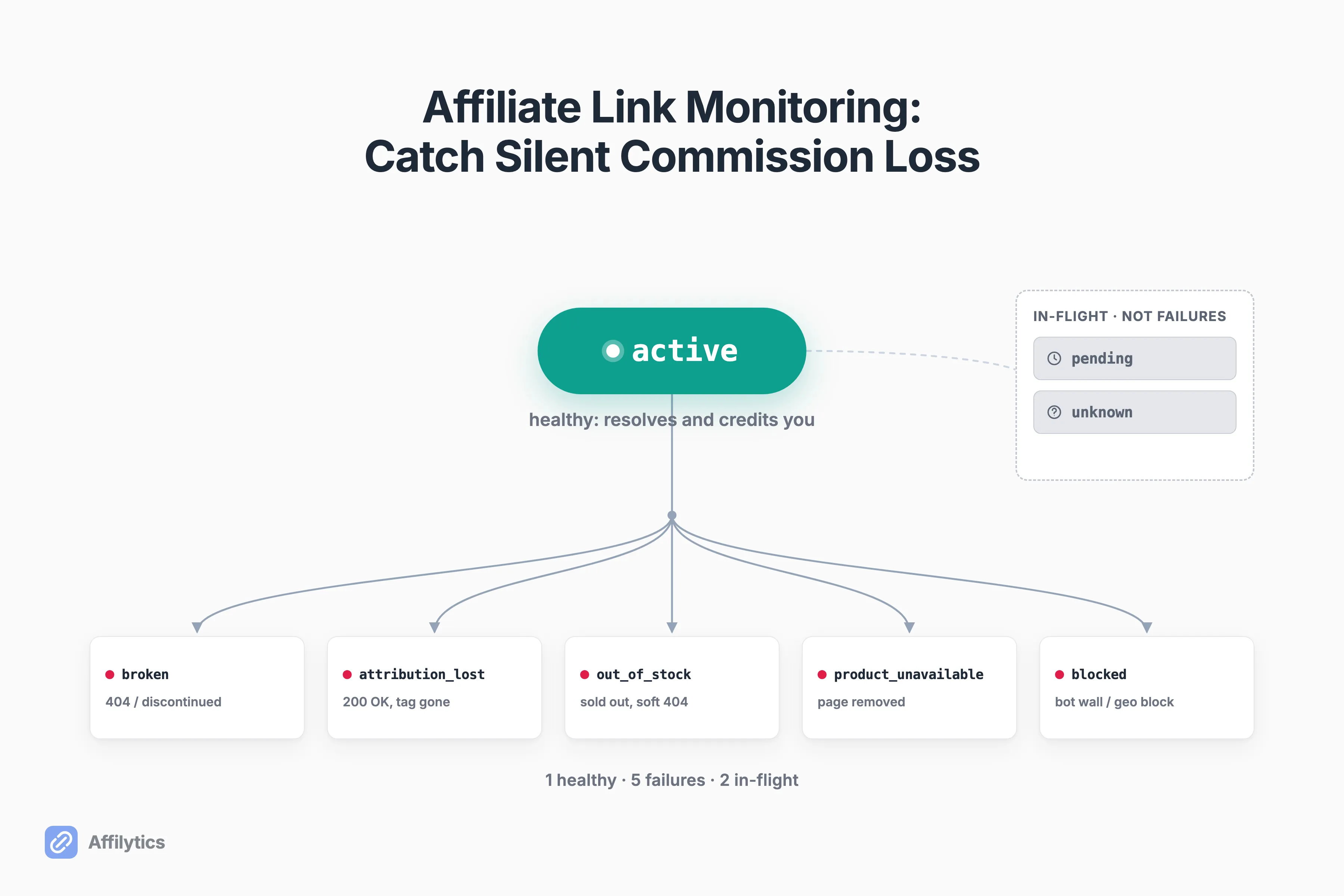
Affilytics sorts every link into one of eight health states. One is the healthy baseline. Around five are real failures. Two are in-flight, meaning we do not know yet. This is not “eight ways your link dies.” It is one vocabulary for telling a stripped tag apart from a dead product apart from a bot wall, so you know what to actually do.
| Health state | What it means | What you do |
|---|---|---|
active | Healthy baseline. Link resolves and credits you. | Nothing. This is the goal. |
broken | Dead end. A 404, or a product that was discontinued. | Repoint or replace the link. |
attribution_lost | Loads fine (200 OK), but your affiliate tag did not survive. | Rebuild the link so the tag reaches the merchant. |
out_of_stock | Product is sold out. The page may render a soft “out of stock” screen that looks fine. | Swap to an in-stock alternative. |
product_unavailable | The product page is gone or replaced entirely. | Find the new page or a substitute. |
blocked | A bot wall or a per-country block page is stopping the check. | Verify manually; it may work for real visitors, or fail in one region. |
pending | A check is in flight. Not a failure. | Wait. |
unknown | Indeterminate result. Not a failure, just not confirmed. | Re-check; treat as a maybe, not a no. |
The failures on that list are not hypothetical. A publisher who ran automated weekly scans described them from real data: out-of-stock variants are sneakier than discontinued products, because “this color or size is sold out while the parent product still exists” renders a soft 404 that looks fine to a basic checker. He also noted that network restructures kill links in clusters, not one by one, so a single retailer changing its URLs can dark out dozens of your links in a day.
The r/Blogging creator’s own list mapped cleanly onto these states too: sold-out products, programs discontinued mid-year while old links still resolve, and domain migrations where a retailer moves a product to a new URL and your link now redirects to their homepage.
Two of these states behave differently depending on where the click comes from. A link can pass every check from your desk and still hit a block page for a reader in another country. Amazon is the classic case, where an out-of-stock item or a regional storefront changes what the visitor actually sees.
The point of the vocabulary is simple. active and pending and unknown are not emergencies. The five failure states are, and each one has a different fix.
Why Affiliate Link Rot Turns Invisible at Scale
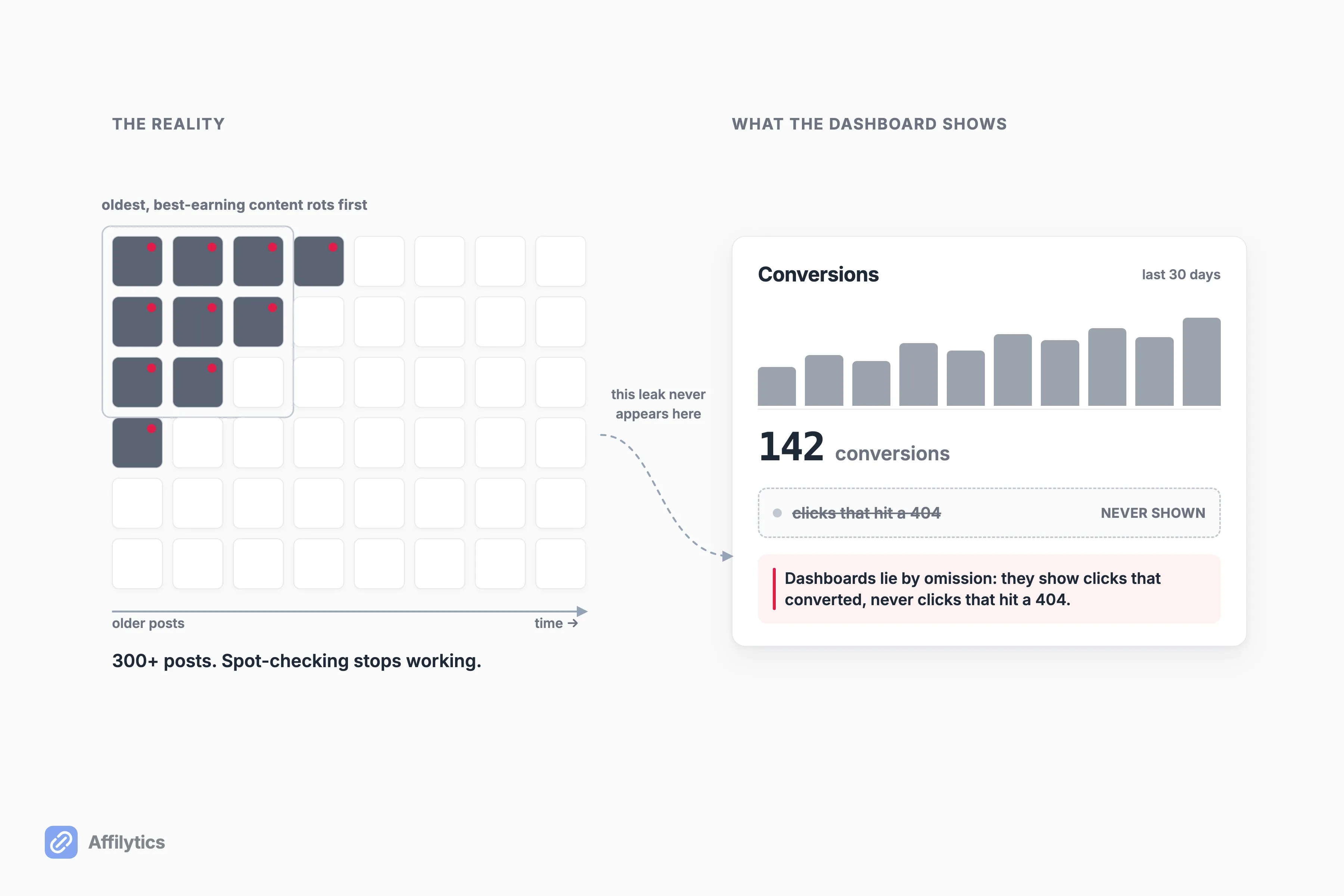
Section titled “Why Affiliate Link Rot Turns Invisible at Scale”With ten links, you can spot-check. With three hundred posts, you cannot, and that is where the leak lives.
One creator laid out the trap plainly: he had 300+ posts with links across multiple networks, some of them pointing at out-of-stock products, and manually checking each one would take forever. He had probably been losing commissions for weeks without knowing. That is not a discipline problem. It is a math problem.
Two things make affiliate link rot invisible instead of just annoying:
- Your network dashboards show conversions, never the clicks that hit a dead end. As one publisher put it, affiliate dashboards lie by omission: they show you clicks that converted, never clicks that hit a 404. The leak is structurally invisible until you go looking for it.
- Your oldest, best-earning content rots fastest. It has had the most time for merchants to migrate URLs and discontinue products, and it is exactly the content you assume is “running itself.” This is why whether Amazon affiliate links expire is the wrong question to lose sleep over: they do not expire on a timer, they rot as the products behind them disappear.
That same publisher, running weekly scans on a large site, found roughly 1 in 4 of his links dead or redirecting away from the original product, concentrated heaviest on his highest-earning articles. I want to be clear about what that number is and is not. It is one publisher’s report from his own site. It is not an industry rate, and it is not Affilytics data. But it lines up with the mechanism. The money silently leaking sits inside a channel where US affiliate spending alone reached $9.56 billion in 2023. None of that leak shows up in a conversions report.
For operators at scale: if you run a portfolio or an agency, this problem multiplies by every client and every site. A quarterly manual audit misses every break that happens the day after the audit, and you are not auditing one library, you are auditing dozens. And if any of those assets is headed for a sale, selling the site raises the stakes on link monitoring: a link that dies mid-deal gets found by the buyer, not by you.
What Real Monitoring Checks That a Broken-Link Plugin Misses
Section titled “What Real Monitoring Checks That a Broken-Link Plugin Misses”The most common answer creators reach for is a generic broken-link plugin. On r/Affiliatemarketing, when someone asked how to monitor links at scale, the top reply was Broken Link Checker, the WordPress plugin. It is a reasonable instinct and a real tool. It also checks HTTP status only, which means it catches the loud 404s and misses everything quiet, which is exactly why link checkers report false positives on dead affiliate links.
Real affiliate link monitoring has to do five things a status checker does not:
- Look like a real browser. Many retailers serve a bot wall to anything that smells automated, so a naive checker gets a block page instead of the real result. Our checker loads links with a real browser fingerprint, and when a site throws up a wall (Cloudflare and friends), it records that as
blockedrather than pretending the link is fine. - Verify the tag survived. It follows the link to the final destination and confirms your affiliate tag is still attached, which is the only way to catch the
attribution_lostcase. - Detect stock and availability, not just 404s. It tells the difference between a page that is gone and a product that is sold out, so an out-of-stock item does not read as healthy.
- Confirm a break before crying wolf. A single failed check can be a fluke. Affilytics waits for several consecutive non-healthy checks before it downgrades a link that was active, and recovery back to healthy is instant. No false-alarm spam.
- Run continuously. Breaks do not wait for your quarterly audit. Checks run on their own and alert you when a state actually changes, not on a calendar.
So what does a plugin actually buy you? A yes-or-no on whether the page answered. That is a fraction of the job, and it holds no matter which Amazon affiliate WordPress plugin you settled on. The commission leaks live in the gap between “the page answered” and “the page paid me,” and closing that gap is the entire reason monitoring exists. There is a compliance argument for looking regularly too, since several of the closure triggers continuous checks help you catch are just link drift nobody noticed in time.
Monitoring Across Every Post, Video, and Network in One Place
Section titled “Monitoring Across Every Post, Video, and Network in One Place”Here is the trap most creators fall into: one tool for YouTube, another for the blog, and a spreadsheet for everything else. Coverage has two axes, and you need both.
The first axis is surfaces. Affilytics discovers and watches links across a YouTube channel’s video descriptions and across a website or blog. The site crawler reads your sitemap, walks your pages, and understands cloaked link paths like /go/ and /recommends/ that plugins use, so it finds the links you actually published, not just the ones you remember. You can’t monitor what you haven’t found, so it pays to build an affiliate link inventory first and point monitoring at the complete list.
The second axis is networks. Your library is not Amazon-only, so your monitoring should not be either. Affilytics classifies links across the major networks out of the box:
- Amazon (US and international)
- Impact
- CJ Affiliate
- Awin
- ShareASale
- Rakuten
- PartnerStack, and more
Running one scan across every network is the point: your library is not sorted by network, so your monitoring should not be either.
This is where an honest word about the incumbent belongs. AMZ Watcher is the tool people name for this job, and it is genuinely good at what it does: deep, focused monitoring of Amazon Associates links. If you are a pure-Amazon creator, it does that one thing well. The limits are structural, though. It monitors Amazon links only, its YouTube support covers Amazon links only, and it owns no redirect layer, so there is no geo-routing or smart-link fix on the other side. It is also a mature but quiet product, live for years with little recent movement. Best for a single-network Amazon creator. Not for a library spread across five networks and two surfaces.
If most of your library is on YouTube, the fastest starting point is to check your YouTube affiliate links in bulk and watch them from there. If it lives in a mailing list instead, the surface to watch is affiliate links inside a newsletter archive, where a sent issue cannot be edited at all.
One more dimension is coming in the next section: a link can work for you and fail for a viewer in another country. As one operator described it, a redirect chain can break in only one region, where users see a block page, a timeout, a blank page, or the wrong redirect. Monitoring has to see that too.
From Catching Breaks to Fixing Them: Self-Healing, Geo-Routed Smart Links
Section titled “From Catching Breaks to Fixing Them: Self-Healing, Geo-Routed Smart Links”Monitoring tells you a link broke. It does not, on its own, stop the next break. The durable fix is to stop pointing readers at a raw retailer link that can rot without warning.
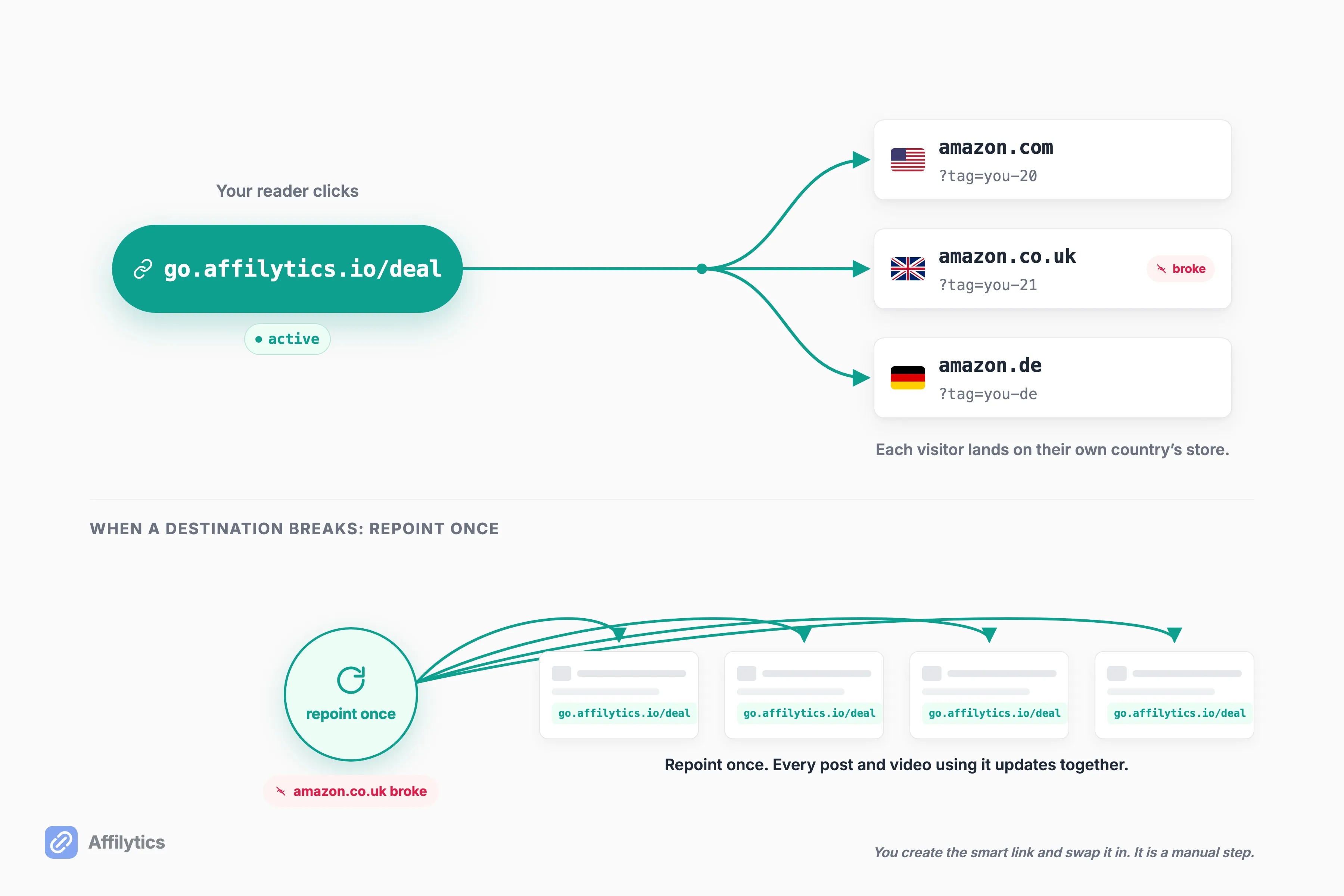
The move is to replace that raw link, once, with a smart link (go.affilytics.io/{slug}). To be straight with you, this is a manual step: you create the smart link and swap it into your content yourself. Discovery finds and watches your links, but it does not silently rewrite them for you. You stay in control of what your content points to.
Once that swap is done, two things change:
- It self-heals. The destination lives in one place. When a merchant migrates a URL or a product dies, you repoint the smart link once, and every post and video using it updates at the same time. No hunting through a hundred old articles.
- It routes by country. This is the income turn, and it matters more than the loss-prevention story. A plain amazon.com link earns you nothing on a click from London or Sydney. A smart link sends each visitor to the right regional store for their country, which recovers the international commission a single-storefront link throws away. A large share of most creators’ audiences is international, even when they do not realize it.
That is the full arc: monitoring stops the loss, and geo-routing grows the income. If you want the mechanics, here is how affiliate geo-routing works and how to create a smart link for your highest-earning pages first. Every smart link you make is health-monitored automatically, so the fix and the watch are the same object.
Start Watching Your Links Before the Next Silent Break
Section titled “Start Watching Your Links Before the Next Silent Break”You can point Affilytics at your channel or your site today and let it find the leaks you cannot see: the links that load fine and pay nothing, the tags that fell off in a redirect, the products that quietly sold out. The reverse trial gives you two full weeks with everything unlocked, no credit card, so you can see what is actually broken before you decide anything.
Create your free account, let it map your links, and turn the breaks it finds into geo-routed smart links that recover commission instead of losing it.
What is the difference between affiliate link monitoring and affiliate link tracking?
Section titled “What is the difference between affiliate link monitoring and affiliate link tracking?”Monitoring watches whether your links are still healthy and still crediting you, which is commission integrity. Tracking counts clicks and conversions, which is analytics. They are different jobs. You want both, but a click counter will never tell you a link died.
Can an affiliate link return 200 OK and still be broken?
Section titled “Can an affiliate link return 200 OK and still be broken?”Yes. The page can load fine while the affiliate tag was stripped in a redirect, the product is out of stock, or the program shut down and old links still resolve. The status code alone cannot confirm the link still earns you a commission.
How often should I check my affiliate links?
Section titled “How often should I check my affiliate links?”Continuous automated checks beat quarterly manual audits. A break can happen the day after you check, and manually re-checking links across hundreds of posts or videos is not realistic. Let a tool watch them and alert you when something changes.
Will a normal broken-link checker catch dead affiliate links?
Section titled “Will a normal broken-link checker catch dead affiliate links?”Not reliably. Generic checkers verify HTTP status only, not whether your affiliate tag survived the redirect, whether the product is in stock, or whether the page loads from another country. That is exactly where affiliate commissions leak.
Does affiliate link monitoring work for both a website and a YouTube channel?
Section titled “Does affiliate link monitoring work for both a website and a YouTube channel?”Yes. Affilytics discovers and monitors links across a YouTube channel’s video descriptions and across a website or blog, and it covers the major affiliate networks, not just Amazon.