
How to Check YouTube Affiliate Links in Bulk: 5 Steps
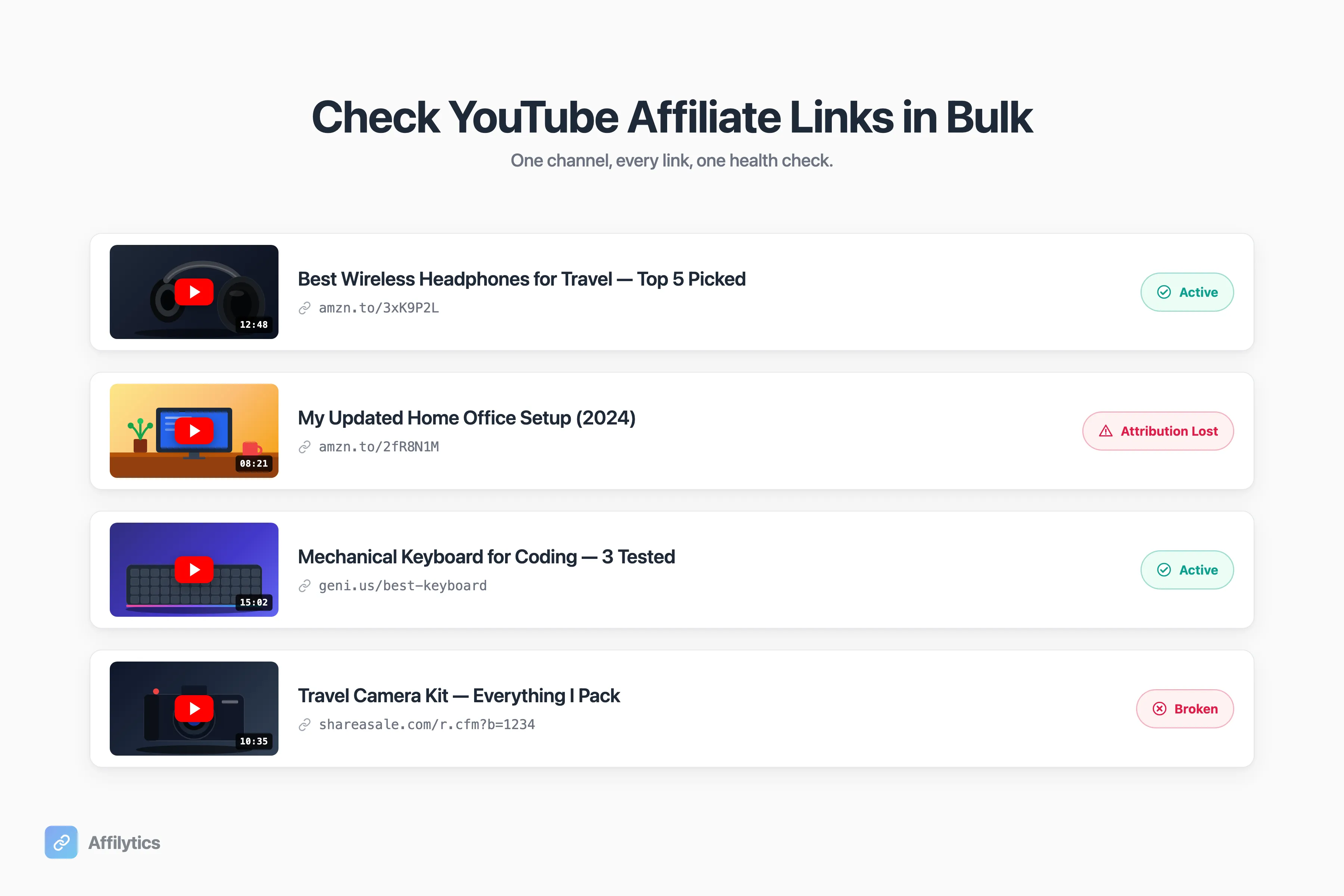
If you have a year-old YouTube video sitting on evergreen traffic, there’s a good chance one of its affiliate links is already dead and you have no idea. As u/GroceryHead1338 put it on r/YouTubeCreators: “I’m terrified of how many dead links might be sitting in my video history.”
I’m Slav, co-founder of Affilytics. We build link-health infrastructure for creators, the kind that scans entire YouTube channels and runs honest status checks against every affiliate link in every description.
Affiliate link rot pairs with two related problems most creators also miss. Your international audience leaks commission three ways when they click a US-only Amazon link, and smart links that route every click to the right local store are how senior creators stop bleeding money to the wrong storefronts. If you’re considering tooling, we also wrote Geniuslink alternatives compared honestly and an AMZ Watcher alternative for Amazon link auditing. And if you run a blog alongside your channel, here’s how to manage a blog’s affiliate links without checking them by hand, plus the same audit applied to a site: how to check every affiliate link on your website in one pass.
This guide walks the 5-step bulk audit: pull every affiliate link from every description, check each link’s real status (not just 200 or 404), triage by failure mode, replace the worst offenders with smart links, and set a recurring digest so you don’t have to do this manually again. If you would rather diagnose one link before auditing hundreds, start with the nine reasons an Amazon affiliate link stops working.
Why Old YouTube Affiliate Links Go Bad (and Why Creators Don’t Notice)
Section titled “Why Old YouTube Affiliate Links Go Bad (and Why Creators Don’t Notice)”Old links don’t fail loudly. They just stop earning. Four common failure modes:
- The product gets discontinued. The page 404s.
- The retailer redesigns its URL structure. Old links land on a generic page or strip your tag.
- The affiliate program shuts down or you lose access. Your tag becomes invalid.
- The product runs out of stock. The page loads; conversion drops to near zero.
None of these announce themselves, and creators rarely look. As u/andrewthinking wrote on r/YoutubersViews: “the real answer for most youtubers is they don’t think about them at all, or very little. They get so focused on the next thing they’re making its easy to forget about your backlog.”
u/Olivers5797 on r/Affiliatemarketing put it bluntly: “Dead links and missing tags are such silent revenue killers.”
Why does this matter? Evergreen traffic keeps clicking. A 2-year-old gear review earns clicks every week. If the link rotted six months ago, those clicks earn nothing.
The Manual Way (And Why It Falls Apart at 50+ Videos)
Section titled “The Manual Way (And Why It Falls Apart at 50+ Videos)”You can do this by hand. Open YouTube Studio, click into each video, copy each affiliate link, paste it into a browser tab, watch where it lands, log the result in a Google Sheet, repeat.
u/Olivers5797 on r/Affiliatemarketing described it: “open files one by one and manually copy everything. Super time-consuming and honestly frustrating.”
The math is unkind. At 30 seconds per link, 5 links per video, 100 videos, that’s more than 4 hours to look once. The redo cycle is on top.
If you’re technical, you’ve probably considered scripting it. Two well-known DIY tactics:
- YouTube’s official OEmbed endpoint, which returns “Unauthorized” for private videos, “Not Found” for deleted ones, and JSON for live ones.
- youtube-dl exit codes can detect private and deleted videos inside a shell script.
yt-dlpis the actively-maintained fork most engineers run today.
Both check whether the video is alive. Neither checks whether the affiliate links inside the description still earn. Wrong layer.
What about hiring a VA? Still slow, still has to be redone every quarter. A VA also can’t catch the worst failure mode: they see a 200 OK and move on while the link silently strips your tag.
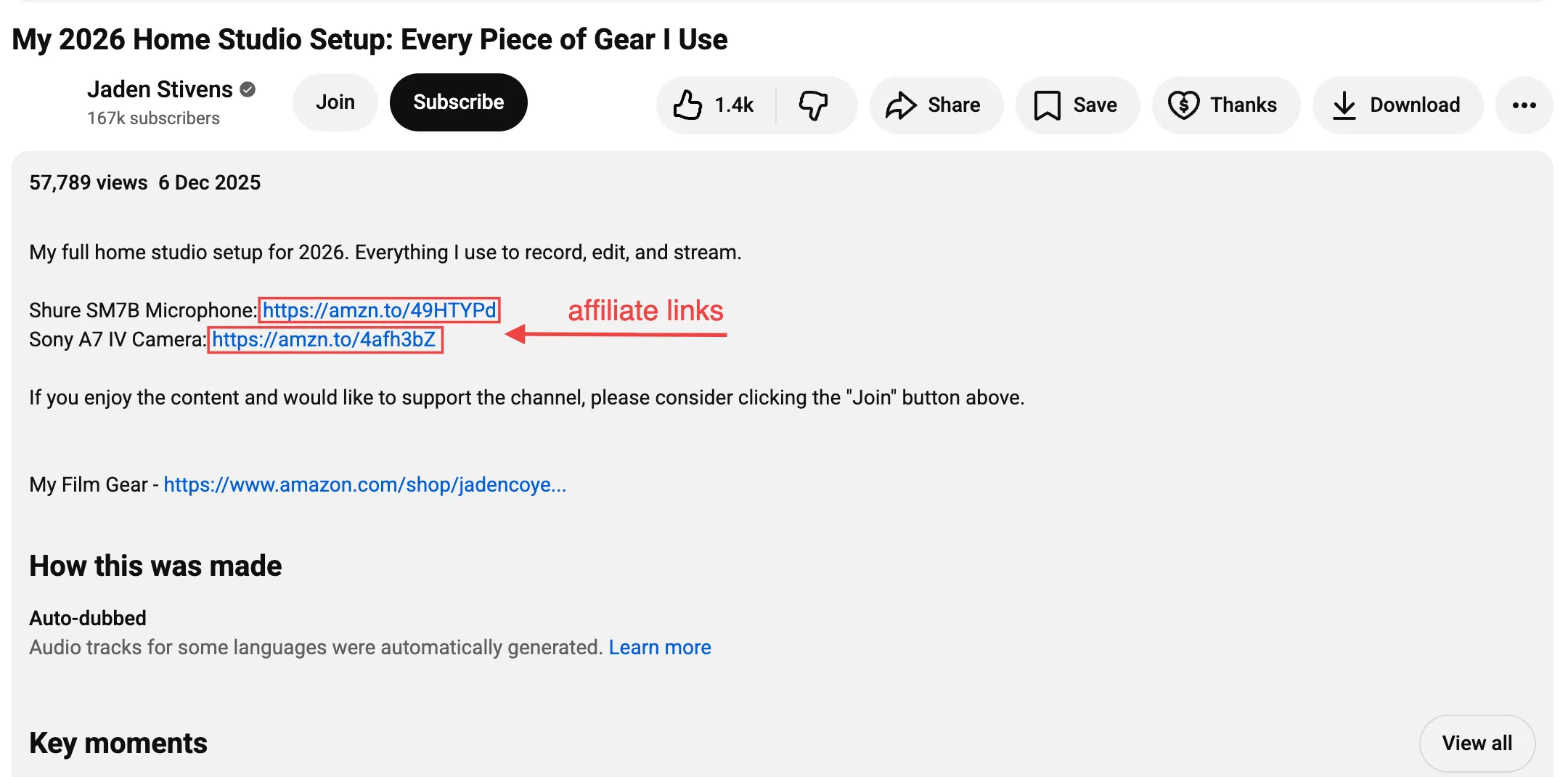
Step 1, Pull Every Affiliate Link from Every Video Description
Section titled “Step 1, Pull Every Affiliate Link from Every Video Description”The goal is one flat list: every external URL across every video description, in a CSV or a dashboard. Not a list of videos. The links are what you act on. This is really an inventory step, and the same discipline of finding every affiliate link you’ve published applies whether the links live on YouTube, a blog, or both. Shorts count as videos here, though it is worth knowing what a scan does and does not see on a Short before you rely on the list.
The manual path is YouTube Studio’s content view. You pull descriptions one row at a time, and as one Reddit OP described it, the links end up “scattered across Google Docs, Sheets, and random notes.”
The catch: YouTube Studio’s export gives you description text. It does not parse affiliate URLs, and it does not tell you which network each URL belongs to (Amazon vs ShareASale vs Impact vs CJ vs Awin vs Rakuten vs the long tail).
If you’d rather skip the parse-it-yourself step, paste your channel URL into Affilytics. We crawl every description via the YouTube Data API and extract every affiliate URL into one list, Amazon Associates and every other program you’ve ever used.
Does link order matter? No. The next step works per URL. You re-attach video context at triage.
Step 2, Check Each Link’s Real Status, Not Just “200 or 404”
Section titled “Step 2, Check Each Link’s Real Status, Not Just “200 or 404””Most DIY scripts trip over the same trap: a 200 OK does not mean the link still earns. The redirect can strip your tag mid-flight. The page can resolve to “currently unavailable.” The listing might be pulled entirely. All three return a 200, and all three cost you money.
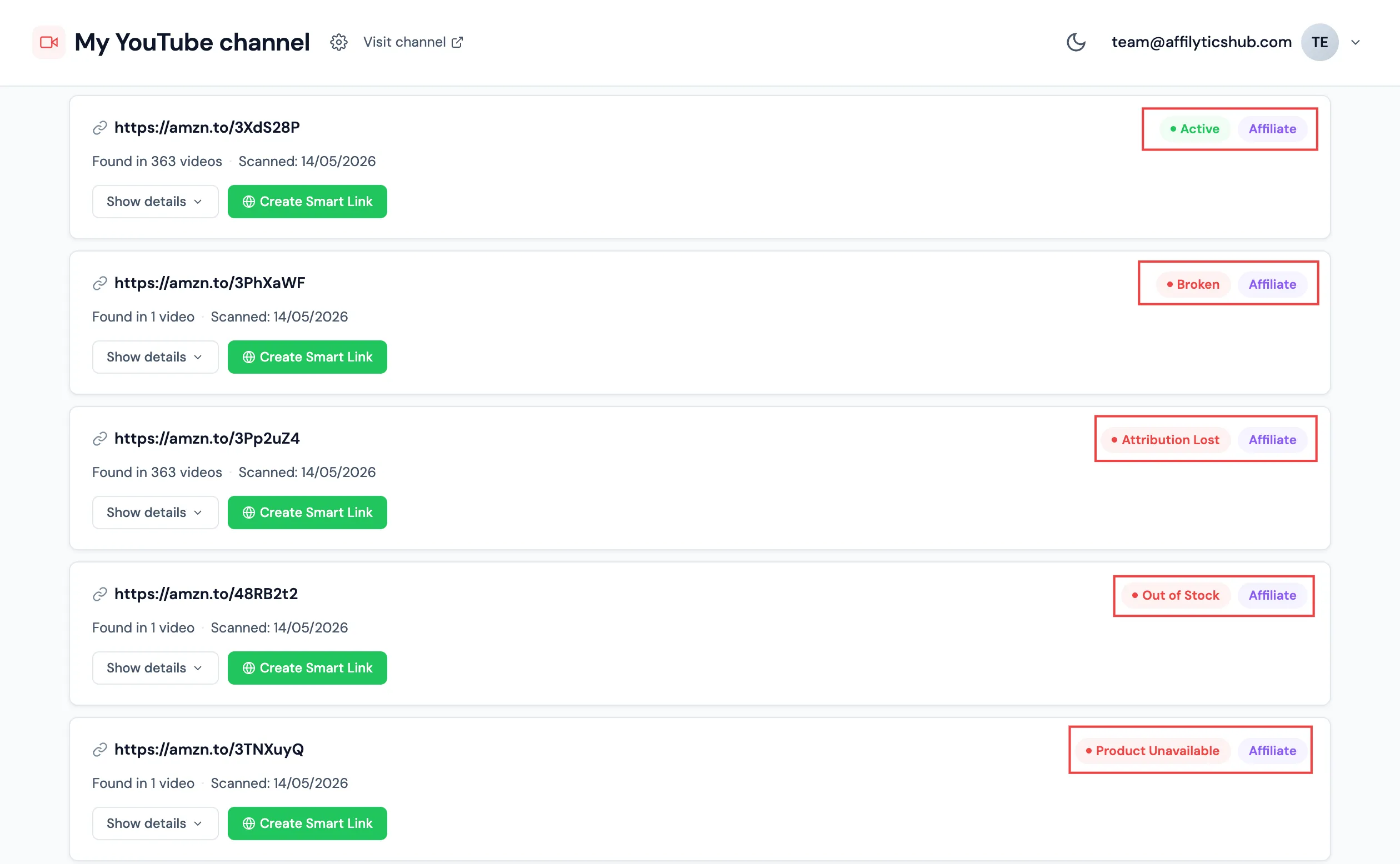
A useful checker reports more than two outcomes. The 8-status taxonomy we use:
- Active. Link resolves, tag intact.
- Broken. 404 or DNS failure.
- Attribution lost. Redirect chain strips your tag. You earn zero.
- Out of stock. Real page, product sold out.
- Product unavailable. Real page, listing pulled.
- Blocked. Anti-bot refused us, so we can’t verify.
- Unknown. Transient error or unclassified.
- Pending. Still being checked.
One credibility note. We use stealth HTTP with TLS fingerprinting and rotating residential proxies, because Amazon’s anti-bot system blocks naive checkers within the first handful of requests. That’s why blocked is rare and attribution-lost detection is reliable.
u/Independent_Lynx_439 on r/SmallYoutubers described links that “went dead or started redirecting to random pages.” That’s attribution-lost in plain English.
Why does attribution-lost matter most? It’s invisible to the visitor. Broken, out-of-stock, and product-unavailable all show as errors. Attribution-lost lets the visitor buy, the retailer keeps the sale, and you don’t get paid. If you want the full anatomy of how affiliate click attribution silently breaks, we wrote that up on its own.
Step 3, Triage by Failure Mode
Section titled “Step 3, Triage by Failure Mode”You now have a list of URLs, each tagged with one of eight statuses. Not every status deserves the same response.
- Broken and Product unavailable: retire or replace. The product is gone.
- Out of stock: wait or replace. If the merchant restocks, the link recovers on its own. If the gap drags on, find an alternative.
- Attribution lost: replace urgently. This is where the silent revenue lives.
- Blocked: don’t act yet. Real visitors aren’t being blocked, only the automated checker is. Wait one cycle, then investigate.
- Unknown and Pending: wait.
- Active: leave alone.
The practical reality: most channels have two or three categories worth fixing first. Don’t try to fix all 600 links in a weekend. Sort by status crossed with view count. Highest-watched videos earn back the most when you fix them.
u/stovetopmuse on r/Affiliatemarketing had the right instinct: “Biggest thing I’d want is ongoing monitoring, not just extraction. Like auto-flag dead links, out of stock, or price drops in one place.” Ongoing monitoring beats one-shot triage every time, because the second audit is mostly already done.
Step 4, Replace with Smart Links So You Don’t Repeat the Audit
Section titled “Step 4, Replace with Smart Links So You Don’t Repeat the Audit”The durable answer isn’t a faster audit. It’s making the audit unnecessary.
A smart link is a single short URL you put in your video description (go.affilytics.io/{slug} is ours, any equivalent works). One URL. You update the destination in one place and never edit a description again to fix a link. If you’ve never set one up, the 8-step walkthrough is here, it takes about ten minutes end-to-end.
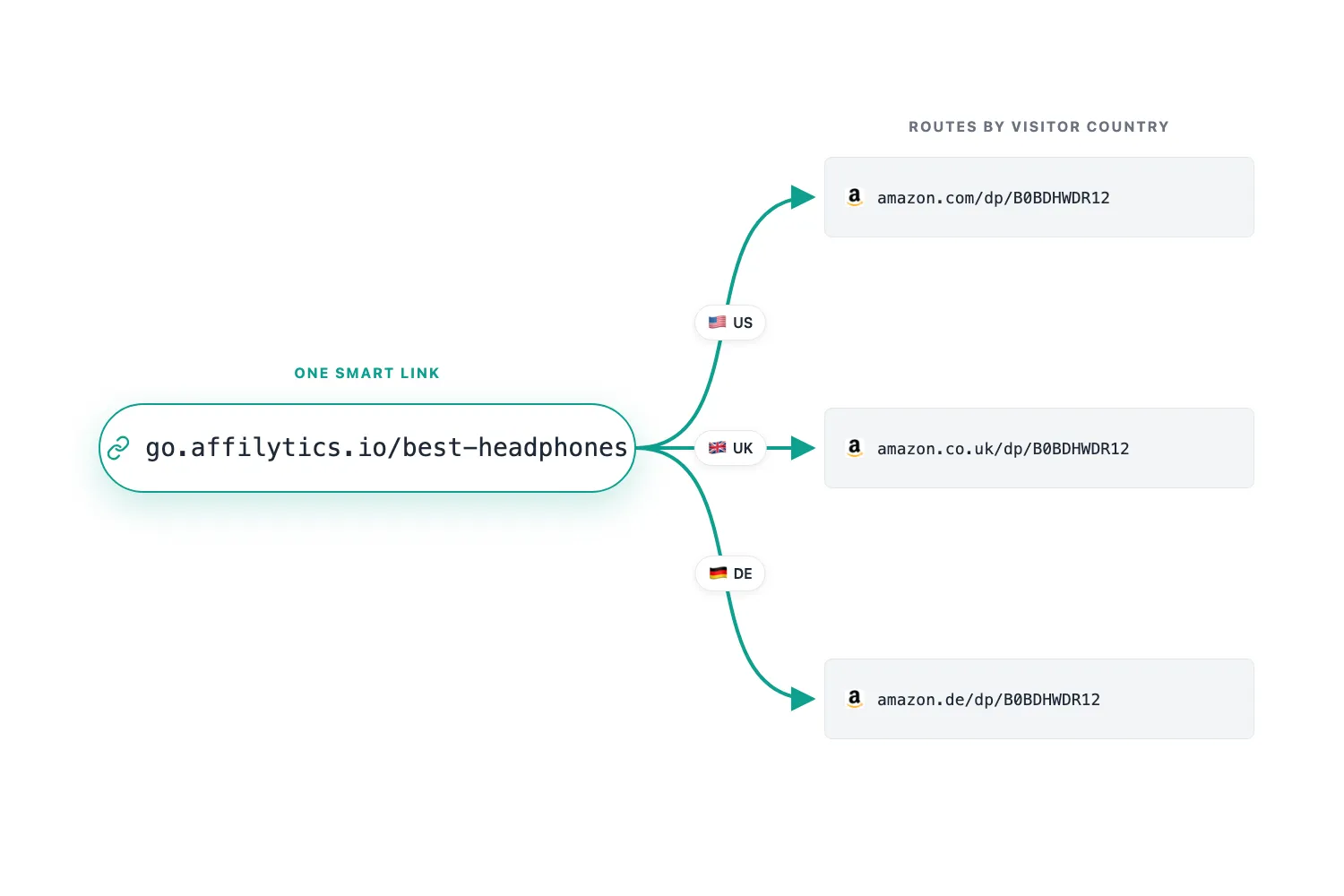
Smart links solve a second problem. A big slice of most creator audiences is international, and a direct amazon.com link captures US conversions while international clicks land on the wrong storefront and lose the sale. A smart link routes by visitor country: IP, GeoIP lookup, matching rule, 302 redirect to the right regional store.
When a product goes out of stock, you join a new program, or Amazon changes its regional URL structure, you update the destination once and every video that linked to it follows.
Inside Affilytics, this is the smart-links tab: per-link routing rules, per-country destinations, click analytics, and ongoing health checks on every destination.
u/andrewthinking on r/YoutubersViews mapped this path unprompted: “use a smart links tool. Couple of options on the market for those, Genius Links and URL Genius are pay per click and some are flat rate like Linktwin or Youfiliate.”
Does this work for non-Amazon programs? Yes. Smart links don’t care about the network. ShareASale, Impact, Rakuten, all routed the same way.
Step 5, Set a Recurring Digest (or You’ll Fall Back into Inertia)
Section titled “Step 5, Set a Recurring Digest (or You’ll Fall Back into Inertia)”Most creators who run the audit once go back to ignoring it. The next video matters more. Without a recurring system, link rot returns within a quarter and you start over.
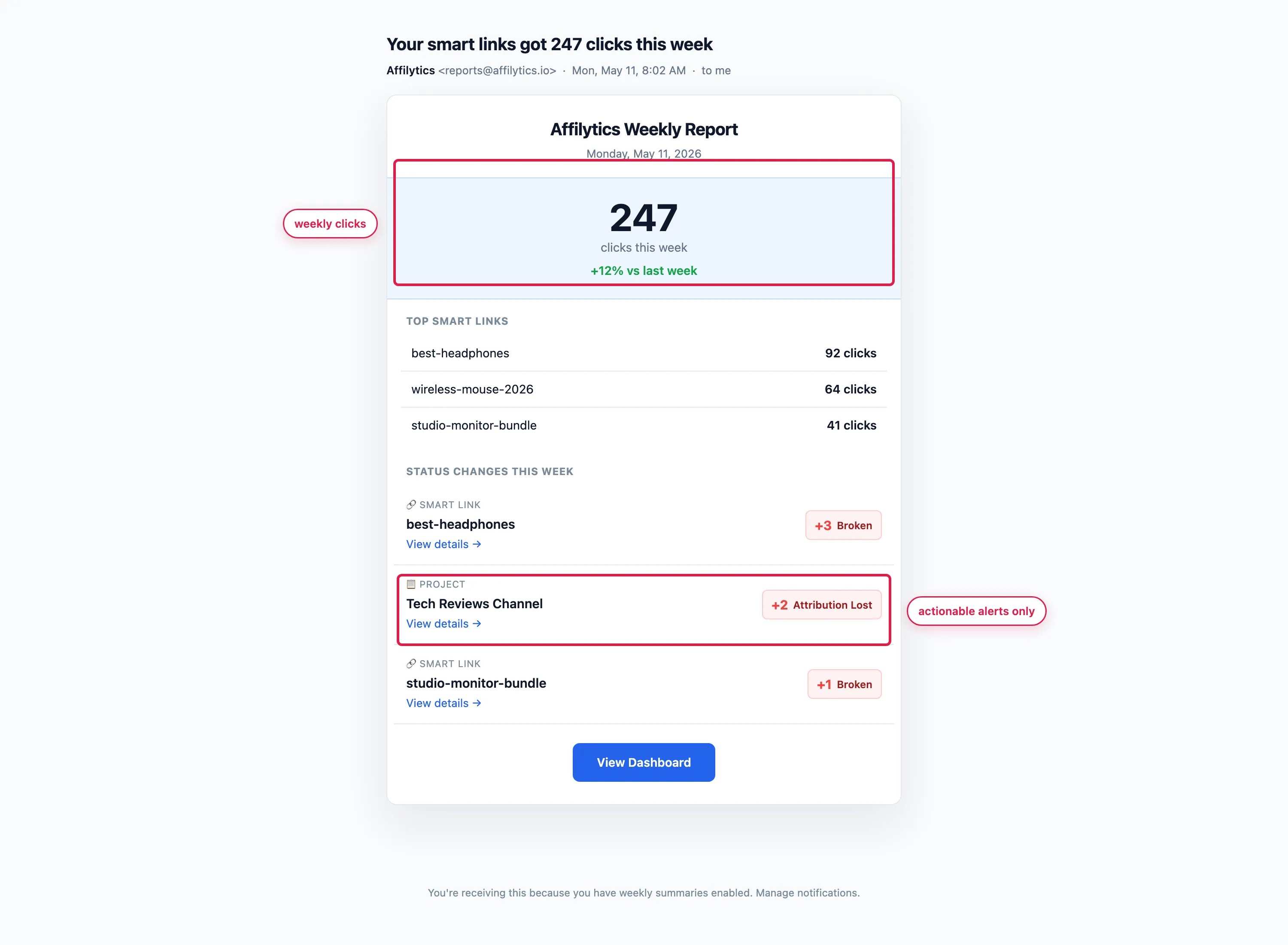
A good recurring system has three properties:
- Automated re-checks at a pace that matches the channel. Weekly is fine for most creators.
- Delivered to a place you already open. Email or Slack, not a dashboard you have to remember.
- Alerts only on actionable status changes. Broken or attribution-lost merits an email; an active link does not.
u/stovetopmuse on r/Affiliatemarketing described the bar: “If it evolves into a ‘link health dashboard’ instead of just a scraper, that’s something I’d actually keep open daily.”
We ship a Monday-morning digest with click totals and status changes for every link, and paid users get it automatically. The digest is the visible surface of continuous affiliate link monitoring, which watches every link between audits so a break reaches you the day it happens.
A recurring audit is the last of the seven best practices for YouTube affiliate links. The other six, placement, labeling, country-routing, disclosure, and the rest, are what keep links from breaking between checks, so the digest has less to catch.
Other Tools You Might Consider
Section titled “Other Tools You Might Consider”A short, honest aside. Not a battle card.
- Geniuslink. Incumbent smart-link router for Amazon affiliates since 2010. Single public tier at $6/mo with 1,000 clicks/mo included; $3.50 per additional 1,000 clicks. Strong on Amazon multi-country routing. Doesn’t scan your YouTube channel, you bring the URLs to them. Best for: creators with low-to-moderate click volumes who only need routing and don’t mind importing URLs by hand.
- TubeBuddy bulk-replace. Named by Reddit creators as the closest workaround. Bulk-edits descriptions across many videos. Doesn’t audit link health. Best for: creators who already know which links to swap and just need to update many descriptions in one shot.
Should I write my own script? If you’re comfortable with anti-bot evasion, proxy rotation, and TLS fingerprinting, sure. For most creators, a tool that handles the engineering is the cheaper trade.
Translation: paste your channel URL into our dashboard, pour a coffee, and go shoot your next video. We’ll wrestle Cloudflare so you don’t have to.
How often should I bulk-check my YouTube affiliate links?
Section titled “How often should I bulk-check my YouTube affiliate links?”If you’ve never audited your backlog, run one full check now, then re-check at least quarterly. If you’re on a tool that supports automated checks, weekly is the sweet spot. The reason isn’t paranoia, it’s inertia: most creators who run a one-shot audit drift back to ignoring it within a quarter.
What’s the difference between a broken link and an attribution-lost link?
Section titled “What’s the difference between a broken link and an attribution-lost link?”A broken link returns a 404 or fails to resolve; the visitor sees an error and leaves. An attribution-lost link loads a real product page, but the redirect chain stripped your affiliate tag along the way. The visitor can buy, the retailer keeps the sale, and you earn nothing. Broken links are loud; attribution-lost links are silent.
Can I check YouTube affiliate links in bulk for free?
Section titled “Can I check YouTube affiliate links in bulk for free?”Yes, if you script it. The OEmbed endpoint plus a redirect-trace script gets you partway there. The catch: that path checks video availability and naive HTTP, not attribution loss, and Amazon’s anti-bot systems start blocking your script within ten requests. For a full audit, look for a tool with a free trial that includes attribution-loss detection.
Will TubeBuddy or vidIQ check my affiliate links?
Section titled “Will TubeBuddy or vidIQ check my affiliate links?”No. They’re description editors and channel analytics tools, not link-health checkers. TubeBuddy’s bulk-replace is useful once you already know which links to swap; it does not audit them.
Should I replace every Amazon link with a smart link?
Section titled “Should I replace every Amazon link with a smart link?”Not all at once. Start with your highest-watched videos: a smart link on a video with hundreds of thousands of evergreen views recovers more than the same fix on a video with a few hundred. Sort by traffic, fix the top ten, then expand.
If you’d rather skip the spreadsheet, paste your channel URL into Affilytics and we’ll surface every affiliate link, every status, and every silent revenue leak in one pass.