
Geo Affiliate Links: The Ultimate Guide for Creators (2026)
Two months ago, a creator on r/AffiliateMarket asked: “when you have an offer that only pays in certain countries, how do you make sure clicks from other countries don’t just waste your budget?” The thread sat in a 41,000-subscriber subreddit for two months. Zero replies. Geo affiliate links are how you stop losing commission on every international click, and this guide is the answer that thread never got.
I’m one of the engineers who built Affilytics. We use MaxMind’s GeoIP database to send each visitor to the right regional storefront in a single 302 redirect, and we wrote the routing layer ourselves rather than wrapping someone else’s redirect API. If you want the click-by-click walkthrough of that path, we cover how affiliate geo-routing works step by step separately.
If you’ve already started cleaning up an old link library, our roundup of Geniuslink alternatives is the natural sibling to this guide. If you haven’t, the 5-step bulk audit is where to start, you’ll need that inventory before you migrate anything. And if you run a content blog rather than a channel, the affiliate link manager for bloggers guide is the blog-shaped companion to this one. This one picks up where that one leaves off: not which tool to pick, but how the routing actually works, what it costs to leave it broken, and how to size your own leak before you spend a dime.
This guide covers what these links actually are (and how they differ from the “GEO” you may have seen on X), why creators lose silent commission, how the routing path works under the hood, what Amazon OneLink and Geniuslink each give you, and how to size the leak in your own audience without paying anyone first.
What Are Geo Affiliate Links?
Section titled “What Are Geo Affiliate Links?”A geo affiliate link is a single short URL you publish once, that quietly routes each visitor to the right regional store based on their country. A reader in London clicks the same go.affilytics.io/headphones slug as a reader in Toronto. The link sends one to amazon.co.uk and the other to amazon.ca, both with the correct affiliate tag attached.
That’s it. There’s no special formatting, no tracking pixel, no JavaScript on your page. From the reader’s side, the link looks like any other shortened URL. From your side, you publish one slug with a list of country rules, and the routing happens at click-time. Which destinations you can route to depends on where each program operates, so it helps to know the full Amazon affiliate program country list before you map your rules.
Why does this matter for creators? Because most creators have a 30 to 50 percent international audience even when they don’t realize it. YouTube Studio shows it. GA4 shows it. Substack stats show it. The default behaviour of every affiliate link you’ve ever pasted is to send those readers to the wrong store. Amazon affiliate links on social media face an extra hazard on top of that: the platform can strip the tracking tag before the click even lands, and Amazon affiliate links on Pinterest are a textbook case. The mechanic of geo-routing fixes the wrong-store half with one short URL per product instead of ten. Until you do, every one of those clicks is a link that works perfectly and still earns nothing.
A short list of what counts in practice:
- A
go.affilytics.io/{slug}smart link with country-specific destination URLs - An Amazon OneLink wrapper that routes between the 13 OneLink-supported marketplaces
- A WordPress plugin that rewrites
amazon.com/dp/...URLs at render time based on the visitor’s IP - A homegrown 302 redirect on your own domain that reads the visitor’s country header from Cloudflare and picks a destination
All of those count. They differ in price, coverage, analytics, and how much they ask you to babysit.
A Quick Disambiguation: This Isn’t “GEO” (Generative Engine Optimization)
Section titled “A Quick Disambiguation: This Isn’t “GEO” (Generative Engine Optimization)”If you got here from an X feed full of “GEO” content, you’re probably looking for something else. On X, “GEO” usually means Generative Engine Optimization, the discipline of getting your content cited inside AI search answers from Perplexity, ChatGPT, and Google’s AI Overviews.
Geographic routing of affiliate links is a different topic. Same three-letter prefix, no relationship. You can practice both. They sit on opposite sides of your stack. This guide is about the geographic kind. If you wanted the AI-search kind, close this tab.
Why Creators Lose Commission on Every International Click
Section titled “Why Creators Lose Commission on Every International Click”Here’s the anatomy of a single lost sale. A reader in Berlin watches your camera review, taps your description, and lands on amazon.com because that’s the link you copied. Three things happen at once:
- Amazon’s storefront-detection logic notices the German IP and offers to redirect, but only if the visitor accepts a banner. Many don’t.
- Even when the redirect lands them on amazon.de, your US affiliate tag doesn’t work in Germany. Amazon Associates ties commission to the storefront-specific Associates account.
- The visitor either bounces (because the price is in dollars, not euros) or buys on the German storefront with no tag attached, in which case Amazon still gets the sale but you get nothing.
Three failure modes, one cause. The default Amazon.com link assumes a US reader. Your audience isn’t all US.
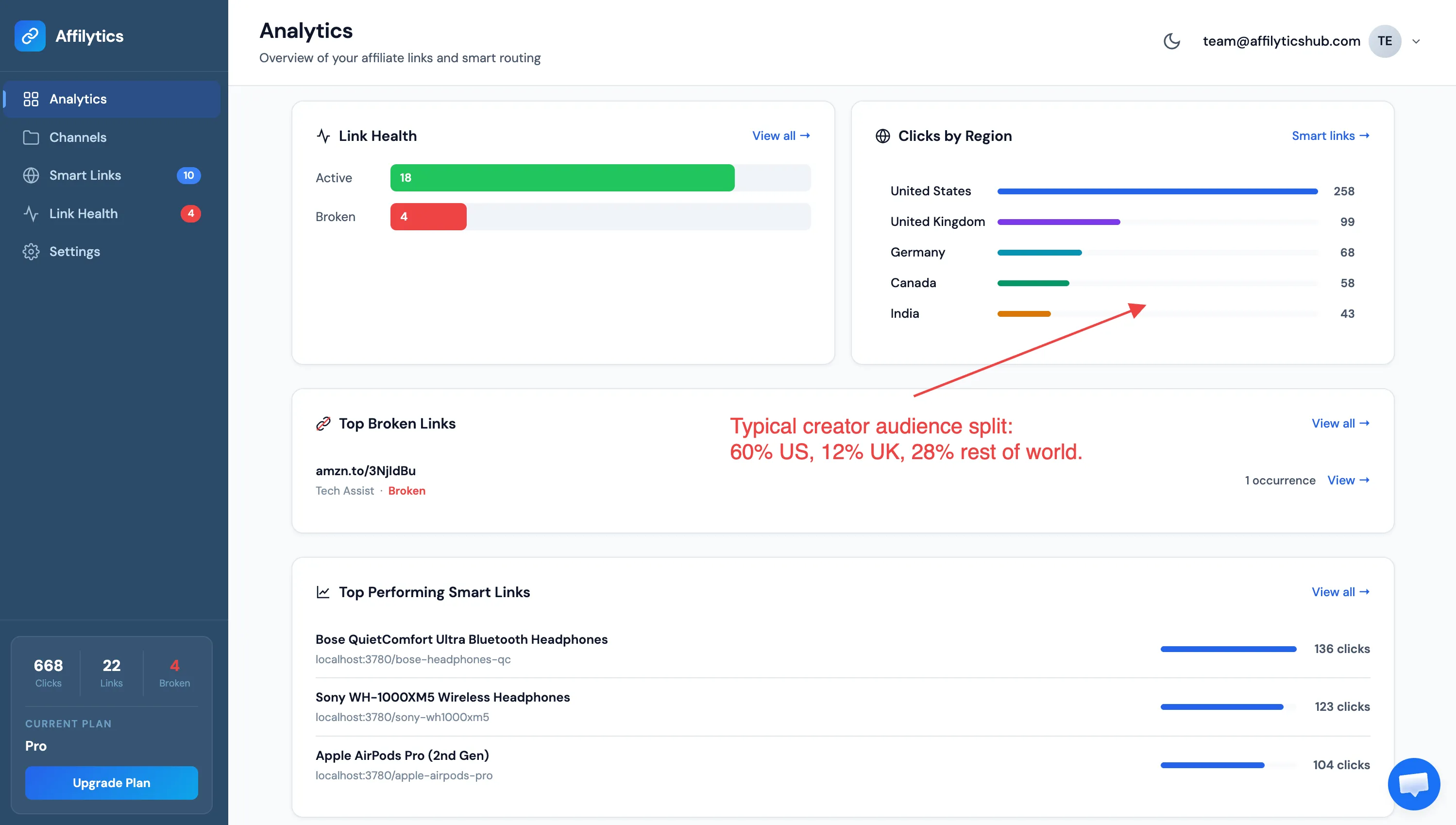
This isn’t a small problem. The international slice usually lands somewhere between a third and half of total views, and most creators have never actually checked. A Tech YouTuber in California reviewing a $200 pair of headphones is unlikely to have a 100 percent US audience. A travel creator on Substack writing about luggage is closer to 50 percent international than 10. Podcasters with global audiences sit in the same trap, their listeners are scattered across every English-speaking market while every show-note link points at one store. Multiply that by the affiliate click-through rate on a healthy review post, and the silent strip can become a four-figure annual line item for a mid-sized channel before you’ve done anything wrong.
The voice-of-customer signal is loud. As one creator put it on r/AffiliateMarket:
“When you have an offer that only pays in certain countries, how do you make sure clicks from other countries don’t just waste your budget? Do you use a tool? Custom scripts? Just accept the loss?”
That post sat with zero replies in a 41K-subscriber subreddit. The pain is felt; the public answer doesn’t exist. A YouTuber in another thread on r/Affiliatemarketing listed “geo-redirect links so international viewers go to their local Amazon (.co.uk, .de, .ca, etc.)” as one of five must-have features in any creator tool. So did the OP of an r/WordpressPlugins thread who built a free plugin specifically because, in their words, “those can cost $5-50/month on their own.”
So the question isn’t “is this a real problem.” The question is “how does the fix actually work.”
How Geo-Routing Actually Works Under the Hood
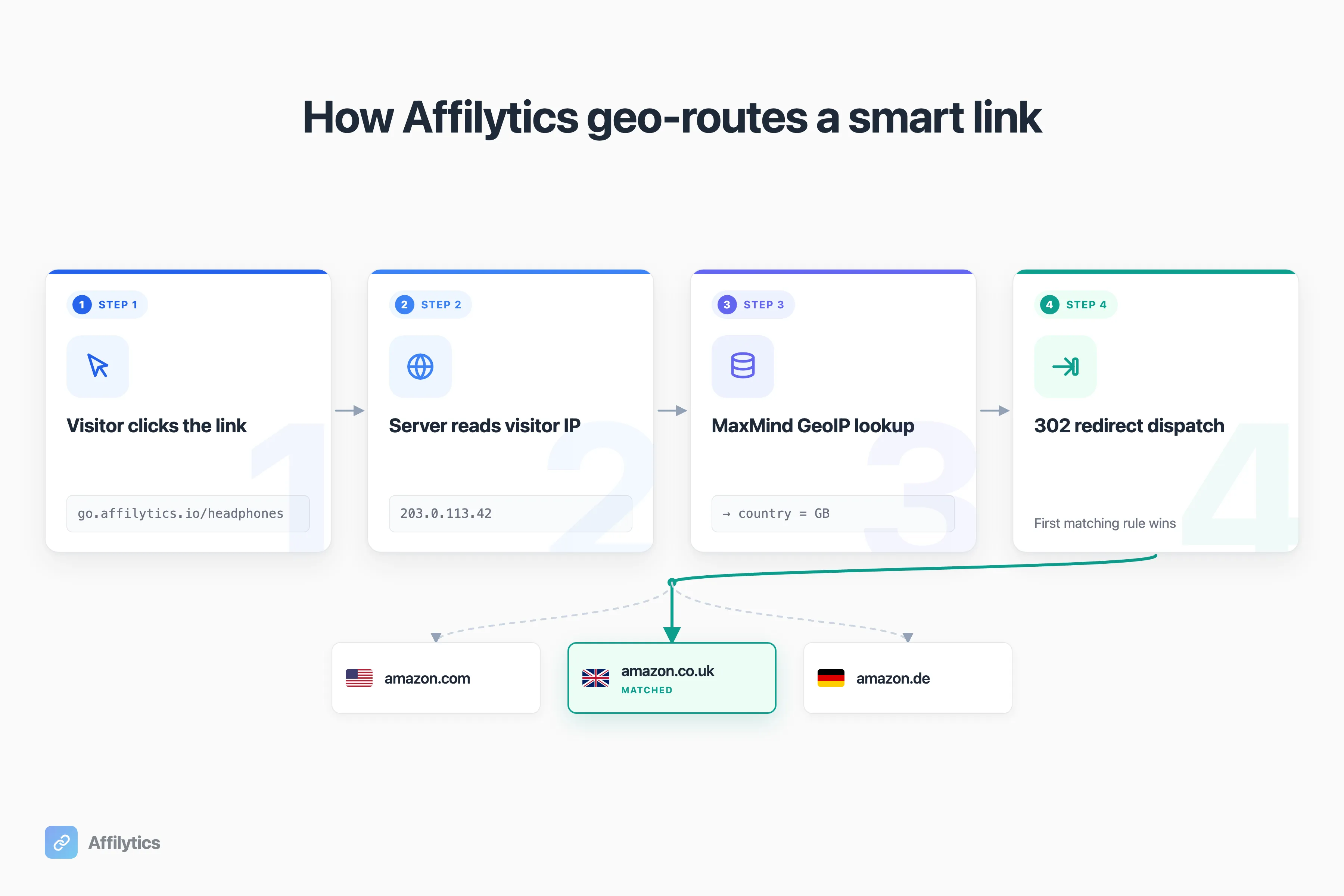
Section titled “How Geo-Routing Actually Works Under the Hood”Every geo-routing tool, regardless of price, does the same four steps in the same order. Knowing this is useful because it lets you compare tools on what actually matters (analytics, monitoring, latency) rather than on marketing copy.
The four steps:
- The visitor clicks your short link, which hits a redirect server.
- The server looks up the visitor’s IP in a country-resolution database. The canonical one is MaxMind’s GeoLite2 database, which Affilytics uses internally and which most other vendors quietly use under the hood as well.
- The router matches that country code (US, GB, DE, CA, AU, etc.) against the link’s routing rules. The first matching rule wins.
- The server replies with a 302 redirect to the destination URL. The visitor’s browser follows the redirect. Total round-trip is one extra request between click and storefront.
What about the visitor’s country if the IP lookup misses? Every serious tool falls back to a default URL, usually the US storefront, and counts the click as a “default” resolution rather than a country match. If you publish a smart link with no rules at all, every click hits the default URL.
What about VPN traffic? VPN exits get geolocated to the exit country, not the visitor’s home country. A US viewer behind a UK VPN looks like a UK visitor to MaxMind, and the link routes accordingly. VPN traffic is a small share of total clicks for most creators, not zero, but not large enough to design routing around. No tool can map a VPN visitor back to their home country reliably.
What about the affiliate tag? The tag is part of the destination URL. When you configure the routing rule that says “DE, FR, IT visitors go to amazon.de,” you embed ?tag=youraffiliatetag-21 in that destination. Each storefront gets its tag because each Amazon Associates account is storefront-specific. The router doesn’t know what an affiliate tag is. It just redirects.
This is genuinely it. The mechanic is industry-standard. Every smart-link tool, including Affilytics, does these four steps. The differences between products aren’t in the mechanic. They’re in the analytics you get back, the price you pay, and what happens when something breaks.
The Free Baseline: Amazon OneLink
Section titled “The Free Baseline: Amazon OneLink”OneLink is the floor of the smart-link market. It’s Amazon’s official, free geo-redirection tool for Associates members. Amazon’s own copy describes it as “Amazon’s geo-redirection solution to help you monetize your international traffic.” If you have any Amazon-affiliate links at all and you’re not using OneLink, set it up this afternoon. It costs nothing and it works. For the fuller picture, here’s what Amazon OneLink is and where it quietly breaks.
What OneLink covers, verbatim from Amazon: 13 marketplaces in two regional groups. Group 1 is Canada, the UK, Spain, Germany, France, and Italy. Group 2 is Japan, Singapore, the Netherlands, Saudi Arabia, Poland, Sweden, and Australia. You enable a group and OneLink rewrites your links at click-time for visitors in any country in that group, attaching the correct storefront-specific tag.
Where it stops:
- Mexico, Brazil, India, China, Türkiye, and the UAE aren’t covered. Amazon Associates programs exist in those countries; OneLink doesn’t currently route to them.
- There are no analytics beyond what Associates Central already shows you. You can’t see how many clicks went to amazon.de versus amazon.fr through your OneLink wrapper.
- It only works for Amazon. If you also push Awin, Impact, ShareASale, or direct merchant programs, OneLink does nothing for those.
- There’s no broken-link detection or out-of-stock alerting. When a product page goes 404, OneLink keeps redirecting to it.
- No public API, no A/B testing, no mobile deep-linking, no Choice Pages. UI-only configuration in Associates Central.
OneLink is a free public good. It’s also a single-purpose tool that solves exactly one problem (Amazon-only geo-redirect) and stops there. If your audience is mostly in OneLink’s covered countries and you only do Amazon, OneLink is genuinely all you need. Not sure you’ve crossed that line yet? Take this 5-question test to see whether you need a smart-link tool at all. The moment your tail of international clicks lands in Mexico or Brazil, or you start running a non-Amazon program, you’ve outgrown it, and it’s worth weighing the Amazon OneLink alternatives that geo-route across every network. And if you’re a non-US creator wiring this up for the first time, the cross-border Amazon affiliate setup walks through eligibility, payment, and routing by country of origin.
The Paid Incumbent: Geniuslink
Section titled “The Paid Incumbent: Geniuslink”Geniuslink is the prevailing paid smart-link tool in this category. It’s been around for over a decade, it has a real customer base, and one creator on r/AffiliateOps recently summed up the reputation: “Best for affiliate creators with a global audience. It handles geo-redirects, localizes links, and tracks performance by country.” That’s fair. Geniuslink does what it says.
Pricing is a single public tier: $6 per month plus $3.50 per 1,000 clicks beyond the first 1,000 included clicks. There’s no plan ladder. The pricing calculator on Geniuslink’s own page shows 3,000 clicks per month at $13.00 total, which is $6 base plus two thousand-click buckets at $3.50 each. A custom-domain add-on is +$50 per month flat. The only free option is a 14-day trial that requires a credit card on file. There’s no permanent free tier.
Inside the $6 base tier, you get:
- Geo-routing, which Geniuslink markets as “Product Localization”: “Automatically send each buyer to the right product in their local Amazon storefront.”
- Mobile Deep Linking with a self-reported “4x sales” claim (Geniuslink’s number, not an independent measurement)
- Choice Pages (multi-destination landing pages) with a self-reported “2x sales” claim
- Link Monitoring with broken-link and out-of-stock alerts
- An Earn from Amazon Sellers feature, currently flagged as new
- API access in the base tier (full API access is “Contact us”)
- A customer testimonial on the homepage claiming “Geniuslink increased our total international affiliate revenue by 120%” (vendor-quoted, no methodology disclosed)
It’s a mature product. The catch, for a creator deciding whether to start, is the same shape as the OneLink catch in reverse: OneLink has no analytics, Geniuslink has no permanent free tier. To find out whether you have an international leak worth fixing, you either pay for Geniuslink, install OneLink and stay blind to the per-country breakdown, or look elsewhere.
How Affilytics Handles Geo Affiliate Links
Section titled “How Affilytics Handles Geo Affiliate Links”Affilytics ships the same four-step mechanic from Section 3, plus the analytics OneLink doesn’t have, plus a free tier that doesn’t require a credit card. The smart-link format is go.affilytics.io/{slug}. You pick the slug, you add routing rules (each rule is a country or list of countries plus a destination URL), and the routing happens on click. The router falls back to a default URL when no country rule matches, and returns a 404 if you haven’t set one. The step-by-step setup is here if you want to see exactly what the form looks like before you sign up.
What I think actually matters for a creator deciding whether to use it:
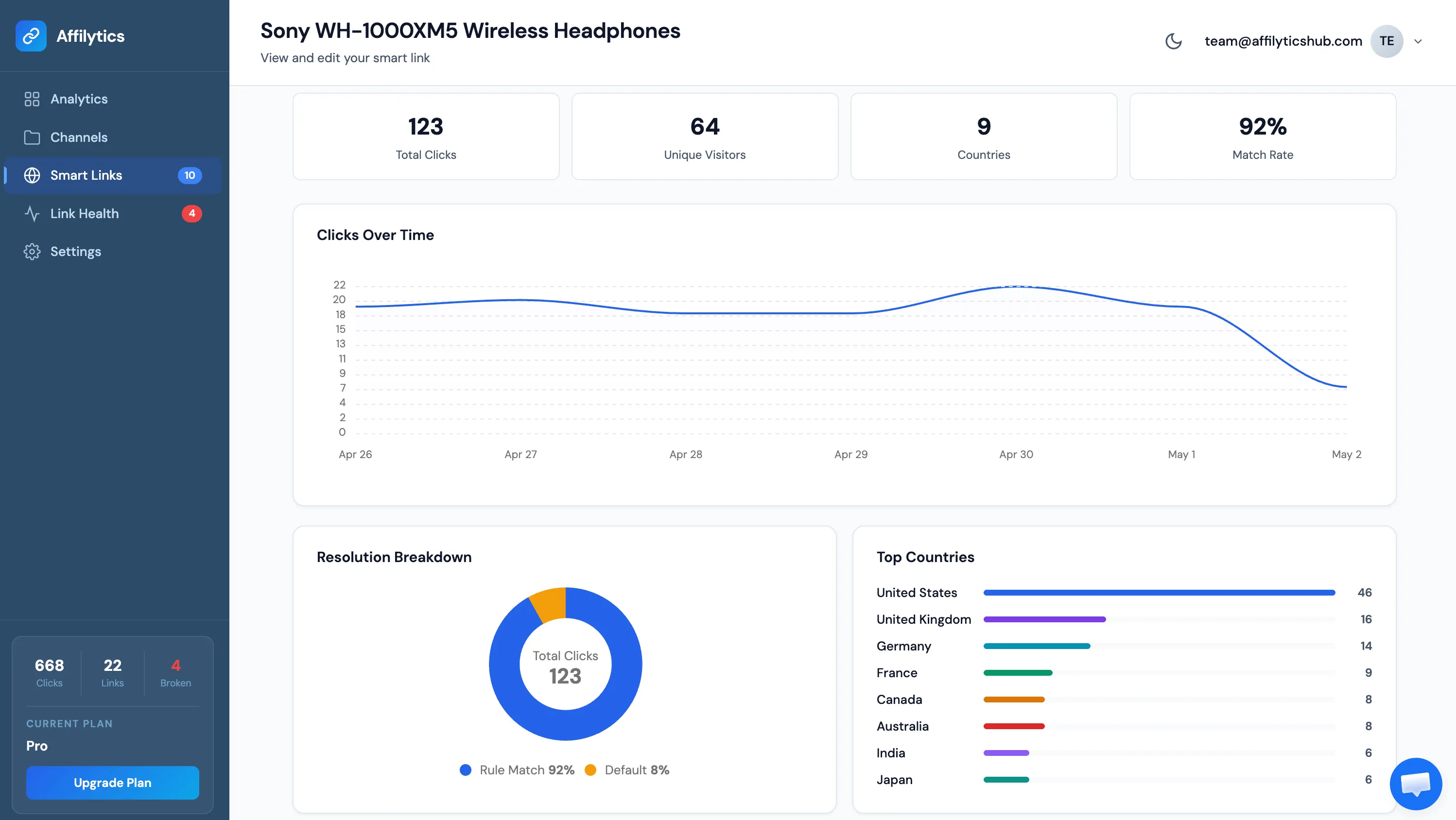
- We log click events async, with country and timestamp recorded per click. Fire-and-forget on the redirect path, so logging never blocks the visitor. After 30 days, raw click events aggregate into daily stats per smart link, per date, per country, per resolution type. We track unique visitors via hashed IP for 365 days, which gives exact cross-day deduplication.
- Per-link and collection-level analytics ship as both an API and dashboard views. The headline view is country breakdown, which is what you actually want when you’re trying to size the leak.
- Smart links auto-register with our Link-Registry service for health monitoring. If a destination URL goes broken or out-of-stock, the smart link itself surfaces the status in the dashboard, no separate broken-link tool needed.
- The free tier records the country breakdown. This is the part that matters most. You get 14 days of full Pro access with no credit card. After the trial, smart links keep working with default-URL routing (geo-routing pauses, the link doesn’t break), and the free tier still shows you what country every click came from. You can quantify the leak before you decide to upgrade.
- Pro is a flat $9 per month with unlimited clicks. No per-thousand-click meter, no plan ladder, no custom-domain upsell hidden behind a +$50/mo add-on.
Ruslan, my co-founder, is actively driving the redirect path under 50 milliseconds because slow redirects bleed clicks.
That’s the wedge. OneLink is free but blind. Geniuslink shows you everything, on a credit card. Affilytics shows you the country breakdown on the free tier so the math is visible before money changes hands. If your international audience turns out to be 6 percent and you don’t care, you stay on free. If it turns out to be 38 percent and the recovered commission pays for the upgrade five times over, you upgrade. We’d rather you make that decision with real numbers than with a guess.
How Much Commission Is Your International Traffic Worth?
Section titled “How Much Commission Is Your International Traffic Worth?”Here’s a quick, illustrative calculator. Plug your numbers in. Mine aren’t yours.
The four inputs you need:
- Monthly views on the page or video that holds the affiliate link. YouTube Studio, GA4, Substack stats all have this.
- Your affiliate click-through rate. A sober default for product reviews is around 2 percent of viewers clicking out to an affiliate URL.
- Your average commission per converted click. Around $4 is a reasonable mid-range default for Amazon Associates on physical goods, but your category may be very different.
- Your international audience share. For most creators this lands between 30 and 50 percent, and they have no idea until they check. YouTube Studio’s “Audience” tab shows your real number.
Three rough buckets at $4 average commission and 2 percent CTR. Numbers below are illustrative. Your numbers will vary.
| Monthly views | Affiliate CTR | Avg commission | International share | Lost commission/mo |
|---|---|---|---|---|
| 10,000 | 2% | $4 | 30% | ~$24 |
| 50,000 | 2% | $4 | 35% | ~$140 |
| 200,000 | 2% | $4 | 40% | ~$640 |
That bottom row, $640 a month, is roughly $7,700 a year. From one channel. From the slice of clicks where the link was working but pointed at the wrong storefront. The math isn’t difficult; the inputs are just usually invisible to creators who haven’t been measuring per-country clicks.
If you’d rather plug in your real per-country audience numbers instead of the 30 to 40 percent guess, the Affilytics free tier records every click’s country so you can replace the guess with your actual distribution. Same calculator, real inputs.
What’s the difference between geo affiliate links and Amazon OneLink?
Section titled “What’s the difference between geo affiliate links and Amazon OneLink?”OneLink is Amazon’s free geo-redirector for 13 specific Amazon marketplaces, with no analytics, no non-Amazon destinations, and no broken-link checks. The broader category sits above it. OneLink is the floor; paid smart-link tools layer analytics, multi-program support, and link monitoring on top. If you’re Amazon-only and your audience is all in OneLink-supported countries, OneLink alone is fine. The moment you push another program or your tail goes to Mexico or Brazil, you’ve outgrown it.
Do geo affiliate links work for non-Amazon programs?
Section titled “Do geo affiliate links work for non-Amazon programs?”Yes. Any affiliate program with country-specific destination URLs can be routed: Awin, Impact, ShareASale, direct merchant programs. OneLink only works for Amazon Associates. Smart-link tools like Affilytics route across any program where you can supply a per-country URL, which is most of them. The routing layer doesn’t know or care what’s on the other end of the redirect. It just resolves the country and picks a URL.
How is “geo affiliate links” different from “GEO” (Generative Engine Optimization)?
Section titled “How is “geo affiliate links” different from “GEO” (Generative Engine Optimization)?”Completely different topic. “GEO” on X usually means optimizing content to be cited by AI search like Perplexity or ChatGPT. Geo affiliate links are about routing each visitor to the right regional storefront based on their country. Same three-letter prefix, no relationship. You can do both. They sit on opposite sides of your stack and solve different problems.
How do I see how much international traffic I’m losing right now?
Section titled “How do I see how much international traffic I’m losing right now?”Most analytics platforms (YouTube Studio, GA4, Substack stats) already show a country breakdown of your audience. Multiply that by your average commission and your average affiliate click-through rate, and you have a rough leak estimate. Smart-link tools that record country-level click data make the actual measurement instant, because they show you not just where your audience is from but where the people who actually clicked the link are from, which is the number that turns into commission.
Will geo-routing slow down my page or hurt SEO?
Section titled “Will geo-routing slow down my page or hurt SEO?”No. The redirect happens on the affiliate-link click, not on initial page load, so page speed stays untouched. SEO isn’t affected because the affiliate link is just a hyperlink in your post. The routing logic only fires once a reader clicks. Latency on the redirect itself matters for conversion (a slow redirect bleeds clicks), which is why we obsess about keeping ours fast.
Spin up an Affilytics account, paste your existing affiliate links in, and watch the country column fill in over the next few days. Two weeks of full Pro, no credit card, no commitment. If your audience turns out to be 92 percent in the same country and you don’t care, walk away knowing. If you find a four-figure leak instead, you’ve already paid for whatever you decide next. Either way, you stop guessing.