
What Is Amazon OneLink (and 5 Ways It Quietly Breaks)
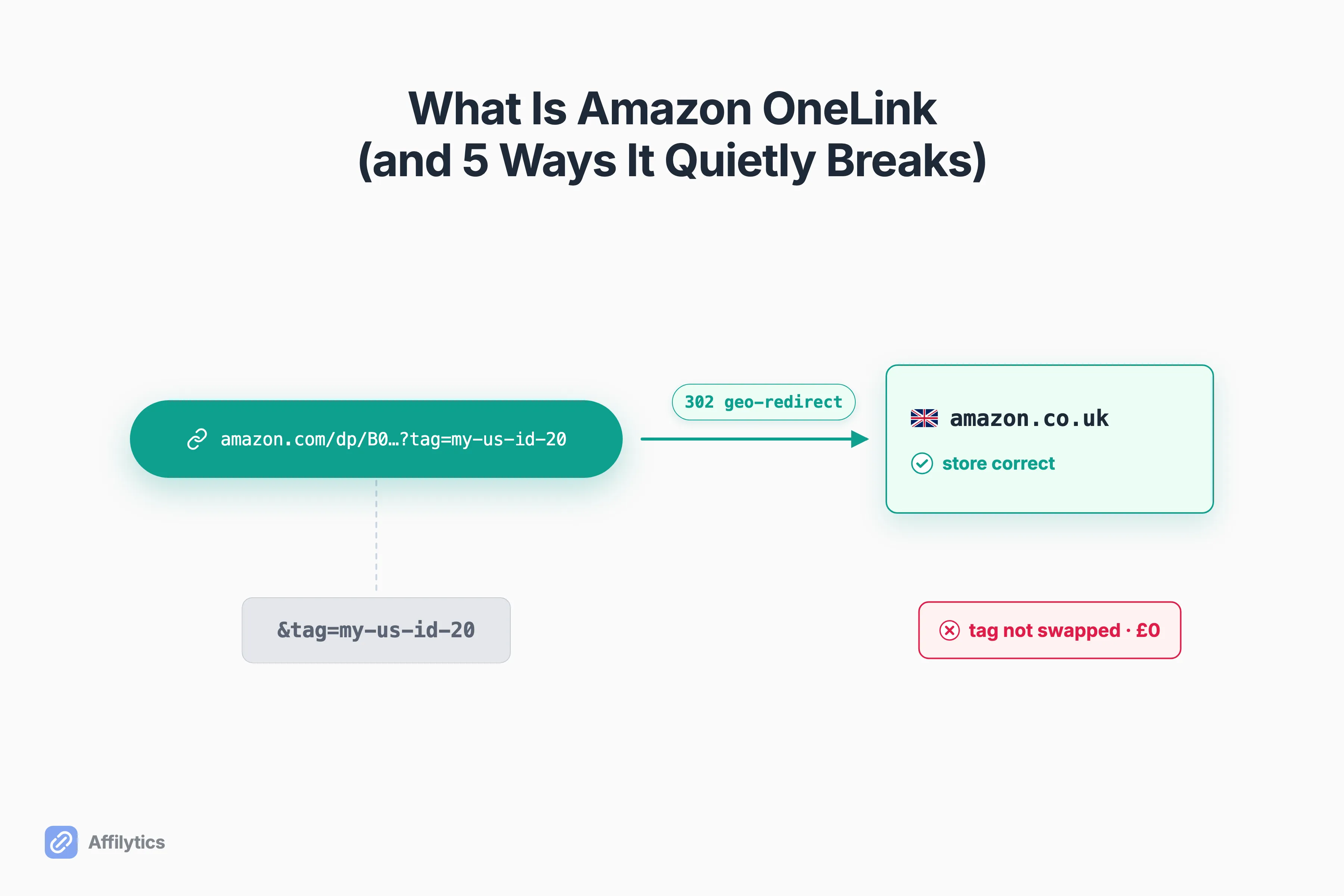
Ask any affiliate creator what Amazon OneLink is and you get a clean answer: it is Amazon’s free tool for routing international shoppers to their local Amazon store so you earn on that traffic. That answer is true, and it is also why a lot of creators quietly lose commissions.
I build Affilytics, where we optimize creators’ affiliate income with geo-routed smart links and continuous link-health monitoring. If that term is fuzzy, here’s what a real smart link is and the features that separate one from a plain redirect. So I spend my days on the exact seam where “the link redirected fine” and “I actually got paid” come apart.
It helps to understand how geo-routing affiliate links work before you judge OneLink, because the mechanic underneath is what decides whether a redirect earns you anything at all.
Here is what Amazon OneLink actually is, what it is genuinely good at, and the 5 cases (pulled straight from real creator threads) where it breaks so quietly that nothing looks wrong.
What Amazon OneLink Actually Is
Section titled “What Amazon OneLink Actually Is”Amazon OneLink is Amazon’s own geo-redirection tool for affiliate links. When someone in another country clicks your Amazon link, OneLink sends them to their local Amazon storefront, so they see the product in their currency and language and check out with the Amazon account they already have. Amazon puts it plainly: OneLink is its “geo-redirection solution to help you monetize your international traffic.”
And it really is free. Amazon’s docs confirm that OneLink and all its features are free with your Associates membership. There is no separate plan and no per-click charge. For a tool doing real work, that is a strong starting point.
It is also official, which matters. A few things OneLink genuinely gets right:
- It is native to Amazon Associates, so there is no third party sitting between you and your commission.
- It localizes the storefront, so a German shopper lands on Amazon.de instead of a US page they cannot easily buy from.
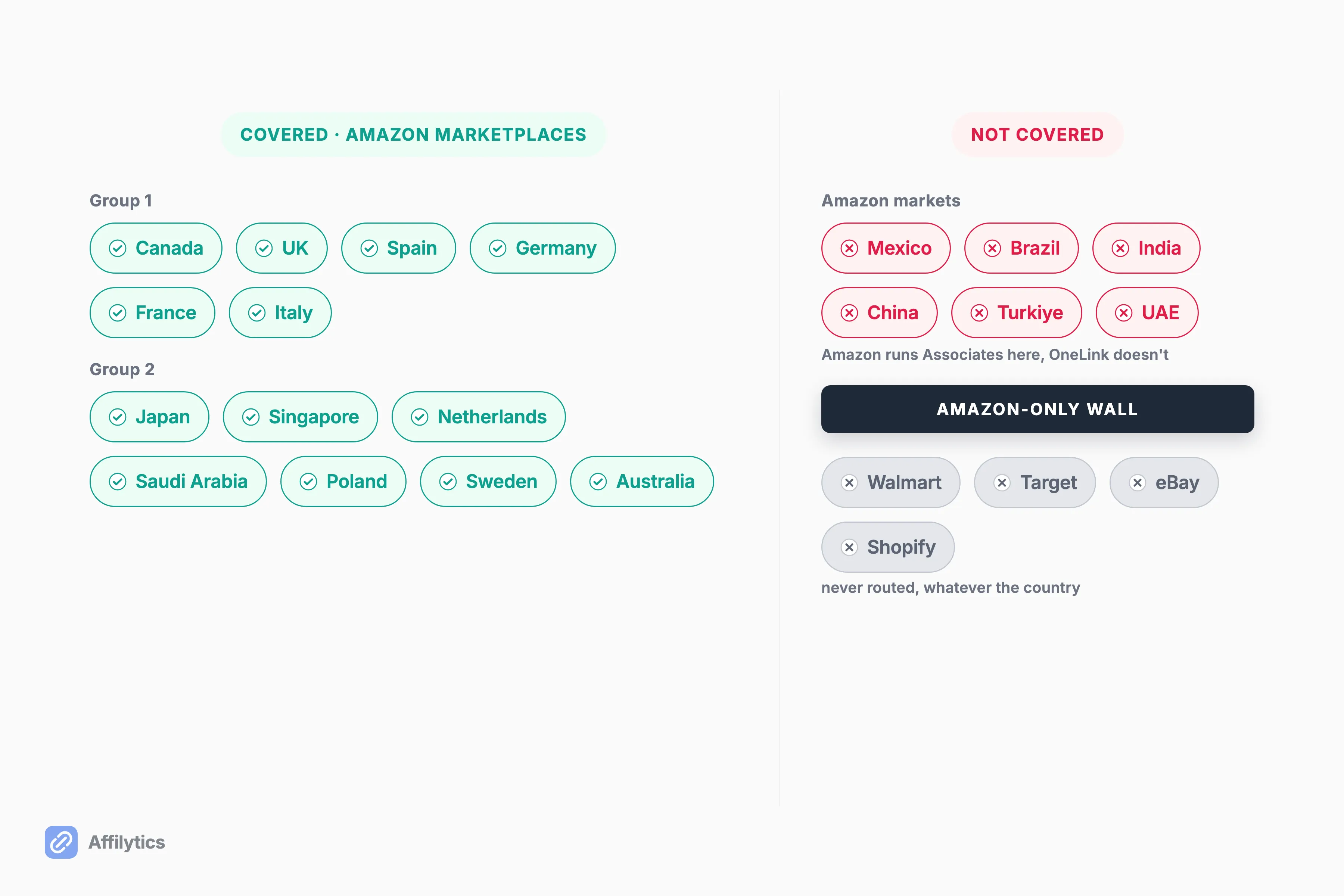
- It covers two groups of Amazon marketplaces: Canada plus the EU5 first (Canada, the UK, Spain, Germany, France, Italy), then Japan, Singapore, the Netherlands, Saudi Arabia, Poland, Sweden, and Australia. The account-side setting that makes one store ID eligible to earn across that first group is Amazon Associates Earn Globally, which is a separate switch from the redirect itself.
Here is the honest verdict up front.
If your audience buys on Amazon and you publish on a web page you control, OneLink is the rational default. The rest of this post is about where that stops being true.
How OneLink Works Under the Hood
Section titled “How OneLink Works Under the Hood”OneLink is not server infrastructure. It is a small piece of JavaScript you paste into your site, and it runs in the visitor’s browser when your page loads. That client-side detail is the root of almost every break later in this post, so it is worth sitting with for a second.
Once the script is running, it rewrites your Amazon links to the visitor’s local storefront and, when it is configured correctly, swaps in that country’s tracking ID. You get three redirect controls: “Exact match”, “Close match”, and “Do not redirect”. Amazon’s docs note that “Close match” is the default, which becomes its own problem in Case 2.
So here is the throughline for everything below. Two things have to happen on every international click:
- OneLink sends the shopper to the right store.
- OneLink attaches the right country’s tracking ID so the sale is credited to you.
It almost always nails the first. It quietly misses the second more often than you would think. When I say a break is “silent,” I mean exactly this: the page loads, the redirect fires, Amazon returns a normal response, and nothing on your end flags a problem.
The money just does not show up. That silent failure is one of several reasons why your Amazon affiliate link might not be working, and it is the hardest one to spot.
Case 1: The Redirect Works, but Your Tracking ID Doesn’t Swap
Section titled “Case 1: The Redirect Works, but Your Tracking ID Doesn’t Swap”This is the canonical silent break, and a creator on r/Affiliatemarketing documented it perfectly. Testing a US link through a UK VPN, the geo-redirect worked and sent them to the amazon.co.uk storefront. But the redirected link still carried the wrong tag. In their words, “the redirected amazon.co.uk link still contains my original US ID (my-us-id-20). This makes it useless for earning UK commissions.”
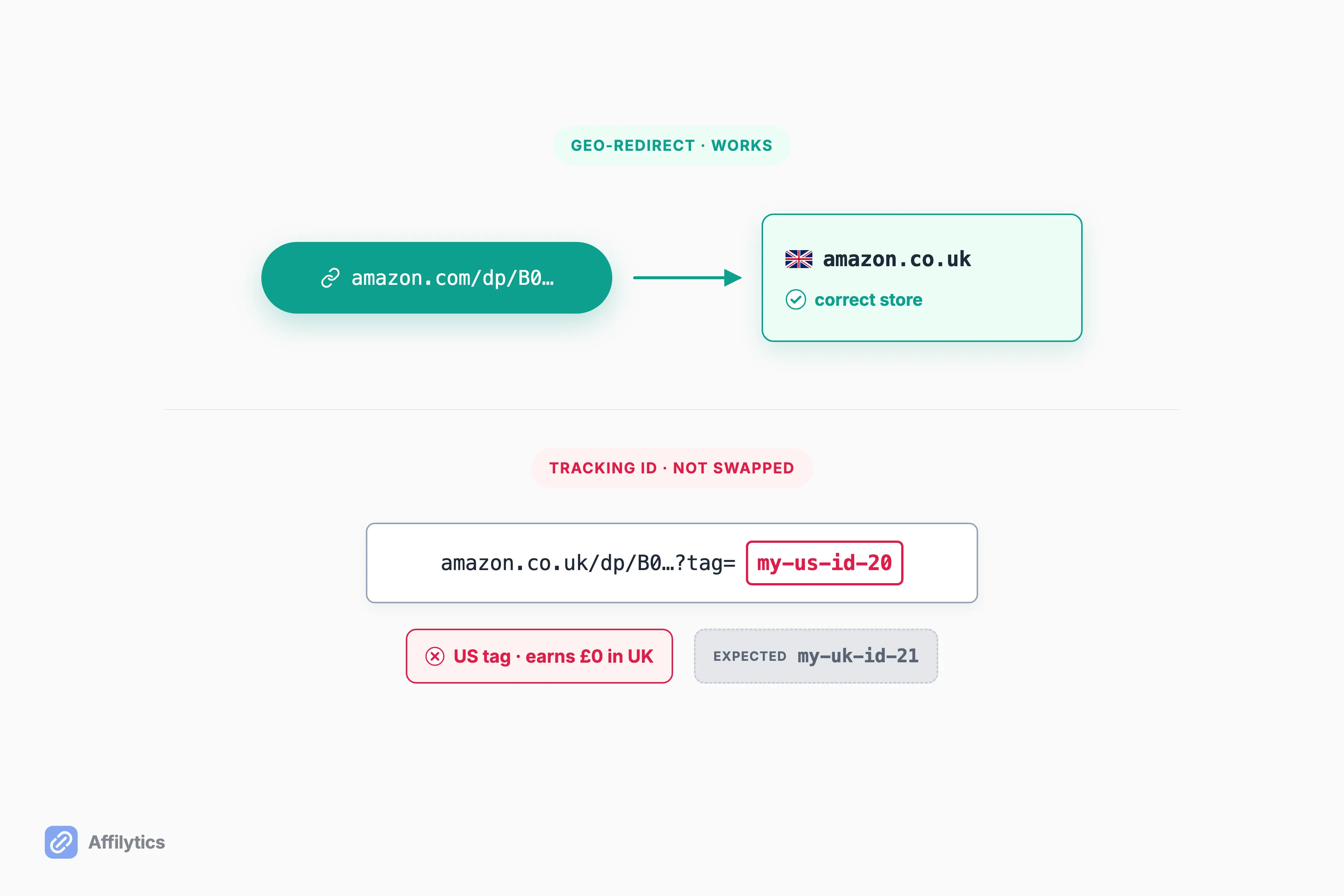
Nothing about this looks broken from the outside. The storefront is correct. The page is a real Amazon product page. The only tell is the tracking ID buried in the redirected URL, which no visitor will ever check and most creators never think to. The same creator tried Amazon’s own “Check matching products” tool and got a persistent “Linked accounts not found” error, even though every international account was correctly linked. The system could not find the mapped UK ID, so it just fell back to the US one.
That is what makes this the most expensive failure on the list.
Every international sale routes to a store where your tag does not earn, and there is no error and no alert to tell you. If you have never sat down and worked out what your international traffic is actually worth, this is the case that quietly eats it. When any of these cases is happening to you, here is how to fix OneLink when it’s not working, symptom by symptom.
Case 2: “Close Match” Sends Shoppers to the Wrong Product
Section titled “Case 2: “Close Match” Sends Shoppers to the Wrong Product”Remember that “Close match” is the default. When your exact product is not available on the shopper’s local store, OneLink substitutes a “close” product instead of stopping. That sounds helpful. In practice it means a shopper can land on a different item than the one you recommended, and you will never see it happen.
ProBlogger’s Darren Rowse hit this first-hand. He described a UK reader who clicked a link to a photography book he recommended and “was directed to a different book by the same author,” adding that “it’s definitely a weakness.” A wrong-but-plausible product still loads a normal page and still returns a normal response. The redirect looks like a success.
Your conversion rate just quietly drops.
How often does the mismatch happen? When Rowse ran his products through Amazon’s “Check matching products” tool, he found that “about half of them gave me errors in quite a few countries.” That is not a rounding error. That is half your catalog potentially pointing international shoppers somewhere you did not choose, with no dashboard flag when it does.
Case 3: It Can’t Run Where You Actually Post Your Links
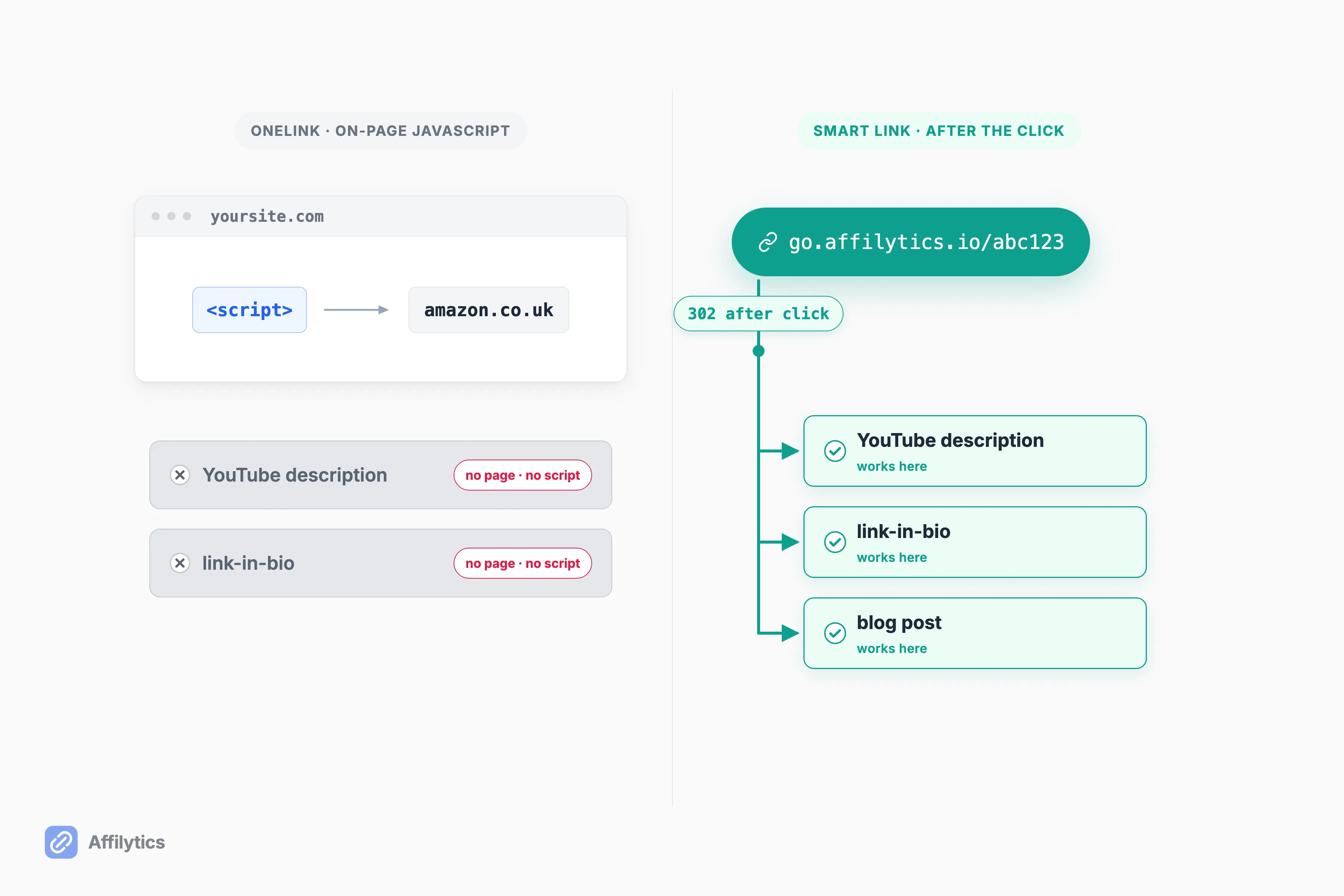
Section titled “Case 3: It Can’t Run Where You Actually Post Your Links”Because OneLink is client-side JavaScript that has to run on a page you control, it does nothing in the places a lot of creators actually put their links. There is no page to inject the script into, so there is no redirect to fire.
Think about where your links live:
- A YouTube description. No page, no script, no redirect.
- A link-in-bio page you do not control the head of. Same problem.
- An X post or a social caption. Nothing runs there either.
In every one of those spots the click still resolves. It just lands on your raw, un-localized link with no geo-redirect and no swapped tag, and nothing flags it as wrong.
Even on your own site the script is fragile. As one creator on r/juststart explained, if a link is localized on your page during page load, caching can absolutely break it, whereas a redirect that “doesn’t happen until after the user clicks the link” is not affected by caching plugins at all. A redirect that runs after the click sidesteps both problems, because it is not tied to your page rendering. A server-side smart link is just a URL, so it works in exactly the spots a script cannot reach.
Case 4: It Only Redirects Text Links, to the Amazon Stores It Covers
Section titled “Case 4: It Only Redirects Text Links, to the Amazon Stores It Covers”OneLink has three scope walls stacked on top of each other, and a click that hits any of them silently falls through to your raw, un-localized link:
- Text links only. Amazon widgets and Native Shopping Ads are not redirected.
- No third-party shortened links.
- Amazon marketplaces only, and only the ones it covers.
Darren Rowse ran into the first two directly: “This only works for text links,” and “OneLink only works on Amazon Affiliate links. So if you use link shortener tools or plugins it won’t pick them up.” Amazon’s own docs back the shortener limit, stating that “Shortened links created by third-party link shorteners are currently not supported and will not be redirected”.
The coverage wall is the one people underestimate. OneLink covers a limited set of Amazon marketplaces, but it does not cover Mexico, Brazil, India, China, Turkiye, or the UAE, even though Amazon runs Associates programs in those countries. And it is Amazon-only, so it will never route a click to Walmart, Target, eBay, or Shopify. If a slice of your audience shops in an uncovered market, or you use a shortener, or you promote anything outside Amazon, those clicks quietly get your plain link and none of the localization.
Case 5: You Get No Warning When It Breaks
Section titled “Case 5: You Get No Warning When It Breaks”Here is the meta-failure that makes the other four dangerous. When OneLink’s mapping breaks, it does not tell you. There is no broken-link detection, no out-of-stock alert, and no public API to check status programmatically, because configuration is UI-only inside Associates Central.
The break is invisible until you go looking for it.
And it is genuinely hard to go looking, because OneLink is miserable to test. Login state, VPN, browser, and page caching all confound a manual check. One creator on r/Affiliatemarketing summed up the confusion: “Every time I test it, it tells me that I need to switch my location [to] Amazon de to see the product.” Another, testing a UK book link, reported that “it still loads that link in UK Amazon store and does not redirect… none of this seems like its working properly. What am I doing wrong?”
So how would you ever notice a silent break? Usually you do not, until a payout report comes in lighter than it should. As one creator put it bluntly when weighing OneLink against a paid tool: “if a free tool is shortening links but costing you commissions, then it ain’t free.” That is the whole tension in one line, and it is the reason to think about what a different redirect model changes.
What Changes When the Redirect Runs After the Click
Section titled “What Changes When the Redirect Runs After the Click”Every case above traces back to the same root cause: OneLink localizes on your page, before the click, with a script. Move the redirect to after the click, on a server, and the failure surface changes shape. This is where a smart-link tool like Affilytics fits, and I want to be precise about how each case gets addressed.
A smart link built as an alternative to Amazon OneLink resolves server-side: the visitor’s IP maps to a country, the country matches a routing rule, and the visitor gets a 302 redirect after they click. Because that happens off your page:
- Case 3 stops mattering. There is no script to break with caching, and the link works in a YouTube description or link-in-bio because it is just a URL.
- Case 4 stops mattering. Routing rules point to any destination by country, so there is no Amazon-only lock-in and no fixed marketplace list.
- Cases 1 and 5 become visible. Continuous link-health monitoring watches for attribution loss and broken links and fires an alert when a check detects the change, and the attribution tracking is built to catch redirect chains that strip your tag.
Here is the compact version:
| Amazon OneLink | A server-side smart link | |
|---|---|---|
| Where the redirect runs | On-page JavaScript, before the click | On a server, after the click |
| Where you can use it | A web page you control | Anywhere you can paste a URL |
| Destinations | A fixed set of Amazon marketplaces | Any retailer or network, by country |
| Tracking-ID reliability | Silent drop possible, no flag | Monitored for attribution loss |
| Alert when it breaks | None | Continuous, alerts on change |
I want to keep this honest. OneLink and a smart-link tool co-exist. This is what you outgrow, not a tool that is bad. If you are 100% Amazon and your links live on a web page you own, OneLink is fine and free and I would not talk you out of it. The moment your links leave the page, or your programs leave Amazon, or a silent drop starts eating real money, that is when the after-the-click model earns its place.
If you would rather your international clicks land in the right store and get told when a link quietly stops paying, that is the whole reason we built Affilytics. You can start your free trial with two full weeks unlocked and no credit card, point your links at a smart link, and see where every click actually goes.
When the trial ends nothing breaks: your smart links keep working on default routing, and you still see the country breakdown of every click. OneLink is where a lot of creators start. This is what you reach for when “it redirected fine” stops being enough.
Is Amazon OneLink free?
Section titled “Is Amazon OneLink free?”Yes. OneLink is included free with an Amazon Associates account, and Amazon’s own docs say all its features and enhancements are free. The catch is that free is only free if it pays you. When OneLink redirects a shopper but drops your tracking ID, that international sale earns you nothing, and you never get a bill for the commission you lost.
What countries and stores does Amazon OneLink support?
Section titled “What countries and stores does Amazon OneLink support?”OneLink covers a fixed set of Amazon marketplaces in two groups. Group one is Canada plus the EU5: Canada, the UK, Spain, Germany, France, and Italy. Group two adds Japan, Singapore, the Netherlands, Saudi Arabia, Poland, Sweden, and Australia. It does not cover Mexico, Brazil, India, China, Turkiye, or the UAE, even though Amazon runs Associates programs there, and it only routes to Amazon stores, not Walmart, Target, eBay, or Shopify.
Why is my OneLink redirecting but not adding my tracking ID?
Section titled “Why is my OneLink redirecting but not adding my tracking ID?”This is the failure creators report most often. The geo-redirect fires and sends the shopper to the right local store, but the redirected URL still carries your original tracking ID from another country, so the sale is not credited to your local account. You only catch it by manually inspecting the redirected link, because OneLink shows no error and sends no alert when the mapping fails.
Does Amazon OneLink work on YouTube or social media links?
Section titled “Does Amazon OneLink work on YouTube or social media links?”No. OneLink is a client-side script that has to run on a web page you control, so it does nothing in a YouTube description, a link-in-bio page, or a social post where you cannot inject that script. A server-side smart link is just a URL, so it does the redirect after the click and works anywhere you can paste a link.
Is Amazon OneLink worth using?
Section titled “Is Amazon OneLink worth using?”Yes, if your audience buys almost entirely on Amazon and you publish on a web page you own. It is free, official, and does its core job well. You outgrow it when you need to route clicks to non-Amazon programs, when your links live off-site in YouTube or social, or when you need an alert the moment a link quietly stops paying you.