
How to Check Affiliate Links on Your Website in One Pass
The affiliate links most likely to be broken on your website are the ones you never think about. The old “best of” post from two years ago that still pulls traffic every day, quietly sending some of it nowhere. When you finally sit down to check affiliate links on your website, that’s exactly where the dead ones hide.
We built Affilytics to crawl an entire site and health-check every affiliate link on it. Our website scanner shipped in 2026, so we’ve watched, up close, exactly how these links fail. It’s almost never a clean, obvious 404.
If you also post on YouTube, this is the site version of the same audit for a YouTube channel: same slow rot, different place to look.
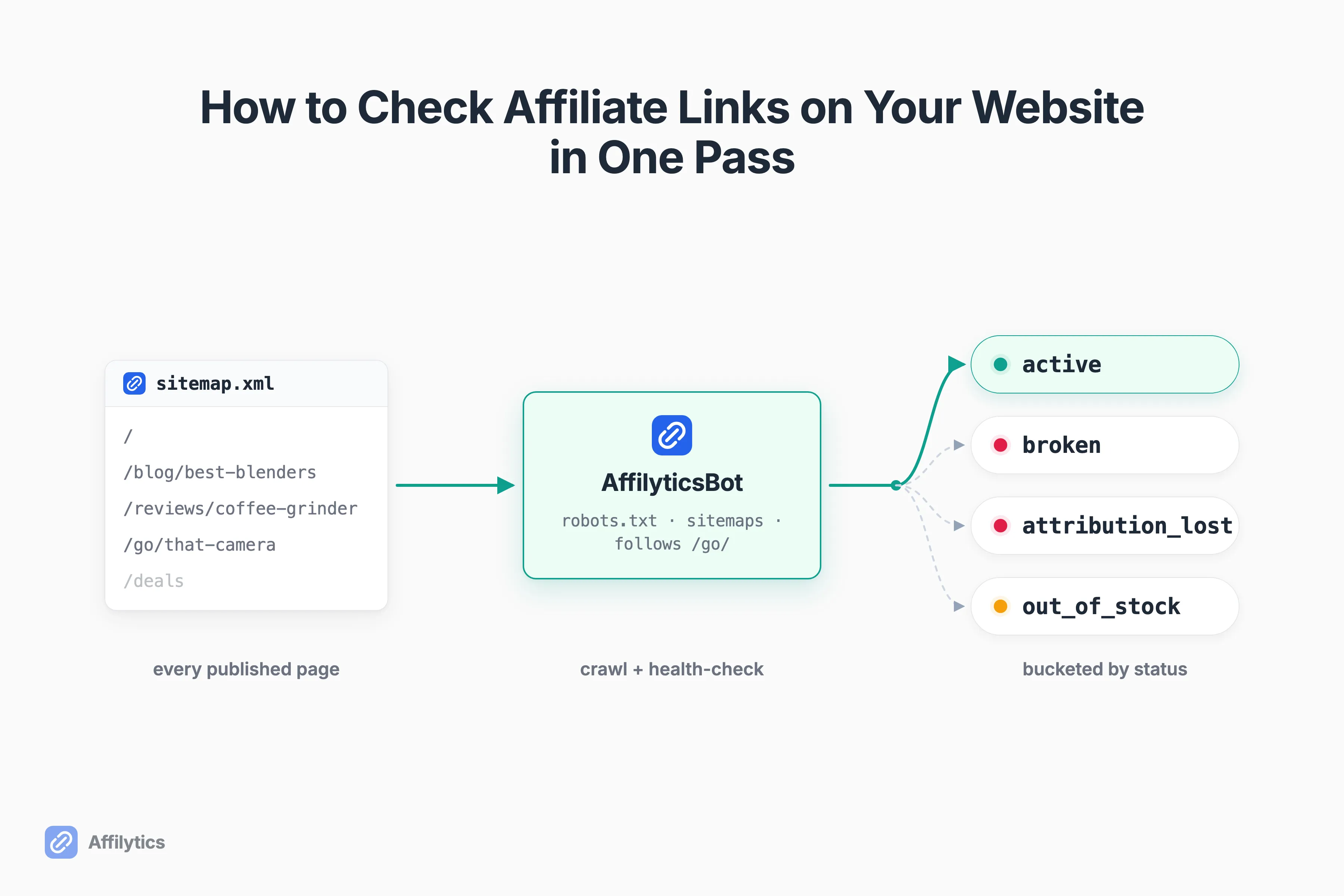
This guide walks through one audit pass. Pull every page from your sitemap, follow the cloaked redirects, health-check each destination for real (not just its status code), and triage what you find by what it earns you.
Why Checking Links One at a Time Stops Working
Section titled “Why Checking Links One at a Time Stops Working”Here’s the math that breaks the manual approach. One reader put it plainly: “I have 300+ posts with links across multiple networks. Manually checking each one would take forever” (u/Minute-Tie-6052, r/Affiliatemarketing). They’re right. Pasting 300 links into a checker, one at a time, is not a plan. It’s a chore you’ll do once and never again.
So how many of your links are dead right now? You can’t know without looking.
And your dashboard won’t tell you. As one publisher who ran automated audits for ten months on their site put it, “Affiliate dashboards lie by omission. They show you clicks-that-converted. They never show clicks-that-hit-a-404” (u/Jewst7, r/Affiliatemarketing). The leak is invisible by design. Your reports only count the clicks that paid, so the ones that vanished never show up.
That same publisher shared what their first scan found: “roughly 1 in 4 links dead or redirecting away from the original product (~25%). Concentrated heaviest on the highest-earning articles, exactly the ones we assumed were ‘running themselves.’” That’s one person’s report from one 10-month audit, not a rule of thumb. But it lines up with what creators keep saying in these threads: the busiest posts leak the most, and nobody’s watching them.
One quick note before we go further. This is about checking that your own affiliate links still work, not about spying on which programs some other site runs. Different job, different search. Here, we’re auditing your site.
What Counts as a Broken Affiliate Link (It’s Not Just a 404)
Section titled “What Counts as a Broken Affiliate Link (It’s Not Just a 404)”Before you can check affiliate links on your website, you need to know what “broken” even means. A 404 is the easy case. The expensive cases look healthy.
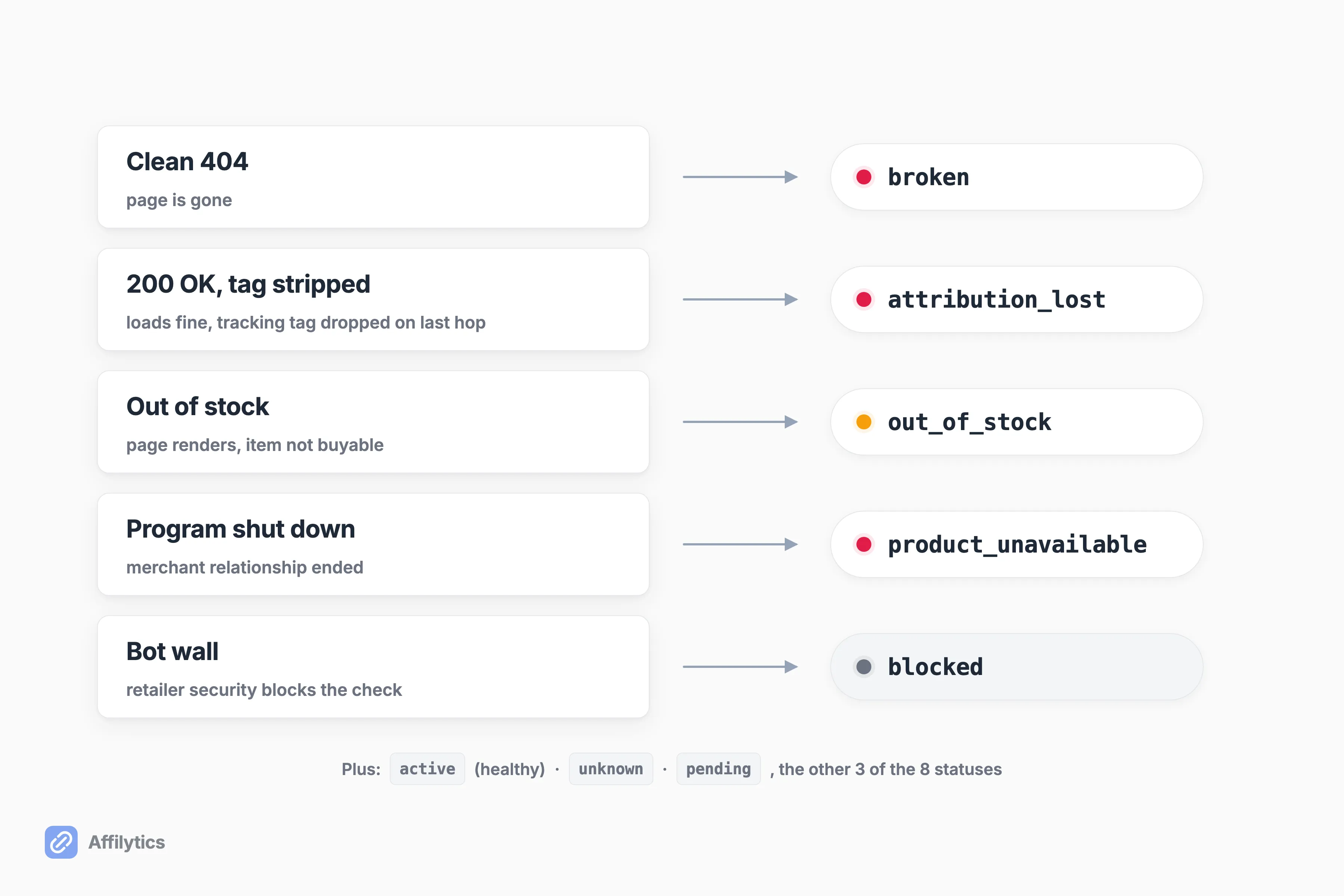
There are five ways an affiliate link fails, and only the first is a clean 404. Here’s each one:
- Clean 404. The page is gone. Easy to spot, and the least common. This is a broken link.
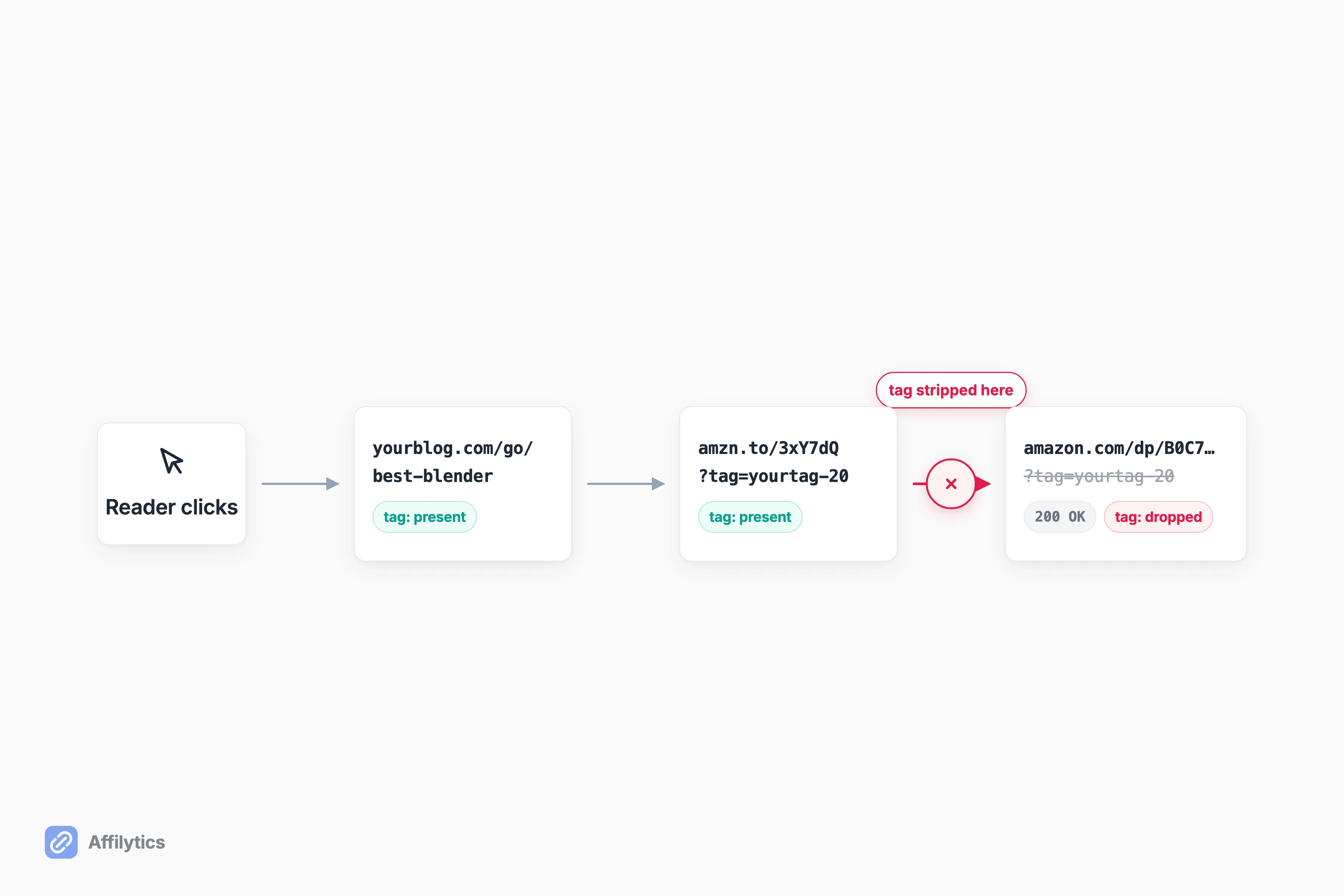
- 200 OK, but the tag was stripped. The page loads, the product is in stock, but your tracking tag got dropped on the last redirect hop. You send the sale and get nothing. This is attribution lost.
- Out of stock or sold-out variant. The page renders fine, but the item can’t be bought. A basic checker sees a working page. This is out of stock, a soft failure.
- Program shut down or merchant gone. The whole affiliate relationship ended. The link may resolve to a generic page. This is product unavailable or broken.
- A bot wall. The retailer’s security blocks the check before it can see anything. This isn’t a broken link, it’s an unknown one. This is blocked.
Those buckets are exactly the health statuses our scanner assigns: active, broken, attribution lost, out of stock, product unavailable, blocked, plus unknown and pending while a check is in flight. Eight states, because “up or down” was never enough for affiliate links.
The sneakiest one is attribution loss. As one commenter described it, “Page returns 200, product is in stock, but your tag didn’t survive the last hop so you just don’t get credit. Looks healthy in every dashboard” (u/CaineCodes, r/Affiliatemarketing). If you’ve ever wondered why a single Amazon link stops working, this is often the reason: the URL is alive, the tag is dead.
Step 1: Start From Your Sitemap
Section titled “Step 1: Start From Your Sitemap”You can’t check a link you can’t find. And you don’t remember every link you’ve ever published, no one does. That’s why the audit starts from your sitemap, not your memory.
Your sitemap is the list of every page you’ve told search engines about. As Google explains, a sitemap lists the pages you want search engines to find, which makes it the perfect map for a crawl too. A good crawl also does the polite thing first: a well-behaved crawler reads your robots.txt first so it only touches pages you allow.
Before it checks a single link, our crawl pulls three things:
- The robots.txt file, to learn what’s off-limits and how fast to go.
- Every sitemap it can find, including sitemap-index files that point to more sitemaps, gzipped ones, and the newest pages first via each entry’s last-modified date.
- A fallback path: if you have no sitemap at all, it follows your internal links from the homepage outward until it’s seen the site.
The result is a complete list of your published pages. Every affiliate link lives on one of them.
Step 2: Follow the Cloaked and Shortened Links, Not Just the Raw Ones
Section titled “Step 2: Follow the Cloaked and Shortened Links, Not Just the Raw Ones”A lot of the affiliate links on your blog aren’t Amazon URLs sitting in the open. They’re hidden behind a tidy internal redirect like /go/best-blender or /recommends/that-camera, usually created by a link-cloaking plugin. If you are putting that layer in yourself, we cover how to cloak affiliate links properly in its own guide. On WordPress, the two plugins that generate most of them share a parent company. If you run a store-style site, Amazon affiliate WordPress plugins generate these paths too. Others hide behind a shortener.
That matters, because those links break exactly like any other, and an audit that only reads raw outbound URLs never sees them.
So what do you do about the ones you can’t see in the page source? You follow them. Our crawler recognizes internal cloaked paths (/go/, /recommends/, /refer/, /out/, /link/, /visit/) and follows each one all the way to the real destination before checking it.
Picture a two-year-old review with a /recommends/coffee-grinder link. It looks fine on the page. It 302-redirects to an Amazon product that was quietly discontinued eight months ago. Every reader who clicks it hits a dead end, and you’d never know unless something walked the redirect to the end. That’s the whole point of following the chain instead of trusting the pretty link on top of it.
Step 3: Check the Destination, Not the Status Code
Section titled “Step 3: Check the Destination, Not the Status Code”This is the step that separates a real audit from a green checkmark. A 200 OK is not “healthy.” It only means the page answered the phone. It says nothing about whether you’ll get paid.
To actually check affiliate links on your website, you have to look at what the reader ends up with. Did your tracking tag survive to the final URL? Is the product actually buyable? Did the link land on the right regional store? On Amazon, your commission is only credited through a properly formatted associate link carrying your tag, and if that tag gets dropped on a redirect hop, the sale still happens without you. This is where generic broken-link checkers fall down. They resolve the HTTP status and stop, so a tag-stripped 200 sails right past them.
It’s the failure that quote named: “Page returns 200, product is in stock, but your tag didn’t survive the last hop so you just don’t get credit.” A status code can’t catch that. A destination check can.
Two things make that check trustworthy. First, our checker loads each destination the way a real browser would, so retailers that put up a bot wall don’t just hand back a fake block page and get logged as dead. Second, it waits for a few consecutive failures before it calls an active link broken, so one bad moment on the retailer’s side doesn’t trigger a false alarm.
Step 4: Sort by Status and Triage by Traffic
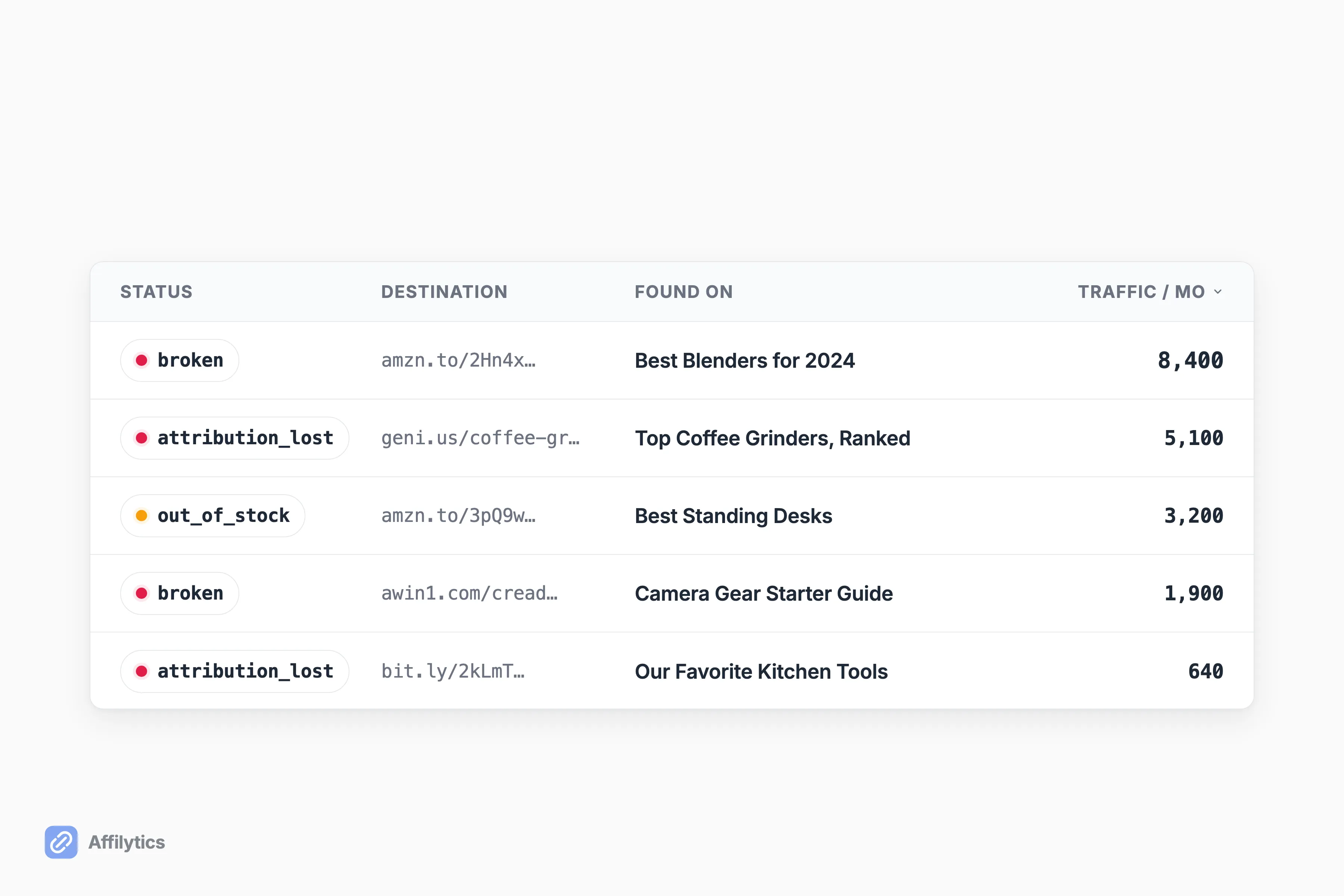
Section titled “Step 4: Sort by Status and Triage by Traffic”A raw list of broken links isn’t a to-do list, it’s a wall. You don’t fix them alphabetically. You fix the ones costing you the most, first.
So bucket everything by status, then order each bucket by which pages actually get traffic and earnings. The reason is simple, and the same publisher from earlier named it: “Top-Google articles rot fastest. Articles ranked for 2-3 years had the highest broken-link concentration” (u/Jewst7, r/Affiliatemarketing). Older, ranked posts get the most clicks over time, which means more chances for a merchant to move a URL while you weren’t looking. A fixed link there pays back the most.
That triage only works if each broken link is tied to the page it lives on. Our scanner records where every link was found (“found on {post title}”), so you can go straight from a broken destination to the article you need to open. No hunting.
Step 5: Fix the Leaks, Then Keep Them Monitored
Section titled “Step 5: Fix the Leaks, Then Keep Them Monitored”Fixing a link is often more than swapping in a fresh URL. For the attribution-lost and wrong-storefront cases, the durable fix is a smart link that sends each visitor to the right regional store on its own, and that you can repoint later without editing the post.
Here’s what “fixed” actually looks like:
- A dead product URL gets replaced with a live one. Simple swap.
- An attribution-lost link becomes a smart link, so the tracking travels with the click.
- A US-only Amazon link becomes one that can route each click to the right regional store instead of dumping your international readers on a page they can’t buy from.
A geo-routed smart link works by reading the visitor’s country and redirecting them to the matching regional retailer, so a reader in Germany lands on the German store instead of a US page that won’t pay you. Lead the “why bother” with recovered commission, because that’s the real return here. Every one of these fixes is a manual step: scanning finds and monitors the links, but you create the smart link and swap it into the post yourself. Once that’s done, keep continuous monitoring on, so the next break re-flags itself the day it happens instead of the next time you remember to look.
By Hand or With a Tool
Section titled “By Hand or With a Tool”You can absolutely run this pass by hand. Export your sitemap, open each page, trace every redirect to its end, and log the statuses in a spreadsheet. For a small site with a couple dozen links, that’s a fine Saturday.
It caps out fast, though. Past a few dozen links it stops being a task and becomes a quarterly dread, which is why so many creators land in the same trilemma: “Do you manually audit them every few months? Use a plugin? Or just ignore it?” (u/Muted-Picture-1151, r/Blogging). The honest middle option has a blind spot. A generic plugin like the “Broken Link Checker” WordPress plugin catches true 404s, but it doesn’t understand affiliate-specific failures: the stripped tag, the out-of-stock variant, the wrong regional store. A full audit understands the destination, not just the status. Even people who use tools stay wary, one creator admitted, “I still keep a spreadsheet though because I trust nothing” (u/DeDobber, r/Affiliatemarketing).
If you’re managing links across a whole blog, that’s where a tool earns its keep. Affilytics runs the whole pass in one go: crawl the site, follow the cloaked links, and health-check every real destination. That works the same on a hosted builder where there is nothing to install in the first place, which is the whole situation when you’re checking affiliate links on a Squarespace site.
For site portfolios and agencies: the same one-pass audit scales sideways. Point it at each site you manage and get every affiliate link back with a status, one pass per property, instead of a checker-and-spreadsheet marathon per client.
Paste one site URL, and get every affiliate link back with a status. That’s the whole promise: no card required, everything unlocked for two full weeks. Create your free account and run your first audit before you decide anything.
You’ll probably find a leak you didn’t know you had. Most people do.
How do I find every affiliate link on my website?
Section titled “How do I find every affiliate link on my website?”Start from your sitemap, which lists every page you’ve published, then follow the cloaked /go/ style redirects to their real destination and check each one. A crawl does all of that in a single pass, so you audit the whole site instead of pasting links one at a time.
Why does a broken affiliate link still return 200 OK?
Section titled “Why does a broken affiliate link still return 200 OK?”The page loads fine, but the affiliate tag was stripped somewhere on the redirect chain, or the product is out of stock while the page still renders. The HTTP status only tells you the page answered, not that you’ll get paid. That’s the failure a generic 404 checker misses.
Will a plugin like Broken Link Checker catch these?
Section titled “Will a plugin like Broken Link Checker catch these?”It flags true 404s, but it does not catch the affiliate-specific failures: a stripped tracking tag on a 200 OK page, an out-of-stock product, or a link that lands on the wrong regional store. For those you need a check that understands the destination, not just the status code.
How often should I check my affiliate links?
Section titled “How often should I check my affiliate links?”Run one full pass now to clear the backlog, then keep continuous monitoring so a link gets re-flagged the day it breaks again. Old, high-traffic posts rot silently between manual audits, so a one-time spreadsheet you abandon by March is where the leaks come back.
Does this work on non-WordPress or non-Amazon sites?
Section titled “Does this work on non-WordPress or non-Amazon sites?”Yes. The audit is sitemap-based and network-agnostic, so it detects the major affiliate networks, not just Amazon. Static HTML sites are fully covered. JavaScript-heavy single-page blogs are flagged rather than fully rendered, so you know when a page needs a manual look.