
Amazon Affiliate Cross-Border: Earn From Every Country
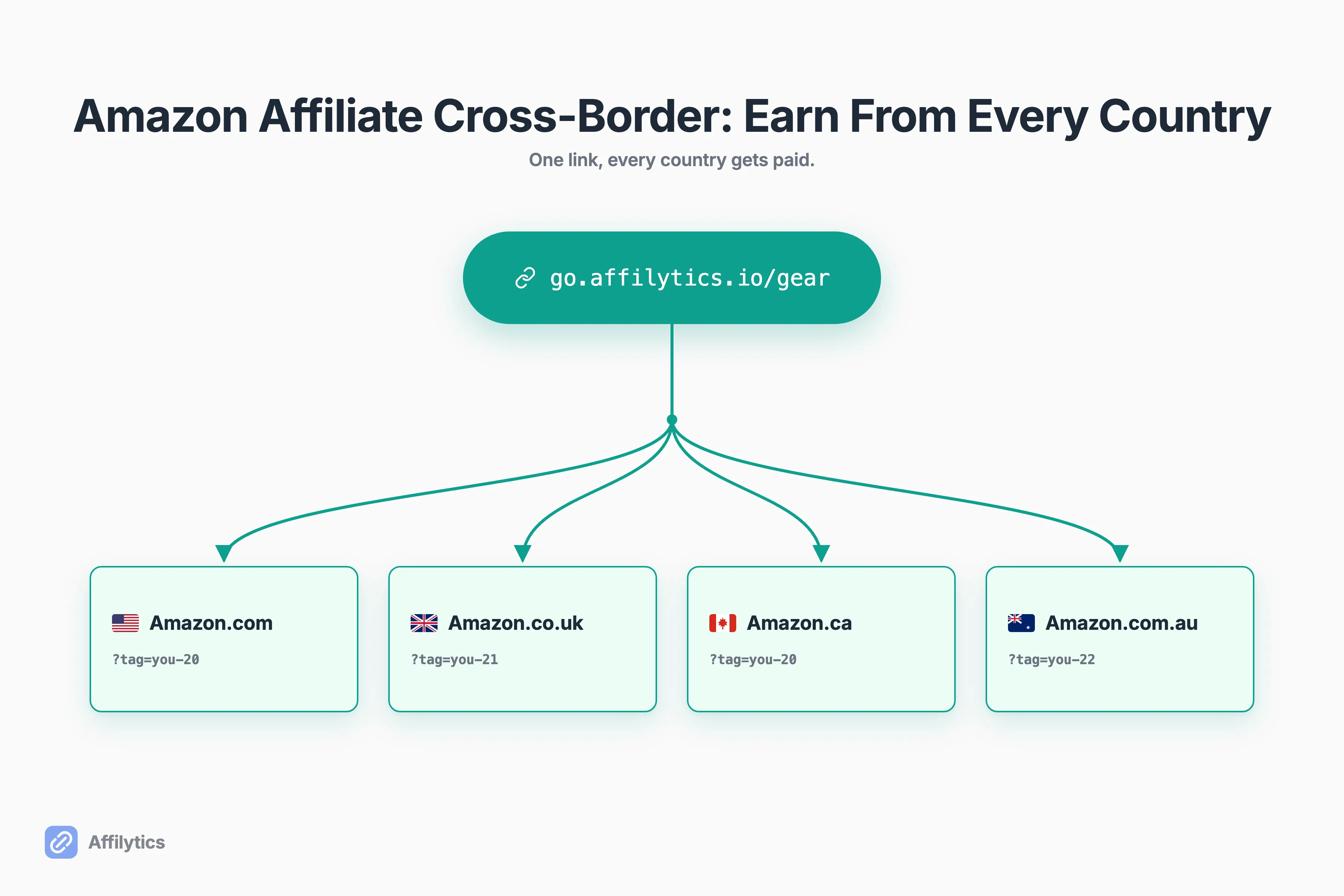
A Canadian creator on Reddit recently described the cross-border Amazon affiliate problem better than I could. More than half his audience was American, but his Amazon.ca links earned him nothing when those fans bought on Amazon.com. As he put it, “over half my audience is from the US,” and he was sure “there has to be a better way.”
We built Affilytics to help creators capture the affiliate income they lose to the wrong regional store, by routing each click to the storefront where the visitor can actually buy.
Before you write off those overseas clicks, know that your international audience is worth real money, and capturing it is mostly a routing problem, not a banking one.
This guide covers why your home-country tag leaks commission abroad, how to route every click to the right store, where Amazon’s free OneLink helps and where it quietly stops, and how to actually get paid, no foreign bank account required.
Why Your Home-Country Amazon Tag Earns Nothing Abroad
Section titled “Why Your Home-Country Amazon Tag Earns Nothing Abroad”Amazon does not run one global affiliate program. It runs a separate one in each country, and your tag only works inside the program it belongs to. Your Amazon.ca tag is invisible on Amazon.com. Your Amazon.co.uk tag is invisible on Amazon.com.au. So when a fan in another country clicks your link, they land on their own local store with no tag attached, and the sale pays you zero.
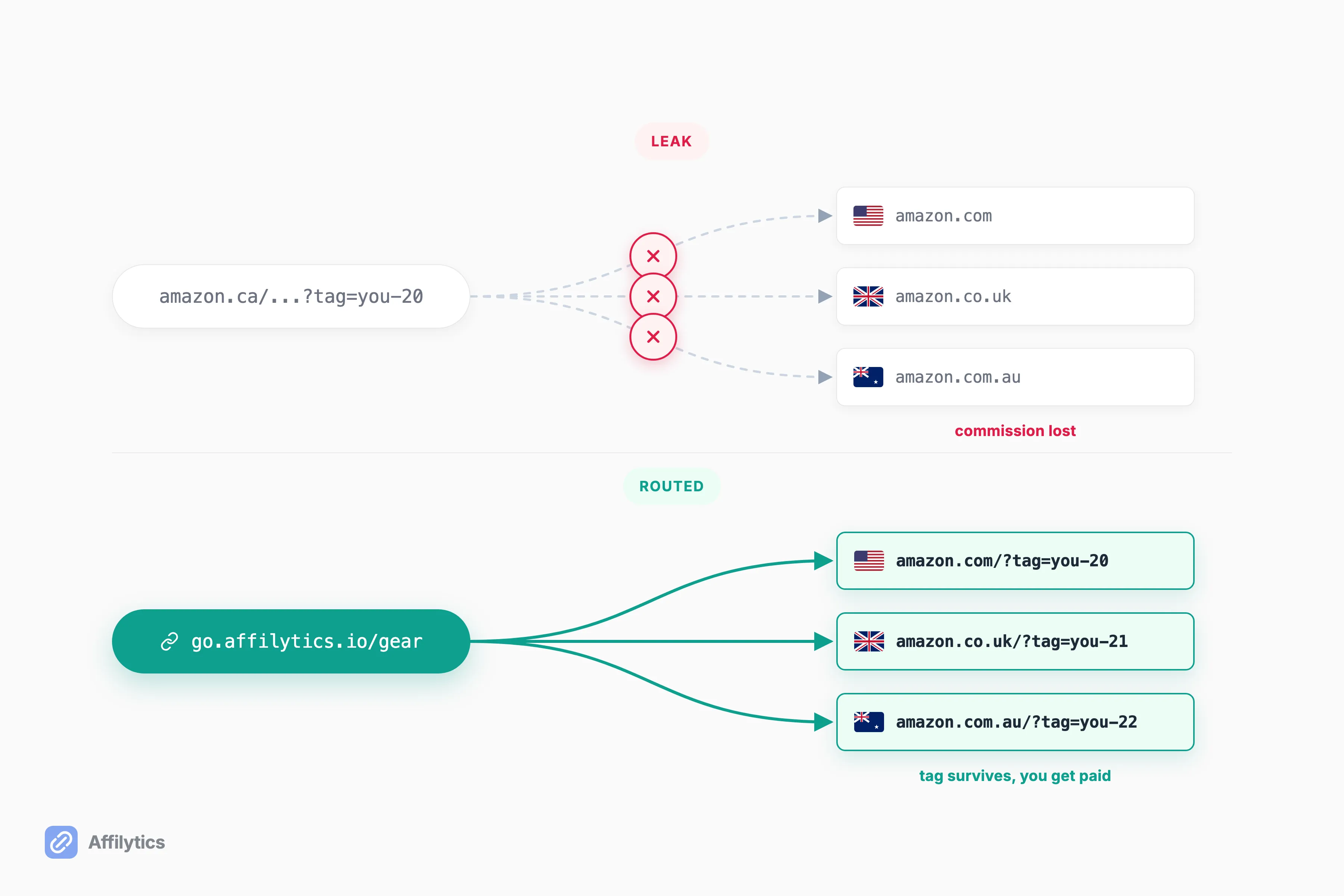
So where does that commission go? Nowhere, to you. The shopper still buys. Amazon still ships. You just are not the affiliate of record on that store.
This is structural, not a bug you can patch with a setting. Amazon operates the Associates Program in twelve locations, with a separate program in each one that you have to apply for individually. One tag, one storefront. Everything outside that storefront is a stranger’s sale.
An Australian creator described the moment it clicked for him: “Every international fan clicking my links, US, UK, CA, was landing on their local Amazon with no affiliate tag. My AU tag means nothing on amazon.com.” It is not only your problem either. A shopper put the other side of it plainly: it is “frustrating to land on the ‘wrong’ Amazon marketplace,” which “likely hurts conversions.” The fan is annoyed, and you do not even get paid for the trouble.
The Real Fix Is Routing, Not a Foreign Bank Account
Section titled “The Real Fix Is Routing, Not a Foreign Bank Account”The Reddit creator’s instinct was to open a US bank account, set things up on the American side, and find a way to move the money back across the border. That is the hard way, and it solves the wrong half of the problem.
The easy lever is routing. Instead of forcing every fan onto one store, you send each click to the visitor’s own regional Amazon. The link checks which country the visitor is in and opens their local store, where your tag for that store is the one that pays. Same content, same click, correct storefront.
This is not a niche optimization. One creator who runs niche sites put “add Amazon OneLink for international sales” at the top of his list of moves to double a site’s revenue, ahead of comparison tables, higher-payout programs, and content scaling. Treat that as one operator’s opinion, not a guarantee, but the instinct is sound: international clicks you already earned are the cheapest revenue you will ever capture, because the traffic is already there.
If you want the mechanics under the hood, here is how geo-routing actually works. The short version: one link, many destinations, decided per visitor.
And the money still comes home. Amazon lets you have your international associate earnings paid into your local bank account. No US account, no wire transfers, no border-hopping. Routing the click is the work; getting paid is the easy part. A smart-link router is exactly the tool that does this routing for you, and I will come back to what that looks like beyond Amazon.
Amazon OneLink, by Country of Origin
Section titled “Amazon OneLink, by Country of Origin”Amazon ships its own free router for this, called OneLink, and the first thing to clear up is the myth in the Reddit creator’s head.
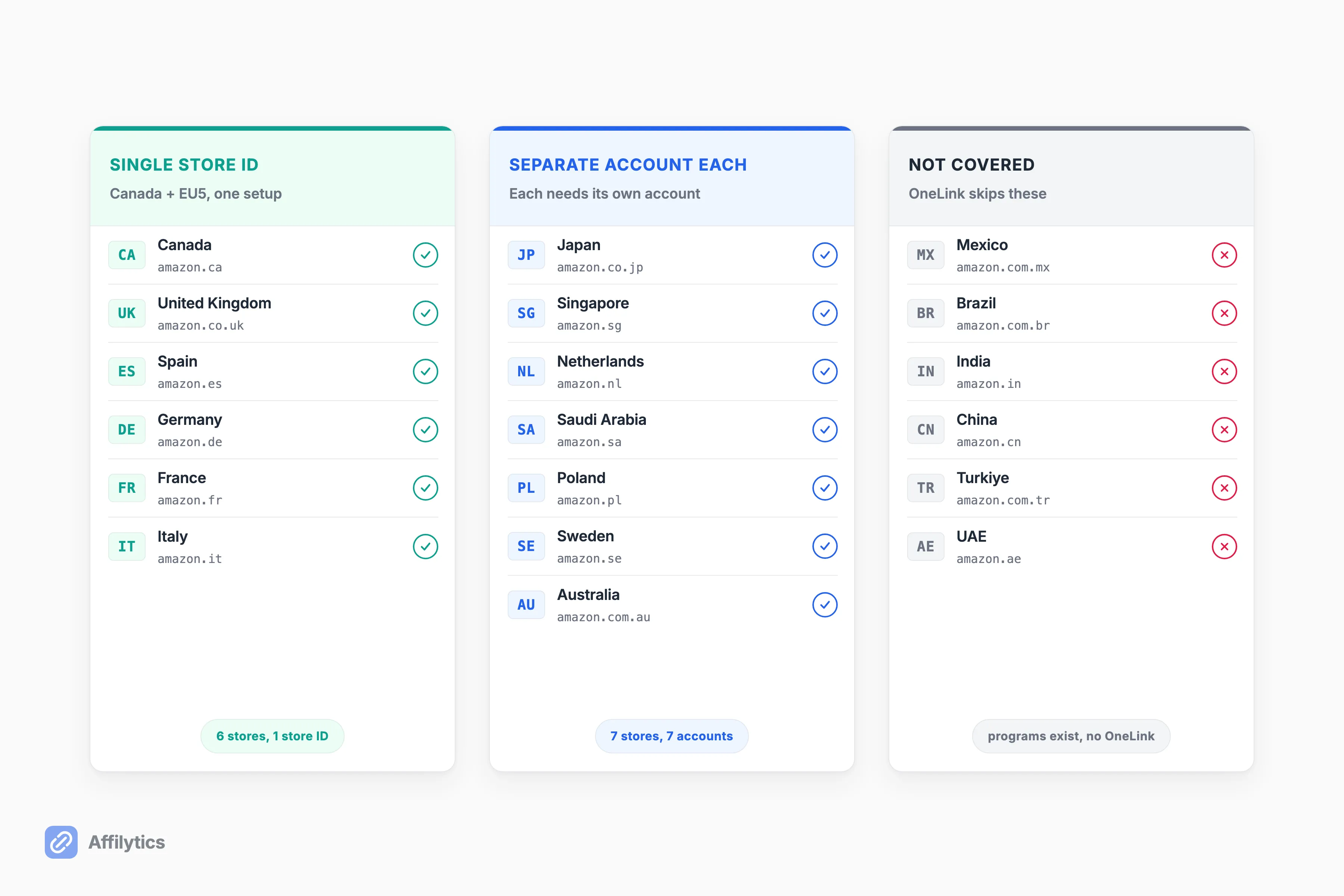
Isn’t OneLink US-only? No, that is the myth that sends creators down the foreign-bank-account rabbit hole. Canada is covered. So is most of Europe. The reason it feels hidden is that Amazon splits eligibility by your country of origin, and the grouping is easy to miss.
Here is the grouping that matters. Canada plus the five big European stores (the UK, Spain, Germany, France, and Italy) run on a single store ID, so one setup covers all six at once. Seven more marketplaces (Japan, Singapore, the Netherlands, Saudi Arabia, Poland, Sweden, and Australia) each need their own Amazon Associates account in that country. Amazon’s own surfaces give slightly different totals depending on where you look, so I will skip the headline number and stick to the grouping. The setting that turns that first group on is called Earn Globally, and we went through what Earn Globally pays and what it skips separately.
Once it is on, redirection is automatic. A visitor’s location decides which store they land on, and you pick how strict the match is:
- Send them to the exact product.
- Or to the closest available match.
- Or do not redirect at all.
The result is what every Reddit answer keeps describing: each fan lands on their own store with your tag applied. It even handles near misses. Amazon notes that “visitors from Ireland, Greece, Georgia, and Iceland, etc., will be redirected to Amazon.co.uk,” so traffic from a country without its own store still lands somewhere the shopper can actually buy.
Credit where it is due. OneLink is free, it is official, and for a creator whose audience and links are all Amazon, it is genuinely the right starting point. One creator describes switching it on as a roughly three-click job that can noticeably lift international income. If that is you, turn it on today. For a fuller map of which Amazon programs exist in each country, start there and come back. It is also worth knowing what each Amazon marketplace actually pays, because the rates move further between countries than most creators expect.
Getting Paid Across Borders: Bank Account, Currency, and Tax
Section titled “Getting Paid Across Borders: Bank Account, Currency, and Tax”This is the part that scares people off, and most of the fear is misplaced.
Do you need a US bank account to collect US commissions? No. Amazon lets you centralize accruals to one bank account of your choice or keep individual bank accounts in each of the countries. One account is fine. The US-bank-account workaround the Reddit creator imagined is solving a problem Amazon already solved for you. Most creators centralize to a single account and let the conversion happen automatically. Keep separate per-country accounts only if you actually want to hold local currency, for example to spend it where you earned it.
Currency is the next worry, and it is real but manageable. Each region pays in its own currency, and each has its own minimum payout. A Reddit commenter laid it out cleanly: “US and Canada in USD, UK in GBP and the others paid in Euro. Each have their own payment threshold.” So a small UK balance might sit until it crosses the GBP threshold while your USD balance pays out first. That is the one piece that genuinely trips people up: your dashboard can show earnings in three currencies, each on its own clock. It is annoying, not blocking, and it is normal.
Then there is tax. As a non-US affiliate you fill out a W-8BEN, the form foreign individuals use to establish non-US status and claim the right withholding rate, which Amazon collects through a short tax interview when you join. Do it once per program and you are done. That is the whole money story: local bank, local currency, one tax form per program.
Where OneLink Stops
Section titled “Where OneLink Stops”OneLink is a good free tool, and like every free tool it has edges. Knowing them early saves you from discovering them the expensive way.
What happens when half your links aren’t even Amazon? OneLink shrugs. Here is where the free router quietly stops:
- Amazon-only. OneLink redirects Amazon links and nothing else. Your Walmart, Target, eBay, or Shopify affiliate links get no help at all.
- Shorteners break it. Amazon is explicit that third-party-shortened links are not supported and will not be redirected. If you cloak or shorten your links, the redirect simply does not happen.
- Partial map. It skips Mexico, Brazil, India, China, Turkiye, and the UAE, even though Amazon Associates programs run in those countries. Fans there fall through.
- No safety net. OneLink will not tell you when a link goes dead. A discontinued product or an out-of-stock page keeps sending traffic into a wall, and your cross-border leak quietly becomes a dead-link leak.
The last one is the sneaky one. A cross-border leak at least sends the shopper to a working store; a dead link sends them nowhere, and you usually find out months later when you notice a video’s affiliate income flatlined. Stack these edges up and the pattern is clear: OneLink routes Amazon clicks well, and it does nothing about everything that is not an Amazon click or has quietly stopped working.
None of this makes OneLink bad. It makes it Amazon-only and unmonitored, which is fine right up until your links and your audience outgrow both. If you are already at that point, here are the OneLink alternatives worth knowing.
Routing Every Click, Beyond Amazon
Section titled “Routing Every Click, Beyond Amazon”So what does routing look like when it isn’t locked to Amazon?
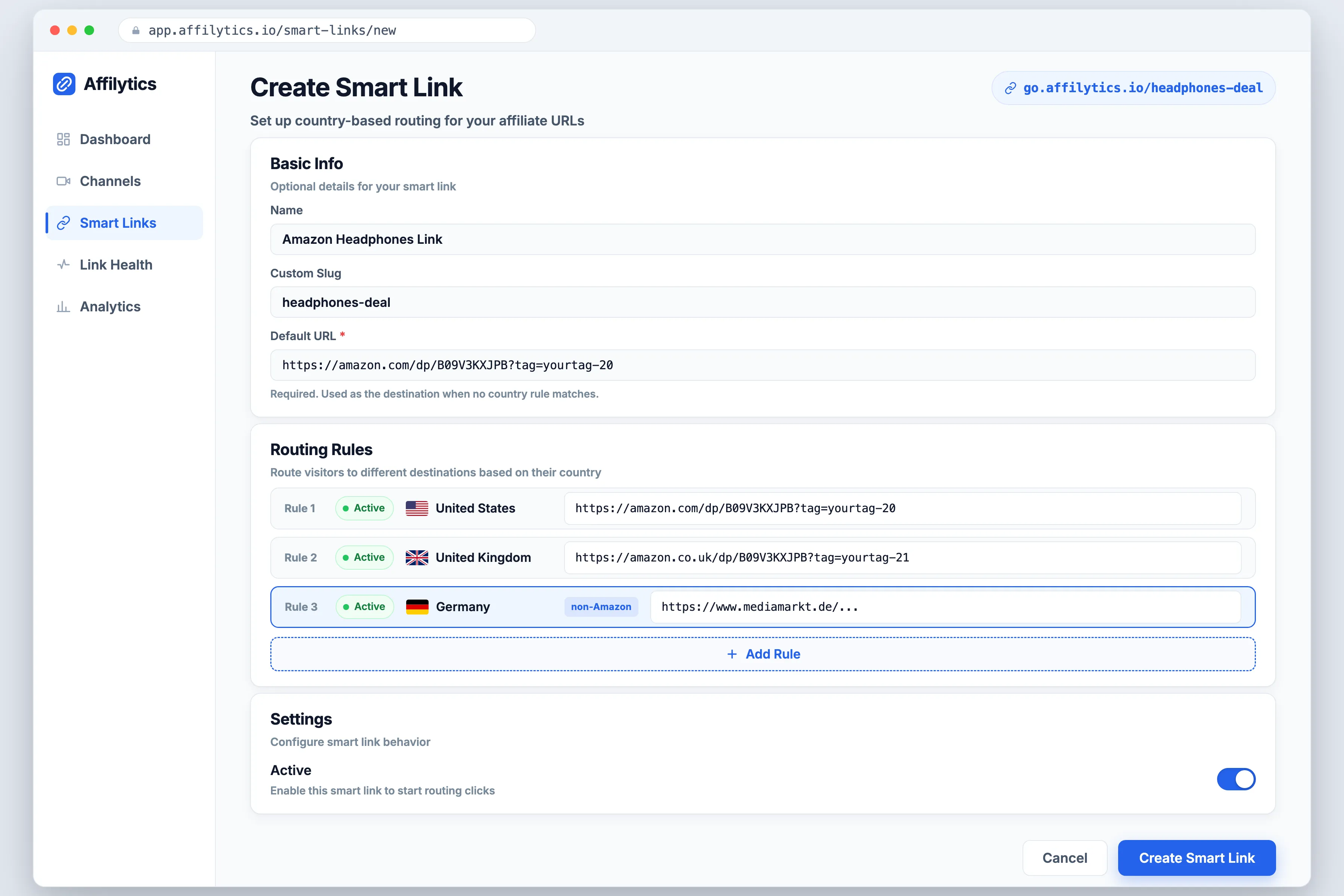
One smart link (go.affilytics.io/{slug}) sends each click to the right destination based on where the visitor is, and that destination does not have to be an Amazon store. You can route a US visitor to Amazon.com, a UK visitor to Amazon.co.uk, and a German visitor to a non-Amazon merchant who pays better in Germany, all from the same link. OneLink cannot do that last part, because it only speaks Amazon.
The second half is the part nobody warns you about: links rot. Products get discontinued, stock runs out, and tags get stripped in a redirect. Affilytics monitors your links continuously and flags the broken, attribution-lost, and out-of-stock ones, so a dead link gets caught instead of bleeding clicks for months. Routing earns the commission; monitoring keeps it from leaking back out.
A smart link works anywhere you can paste a URL:
- A blog post.
- A link-in-bio page.
- A video description.
- A post on X.
Building one is a deliberate step you take: you create the go.affilytics.io/{slug} link with its country rules and drop it in wherever your old raw link used to live. Today our scanning reads YouTube channel descriptions to find the affiliate links you have already published, so you know exactly which ones to upgrade first.
Start Routing Before the Next Big Sale
Section titled “Start Routing Before the Next Big Sale”Cross-border clicks are the cheapest revenue you have, because the traffic already showed up. The only question is whether the right store gets the credit.
You can start routing your links free with two full weeks of everything unlocked and no credit card. After the trial your smart links keep working, so nothing breaks even if you never upgrade. Set it up before the next big sale, not after you have already watched the clicks land on the wrong store.
Is Amazon OneLink available in Canada?
Section titled “Is Amazon OneLink available in Canada?”Yes. Canada is covered through the Canada plus EU5 program, which runs on a single store ID alongside the UK, Spain, Germany, France, and Italy. The belief that OneLink is US-only is the myth that sends Canadian creators chasing foreign bank accounts they do not need. If you are a Canadian creator, you can turn OneLink on today.
Do I need a US bank account to earn from US Amazon traffic?
Section titled “Do I need a US bank account to earn from US Amazon traffic?”No. Amazon pays your international earnings into your local bank account, so there is no need to open an account abroad or move money across borders. You can centralize accruals to one account of your choice or keep separate accounts per country, whichever you prefer.
Does Amazon OneLink work with non-Amazon affiliate links?
Section titled “Does Amazon OneLink work with non-Amazon affiliate links?”No. OneLink only redirects Amazon links. If your links span Amazon and other merchants like Walmart, Target, or Shopify, OneLink leaves those untouched. For a mix of merchants you need a cross-merchant router that can send each click to any destination, not just an Amazon store.
Will my shortened or cloaked links still redirect with OneLink?
Section titled “Will my shortened or cloaked links still redirect with OneLink?”No. Amazon states that third-party-shortened links are not supported and will not be redirected. If you shorten or cloak your links, OneLink will not route them, so handle the routing at the smart-link layer instead and point each region wherever it should go.
Which countries does OneLink not cover?
Section titled “Which countries does OneLink not cover?”OneLink skips marketplaces like Mexico, Brazil, India, China, Turkiye, and the UAE, even though Amazon Associates programs exist in those countries. Traffic to those stores needs separate handling, either a dedicated program account or a router that lets you add those destinations yourself.