
Affiliate Click Attribution: Why Your Commissions Vanish
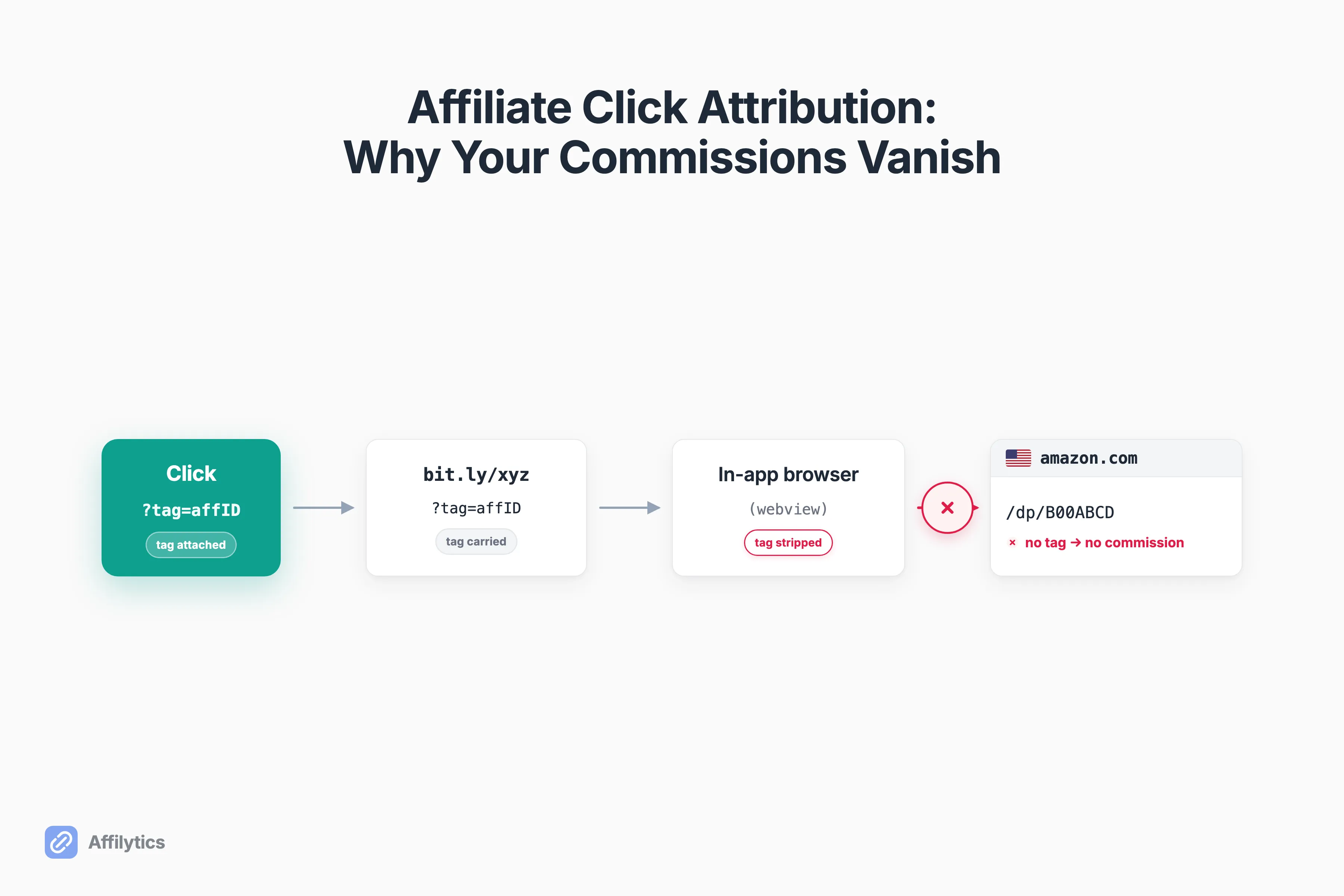
Your affiliate link still works. The page loads, the product is in the cart, the buyer checks out. You just never get paid for it, because somewhere in the chain your affiliate click attribution quietly broke.
We build Affilytics, which monitors the health of creators’ affiliate links, and “attribution lost” is a dedicated status in our system precisely because a link that resolves perfectly while silently dropping its tag is common enough to need its own label. It is one of the 5 ways an Amazon affiliate link dies without ever going dark.
If you have ever lost track of which of your links still pays you, the answer is usually the same thing that makes smart-link tools that route every click to the right place worth having: the redirect in the middle.
This guide explains what affiliate click attribution actually is, the two very different ways your commissions leak, where the affiliate tag gets stripped, how to catch it yourself in under a minute, and how to stop the leak for good. Attribution is only one of the reasons your clicks aren’t turning into sales; this post zooms in on that specific leak.
What Affiliate Click Attribution Actually Is
Section titled “What Affiliate Click Attribution Actually Is”Attribution is just the answer to one question: who gets paid for this sale? When a reader clicks your link and buys something, attribution is the chain that ties that purchase back to you. Get it right and you earn. Drop it and you do not.
Here is the chain in plain terms. A reader clicks. Your affiliate ID gets recorded, usually in a cookie or a click ID. The reader browses, maybe leaves, maybe comes back. At checkout, the program matches that recorded ID to the sale and credits your commission. Every program puts a time limit on that recorded ID, and Amazon’s is one of the shortest in the business: see Amazon’s affiliate cookie duration and what closes it early.
Most affiliate programs run on a “last-click wins” basis. Last-click attribution gives all of a conversion’s credit to the final touchpoint and excludes everything before it. That sounds like a model-choice detail, but it has one consequence that matters enormously for you: the LAST destination URL the buyer lands on is the one that has to still carry your tag. If your tag falls off before that final hop, you lose the sale even though you drove every bit of the traffic.
There is also a clock running. Programs credit a sale only if it happens inside an attribution window. A 30-day window credits a click that converts on day 20, but not a return that converts on day 31. Windows vary a lot, from a couple of weeks at some brands to much longer at big retailers. The window decides when you can get paid. The tag decides whether you can get paid at all, and that is the part most people never check.
If you want the deeper mechanics of how programs de-duplicate and credit a sale across channels, the IAB Affiliate Marketing Handbook lays out the transparency standards networks are supposed to follow. The same redirect that decides who gets credit is also the one doing the work when you are geo-routing the click to the right regional store, which is exactly why preserving the tag through that hop is so easy to get wrong.
Two Ways Your Commission Leaks (and Which One You Can Actually Fix)
Section titled “Two Ways Your Commission Leaks (and Which One You Can Actually Fix)”Not all commission loss is the same, and pretending it is will get you nowhere. There are two leaks here. Only one is yours to fix.
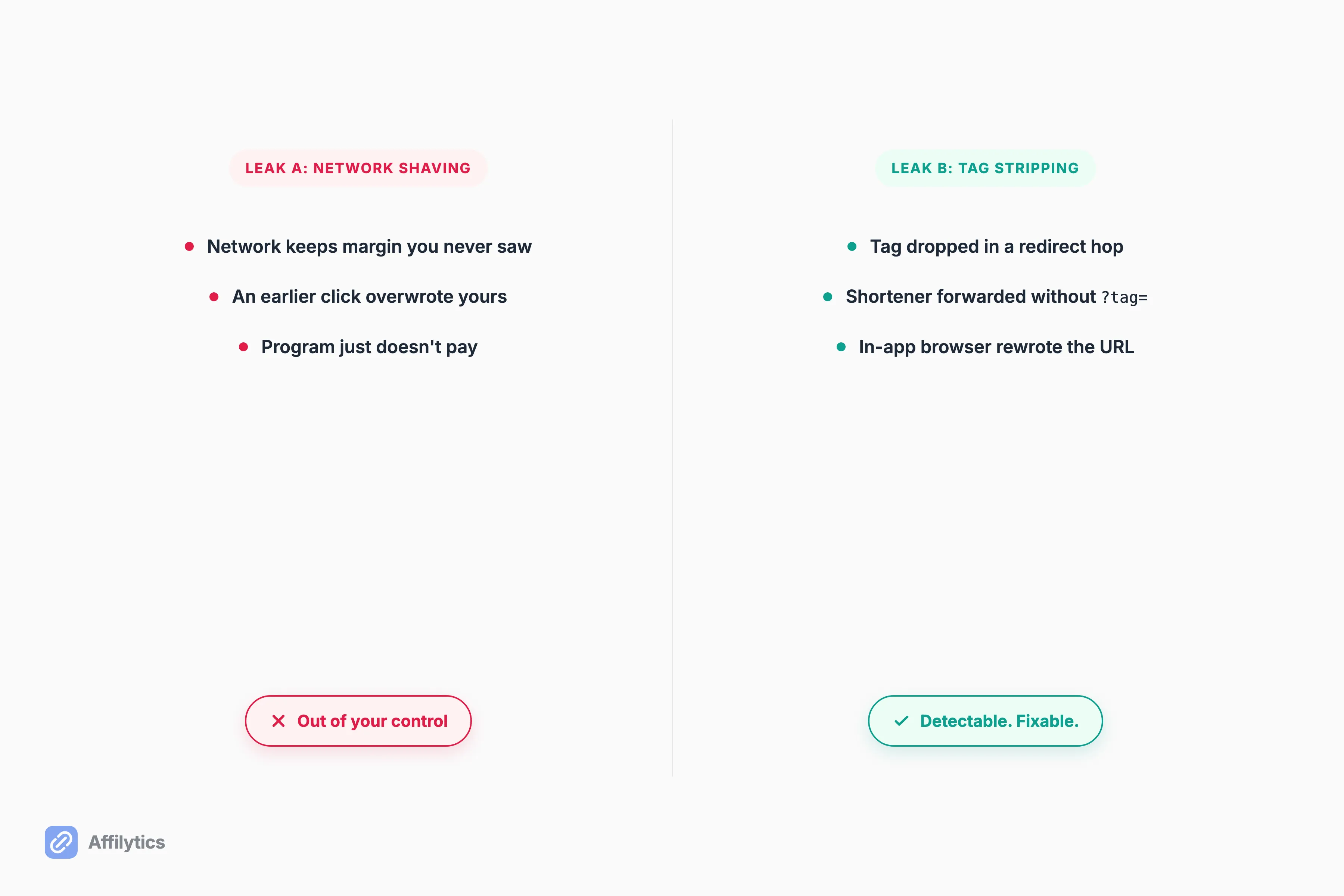
Leak A is the economics you cannot see. The network keeps margin you were never shown. An earlier click overwrote yours. The program “just doesn’t want to pay.” Creators feel this one hard. As one put it, “One of the toughest parts of affiliate marketing is trust in the tracking. I’ve personally had commissions vanish because of cookie clearing, attribution disputes, or networks that just don’t track well” (u/Tall_Lab_5456, r/OnlineIncomeHustle). On X, @JamesEbringer framed the same thing as the network keeping a cut you never agreed to: “You did 100% of the marketing work. Built the content. Drove the traffic. Converted the customer. The network provided a tracking link.” That is network commission arbitrage, a different mechanism than the one this post is about, but the same gut-punch feeling. This leak is largely out of your hands.
The famous example here is the Honey browser-extension controversy, where a cashback extension was reported to modify affiliate links at checkout and claim the commission for itself, even when no coupon was applied. It is worth knowing about, but notice it is a last-click OVERWRITE, not a tag getting stripped from your own link.
Leak B is the one you can actually do something about. This is the technical chain that drops your affiliate tag before the buyer reaches the store. The click is real, the page loads, the program just never sees your ID attached to the sale. You can detect this. You can fix this. The rest of this guide is about Leak B.
Where the Affiliate Tag Gets Stripped
Section titled “Where the Affiliate Tag Gets Stripped”Quick definitions first, because two terms do all the work in this section. Your affiliate tag is the little piece of identity stapled to your link, usually a query parameter like ?tag=yourID, ?aff=123, or ?ref=you. The redirect chain is every hop a click bounces through between the link a reader taps and the page they finally land on. The tag has to survive the whole chain. It often does not.
Here are the usual places it dies:
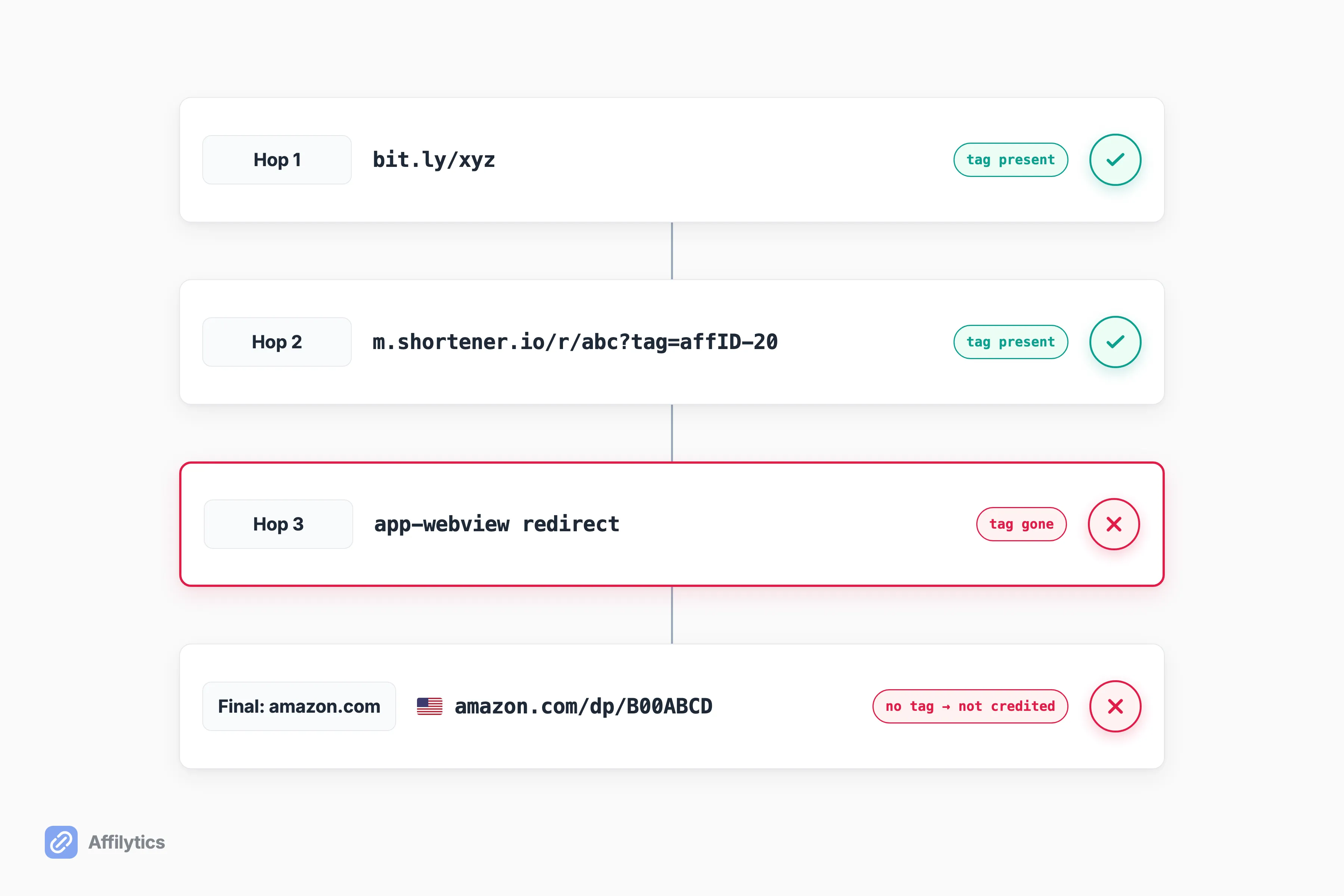
- Long multi-hop redirect chains. Some links bounce through three, four, or five intermediate URLs before reaching the store. Every hop is a chance to drop the query parameters, and a single hop that rebuilds the URL without your tag ends the chain clean.
- URL shorteners that forward without preserving parameters. Here is the trap in concrete terms. You shorten
store.com/product?tag=yourID. Some shorteners do a clean redirect to that exact URL, tag and all, and you are fine. Others 301 the click straight tostore.com/product, the bare product page, dropping everything after the?. Same short link, same working page, but the second one hands the buyer a checkout with no affiliate ID attached. You cannot tell which kind you have by looking at the short link. You only see it by following where it actually lands. - Social-platform in-app browsers. When someone taps your link inside Pinterest, TikTok, or Instagram, it opens in that app’s own webview, not their real browser. Those in-app browsers can rewrite or strip URLs. This is a big reason links you post on social platforms stop paying. It is especially nasty on Pinterest, which strips parameters in its in-app browser before the buyer ever reaches the merchant.
- Browser privacy features that strip tracking parameters. To protect user privacy, browsers have started to strip a known list of cross-site tracking parameters from URLs, the click IDs that ad platforms bolt on. Affiliate tags mostly are not on those lists today, so this is the smallest of the four risks. But it is the direction of travel, and it makes the point of this whole section: a query parameter is never guaranteed to survive the trip, and in-app webviews strip far more aggressively than any desktop browser. How much of this is really happening on any given platform is harder to pin down than most articles admit, which is why we looked at how this plays out on Facebook and what the primary sources there actually support.
This is not theoretical. A creator on r/SmallYoutubers described it from the outside without knowing the cause: “some of my older videos had links that went dead or started redirecting to random pages” (u/Independent_Lynx_439). A link that “started redirecting to random pages” is a redirect chain that changed under them. Somewhere in that new chain, the tag stopped surviving.
Why You Never Notice (the Silent Part)
Section titled “Why You Never Notice (the Silent Part)”So why does this go undetected for weeks? Because every signal you’d normally trust says the link is fine.
A 200 OK is not the same thing as “attributed.” A link can return a healthy status code, load the right product, let the buyer check out, and still carry no affiliate ID by the time it lands. Health and attribution are two different things, and almost nothing you look at distinguishes them. It is the same blind spot behind why a 200 OK can still mean a lost affiliate tag: the status code your checker trusts never looks at whether your ID survived the trip.
The dashboard does not help either. It shows you totals, so a single link that quietly stopped paying just blends into the noise of everything that still works. You find out weeks later, if at all, by digging into stats. Two creators describe the exact feeling:
- “my clicks were showing but conversions just disappeared into void… you’re basically working for free during that time and have no idea until you check your stats” (u/Upset_Scratch9129, r/Affiliatemarketing).
- “the last-click problem is real and its frustrating when you know email played a role but it doesnt show up anywhere” (u/UA_techlike06, r/digital_marketing).
That “no idea until you check your stats” line is the whole problem. Nobody checks hundreds of old links by hand, which is why the right move is to audit every link across your back catalog on a schedule instead of one at a time. The failure is common enough that we gave it a name in our own system, a dedicated attribution_lost status, separate from “broken,” precisely because the link is not broken at all.
How to Detect Attribution Loss Yourself
Section titled “How to Detect Attribution Loss Yourself”You can check a link in well under a minute, and you do not need any special tool to start. The method is the same one Redditors keep reinventing by hand, because nobody trusts the dashboard. As one creator advised another, “Since you cannot trust their dashboard right now, you need to verify the traffic independently… set up your own basic event tracking or even a simple hit counter” (u/MethodIcy5461, r/Affiliatemarketing).
Here is the manual version you can run today:
- Open your link in your browser with dev tools open, on the Network tab. Or paste it into any redirect-tracer tool.
- Watch every hop the click passes through. You will see each intermediate URL light up in sequence.
- Look at the FINAL destination URL, the one for the actual store. Not the first hop. The last one.
- Confirm your tag is still on it. Search the final URL for
?tag=,?aff=, or whatever parameter your program uses. If it is there, attribution survived. If it is gone, the link is “working” and paying you nothing. - Spot-check per platform. Tap the same link from inside Pinterest, TikTok, and Instagram, not just your desktop browser, because the in-app browser is where it often dies.
The thing you are looking for is easy to recognize once you have seen it side by side. A healthy final URL still wears your tag at the very end of the chain: store.com/dp/B00ABCD?tag=yourID-20. A stripped one is the same page with the identity sliced off: store.com/dp/B00ABCD. Both load. Both let the buyer check out. Only the first one pays you. So you are not judging whether the page works, you are reading the tail end of that final address and asking one question: is my ID still on it? If the parameter that was there at the first hop is missing at the last, you have found a leak.
Doing this by hand for one link is easy. Doing it for three hundred, every week, is not, which is the gap a tool fills. The automated version of that exact check is what our redirect classifier does: it follows the real redirect chain end to end after each health check and scores the affiliate classification at 0.8 to 1.0 confidence, versus pattern-only matching at 0.3 to 0.9 confidence. In plain terms, instead of guessing from how the link looks, it walks the chain and confirms what actually arrives, so a tag that dies at hop four gets caught without you clicking every link.
How to Stop the Leak for Good
Section titled “How to Stop the Leak for Good”Detecting the leak is step one. Closing it for good takes two things: holding attribution through a redirect you control, and getting told the moment a link stops paying. Detection without prevention just means you watch the money leave on time.
The first is what smart links are for. Instead of pasting a raw affiliate link that bounces through chains you do not own, you publish one short link on your own redirect domain, like go.affilytics.io/{slug}, and that link holds your tag through a redirect you control. The bonus: the destination is swappable after you publish. When a link rots or a program changes its URL, you fix the destination once and every place you ever posted that short link is fixed too, no editing old video descriptions or blog posts.
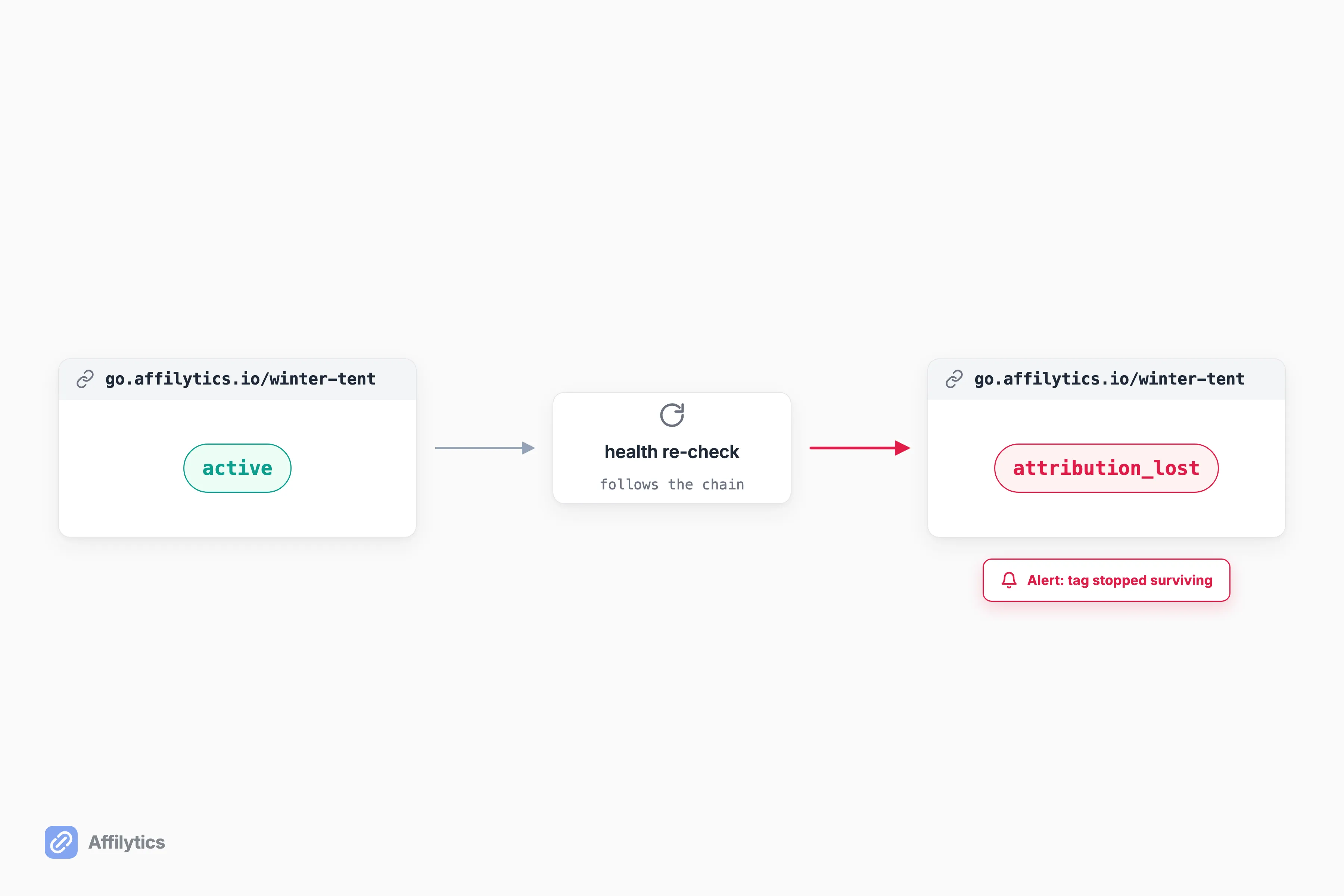
The second is continuous monitoring. This is the part Redditors keep asking for and not getting. The creator who noticed links “redirecting to random pages” asked the thread directly: “Have any system that alerts you when a link stops working?” Nobody answered. That is the gap. A monitoring system that re-checks your links and flags the moment a previously-working one flips to attribution_lost answers that question. The alert fires when a check detects the change, not in a once-a-week summary, so you hear about a dead tag in hours, not after a month of unpaid clicks.
Put together, that is detection plus prevention: the link you publish keeps its tag, and the day something upstream breaks it anyway, you find out instead of finding out by accident in your stats three weeks later.
Stop Guessing Whether Your Links Still Pay You
Section titled “Stop Guessing Whether Your Links Still Pay You”You should not have to manually re-walk every redirect chain to find out which of your links quietly stopped paying. Create your free account and let the monitoring watch the chain for you: two full weeks of everything unlocked, no credit card, and your smart links keep working afterward through default-URL routing even on the free tier.
If you are weighing this against a dedicated routing tool, our comparison of smart-link tools that hold attribution through their own redirect walks through what to look for. The short version: a link that keeps its tag and tells you when it doesn’t beats a link that merely loads.
What is affiliate click attribution?
Section titled “What is affiliate click attribution?”Affiliate click attribution is the process that credits your commission to the click you actually drove. When someone clicks your link and buys, attribution is what ties that sale back to you so you get paid. It breaks when the affiliate tag does not survive the full redirect chain to the final store, because the program then has nothing to match the sale against.
Why do my affiliate clicks show but no commission?
Section titled “Why do my affiliate clicks show but no commission?”The most common technical reason is that the link returns a normal 200 OK while the affiliate tag was stripped somewhere mid-redirect, so the sale is never matched to you. A click counter sees the click, but the final store URL no longer carries your ID. There are also network-side causes you cannot control, like an earlier click overwriting yours or a program that simply tracks badly.
How do I check if my affiliate link still tracks?
Section titled “How do I check if my affiliate link still tracks?”Follow the redirect chain hop by hop to the final destination URL and confirm your tag is still attached, usually a query parameter like ?tag=, ?aff=, or ?ref=. Browser dev tools or a redirect tracer show every hop. If the tag is present at the start but gone at the final store, attribution is lost. A monitoring tool can run this check continuously instead of by hand.
Does using a URL shortener hurt affiliate attribution?
Section titled “Does using a URL shortener hurt affiliate attribution?”It can, if the shortener forwards to the destination without preserving the query parameters that carry your tag. A redirect that passes the full destination URL through, tag included, is fine. What matters is whether the final landing URL still has your affiliate ID on it, not whether you used a shortener at all.
What does “attribution lost” mean for an affiliate link?
Section titled “What does “attribution lost” mean for an affiliate link?”It means the link resolves and loads fine, but it no longer carries the affiliate tag through to the destination, so clicks on it will not be credited to you. It is a distinct failure from a fully broken link. The page works, the buyer can check out, you just stop getting paid for it.