
How to Add Affiliate Links on Squarespace Without a Plugin
Putting affiliate links on Squarespace is the easy part. You paste a URL into the link box, hit save, and it works. It stays easy right up until you need one of those links to do something the page editor cannot do.
At Affilytics we build two things: smart links that send a click to the right country’s store, and health checks that watch affiliate links for breakage.
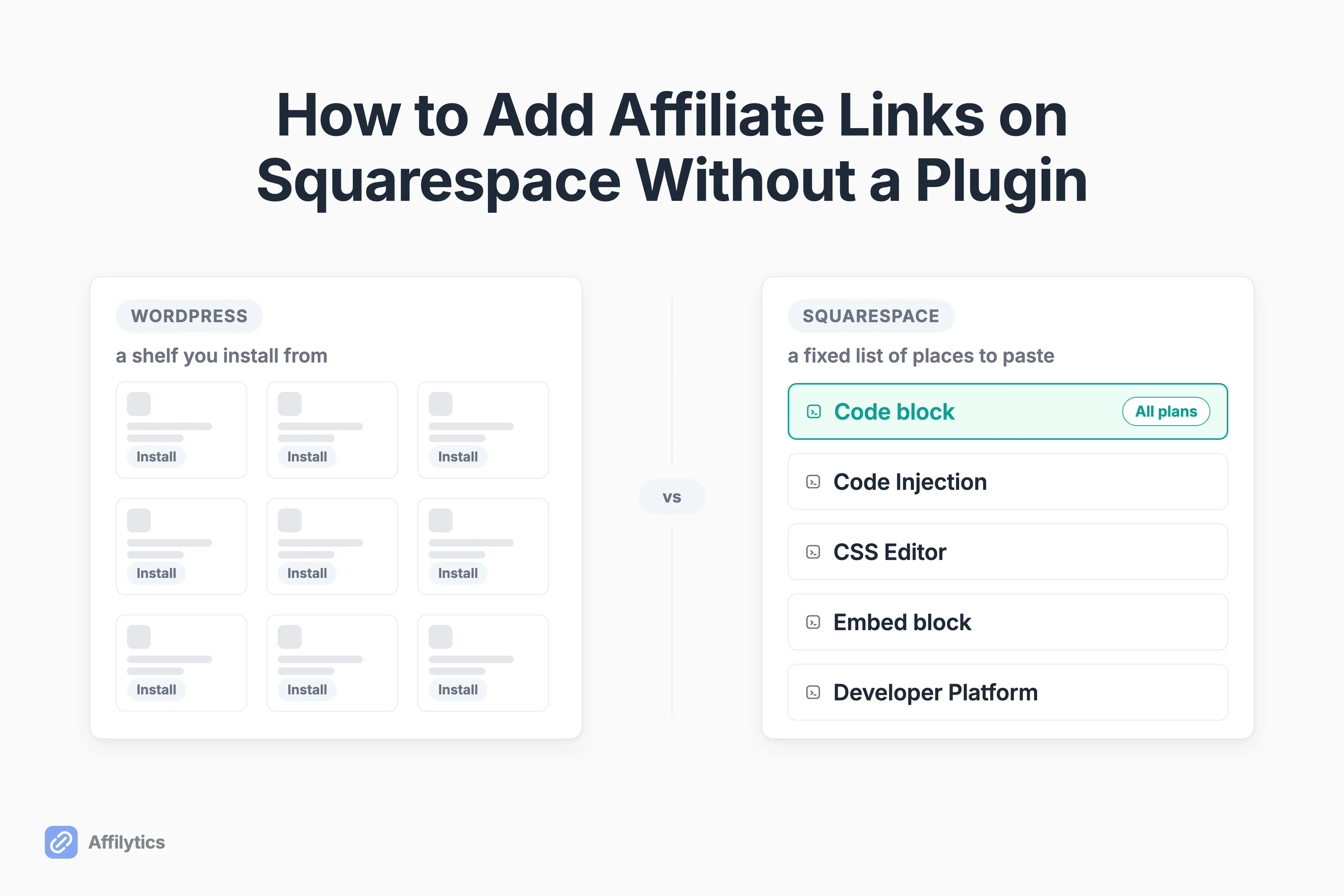
On WordPress you would install something, set it once, and forget it, which is the plugin route WordPress users get. Squarespace has no shelf to install from, so every answer written for WordPress quietly assumes a thing you do not have.
This guide covers what Squarespace actually permits, how to place and tag a link without paying for a plugin, how to disclose it properly, and the two leaks no page editor can close.
Which “affiliate links on Squarespace” question are you asking?
Section titled “Which “affiliate links on Squarespace” question are you asking?”Three different people type that phrase into a search box, and only one of them is you.
- You want a commission for sending people to Squarespace itself. That is Squarespace’s own referral program.
- You sell something on a Squarespace store and want other people to sell it for you. That is running your own affiliate program, and it is what most “Squarespace affiliate plugin” roundups are really about.
- You already have a Squarespace site, and you want to put other companies’ affiliate links into your content and get paid when a reader buys.
Which one are you?
If it is the third, keep reading, because that is the only one this post answers. And if the three-way split feels invented, it is not. One of the pages currently ranking for this keyword is built out of exactly those three readings, one per heading, which is a decent sign that everyone landing here wants a different thing.
What Squarespace actually lets you do
Section titled “What Squarespace actually lets you do”Squarespace doesn’t have a plugin store the way WordPress does. What it has is a fixed list of places where you are allowed to paste code, gated by plan, and the list is short enough to print on a napkin.
| Where you can paste code | Which plans | What it accepts |
|---|---|---|
| Code block | All plans | Plain text, HTML, Markdown, CSS inside style tags |
| Code block with JavaScript or an iframe | Core, Plus, Advanced, and some legacy plans (not Basic) | JavaScript and iframes |
| Code Injection (site header, site footer, per page) | Core, Plus, Advanced, and some legacy plans | Site-wide snippets |
| CSS Editor | All plans | Styling only |
| Embed block | All plans | Third-party embeds |
| Developer Platform | Squarespace 7.0 only | Template-level access |
That is the ceiling. The row that matters most here is the first one, because Squarespace’s own documentation confirms code blocks support plain text, HTML, Markdown, and CSS on every plan, which means the free path works on the cheapest tier.
Now the question everybody arriving from a forum thread actually wants answered: is any of this even allowed?
Yes. Squarespace’s help center says “Although we don’t have built-in advertisement integrations, you can include ads on your site using third-party services like Google AdSense,” and asks that whatever you display follows its Terms of Service and Acceptable Use Policy. Affiliate links are not a grey area on this platform.
Here is what that table does not give you. A WordPress plugin installs itself, updates itself, and keeps every link in one place where you can change them all at once. Nothing on the list does any of those three jobs. It is a set of boxes you may paste text into, and Squarespace says plainly that it “doesn’t support server-side code, including PHP, Ruby, Ruby on Rails, and SQL,” and that “adding code to your site is an advanced modification that falls outside the scope of Squarespace support.” Translation: when the thing you pasted breaks, that is your problem.
How to add an affiliate link, and tag it so Google is happy
Section titled “How to add an affiliate link, and tag it so Google is happy”There are two ways to put a link on a Squarespace page, and picking between them takes one question: does this link need an attribute attached to it?
Image pending: A Squarespace code block in the page editor holding an anchor tag with rel=“sponsored” and a merchant link. (Type: screenshot). Create this asset per action-items, then replace this line with the image embed.
For an ordinary link, the built-in editor is fine. Highlight the text, click the link icon, paste the URL, save. Squarespace’s link documentation describes one behavior setting for that editor, a toggle for opening the link in a new tab, and it does not document a control for adding rel="sponsored" or rel="nofollow" anywhere. That is silence in the documentation rather than proof the platform cannot do it, and it is why I reach for the second method on links that earn money.
So when do you need the second method?
Whenever a commission is attached. Google’s spam policies say monetizing with affiliate links is fine as long as they are qualified with a rel=“nofollow” or rel=“sponsored” attribute value on the anchor tag. The way to guarantee that on Squarespace is to write the anchor yourself and drop it into a code block:
<a href="https://merchant.example.com/product?tag=yourtrackingid" rel="sponsored" target="_blank">the product you are recommending</a>Add a code block where you want the link to appear, paste that in, swap the URL and the visible text. Code blocks take HTML on every plan, so this method costs nothing and works on the entry-level tier.
One correction, because it will save you an afternoon. The most repeated free method for this is to paste the same HTML into a Markdown block, and the people repeating it are not being careless. It has been repeated for years, which is why it sticks. Squarespace’s current Markdown documentation routes you elsewhere: “To add custom HTML, CSS, or JavaScript, use code blocks”. Use the code block.
Paid third-party Squarespace plugins exist that do the tagging for you, and they are a fair purchase if hand-writing anchors annoys you. They buy convenience, not capability.
How to disclose affiliate links without editing every page twice
Section titled “How to disclose affiliate links without editing every page twice”The disclosure is not a footer detail and it is not optional. The FTC’s guidance for creators is blunt about placement: “Place it so it’s hard to miss”, use simple and clear language, and don’t mix it into a group of hashtags or links.
What triggers the duty is a material connection, which the FTC defines to include “a financial relationship, such as the brand paying you or giving you free or discounted products or services.” An affiliate commission is exactly that. If you want help with the sentence itself, these affiliate disclosure examples cover the wording. The rest of this section is about getting it onto every page.
Here is the Squarespace-specific friction. A disclosure you want on every post is a site-wide element, and site-wide elements want Code Injection, which starts at Core. On the entry-level plan you are placing it by hand, one post at a time.
So what do you do if you are on Basic?
You accept that it is manual and make the manual version cheap:
- Write the disclosure once and keep it somewhere you can paste from.
- Put it above the first affiliate link on the page, not at the bottom of the post.
- Keep it in its own line of text, away from a pile of tags and links.
- Add it to your publishing checklist, right next to the title and the header image.
That is not elegant. It is twenty seconds a post, and it is the difference between a page that complies and a page that hopes.
Your links are live. Here is where the money still leaks.
Section titled “Your links are live. Here is where the money still leaks.”Everything above is about getting the link right on the page. The two leaks below happen after that, and perfect markup fixes neither.
International clicks land on the wrong storefront
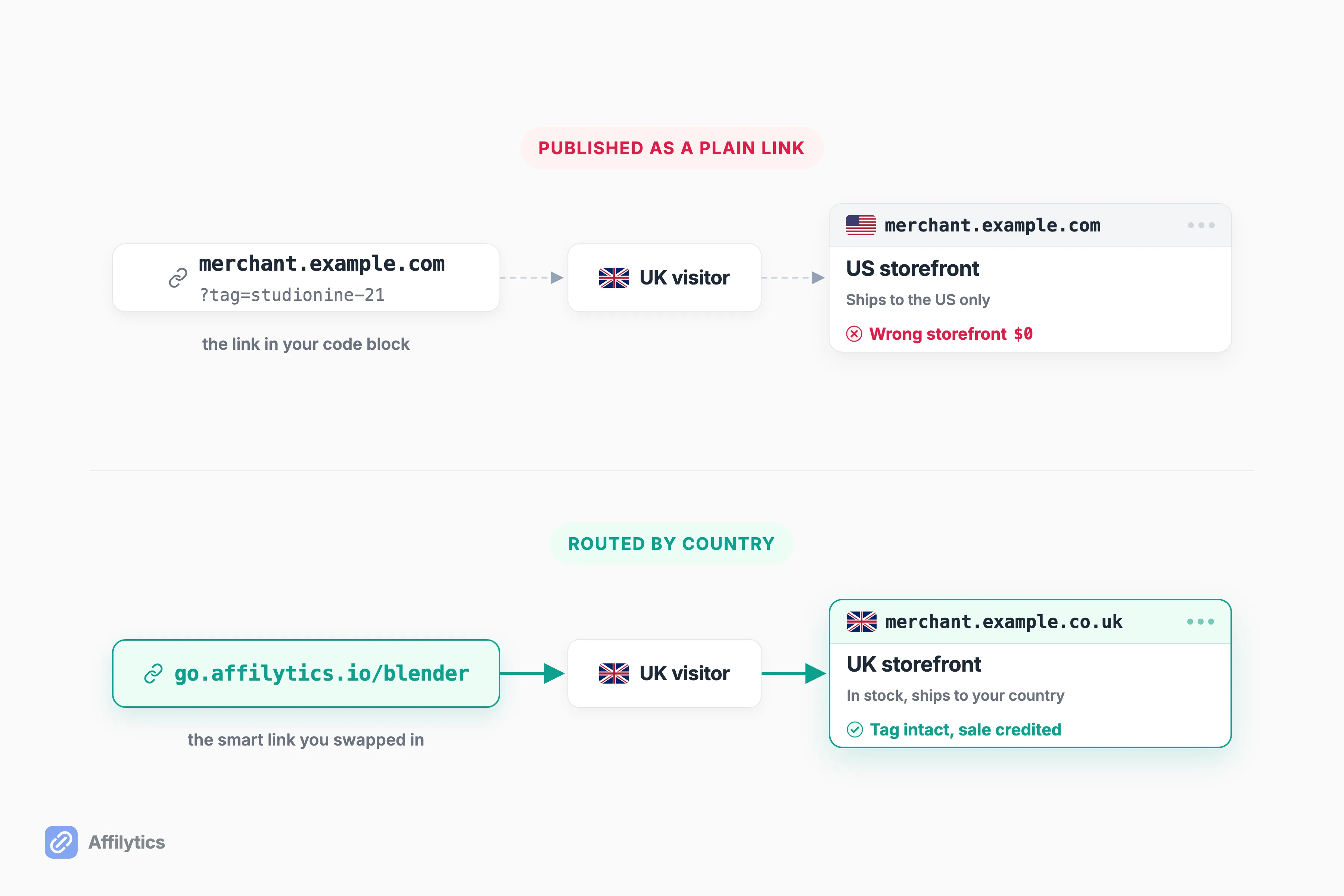
Section titled “International clicks land on the wrong storefront”A reader in Manchester clicks your link to a US store, lands on the US store, and either buys nothing or buys somewhere your tag does not earn the way you expect. The link is not broken. Nothing on your Squarespace page is wrong. It is pointed at the wrong country.
How big is that slice of your readers?
For most creators, somewhere between 30 and 50 percent of the audience sits outside their home country. That is a general pattern across creator audiences, not a number we measured, and tech and gaming niches skew further international still.
The fix is a routing layer in front of the destination: one link in your content, a rule per country behind it, first matching rule wins, and a mandatory default destination for every country you never wrote a rule for. That is what our geo-routed affiliate links do. Worth saying plainly: you create each smart link yourself and swap it into the page. A scan finds the links you already published; it never converts them for you.
Links rot, and nothing tells you
Section titled “Links rot, and nothing tells you”Products go out of stock. Merchants redesign URLs. Programs shut down. Tags get stripped somewhere between the click and the checkout.

Two real cases, both from outside anything we built. In 2020 a Squarespace user posted on r/squarespace: “i have affiliate links on my site and i notice when i click on them, i lose all the tags on the link that identify it as an affiliate link.” The thread has zero replies, and nobody ever established what was happening. I am not going to guess either.
The second is Stephen Robles, who wrote in April 2026 that Squarespace deprecated the feature his affiliate-heavy page depended on. He rebuilt the page in plain HTML, kept every affiliate link, and stayed on the platform.
So who told them?
Nobody inside Squarespace did. Both creators found out from the outside, and detection is the hard part, not repair. So we check every affiliate link on a site on a schedule. Nothing to install, because there is nothing you can install on Squarespace. A retailer’s bot wall reads as blocked, not a false “broken”.
A Squarespace affiliate stack that holds up
Section titled “A Squarespace affiliate stack that holds up”Four layers, and you can add them in this order without touching anything you already published.
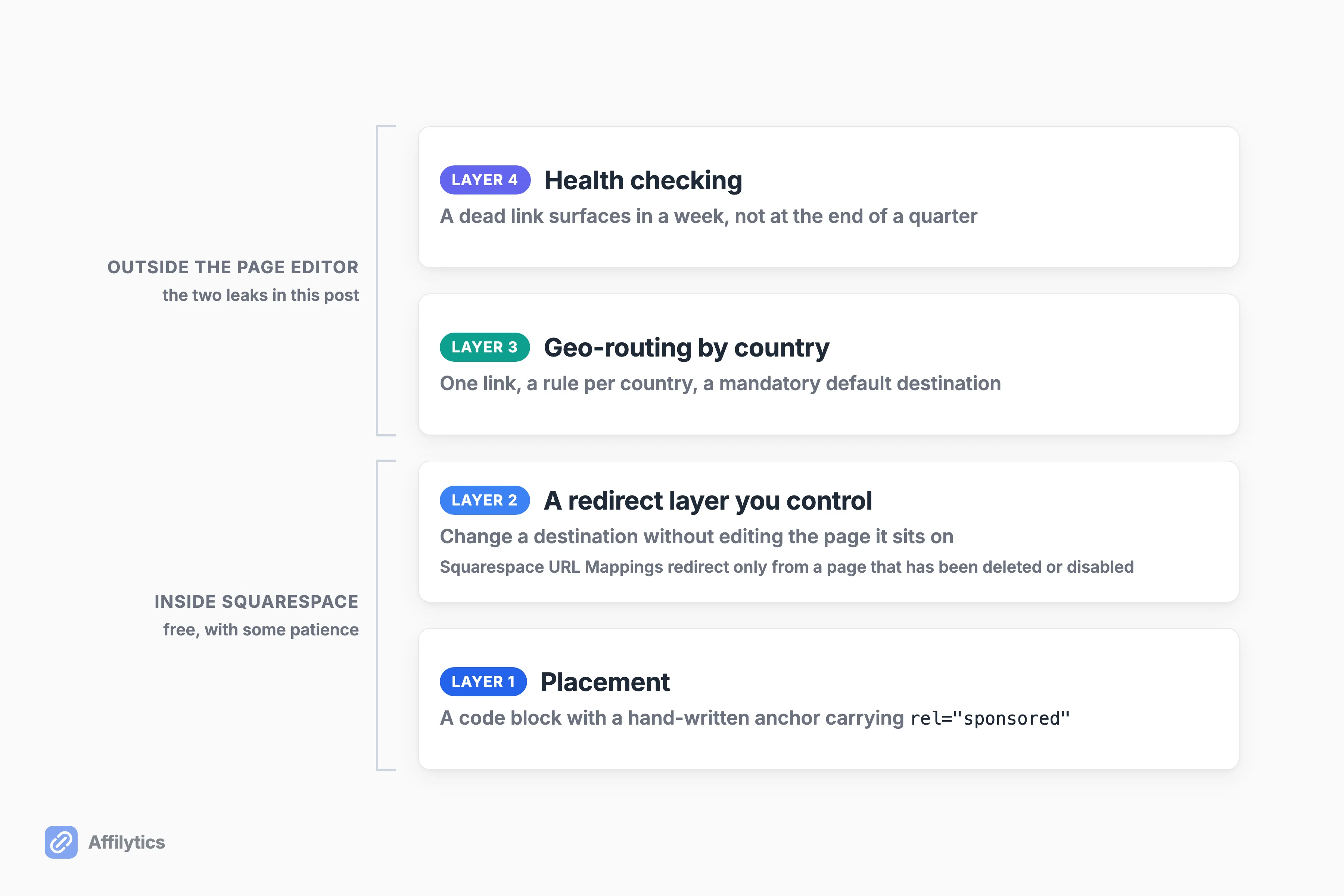
- Placement. A code block with a hand-written anchor carrying
rel="sponsored". Free, every plan. - A redirect layer you control, so a destination can change without you editing the page it sits on. Squarespace’s own URL Mappings can send a visitor to another domain, with a caveat nobody in the search results surfaced: “redirects only work if the page you’re redirecting from has been deleted or disabled”. Good tool for a page you moved, poor stand-in for a link cloaker.
- Geo-routing for the readers who are not in your country. Creating a smart link takes a couple of minutes, and you swap it in once.
- Health checking, so a dead link surfaces in a week instead of at the end of a quarter.
Layers one and two you can build with Squarespace and some patience. Layers three and four are the ones a page editor cannot give you: the first goes after income you are currently not collecting, and the second stops more of it walking out the door.
Do you need all four?
If you have eight affiliate links on the whole site, no. Check them by hand twice a year and go write something instead. Tooling starts paying somewhere past the point where you can no longer remember every link you have published.
One more honest note. Some people answer platform fragility by leaving Squarespace entirely, and that argument shows up every time this comes up. It is a real option. This post is for the people staying.
Point one scan at the page you would hate to lose
Section titled “Point one scan at the page you would hate to lose”The last two leaks need something watching from outside the page editor. If you want to know what your site is doing right now, point one scan at it and read the list of every affiliate link you have published: the ones pointing international readers at a single country’s store, and the ones that are already dead.
Create your free account and you get two full weeks with everything unlocked, no credit card. Start with the page that quietly earns more than the rest of the site, the review or the resources page. That is the one where a wrong-country click costs you the most.
Can you put affiliate links on a Squarespace site?
Section titled “Can you put affiliate links on a Squarespace site?”Yes. Squarespace’s help center says that although it has no built-in advertisement integrations, you can include ads on your site using third-party services like Google AdSense, and it asks that whatever you display follows its Terms of Service and Acceptable Use Policy. Affiliate links are not a grey area on this platform.
Do you need a paid plugin to add affiliate links on Squarespace?
Section titled “Do you need a paid plugin to add affiliate links on Squarespace?”No. Code blocks accept HTML on every plan, and a hand-written anchor tag carrying rel="sponsored" is all a properly tagged affiliate link needs. Paid third-party Squarespace plugins exist and they are a fair purchase, but what they buy you is convenience, not capability.
Which Squarespace plan do you need for affiliate links?
Section titled “Which Squarespace plan do you need for affiliate links?”Any plan will place and tag a link, because code blocks accept HTML on all plans. Core and up is where JavaScript in code blocks and site-wide Code Injection unlock, which is what a disclosure you want on every page really wants. On the entry-level plan you place that disclosure by hand.
Do affiliate links hurt your Squarespace SEO?
Section titled “Do affiliate links hurt your Squarespace SEO?”Not by themselves, as long as they carry rel="sponsored" or rel="nofollow". Google’s spam policies say good affiliate sites add value by offering meaningful content or features. The actual risk is thin affiliate content, which Google defines as product descriptions and reviews copied from the merchant with nothing original added.
Can Squarespace redirect an affiliate link the way a cloaking plugin does?
Section titled “Can Squarespace redirect an affiliate link the way a cloaking plugin does?”Partly. URL Mappings can send a visitor to another domain with a 301, but Squarespace’s own documentation says redirects only work if the page you are redirecting from has been deleted or disabled. That makes it a good tool for pages you moved and a poor general-purpose cloaker.