
Affiliate Link Rot: Why Old Links Quietly Stop Earning
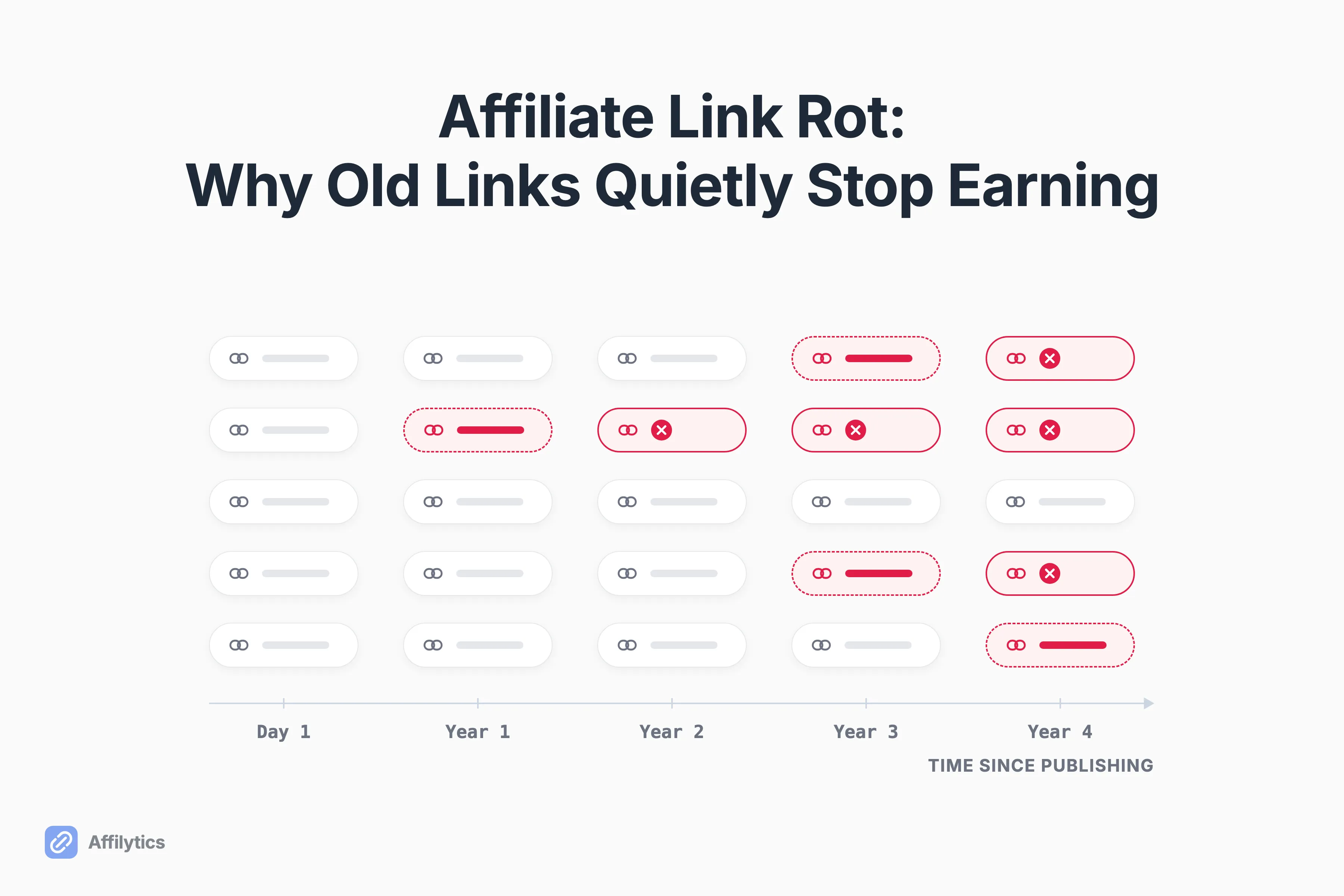
Affiliate link rot is what happens to the links in a video or post you published two years ago: the product gets delisted, the retailer moves its URLs, the network migrates, or the tag gets stripped. The link keeps getting clicks while earning nothing, and it keeps happening after any one check.
I’m one of the engineers behind Affilytics, which sends each visitor to their own country’s store and also scans a channel or site, re-checking every affiliate link through a client that looks like a real browser. So I spend a lot of my week looking at links that seemed fine last month.
Rot is the reason affiliate link monitoring exists at all, but the fix makes more sense once you see how the decay works.
Below: what the research says about how fast links decay, why affiliate links fall apart faster than ordinary ones, and why a one-time audit starts going stale the day it finishes.
What Affiliate Link Rot Is (and Why It Rarely Looks Like a 404)
Section titled “What Affiliate Link Rot Is (and Why It Rarely Looks Like a 404)”An affiliate link has rotted when it no longer earns. Whether it still loads is a separate question, and that’s where most people get tripped up.
A hard break is the one everyone pictures: a 404 page, a dead domain, a browser error. Those happen, and they’re the easy ones to spot. The common failure is a soft break, where the page loads but the sale can’t happen:
- The product page says it’s unavailable
- The link redirects to the retailer’s homepage or a search page
- Your tracking tag fell off somewhere between the click and the store
One r/juststart poster nailed it: “a dead affiliate link mostly doesnt 404. the page loads fine, status 200, checker says youre good.” (Status 200 is the server’s “all good” code.)
So is a link that loads a healthy link?
Not if nobody can buy through it. That’s why a 200 OK can still be a dead link, and why the useful question is “does it earn?”, not “does it load?”
How Fast Links Decay: What the Research Actually Shows
Section titled “How Fast Links Decay: What the Research Actually Shows”There’s no large, independent public study of how fast affiliate links decay. The honest baseline is the general web, and affiliate links sit on top of it with extra ways to fail.
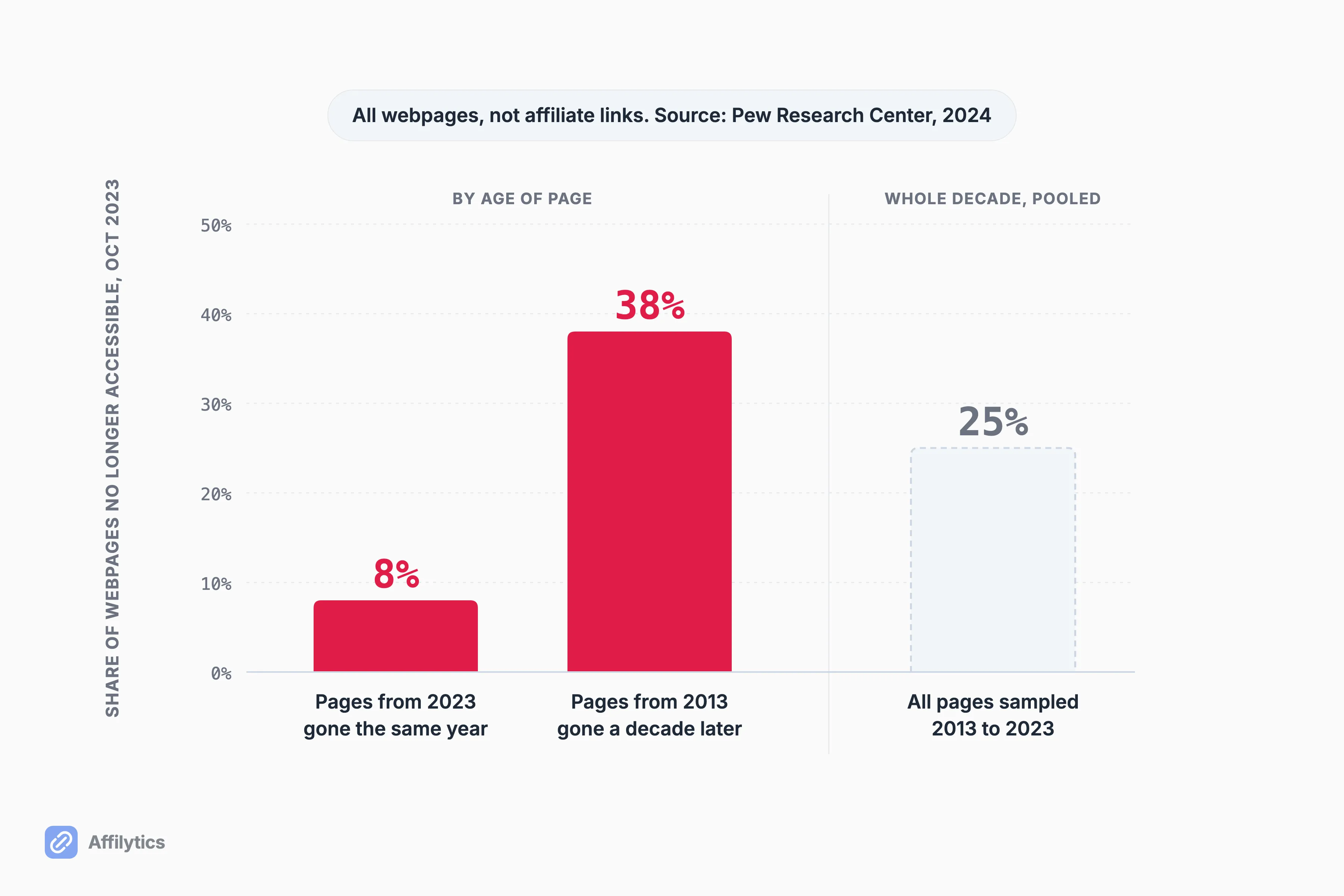
In a 2024 report, Pew Research Center looked at nearly a million webpages from 2013 to 2023 and found:
- 8% of pages from 2023 were already gone by October 2023
- 25% of all the pages it sampled across the decade were gone
- 38% of pages that existed in 2013 were gone a decade later
- 23% of news pages carried at least one broken link
Careful linking doesn’t save you, either. A 2014 Harvard Law School study by Zittrain, Albert and Lessig found that half the links in US Supreme Court opinions no longer pointed to what was cited. In the Harvard Law Review and other journals, it was more than 70%. These are people whose whole job is precision.
The closest thing to an affiliate number is a separate vendor snapshot. Trackonomics, which sells a link scanner, reported in 2019 that a scan of 7,000+ pages across 25 publishing sites found rot in about 4% of affiliate links, but on more than 40% of the pages carrying them. So even a small share of dead links is enough to leave a lot of pages leaking.
Which posts carry the most?
Your oldest ones. Rot is a rate that accumulates with age, so your oldest content, often your best-ranking content, carries the most of it. One publisher who builds a link checker reported the same pattern: “Articles ranked for 2-3 years had the highest broken-link concentration.”
Why Affiliate Links Rot Faster Than Ordinary Links
Section titled “Why Affiliate Links Rot Faster Than Ordinary Links”A normal link needs one thing to stay alive: the page at the other end. An affiliate link depends on five layers, and each one can fail on its own schedule.
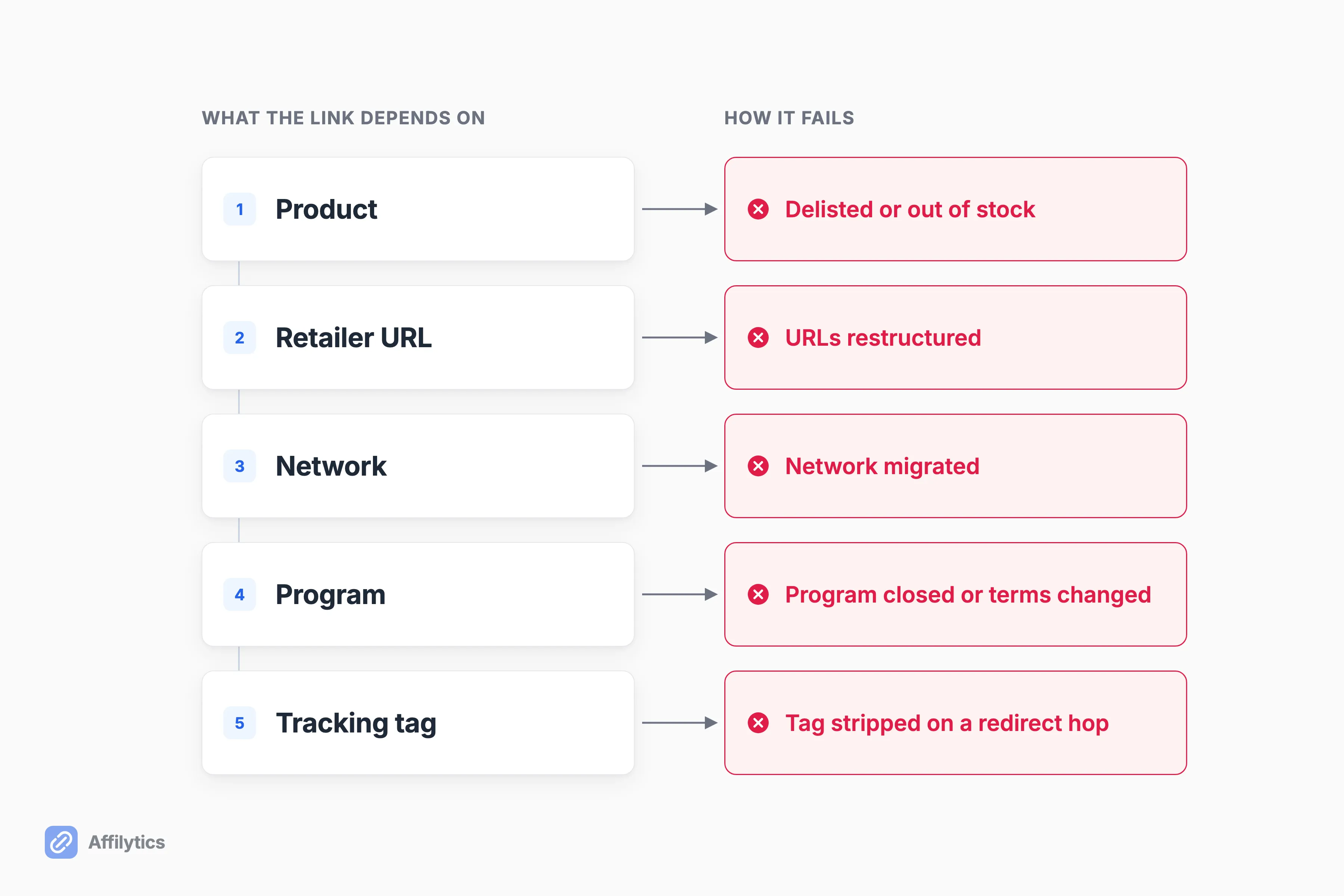
- The product disappears. Delisted, discontinued, or out of stock. Amazon affiliate links don’t expire on their own, but the product behind them can vanish while the page keeps loading.
- The retailer restructures its URLs. This tends to happen on one day, to many links at once. The same publisher, describing a Coolblue URL change in the Netherlands, put it this way: “Network restructures kill links in clusters, not one-by-one.”
- The network migrates. When Awin moved ShareASale onto Awin and closed the old platform, most tracking links kept working. Not all of them: old short links that had gone a year without a click stopped tracking (more on that below).
- The program closes or changes terms. Merchants leave networks or shut programs down, and the link may still redirect while nobody pays.
- The tag gets stripped. The sneakiest one. An r/Affiliatemarketing commenter described it exactly: “Page returns 200, product is in stock, but your tag didnt survive the last hop so you just don’t get credit. Looks healthy in every dashboard.”
Notice how many of those still load?
Most of them. That’s what makes rot so hard to see from the outside.
Why a One-Time Audit Is Already Decaying
Section titled “Why a One-Time Audit Is Already Decaying”An audit is a snapshot. Every cause above keeps firing after it finishes, and several fire on a specific date, so a sweep that lands the week before a retailer restructure stays blind until the next one.
Here’s what that feels like from the creator side, in a r/YouTubeCreators post:
“I’ve probably been losing out on commissions for months because those old videos still get evergreen traffic.”
“Do you just use TubeBuddy’s bulk replace once a year, or is there a way to actually get alerted when a link dies?”
Your dashboard won’t warn you either. The same link-checker builder from earlier put it bluntly:
“Affiliate dashboards lie by omission. They show you clicks-that-converted. They never show clicks-that-hit-a-404.”
The ShareASale move is the cleanest dated example. Awin’s rule was that short links with no clicks in the previous 12 months went inactive. Those are exactly the forgotten links in old content, and an audit run before the migration passed every one of them.
The common advice is to check every 30 days. SEO educator Nina Clapperton’s version: “If the answer is more than 30 days ago, go check them.” That beats never. It still leaves up to a month of dead clicks per break, and few people keep it up across hundreds of posts.
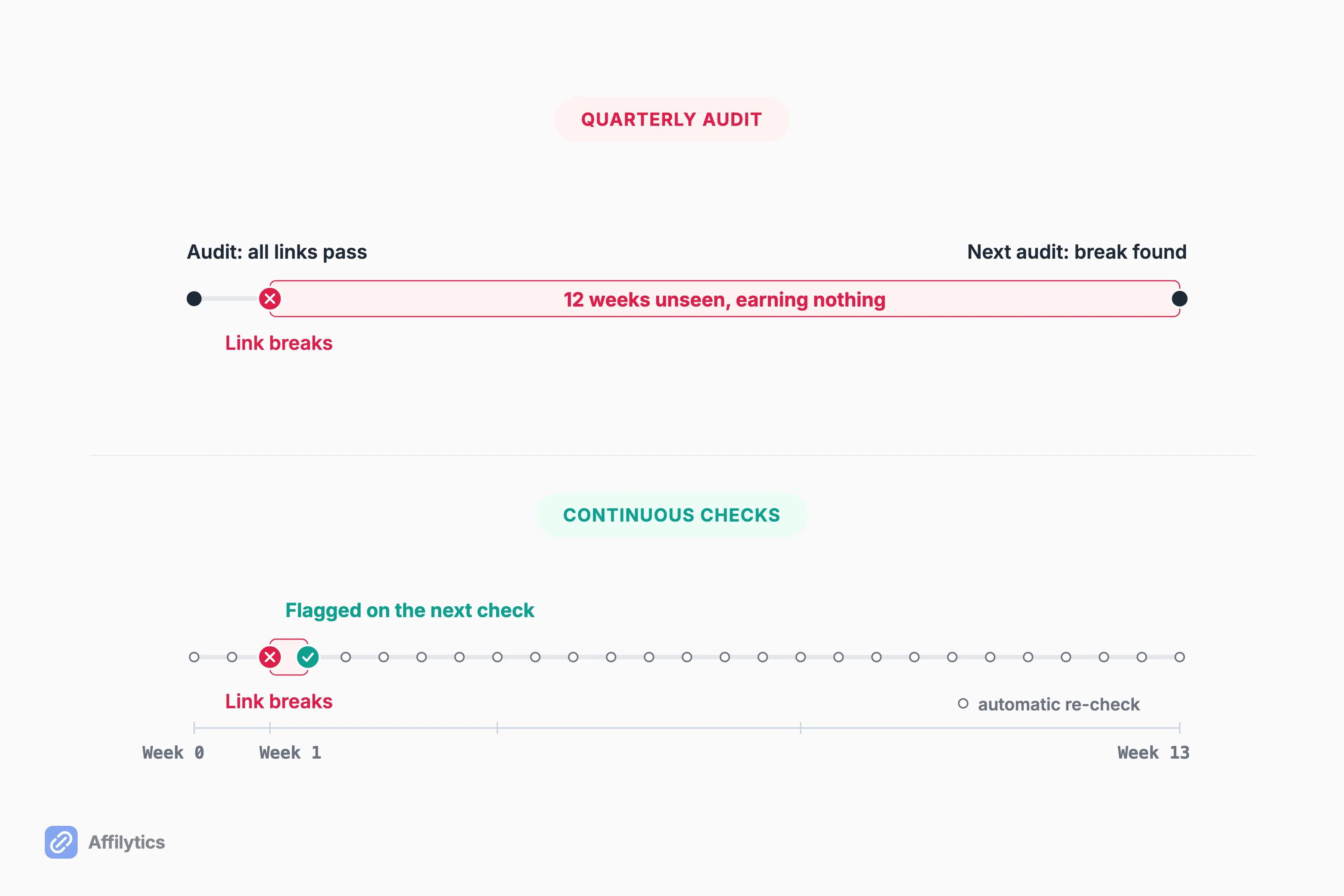
Here’s a hypothetical with a quarterly audit:
- Week 0: your audit passes every link
- Week 1: the retailer changes its URLs, and one link starts landing on a search page
- Weeks 1 to 12: the video keeps getting views, and the link earns nothing
- Week 13: the next audit finally catches it
So what actually fixes it?
Shrinking the gap. The break happens on its own date, not yours, so what matters is how long a dead link goes unseen and whether catching it depends on you remembering to look.
What Continuous Monitoring Catches That an Audit Cannot
Section titled “What Continuous Monitoring Catches That an Audit Cannot”Whatever tool you use, or none, the setup that matches how rot behaves has three parts:
- Find every link you’ve published, not just the ones you created in a link tool.
- Re-check them on their own, with a check that sees soft failures, not just the status code.
- Alert when a status changes, pointing at the exact video or page to fix.
Do you need all of that?
With a small library, a careful manual pass is fine. Continuous checks earn their place once you’re into hundreds of links.
That’s the job we built Affilytics to do. It pulls every affiliate link out of a crawled site, including /go/-style cloaked links (the short redirects WordPress link plugins create), or out of a YouTube channel, so you can check every YouTube description at once. Then it keeps checking them and flags more than “broken”: out-of-stock, product-unavailable, attribution-lost. Each one points at the video or page it lives on.
One honest limit: the free plan’s broken-link check runs on the first scan only, which is exactly the kind of snapshot this post argues against. Continuous checks with alerts are on the paid plan.
If every link you promote is Amazon, AMZ Watcher is a good fit: it runs scheduled re-checks on a cadence you pick. It monitors Amazon links only.
Find Out Which Old Links Still Pay
Section titled “Find Out Which Old Links Still Pay”Every new account gets two full weeks with everything unlocked, no credit card. Add your oldest channel or site first, since that’s where rot piles up, and see which links died since you last looked. Start your free trial.
Want the longer version first? Here’s how affiliate link monitoring works, end to end.
What is affiliate link rot?
Section titled “What is affiliate link rot?”It’s what happens when affiliate links stop earning over time because something behind them changed: the product was delisted, the retailer moved its URLs, the network migrated, or the tracking tag got stripped. The tricky part is that the page often still loads, so the link looks fine while paying nothing.
How fast do affiliate links break?
Section titled “How fast do affiliate links break?”No large public study measures affiliate links specifically. The best baseline is general-web data: Pew Research Center found 8% of pages from 2023 were gone within the same year, and 38% of pages from 2013 were gone a decade later. Affiliate links add extra failure points on top of that: the product, the retailer, the network, and the tag.
How often should I check my affiliate links?
Section titled “How often should I check my affiliate links?”If your library is large, use automated re-checks that don’t depend on you remembering, because links break on their own dates and the longer the gap between checks, the more dead clicks you pay for. With a small library, a careful monthly manual pass works fine.
Can a broken link checker catch affiliate link rot?
Section titled “Can a broken link checker catch affiliate link rot?”Only the hard breaks, like a 404 or a dead domain. A checker that reads the status code alone passes the soft failures: a delisted product on a page that still loads, a redirect to the retailer’s homepage, or a tag that got stripped along the way. You need a check that looks at where the link actually lands.