
How Affiliate Geo-Routing Works: The 5-Step Redirect Path
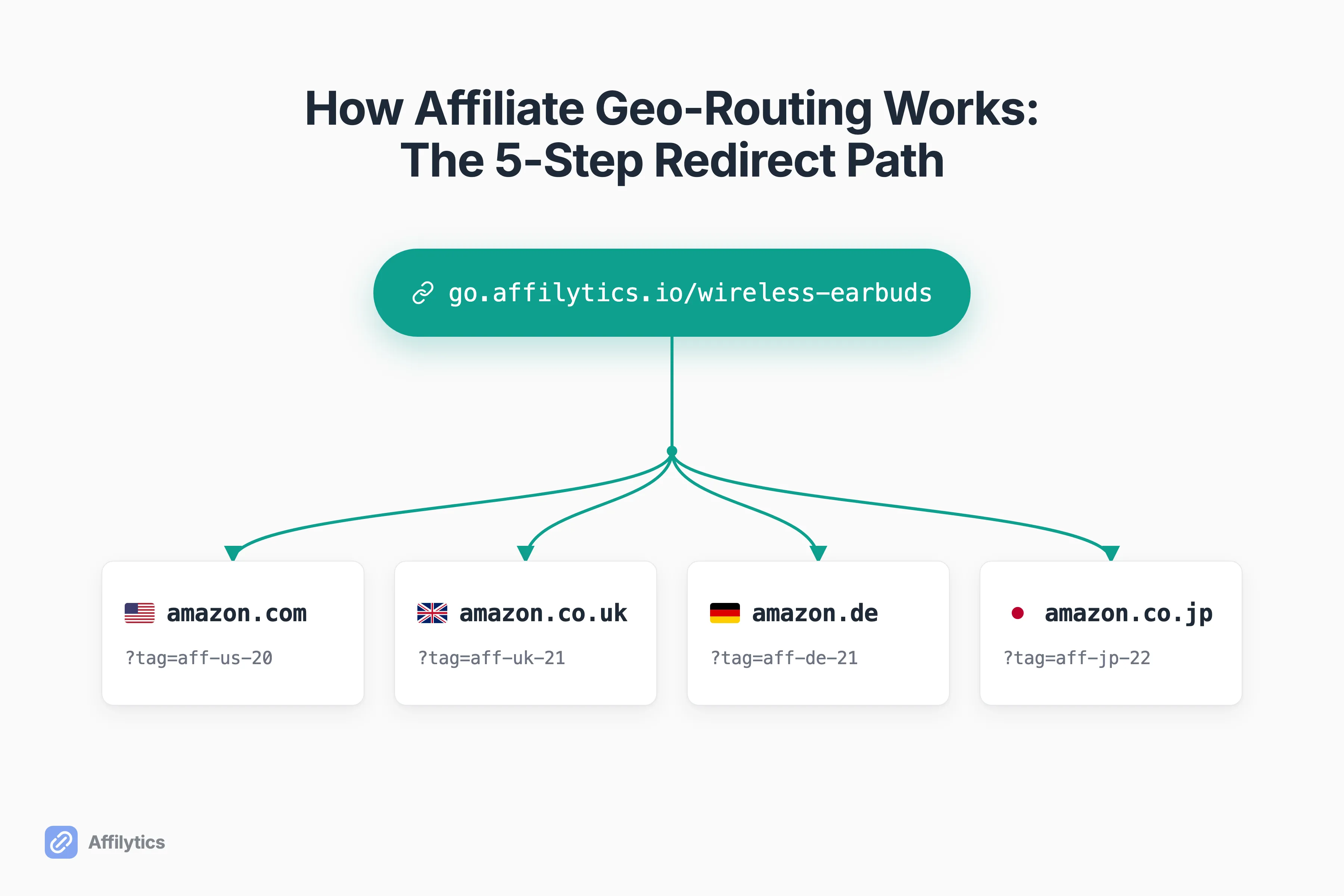
A while back, an affiliate marketer on r/AffiliateMarket asked a question that never got a real answer: when a click comes from a country your offer doesn’t pay in, do you reach for a tool, write custom scripts, or just accept the loss? That question is really about affiliate geo-routing, and the honest answer is that it’s a small, well-understood redirect pipeline once you watch it run.
We build Affilytics’ redirect layer in Rust, so the walkthrough below isn’t a diagram off a whiteboard. It’s the actual path our Link-Router runs for every go.affilytics.io click.
If you want the wider picture first, why international clicks leak commission and what to do about it, we cover geo affiliate links in a separate guide. This post zooms all the way in on the redirect itself.
Here I walk the five steps a geo-routed click takes, from the moment it lands on your smart link to the 302 that drops the visitor in their local store, plus an honest look at how fast that really is and where the tools actually differ.
Geo-routing, defined (and the two things it gets confused with)
Section titled “Geo-routing, defined (and the two things it gets confused with)”Affiliate geo-routing is one specific thing: you read a visitor’s country from their IP address, then send that click to the regional store or offer that actually pays you for them. That’s it. One link in, the right destination out, decided per visitor.
The search results muddle this with two look-alikes that share the word “geo.” Worth separating them before we go further:
- Geo-market strategy is a media-buying decision: which countries you run offers in at all (the Tier 1 / Tier 2 / Tier 3 language). That’s about where you spend, not where a click lands.
- GEO, as in Generative Engine Optimization, is about showing up inside AI-generated answers. Same three letters, unrelated problem.
This post is about neither. It’s about the redirect: the plumbing between a click on your link and the correct regional page loading in the visitor’s browser.
Why the wrong store is a silent revenue leak
Section titled “Why the wrong store is a silent revenue leak”Before the mechanism, the stakes. Hand a default amazon.com link to an international visitor and it does one of three unhelpful things:
- Strips your commission, because the visitor buys on their own local Amazon instead.
- Shows a page they can’t check out on.
- Bounces them entirely.
Two creators put it better than I can. One affiliate marketer on r/AffiliateOps: “If someone from the UK clicks your Amazon.com link, it doesn’t redirect them to Amazon.co.uk. And if you’re promoting anything outside the US, that’s just money on fire.” Another, describing the same leak: “Traffic from non-US countries landing on the US Amazon page and bouncing. Zero conversion, zero earnings.”
Amazon is the archetypal case because it runs a separate storefront per region: amazon.com, amazon.co.uk, amazon.de, amazon.co.jp, and more. A UK buyer needs the .co.uk product page with your tag on it, not the .com one. Get the store wrong and the sale either doesn’t happen or happens without you.
None of this shows up in a dashboard as an error. It’s quiet. If you want to size the leak before you fix it, we break down how much your international traffic is worth separately. Geo-routing is the fix, and the next section is exactly how it works.
The 5-step path a geo-routed click takes
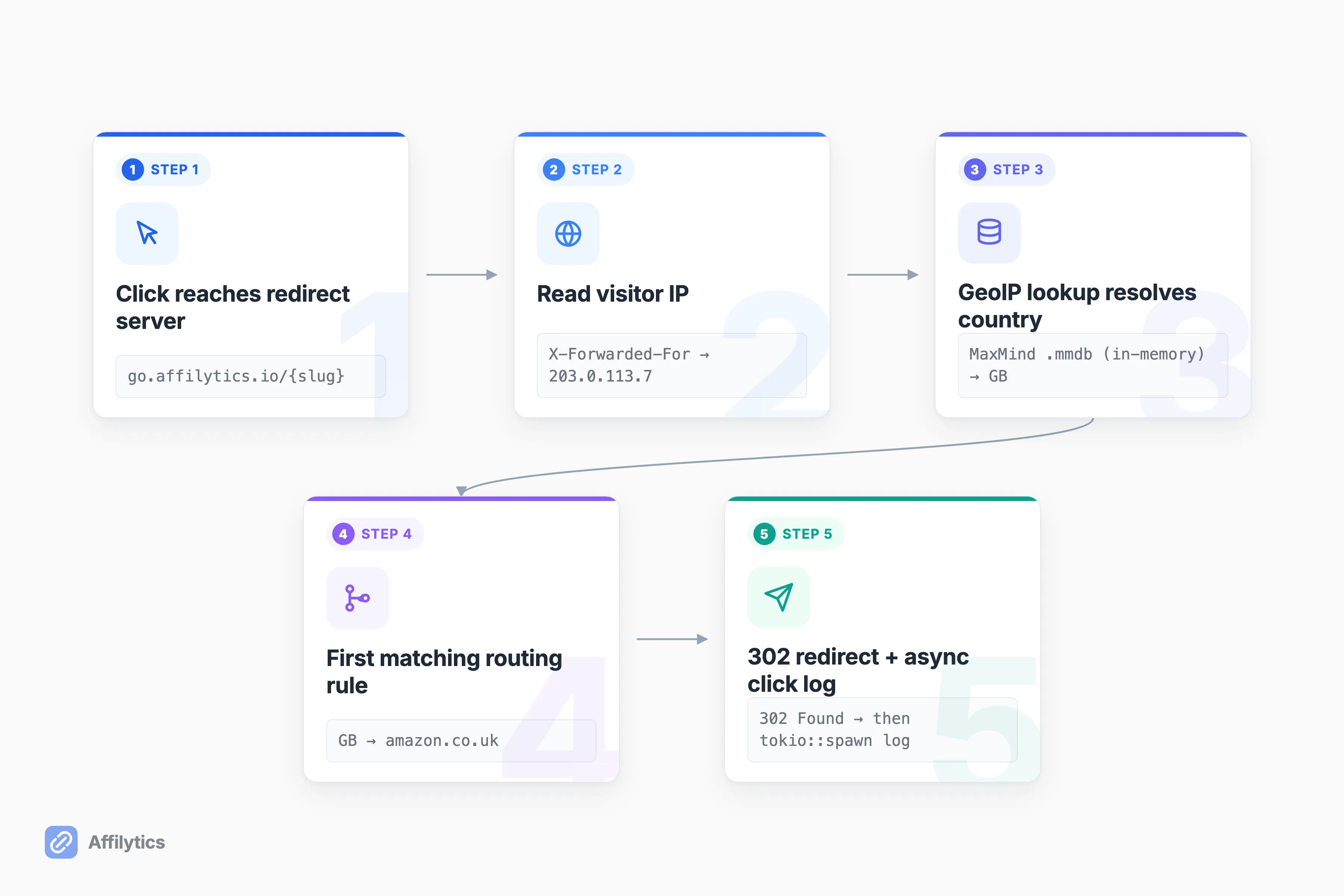
Section titled “The 5-step path a geo-routed click takes”Here’s the entire path, start to finish. A visitor clicks your smart link, the redirect server reads their IP and resolves it to a country, matches that country against your routing rules, returns the first matching rule’s URL as a 302 redirect, and logs the click after the fact. Five steps. Let’s walk each one.
Step 1: The click reaches the redirect server
Section titled “Step 1: The click reaches the redirect server”Plainly: someone clicks go.affilytics.io/{slug}, where {slug} is the short code you chose when you made the link. That request lands on a server whose only job is to resolve the click and redirect it. It doesn’t render a page or run your site’s code.
One layer down: that redirect endpoint is rate-limited so it can’t be hammered. We use tower-governor keyed on the rightmost X-Forwarded-For IP (the rightmost entry is the one you can trust, since upstream proxies append rather than overwrite it), with a default burst of 10 and a replenish of 1 request per second. Health checks are exempt. It’s a small abuse-control detail, but it’s the difference between a redirect service and an open redirect anyone can weaponize.
Step 2: The visitor’s IP becomes a country
Section titled “Step 2: The visitor’s IP becomes a country”Now the server has an IP address. It needs a country.
Plainly: it looks the IP up in a local database that maps IP ranges to countries. No per-click call to a third-party API, no network round-trip, just an in-memory lookup.
One layer down: that database is a MaxMind GeoIP2/GeoLite2 .mmdb file, the binary format that’s become the standard way to resolve an IP to a country. We load it into memory, so a lookup is a fast in-memory hit, not a request that could fail or add latency. This is why the geo decision is essentially free, more on that when we get to latency.
Honest caveat: geolocation is IP-based, so it sees the network, not the person. A visitor connecting through a VPN exit in Germany is routed as a German visitor, because from the server’s view, they are one. That’s expected behavior, and it’s worth knowing before you read your country stats.
Step 3: The country matches a routing rule
Section titled “Step 3: The country matches a routing rule”The server has a country. Now it picks a destination.
Plainly: each smart link carries a list of routing rules, each rule saying “visitors from these countries go here.” The server checks the visitor’s country against those rules and takes the first one that matches.
One layer down: when you write a rule for a list of countries like ["US", "GB", "DE"], we expand it into three individual RoutingRule rows under the hood, one per country. Rules are priority-sorted, and the first country match wins, so resolution is a short, predictable scan, not a fuzzy best-guess.
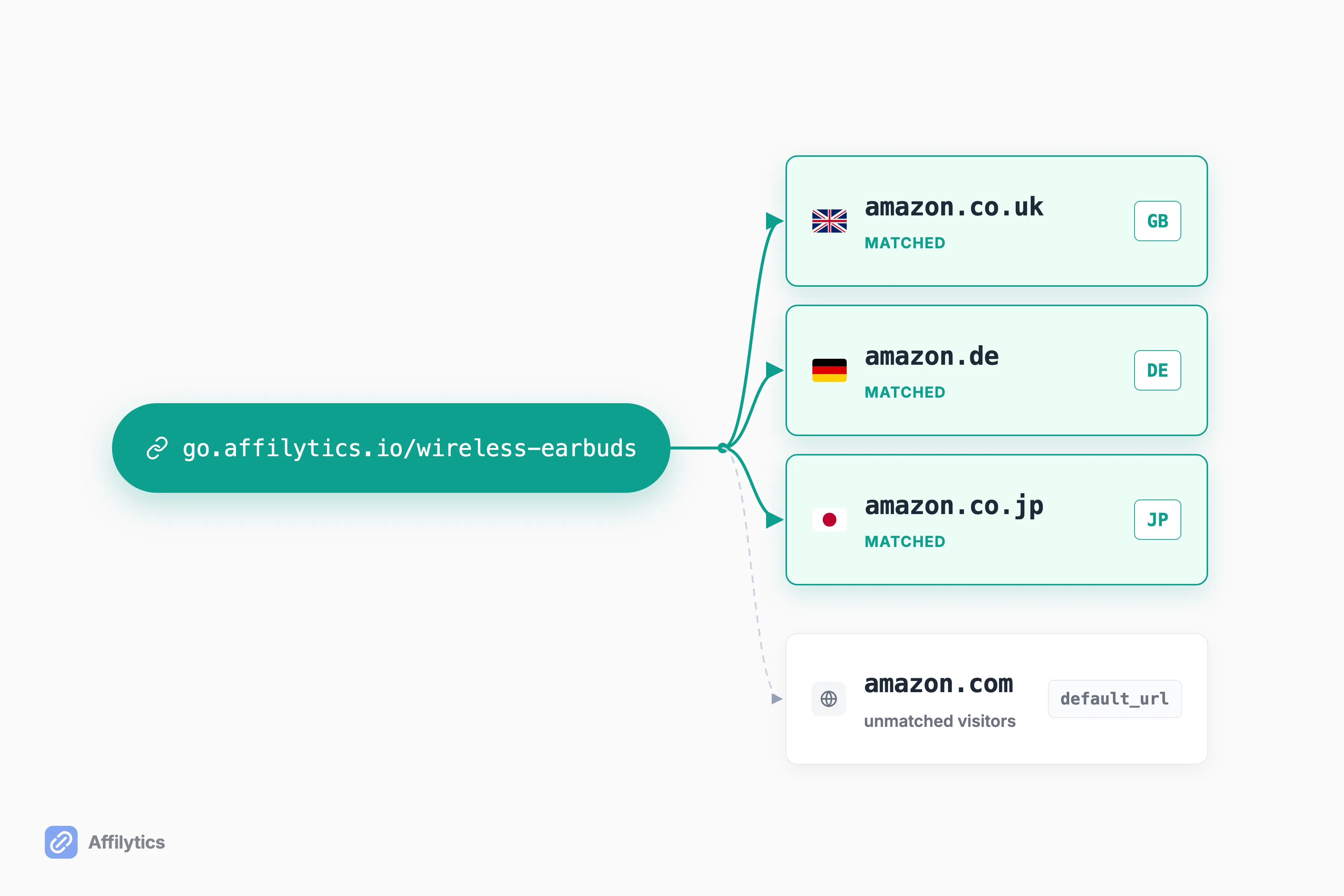
The Amazon case makes it concrete. Your default is amazon.com, and you add rules: UK visitors to amazon.co.uk, German visitors to amazon.de, Japanese visitors to amazon.co.jp. One smart link, four destinations, each with your regional tag on it.
Step 4: A 302 sends the browser to the right store
Section titled “Step 4: A 302 sends the browser to the right store”The destination is chosen. Time to send the browser there.
Plainly: the server answers the click with a redirect, and the browser follows it to the regional store, your affiliate tag intact.
One layer down: the response is a 302 “Found” temporary redirect. Temporary is the right choice here, because the destination for a given link can change (you might re-point a rule, or the visitor’s country differs next time), and a 302 tells browsers and crawlers not to cache the mapping as permanent.
What if no rule matches the visitor’s country? The click falls through to the link’s default_url. That fallback is mandatory in our system: default_url is NOT NULL with a non-empty check at the storage layer, so a smart link literally cannot exist without a destination. A click never dead-ends on a missing rule.
The tag surviving that redirect is its own topic. Getting the store right only pays if the affiliate parameter arrives intact, which is the affiliate click attribution story.
Step 5: The click is logged, without slowing anything down
Section titled “Step 5: The click is logged, without slowing anything down”The visitor is already on their way. Now we record what happened.
Plainly: after the 302 is sent, the server logs the click (country, timestamp, resolution type) in the background. It’s fire-and-forget: the logging runs on its own task with tokio::spawn, and if the insert hiccups, the error is warned and dropped. It never blocks or delays the redirect, because the redirect already left.
One layer down: raw click events roll up into daily per-country stats (click_daily_stats), and we dedupe unique visitors with a hashed IP so the counts mean something without storing raw addresses. That’s the whole path. If you want to build one yourself, we walk it step by step in create a smart link.
So how fast is a geo-routing redirect, really?
Section titled “So how fast is a geo-routing redirect, really?”So how fast is all of this? Fast enough that speed isn’t the interesting question, which surprises people. The routing decision itself is cheap: the country resolution is an in-memory GeoIP lookup, not a network round-trip or a call to an external API, and once we load the link’s rules, a short in-memory scan picks the destination. Server-side, the whole thing resolves in well under 100ms.
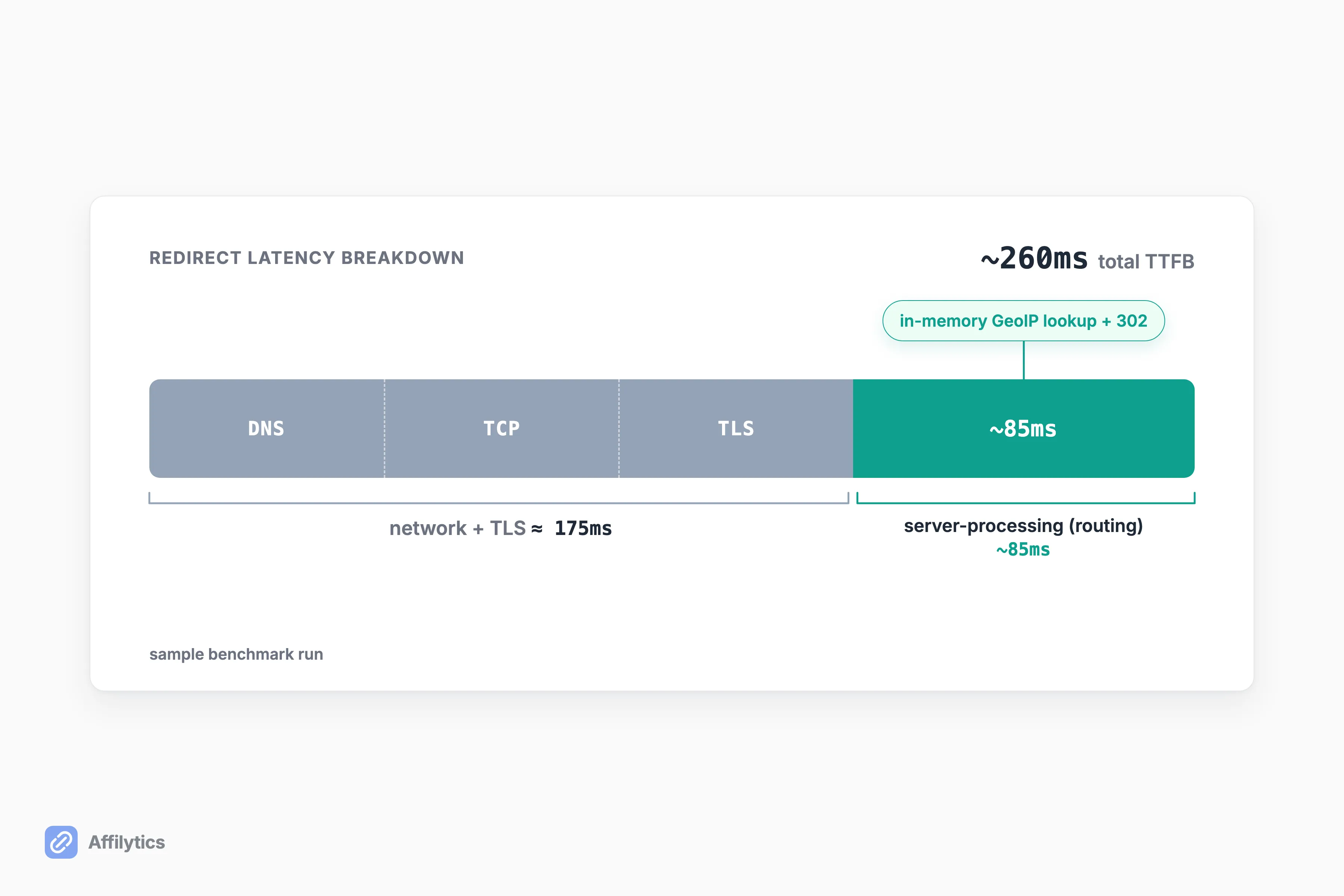
We keep a small redirect-benchmark tool in the repo that times the first-hop 302 with curl, and I’ll quote its sample run rather than a number I invented. In that sample, our redirect resolves server-side in about 85ms, and Geniuslink’s resolves in about 67ms. Both are comfortably under 100ms, and in this sample Geniuslink is a touch quicker on raw server processing. The full time-to-first-byte in the sample is around 260ms, and most of that is DNS, TCP, and TLS negotiation (roughly 175ms), not the routing decision.
The takeaway: a geo-routing redirect is cheap for everyone who builds it competently. The milliseconds are dominated by the network, not the country lookup. Which means speed is not where these tools actually differ.
Where geo-routing tools actually differ
Section titled “Where geo-routing tools actually differ”If the redirect is cheap and the mechanic is the same shape everywhere, what’s left to compete on? Correctness and coverage. The right store, a preserved tag, a working destination, and knowing when any of that breaks. Here’s an honest comparison of three ways to geo-route, from the free floor up.
| Amazon OneLink | Geniuslink | A full pipeline (Affilytics) | |
|---|---|---|---|
| Price | Free | $6/mo including 1,000 clicks, then $3.50 per additional 1,000 | Free plan; paid plan unlocks country rules |
| Destinations | Amazon only, 12 marketplaces | Amazon, iTunes/Apple, Microsoft | Any affiliate network |
| Health monitoring | None | Amazon-only broken / out-of-stock alerts | Cross-network destination monitoring |
| Link discovery | None | None | Scans your YouTube descriptions and crawls your blog/site |
A few honest notes. Amazon’s OneLink is a genuinely good free floor: if you’re Amazon-only and your traffic sits inside its 12 marketplaces, it does the job at zero cost. Its limits are structural, not quality problems, and worth understanding before you lean on it: here’s why OneLink’s on-page redirect quietly breaks. It routes Amazon destinations only, with no broken-link detection, no non-Amazon routing, and no public API.
Geniuslink is a solid incumbent that’s been at this since 2010, and its Product Localization routes across Amazon, iTunes/Apple, and Microsoft, not just Amazon. Its link monitoring, though, is Amazon-only, and its pricing is per-click, so cost scales with your traffic.
Where a full pipeline earns its place is routing any affiliate network to any destination, monitoring that destination’s health across networks, and discovering the affiliate links already sitting in your YouTube descriptions so you know what to route in the first place. If you want the head-to-head, we wrote Geniuslink vs Affilytics separately.
See it run on your own links
Section titled “See it run on your own links”You’ve seen the whole pipeline. The fastest way to understand it is to watch it run on your own links: make a smart link, point a couple of country rules at the right stores, and read the per-country clicks that come back.
Create your free account and you get two full weeks of everything unlocked, no credit card. When the trial ends, your links don’t break: they keep resolving through their default URL, so the worst case is that geo-routing pauses, not that a click dies. That mandatory default_url from Step 4 is doing its job.
What HTTP status code does an affiliate geo-routing link use?
Section titled “What HTTP status code does an affiliate geo-routing link use?”A 302, the “Found” temporary redirect. After the server resolves the visitor’s country and picks a destination, it answers the click with a 302 pointing at that regional URL, and the browser follows it there. Temporary is deliberate: the destination for a country can change over time, so the mapping shouldn’t be cached as permanent the way a 301 would be.
Does a VPN break geo-routing?
Section titled “Does a VPN break geo-routing?”No, but it does change what the routing sees. Geo-routing reads the country from the visitor’s IP address, so a visitor connecting through a VPN is routed by their VPN’s exit country, not their real one. That’s expected behavior rather than a bug, since the server can only route by the network address it’s given.
What happens if a visitor’s country has no routing rule?
Section titled “What happens if a visitor’s country has no routing rule?”They fall through to the link’s default URL, so a click never dead-ends. You set that default when you create the link, and in our system it’s mandatory, a smart link can’t exist without one. Unmatched visitors simply land on the default destination instead of a matching regional rule.
Is geo-routing the same as Amazon OneLink?
Section titled “Is geo-routing the same as Amazon OneLink?”OneLink is one kind of geo-routing: a free, Amazon-only redirector that sends buyers to their local Amazon across 12 marketplaces. A full geo-routing tool is broader. It routes any affiliate network to any destination, not just Amazon, and can monitor whether the destination is still healthy. OneLink is a good floor; it just stops at Amazon’s edge.
Does logging every click slow the redirect down?
Section titled “Does logging every click slow the redirect down?”No. The click is logged asynchronously, after the 302 is already on its way to the browser. The logging runs as a fire-and-forget background task, and if it fails, the error is dropped rather than propagated, so it can never add latency to the redirect itself.