How to Create Affiliate Smart Links: 8 Steps for Beginners
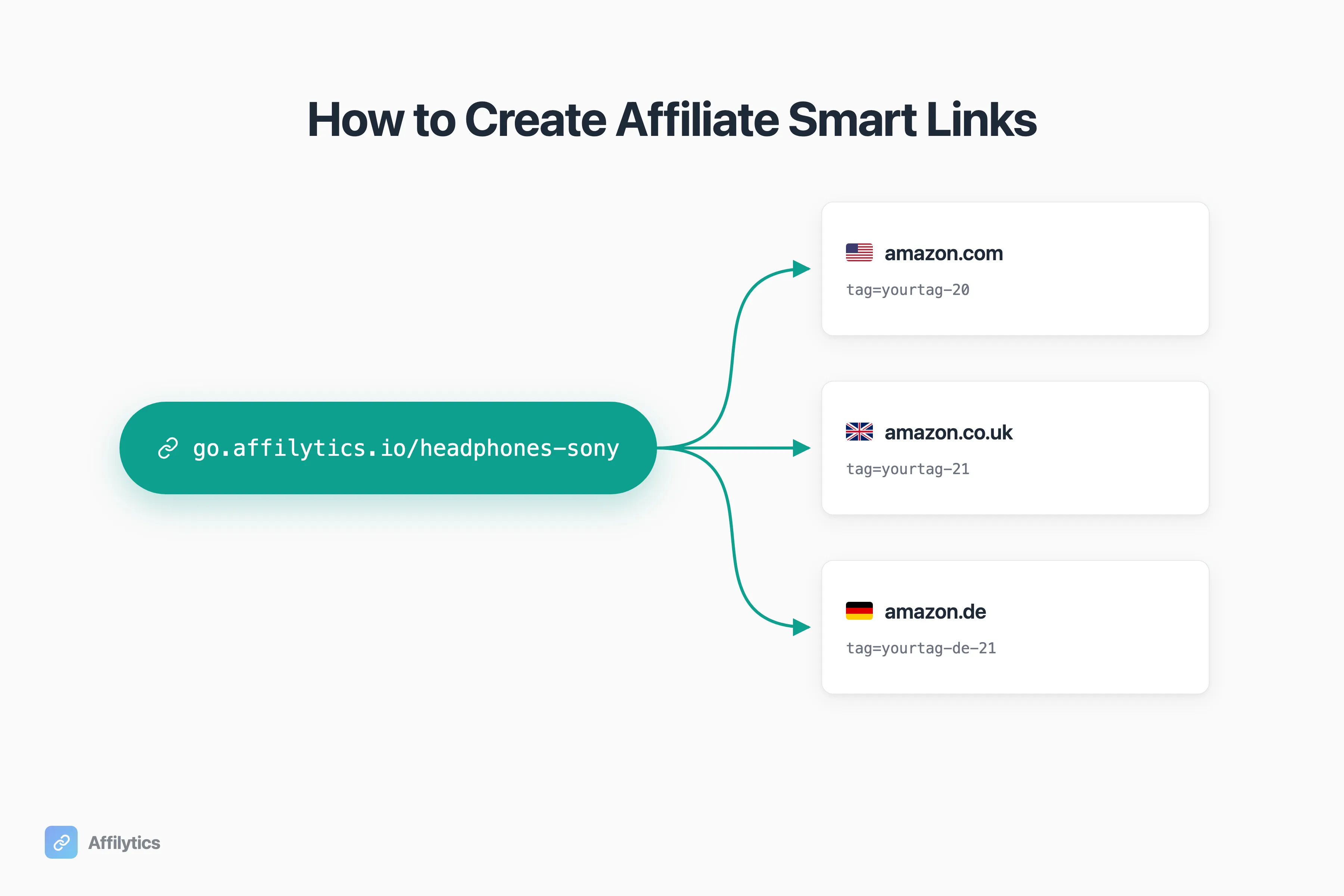
If you share affiliate links with a global audience and you’ve never set up geo-routing, you’re almost certainly losing commission on every non-US click. A smart affiliate link is the cheapest way to plug that leak. Roughly 30 to 50% of most US-based creators’ audience is international, and the default Amazon US link earns nothing on the half of your traffic that lives in London, Berlin, or Toronto.
I’m one of the co-founders of Affilytics, the smart-link platform we built so every click hits the right regional Amazon storefront with your tag attached, and this guide walks you through creating your first smart link in the dashboard.
If you want the deeper why, I’ve covered how geo-routing actually works, how much money your international traffic is worth, other smart-link tools I’ve compared on this blog, and the bigger picture of managing affiliate links across a whole blog. This piece is the setup guide that comes after you’ve decided yes.
I’ll walk through the eight fields and clicks that turn one Amazon URL into a short, country-aware affiliate link, and what to watch for when something looks off.
Smart Links in 60 Seconds (and What They’re Not)
Section titled “Smart Links in 60 Seconds (and What They’re Not)”A smart link is one short URL, in our case go.affilytics.io/<slug>, that routes each visitor to the right regional affiliate destination with the right tag. One link replaces three or four per-region URLs. If you are still deciding which URL shortener to start from, that comparison is worth reading first. If you want to see exactly how that routing happens under the hood, here’s how geo-routing routes each click, step by step.
I’ll use Amazon Associates as the canonical example throughout, because it’s the most common affiliate programme creators use. But smart links route anywhere a URL works: Walmart, Target, Best Buy, eBay, Shopify checkouts, ShareASale or Impact merchants, your own store. Amazon’s just the easiest to walk through.
Quick disambiguation first. If you came here looking for ad-network “smartlinks” that rotate CPA offers and pick the highest-paying campaign per click, that’s a different product; you want one of the ad networks. The smart links I’m covering are for creators with affiliate programs who want one URL that respects each visitor’s country. If those two keep getting tangled for you, I broke down what a smart link actually is in its own post.
Here’s the worked example. Without a smart link, you’d publish three separate URLs to cover three storefronts:
amazon.com/dp/B09V3KXJPB?tag=yourtag-20amazon.co.uk/dp/B09V3KXJPB?tag=yourtag-21amazon.de/dp/B09V3KXJPB?tag=yourtag-de-21And hope viewers pick the right one. Most don’t. With a smart link, you publish one URL, and Affilytics matches each click to the right destination at click time.
Step 1: Get Your Prerequisites Ready
Section titled “Step 1: Get Your Prerequisites Ready”Before you open the form, gather three things.
- An Affilytics account. The free trial works for setup. The free plan supports the default URL only; per-country routing rules require a paid plan.
- Per-region product URLs. Open the product on
amazon.com, copy the URL, then repeat onamazon.co.uk,amazon.de, and any other storefront you want to support. The product ID (theB0XXXXXXpart) is usually identical across regions, only the tag changes. - Your affiliate tag per region. Amazon issues a separate tag for each Associates programme you’ve joined (US, UK, DE, FR, IT, ES, JP, and so on). Keep them somewhere you can grab in two minutes.
If you have these three, the rest is form-filling.
Step 2: Open the Create Smart Link Form
Section titled “Step 2: Open the Create Smart Link Form”In the Affilytics dashboard, click Smart Links in the left sidebar, then the Create Smart Link button in the top right.
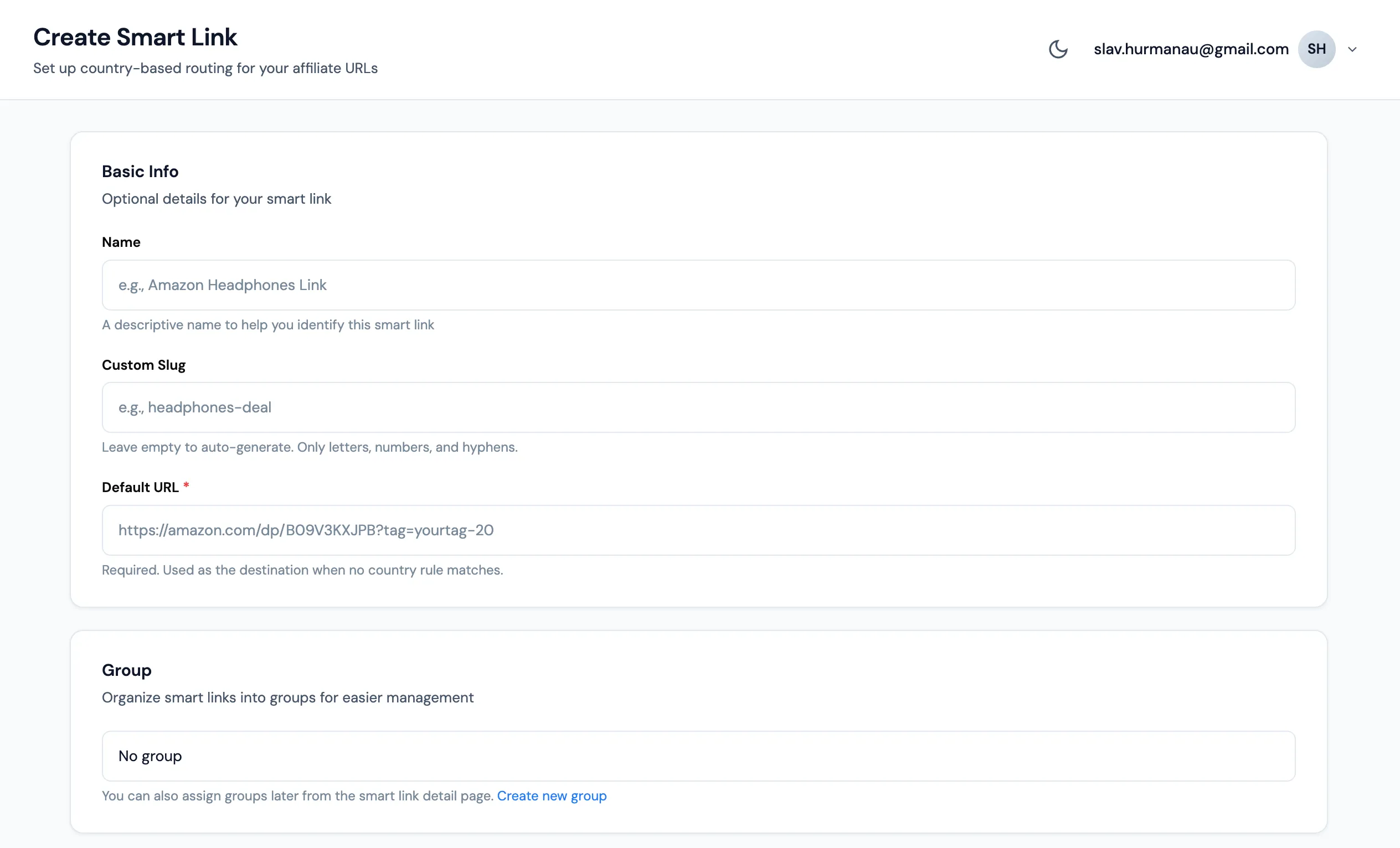
You’ll land on a form titled “Create Smart Link” with the subtitle “Set up country-based routing for your affiliate URLs”. The form has four sections, top to bottom: Basic Info, Group, Routing Rules, and Settings. We’ll work through them in order.
Step 3: Fill in the Basic Info
Section titled “Step 3: Fill in the Basic Info”The Basic Info section has three fields. Two are optional. One is mandatory and matters more than people expect.
| Field | Required | What to put |
|---|---|---|
| Name | Optional | A label for you, not the visitor. Something like “Sony WH-1000XM5 headphones” so you find it in the list six months from now. |
| Custom Slug | Optional | The tail of the short URL. headphones-sony becomes go.affilytics.io/headphones-sony. Letters, numbers, hyphens. Leave it blank and we auto-generate one. |
| Default URL | Required | The fallback destination when no country rule matches. Usually amazon.com with your US tag. |
Slow down on the Default URL. Most creators put Amazon US here, because it catches the widest fallback audience.
Pick a slug you’d be happy reading aloud on a podcast. Short, descriptive, stable.
Step 4: Add Country Routing Rules (the Geo Magic)
Section titled “Step 4: Add Country Routing Rules (the Geo Magic)”This is where smart links earn their name. Each rule says “if the visitor is from country X, send them to URL Y.” The router checks the visitor’s IP, looks up the country, walks the rules top to bottom, and takes the first match. If nothing matches, the Default URL from Step 3 wins.
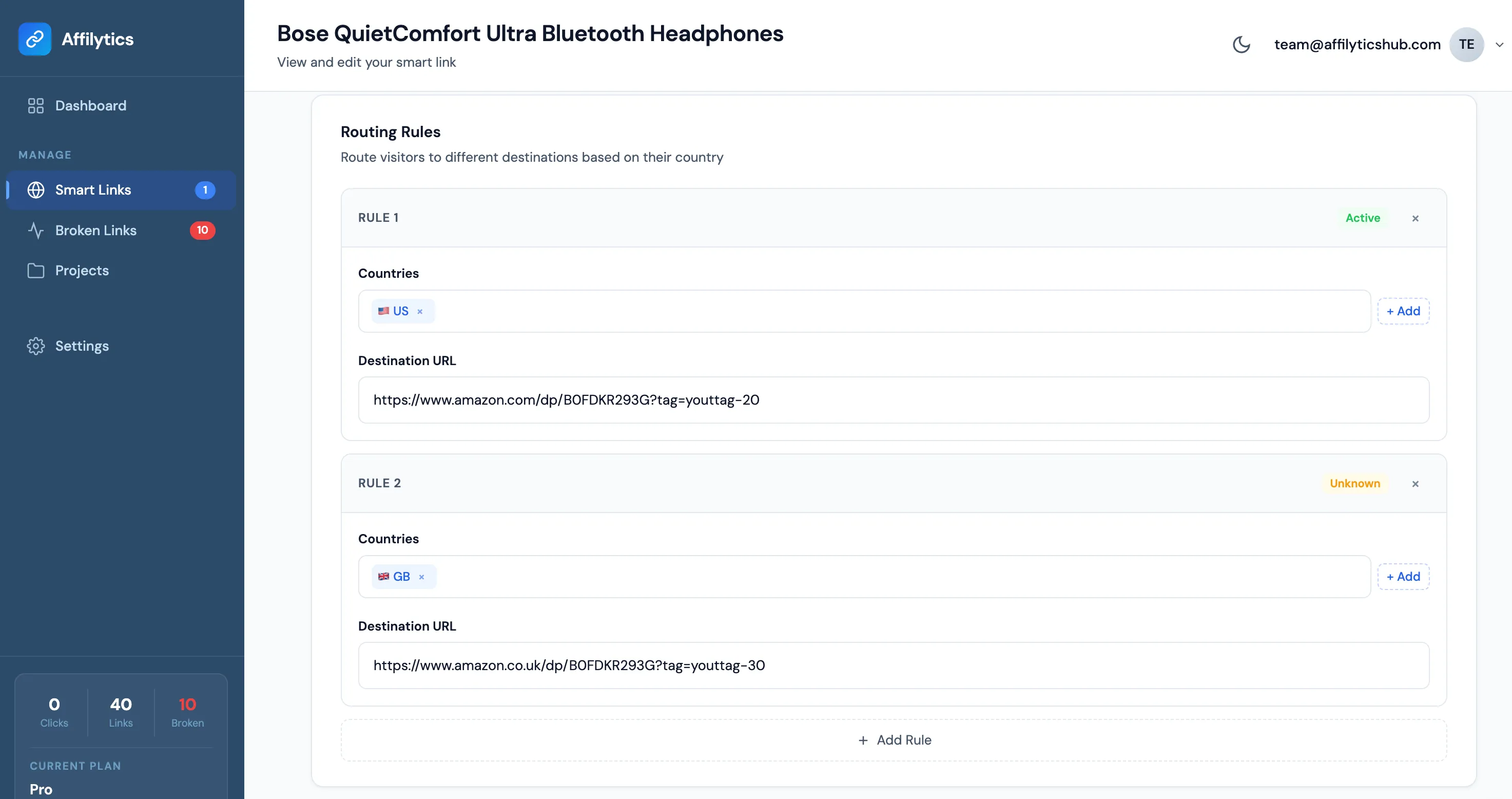
Click + Add Rule. Each rule has two fields: Countries (one or more) and Destination URL. Here’s the worked example with three rules.
| Rule | Countries | Destination URL |
|---|---|---|
| 1 | United States | https://amazon.com/dp/B09V3KXJPB?tag=yourtag-20 |
| 2 | United Kingdom | https://amazon.co.uk/dp/B09V3KXJPB?tag=yourtag-21 |
| 3 | Germany | https://amazon.de/dp/B09V3KXJPB?tag=yourtag-de-21 |
A small green “Added” check appears in each rule header once the fields are valid. Add as many rules as you have storefronts you’ve actually joined. US, UK, DE, FR, IT, ES, CA, JP is a common starting set. Don’t add a rule for a country whose Associates programme you haven’t signed up for, because the tag won’t track.
Why does per-country tagging matter this much? Each Amazon Associates programme tracks commission separately. If a UK visitor lands on amazon.co.uk carrying your US tag, the click counts against the wrong programme, and the answer to “how much did you earn?” is usually $0. The point of a smart link is making sure the right tag rides along with the right storefront, automatically.
Country routing rules require a paid plan. Free-plan links route every visitor to the Default URL only, fine for testing the workflow before you upgrade.
One thing I like about how we ship this: the moment you save a smart link, the destination URLs auto-register with our link checker. So if Amazon redesigns a product page in eight months and one of your destinations starts 404ing, we flag it instead of letting the click silently disappear.
Step 5: Review Settings and Click Create
Section titled “Step 5: Review Settings and Click Create”The Settings section has one toggle worth knowing about. Active is locked on at creation; once the link exists, you can pause it from the detail page if you ever need to.
Four sections, one button. When everything looks right, click Create Smart Link at the bottom right.
Step 6: Copy the Short Link from the Success Modal
Section titled “Step 6: Copy the Short Link from the Success Modal”A modal appears titled “Smart Link Created!” with a green checkmark and your new short URL. Something like go.affilytics.io/headphones-sony. Click Copy to put it on your clipboard.
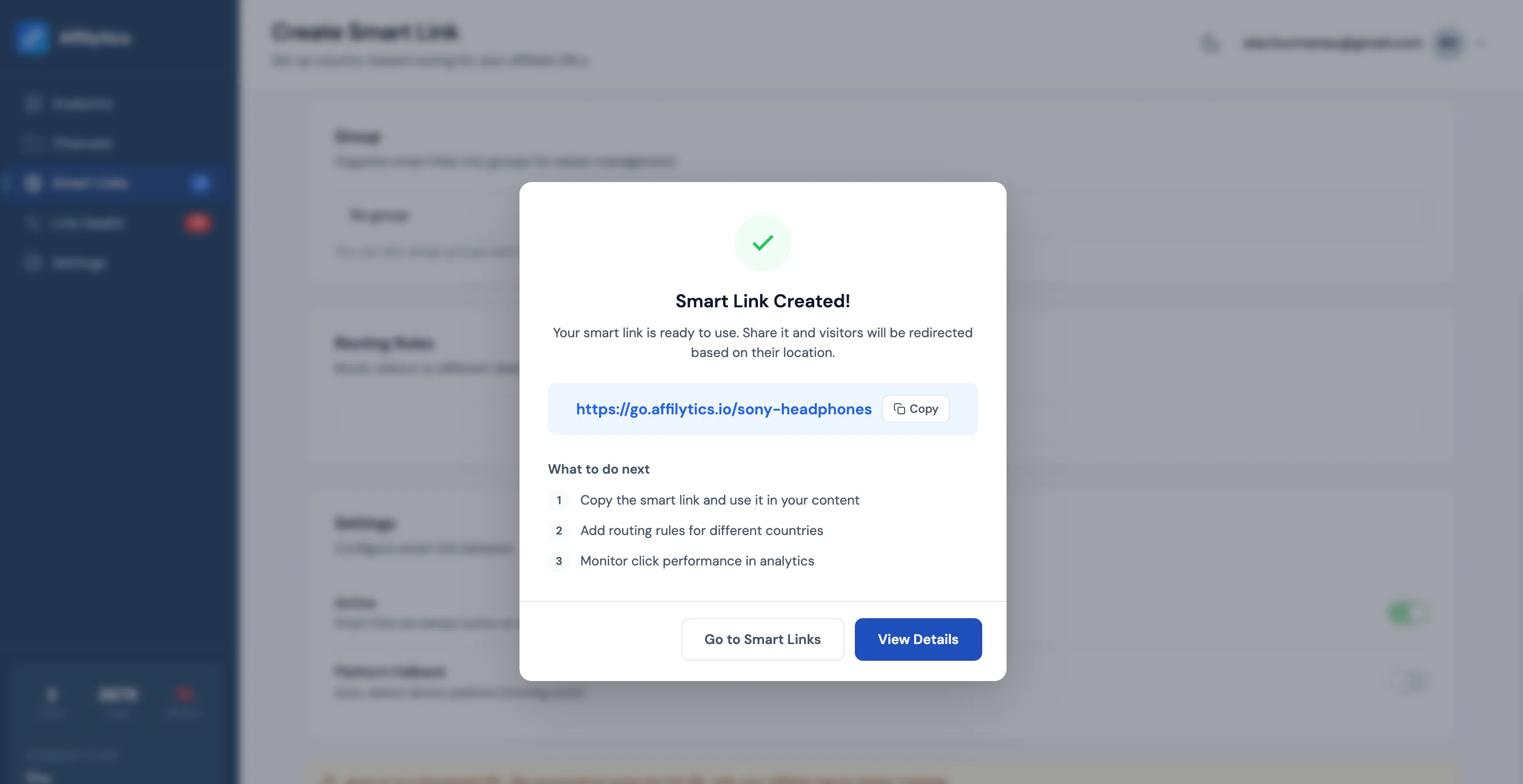
The modal offers two follow-up buttons: View details opens the detail page (analytics, edit rules, copy the URL again), and Go to list drops you back at the smart-links list. You can close the modal without doing either; the short URL is always available later from the detail page or the list.
Step 7: Share the Link
Section titled “Step 7: Share the Link”The short URL behaves like any other URL. Paste it anywhere your audience meets your content. Common placements:
- YouTube descriptions and pinned comments
- Blog posts and review articles
- Pinterest pins
- Instagram link-in-bio tools (Linktree, Beacons, and friends)
- Email newsletters
- TikTok bio links
- Podcast show notes
One URL, every placement. Affilytics resolves the routing at click time, not at link-paste time, so the same go.affilytics.io/<slug> handles a viewer in Seattle and a listener in Munich without you publishing two versions. Each platform handles links a little differently once someone taps through, so it helps to know which links survive on each social platform before you paste.
If YouTube is your main channel, where you drop the link in the description and how you disclose it decide whether the click ever happens. The seven YouTube affiliate link best practices cover the placement and disclosure rules that wrap around the smart link you just made.
Step 8: Verify the Routing Works
Section titled “Step 8: Verify the Routing Works”Before you blast the link to your whole audience, run a 30-second sanity check. This catches the silly stuff (missing tag, wrong storefront URL) before it costs you a week of clicks.
- Open the short URL in a normal browser tab. You should land on the storefront for your own country with your tag visible in the URL bar.
- Open it again in a VPN session set to a country you have a rule for. You should land on that country’s storefront, with that country’s tag.
- Optionally, open the smart link’s detail page and check the click in the analytics view. We log every click with country and destination, so you can confirm the routing fired correctly.
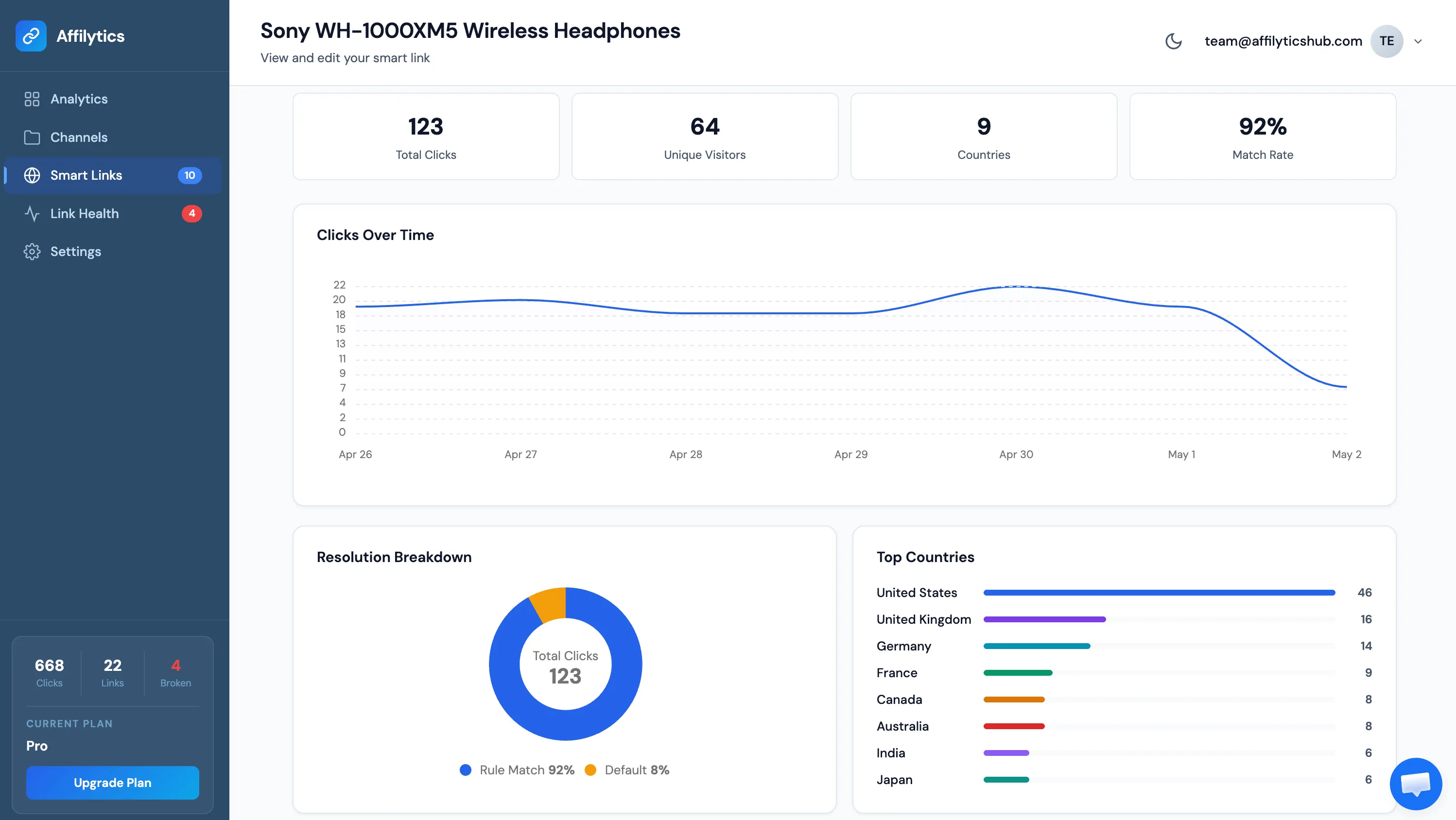
If a click lands on the wrong storefront, the cause is almost always one of three things.
- The visitor’s country isn’t in any rule, so they fell through to the Default URL. Add a rule, or accept the fallback if it’s a low-traffic country.
- A typo in the destination URL, usually a missing or wrong tag query parameter. Edit the rule, save, retest.
- A VPN or extension overriding the visitor’s geolocation. Nothing to fix on your side; their click resolves against whatever IP they’re using.
That’s the whole flow. One short URL, country-aware, with your tag attached on every storefront you’ve joined. The rest is swapping it into the places your audience already clicks.
Create Your First Smart Link in 10 Minutes
Section titled “Create Your First Smart Link in 10 Minutes”Ten minutes from now, your next published affiliate link can be country-aware. Every week you wait is another batch of international clicks landing on the wrong storefront, with the wrong tag, paying you nothing.
Start your free trial (no credit card required), or log in if you already have an account. Open Smart Links, click Create Smart Link, walk the eight fields above, and paste the short URL into your next video description, blog post, or pinned comment. By tomorrow, every click is routed.
Can I change the routing rules later?
Section titled “Can I change the routing rules later?”Yes. Open the smart link from the list, edit any rule, and save. Existing clicks stay in your analytics, future clicks use the new routing. You can also add or remove rules at any time, so if you join a new Associates programme next month, it’s a two-minute update, not a rewrite.
Can I use my own custom domain instead of go.affilytics.io?
Section titled “Can I use my own custom domain instead of go.affilytics.io?”Custom domains are on the roadmap. For now every smart link lives under go.affilytics.io/<slug>. When the feature ships, existing smart links will be portable to your own domain without breaking the routing or the analytics history.
What if Amazon blocks the click or the storefront is down?
Section titled “What if Amazon blocks the click or the storefront is down?”The redirect still fires. Amazon’s response is whatever Amazon serves at that moment, whether that’s the product page, a captcha, or a temporary error. Smart links don’t proxy or cache the storefront page itself, they just hand the visitor over to the right URL with the right tag.
How does this compare to Amazon OneLink?
Section titled “How does this compare to Amazon OneLink?”OneLink is Amazon-only by design. It routes visitors between Amazon’s 13 covered marketplaces and does not support non-Amazon destinations (Walmart, Target, eBay, your own checkout). Affilytics smart links route anywhere. The bigger difference is mechanical: OneLink is a JavaScript snippet you paste into your own website that rewrites outbound Amazon links at render time, so it does nothing when your link is pasted into a YouTube description, Instagram bio, Linktree, or DM. A smart link is a short URL; it works anywhere a URL works.