
Amazon Affiliate Links on Social Media: What Survives Where
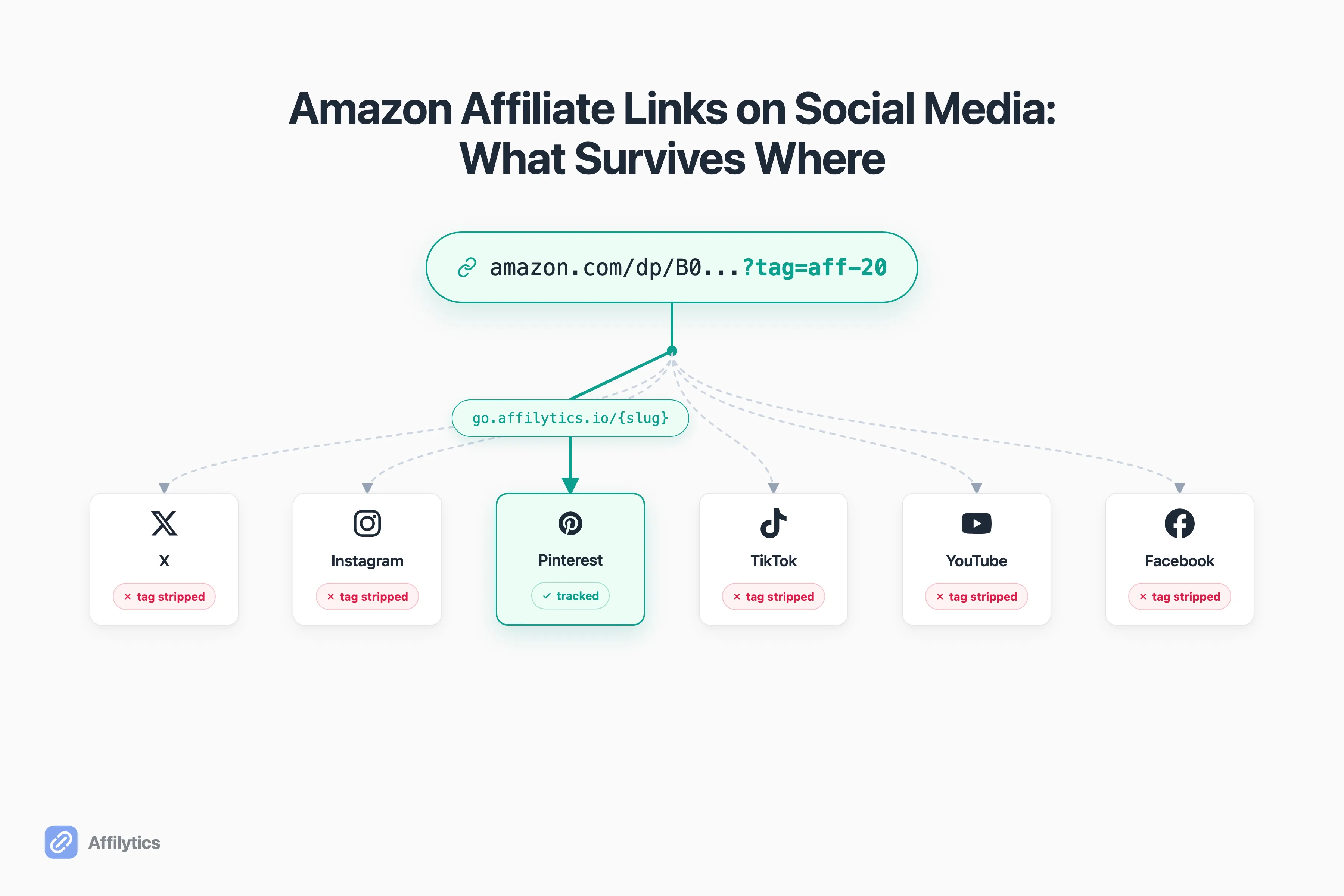
You posted the Amazon affiliate link, the reel did big numbers, and your Associates dashboard shows almost nothing. That gap is the quiet tax of posting Amazon affiliate links on social media, and almost nobody explains why it happens.
We build Affilytics to optimize affiliate income through geo-routed smart links and to flag broken links, so we spend our days watching exactly where an affiliate link survives a click and where it silently dies. That work is also why we ended up building a flat-rate Geniuslink alternative in the first place.
Here is the part that stings: a link can be fully allowed by a platform and still never earn you a cent. Allowed is a policy question. Tracked is a mechanics question. They are not the same thing.
This guide goes platform by platform, X, Instagram, Pinterest, TikTok, YouTube, and Facebook, on what is allowed, what survives a click, and the one setup that keeps your commissions everywhere.
Are Amazon Affiliate Links Allowed on Social Media?
Section titled “Are Amazon Affiliate Links Allowed on Social Media?”Short answer: yes, on almost every major platform, as long as you play by Amazon’s rules. Amazon’s own position is blunt. The company says that what you’re allowed to use on your website is what you’re allowed to use on your social media feeds.
So the gate is not “can I post this.” The gate is “did I follow the rules every time.” Two rules matter most for social.
First, disclosure. Every platform shares this one. Amazon says how to disclose an affiliate link can be as simple as “(paid link)”, “#ad”, or “#CommissionsEarned”, and your account needs the statement “As an Amazon Associate I earn from qualifying purchases.” A vague “#affiliate” tag on its own does not clear the bar. The wording is only half of it: where your disclosure has to sit on each platform is the part that decides whether it counts at all.
Second, link clarity. If you shorten a link, the shortener cannot hide where it points. Amazon’s program policies on link clarity state that you will not use a link shortening service or hyperlink “in a manner that makes it unclear that you are linking to an Amazon Site.” Cloaking the Amazon destination is a violation, even when the rest of your post is clean.
Get those two right and you are allowed almost everywhere. But allowed is the easy part. The hard part is whether the link still earns after someone taps it.
Why Your Amazon Links Quietly Break on Social
Section titled “Why Your Amazon Links Quietly Break on Social”Here is the mechanic nobody walks you through. When someone taps a link inside a social app, the app usually opens it in its own in-app browser rather than handing it to Safari or Chrome. That in-app handling can strip parameters off the URL on the way through.
For an Amazon affiliate link, the parameter that matters is your tracking tag, the ?tag= piece that tells Amazon the sale belongs to you. Strip that, and the page still loads. The product still shows. The visitor can still buy. But the commission goes nowhere, because the link arrived without your name on it. That gap between a click that registers and a sale that never attributes is exactly why stripped parameters cost you the commission.
That is the silent failure. Nothing looks broken. The reel performed, the clicks happened, and the earnings just never showed up.
There is a second, sneakier version of the same problem: the wrong-store click. A US-tagged Amazon.com link works fine for your US audience, but an international viewer who taps it either lands on a store where they cannot easily check out or gets bounced to their local Amazon on a path that drops your tag entirely. The link was never broken. It just sent the click somewhere your commission could not follow.
And this is not hand-waving. Software sitting between your post and the sale increasingly rewrites URLs on purpose. Apple’s Link Tracking Protection already strips known tracking parameters out of links opened in Messages, Mail, and private browsing. It targets ad-click trackers rather than affiliate tags specifically, but the direction of travel is obvious, and every social app’s in-app browser is its own black box with its own rules. Exactly which parameters survive which platform is not publicly documented, so the safe assumption is the pessimistic one: treat any raw ?tag= as something that can quietly fall off in transit, and a stripped Amazon link stops tracking while still looking perfectly healthy.
Now the part most creators get wrong: they assume Amazon’s free geo-tool fixes this. It does not, at least not here. Amazon OneLink is a geo-redirection tool, and Amazon describes it as “Amazon’s geo-redirection solution to help you monetize your international traffic.” It is genuinely good at one job: sending international visitors to their local Amazon storefront. It is also free, with no click-volume limit, included with your Associates membership.
But OneLink works as a JavaScript snippet you paste into your own website. It is a website mechanism, not a portable link. So when you copy a raw Amazon URL and drop it into a tweet or a caption, none of OneLink’s logic travels with it. The snippet lives on your site. The social post is not your site. That is the whole reason OneLink does not survive most social platforms.
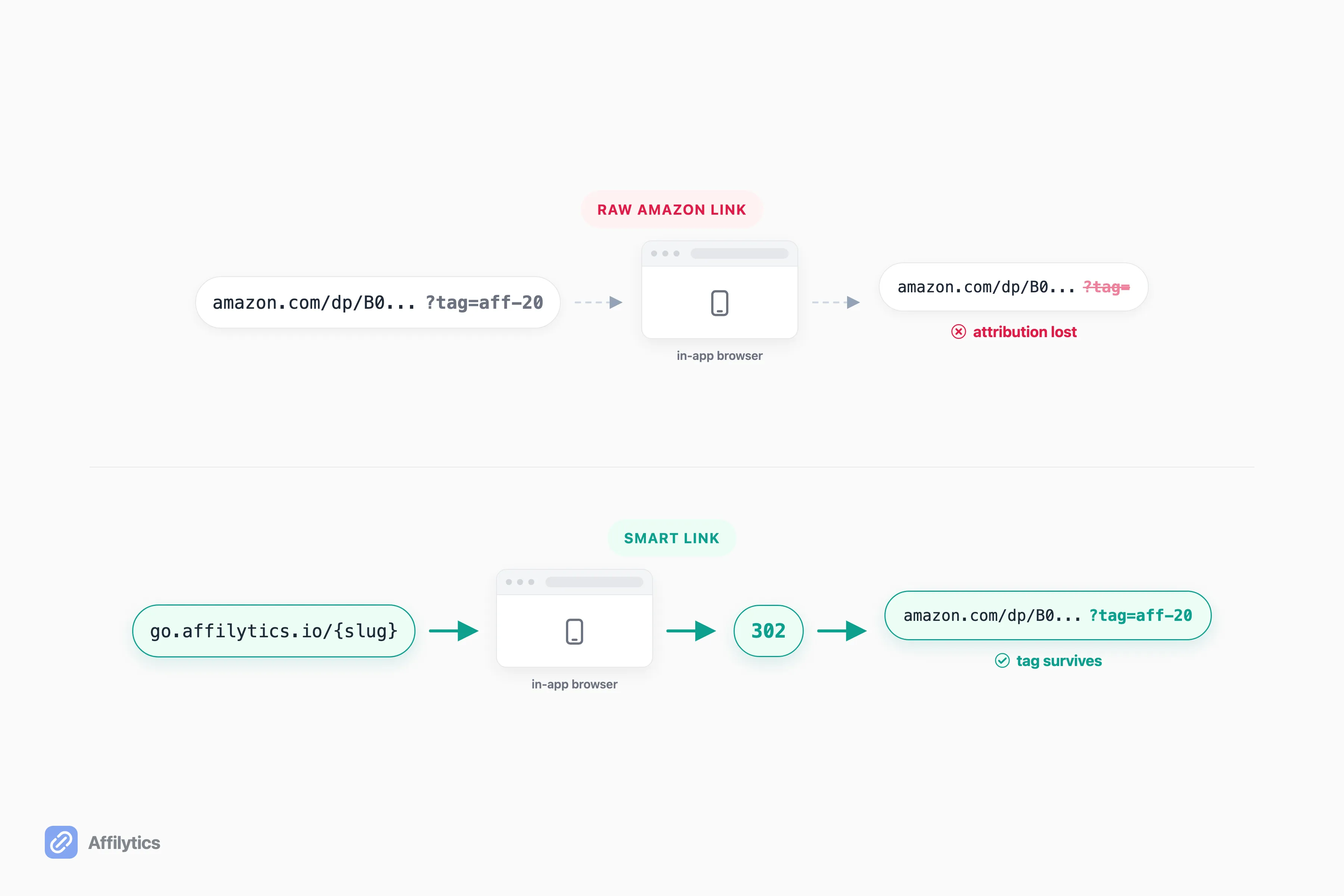
So what actually survives? A redirect that lives on a domain you control. When the link you paste points at your own domain, the platform’s in-app browser handles your domain, and your server resolves the real Amazon destination behind the scenes. The tag is applied at the redirect, not pasted into the post, so the platform never gets a chance to strip it. Hold that idea. We come back to it once we have walked every platform.
Amazon Affiliate Links Platform by Platform
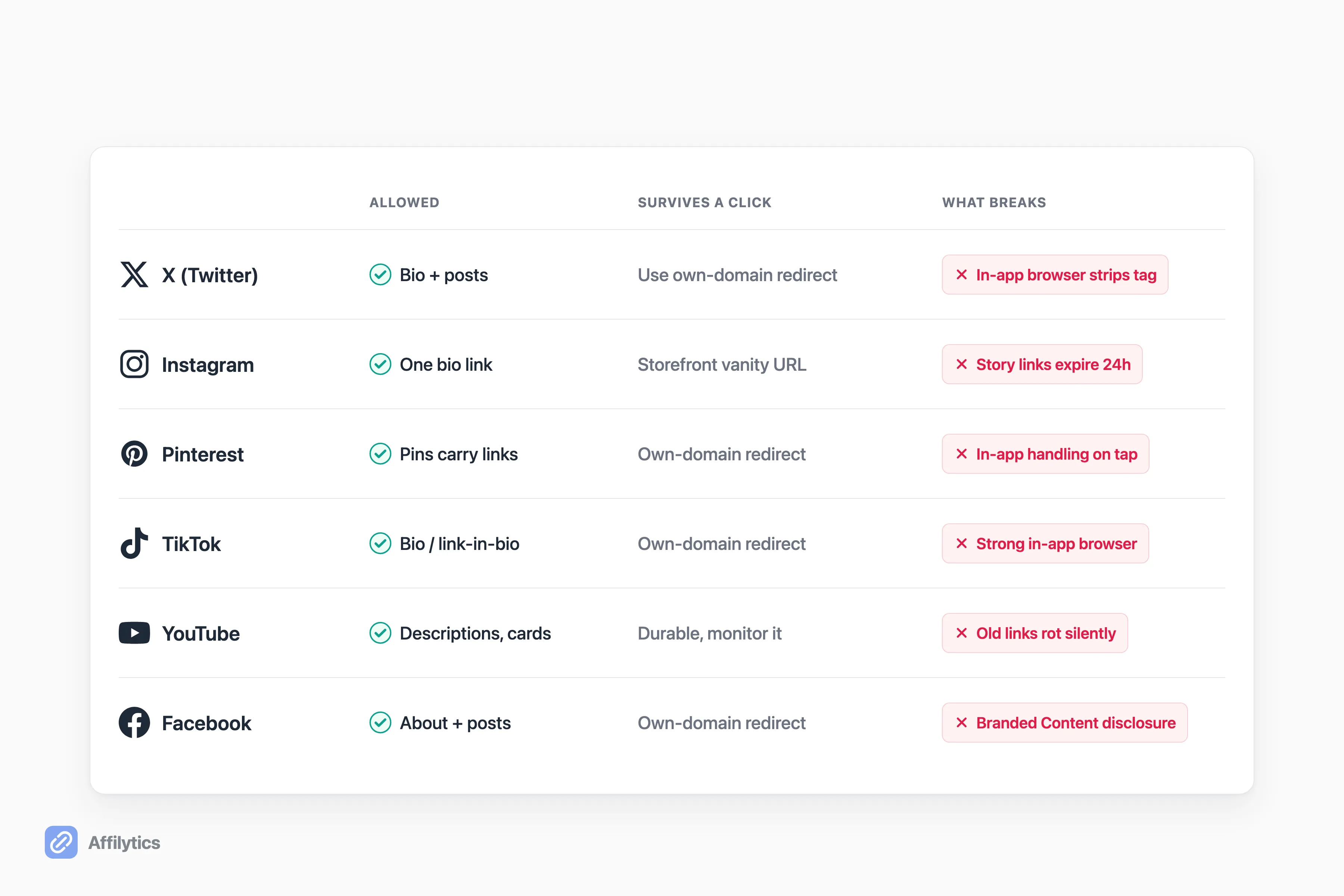
Section titled “Amazon Affiliate Links Platform by Platform”Each platform has its own rules for where links go and its own behavior once a link is tapped. Here is the platform-by-platform breakdown: what is allowed, what survives a click, and what tends to break. Email sits outside this list with a rule of its own, so it is worth knowing what Amazon affiliate links in email actually allow before you send one.
X (Twitter)
Section titled “X (Twitter)”Allowed. You can put Amazon affiliate links both in your bio and directly in posts. X is one of the more link-friendly platforms.
The friction is the click and the character count. X opens tapped links in its in-app browser, so the same parameter-stripping risk applies, and a stripped link stops tracking. The tight character limit also pushes people toward URL shorteners to save space. That is fine, but remember the rule: a shortener cannot hide that the destination is Amazon. Use a redirect you control rather than a generic shortener, and you solve the length problem and the cloaking rule at once.
One more thing about X specifically: a single high-performing post can keep getting clicks for days as it gets reshared. That is great for reach and bad for a stripped link, because the leak compounds with every tap. The mechanics you set up once are doing the earning long after you stop watching the post. If X is your main channel, it is worth seeing in detail where Amazon affiliate links survive on X.
Instagram is the classic single-link trap. Historically you get one tappable link in your bio, and raw URLs typed into captions are not clickable at all. Stories links are tappable, but they are temporary. Amazon notes that Instagram stories that have not been pinned have a 24-hour life span, so a link you share in a story is gone tomorrow unless you pin it to a Highlight.
Because bio space is so scarce, Amazon pushes the influencer storefront vanity page as the “one link” answer here. It is a reasonable share-everywhere URL for the bio slot. Just know it sends every visitor to the same place, and the in-app browser can still strip parameters off an individual product link you share elsewhere. If Instagram is your main channel, it is worth seeing in detail where Amazon affiliate links survive on Instagram.
Pinterest allows affiliate links, and Pins can carry a destination URL straight to a product. For most creators it behaves like the other platforms: the Pin links out, and the same in-app handling questions apply once someone taps through. If Pinterest is your main channel, it is worth seeing in detail how Amazon affiliate links survive on Pinterest.
There is also a newer wrinkle worth knowing. In June 2026, Pinterest added Amazon Storefront linking for creators: connect your Amazon Storefront once, and Pinterest automatically applies your affiliate information whenever you tag an eligible Amazon product, no manual links or IDs. That is a real convenience, and it shortens the path from a Pin to a purchase. But it does not, on its own, solve country-correct routing or tell you when a destination breaks. A native integration sends every tagged click to the same regional store and hands you no health signal, so treat it as complementary to a redirect you control, not a replacement.
TikTok
Section titled “TikTok”TikTok allows affiliate links in your bio and link-in-bio setup, while in-video links are restricted. So most of your affiliate traffic funnels through that single bio link. If that slot points at a Linktree, it is worth knowing what happens to the affiliate links on a Linktree once they are live.
TikTok also has a strong in-app browser, which means parameter survival is fragile here. Worth noting: Amazon’s own social-sharing guidance does not even mention TikTok, so you will not find a TikTok-specific blessing in the official docs. The platform is allowed, but you are on your own for the mechanics, which is exactly when a redirect you control earns its keep.
YouTube
Section titled “YouTube”YouTube is the friendly one. Affiliate links are allowed in video descriptions, pinned comments, and cards, and descriptions are durable. They sit there for years. That is long-form though, and Shorts follow different link rules: a URL in a Short’s description or pinned comment is not clickable at all.
That durability is a double-edged sword. The link you dropped in a description two years ago is still live, still being clicked, and still quietly rotting if the product moved or the tag broke. Old descriptions are where attribution dies of old age. If you publish on YouTube, it is worth adding affiliate links to YouTube the right way from the start, because a description link you never revisit is a link you never notice failing.
Facebook allows affiliate links in your About section and in posts. The platform-specific wrinkle Amazon calls out is disclosure tooling: Amazon names Facebook’s Branded Content tool as a consideration when you share affiliate links there. Use it where it applies, and keep your disclosure in the post itself so it is clear and conspicuous regardless of which surface the link sits on. Facebook has more moving parts than any other platform here, Pages versus Groups, Meta’s own gated affiliate program, and a genuine dispute about what happens to your tag after the tap, so we broke it out into the full Facebook playbook.
What Actually Survives: Smart Links, Geo-Routing, and Keeping Your Commissions
Section titled “What Actually Survives: Smart Links, Geo-Routing, and Keeping Your Commissions”Walk back through every platform above and one fix keeps reappearing: a redirect link on a domain you control. This is the durable answer to both problems, the income one and the loss one.
Lead with the income. Most creators link to Amazon.com by default, but a large share of any audience is international. Those clicks land on the wrong regional store, where the visitor either bails or buys on a site that strips your commission. A smart link fixes this by routing each click to the right place. Here is the mechanic: the visitor hits your go.affilytics.io/{slug} link, we read their country from their IP, match the first routing rule, and send a 302 redirect to the correct regional Amazon store. US clicks go to .com, UK clicks go to .co.uk, German clicks go to .de, and so on. Same link in every post, different destination per visitor.
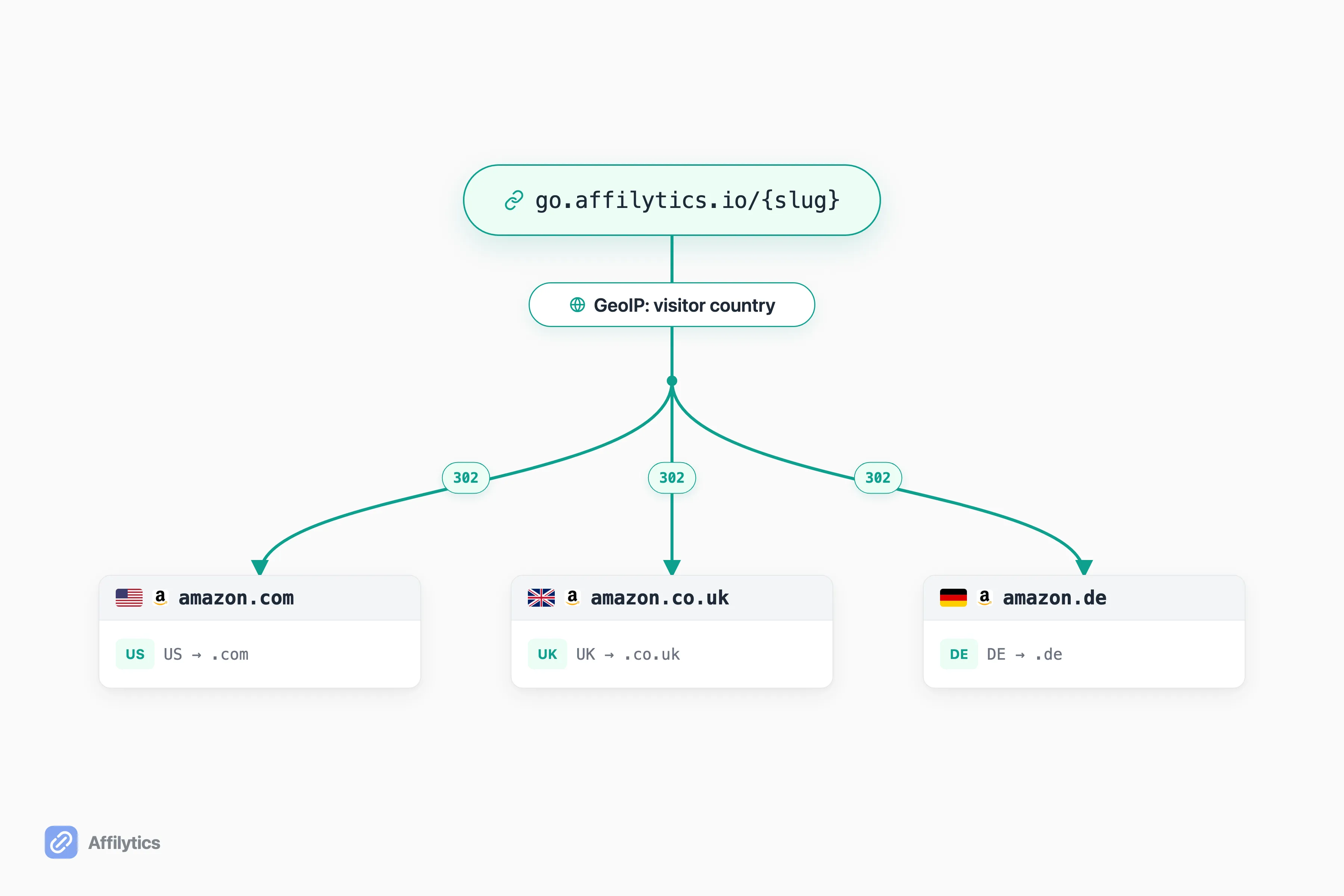
That own-domain redirect is also what survives the URL-stripping problem from the last section. Because the link points at our domain, the platform’s in-app browser handles our domain, and the tagged Amazon destination is resolved server-side. The platform never sees the ?tag= to strip in the first place. One link, country-correct, and tracking intact. This is also where you can learn how geo-routing sends each click to the right Amazon store in more depth, and why your international traffic is worth more than you think.
Now the loss-prevention half. A smart link also gives you a monitoring point. Affilytics runs continuous health checks against the destination behind each smart link, with an 8-status model (active, broken, attribution-lost, out-of-stock, product-unavailable, blocked, unknown, pending), and alerts you when a check detects a change. So when a product goes out of stock or a link rots, you find out, instead of discovering it months later in a flat earnings report.
One honesty note on scope. Affilytics discovers and monitors the affiliate links in your YouTube descriptions. It does not crawl your Instagram, TikTok, Pinterest, X, or Facebook posts. On those platforms, the value is the redirect layer itself: you create the smart link, paste it wherever you post, and we route and monitor the destination. Creating the link and swapping it into a post is a manual step you do once per link.
Honest competitor note, because you have options. Amazon OneLink is free and good at international redirection, but as we covered, it lives on your website and does not travel onto social. Geniuslink is the incumbent paid option, and its geni.us redirect survives social URL-stripping the same way an own-domain redirect does, with Product Localization sending each buyer to their local Amazon store and Link Monitoring alerting on broken or out-of-stock products. Its pricing is per-click: a $6/mo base tier includes 1,000 clicks, then $3.50 per additional 1,000 clicks, with a custom domain available as a flat +$50/mo add-on and no free tier (a 14-day trial, card required). Geniuslink is best for creators who want per-click pricing and a decade-old incumbent. The wedge for us is a free plan, flat framing, and the discovery layer for your YouTube footprint that paste-only tools do not have.
A Quick Setup That Survives Every Platform
Section titled “A Quick Setup That Survives Every Platform”Here is the short version you can act on today. Five steps, in order.
- Disclose in the medium of the post. Amazon is specific here: the disclosure must be in the medium of the recommendation, text for text, voice for voice. Bake “(paid link)” or “#ad” into the caption, not just a profile bio.
- Stop pasting raw Amazon URLs. Use one redirect link you control, on your own domain, so the tracking tag never reaches the platform to be stripped.
- Set country routing. Add rules so a non-US click lands on its local Amazon store instead of bouncing off the wrong region.
- Monitor the destination. Point a health check at the link so a dead or out-of-stock product surfaces as an alert, not as a silent dip.
- Use your Amazon storefront vanity URL for bio slots. Where a platform gives you exactly one link (Instagram bio, link-in-bio), the storefront vanity page is Amazon’s recommended single link for discovery placements.
Do those five and the same link behaves the same way on X, Instagram, Pinterest, TikTok, YouTube, and Facebook. No per-platform guesswork, no silent attribution leaks.
Keep Your Commissions Across Every Platform
Section titled “Keep Your Commissions Across Every Platform”The fastest way to see this work is to do it on your own traffic. Start your free trial, two full weeks of everything unlocked, no credit card. Create one smart link, swap it into your highest-traffic post, and watch country routing and destination monitoring kick in on a link you actually care about.
If you would rather weigh the paid incumbent first, compare the flat-rate option against per-click pricing before you commit. Either way, the goal is the same: one link that survives every platform and keeps the commission you already earned.
Can you post Amazon affiliate links directly on social media?
Section titled “Can you post Amazon affiliate links directly on social media?”Yes, on most platforms, as long as you follow Amazon’s program rules and disclose that the link is affiliate. The catch is that allowed is not the same as tracked. Raw Amazon links pasted into posts often lose their tracking tag inside the platform’s in-app browser, so the click looks fine but the sale never attributes to you.
Why do my Amazon affiliate links stop tracking on Instagram or TikTok?
Section titled “Why do my Amazon affiliate links stop tracking on Instagram or TikTok?”Social platforms open links in their own in-app browser, and that handling can strip the tracking parameters that attribute the sale to you. The fix is a redirect link on your own domain. Because the visitor first hits your domain, the redirect resolves the real Amazon destination server-side, so the tag survives the platform’s URL handling.
Does Amazon OneLink work on social media?
Section titled “Does Amazon OneLink work on social media?”Not for links you paste into posts. OneLink is a JavaScript snippet you install on your own website, so it only geo-redirects visitors who are already on your site. A raw Amazon URL dropped into a tweet, caption, or bio carries none of that logic, which is why OneLink does not travel onto social.
What is the best way to share one Amazon link across every platform?
Section titled “What is the best way to share one Amazon link across every platform?”Use a smart redirect link on a domain you control that geo-routes each click by visitor country and can be monitored when the destination breaks. For single-link bio slots where you only get one URL, the Amazon influencer storefront vanity page is Amazon’s recommended fallback.
Do I have to disclose affiliate links on every social platform?
Section titled “Do I have to disclose affiliate links on every social platform?”Yes. Both the FTC’s disclosure rules for social media influencers and Amazon require a clear, conspicuous disclosure in the same medium as the post, text disclosure for text, voice disclosure for voice. Amazon accepts simple language like (paid link), #ad, or #CommissionsEarned, and a tag like #affiliate on its own is not enough.