
11 Best YouTube Affiliate Tools for Creators in 2026
You typed “youtube affiliate tools” hoping for a real answer and got a wall of lists that, as one creator put it, are “mostly affiliate spam shit.” The good ones, the same creator said, “actually solve real problems” (u/Miguel07Alm, r/NewTubers).
We build Affilytics, geo-routed smart links plus automated link-health monitoring for creators, so we live in the same Reddit threads where YouTubers ask for tools that actually move affiliate income. One tool on this list is ours. We’ll flag it plainly when we get there.
If you want the rest of the link-side workflow after this, our guide to YouTube affiliate link best practices goes deeper on placement and disclosure.
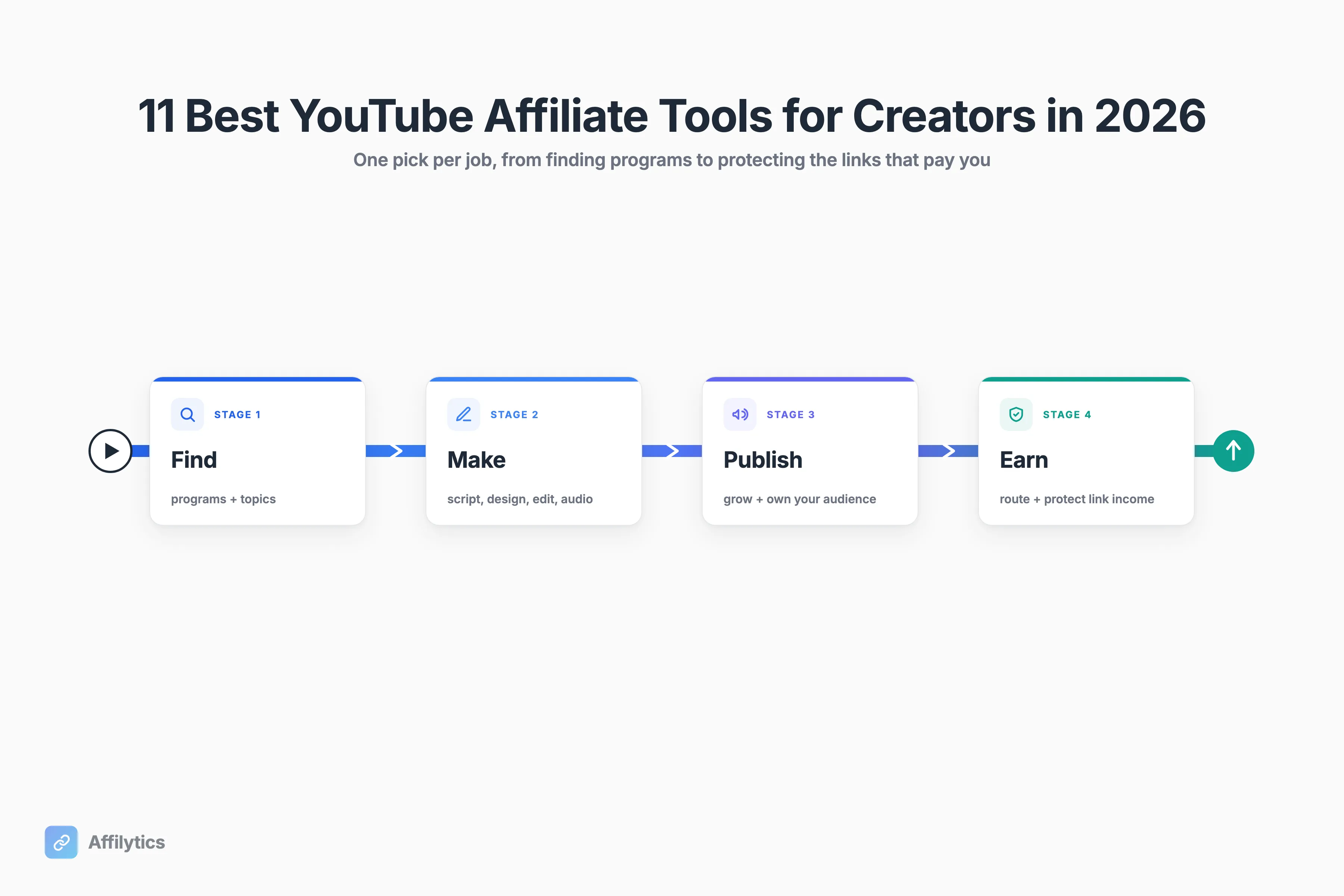
This is one pick per job across the whole workflow: find programs to promote, research what to make, script and edit it, publish and grow, then earn and protect the affiliate links that actually pay you.
How We Picked These 11 Tools
Section titled “How We Picked These 11 Tools”Creators are allergic to tool roundups, and they should be. The top comment on that same thread said the post “straight up reads like product advertisements,” and another creator pushed back that solo YouTubers have “WAY to much going on” already, that “all this stuff costs too” (u/Localmate25, r/NewTubers).
So here’s the bar we used:
- One job per tool. No two tools on this list overlap, so you’re never paying twice for the same thing.
- It has to solve a real problem, not a problem invented to sell software.
- It has to be realistic for a solo creator’s time and money, not an agency stack.
And the disclosure that earns the rest: one of these eleven, Affilytics (number 10), is our own product. We’ll be specific about what it does and what it doesn’t, the same way we are about every other tool here.
The 11 YouTube Affiliate Tools at a Glance
Section titled “The 11 YouTube Affiliate Tools at a Glance”Here’s the whole list before we dig in, so you can scan for the jobs you actually have open right now.
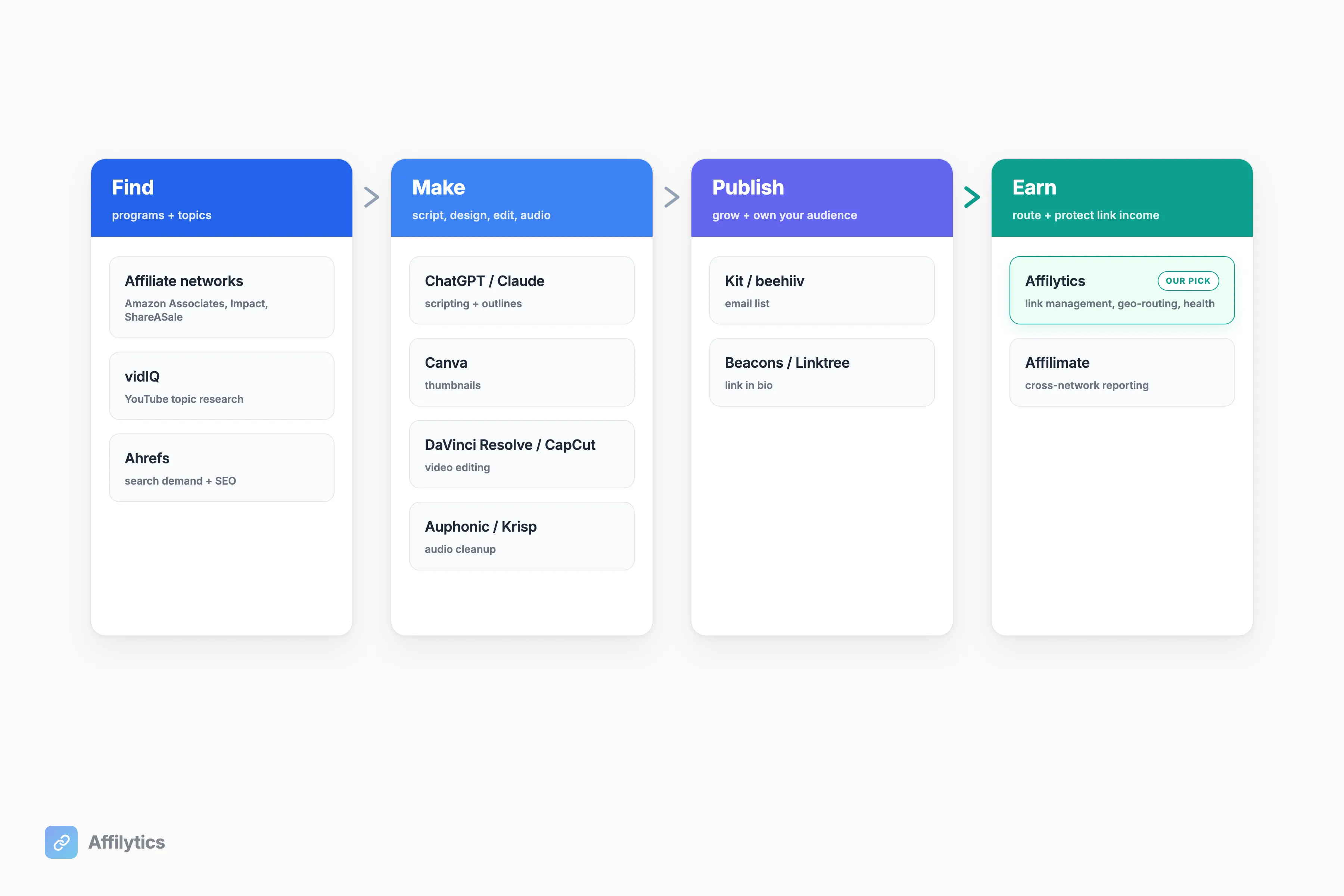
| # | The job it does | Best for | Free option? |
|---|---|---|---|
| 1 | Find programs to join (networks) | Every YouTube affiliate | Amazon Associates is free to join |
| 2 | YouTube keyword and competitor research | Picking what to make next | Yes, vidIQ has a free plan |
| 3 | Search-demand and SEO research | Creators who also rank in search | Yes, Ahrefs Free gives limited Site Explorer access |
| 4 | AI scripting and ideation | Beating the blank page | Yes, both ChatGPT and Claude have free plans |
| 5 | Thumbnails and graphic design | Creators without a designer | Yes, Canva has a free plan |
| 6 | Video editing | Free pro editing or fast short-form | Yes, DaVinci Resolve has a genuinely usable free version (Studio is a one-time license) |
| 7 | Audio cleanup | Voiceover and bad-room audio | Yes, Auphonic gives 2 hours of free audio processing per month; Krisp has a free tier |
| 8 | Email list and newsletter | Owning your audience | Yes, Kit is free up to 1,000 subscribers; beehiiv’s Launch plan is free up to 2,500 |
| 9 | Link-in-bio landing page | Routing Shorts traffic to many links | Yes, both Beacons and Linktree have free tiers |
| 10 | Affiliate-link management, geo-routing, health | Catalogs leaking commission | Affilytics has a free plan |
| 11 | Cross-network commission reporting | Earnings across many programs | No, Affilimate’s pricing is demo-gated |
Pricing pages move all the time, so spot-check each link before you rely on a specific number. The broad answer is that most of this stack has a usable free option, and a couple (Amazon Associates and Ahrefs Free) cost nothing to set up at all.
Find What to Promote
Section titled “Find What to Promote”Before any editing software or thumbnail tool, you need two things: programs that pay you and topics worth covering. Three tools handle that side.
1. Affiliate Networks (Amazon Associates, Impact, ShareASale)
Section titled “1. Affiliate Networks (Amazon Associates, Impact, ShareASale)”This is where you actually get links to promote. Amazon Associates is the default for physical products because almost everything is on Amazon. Networks like Impact and ShareASale are where you find software and brand programs that don’t live on Amazon. YouTube also runs the YouTube Shopping affiliate program of its own, which lets eligible channels tag partnered merchants’ products inside the video instead of only in the description.
Best for: every YouTube affiliate. Start with Amazon Associates, then add a network for the non-Amazon brands you actually use on camera.
Watch-outs: Amazon Associates commission rates vary by category, roughly 1% to 10% for most categories, so a high-volume category at 1% pays very differently from a 10% one. Approval can also take time, and Amazon expects you to make a few qualifying sales early on. One thing the rate card hides: if a big slice of your audience is outside the US, a plain Amazon.com link sends them to a store they may not be able to buy from, which quietly changes the math on every link. We get into that in how geo-routing affiliate links works for international audiences.
2. vidIQ, YouTube Keyword and Competitor Research
Section titled “2. vidIQ, YouTube Keyword and Competitor Research”vidIQ tells you what your audience actually searches on YouTube, what your competitors rank for, and which products are pulling review demand. For an affiliate channel, that’s the difference between reviewing a product nobody’s looking for and catching a wave of search interest early.
Best for: creators deciding which product or video to make next, instead of guessing.
Watch-outs: the free plan is enough to start; vidIQ’s Boost tier (around $17/mo) and Max plans unlock the heavier keyword and ideation features. Check vidIQ’s plans page before you commit. TubeBuddy is the other big name in this category and worth a look if vidIQ doesn’t fit how you work.
3. Ahrefs, Search-Demand and SEO Research
Section titled “3. Ahrefs, Search-Demand and SEO Research”Ahrefs confirms that a review topic has real demand in Google and YouTube search before you spend a weekend filming it. It’s also where you find comparison keywords (“X vs Y,” “best X under $100”) that convert well for affiliate content.
Best for: creators who also rank video or written content in search, not just chasing the YouTube algorithm.
Watch-outs: it’s a pricier, pro-grade tool, with paid plans starting around $29/mo (Starter) and going up to enterprise. The free Ahrefs plan lets you sample Site Explorer and Site Audit before committing. Semrush is the main alternative if you want to compare before paying anyone.
Make the Content
Section titled “Make the Content”Now you turn a topic into a finished video: script, design, edit, audio. Four tools, and this is the stack creators actually name when they talk about beating burnout. As one put it, “YouTube burnout isn’t about lacking discipline, it’s about having a shit workflow” (u/Miguel07Alm, r/NewTubers).
4. ChatGPT / Claude, AI Scripting and Ideation
Section titled “4. ChatGPT / Claude, AI Scripting and Ideation”ChatGPT and Claude are fast ways to draft a review script, outline a comparison, brainstorm hooks, or rough out a description. If the blank page is what kills your upload schedule, this is the fix.
Best for: creators who get stuck starting, or who batch-script several videos in one sitting.
Watch-outs: edit everything for accuracy and your own voice. Don’t publish raw AI copy, especially in a review where a wrong spec or price makes you look careless. Both ChatGPT and Claude have free plans; paid tiers (Plus or Pro on ChatGPT, Pro on Claude) hover around $17 to $20 a month and unlock better models, longer context, and higher daily limits.
5. Canva, Thumbnails and Graphic Design
Section titled “5. Canva, Thumbnails and Graphic Design”Canva is how a solo creator without a designer makes thumbnails that earn the click, plus channel art and simple in-video graphics. The click-through on your thumbnail decides whether the video you just spent ten hours on gets watched at all.
Best for: solo creators who can’t justify hiring a designer yet.
Watch-outs: the free plan covers most thumbnail work. Canva Pro unlocks the brand kit, the background remover, premium templates, and more storage, useful as soon as you start batching thumbnails for a series.
6. DaVinci Resolve / CapCut, Video Editing
Section titled “6. DaVinci Resolve / CapCut, Video Editing”DaVinci Resolve is a pro-grade editor with a genuinely usable free version, which is why it shows up constantly in creator tool threads. CapCut is the go-to for fast short-form cuts.
Best for: DaVinci if you want a free editor that grows with you. CapCut if most of your output is Shorts.
Watch-outs: DaVinci Studio is a one-time license (currently $295 on the Blackmagic site), not a subscription, which is friendly to creators who hate recurring bills. If you rely on a specific third-party plugin like Reactor, double-check current Resolve version support before installing, the rules around free third-party plugins have shifted over the years. CapCut is great for short-form, but spot-check which features sit behind its Pro tier before you build a workflow around a specific one.
7. Auphonic / Krisp, Audio Cleanup
Section titled “7. Auphonic / Krisp, Audio Cleanup”Bad audio loses viewers faster than bad video. Auphonic auto-levels and cleans up narration so your voiceover sounds even. Krisp handles noise cancellation and accurate transcription, which is handy when you record in a room that wasn’t built for it.
Best for: talking-head and voiceover reviewers, and anyone fighting a noisy recording space.
Watch-outs: Auphonic’s free tier covers up to 2 hours of audio processing per month (see auphonic.com/pricing for current credit packs). Krisp’s free tier covers calls, transcripts, and action items, and the paid plans unlock unlimited use across more apps.
Publish and Grow Your Audience
Section titled “Publish and Grow Your Audience”Two tools here, and they share a theme: stop renting your audience. The YouTube algorithm decides who sees your videos, and the new Amazon Associates report decides how much you can even see about your own sales. The fix is owning a direct line to your viewers.
8. Kit (ConvertKit) / beehiiv, Email List and Newsletter
Section titled “8. Kit (ConvertKit) / beehiiv, Email List and Newsletter”Kit and beehiiv let you capture an email list and send affiliate-aware newsletters. An email list is the one audience an algorithm can’t take away from you, and it’s where repeat affiliate clicks come from after a video falls off the homepage.
Best for: creators turning one-time views into a durable audience that buys more than once.
Watch-outs: Kit’s free plan covers up to 1,000 subscribers; beehiiv’s Launch plan is free up to 2,500. After that, both scale by audience size, with Kit’s Creator tier starting around $33/mo and beehiiv’s Scale tier around $43/mo.
9. Beacons / Linktree, Link-in-Bio Landing Page
Section titled “9. Beacons / Linktree, Link-in-Bio Landing Page”Beacons and Linktree give you one tidy landing page for everything: your gear list, current offers, socials, and affiliate links. It’s where Shorts and community-tab traffic should go when you can’t fit every link in a description.
Best for: creators driving traffic to many links from places that only allow one.
Watch-outs: both have free tiers, and Linktree’s paid tiers start around $6/mo (Starter) while Beacons’ Creator plan sits around $30/mo. Paid plans unlock custom domains, deeper analytics, and built-in selling. A link-in-bio page holds your links, but it doesn’t route a click to the viewer’s local store or tell you when one of those links breaks. That’s the next job.
Earn and Protect Your Affiliate Link Income
Section titled “Earn and Protect Your Affiliate Link Income”Here’s the half most lists skip entirely. The affiliate links in your descriptions are the thing that actually pays you, and they decay. One creator summed it up exactly: “I probably have 100+ affiliate links across my videos, and I’ve honestly never checked most of them after publishing… Feels like I might have been leaking revenue without even realizing it” (u/Hot_Car_9447, r/NewTubers). Another creator asked the room flat out whether “anyone here uses a tool to check their YouTube videos’ descriptions for broken or outdated links” (u/chadidi, r/Affiliatemarketing).
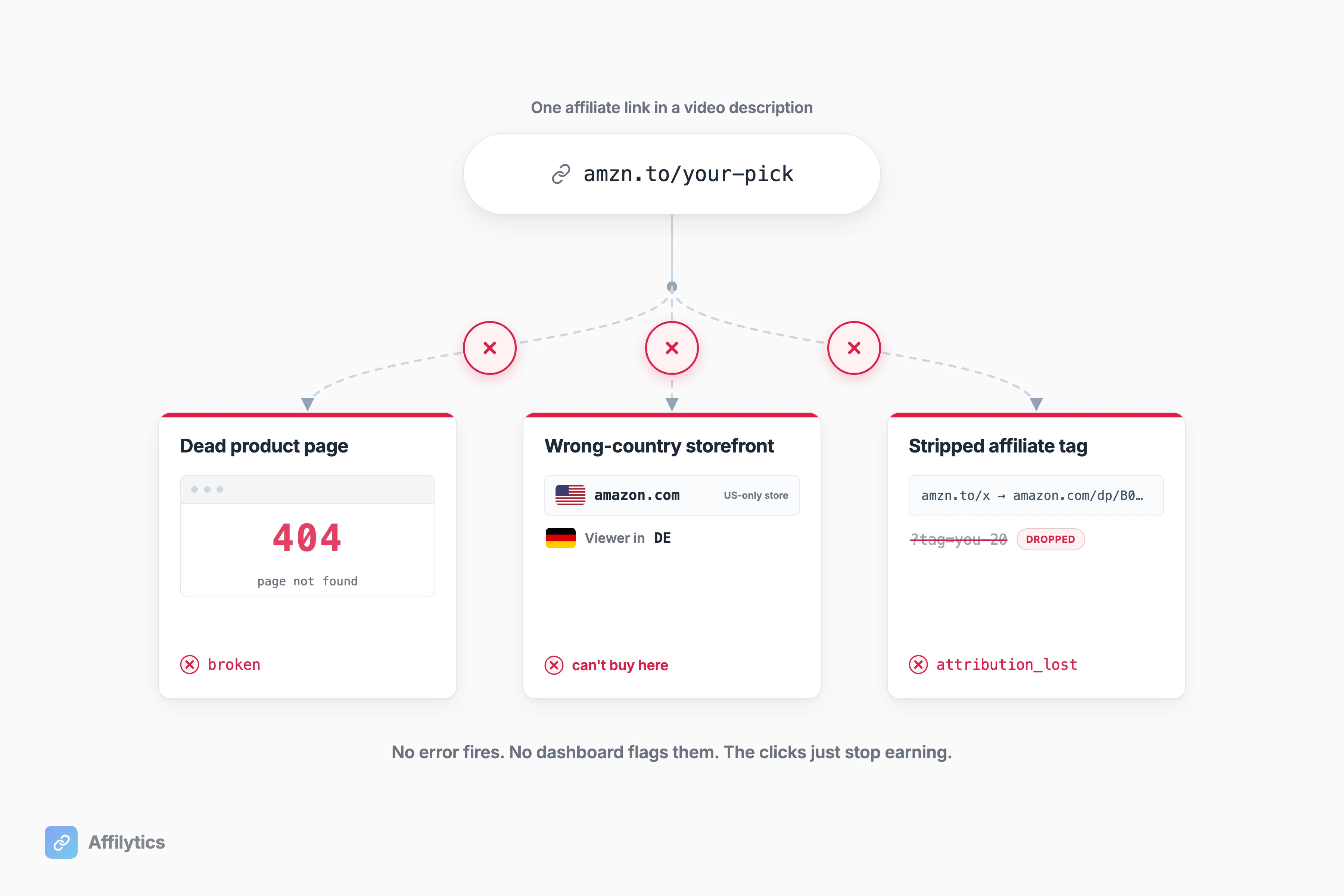
Two tools cover this, and the first one is ours.
10. Affilytics, Affiliate-Link Management, Geo-Routing and Link Health (Our Pick)
Section titled “10. Affilytics, Affiliate-Link Management, Geo-Routing and Link Health (Our Pick)”This is the one we make, so here’s exactly what it does, in order of what earns you the most money first.
- Geo-routed smart links. A link like
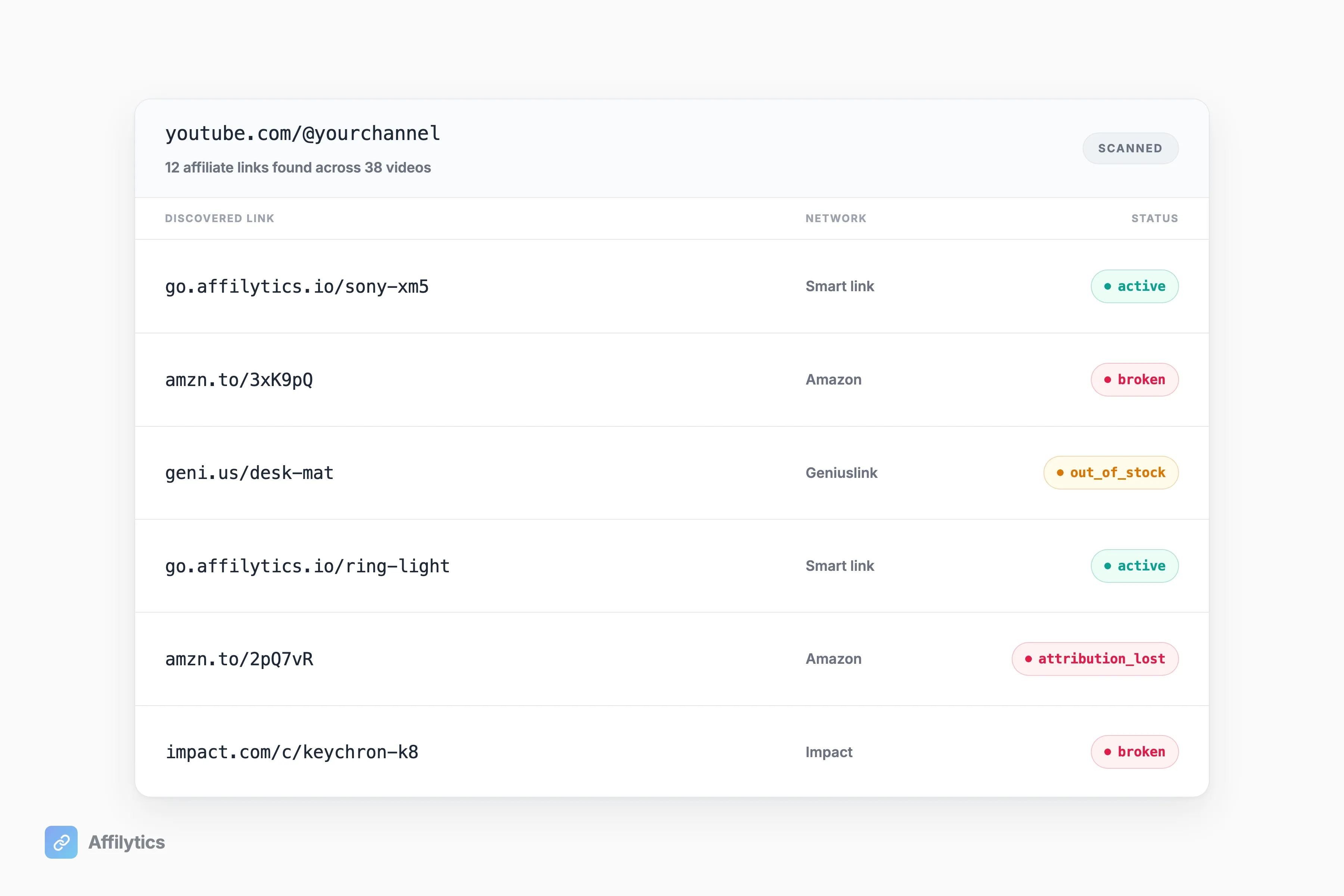
go.affilytics.io/{slug}reads each visitor’s country and sends them to their local store instead of dumping an international viewer on a US page they can’t buy from. That’s the click most creators lose without ever seeing it. - A read-only scan of your YouTube channel descriptions. Paste your channel, and it finds the affiliate links you’ve already published across the major networks (Amazon, Impact, ShareASale, CJ, Awin, Rakuten, PartnerStack, and more), then registers each one for monitoring. You don’t re-enter anything. Run a blog or website too? Paste its URL and it crawls your pages the same way.
- Continuous link-health monitoring. When a link goes broken, out-of-stock, or starts losing its affiliate tag, you get flagged when the change is detected, not on some weekly digest.
A few honest limits. Swapping a smart link into a description is a manual step you do, not something we auto-edit. The scan is read-only by design, and that’s deliberate: as one developer noted on Reddit, “editing descriptions requires full youtube permissions… read permission is a bit safer” (u/WhiffleX, r/Affiliatemarketing). We scan on the safer side and leave the editing to you. Beyond YouTube, we also crawl blogs and websites, though the site crawl reads static HTML only, so a fully JavaScript-rendered blog may not scan.
Best for: YouTubers with a back-catalog who are quietly leaking commission on dead or wrong-country links. We wrote up that exact channel-scan story in our affiliate link tool for YouTubers post, and a step-by-step on how to check YouTube affiliate links in bulk.
On routing specifically: Amazon’s free OneLink does Amazon-only geo-redirect across its marketplaces, with no monitoring and nothing for your non-Amazon programs. Affilytics covers every network plus link health. If you want a head-to-head against the dedicated link tools (Geniuslink and the rest), that’s a different post: see our Geniuslink alternatives comparison, or an AMZ Watcher alternative if your focus is monitoring and routing Amazon affiliate income in one tool.
On pricing, Affilytics has a free plan and a paid plan with flat pricing and no per-click fees. Current numbers live at affilytics.io/#pricing.
11. Affilimate, Cross-Network Commission Reporting
Section titled “11. Affilimate, Cross-Network Commission Reporting”If you’re on several programs, logging into five dashboards to add up your earnings is its own part-time job. Affilimate pulls clicks and commissions from Amazon and other networks into one view.
Best for: creators running multiple programs, and anyone rattled by the recent Amazon Associates reporting change. As one creator put it: “how can we verify any of the numbers given by Amazon when we are now being given far less information?” (u/ITguydoingITthings, r/Amazon_Influencer). A reporting layer that isn’t Amazon’s own dashboard gives you a second opinion.
Watch-outs: Affilimate’s pricing is demo-gated across creator, premium-publisher, and merchant or agency tiers, so you book a demo before you see a number. That works if you’re already at the scale where unifying networks pays for itself; it’s less friendly for solo creators just starting out.
How to Choose (You Don’t Need All 11)
Section titled “How to Choose (You Don’t Need All 11)”You don’t need eleven tools. That tool-sprawl worry is legitimate, and the creator who said a solo channel has “WAY to much going on” and that “all this stuff costs too” was right to say it (u/Localmate25, r/NewTubers).
So which ones do you actually need?
Pick by stage and budget, not by checklist:
- Starting out: a network (Amazon Associates), an editor (DaVinci Resolve), a thumbnail tool (Canva), and a link manager. That’s a complete affiliate setup.
- Free-first path: Amazon Associates to join, DaVinci Resolve to edit, Canva’s free tier for thumbnails, and Affilytics’ free plan to see what’s broken. Most of a working stack costs nothing to start.
- Scaling up: add research (vidIQ or Ahrefs), an email list (Kit or beehiiv), and cross-network reporting (Affilimate) when you actually hit the wall each one solves.
Add a tool when a real bottleneck shows up. Not before.
Start With What’s Already Leaking
Section titled “Start With What’s Already Leaking”If the part that worries you is the links silently dying in your old descriptions, start there. Create your free Affilytics account: two full weeks of everything unlocked, no credit card, and you’ll see what’s broken across your channel before you decide anything.
After the trial your smart links keep working through default routing, so nothing breaks if you stick with the free plan.
What’s the difference between an affiliate network and an affiliate link tool?
Section titled “What’s the difference between an affiliate network and an affiliate link tool?”An affiliate network is where you get programs and links to promote, like Amazon Associates, Impact, or ShareASale. An affiliate link tool manages the links after you place them: it can route a click to the viewer’s local store, track where clicks come from, and monitor whether each link still works. Networks supply the links. A link tool looks after them.
Do I really need all of these tools?
Section titled “Do I really need all of these tools?”No. Pick one tool per stage of your workflow and per your budget. A network to get links, an editor to make the videos, and a link manager to protect the income is a perfectly good starting stack. Add research, email, and reporting tools only when you hit a wall the free path can’t solve.
What are the best free YouTube affiliate tools?
Section titled “What are the best free YouTube affiliate tools?”Amazon Associates is free to join. DaVinci Resolve has a genuinely capable free version, and Canva and Affilytics both have free plans. Several other tools on this list advertise free tiers too, but check each tool’s current pricing page before you count on a specific limit, because free-tier rules change often.
How do I stop my old affiliate links from quietly breaking?
Section titled “How do I stop my old affiliate links from quietly breaking?”You can’t check 100-plus links by hand, and that’s exactly why they rot unnoticed. A link-health tool scans your video descriptions and flags links that have gone dead, started redirecting, or point to out-of-stock and discontinued products. You fix the few that are actually broken instead of clicking through all of them.
Are affiliate links allowed on YouTube?
Section titled “Are affiliate links allowed on YouTube?”Yes. Affiliate links are allowed in YouTube descriptions as long as you disclose the paid relationship to your viewers, both on-screen and in the description, per YouTube’s rules on paid product placements, sponsorships and endorsements. Disclosure is the requirement, not a ban.