
Affiliate Links on YouTube Shorts: 5 Placements Ranked
You did what every guide tells you to do. You dropped your affiliate link into the description of your YouTube Short, pinned a comment with the same link, and waited for the clicks. Nobody clicked, and it turns out nobody could.
We build the link layer creators use to send affiliate clicks to the right country’s store and to catch the ones that quietly died, so the first thing we check on any platform is where a link can physically live. On Shorts, that answer is much narrower than most articles about affiliate links on YouTube Shorts will admit.
If you already run links in long-form descriptions, most of the YouTube affiliate link best practices you learned there do not carry over, and the reason is mechanical rather than strategic.
This guide ranks all five places an affiliate link can go on a Short by whether YouTube actually makes it tappable, then shows how to keep the one link that works pointing somewhere useful.
Why Your Shorts Affiliate Link Is Not Getting Clicked
Section titled “Why Your Shorts Affiliate Link Is Not Getting Clicked”One sentence from YouTube’s own help docs explains the whole thing. To reduce spam and scam attempts, URLs placed in YouTube Shorts comments and Shorts descriptions are non-clickable.
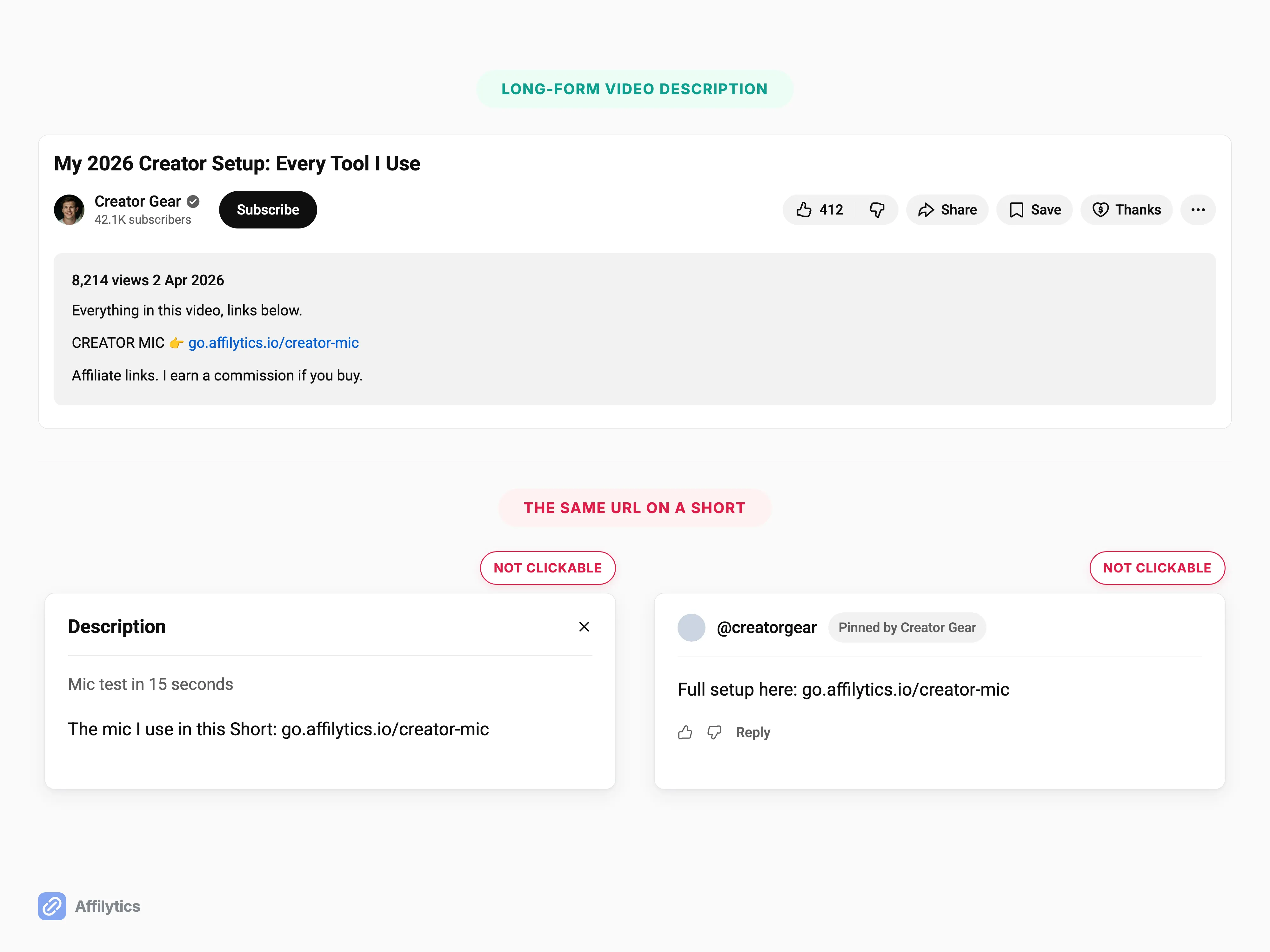
Not throttled. Not deprioritized. Not buried under a “more” toggle. The URL renders as plain text, so a viewer who wants to reach it has to read it, remember it, and type it into a browser by hand. In a feed built for thumb swipes, that is not a link, it is a phone number written on a wall.
Creators already feel this without knowing the cause. “I only post the long form to YouTube with affiliate link in the description. I also tried shorts but no one will go to your profile to click your link,” as one Amazon Influencer creator (u/Jay-S-0508) put it on r/Amazon_Influencer. Another creator was blunter on r/YouTubeShorts: “People don’t even read the title in shorts. Do you expect them to know how to open the desc page?” (u/OkCan9068).
So is this a persuasion problem or a plumbing problem?
Plumbing. You can write a sharper call to action, tighten the hook, and say the URL three times on camera, and that description link still will not be tappable, because YouTube decided it should not be. Worth knowing before you spend another month rewriting copy.
There is one more constraint on the audience side, and it is not a moral question. A maintained browser extension exists purely to strip the on-screen product sticker out of Shorts, so a slice of viewers is actively suppressing the one placement that is visible without leaving the video. Link rules differ sharply by platform: if you publish the same link in several places, it pays to know what survives on each platform before assuming Shorts behave like a feed post.
Where Can You Put Affiliate Links on YouTube Shorts?
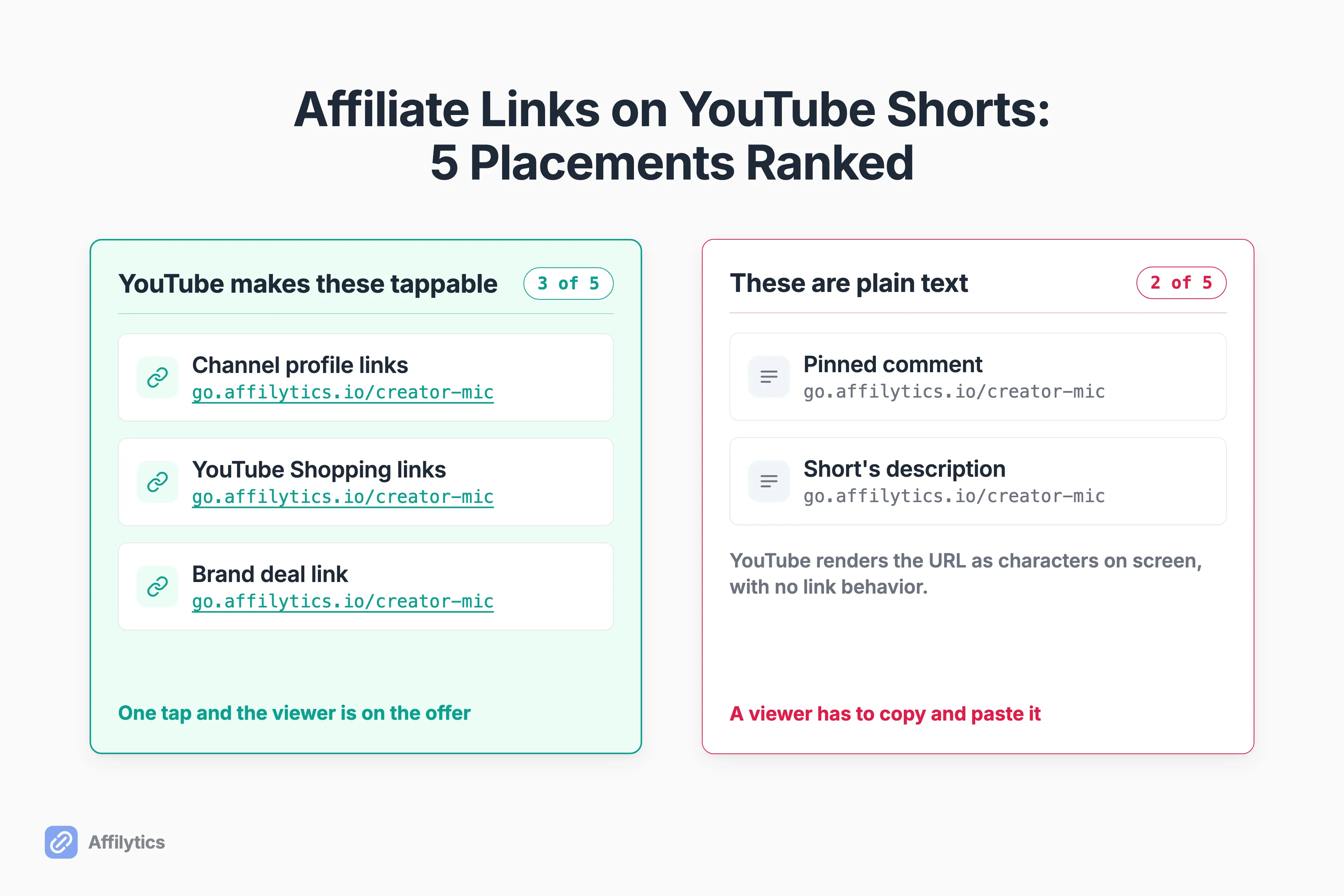
Section titled “Where Can You Put Affiliate Links on YouTube Shorts?”Five surfaces can carry an affiliate destination on a Short. I rank them on one criterion first: does YouTube render it as a tappable link. Then who is eligible to use it. Then how much reach it gets.
Why lead with clickability rather than reach?
Because everything else is a rounding error next to it. And notice where the two placements every ranking article recommends first end up in this table.
| Placement | Clickable? | Who can use it | Best for |
|---|---|---|---|
| Channel profile links | Yes | Any channel | One durable destination sitting behind every Short |
| YouTube Shopping affiliate links | Yes | Creators who meet YouTube Shopping eligibility | Tagged products inside YouTube’s own merchant set |
| Brand deal link on a sponsored Short | Yes | Creators inside a reported brand deal campaign | A paid campaign with a single destination |
| Pinned comment | No | Any channel | A short spoken destination, plus disclosure |
| The Short’s description | No | Any channel | Disclosure, and the surface a scan can read |
1. Your Channel Profile Links
Section titled “1. Your Channel Profile Links”This is the only placement that is both tappable and open to every channel, which is why it wins. YouTube lets you showcase up to 14 links on your channel page, and it lists channel profile links as clickable.
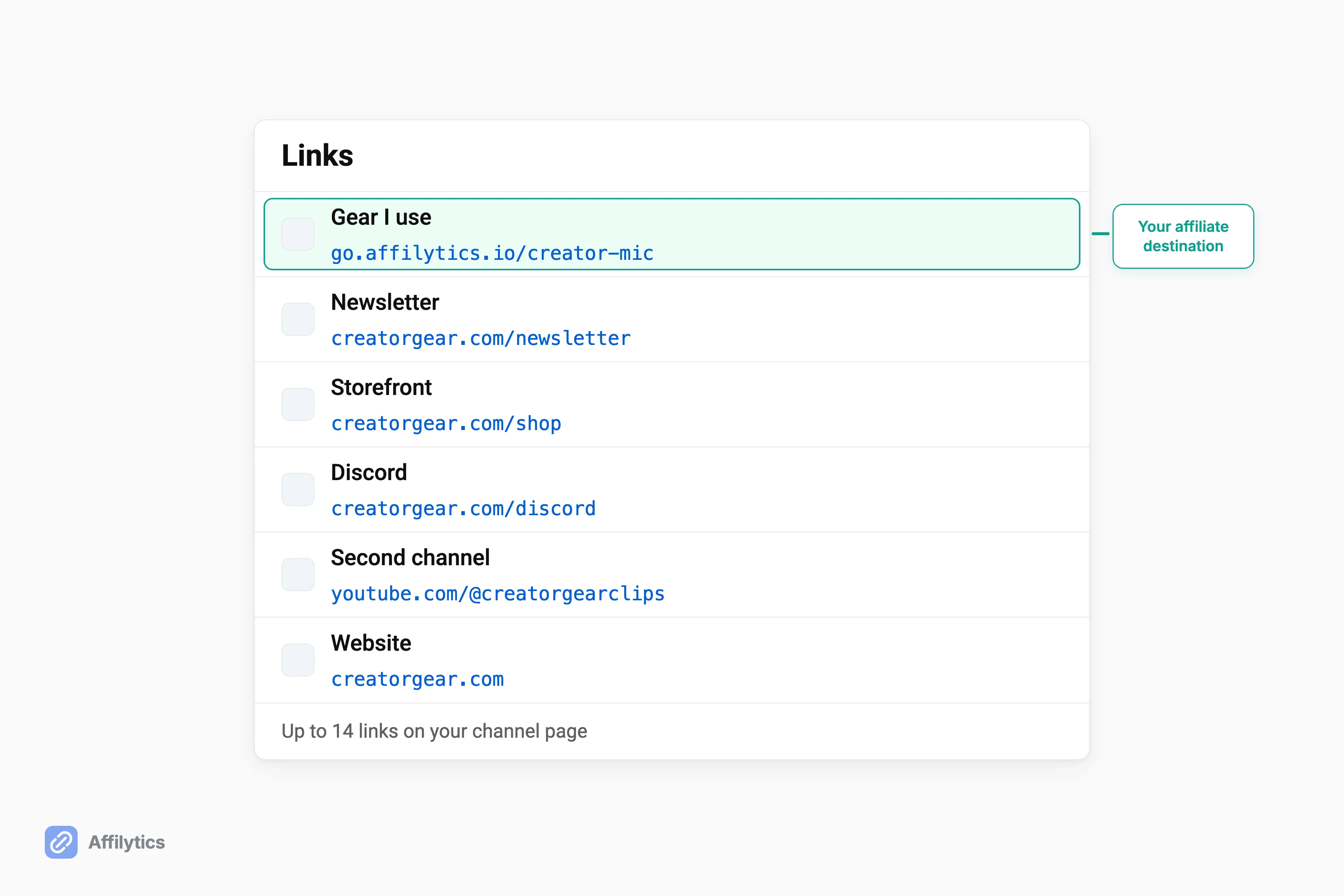
It also sits behind every Short you have already posted and every one you post next year. No per-video work, no eligibility review, no re-editing a published Short to fix a destination that changed.
Fourteen slots is more than most creators need, and that’s the useful part. One slot carries the affiliate destination you actually mention on camera, and the rest can hold the storefront, the newsletter, and the gear list without any of them competing with it.
So is that a real solution or a consolation prize?
Somewhere in between, and I would rather say so. Channel links are generic, and the viewer has to leave the Short, tap through to your channel, and pick the right link, which is exactly the friction u/Jay-S-0508 described. They rank first because they are the only ungated placement YouTube actually renders as a link, not because they are frictionless.
2. YouTube Shopping Affiliate Links
Section titled “2. YouTube Shopping Affiliate Links”Clickable, and native to the Short itself. You tag a product and the link rides on the video instead of sitting in a description nobody opens. The catch is the gate: you have to meet YouTube Shopping features eligibility before you can tag anything.
YouTube says its own pilot found creators who tagged Shorts with relevant products saw up to an 8% increase in views on those videos on average compared with untagged videos. Read the scope carefully: it measures views on the tagged videos, it is YouTube’s own internal 2024 pilot data, and it says nothing at all about clicks, conversion, or revenue.
Two limits come with it:
- You are restricted to merchants inside YouTube’s Shopping program, so the affiliate networks you already run are out.
- This is the exact placement viewers install extensions to hide.
Disclosure of commission earned is required here, per YouTube’s own Shopping affiliate guidance.
3. The Brand Deal Link on a Sponsored Short
Section titled “3. The Brand Deal Link on a Sponsored Short”This is the placement most readers misidentify as a general affiliate feature. It is not one. It exists for creators working with a partner brand inside a reported brand deal campaign, and outside that campaign it does not exist for you at all.
When it does apply, it is the strongest surface on the list. The link appears on screen with the sticker and in the Shorts description, and YouTube states that these links are globally visible on mobile devices to all organic viewers. You control where it shows through the “Video description” and “Video player” toggles under Paid promotion and brands.
What does it cost you? Two things. The visibility YouTube documents is on mobile, globally, for organic viewers, and it does not show up on paid impressions, meaning views driven by paid promotion. Plan around it only when a brand deal is actually signed and reported as one.
4. The Pinned Comment
Section titled “4. The Pinned Comment”Here is the correction most of the internet still owes you. A pinned comment is permitted, it is visible, and it is not clickable on a Short.
YouTube’s external links policy applies to video, audio, channel, comments, pinned comments, live streams, and any other YouTube product or feature on the same terms, and the same page says plainly that affiliate content doesn’t violate YouTube’s Terms of Use. So the pinned comment is allowed. The URL inside it just is not a link.
What is it still good for? A short, memorable destination you say out loud on camera. That is the pattern two creators on r/PartneredYoutube arrived at independently: register a short domain, redirect it to the affiliate link, then speak the domain in the video. u/NickNimmin’s version is literally “get[productname].com”. It is also a reasonable place for a written disclosure, as long as it is not the only place.
5. The Short’s Description
Section titled “5. The Short’s Description”Ranked last for two reasons that stack: the URL is not clickable, and, as the creators quoted above put it, viewers barely open a Short’s description in the first place.
It still earns a line in your workflow. It is where a written disclosure belongs, and the FTC is specific about what an affiliate disclosure has to do to count. It is also the one Shorts surface an automated scan can read later, which matters more than it sounds like it should.
One useful exception: mentions and hashtags in Shorts descriptions and comments do stay clickable. Pointing at your own channel handle works there even when a URL does not.
Point Every Short at One Link You Can Change Later
Section titled “Point Every Short at One Link You Can Change Later”Of those five, exactly one is both clickable and open to any channel, and it is a fixed list of URLs on your channel page. That slot is a decision you make once and then live with across hundreds of Shorts.
So what should sit behind it?
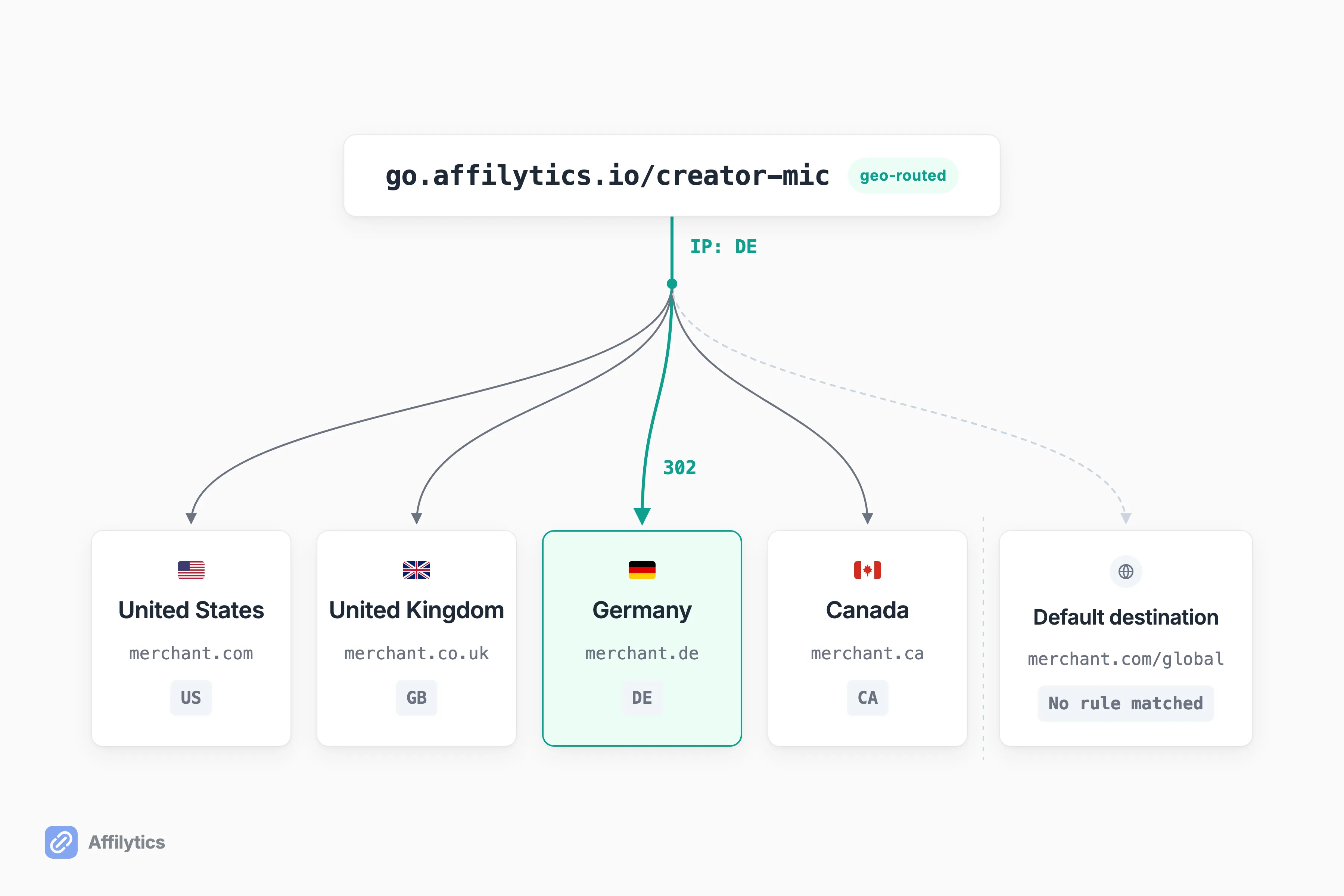
Not a raw affiliate URL. A raw URL freezes one merchant, one campaign, and one country’s storefront on the day you paste it, and every non-US viewer who taps it lands on the wrong store.
You can edit that profile slot later, of course. What you cannot do is edit it per campaign, per country, and per viewer. That’s the actual job.
A smart link fixes both halves of that. You create an affiliate smart link with a slug you choose on go.affilytics.io, add a routing rule per country, and the redirect resolves the visitor’s country from their IP, takes the first matching rule, and falls back to a default destination you set so a click never dead-ends. That is how affiliate geo-routing works in one sentence, and it works for any merchant, not just Amazon.
Two things to be clear about:
- Creating a smart link is a manual step you take yourself: scanning a channel finds and monitors the links you already published, and it never converts them into smart links on your behalf.
- The Reddit workaround (buy a short domain, redirect it, say it on camera) is the same instinct built by hand, and it is a good instinct. It just has no country routing and no health checking behind it, so it keeps sending your UK viewers to a US storefront and stays quiet when the destination dies.
Check the Shorts Links You Already Published
Section titled “Check the Shorts Links You Already Published”A Short is a video on your channel, which means the links you dropped into Shorts descriptions belong to the same back catalogue as everything else you published, rotting on the same silent schedule.
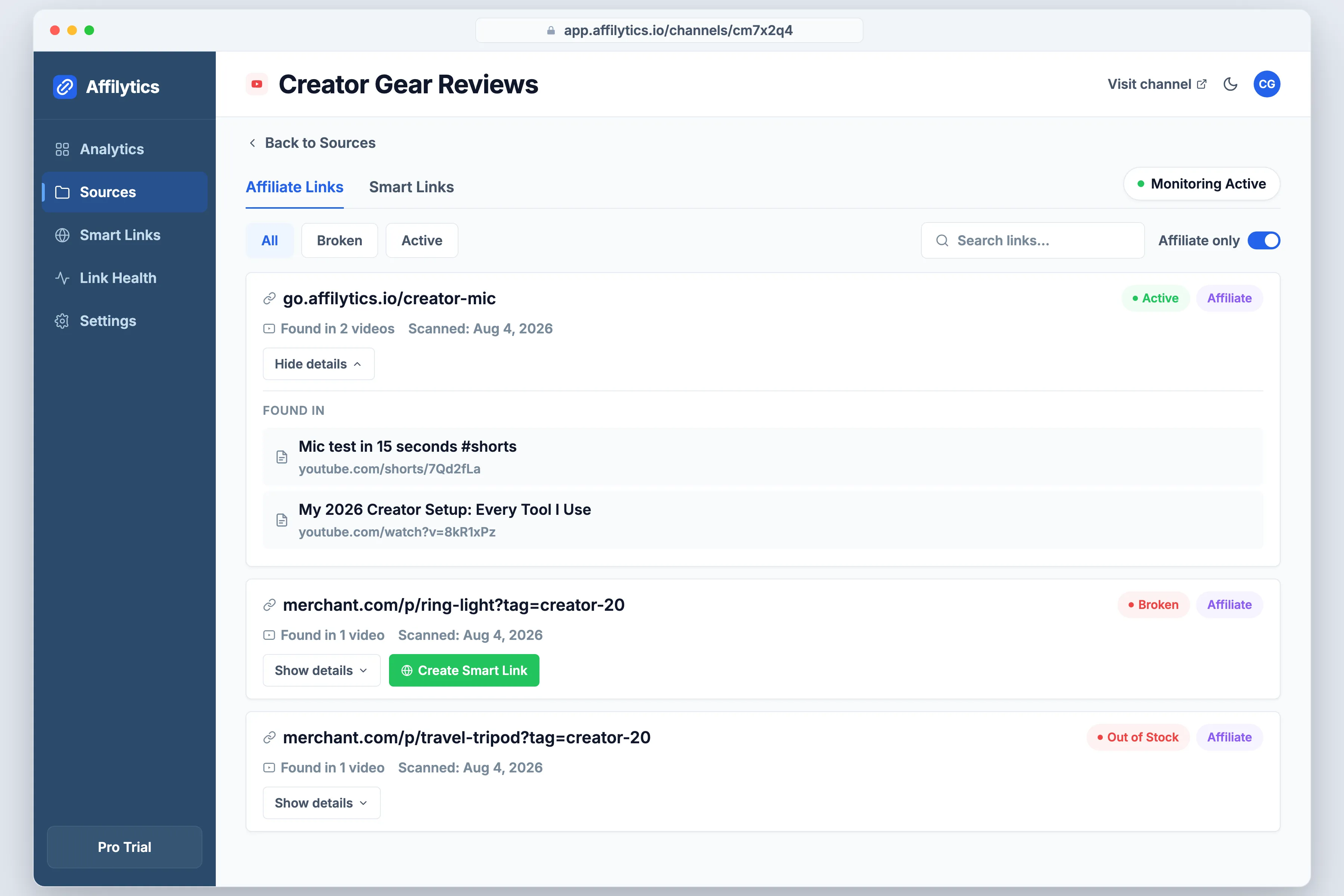
When did you last open a Short from eight months ago and click its link?
Nobody does. That is exactly why the breakage is invisible: the video keeps collecting views while the destination stops paying.
Affilytics reads a channel’s published video descriptions through the YouTube Data API, pulls out every affiliate URL, and registers each one for ongoing health checks. Every link comes back with a plain state:
- active, the destination still works
- broken, the page is gone
- attribution-lost, the tag got stripped somewhere in the hops between the click and the store
- out-of-stock or product-unavailable, the page loads fine but the product does not exist to buy.
If you would rather do a first pass by hand, here is how to check a channel’s affiliate links in bulk.
Two details there matter more than the list of states. When a retailer’s bot-blocking layer (the thing that challenges any request that does not look like a real browser) stops a check, we report it as blocked rather than as a false broken, so you are not chasing links that were fine the whole time. And we rescan a channel you add as a recurring source on the cadence you choose, so a Short from last spring gets rechecked without you having to remember it exists.
One scope limit, stated plainly, because the ranking above depends on it. The scan reads video descriptions. It does not read pinned comments. A link you pinned in a comment is monitored only if you routed it through your own smart link first, because then the smart link itself is the thing being watched, wherever you pasted it.
Fix the One Slot You Already Have
Section titled “Fix the One Slot You Already Have”Start with the placement you already own. Put a smart link into your channel profile links, point it at the right destination per country, then find out what is already broken behind the links sitting in your published descriptions.
Start your free trial and you get two full weeks with everything unlocked, no credit card. Scan the channel, read what comes back, and decide from there.
Can I put affiliate links on YouTube Shorts?
Section titled “Can I put affiliate links on YouTube Shorts?”Yes, affiliate links are permitted on Shorts, but be precise about what “put” means. A URL you type into a Short’s description or a comment shows up as plain text, not as a tappable link. The placements YouTube does render as clickable are your channel profile links, YouTube Shopping affiliate links, and the brand deal link on a sponsored Short.
Are affiliate links allowed on YouTube?
Section titled “Are affiliate links allowed on YouTube?”Yes. YouTube states that affiliate content doesn’t violate YouTube’s Terms of Use. The caveat is spam: excessively posting affiliate content in dedicated accounts may violate its policies around spam, so a channel that exists only to blast links is a different question from a creator adding links to real videos.
Why is my link not clickable in my Short’s description?
Section titled “Why is my link not clickable in my Short’s description?”YouTube disabled it deliberately, to reduce spam and scam attempts. The rule covers URLs in both Shorts descriptions and Shorts comments. Mentions and hashtags in those same fields stay clickable, which is why your channel handle still works there and your affiliate URL does not.
Do I have to disclose an affiliate link on a Short?
Section titled “Do I have to disclose an affiliate link on a Short?”Yes. YouTube’s Shopping affiliate guidance requires you to disclose commission earned and points at FTC guidance for how to do it. Because a Short’s description is barely opened, a disclosure that lives only there is weak. Say it in the video or put it on screen so it is understandable inside the Short itself.
Does an affiliate link checker pick up the links in my Shorts?
Section titled “Does an affiliate link checker pick up the links in my Shorts?”Descriptions, yes: a Short is a video on your channel, so a channel scan that reads video descriptions covers Shorts too. Pinned comments, no. If you route a link through your own smart link, that link is monitored wherever you pasted it, including a pinned comment, because the smart link itself is what gets checked.