
Amazon Affiliate Links in Email: What the Rules Now Allow
If you search whether Amazon affiliate links in email are allowed, the top-ranking guide will tell you no, and Amazon’s own operating agreement will tell you yes. Both are on page one of the same search.
We build affiliate-link infrastructure at Affilytics: geo-routed smart links and continuous link-health checking. The two failure modes this rule leaves untouched are the ones we work on every day.
We have already covered what survives on each platform for social, and gone a level deeper on what the rules allow on Facebook, where the same solicited-messaging clause quoted below decides what you can send in a DM. Email is the channel most creators assume is off limits.
This post quotes the clause that governs it, walks the four conditions attached to it, and then covers the two problems permission does not solve.
The short answer, and the clause it comes from
Section titled “The short answer, and the clause it comes from”Yes. Amazon affiliate links in email are allowed when the person receiving them asked to hear from you. Amazon calls them Special Links: an Amazon URL carrying your Associates tag. Here is the clause:
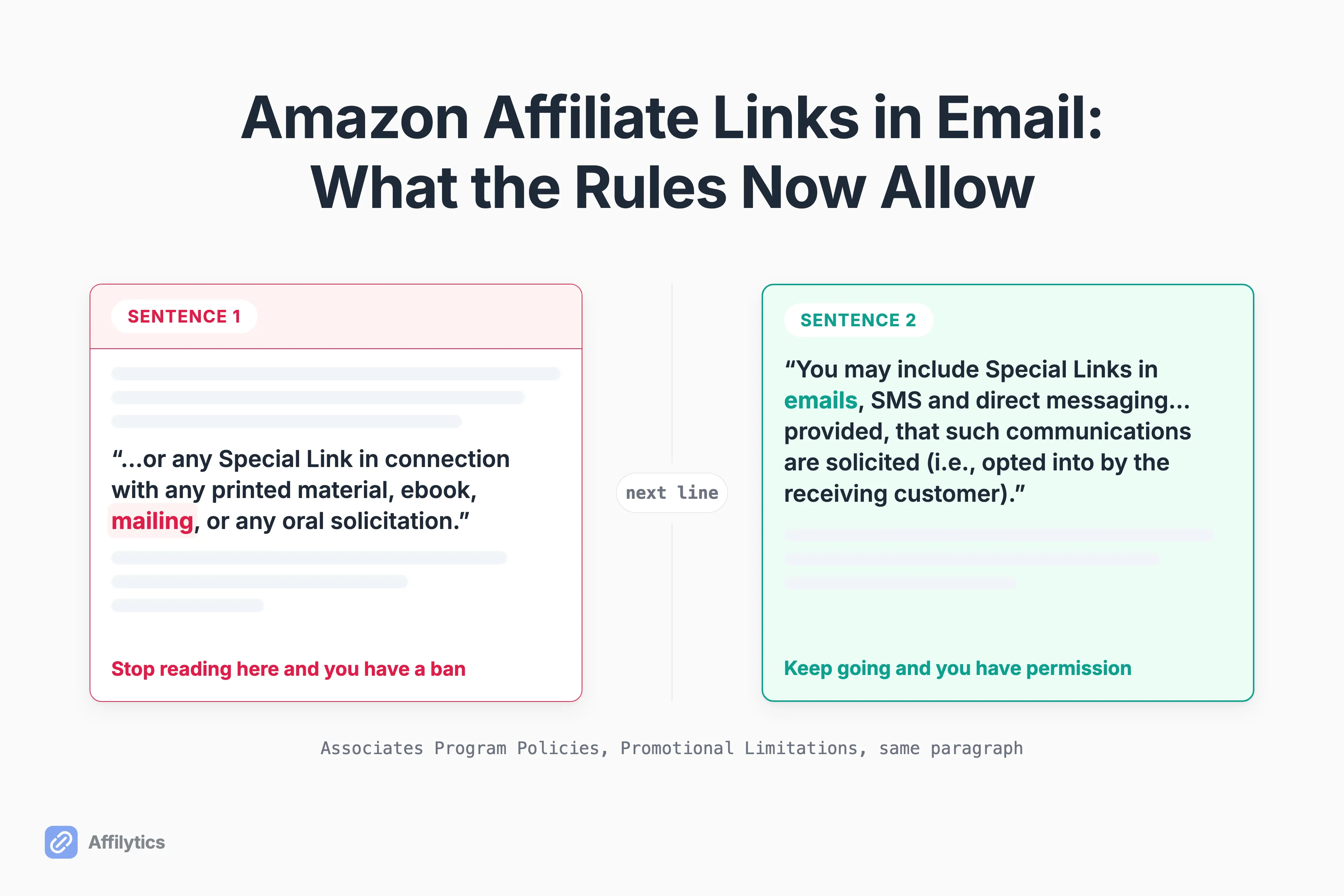
You may include Special Links in emails, SMS and direct messaging from your social media Sites; provided, that such communications are solicited (i.e., opted into by the receiving customer) and are otherwise in compliance with the Agreement, the Trademark Guidelines, and the Amazon Brand Usage Guidelines.
The sentence carries a qualifier: “from your social media Sites,” a phrase Amazon does not define on either page cited here. Which of your properties the permission covers is a separate question, and it gets its own section below.
So why does almost everyone read that as a prohibition?
Because of the sentence sitting directly before it, which bans offline promotion: “You will not engage in any Promotional Activities in any offline manner, including by using any of our or our affiliates’ trademarks or logos (including any Amazon Mark), any Program Content, or any Special Link in connection with any printed material, ebook, mailing, or any oral solicitation.” Stop reading at “mailing” and you have your ban. Keep going one sentence and you have your permission.
Amazon states the same rule in plainer language on a separate help page: Special Links can only be used in emails, SMS messages, or social posts sent to recipients who have opted-in to receive such communications from you, and who are given an easy way to opt out.
Why so much of the advice still says no
Section titled “Why so much of the advice still says no”The rule changed. Most of the advice did not.
One page-one guide for this exact search still opens with “No, you cannot put Amazon affiliate links in emails. Full stop.” and runs a section headed “Why Amazon Bans Affiliate Links in Emails.” Its argument rests on agreement language Amazon has since replaced. Two other page-one articles quote the current clause and get it right.
Which one is live? The one Amazon publishes.
Readers can already feel the gap. In an r/Emailmarketing thread where a creator asked whether an 8 to 10 item gear listicle inside a welcome email would hurt deliverability, one commenter wrote: “I recall Amazon didn’t allow links in emails but I think this changed?” The poster replied, “Yeah they changed it, I think last year or something, although I can’t find any documentation.”
That exchange is the whole problem. The rule changed, the documentation is public, and it sits inside a long policy page under a heading called “Promotional Limitations” that gives no hint an email answer is in there.
The four conditions attached to the permission
Section titled “The four conditions attached to the permission”Permission comes with strings, and they’re not all in the same document. Here they are in one place.
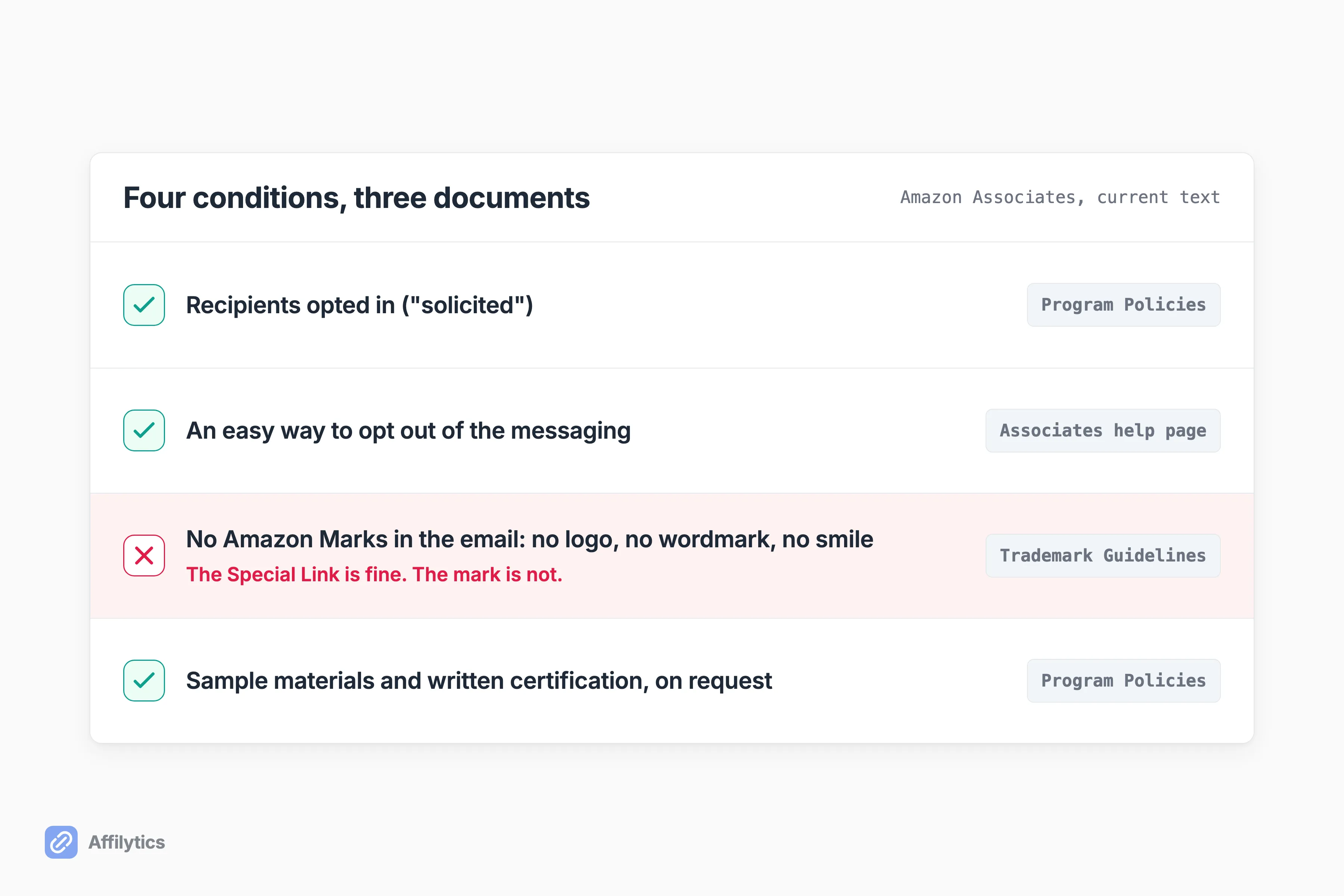
- The recipients opted in. Amazon’s word is “solicited,” and its help page renders that as “recipients who have opted-in to receive such communications from you.”
- They can opt out easily. Same sentence: subscribers must be “given an easy way to opt out of the messaging.” A working unsubscribe link in every send covers it.
- No Amazon Marks in the email. The Trademark Guidelines are blunt: “You may not use or display the Marks… in offline material or email (e.g., in any printed material, mailing, SMS, MMS, attachment to email, or other document, or any oral solicitation).”
- Amazon can ask you to prove it. “Upon our request, you will provide us with representative sample materials and written certification that you have complied with the foregoing… Any failure by you to provide the certification in accordance with our request will constitute a material breach of this Agreement.”
The third condition is the one none of the page-one explainers cover, and the one most likely to catch a nicely designed newsletter. The Special Link is fine. The Amazon logo in your header, the Amazon smile on a product card, the Amazon wordmark on a button: not fine, in email specifically. Amazon’s standalone trademark page states only the narrower rule, that you may not use any Amazon Mark in connection with any offline promotion. The version inside the program policies is the one that names email, so read that one.
What does that leave you? Your own photos, your own copy, and a plain link. Roughly what a good newsletter looks like anyway.
The fourth condition has a practical read too. If Amazon can demand sample materials and a written certification, your archive of past sends and your opt-in records are the evidence. Your email platform probably keeps both by default, but confirm it before you need them.
Amazon calls you the Sender, and that is not a formality
Section titled “Amazon calls you the Sender, and that is not a formality”Further down the same policy page is a sentence that hands you a legal role:
for the purposes of applicable marketing laws (for example, if applicable, the CAN-SPAM Act of 2003, the Telephone Consumer Protection Act of 1991 and any similar or successor legislation), you are the “Sender” of each communication containing any Special Links
So what does being the Sender actually cost you?
Read it as a division of labor. Amazon grants the permission; you carry the obligation. Three things stay with you:
- The consent record behind every address on the list
- The unsubscribe path, and honoring it
- The exposure if either one turns out to be wrong
Amazon names CAN-SPAM in that sentence but doesn’t restate what the law requires. The FTC’s guide does: accurate headers, an honest subject line, a disclosure that the message is an ad, your valid physical postal address, and an opt-out that keeps working 30 days and gets honored within 10 business days.
Approval is a separate gate from the email rule
Section titled “Approval is a separate gate from the email rule”The email clause tells you what you may put inside a send. It says nothing about whether the property you send from is an approved Site.
Those are two different gates, and the second one has its own history of surprising people. A Substack author posted that Amazon balked at their affiliate application because they had listed their newsletter as one of their “sites,” then asked why some newsletters get to use Amazon links and theirs did not. That post predates the email-rule change, so it says nothing about the current rule. It says plenty about Site approval being its own conversation.
What do you do with that?
Open your Associates account and read the list of Sites it shows. That list is what your account is approved for, not a policy page and not a blog post. If the property you plan to email from isn’t on it, ask Amazon.
What permission does not fix
Section titled “What permission does not fix”Permission isn’t the same thing as a good setup. Two problems with links in an email survived the rule change untouched.
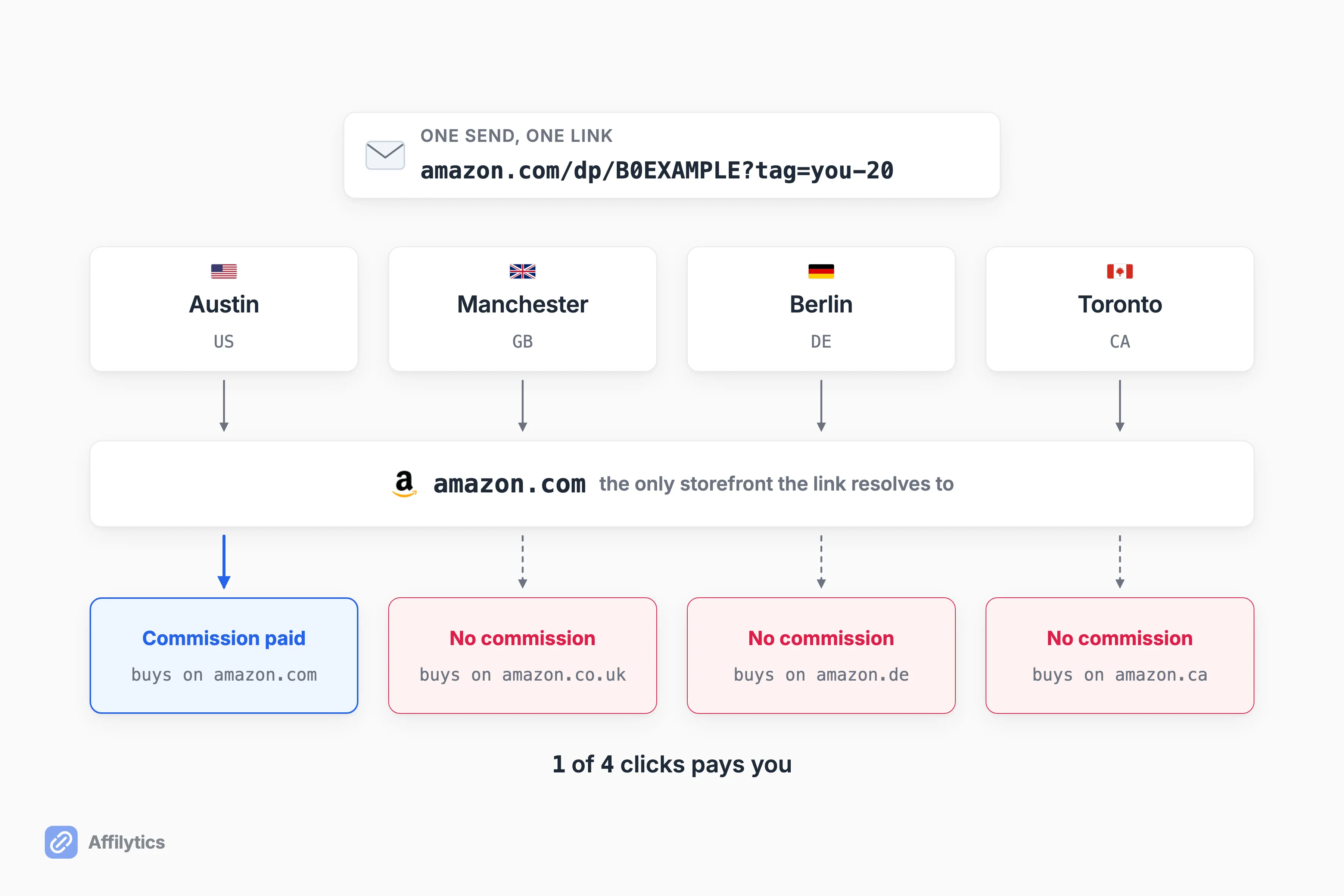
The first is geography. An amazon.com Special Link sends every reader to the US storefront, and your list is not in one country. A subscriber in Berlin or Manchester clicks, lands on a storefront that isn’t theirs, and whatever they buy next doesn’t pay you.
Amazon’s own localization tool addresses part of this for Amazon and none of it for your other merchants.
That half is what we build for. An Affilytics smart link resolves the visitor’s country at click time and sends them to the matching storefront, with any unmatched country falling back to a default you choose. One link in the email, the right store on the other end.
The second problem is that a sent email is frozen: every URL inside it is fixed the moment it leaves. If the product goes out of stock, the merchant restructures the URL, or the program ends, the link in that inbox is wrong permanently and there is no edit path.
How would you even find out?
On a page you own, that same failure is visible and fixable. A health check tells you which state a link has fallen into:
- active
- broken
- attribution-lost, meaning the tag got stripped somewhere in the hops
- out-of-stock
- product-unavailable
- blocked, meaning the retailer’s bot wall answered instead of the product page
An alert fires when a check detects the change, not on a weekly schedule. In an inbox, none of that helps. You can know the state; you can’t change the link.
The pattern that stays editable
Section titled “The pattern that stays editable”Here is the practice I would follow, and it is a practice, not a requirement: email a page you own and put the affiliate links there.
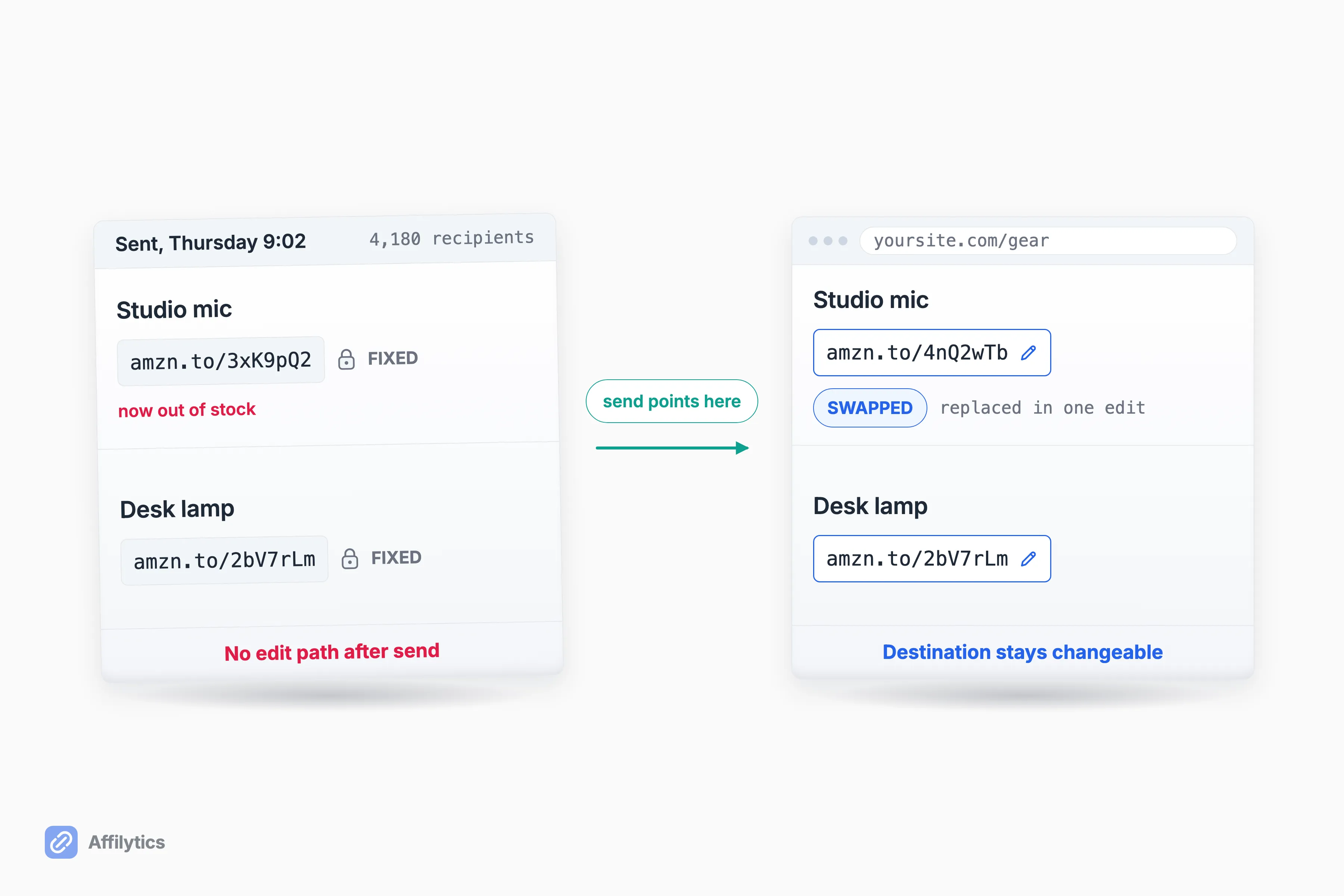
The rule no longer forces this pattern. The architecture still rewards it, and the same reasoning generalizes past Amazon to affiliate links for newsletter creators of any kind:
- The destination stays editable after the send. A dead link becomes a live one with one edit, not a correction email.
- The links on that page can be monitored, so checking them on a schedule replaces waiting for a reader to complain.
- Each one can be geo-routed instead of pointing at a single storefront.
- You find out when the link still resolves but stops earning, which is the failure a healthy-looking response hides.
Building the inventory is the easy part. Point a crawl at the site and it finds the affiliate links already published there, registering each for ongoing checking.
Is that worth it for everyone? No. If you send one link to a small list and your readers are mostly in one country, put the Special Link straight in the email and get on with your day. The extra hop earns its keep when the same links live in many places, or your list spans countries, or both.
Put it against your own list
Section titled “Put it against your own list”Before you rewrite your next send, find out what your existing links are doing. Start your free trial and get two full weeks with everything unlocked, no credit card, starting with the country breakdown of the clicks your links get today.
Then decide whether a single-storefront link in your next email is costing you anything. The rule says you can send it. The numbers say whether you should send it that way.
Can I put Amazon affiliate links in my newsletter?
Section titled “Can I put Amazon affiliate links in my newsletter?”Yes, when your recipients opted in. The Associates Program Policies say you may include Special Links in emails, SMS and direct messaging from your social media Sites, provided the communications are solicited, which Amazon defines as opted into by the receiving customer. Amazon’s help page adds that recipients must be given an easy way to opt out. A newsletter people subscribed to and can unsubscribe from meets both conditions. Which properties your Associates account actually covers is a separate question, and your account’s Sites list is where you check it.
Can I use Amazon product images or the Amazon logo in an email?
Section titled “Can I use Amazon product images or the Amazon logo in an email?”The Amazon logo, wordmark, and smile are out. The Trademark Guidelines bar the Amazon Marks in offline material or email, including printed material, mailing, SMS, MMS, and attachments to email. Amazon’s product photography sits under a different part of the agreement than the Marks clause, so treat it as unsettled rather than permitted. The link itself is allowed either way. The clean answer is your own photography and your own copy.
Does Amazon have to approve my newsletter?
Section titled “Does Amazon have to approve my newsletter?”Your Associates account lists the Sites you were approved for, so read that list rather than assume. The email clause governs what you may put in a send, not which properties your account covers. If the property you are sending from is not on the list, that is a question for Amazon and not something to infer from a policy page.
Do affiliate links hurt email deliverability?
Section titled “Do affiliate links hurt email deliverability?”The marketers who deal with this daily say affiliate links are not a spam signal by themselves. What email marketers actually watch is link density relative to text, the reputation of your sending domain, and the reputation of the domain your links redirect through. Your email platform also sets its own terms on affiliate content, separate from Amazon’s, so read them before your first send.
Can I fix an affiliate link after the email is sent?
Section titled “Can I fix an affiliate link after the email is sent?”No. Once a send leaves, every URL inside it is fixed, and there is no edit path for a message already sitting in someone’s inbox. That is the practical argument for pointing the send at a page you control, where the destination stays changeable later.