
Pinterest Amazon Affiliate Links That Actually Track
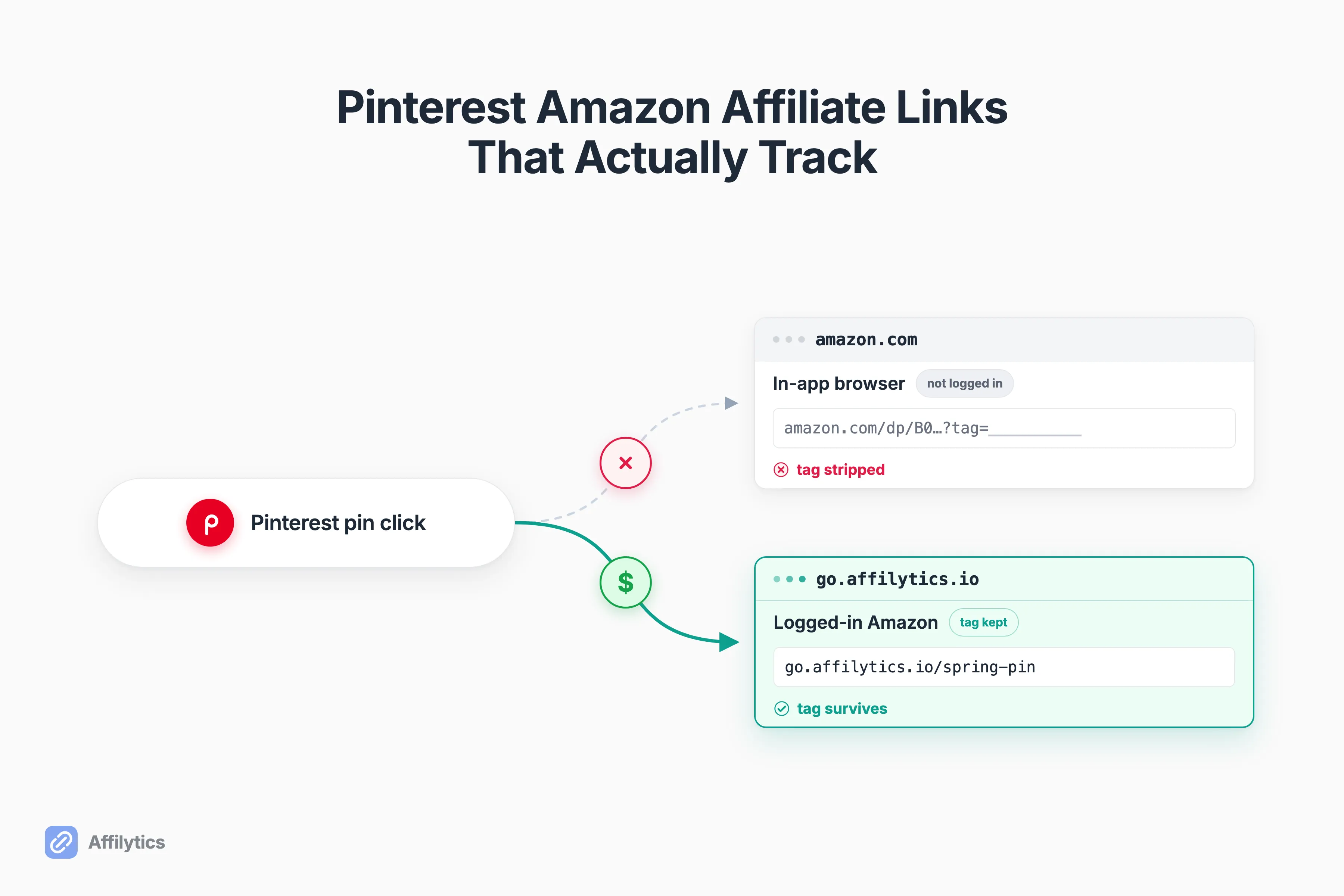
You can post Amazon affiliate links on Pinterest. That part is allowed. What most creators never find out is that their links quietly stopped paying, until they sit down to figure out why hundreds of Pinterest clicks turned into zero sales. One creator put it plainly: “I have hundreds of click throughs but not a single sale.”
We build the redirect and link-health layer at Affilytics: a link router that sends each click to the right country’s store and continuously checks whether the affiliate tag is still intact. So “did this link actually keep its tag?” is the question we work on every day.
Pinterest is a search engine that sends shoppers outward, which is exactly why geo-routing each click to the right Amazon store matters so much on this platform.
This guide covers what Pinterest actually allows, why your clicks quietly lose the sale, which link setups survive Pinterest’s handling and which get you flagged, a 60-second test to check your own links, and how to set up a link that keeps the tag and sends each shopper to their local Amazon.
Can you actually use Amazon affiliate links on Pinterest?
Section titled “Can you actually use Amazon affiliate links on Pinterest?”Yes, with caveats. A Pinterest moderator confirmed it directly in the business community: “You can add your affiliate link directly to your Pin on the destination link field… make sure to link directly to the product and avoid linking to a collection of items. Additionally, limit the number of redirects in your links to prevent triggering spam filters.”
Pinterest’s rules here are short:
- Link straight to the product, not a collection of items.
- Keep the number of redirects low.
- Disclose, per Pinterest’s affiliate-link and disclosure guidelines.
There is also a newer native path. In June 2026, Pinterest added Amazon Storefront linking for creators: connect an Amazon Storefront to your Pinterest profile, and affiliate links get applied automatically to tagged products, with Pinterest auto-adding the disclosure for you.
So why does everyone still seem confused about this?
The policy history is genuinely messy, and the advice you will find openly contradicts itself:
- Older guides flatly said you could not add Amazon links directly.
- One Amazon Associates support reply even claimed Pinterest was “no longer an approved platform.”
- The 2025 moderator answer says the opposite.
The honest read is that the policy shifted. The current answer is “allowed, if you do it carefully.”
What gets people in trouble is not the link itself. It is carelessness. Dropping raw links into every pin or reaching for shorteners reads as spam. As one guide put it, “Pinterest identifies this as low-quality content and potential spam.” Creators on Reddit learned this the hard way: “I lost a 5-week-old account with over 30k monthly views because of that.”
Why your Pinterest clicks don’t turn into commissions
Section titled “Why your Pinterest clicks don’t turn into commissions”Allowed is not the same as tracked. This is the part nobody warns you about.
When a shopper taps a raw Amazon link inside Pinterest, it usually opens in the app’s built-in browser. That shopper is not logged into Amazon there, and the affiliate tag can get dropped on the handoff. The link looks fine. The clicks register. The sales just never show up.
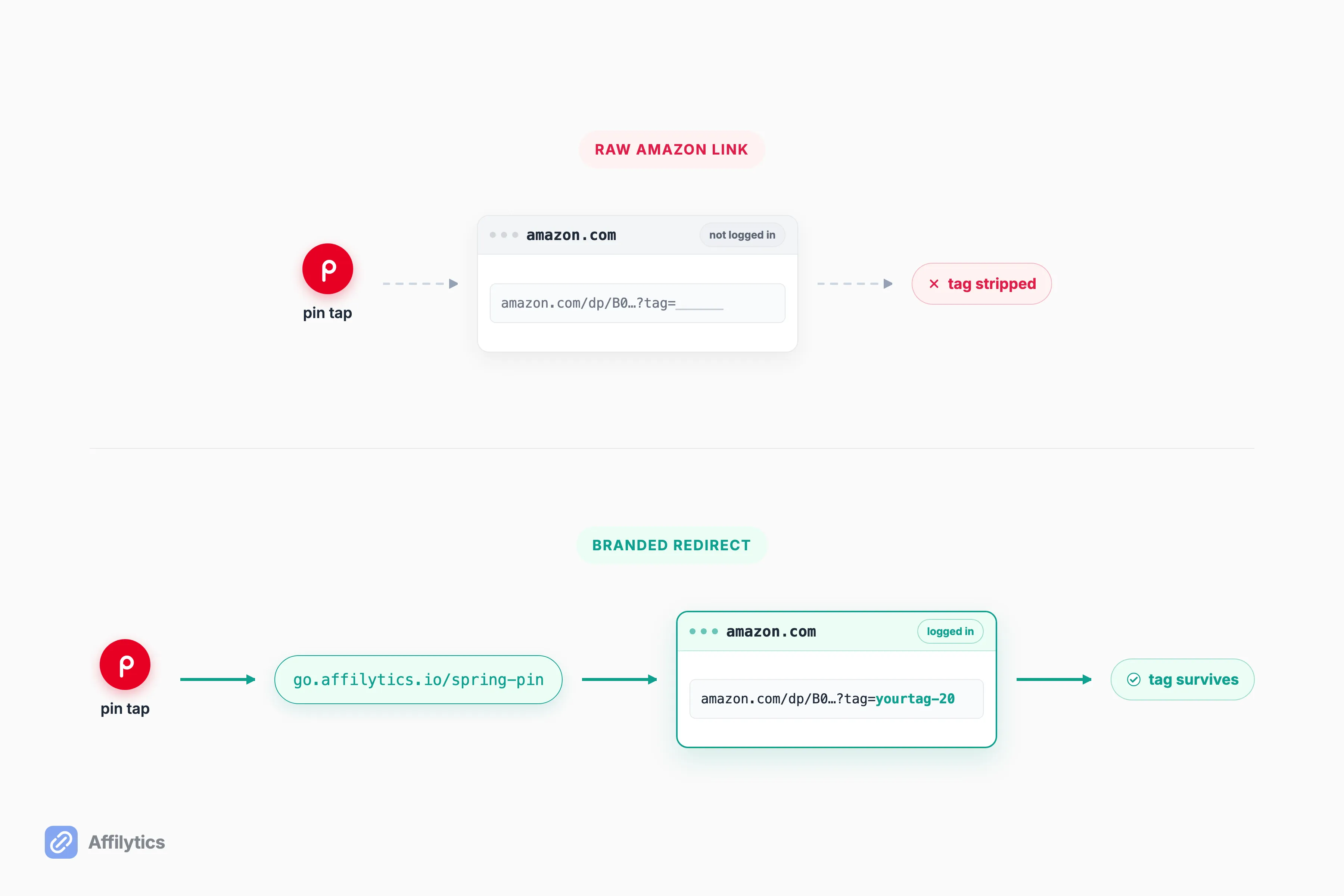
A creator on r/Amazon_Influencer described the mechanic better than most product docs: “A raw amazon affiliate link usually opens (not logged into Amazon) in the browser built into the app (Pinterest, IG, etc) and not in the amazon app itself. You want it to open the Amazon app (logged in) which is what deeplinks accomplish.”
And it gets worse. So how much worse?
It is not just attribution. The in-app browser converts worse, period. Another affiliate measured it: “Most of my paid social traffic was landing in the in-app browser… Conversion rate in those browsers was like 1/3 of Safari.” Same shoppers, same products, a third of the sales, because of where the click landed.
The same tag-stripping problem hits every social platform, not just Pinterest, and it is worth reading how the argument plays out for Amazon affiliate links on Facebook, where creators openly disagree about whether the tag is lost at all. The fix is the same everywhere: hold the tag through a redirect you control, then keep an eye on whether it stays intact. That second part is continuous link-health monitoring, and it is the only way to catch a tag that quietly breaks again next month.
What survives Pinterest’s link handling, and what doesn’t
Section titled “What survives Pinterest’s link handling, and what doesn’t”Not every link setup is equal. Here is an honest scorecard of four common ones, measured on the things that actually matter for a Pinterest affiliate.
| Setup | Pinterest-safe | Tag survives in-app browser | Routes by buyer country | Health-monitored |
|---|---|---|---|---|
| Raw Amazon affiliate link in the pin | Risky (spam flags) | Often lost | No | No |
| Bitly-style shortener | Worst (treated as suspicious) | Often lost | No | No |
| Pinterest native Amazon Storefront tagging | Safe, auto-disclosed | Handled by Pinterest | Locks to one marketplace | No |
| Branded geo-routing smart link (your own domain) | Safe if transparent | Held server-side | Routes per click | Yes |
The storefront row is a decision of its own, so weigh storefront links versus product links on Pinterest before you let Pinterest’s native tagging settle the format for you.
The shortener row deserves a callout. Creators warn each other off it constantly: “Never use Bitly or other shorteners. Pinterest treats them as suspicious.” A shortener gives you the spam risk of a raw link with none of the upside. None of this is unique to Pinterest either: the same handoff problem on Instagram plays out through that platform’s own in-app browser.
So does a redirect put you on the wrong side of Pinterest’s rules?
Now the honesty wedge, because this is where a lot of “smart link” advice goes wrong. Pinterest follows a no-surprises rule, and the line it draws is about deception, not redirects:
- Fine: a transparent branded redirect that lands the shopper on the real product they expected.
- Banned: a cloaking trick, like a blank-domain meta-refresh, that hides where the click is actually going.
The moderator guidance to “limit the number of redirects” is about that second case, not a single clean redirect that does what it says. Lead the shopper somewhere honest and you are inside the rules.
The bottom row is the only one that scores across all four columns. A branded geo-routing smart link works because the destination and the affiliate tag live server-side, in the routing rule, not in the URL you publish on the pin.
So the pin carries a clean branded address, and the real product and tag get applied at redirect time. That is why it survives Pinterest’s in-app-browser handling and stays transparent: the redirect lands on the actual product. This is exactly the mechanic behind Affilytics smart links (go.affilytics.io/{slug}).
Your Pinterest audience isn’t all in one country
Section titled “Your Pinterest audience isn’t all in one country”Pinterest traffic is international by default. A pin you made for a US audience gets seen, saved, and clicked from the UK, Germany, Canada, India, and dozens of other countries. Every one of those clicks on a plain Amazon.com link either lands on the wrong regional store, strips the commission, or bounces.
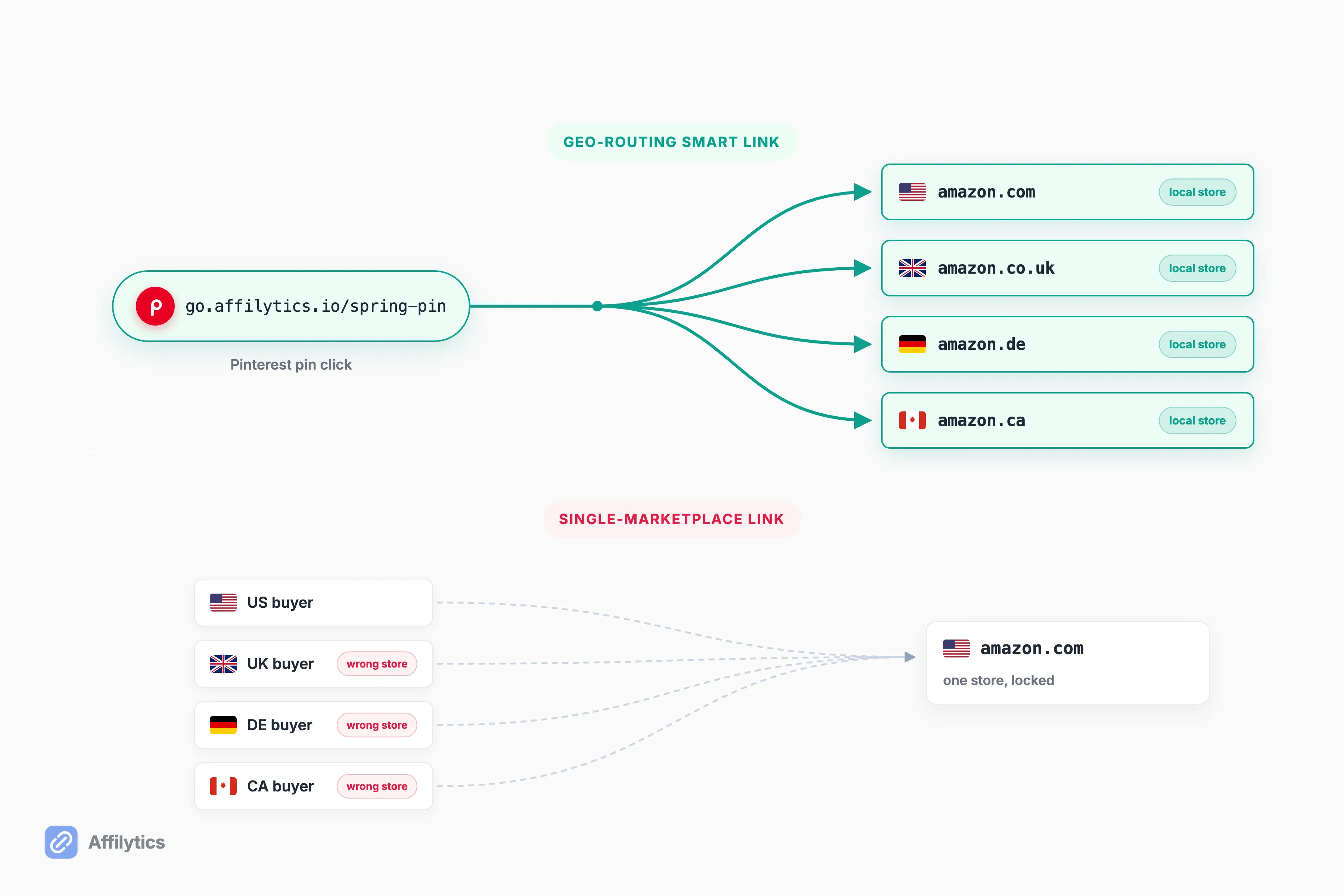
The native Pinterest path does not solve this. If you have multiple storefronts, Pinterest’s native Amazon Storefront linking selects the storefront matching your account location and, in Pinterest’s own words, “It’s not possible to choose which Amazon Storefront account is linked.” One marketplace, locked, no matter where the buyer is.
So what does Amazon offer here?
Amazon has its own free fix, and it is worth knowing about. OneLink is Amazon’s free official geo-redirector, covering 12 Amazon marketplaces. It is a solid baseline if you stay inside Amazon. But it has real gaps:
- It does not cover Mexico, Brazil, India, China, Türkiye, or the UAE, even though Amazon runs Associates programs there.
- It is geo-redirect only: no broken-link detection, no non-Amazon destinations, no branded domain.
A geo-routing smart link closes both gaps. You set per-country rules to any destination you want, Amazon or not, so a click from a country OneLink ignores still goes somewhere that pays. If you have never run the math on this, it is worth knowing how much your international traffic is actually worth before you leave it on the table.
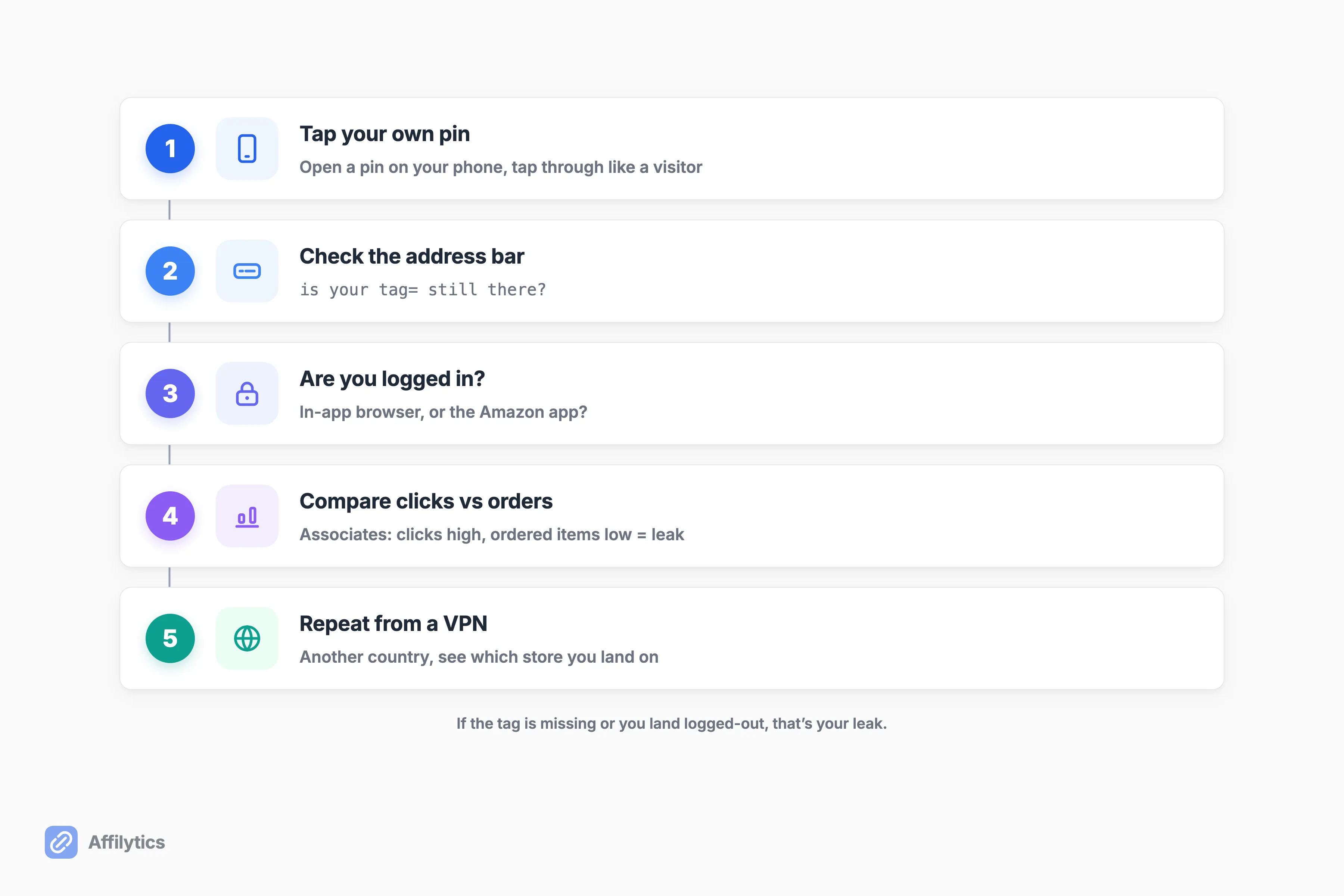
How to test whether your affiliate tag actually survives
Section titled “How to test whether your affiliate tag actually survives”You do not need a tool to find out if you have this problem. You need about 60 seconds and your own phone.
- Open one of your own pins on your phone and tap through it like a normal visitor would.
- When you land on Amazon, look at the address bar. Is your
tag=parameter still there? Did it open in the in-app browser, or did it kick over to the Amazon app? - Check whether you are even logged into Amazon in that browser. If you are not, neither is your average shopper.
- Open Amazon Associates and compare your “clicks” to your “ordered items.” A big gap with healthy clicks is the classic attribution-loss signature.
- Repeat the tap from a VPN set to another country and see which store you land on.
If the tag is missing or you land in a logged-out in-app browser, that is your leak.
So can you keep doing this by hand?
Once, sure. Doing it for every link, every month, forever, is not realistic, which is where continuous link-health monitoring earns its place: it runs the “did it survive?” check for you and flags the moment a tag breaks.
How to set up a Pinterest-safe link that keeps the tag
Section titled “How to set up a Pinterest-safe link that keeps the tag”The fix is a branded redirect on your own domain that lands on the real product, routes by country, and is monitored. Transparent, not cloaked. Here is how the main options compare, honestly.
- Geniuslink is best for creators who want mature Amazon deep-linking and accept per-click pricing. Their Mobile Deep Linking feature markets “4x sales by sending mobile visitors to their Amazon app whenever possible,” which targets exactly the in-app-browser problem this post is about. Credit where it is due: that is a real answer to a real failure.
- Amazon OneLink is best for free, Amazon-only geo-redirect across its 12 marketplaces. If your whole catalog is Amazon and you only sell into those 12 countries, it is hard to argue with free.
- Affilytics is best for a flat-rate, transparent branded redirect that holds attribution, geo-routes beyond Amazon’s 12 markets and beyond Amazon itself, and continuously monitors link health. It starts free, paid plans unlock country routing rules, and there is no per-click charge.
So what does it take to actually wire one up?
Not much. It is a short, manual sequence:
- Create the smart link and add your routing rules, one per country (or group of countries) pointing at the right destination.
- Replace the raw Amazon link in your Pin’s destination field with the branded link.
- Disclose, per Pinterest policy.
- Keep it transparent: every rule points at the real product, so the redirect never surprises the shopper.
If you are weighing tools, it helps to understand a flat-rate alternative to per-click smart-link tools, and the practical steps to create a smart link in a few steps.
Make a branded link for your top pins and watch the tag
Section titled “Make a branded link for your top pins and watch the tag”Pick your best-performing pins, the ones already pulling clicks, and put a transparent branded redirect behind them. Then actually watch whether the tag survives, instead of guessing why the sales never came.
Create your free account and you get two full weeks of everything unlocked, no credit card. Make a smart link for a few pins, route each click to the buyer’s local store, and let the monitoring tell you the moment a tag breaks.
Are Amazon affiliate links allowed on Pinterest?
Section titled “Are Amazon affiliate links allowed on Pinterest?”Yes. Pinterest permits direct affiliate links in a Pin’s destination field as long as you disclose, link straight to the product instead of a collection, and keep the number of redirects low. A Pinterest moderator confirmed this in the business community. The catch is that being allowed is not the same as being tracked, so test that your tag survives the click.
Why am I getting Pinterest clicks but no Amazon sales?
Section titled “Why am I getting Pinterest clicks but no Amazon sales?”Raw Amazon links tapped inside Pinterest usually open in the app’s built-in browser, where the shopper is not logged into Amazon and the affiliate tag can be dropped on the handoff. The link looks fine and the clicks register, but the sale and the commission slip away. A redirect that forces a logged-in context recovers it.
Can I use a link shortener like Bitly for Amazon links on Pinterest?
Section titled “Can I use a link shortener like Bitly for Amazon links on Pinterest?”No. Pinterest treats generic shorteners as suspicious and they can trigger spam filters, and they do nothing to fix the attribution problem. Use a transparent branded redirect on your own domain that lands on the real product instead.
Do redirects break Pinterest’s rules?
Section titled “Do redirects break Pinterest’s rules?”Deceptive redirects that hide the destination are banned under Pinterest’s no-surprises rule. A transparent branded redirect that lands the shopper on the actual product they expected is fine. The line is honesty about where the click goes, not the redirect itself.
How do I send international Pinterest visitors to their local Amazon store?
Section titled “How do I send international Pinterest visitors to their local Amazon store?”Use a geo-routing smart link that sends each click to the buyer’s local Amazon store, or Amazon’s free OneLink for its 12 marketplaces. Pinterest’s native Storefront integration locks to a single marketplace matching your account location and cannot be set per buyer.