
YouTube Affiliate Links Best Practices: 7 Steps to Earn More
A creator drops the perfect product link in the description, the video pulls 50,000 views, and a big slice of those viewers can’t buy through it because the link points to the wrong country’s store. That gap is the difference between good and great YouTube affiliate links, and the seven best practices below close it.
We build Affilytics, the tool that scans a creator’s YouTube descriptions for every affiliate link they have published and routes each click to the right country, so we see exactly where these links quietly leak money.
The wrong-store leak is the expensive one, and we break down the pure mechanics of it in how geo affiliate links work. This guide is the practical version: the seven things you control on the video itself.
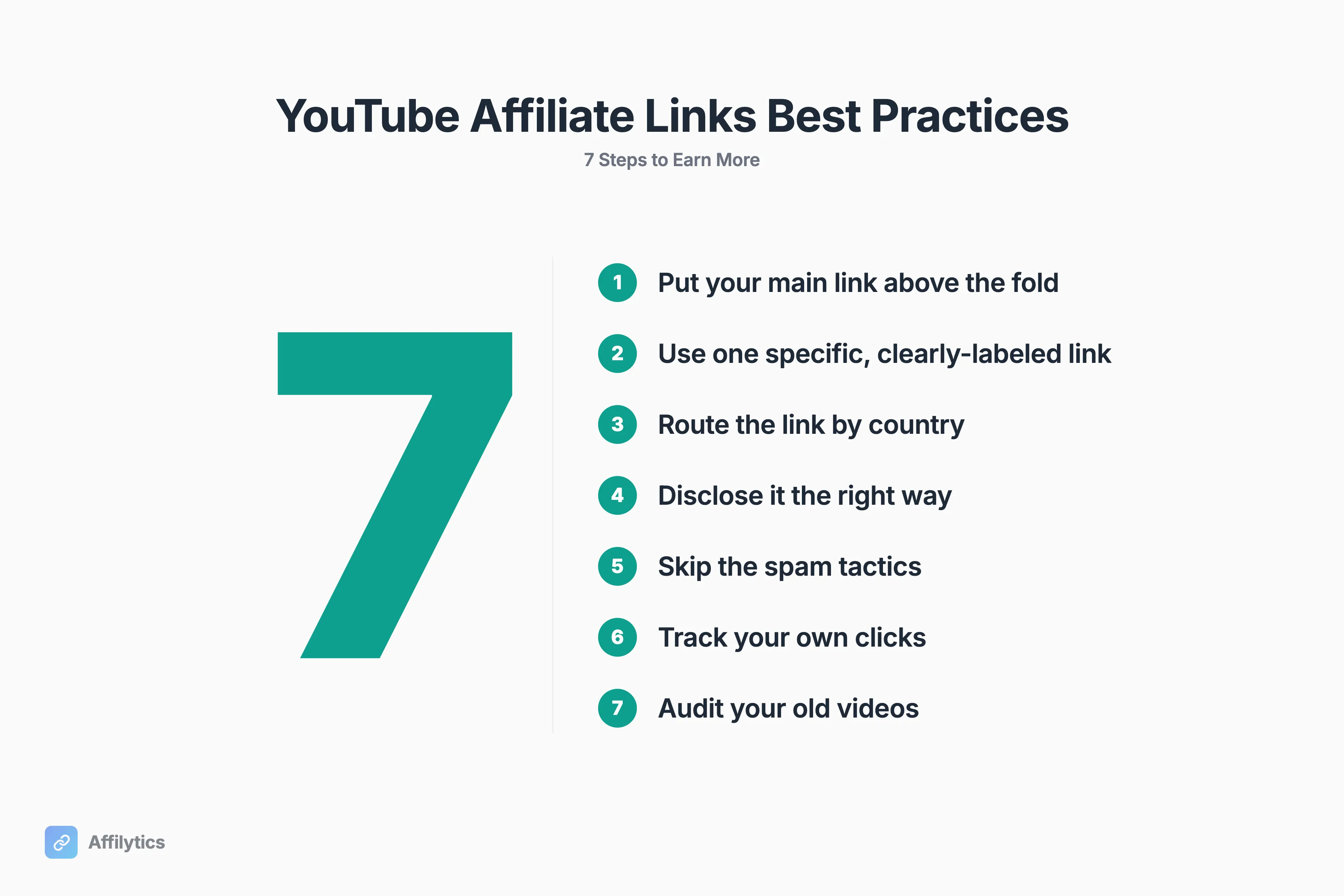
This guide walks through seven best practices: where to place the link, how to label it, routing it by country, disclosing it correctly, the spam tactics to skip, tracking your own clicks, and fixing the dead links in your old videos.
1. Put Your Main Affiliate Link Above the Fold
Section titled “1. Put Your Main Affiliate Link Above the Fold”YouTube collapses your description after about two or three lines, hiding everything else behind a “…more” tap. Your primary affiliate link belongs in those first lines, not buried at the bottom under your gear list and social handles.
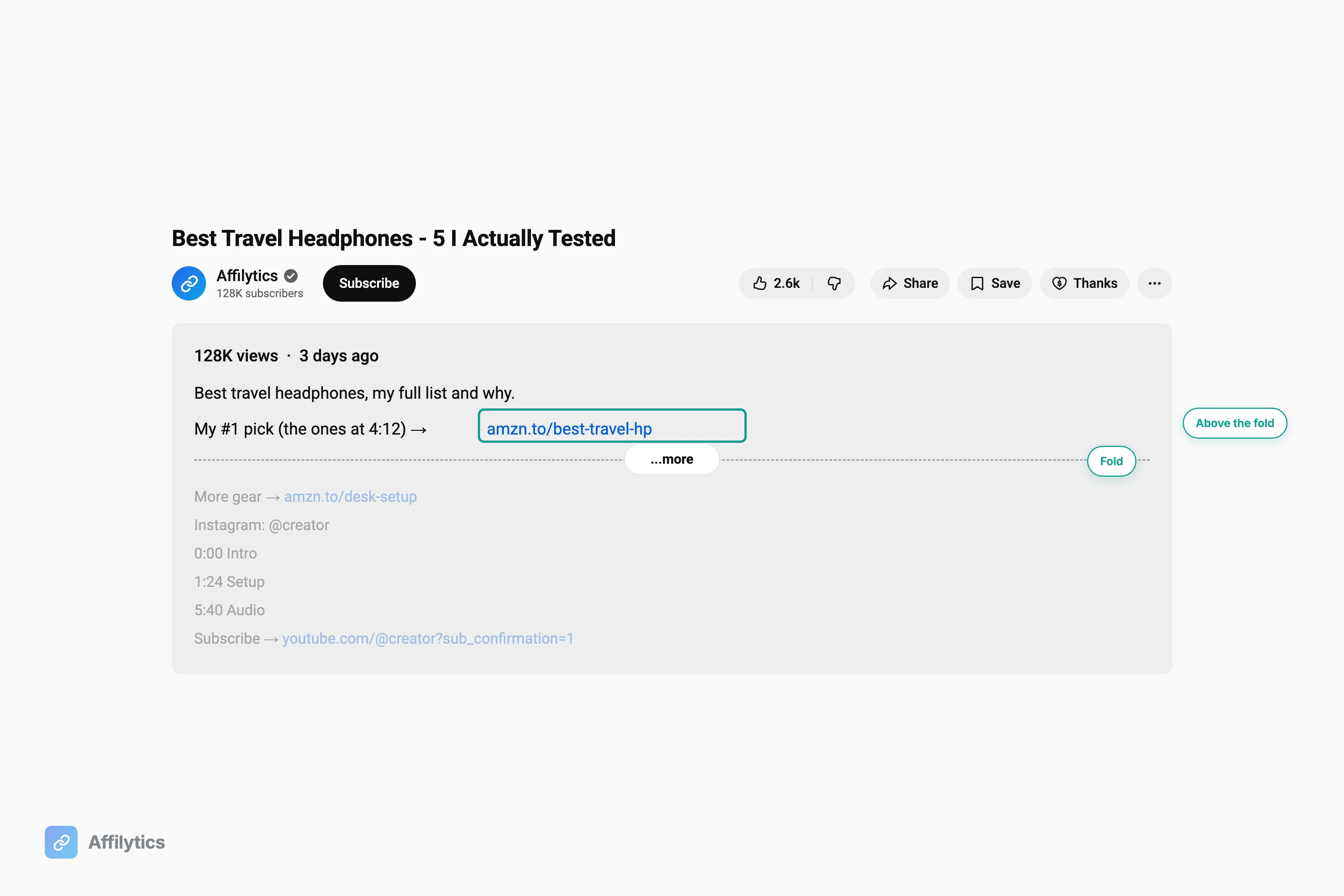
Placement matters because viewers decide fast. Google’s own research found that 68% of YouTube users watched a video to help them make a purchase decision, and 80% of those watched at the beginning of the shopping process. They are forming an opinion in the first minute, not scrolling to the bottom of your description after the credits.
One platform rule trips creators up. If you publish Shorts, know that YouTube Shorts description and comment links became unclickable as of August 31, 2023. A Short can still drive demand, but the buyable link has to live somewhere else: a regular video, a pinned channel link, or a link-in-bio destination you mention out loud. We ranked where affiliate links can actually go on a Short if you post them regularly.
Description placement is not the only surface anymore, either. If your channel qualifies, product tags sit inside the video frame itself, and it is worth knowing when in-video product tags beat a description link and when they cannot reach your viewer at all.
So what is the simple rule here?
- Lead with the single link that matters, in the first two lines.
- Save the affiliate stack, timestamps, and credits for below the fold.
- Treat Shorts as awareness, not as a clickable storefront.
2. Use One Specific, Clearly Labeled Link, Not a Wall of Them
Section titled “2. Use One Specific, Clearly Labeled Link, Not a Wall of Them”A vague label loses the click. One viewer in a beauty-community thread put it plainly: “If there link only says ‘lipstick’ I do not click … If it says ‘Mac This Specific Shade’ … I click”. The label is doing the selling. “Buy here” is weak. “MAC Velvet Teddy, the exact shade I used at 4:12” is strong.
The instinct when you are starting out is to dump ten links and hope one converts. It backfires. A wall of links reads as noise, and noise gets skipped. One purposeful, named link beats a stack of ten every time.
There is a money reason to obsess over the one label that matters. A small creator who wrote up their first affiliate earnings noted that “Most clicks came from 1–2 videos, not all”. Revenue concentrates. A handful of videos carries most of the income, so the label on the link inside those videos is worth getting exactly right.
One legitimate extra link is fine: append ?sub_confirmation=1 to your channel URL and you get a one-click subscribe button you can drop in the description. That is a real description-box tactic, not link clutter, because it does one clear job.
3. Route That Link by Country So You Stop Losing International Clicks
Section titled “3. Route That Link by Country So You Stop Losing International Clicks”Here is the part nobody talks about, and it is where the money is. The single loudest thing viewers say about description links is that they point to the wrong store. “most of those links are for american stores and i am not american so…” was the top-voted comment in that beauty thread. Another viewer said it just as flatly: “I usually live in a different country so it makes no sense for me to try to buy through that.” The same wrong-store problem follows Amazon affiliate links on social media, where each platform handles the link its own way once a viewer taps through.
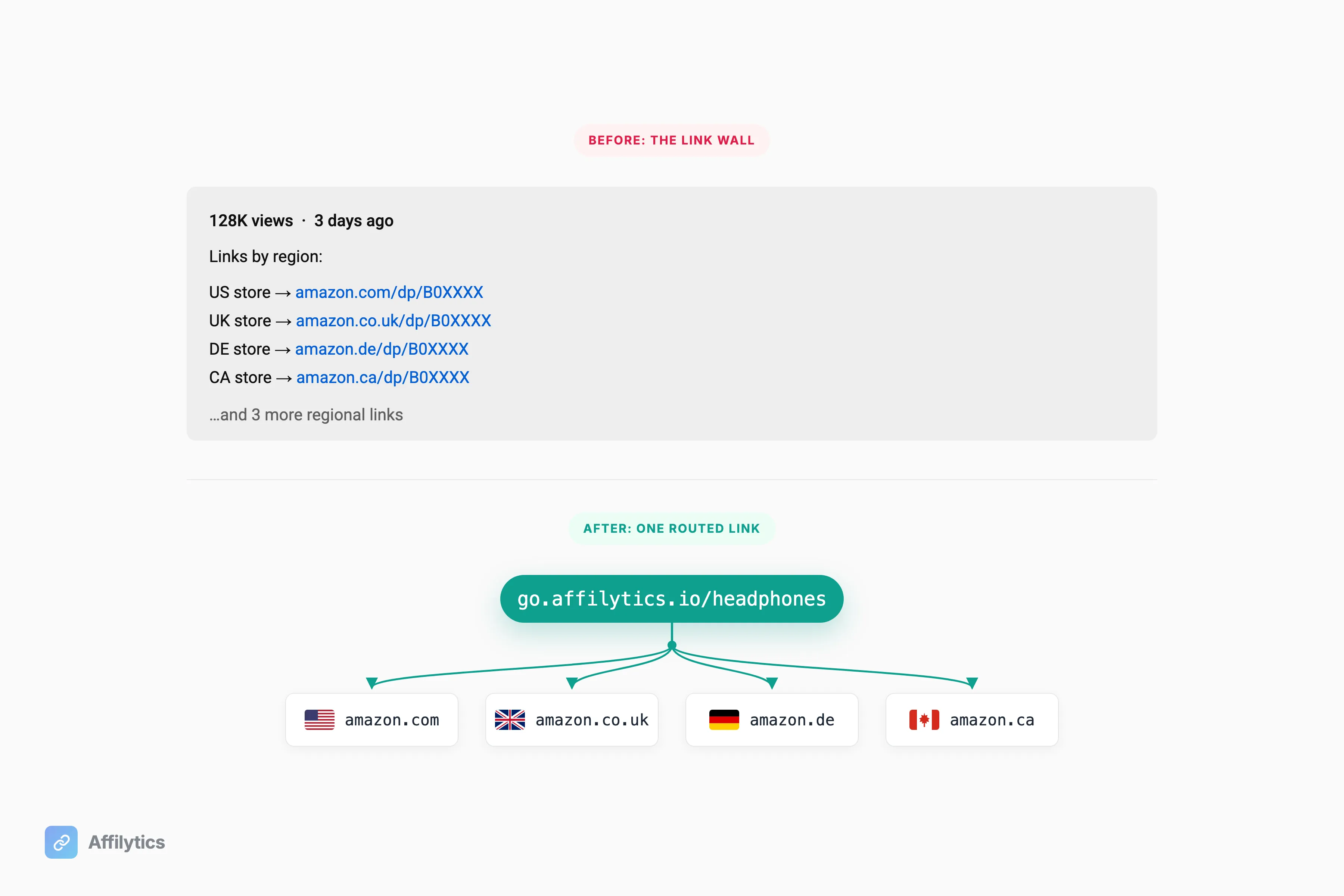
Think about what an amazon.com link actually does for a UK, German, or Canadian viewer. They click, they land on a US store they can’t easily buy from, and even if they fight through it, your commission often does not credit. You did the work to earn the recommendation and the click, and the sale evaporates because of geography.
The manual workaround is the wall of regional links: amazon.com, then amazon.co.uk, then amazon.de, then amazon.ca, stacked in the description. It is ugly, and most viewers will not stop to find their own country in a list. They will click the first one or none.
The best practice is one link that detects where the viewer is and sends them to their own regional store automatically. That is exactly what an Affilytics smart link does: each click resolves by the visitor’s country to the first matching routing rule, sends them to the right regional retailer, and falls back to a default destination if there is no rule for their country, so nobody ever hits a dead end. One link in the description, the right store for every viewer. Setting one up takes a few minutes, and the step-by-step is in create an affiliate smart link. If you want to size the leak you are actually closing, what your international Amazon traffic is really worth does the math on a typical channel.
4. Disclose the Right Way, and Use Both of YouTube’s Controls
Section titled “4. Disclose the Right Way, and Use Both of YouTube’s Controls”Disclosure is not a legal nuisance. It is a trust lever, and your audience already expects you to make money. The mistake is using only half of what YouTube gives you.
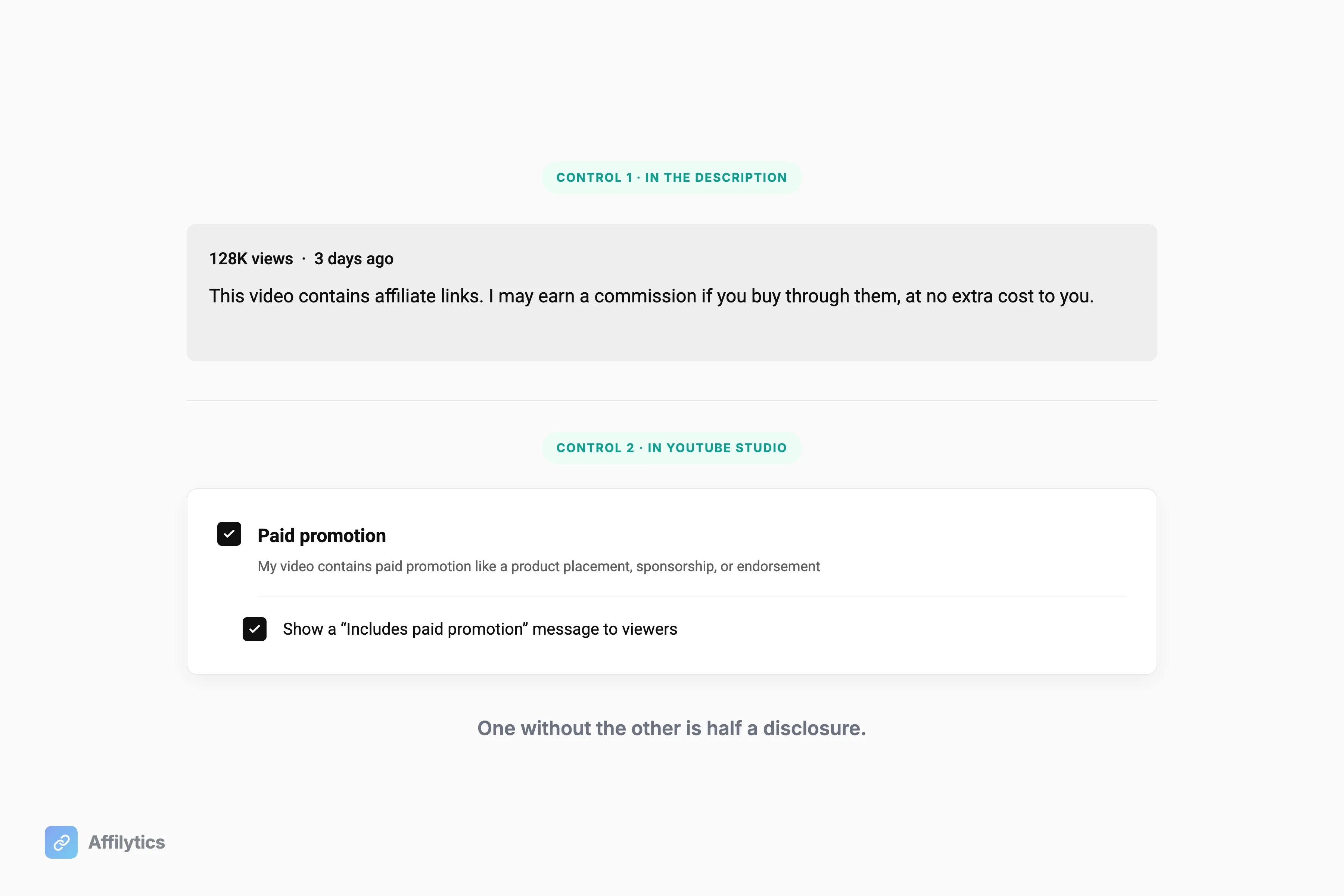
There are two mechanisms, and you need both. The first is your written disclosure in the description. YouTube’s own policy is that affiliate links must be disclosed in the video description, not hidden in the video or the title. The second is YouTube’s built-in “includes paid promotion” setting in the upload flow, which adds an on-screen label. Most creators use one or the other. Use both.
The legal floor comes from the FTC. The standard is that endorsers must disclose a material connection to the seller clearly and conspicuously. “Clear and conspicuous” means a viewer can actually see it without hunting, so a plain line near the top beats a wall of legalese at the bottom. A line you can adapt: “This video contains affiliate links, which means I may earn a commission if you buy through them, at no extra cost to you.” If you publish on more surfaces than YouTube, we have affiliate disclosure examples for each one, with the placement rule that makes each version work.
Why bother past the legal minimum? Because audiences punish content that hides the ball. One viewer described pulling back: “I have cut my YouTube beauty down a lot now, since some are just pushing stuff and you can tell it’s fake.” A clear disclosure paired with a specific, honest recommendation reads as confidence. Hiding it reads as a reason to leave.
5. Skip the Spam Tactics That Get Links Ignored or Penalized
Section titled “5. Skip the Spam Tactics That Get Links Ignored or Penalized”Every spam tactic trades a few short-term clicks for the long-term trust that actually pays. Here is what to skip:
- Do not comment-spam your affiliate links on other creators’ videos. Some affiliate guides openly recommend replying to other people’s videos with your links. It is risky, it reads as spam, and it burns trust faster than it earns clicks. Skip it.
- Do not stuff a wall of links hoping one sticks. We covered why in practice #2: noise gets skipped, and it makes the whole description look untrustworthy.
- Do not run fake “honest review” content. Entire niches have learned to distrust affiliate-stuffed “best X” videos.
That last one is not theoretical. In a hosting discussion, a frustrated reader described searches where “you ONLY get reviews by channels which are 100% filled with AI generated content … clearly bought”, and another noted it has gotten so bad that “only a negative review would be considered honest.”
That is the real cost. Once a niche stops believing the recommendations, the affiliate link is worthless no matter where you place it. Protecting trust is not the soft option. It is the revenue strategy.
6. Track Your Own Clicks So You Can Trust Your Numbers
Section titled “6. Track Your Own Clicks So You Can Trust Your Numbers”Picture this: your views are steady, then your affiliate income falls off a cliff, and the network’s report tells you nothing about why. That exact scenario plays out constantly. One creator described it in detail: “Links are working and include my tracking ID … BUT conversion rate collapsed to ~1%–1.5% (normally I’m around 3.5%–5%)”.
When that happens, the network’s dashboard is a black box. Another creator in the same thread asked the question every affiliate eventually asks: “how can we verify any of the numbers given by Amazon … It’s a huge lack of transparency”. You cannot fix what you cannot see.
The best practice is an independent click layer you control, measured per link and per country. Not a vanity dashboard. A diagnostic. When you can see clicks at that resolution, a vague “my income dropped” becomes a specific, fixable claim:
- UK clicks held steady but stopped converting? Probably a wrong-store or stripped-tag problem, not the algorithm.
- One video’s clicks fell off a cliff? Check that description first.
- Clicks down everywhere at once? That is a reach problem, not an attribution problem.
Affilytics gives you per-link, per-country click analytics and inspects the redirect chain to catch when an affiliate tag gets stripped before the sale. The point is not the dashboard. The point is that you stop guessing.
7. Audit and Fix the Affiliate Links in Your Old Videos
Section titled “7. Audit and Fix the Affiliate Links in Your Old Videos”Old videos are an annuity. They keep pulling search views and paying commission for years, which means a dead link in a four-year-old description is silent lost income you never see. One creator running an evergreen channel said it directly: “Got videos from 5 years ago still paying me”.
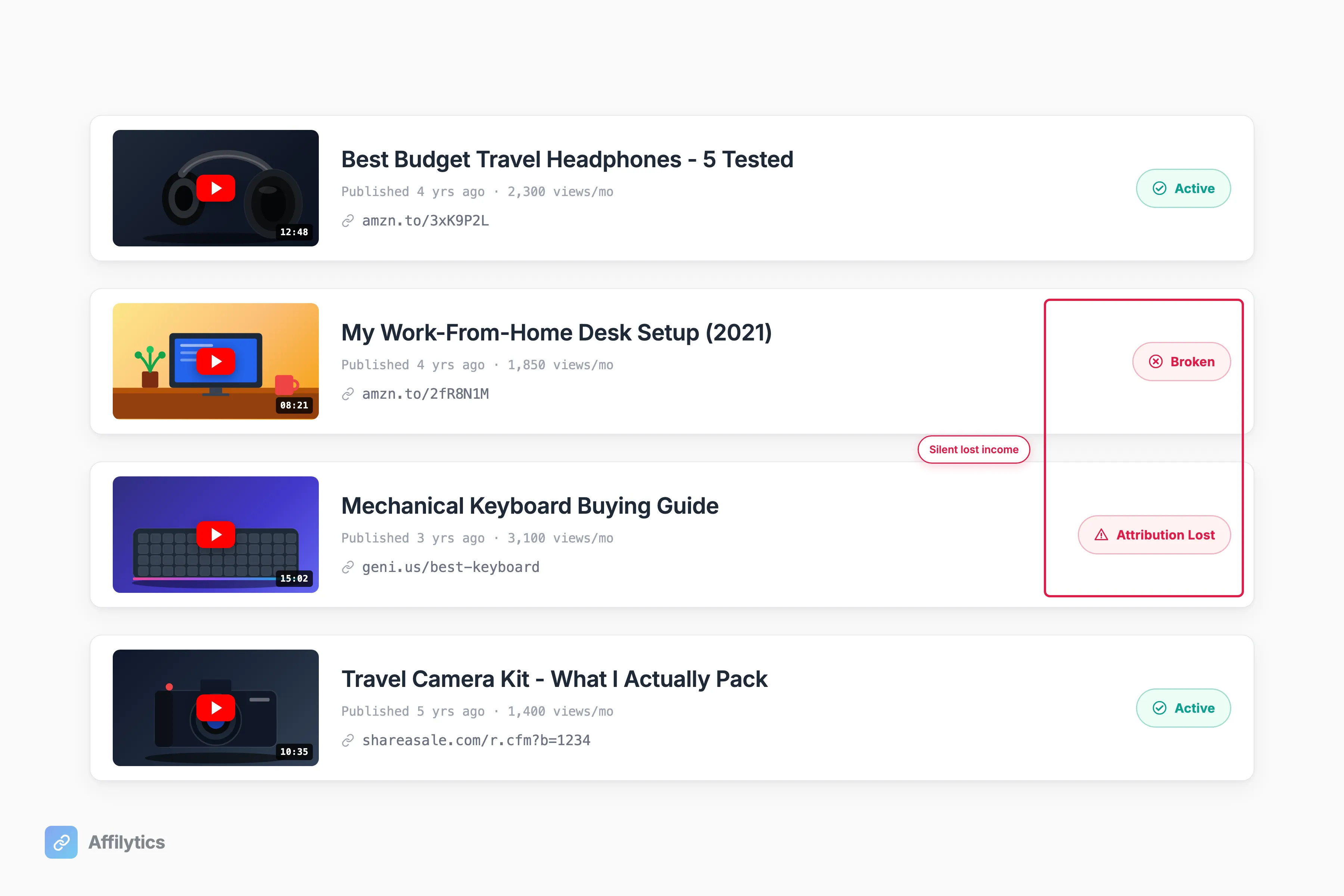
Here is the trap. Old video descriptions never fix themselves. The link that broke last year is still sitting there, still getting clicks, still earning nothing, and nothing in YouTube will tell you.
Doing this by hand across hundreds of videos is not realistic, which is why most creators never do it. The best practice is a recurring audit instead of a one-time cleanup. Affilytics scans a channel URL, surfaces every affiliate link you have already published across 47+ networks, flags the ones that are broken or no longer crediting commission, and sends a weekly digest so a dead link gets caught in days, not years. For a step-by-step on the audit itself, see our guide on how to check your YouTube affiliate links in bulk.
Put These Seven to Work
Section titled “Put These Seven to Work”Run them in order. Placement, labeling, disclosure, and skipping the spam tactics are an afternoon of cleanup you can finish today. The two that compound are routing and the audit: one link that sends every viewer to their own store, and a recurring check that catches a dead link in days instead of after a year of silent lost commission.
Affilytics does both for you. Create your free account and get two full weeks of everything unlocked, no credit card, then point it at your channel before another year of commission slips by.
Do I Need 1,000 Subscribers to Use Affiliate Links on YouTube?
Section titled “Do I Need 1,000 Subscribers to Use Affiliate Links on YouTube?”No. The 1,000-subscriber and 4,000-watch-hour bar is for the YouTube Partner Program, which controls ad revenue. Affiliate links are separate. You can add them to your descriptions and earn commission at any channel size, even on your very first video.
Where Exactly Should I Put Affiliate Links in a YouTube Video?
Section titled “Where Exactly Should I Put Affiliate Links in a YouTube Video?”Put your main affiliate link in the first two or three lines of the description, above the point where YouTube hides the rest behind “…more”. A pinned comment with the same link is a good backup. Remember that description and comment links in Shorts are not clickable, so Shorts need a different plan.
How Do I Disclose Affiliate Links on YouTube the Right Way?
Section titled “How Do I Disclose Affiliate Links on YouTube the Right Way?”Use both controls together: a clear plain-language line in the description that says you earn a commission, plus YouTube’s built-in paid-promotion setting in the upload flow. The FTC standard is that a material connection has to be disclosed clearly and conspicuously, so make it easy to see, not buried at the bottom.
Why Are My Affiliate Clicks Not Converting Even Though My Views Are Steady?
Section titled “Why Are My Affiliate Clicks Not Converting Even Though My Views Are Steady?”It is usually attribution loss, not bad luck. The two common causes are a US store link shown to a viewer in another country, or a redirect chain that quietly drops your affiliate tag before the sale lands. Track your clicks per link and per country so you can see exactly where the break happens instead of guessing.
How Do I Find Affiliate Links That Broke in My Old Videos?
Section titled “How Do I Find Affiliate Links That Broke in My Old Videos?”You audit them. Doing it by hand across hundreds of videos is not realistic, so scan the channel instead. A scan reads every description, finds every affiliate link you have already published, and flags the ones that have died so you can fix the descriptions that are still pulling views.