
Amazon Affiliate Links on Facebook: What Actually Works
Posting Amazon affiliate links on Facebook is allowed, and that is the easy part. The hard part is that a link can keep working long after it has stopped earning you anything.
We build the redirect and health-checking layer that creators put between their post and Amazon, so we spend a lot of time on exactly one question: what a platform does to a link after it leaves your hands.
If you want the cross-platform version first, we already mapped what survives on each social platform. This post goes a level deeper on Facebook alone.
Here is what it covers: what Amazon’s policy actually pins down for Pages and Groups, how Meta’s own Amazon program differs from pasting a SiteStripe link, what creators report happening to their links after they post, and the setup that keeps the commission either way.
Are Amazon Affiliate Links Allowed on Facebook?
Section titled “Are Amazon Affiliate Links Allowed on Facebook?”Yes, and the answer comes from Amazon’s paperwork rather than from Facebook’s.
The Operating Agreement defines your Site to include social media user-generated content, listed right alongside a website, an online software application, and an Alexa skill. A post on your Facebook Page is social media user-generated content. That one line is why this question has such a boring answer.
Amazon’s own tooling says the same thing out loud. SiteStripe, the toolbar you use to grab a tagged link from a product page, lets you build links to any page on Amazon and share them on Facebook or Twitter. Amazon’s own help docs name Facebook as a destination.
One housekeeping step most creators skip: Program Policies require you to identify your Sites in your application. If Facebook is where you post, that Page belongs on the list in your Associates account. It takes a minute and it removes an argument you never want to have.
So what is actually left to worry about?
Three things are true at the same time:
- Amazon’s contract counts a social post as one of your Sites.
- Amazon’s own link builder names Facebook as a place to share.
- Neither document promises the link will still be tagged when somebody actually buys.
That third line is the whole post. Allowed and tracked are different things, and only one of them pays.
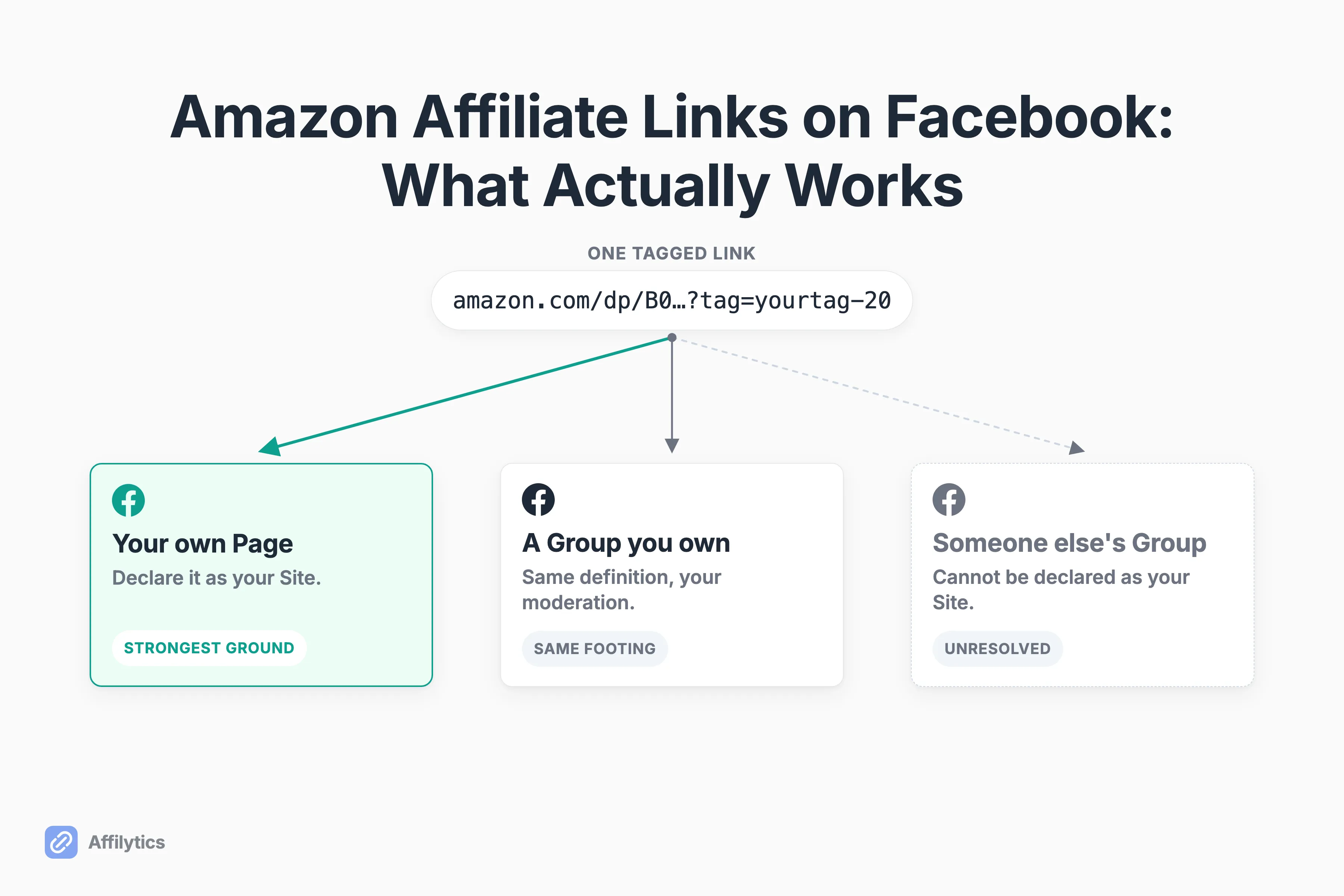
Pages, Groups, and What Amazon’s Policy Actually Pins Down
Section titled “Pages, Groups, and What Amazon’s Policy Actually Pins Down”This is where most articles get confident. I am going to get careful instead, because the policy text is thinner than the internet pretends.
| Where you post | What the policy text actually supports |
|---|---|
| Your own Facebook Page | Clearly a Site under the Operating Agreement’s definition, and you can declare it in your application. Strongest ground you have. |
| A Group you own and run | Same definition, same ability to declare it, and you control moderation and disclosure. |
| A Group someone else runs | Not obviously your Site, and you cannot list it as one. You are working from interpretation, not verified rule. |
| Messenger and DMs | Allowed only when the conversation was solicited, meaning the person opted in first. |
Two clauses do most of the work. Amazon’s Program Policies say you may not make it unclear that you are linking to an Amazon Site through a link shortener, a button, or any other placement. Separately, Special Links may go into email, SMS, and direct messaging from your social Sites only when those messages are solicited. That carve-out is narrow on purpose.
A third clause matters if you post in deal Groups: you must not encourage customers to bookmark your Special Links. “Save this one for later” is a natural thing to type under a price drop. It is also the exact behavior the policy names.
Now the part where I have to be honest with you. You will read on plenty of sites that Amazon requires you to be the sole moderator of any account you post to. That wording traces back to an Amazon resource page that sits behind an Associates login, and fetching it just redirects to the sign-in screen. I am not going to assert wording I cannot show you.
What do you actually do with that?
Treat it as unresolved and route around it. If you do not own the Group, you cannot declare it as your Site, you cannot control how the disclosure is displayed, and you are leaning on an interpretation nobody outside the login wall can verify. Your own Page plus a Group you genuinely run is the version where you are never guessing.
Facebook’s Own Amazon Program Is Not the Same as Pasting a Link
Section titled “Facebook’s Own Amazon Program Is Not the Same as Pasting a Link”There are two completely different ways to post Amazon affiliate links on Facebook, and creators conflate them constantly.
The first is Meta’s native affiliate partnerships feature, where a product banner attaches to your post or Reel and Meta handles the connection to Amazon. Meta’s requirements for the Amazon program are specific: more than 5,000 followers, 18 years of age or older, US residency, and compliance with Amazon’s Operating Agreement and Program Policies.
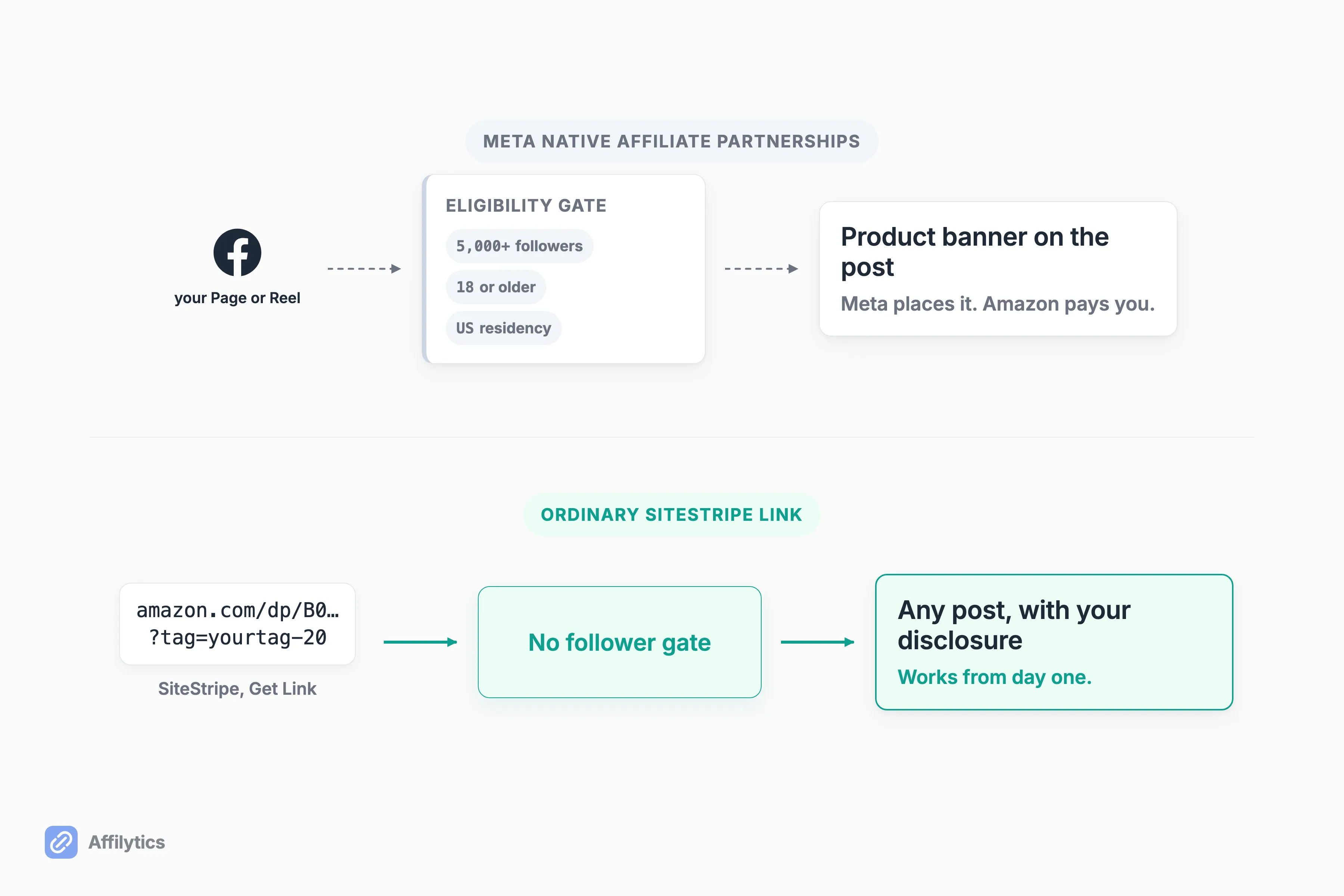
The second route is the one everyone already knows: copy a tagged link out of SiteStripe, paste it into a post, write your disclosure. No follower count, no residency rule, no connection between accounts.
Meta pins down a few more details worth knowing before you chase the native option. “Only one Facebook professional profile or Page can be linked to one Amazon affiliate partner account at this time.” Payment flows through the retailer, not the platform: “You are paid by our affiliate partners. Payments to creators will not come from Meta.” The banner is a placement, not a payer. And the bar itself is not universal: on the same feature, Meta’s Shopee program asks for more than 1,000 followers from creators in Brazil, so Amazon is the stricter of the two.
Which one do you actually want?
If you are under 5,000 followers or living outside the US, the native banner is simply not available to you. That is an eligibility line, not a penalty and not something wrong with your account. You can still post an ordinary Associates link tomorrow morning, and for most creators that link is where the money already comes from.
What Actually Happens to Your Link After You Post It (and What Is Still Disputed)
Section titled “What Actually Happens to Your Link After You Post It (and What Is Still Disputed)”The symptom shows up in creators’ own words long before anyone can explain it. On r/Amazon_Influencer, u/handsome1945 described it plainly: “what I honestly see is clicks but no conversion so I remain wondering what’s really happening?”
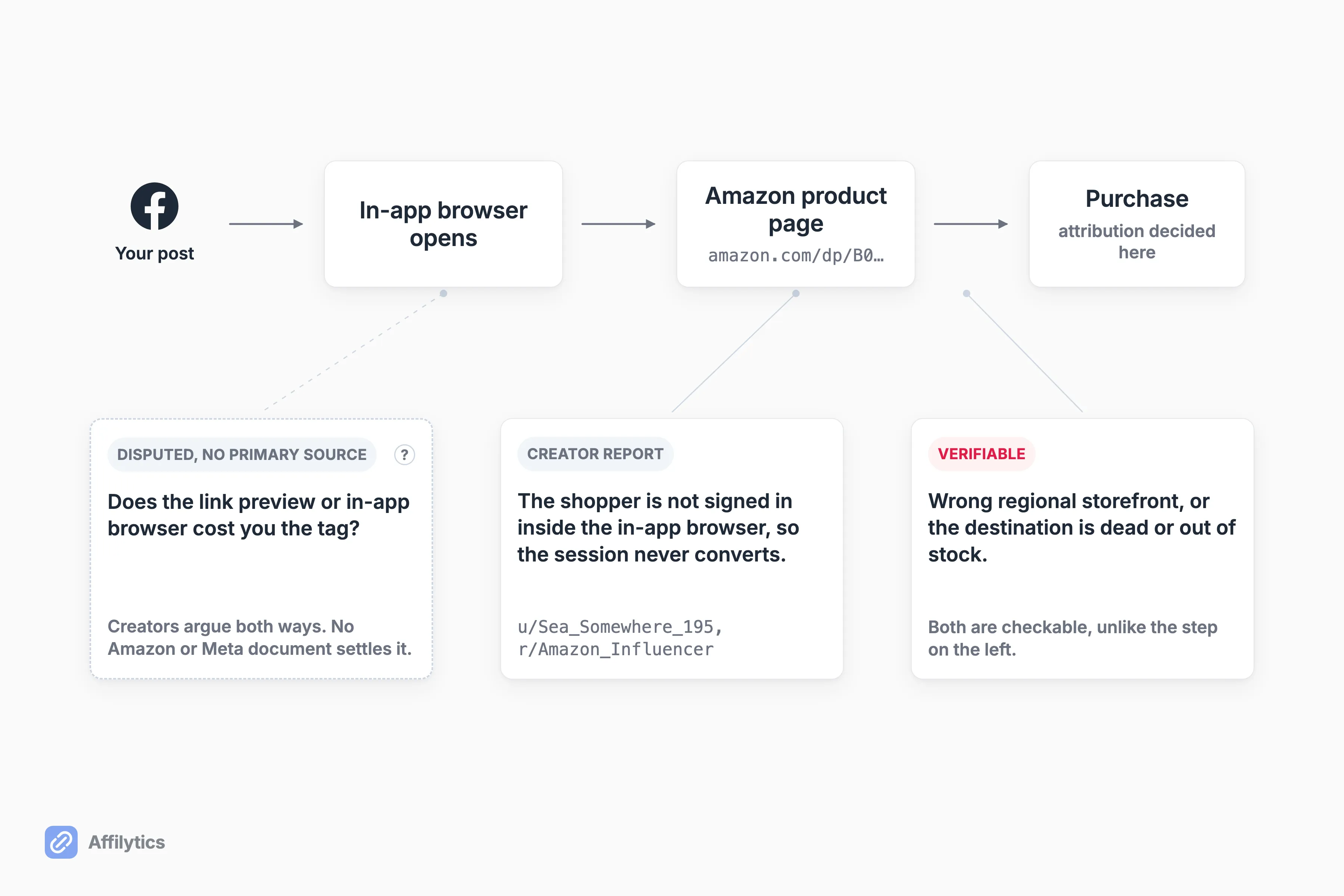
The most repeated theory in creator circles is that Facebook’s link preview and in-app browser cost you the tag. In the thread where it comes up most, a creator had posted a ChatGPT-generated explanation making exactly that case. In that same thread, the most upvoted reply says the opposite. u/Old_Marzipan6085 pushed back directly: “Points 1 and 2 are wrong… When links open in the app it’s a better experience for the user which leads to more conversions. And no, the cookie/tag is not lost.”
A third creator in that same thread offered something narrower and, to me, more believable, because it describes a person rather than a mechanism. u/Sea_Somewhere_195: “Using only the sitestripe link opens the browser within the app you’re using. So if you pose on IG, it opens in the IG browser, which nobody logs in on.” Their example is Instagram, but the shape is the same anywhere a post opens a link inside the app. Nothing gets stripped in that story. The shopper just is not signed in, drifts off to search the product in the app, and buys it without your click in the chain. Same missing commission, entirely different cause.
So who is right?
Here is the plain version: no Amazon or Meta document we could find settles which of these is happening, and anyone who tells you they know for certain is guessing. If you want the general mechanics of why commissions vanish between the click and the sale, we wrote that up separately, and the same question on Pinterest plays out with its own quirks.
There is a second Facebook-specific failure mode that is not disputed at all, because creators can see it happen. Native Amazon banners disappear from posts while the account still shows as connected. u/NiceTomorrow2431 reported it: “I’ve been posting Amazon links on Facebook for a while without issue. Today I noticed all of my Amazon Links have been removed.” In the replies to that post, u/Momof3_social described the support experience: “I got on the phone with meta support and was transferred four times over the course of 3 hours and it was never resolved.”
Creators in those conversations speculate the disappearance is tied to the 5,000-follower bar. Meta documents that number as a requirement for joining, not as a threshold it re-checks on you, so I will report both and leave the causation alone.
Disclosure, and the Two Different Ways Creators Get Flagged
Section titled “Disclosure, and the Two Different Ways Creators Get Flagged”Creators lump these together and they should not. Missing disclosure is one failure. Misusing Amazon’s brand terms is a completely separate one, and the second is the one that ends accounts.
Start with disclosure, because Amazon is unusually clear here. How Amazon says to disclose an affiliate link comes down to three rules:
- Acceptable short forms are “(paid link)”, “#ad”, or “#CommissionsEarned”.
- The disclosure “should be placed near any affiliate link or product review in a location that customers will notice easily”.
- “The disclosure must be made in the medium in which the recommendation was provided.”
That last rule is the one Facebook breaks for people. A text post needs a text disclosure inside the post, not a line in your bio three screens away. A Reel needs it in the Reel. Separately, the Operating Agreement requires the statement Associates must display: “As an Amazon Associate I earn from qualifying purchases.”
The second failure mode has nothing to do with disclosure. One creator, u/dreamit-makeit, reported this on r/Amazon_Influencer: “I was sharing off-site links on my social media and got my entire account shutdown for trademark violations. I was saying ‘amazon deals’ on my posts and in my bio.” That is one person’s account and not a documented rule, but the shape of it is worth respecting. Naming a brand in your handle, your bio, or your Page name is a different risk from forgetting a hashtag.
What about boosting a post?
Amazon’s Program Policies define a “Prohibited Paid Search Placement” as covering a product bought by a customer referred through an advertisement you purchased, including through bidding on keywords or identifiers that include Amazon trademarks. Boosting a Facebook post is a paid placement. Whether your specific boost lands inside that definition is a question for your own account terms, and I would rather send you to check than repeat the blanket ban you will see elsewhere without a citation behind it.
The Setup That Survives: One Link You Control
Section titled “The Setup That Survives: One Link You Control”Start with the money, not the compliance. Most creators paste an amazon.com link because that is the storefront they shop on, while plenty of the people reading that post are shopping on a different Amazon entirely. A click from London lands on a storefront that cannot pay your US tag, and nothing in your dashboard says so.
A smart link fixes that by deciding the destination per visitor. The mechanic is simple: the reader taps go.affilytics.io/{slug}, we read their country from their IP address, match the first routing rule you set, and send a 302 redirect to the right regional Amazon store. Same link in every post, different destination per person.
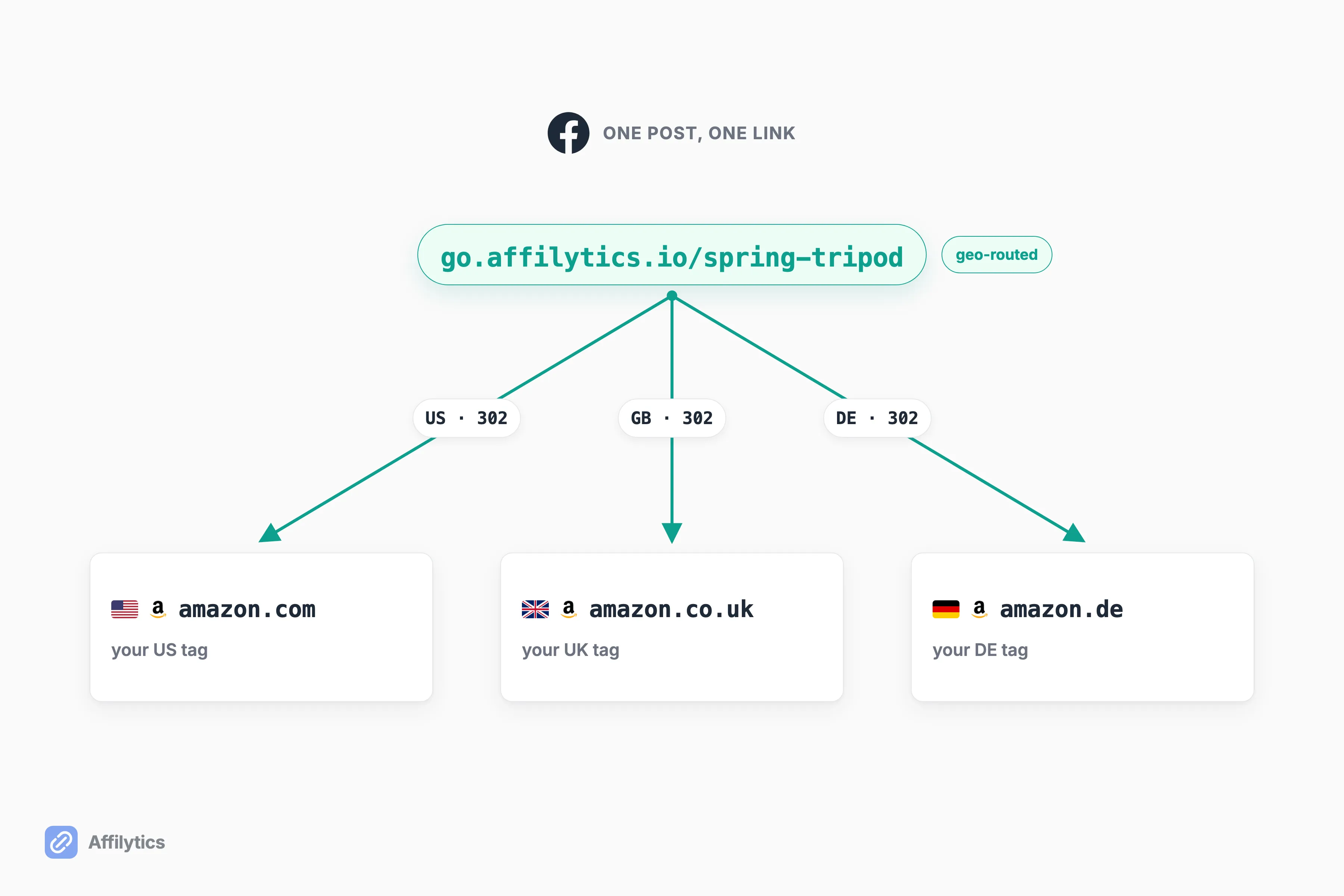
It also sidesteps the argument in the last section without needing to win it. Because the posted link points at a domain we control, we resolve the tagged Amazon destination on our side of the redirect, so Facebook never handles the ?tag= parameter itself. You can find out more about how geo-routing sends each click to the right Amazon store if you want the full path.
Which brings back the link-clarity clause from earlier. A redirect on your own domain that lands on a clearly labeled Amazon product page is a different thing from a shortener that hides where the click is going. Keep the destination obvious and the disclosure in the post, and you are inside the rule rather than testing it.
And what happens the day the destination itself dies?
That is the second job. Every smart-link destination gets checked continuously, and the answer is never just up or down:
- Active, or broken, the two everybody expects.
- Attribution-lost, meaning the page loads fine but your tag did not make it through.
- Out-of-stock or product-unavailable, where the listing is alive and the sale is not.
- Blocked, meaning the retailer’s bot defenses answered instead of the product page, which is a very different thing from dead.
Alerts fire when a check detects the change, not on a weekly digest schedule.
One honest limit. Affilytics does not crawl Facebook. We discover and monitor links in YouTube descriptions and on websites and blogs, and no scan of ours ever touches a Page, a Group, or a feed. On Facebook the value is the redirect layer itself: you make the smart link, paste it where you post, and we route and monitor the destination from there. How to create a smart link is a one-time manual step per link, and nothing auto-converts what you already published.
Try It on the Post That Already Works
Section titled “Try It on the Post That Already Works”Amazon affiliate links on Facebook do not fail loudly. They just quietly stop paying, and the clicks keep rolling in either way. Pick the post that already gets the most of them, make one smart link, and swap it in. Within a week you will see which countries those clicks come from and whether the destination is still alive, on traffic you already have rather than traffic you have to go find.
Start your free trial and you get two full weeks with everything unlocked, no credit card. If the country breakdown turns out flat and every destination is healthy, you will have learned that for free, which is a fine outcome too.
Can you post Amazon affiliate links on Facebook?
Section titled “Can you post Amazon affiliate links on Facebook?”Yes. Amazon’s Operating Agreement counts social media user-generated content as one of your Sites, so a Facebook post is a place you are allowed to put a tagged link. The gate is not getting permission once, it is following the rules every time: disclose the link in the post, never obscure that you are linking to Amazon, and list the Facebook Page you post from in your Associates account.
Can you post Amazon affiliate links in a Facebook group?
Section titled “Can you post Amazon affiliate links in a Facebook group?”A Group you own and run is the clear case, because you can declare it as one of your Sites and you control the disclosure. For a Group someone else runs, be careful. The commonly repeated rule that you must be the sole moderator of any account you post to traces back to an Amazon page that sits behind an Associates login, so treat it as unverified rather than settled, and prefer surfaces you own and have declared.
Do you need 5,000 followers to post Amazon affiliate links on Facebook?
Section titled “Do you need 5,000 followers to post Amazon affiliate links on Facebook?”No, not for an ordinary Associates link. The 5,000-follower bar applies only to Meta’s native affiliate partnerships feature, which also requires you to be 18 or older and to live in the US. Pasting a SiteStripe link into a normal post has no follower requirement at all.
Why do I get clicks on my Facebook affiliate links but no sales?
Section titled “Why do I get clicks on my Facebook affiliate links but no sales?”There are three honest candidates. The visitor may be browsing inside an in-app browser they are not logged into Amazon on, so the session never converts. International clicks may be landing on the wrong regional storefront. The destination itself may be dead or out of stock. Whether Facebook’s link handling strips or burns your tracking tag is genuinely disputed among creators and no primary source settles it, so fix the parts that pay off either way.
Do you have to disclose affiliate links on Facebook?
Section titled “Do you have to disclose affiliate links on Facebook?”Yes. Amazon says the disclosure must be made in the medium in which the recommendation was provided and placed near the link where people will notice it easily. On Facebook that means a text post needs a text disclosure in the post itself, not only in your bio. Acceptable short forms include “(paid link)”, “#ad”, and “#CommissionsEarned”, alongside the standard statement that you earn from qualifying purchases as an Amazon Associate.