
How to Cloak Affiliate Links: 5 Steps and 2 Real Risks
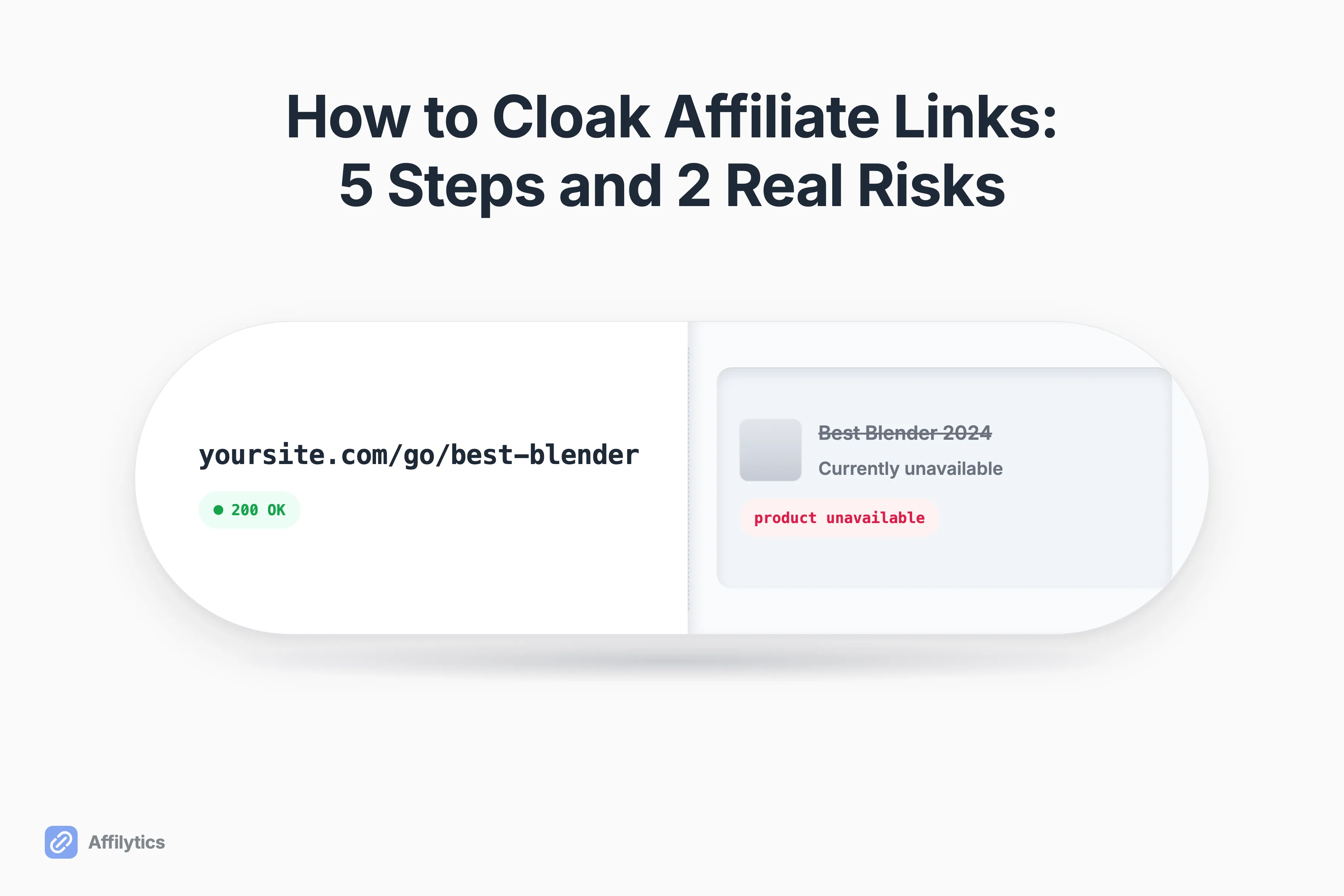
Most people decide to cloak affiliate links for one reason: the raw ones look terrible. A tidy /go/best-blender replaces forty characters of tracking junk, and the whole job takes about ten minutes. The part nobody mentions is that a cloaked link keeps looking perfect long after it stops earning anything.
We build affiliate-link tooling at Affilytics, and a chunk of that work happens at the far end of exactly these links: our crawler recognizes the cloaked paths a link plugin creates, and our checker follows each one through to whatever is actually sitting at the other end.
That matters more than it sounds, because affiliate links do not expire so much as rot, and a cloak is very good at hiding rot.
Here is what cloaking actually is, the five steps to do it properly, the two rules Amazon’s policies actually name, and the five ways a cloaked link quietly stops paying you.
What Cloaking Actually Is (and Two Things It Gets Confused With)
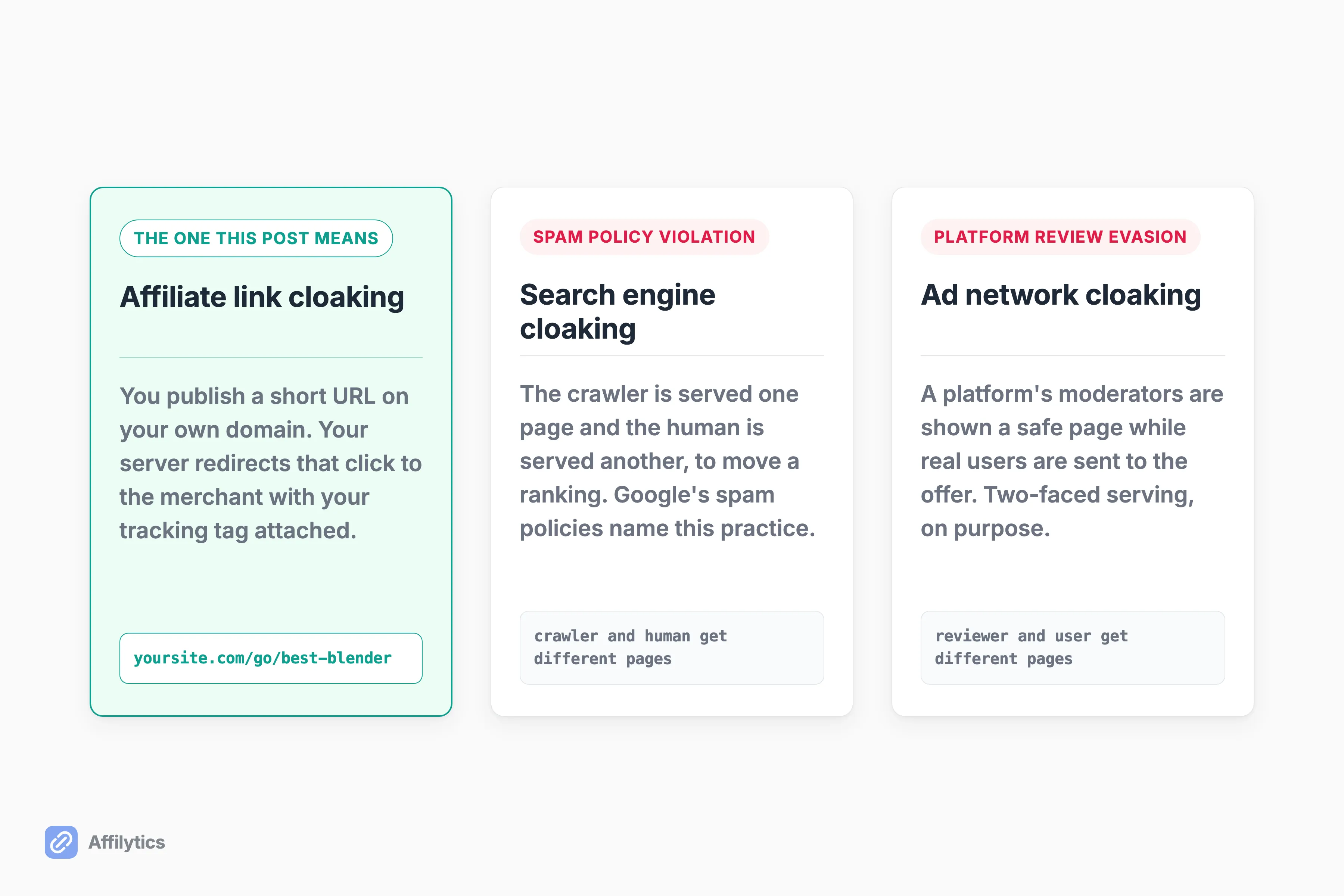
Section titled “What Cloaking Actually Is (and Two Things It Gets Confused With)”Affiliate link cloaking is one boring mechanic wearing three different reputations. The mechanic: you publish a URL on your own domain, something like yoursite.com/go/best-blender, and your server redirects that click to the merchant with your tracking tag attached.
Nothing is hidden from anybody in that exchange. The merchant still sees the click arrive from your site, the reader still lands on a product page whose URL they can read, and you get one short link you can re-point later without editing a single post. If you are weighing a hosted shortener against running the redirect yourself, we ranked the options in our best URL shortener for affiliate links comparison.
So why does the word make people flinch?
Because three different practices answer to the same word, and two of them are nothing like yours:
- Affiliate link cloaking: a branded redirect on your own site, one destination for everybody.
- Search-engine cloaking: serving crawlers different content than humans, which is a spam violation.
- Ad-network cloaking: showing a platform’s moderators a safe page while real users get the offer.
Only the first one is what you are trying to do. Google defines the second as presenting different content to users and search engines with the intent to manipulate search rankings and mislead users. The tell is that the crawler and the human get different things, and a redirect that sends everyone to the same place is not doing that.
The third one is a different animal entirely. Here is a practitioner describing it on X, in his own words: “Bots and moderators will see a safe page, while real users get redirected to your offer.” That is deliberate two-faced serving, built to get an offer past a platform’s review team. It shares a word with what you are doing and nothing else.
None of this confusion is theoretical. A marketer on r/SEO_Digital_Marketing posted that he keeps seeing domain.com/recommends links everywhere and has no idea what produces them. The mechanism is opaque even to people working right next to it.
One real rule does apply, and it is narrower than the internet thinks. Amazon cares about two things: whether it can still tell which site the click came from, and whether your reader can tell they are heading to Amazon. The exact clauses get a section of their own, right after the setup steps.
How to Cloak an Affiliate Link in 5 Steps
Section titled “How to Cloak an Affiliate Link in 5 Steps”Setup is five decisions. Get the first four right and the fifth gets much easier to pass.
Step 1: Pick the Path Your Links Will Live Under
Section titled “Step 1: Pick the Path Your Links Will Live Under”Every cloaked link lives under a path prefix you choose once and then leave alone. The common ones are /go/, /recommends/, /refer/, /out/, /link/, and /visit/.
Pick one. Genuinely, just one.
The reason is auditing, not aesthetics. Six months from now you will want to list every affiliate link on your site in one shot, and “every URL under /go/” is a question you can actually answer, while “the ones I cloaked, plus the ones I shortened that one week, plus the three I hardcoded” is not. Those six prefixes are exactly the paths our own crawler registers as cloaked redirects when it scans a site, because they are what the WordPress link managers generate by default.
Consistency here is what makes the audit in the last section take minutes instead of an afternoon.
Step 2: Choose the Plugin or Do It Yourself
Section titled “Step 2: Choose the Plugin or Do It Yourself”Two routes, and most creators should take the first one.
Route one is a WordPress link manager. ThirstyAffiliates and Pretty Links are the two WordPress plugins most creators pick between, and both generate exactly the kind of path prefix step 1 describes. If you want them properly compared, that post does it, and if the annual licence is the sticking point, the free Pretty Links alternatives worth comparing are sorted by what each one actually does. This one is about the mechanic.
Route two is doing it yourself. You can register a redirect without any plugin at all, and the redirect script most no-plugin guides point at is a small index.php that reads a plain-text list of slugs and destinations. It is a genuinely good option if you like owning your own code and you are comfortable editing files on your server.
What are you giving up by hand-rolling it?
Click counts, a dashboard, and one place to bulk-edit links when a merchant changes domains. What you keep is a redirect you fully understand.
Step 3: Decide Between a 301 and a 302
Section titled “Step 3: Decide Between a 301 and a 302”A 301 is the instinct here, and it is the wrong promise to make.
A 301 means permanent. MDN’s reference is explicit that with a 301, search engines will attribute links to the original URL to the redirected resource, and browsers cache the redirect aggressively.
Now think about what an affiliate destination actually is. The product gets discontinued. The merchant moves the SKU to a new URL pattern. Your program switches networks and the whole link shape changes. You will re-point that link, probably more than once.
A 302, the temporary version, keeps the cloak URL as the thing that matters and leaves you free to swap what sits behind it. Use 302 unless you have a specific reason not to.
Step 4: Add the Right Link Attributes and Your Disclosure
Section titled “Step 4: Add the Right Link Attributes and Your Disclosure”Two small things, both non-optional.
Money links get rel="nofollow sponsored". That tells Google the link is a paid placement rather than an editorial vote, which is the honest signal and the one its documentation asks for.
Your disclosure stays exactly where it was. Cloaking changes what the URL looks like, not what the link is, so if the sentence above your link said you earn a commission when it was a raw affiliate URL, it still says so now.
One thing worth being precise about, because the field is loose here: adding those attributes is not a blanket “cloaking is fine for SEO” pass. It is one specific signal doing one specific job.
Step 5: Check It Against Amazon’s Two Rules
Section titled “Step 5: Check It Against Amazon’s Two Rules”Two clauses in Amazon’s Associates Program Policies touch cloaking, and both reduce to one test you can run in a minute:
- Can Amazon still tell which site the click started on?
- Can your reader tell they are heading to Amazon before they click?
Two yeses and what you have built is not what those clauses describe. The clauses themselves, and the argument still running about them, are next.
Does Cloaking Break Amazon’s Rules? The Two Clauses That Matter
Section titled “Does Cloaking Break Amazon’s Rules? The Two Clauses That Matter”Two clauses get quoted at creators who cloak. Here is what they actually say.
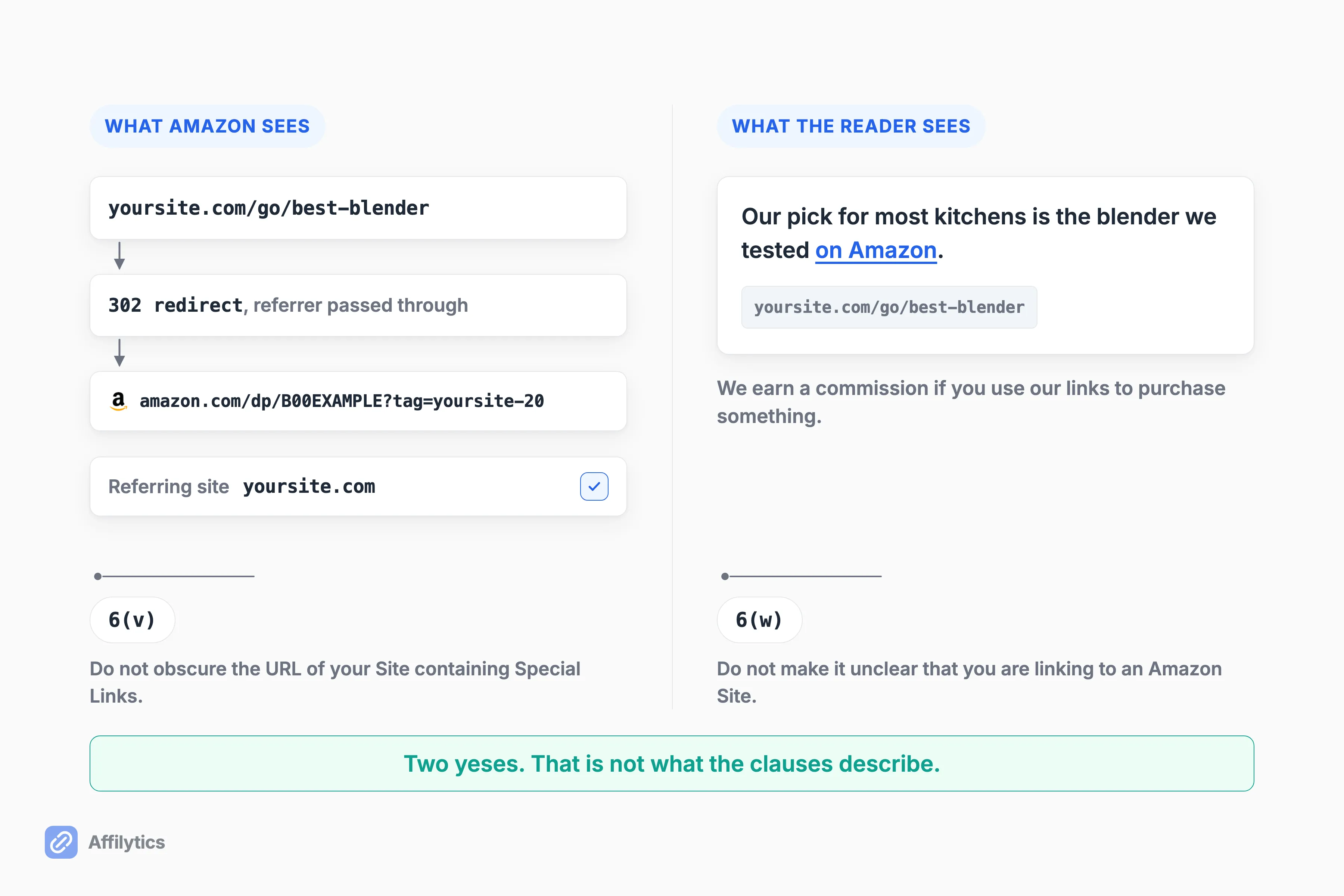
Section 6(v): “You will not cloak, hide, spoof, or otherwise obscure the URL of your Site containing Special Links (including by use of Redirecting Links) or the user agent of the application…” The clause goes on to tie the prohibition to whether Amazon can determine the site a customer clicked through from.
Read that again. It prohibits obscuring the URL of your Site. Your site, not Amazon’s.
Section 6(w) covers the other half: “You will not use a link shortening service, button, hyperlink or other ad placement in a manner that makes it unclear that you are linking to an Amazon Site.” That half is about your reader, not about Amazon’s reporting.
So what about the Redirecting Links that 6(v) names in passing?
Amazon defines one as a link that sends a customer to Amazon through an intermediate site, “without requiring the customer to click on a link or take some other affirmative action on that intermediate site”. A plain auto-forwarding cloak meets that description. Nobody clicks anything on your /go/ path, because there is nothing sitting there to click. And 6(v) names Redirecting Links as one way a site’s URL gets obscured.
Two things stop that from being a verdict. The definition sits in Amazon’s Disqualified Purchases definitions, not in the content rules 6(v) belongs to. And 6(v)‘s operative question is still the one inside the clause itself: can Amazon determine the site the click came from? A branded redirect that passes referrer data through leaves that determinable.
Practitioners still argue about all of this. In one r/Amazon_Influencer thread the subreddit’s moderator reads a 302 as cloaking and warns that “Hiding that it’s an Amazon link will get into trouble and get your account terminated”, while two other practitioners in the thread read it more narrowly: “As long as you aren’t stripping referrer data, or trying to trick users, you aren’t cloaking (imo).”
What a Cloak Hides: 5 Ways a Clean Redirect Keeps Pointing at Nothing
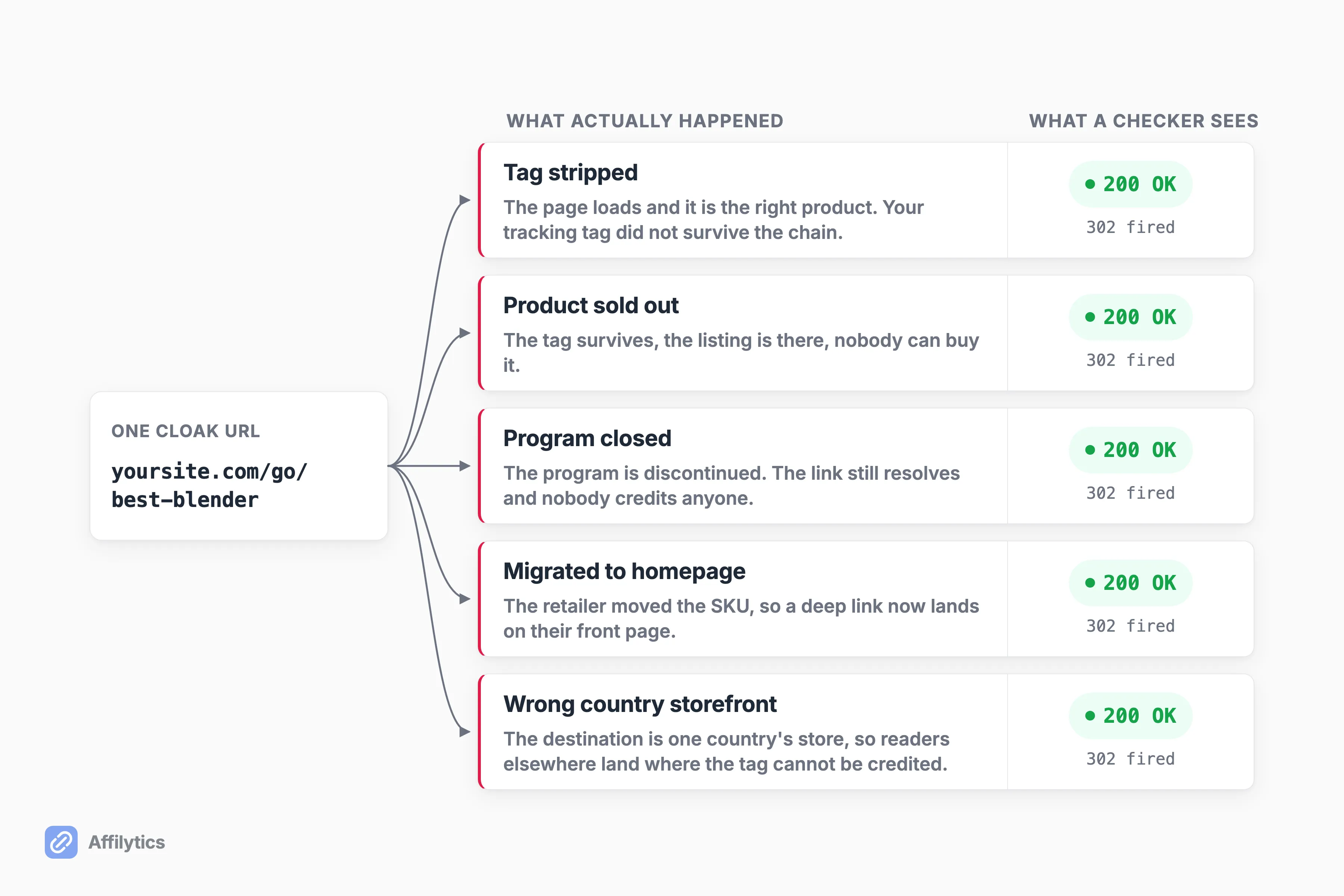
Section titled “What a Cloak Hides: 5 Ways a Clean Redirect Keeps Pointing at Nothing”A cloaked link has one property that makes it uniquely dangerous: it looks identical whether it works or not. yoursite.com/go/best-blender renders exactly the same on the day you publish it and two years later, when the product behind it no longer exists.
So what does a broken cloaked link look like from the outside?
Exactly like a working one. Your server answers, the redirect fires, the browser goes somewhere. Nothing in that sequence tells you whether the somewhere is still worth anything.
A working blogger on r/Blogging listed four of these modes independently, which is how I know this is not a vendor’s imagination:
- The tag gets stripped. The most expensive mode and the least visible. The tracking tag gets dropped somewhere in the chain between your cloak and the merchant’s page. The page loads, returns 200 OK, and is the right product. You just do not get paid for it.
- The product sells out. The page loads, the tag survives, nobody can buy. Commissions fall to zero while every dashboard you own reports normal traffic.
- The program shuts down. Programs get discontinued mid-year. Old links still resolve, the merchant still ships product, and nobody credits anyone.
- The retailer migrates. A retailer moves a SKU to a new URL pattern, and your deep link now redirects to their homepage. Same clicks, zero conversions, because a homepage does not sell a blender to somebody who came for a blender.
- The storefront is single-country. The destination behind the cloak is one country’s store, so every international reader who clicks lands somewhere that will not credit your tag. The cloak hides that too, because
/go/best-blenderlooks the same in every country.
The blogger who listed the first four put the problem better than I can: “None of these trigger an alert with normal uptime monitors because the URLs technically still resolve.”
That is the whole trap. Uptime monitoring answers “did the server respond”, and every one of those five failures responds beautifully.
Creators in that same thread do not think their cloaking tool closes the gap. One put it plainly: “A few use Pretty Links or Lasso for cloaking but those mostly count clicks, they don’t verify the destination is still healthy.” A click counter tells you the redirect fired. It cannot tell you the click was worth firing.
Which is also why a checker that calls a dead link healthy is arguably worse than no checker at all. A 200 response from the merchant proves the page answered. It proves nothing about whether you earned anything.
How to Audit What Is Behind Your Cloaked Links
Section titled “How to Audit What Is Behind Your Cloaked Links”You can do this by hand, and on a small site with a handful of cloaked links you probably should.
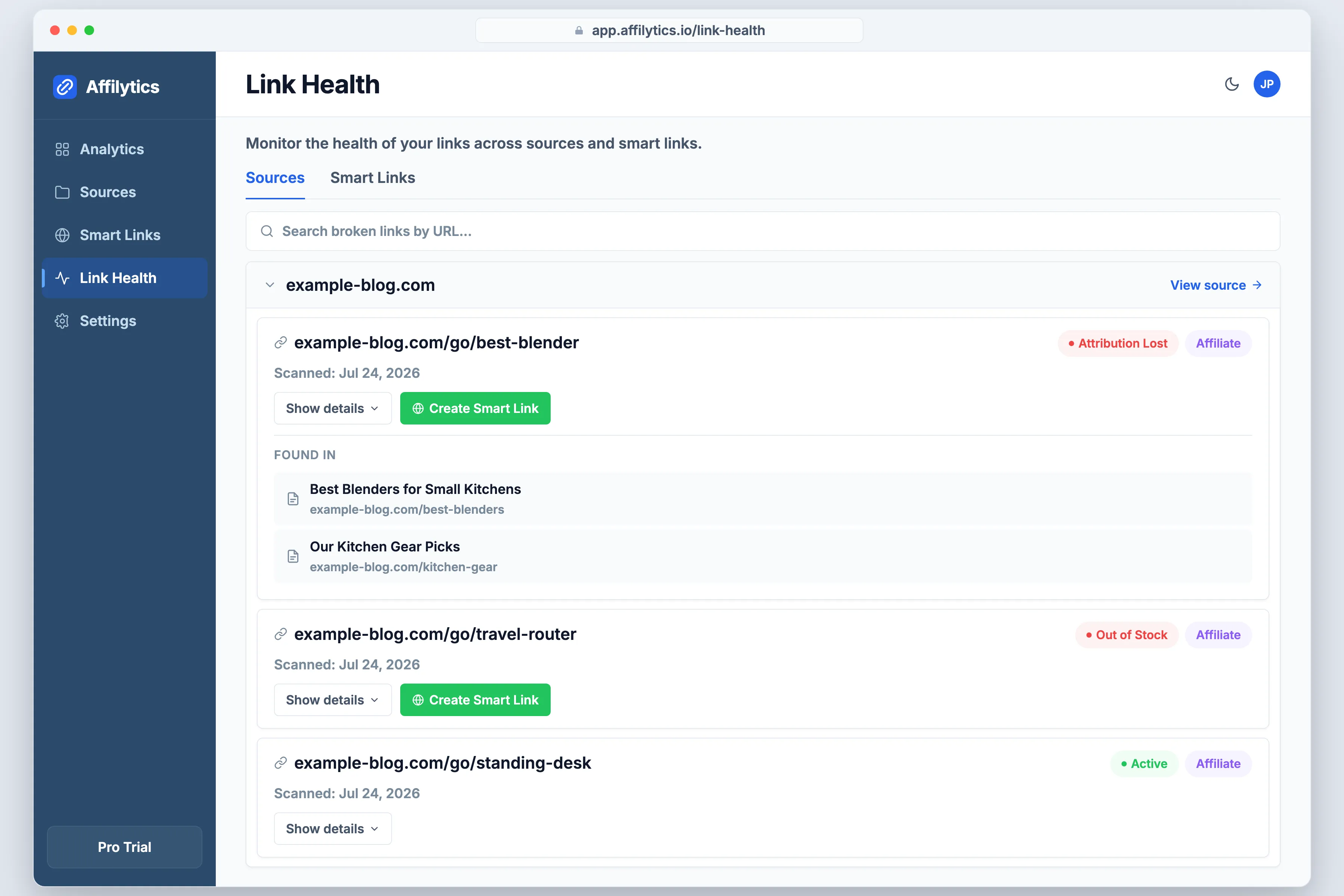
The manual pass is three moves:
- List every URL under your cloak prefix. This is the payoff for picking one prefix back in step 1.
- Follow each one all the way to its final destination, not just the first hop.
- At that destination, check three things: it is the right product page, the product is actually buyable, and your tracking tag survived the trip.
The third check is the one people skip, and it is the one that costs the most. Open the final URL, look for your tracking ID in the address bar, and if it is not there, that link has been free traffic for the merchant.
How long does that take across a whole archive?
That is the part we built for. Affilytics crawls a site and can check every affiliate link on your site in one pass. Cloaked internal redirects get special treatment: the crawler recognizes those path prefixes and registers them, then deliberately leaves them out of the list of pages to crawl, because the health checker is going to follow each one through the redirect chain to the real destination anyway.
What comes back is a state per link rather than a status code. Attribution-lost is its own state, separate from broken, which is precisely the failure a cloak hides best: a healthy page arriving without your tag. Anti-bot responses from big retailers get their own state as well (blocked), so a store that refuses an automated check does not get filed as a dead link.
Worth being clear, since the rest of this post lives inside WordPress: this runs from the outside. There is nothing to install, it crawls your blog the same way it crawls any other site, and your cloaks stay exactly as you built them.
Cloak Them, Then Check What Is Behind Them
Section titled “Cloak Them, Then Check What Is Behind Them”Cloaking is a good idea. It makes your links readable, keeps them editable, and, done the way those two clauses describe, it is not what they prohibit. It just does not tell you anything about whether those links still earn.
If you want that answer for your own /go/ paths, run one scan against your site and read what each cloak actually resolves to. Every new account gets two full weeks with everything unlocked, no credit card. Start your free trial, point it at your archive, then go fix the three worst links it finds.
Is cloaking affiliate links against Amazon’s rules?
Section titled “Is cloaking affiliate links against Amazon’s rules?”No, not as such. What Amazon’s Associates Program Policies prohibit is obscuring the URL of your own site (Section 6(v)) and using a shortener, button, or placement in a way that makes it unclear you are linking to an Amazon Site (Section 6(w)). Run the two-part test: can Amazon still tell which site the click started on, and can your reader tell they are heading to Amazon? Two yeses and a branded redirect that passes referrer data through is not what those clauses describe.
Does link cloaking hurt SEO?
Section titled “Does link cloaking hurt SEO?”It depends which cloaking you mean. Google’s spam policy defines cloaking as presenting different content to users and search engines with the intent to manipulate search rankings and mislead users, and a redirect that sends every visitor to the same destination is not doing that. A disclosed affiliate redirect carrying rel="nofollow sponsored" is a different practice with a different purpose. What would actually put you in Google’s crosshairs is serving crawlers one page and humans another.
Should I use a 301 or a 302 for a cloaked affiliate link?
Section titled “Should I use a 301 or a 302 for a cloaked affiliate link?”Use a 302 unless you have a specific reason not to. A 301 means permanent: search engines attribute links to the destination and browsers cache it aggressively. Affiliate destinations are the opposite of permanent, since products get discontinued, merchants move SKUs, and programs change networks. A temporary redirect keeps your cloak URL as the stable thing and leaves you free to re-point what sits behind it.
Can a cloaked link break without me noticing?
Section titled “Can a cloaked link break without me noticing?”Yes, and that is the whole reason this post exists. Your server keeps issuing a clean redirect no matter what happened at the other end, so the link looks identical whether the destination is a live product page, a sold-out listing, a discontinued program, a homepage after a domain migration, or a page that quietly dropped your tracking tag. Uptime monitors miss all of it, because the URLs still resolve.
Do I still need to disclose an affiliate link if it is cloaked?
Section titled “Do I still need to disclose an affiliate link if it is cloaked?”Yes. Cloaking changes how the URL looks, not what the link is. Your disclosure obligations are exactly what they were with a raw affiliate URL, and the reader still needs to be able to tell that clicking earns you a commission. If anything it matters more once the merchant’s name is no longer visible in the link itself.