
Affiliate Link Manager for Bloggers: Earn More, Lose Less
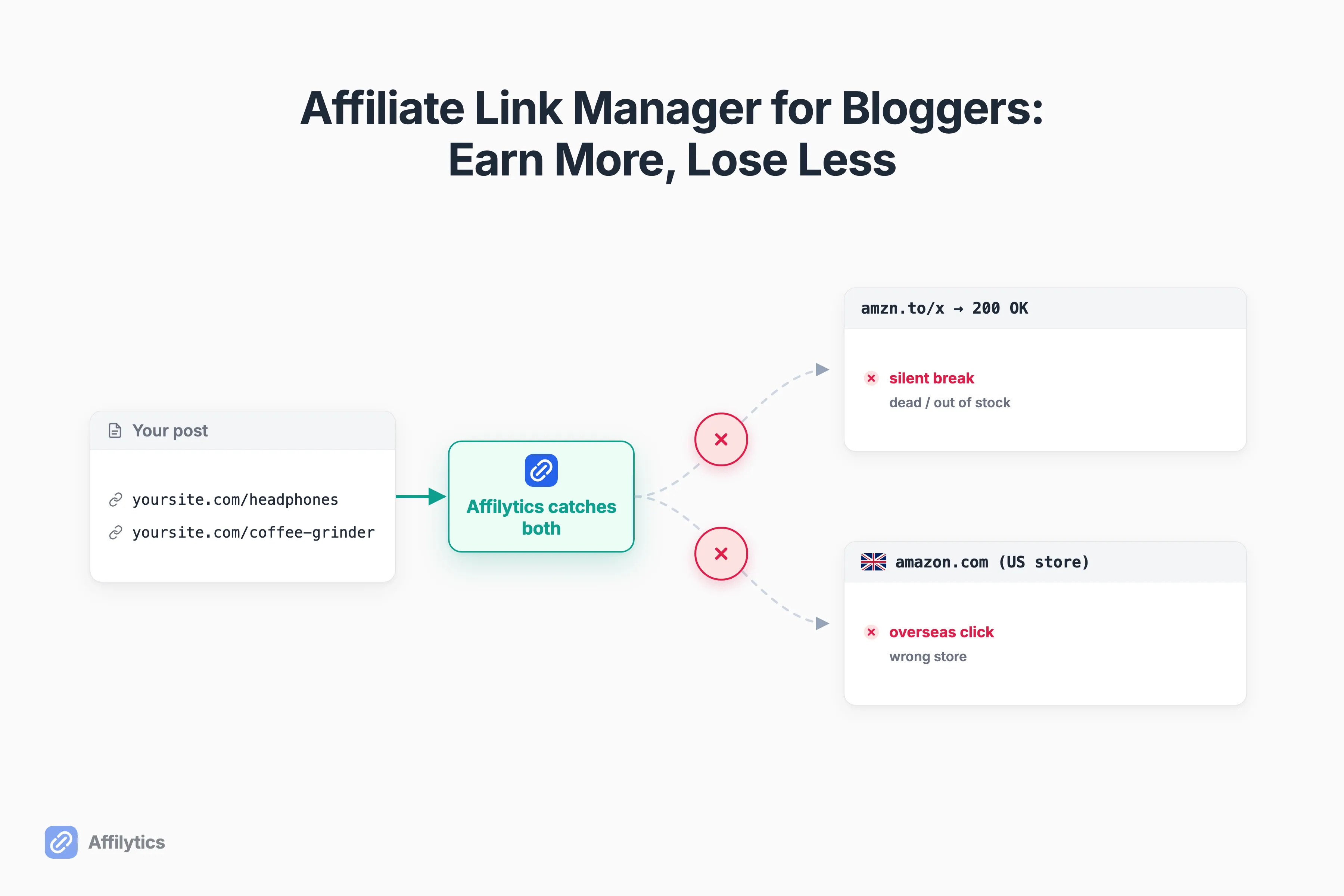
You have 150 affiliate links scattered across two years of posts, and one of them broke last month. You did not notice. The question almost every blogger eventually asks themselves, and the reason they go looking for an affiliate link manager in the first place, is the one u/RAV957_YT posted on Reddit: “Do you manually check if they’re still working or just hope for the best? I’m paranoid because one broke and I’ve been losing commissions.”
We build Affilytics, and our engineers write the link-health checker itself, the part that quietly visits a link the way a real browser would and the part that routes each click to the right country. So we see exactly how a blogger’s links fail, and where the commission leaks out.
Two leaks, actually. Links that die silently, and clicks from overseas readers that land on the wrong store. That second one is what your international traffic is actually worth, and most bloggers never route for it.
This guide covers what a “link manager” actually has to do for a blogger, the two ways your links quietly lose money, when a simple WordPress cloaker is genuinely enough, and when you need geo-routing plus real monitoring. One note on scope first: this is about managing the affiliate links you place in your posts, not about running your own affiliate program.
What an Affiliate Link Manager Actually Does for a Blogger
Section titled “What an Affiliate Link Manager Actually Does for a Blogger”Quick disambiguation, because Google muddles this. An affiliate link manager handles the links you put in your articles. It is not merchant software like AffiliateWP or Tapfiliate, which you would use to run your own program and pay other people commissions. Different job entirely.
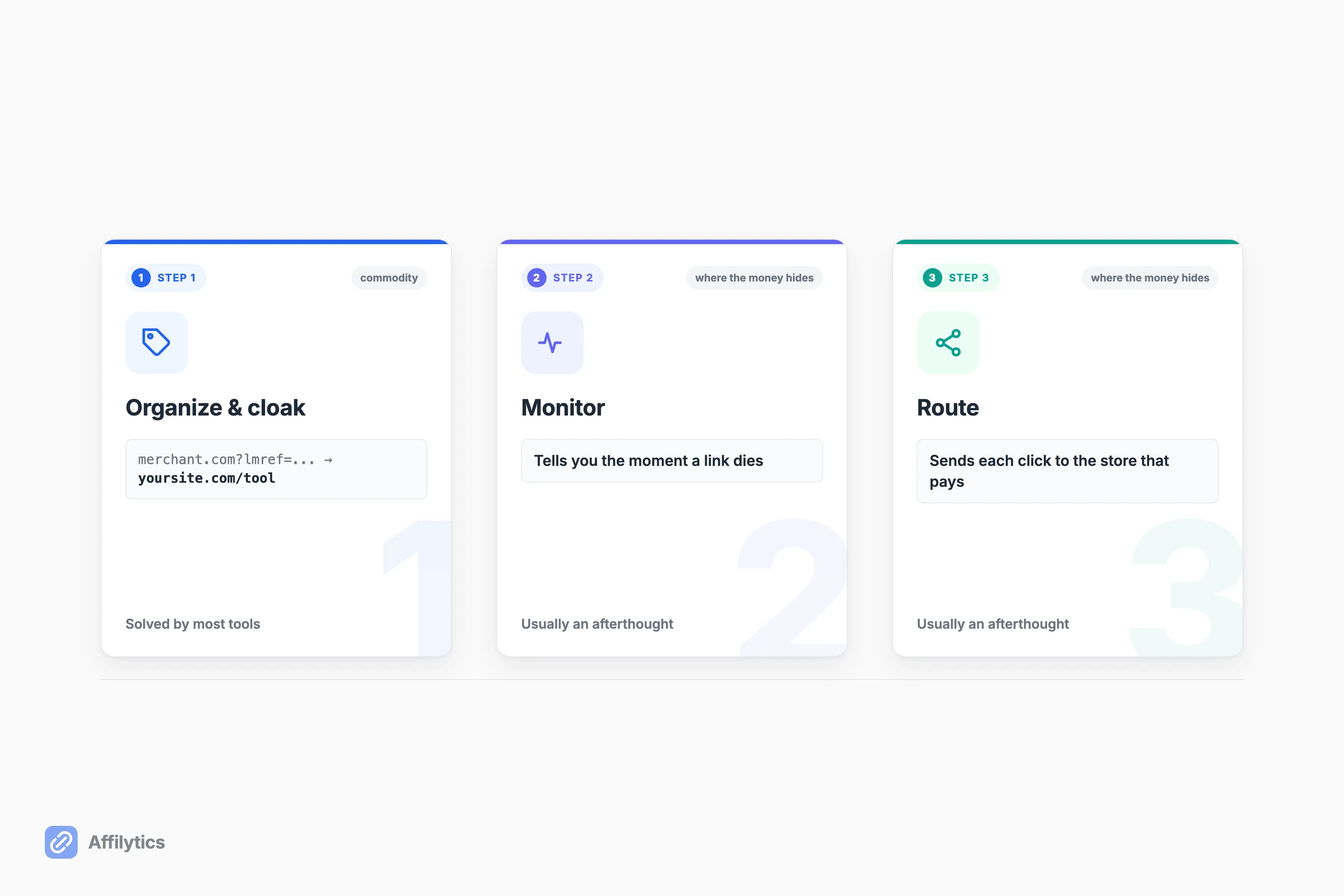
So what does a manager actually have to do? Three jobs:
- Organize and cloak. Turn an ugly
merchant.com?lmref=...link into a tidy, brandedyoursite.com/toollink, protect it from theft, and make it easy to drop into a post. - Monitor. Tell you the moment a link dies, instead of you finding out months later.
- Route. Send each click to the store that actually pays for that reader.
Here is the catch. Most tools nail job one and treat the other two as afterthoughts. The category is crowded with cloaking-only plugins, the kind where the wordpress.org “Smart Affiliate Link Manager” plugin ranks on the exact phrase with fewer than 10 active installs. And in roundups like WPBeginner’s, geo-targeting shows up as a single checkbox in the review criteria, not a feature anyone develops. Organizing is solved. Monitoring and routing are where the money hides.
The Two Ways Your Blog’s Affiliate Links Quietly Lose Money
Section titled “The Two Ways Your Blog’s Affiliate Links Quietly Lose Money”There are two leaks, and both are silent by design. You will not see either one in your analytics until you go looking.
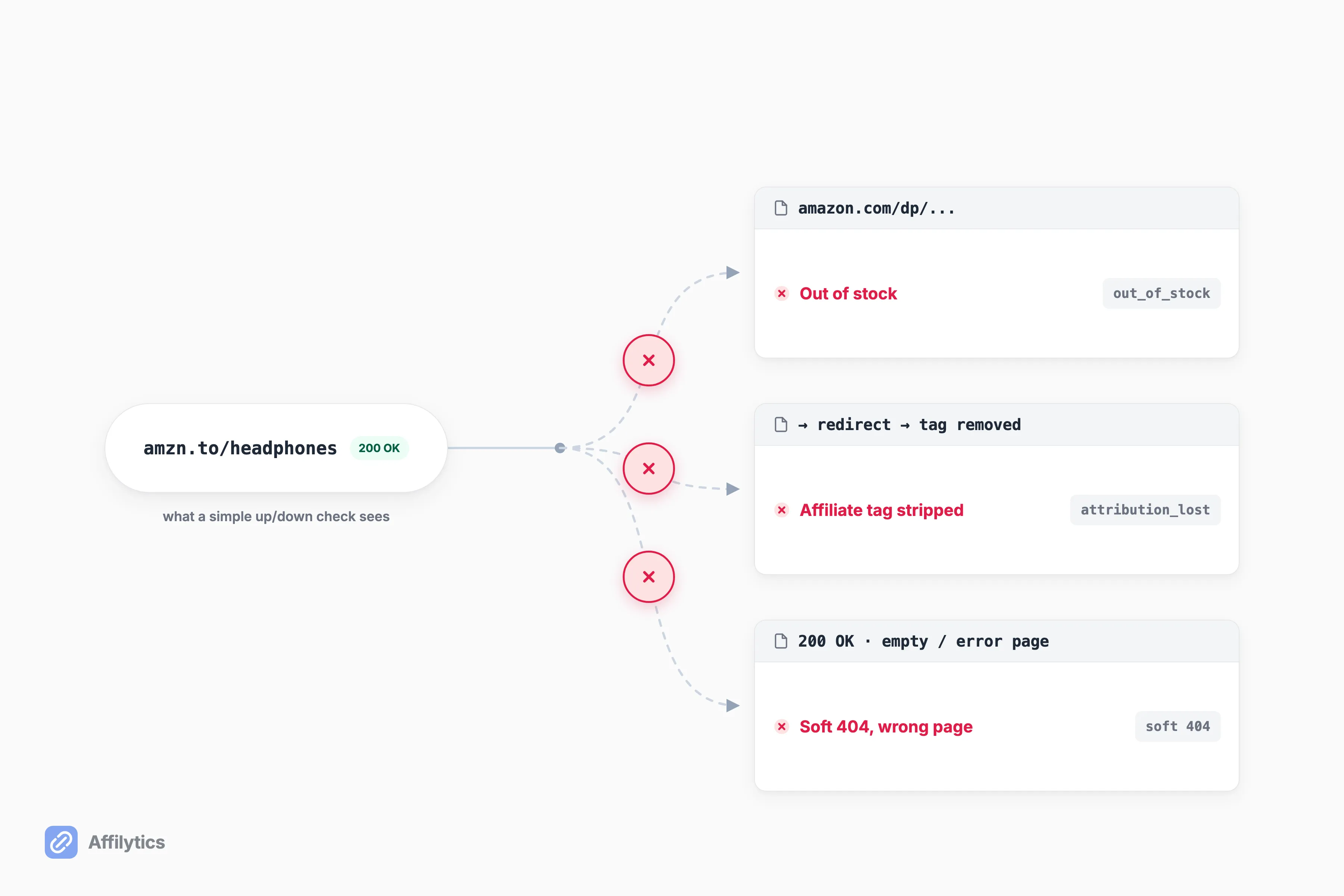
The first leak is the silent break. A link can return a clean 200 OK and still be dead to your reader: the product is out of stock, the item was discontinued, or your affiliate tag got stripped somewhere in a redirect. Simple up-or-down checks and a quick manual click-through miss exactly these. As one marketer put it on Reddit, “a 200 with the wrong body is invisible to most uptime tools.” Even the writers who recommend manual checking admit the limit here. The blog Productive Blogging says it plainly: a manual spreadsheet check “will not find links which are now redirecting to a different page… or which are still going to the correct product page, but where the product is no longer available.” On our side these are real, named states. We flag links as out-of-stock, attribution-lost, or blocked, because an HTTP 200 response can still be the wrong or empty page (a soft 404).
The second leak is the international one, and this is the income half. You link to Amazon.com by default. A reader in the UK, Australia, or Germany clicks, lands on the US storefront, and either bounces or buys somewhere you get nothing. The commission evaporates. Creators already know this lever exists, which is why Amazon’s OneLink keeps coming up as the first international fix. OneLink sends each shopper to their local Amazon storefront, but it only covers Amazon programs. If you run alternatives to Amazon OneLink or any non-Amazon program, those international clicks are still leaking.
How much of your audience are we talking about? For a lot of blogs, a meaningful share of readers sit outside your home country, and none of them are routed.
When a WordPress Cloaker Is All You Need
Section titled “When a WordPress Cloaker Is All You Need”Here is the honest part. If you are on WordPress, a cloaker does its job well, and sometimes that job is all you need.
ThirstyAffiliates and PrettyLinks tidy your links, brand them, protect them from theft, make in-post insertion painless, and let you change a destination once to update every instance. That is real value, and if you are picking between ThirstyAffiliates and Pretty Links specifically, we put those two side by side; for the wider field we compared the best Amazon affiliate WordPress plugins on price and on who each one actually suits. WPBeginner is about as authoritative as blogging advice gets, and it publicly discloses that it uses ThirstyAffiliates to manage its own links. Even big sites run a cloaker.
ThirstyAffiliates is a WordPress-only plugin. It has a free version, and a Basic tier at $99.60/yr promo that renews at $249/yr. Geographic Redirects, its geo-routing, are now included in that Basic tier rather than gated to a higher one. Its broken-link detection is an “Automatic 404 Checker,” and the depth of that checker is undisclosed.
So when is a cloaker enough? When all of these are true:
- You are on WordPress.
- You have a manageable number of links.
- You will actually run that periodic manual check, not just intend to.
If that is you, stop here. A good cloaker plus a calendar reminder is a fine system.
When You Need Geo-Routing and Real Monitoring
Section titled “When You Need Geo-Routing and Real Monitoring”A cloaker stops being enough at a fairly predictable set of moments. You will recognize yours.
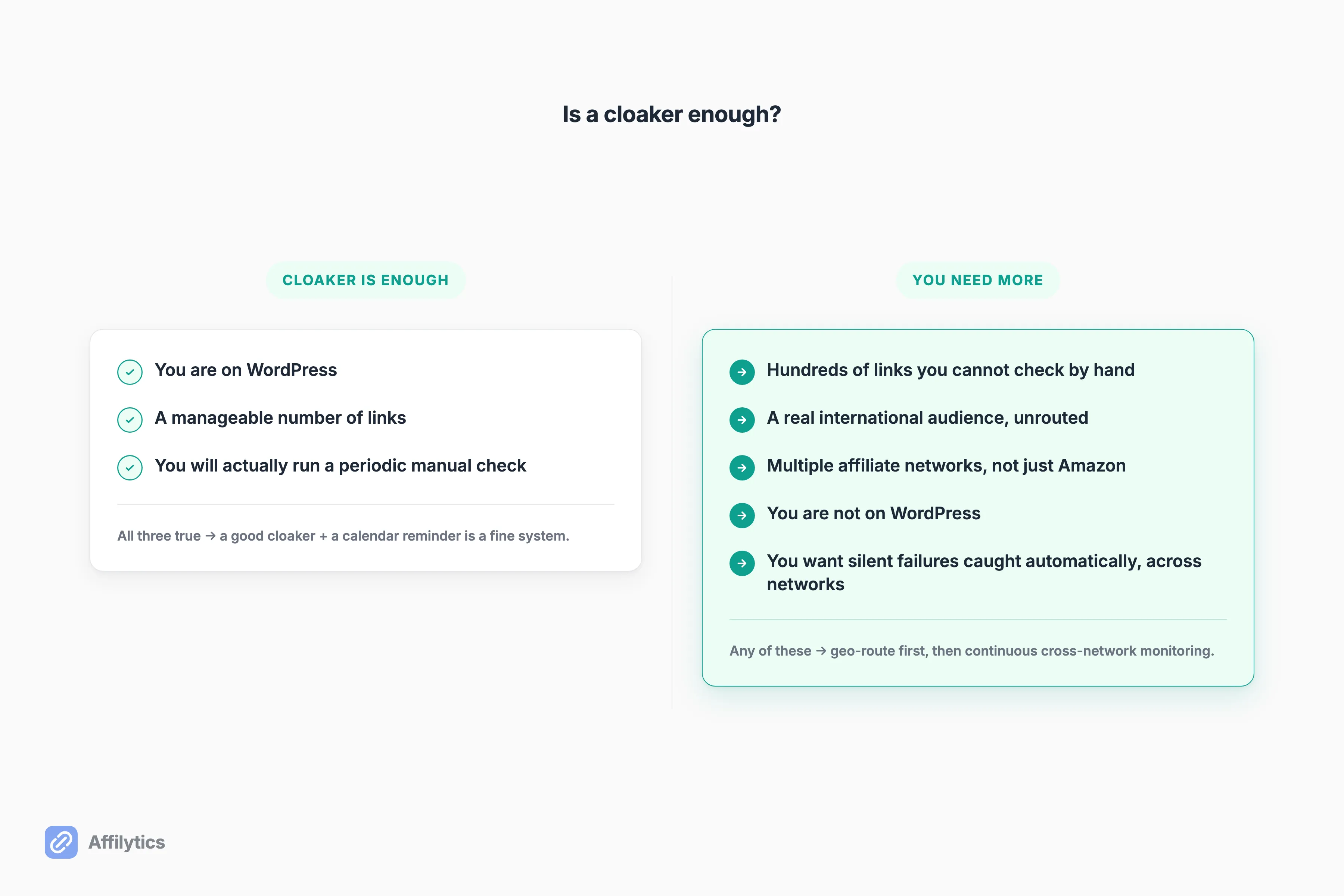
The upgrade triggers:
- Hundreds of links you cannot check by hand. One blogger described 300+ posts with links across multiple networks. Another put the threshold plainly: “Once you reach hundreds of links, it’s definitely worth investing in some automation.”
- A real international audience you are leaving unrouted.
- Multiple affiliate networks, not just Amazon.
- You are not on WordPress. A whole cohort of creators wants link management without installing a plugin. As u/BareBonesTek put it, “I have seen Pretty Links, but my understanding is that this runs on a Wordpress blog, which I don’t currently have and would prefer (at this stage) not to set up.” If that platform is Squarespace, we mapped what managing affiliate links on Squarespace actually looks like when there is no plugin shelf to shop from.
- You want the silent failures caught automatically, across every network, not just Amazon.
This is where Affilytics fits, and the order matters. First, it geo-routes each click to the destination that pays for that reader, any destination, not only Amazon storefronts. Then it runs continuous cross-network monitoring that catches out-of-stock, attribution-lost, and blocked links, using a real checker, not a quick HEAD-request loop. The competitors here are genuinely good, so I will be precise about the wedge: Geniuslink also localizes storefronts, but its link monitoring is Amazon-only. The depth of the others’ checkers is undisclosed. Monitoring across every network you actually use, and routing to any destination, is the gap.
How to Manage Your Blog’s Affiliate Links Without Checking Them by Hand
Section titled “How to Manage Your Blog’s Affiliate Links Without Checking Them by Hand”So what is the practical method, today, for a blog? You do it per post, and you start with the posts that matter.
For the links worth protecting, you replace the raw affiliate URL with a per-post smart link (go.affilytics.io/{slug}) that does two things at once. It routes each click by the reader’s country, and it stays health-monitored continuously, so you get told the moment one breaks instead of finding out months later. “Manually checking each one would take forever,” as one blogger on Reddit put it, is the whole problem, and this is the part that removes the manual step.
Here is how it works end to end. Affilytics scans your whole blog automatically: add your site’s URL and AffilyticsBot crawls your posts, sitemap first, to find every affiliate link across networks, then registers each one for monitoring. (It reads static HTML, so a fully JavaScript-rendered blog may not crawl.) Discovery is the automatic part. Turning a link into a geo-routed smart link is the step you choose, per post, for the links worth protecting. So the reliable sequence for a blog is simple:
- Prioritize your highest-traffic posts first.
- Convert those affiliate links to smart links.
- Let the monitoring run.
That is the practical core of managing affiliate links across a whole blog: convert the links that matter, then stop guessing about the rest. For the audit mechanics themselves, here is how to run a one-pass audit of every link on a site.
The Main Affiliate Link Tools for Bloggers, Honestly
Section titled “The Main Affiliate Link Tools for Bloggers, Honestly”No ranked listicle here. Just an honest “best for” read on the main options, so you can match the tool to your situation.
| Tool | What it’s best at | Watch-out |
|---|---|---|
| ThirstyAffiliates | WordPress bloggers who mainly want tidy, branded, theft-protected links | WordPress-only; Basic $99.60/yr promo renews at $249/yr; 404-checker depth undisclosed |
| Lasso | WordPress and creator sites that want product-display boxes plus a brand-deal marketplace | Geo-routing starts at the Pro tier ($29/mo); API access gated to Studio ($59/mo) |
| Geniuslink | Amazon-heavy creators who want storefront localization | Per-click pricing scales with traffic ($6/mo, 1,000 clicks included, then $3.50 per 1,000); no free tier; link monitor is Amazon-only |
| Affilytics | Creators who want any-destination geo-routing plus deep cross-network monitoring on any platform, with a free tier | Blog crawl reads static HTML, so a fully JS-rendered blog may not scan; smart-link swaps are per post |
A few honest notes. ThirstyAffiliates and Lasso are genuinely good WordPress tools, and Lasso is multi-platform, not WordPress-only. Geniuslink is the comfortable pick for Amazon-first creators. The reason Affilytics exists in this list is the combination that is hard to find together: routing to any destination, monitoring that goes deep across networks, no WordPress required, and a free tier to start. If you specifically want the Geniuslink contrast, here is how Affilytics compares to Geniuslink. And if you are starting from a Pretty Links licence you would rather not renew, we sorted the alternatives by which link tool does the job you actually need, or step back a level and read the five jobs an affiliate link management tool can do before you shortlist anything.
Stop Guessing Which Links Still Pay
Section titled “Stop Guessing Which Links Still Pay”You can start free, with two full weeks unlocked and no credit card. Convert your highest-traffic posts’ links to monitored smart links, watch the country breakdown of who is actually clicking, and stop hoping the rest still work.
After the trial, nothing breaks: your smart links keep working on default routing, so there is no downside to trying it. Create your free account and turn the guesswork into something you can see.
Do I really need a separate tool, or is a WordPress plugin like ThirstyAffiliates enough?
Section titled “Do I really need a separate tool, or is a WordPress plugin like ThirstyAffiliates enough?”A cloaker is enough if you are on WordPress, have a manageable number of links, and will actually run a periodic manual check. You need more once you have hundreds of links, an international audience, multiple affiliate networks, or you want to catch silent failures and monitor across networks automatically rather than clicking every link by hand. The threshold is less about the tool and more about your scale and reach.
What’s the difference between cloaking and geo-routing?
Section titled “What’s the difference between cloaking and geo-routing?”Cloaking masks and brands one URL so it looks tidy and resists theft, but it sends every reader to the same destination. Geo-routing sends each click to the right regional store based on the visitor’s country, so a UK reader lands on the UK storefront instead of the US one. They are different jobs, and you often want both: a clean branded link that also routes by country.
Can a tool just scan my whole blog and find all my affiliate links automatically?
Section titled “Can a tool just scan my whole blog and find all my affiliate links automatically?”Yes. Affilytics scans both YouTube channels and websites. Add your blog’s URL and AffilyticsBot crawls your posts, sitemap first, then surfaces every affiliate link it finds across networks and registers each one for monitoring. It reads static HTML, so a fully JavaScript-rendered blog may not crawl. From there, convert your highest-traffic posts’ links to monitored smart links so they geo-route by country too, and let the monitoring alert you when one breaks.
How can an affiliate link be broken if the page still loads?
Section titled “How can an affiliate link be broken if the page still loads?”A link can return a 200 OK and still be the wrong page: a soft 404, an out-of-stock product, or a destination that stripped your affiliate tag somewhere in the redirect chain. A simple up-or-down check sees the 200 and reports the link as fine, so these failures stay invisible until you read the page yourself. Catching them needs a checker that inspects what the reader actually sees, not just the status code.
Do I have to disclose affiliate links?
Section titled “Do I have to disclose affiliate links?”Yes. Clear, conspicuous disclosure of affiliate relationships is required, and the FTC publishes guidance on exactly how to do it: affiliate links must be clearly disclosed. Put the disclosure near the link, in plain language, before the reader clicks, so anyone reading the post knows the relationship up front.