
Best URL Shortener for Affiliate Links: 7 Ranked 2026
Ask ten creators for the best URL shortener for affiliate links and you get ten confident answers, which is usually a sign that everyone is answering a slightly different question. You have a long ugly link. You want a short one that still pays you.
We build the layer underneath this at Affilytics: smart links that send a visitor to their own country’s store, and a checker that keeps watching every destination after you publish it.
Before you pick anything, it’s worth working out whether you need a smart link tool at all, because for plenty of creators the honest answer is no. This post tries to be honest about which one you are.
Below are seven shorteners worth using, what each one is actually good at, and the three jobs none of them do. Which of those ten answers is right depends entirely on what you need the link to survive, so there is also a test you can run on your own links tonight without buying anything.
What are the best URL shorteners for affiliate links?
Section titled “What are the best URL shorteners for affiliate links?”The order below is by fit, not by score. Read the Free tier column as a yes-or-no signal rather than a plan comparison.
So how do you pick between them?
| Tool | Best for | Free tier |
|---|---|---|
| Dub | Knowing what a click did, not just that it happened | No, trial only |
| Rebrandly | Running every link on a short domain you own | Yes |
| Short.io | Starting on your own domain without paying first | Yes |
| Bitly | A link whose destination you may want to change later | Yes |
| TinyURL | A link you set once and never manage again | Yes |
| Cutt.ly | Click numbers without a subscription decision | Yes |
| Your own domain | Full control and no third-party dependency | Not applicable |
Every cell above came from that company’s own pricing page, not from another roundup, and pricing pages change without warning. Dub was the surprise: its page currently lists paid plans and a trial with no free plan on it, which is not what most articles ranking for this keyword still say.
Dub is the entry that treats a link as a measurement problem rather than a formatting one. Dub is open source and can be self-hosted, which matters if you would rather own the machinery than rent it.
Best for: creators who want to know what a click did, not just that it happened.
Worth knowing: outsiders read it as a different category. “Dub is an open-source link attribution platform, and alternative to Bitly… It’s not just a link shortener,” wrote @MindTheToken after going through the repo. That is his read, not a benchmark.
Rebrandly
Section titled “Rebrandly”Rebrandly is the branded-domain specialist of the group, built around putting your own short domain on the front of every link. Its own product pages lead with exactly that, describing a branded link shortener as one that “uses your own custom domain name in every link”.
Best for: a creator who already owns a short domain and wants every link running on it.
Worth knowing: a branded domain fixes the recognition problem, and that problem is real (there is a reader in the next section who closed a bio link on sight). It changes nothing about what happens after the click, and if you do not already own a domain you like saying out loud, start elsewhere.
Short.io
Section titled “Short.io”Short.io is the one people reach for when they want branded links without paying first, because custom domains are on its free plan rather than behind the first upgrade.
Best for: starting on your own domain before you are sure this is a workflow you want to keep.
Worth knowing, as a caution about the category rather than a knock on this tool: free allowances here are sometimes lifetime totals instead of monthly ones. Read the wording before you move a whole library onto one plan. A week of use tells you whether branded links change anything for your audience.
Bitly is the name everyone recognizes, and recognition cuts both ways. It came up in almost every thread I read while researching this post, usually as the thing somebody was already using.
Best for: a link whose destination you may want to swap later, in a placement where nobody is studying the domain. Bitly calls that redirects, and describes it as changing a link’s destination page after the fact. Check its plan comparison first, because redirects sit on the paid plans rather than the free one.
Worth knowing: “Clicked a guy’s bio link. Bitly. first thought? ‘This dude’s running some 2019 affiliate scheme.’ Instantly closed it,” wrote @TheInfoLegend. One reader’s reaction, not a measured effect on your conversions.
TinyURL
Section titled “TinyURL”TinyURL is the minimal option, and it is still running long after better-funded shorteners closed down. Two of those closures show up later in this post.
Best for: a link you want to set once and never manage again.
Worth knowing: in a category where services shut down, and they do, longevity is a genuine feature rather than a boring one. Minimal also means minimal, and that is the point of choosing it. For a three-year-old video description, nothing to keep up with is the whole appeal.
Cutt.ly
Section titled “Cutt.ly”Cutt.ly sits at the budget end of the list and still reports on clicks, including on its free plan, though the free plan keeps a shorter window of history than the paid ones.
Best for: a creator who wants numbers without making a subscription decision this week.
Worth knowing: a lot of what ranks for this keyword is written by the shorteners themselves, this one included, so read the feature list as a claim and test it on two links before you move anything important. A week of that tells you whether the click numbers it reports line up with what your affiliate dashboard says.
Your own domain with a redirect you control
Section titled “Your own domain with a redirect you control”The seventh option is not a product. It’s a subdomain you own, something like links.yoursite.com, pointing at your affiliate destinations through a redirect you run yourself.
Best for: full control, and no dependency on a company that might sunset the service.
Worth knowing: this is the only entry on the list that nobody can shut down on you, and it is also the one that hands you no dashboard, no click count, and no QR code unless you build them. You are trading convenience for permanence.
What every shortener on that list actually does
Section titled “What every shortener on that list actually does”Line those seven up and the feature pages collapse into the same four things.
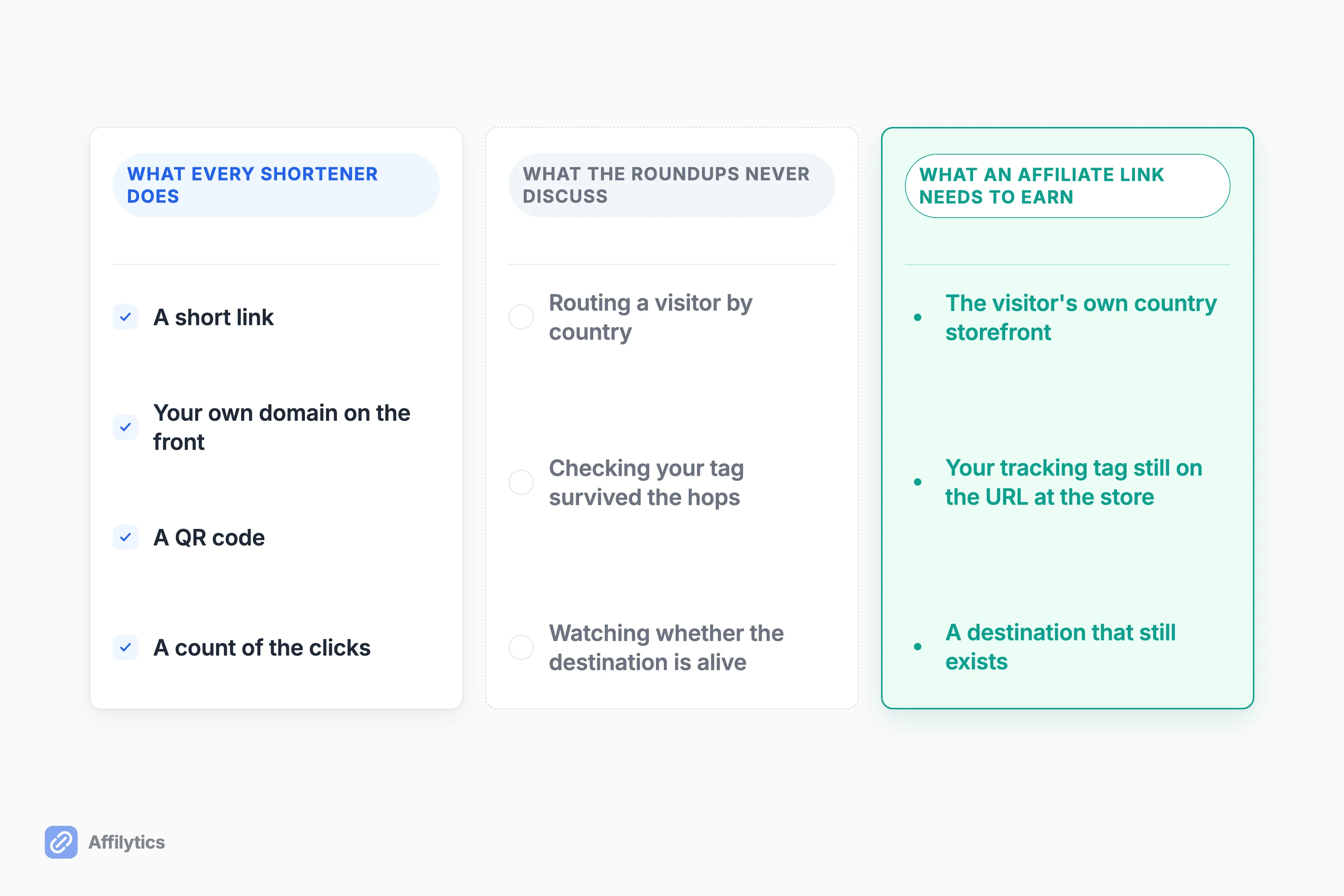
- A short link
- Your own domain on the front of it
- A QR code
- A count of the clicks
Those four are the category, and they are genuinely useful. So what is not in the box?
Across every roundup I read for this post, covering ten-plus tools between them, not one discusses routing a visitor by country, checking that your tracking tag survives the hops between the click and the store, or watching whether the destination on the other end is still alive. That is an absence in the conversation about the category, not a knock on any single tool, and it is the whole reason this post keeps going after the list.
None of this is a design failure. A shortener exists to take one long URL and hand back a short one that resolves fast, and those four features are what that job needs. The three missing ones belong to a different job.
Somebody outside the category already named the split out loud. “Nine describe WHAT they do. Dub describes WHAT YOU GET. Same category page, different category,” wrote @seetoai after comparing shortener taglines side by side.
Worth separating from all of this: shortening is not the same job as cloaking an affiliate link, even though the two look identical to your reader. And you may already have a shortener applied whether you picked one or not, because X shortens links shared on the platform through its own t.co service. X wraps every link in its own redirect, so on that platform the question is never whether your link gets shortened, only whose redirect it passes through.
Does shortening break your affiliate tracking?
Section titled “Does shortening break your affiliate tracking?”“There are clicks coming through but I’m not sure if it’s through the shortened links because… it’s hard to attribute it to the short links,” wrote u/Bstein2602 in r/Affiliatemarketing. That is the honest position most creators are in: the numbers move, and nobody can prove why.
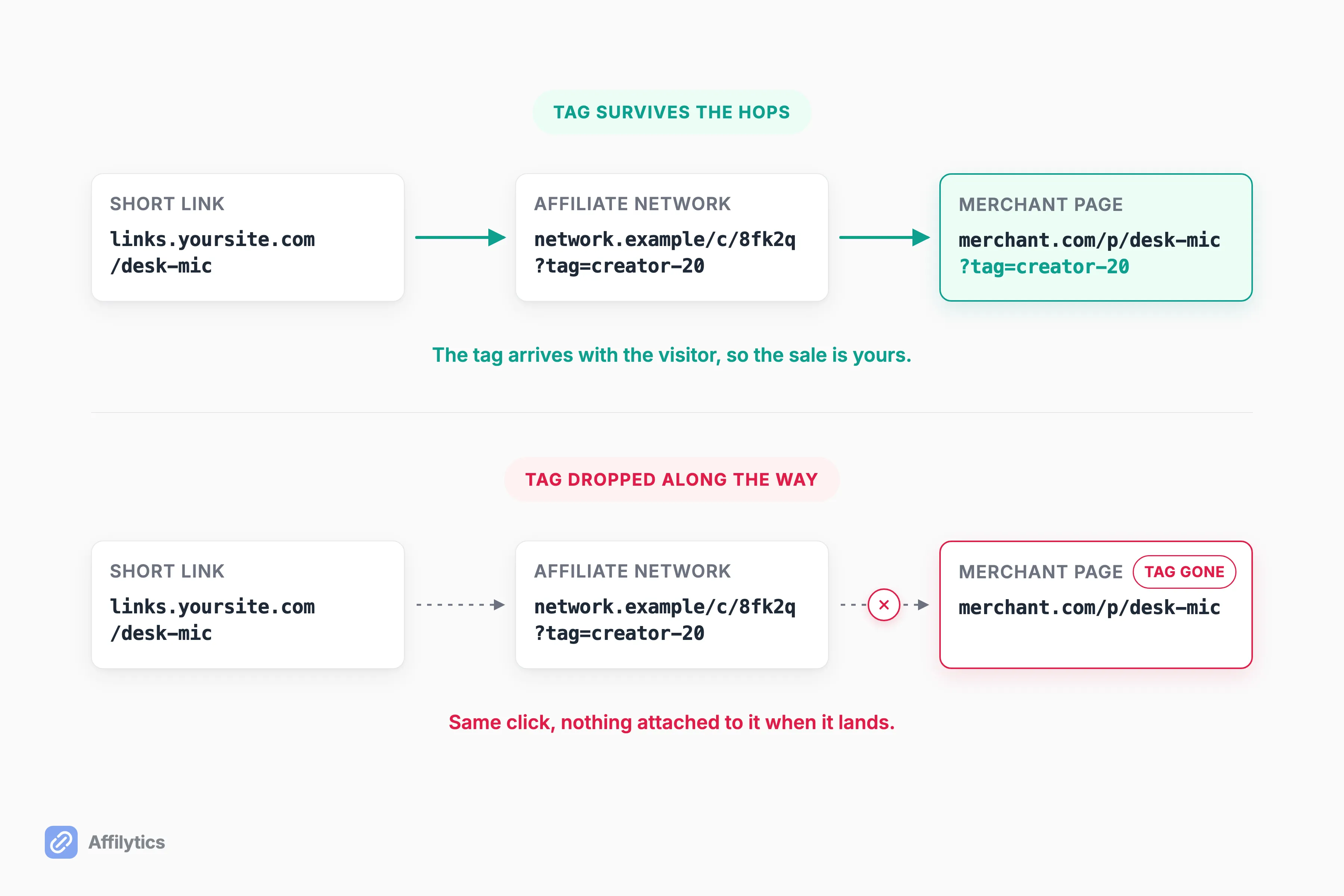
Here is the mechanic in plain words. A short link is a redirect, so your click goes short link, then affiliate network, then merchant, and your tracking tag has to survive every hop to get you paid. Shortening is usually fine, because the shortener hands the visitor the affiliate URL exactly as you saved it. It stops being fine when something along the way rewrites or drops the query string on the end of that URL.
So how do you know which one you have?
You can settle this for your own links in five minutes, with no tool at all:
- Open your short link in a private browsing window.
- Let it finish loading and read the address bar on the final page.
- Confirm your affiliate tag or tracking ID is still sitting in that URL.
- Repeat it on your phone, where in-app browsers behave differently.
The sharper version came from the same Reddit thread: “could use a unique tracking ID (TID) when testing to be sure,” wrote u/HappyScaling. A unique ID turns a guess into proof, because any click that shows up under it could only have come from the link you were testing. If you want the longer version of why commissions vanish between the click and the sale, that is its own post.
One caveat if you run Amazon links. The Associates program policies say you will not use a link shortening service in a manner that makes it unclear that you are linking to an Amazon Site, and separately that you will not cloak, hide, spoof, or otherwise obscure the URL. Shortening an Amazon link is not the problem. Shortening it so nobody can tell where it goes is.
The country your short link cannot see
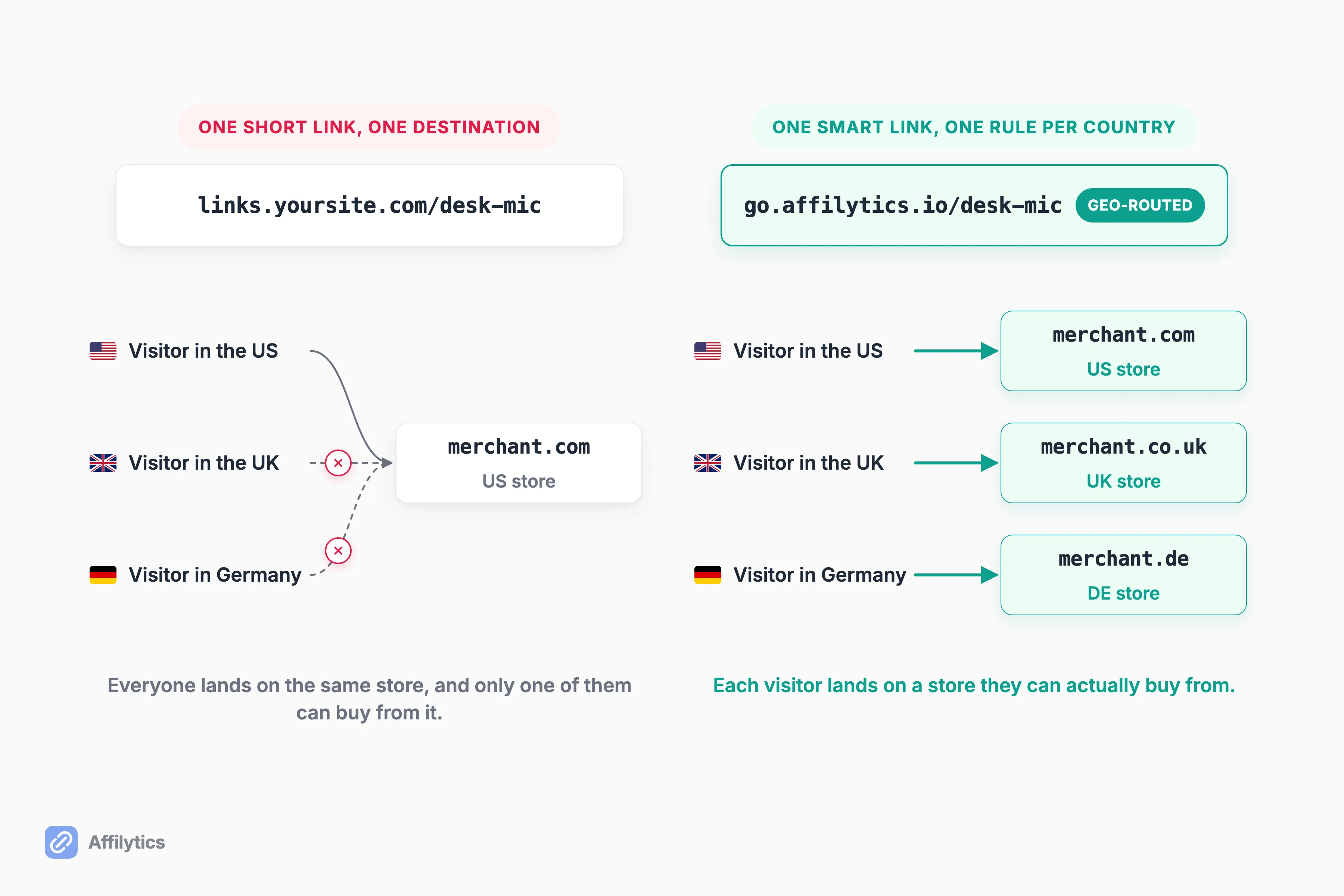
Section titled “The country your short link cannot see”A short link has one destination field, so it resolves to the same place for everyone who touches it. A viewer in London and a viewer in Chicago click the same link, land on the same storefront, and only one of them can buy from it.
How much of your audience is that, actually?
The rough shape of a creator audience, not a measurement of ours: plenty of creators sit somewhere between a third and a half international without ever checking, and a US-based channel usually still sees the clear majority of its traffic from the US, with the rest spread across the UK, Canada, Australia, and everywhere else. Go look at your own analytics, that is the only number that matters here.
One reader in r/Affiliatemarketing, writing about a paid tool this post does not rank, named the problem the way most creators eventually find it: “This was traffic I’d already been getting, I just hadn’t been able to monetize it,” wrote u/GomerPyles. One person’s account, and a familiar one.
No shortener is structurally able to fix that, because a single destination field cannot hold a different answer per visitor. Routing by country needs a rule per country plus a lookup at the moment of the click, which is a different product.
That is the one we build: an Affilytics smart link with a slug you choose, one rule per country, the visitor’s country read from their IP, first matching rule wins, and a default destination for everyone else.
It works for any merchant, not only Amazon. You create the smart link and swap it into your content yourself, since scanning finds and monitors what you already published rather than converting it for you. The mechanics of geo affiliate links go deeper if you want them.
When the destination dies, the short link still works
Section titled “When the destination dies, the short link still works”This is the cruel one. Your short link keeps resolving perfectly, the click counter keeps counting, and the page on the other end has been dead for months.
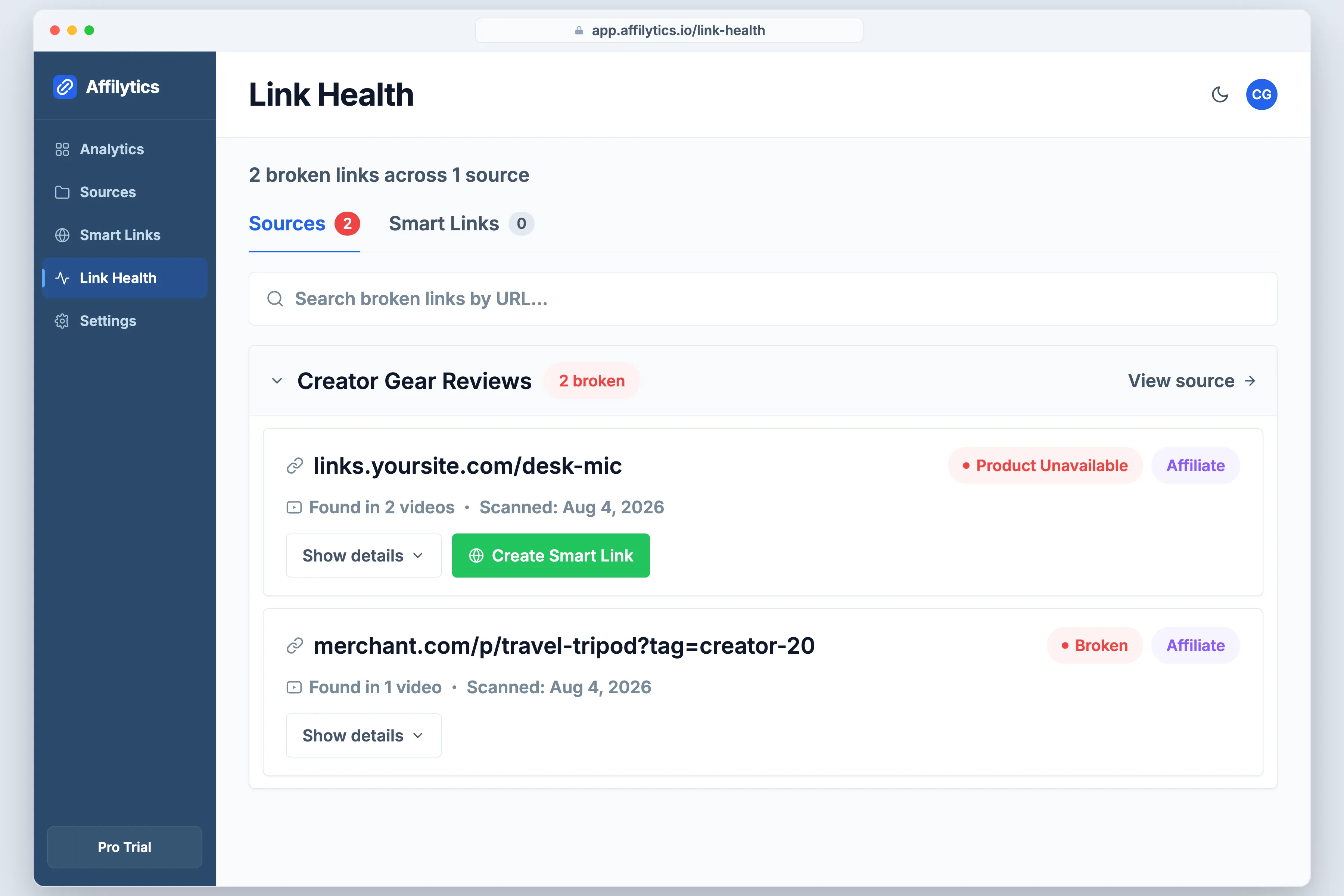
Every other failure in this post is visible if you go looking. This one looks identical to success from the dashboard, because the shortener is doing its job correctly and its job was never to check the far end. It measures whether the click happened, not whether the click could have earned you anything.
What actually breaks over there, in plain English:
- The product went out of stock
- The product page is gone
- The merchant redesigned their URLs
- The program shut down
- Your tag got stripped somewhere along the way
The timing is what makes it expensive. A link published a year ago can sit dead for months before anybody notices, while the video or post it lives in keeps sending people to it the entire time.
So how would you find out?
By hand, one link at a time, or by having something watch for you. We check every destination continuously and report back in exactly those words, with a confirmation gate so one bad check does not flip a healthy link into broken, and immediate recovery when the page comes back.
Checks go out through a browser-like client, so a retailer’s bot-blocking layer shows up as blocked rather than as a false broken, which is the failure mode that makes people stop trusting a checker. There is a fuller walkthrough of affiliate link monitoring if this is the part you recognize.
Two quieter ways a shortener costs you
Section titled “Two quieter ways a shortener costs you”Two risks the roundups skip, both cheap to understand and expensive to ignore.
The first is the link that never loads. Corporate and school networks block shortener domains wholesale, no matter where the link actually goes.
“A firewall blocking URL shorteners prevents users from seeing and/or using those links no matter what site you place them on,” wrote u/bookchaser, who also found the problem in his own inbox: “I’ve had e-mails blocked because I included a Google Maps link. When I discovered that, I realized there were several e-mails going back a few years that the recipients never received.” A reader account, not a measured rate, and worth knowing anyway.
You cannot fix somebody else’s firewall, but you can suspect it: when one placement converts far worse than the rest for no visible reason, the domain sitting in front of the link is a fair thing to blame.
The second is the shortener that shuts down, which takes every link it ever served with it. Google retired its own URL shortener, and there is a useful breakdown of what happened to goo.gl links that were already out in the wild. Firebase Dynamic Links went the same way, and Google said it plainly in advance: all links served by Firebase Dynamic Links will stop working, custom domains included, with clicks returning a 404 afterwards.
Small services go the same way, just quietly. “Linktracker.info (2023-2025)… Sunset on Dec 2025 after discovering most volume came from adult/affiliate/bot traffic and only a few legit SMBs,” wrote its founder of a tracker that had served roughly 557 users and 150k tracked clicks.
So what survives that?
That’s the whole argument for the seventh entry on the list. Nobody can retire a domain you own.
So which should you actually use?
Section titled “So which should you actually use?”Here is the part most posts in this format will not say out loud: a plain shortener is genuinely enough for a lot of people, and you may be one of them.
You are fine with a shortener alone if you have a handful of links, an audience concentrated in one country, and a library small enough to re-check by hand. “I don’t really see what there is to juggle… affiliate links specific to a video are rarely more than one or two,” wrote u/Ninja_bambi in r/youtubers, and he is right about his own situation.
So when does that stop being true?
You have outgrown it when any of these is true:
- Your analytics show real traffic from outside your merchant’s country
- Your library is big enough that hand-checking stopped being a plan
- You have already been surprised by a dead link months after publishing
Volume arrives faster than people expect. In the same thread, u/NicolaSagliano described building “8-10 links for components” for a single keyboard video, then repeating “this process for every product and platform.” Two links per video is a different world from that. What you add at that point is routing the click by country and watching the destination afterwards, which is the pair we built Affilytics around.
The middle branch is the common one. Keep the shortener for the job it does well, and add the two jobs it was never built to do. They are not competing purchases.
Point one link at the right country
Section titled “Point one link at the right country”If the country problem or the dead-destination problem sounds like yours, the fastest way to find out is to look at your own links rather than read another list. Create your free account and you get two full weeks with everything unlocked, no credit card. Start with one link and one country rule, which takes about as long as reading this section did.
Keep the shortener you like. This runs underneath it, and the links you already published are the first thing it looks at.
Do URL shorteners break affiliate links?
Section titled “Do URL shorteners break affiliate links?”Usually no. A shortener redirects the visitor to your affiliate URL as you saved it, so the tracking stays intact through the hop. The reason to check anyway is that you cannot see the failure if it does happen: open your short link in a private window, read the address bar on the final page, and confirm your tag is still there. Testing with a unique tracking ID makes it provable rather than probable, because then the clicks that show up in your dashboard can only have come from that one link.
Can I use a URL shortener with Amazon Associates?
Section titled “Can I use a URL shortener with Amazon Associates?”Yes, with a condition Amazon sets rather than one a blog can set for you. The Associates program policies say you will not use a link shortening service in a manner that makes it unclear that you are linking to an Amazon Site, and that you will not cloak, hide, spoof, or otherwise obscure the URL. So the shortening itself is fine, and hiding the destination is not. Read the current policies before you route Amazon links through anything, because those rules are the only ones that matter if your account is on the line.
What happens to my links if the shortener shuts down?
Section titled “What happens to my links if the shortener shuts down?”They stop resolving, everywhere you ever posted them, all at once. Google retired its own URL shortener and that is the best-known example, but small services sunset too, and the links inside your old videos and posts do not get a warning. A subdomain you own is the only version of this you control, because the domain keeps working as long as you keep paying for it.
Is a free URL shortener good enough for affiliate links?
Section titled “Is a free URL shortener good enough for affiliate links?”For a small library aimed at one country, yes. The limit that eventually bites is not the link quota on the free plan. It is the three jobs the shortener roundups never discuss: routing a visitor to their own country’s storefront, confirming your tracking tag survived the trip, and telling you when the destination died. If none of those apply to you yet, a free tool is a real answer and not a compromise.