
Do You Need a Smart Link Tool? A Test for Affiliates
Here’s the honest answer most tool reviews won’t give you: you probably don’t need a smart link tool, until one thing about your audience changes.
We build Affilytics, the tooling that geo-routes affiliate links and flags the broken ones, so we spend our days inside this exact decision: when has a creator actually outgrown plain links?
First, let me clear up what we’re even talking about. This post is for affiliate content creators who publish links to products like Amazon. Not musicians building “listen on your platform” landing pages, and not ad-network operators rotating CPA offers. If you want the deep version, here’s how geo-routing an affiliate link actually works, but you don’t need it to take this test.
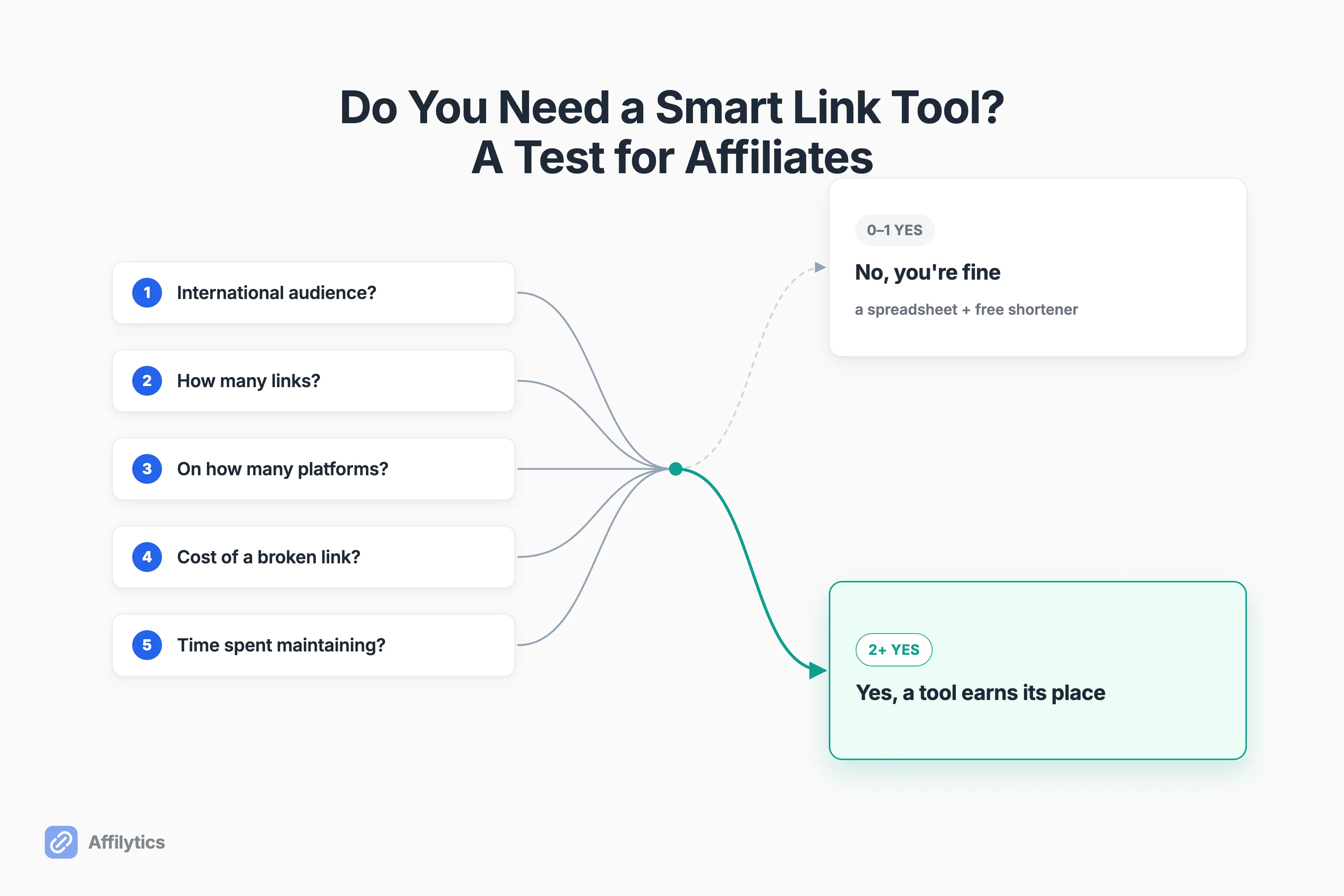
This is a 5-question test. Answer honestly, add up your yeses, and you’ll know whether a smart-link tool would pay for itself or just sit unused in your stack.
What a Smart Link Tool Actually Does (and What It Doesn’t)
Section titled “What a Smart Link Tool Actually Does (and What It Doesn’t)”A smart link gives you one link that routes each click by the visitor’s country to the right regional store, then tracks and monitors those links over time. One creator, the YouTuber Theo, put it in plain terms: it’s an Amazon link wrapper that redirects to your specific country and makes affiliate links way easier to manage.
That’s the whole idea. It is NOT a Linktree-style page that lists your music. It is NOT a CPA “smartlink” that rotates ad offers to whoever converts best. It’s after-the-click routing for the affiliate links you already publish.
So why does the country part matter so much? Because if you link to amazon.com and a reader in Germany clicks, they often land on a store that can’t honor your tag. Geo-routing sends that German click to amazon.de with your commission intact.
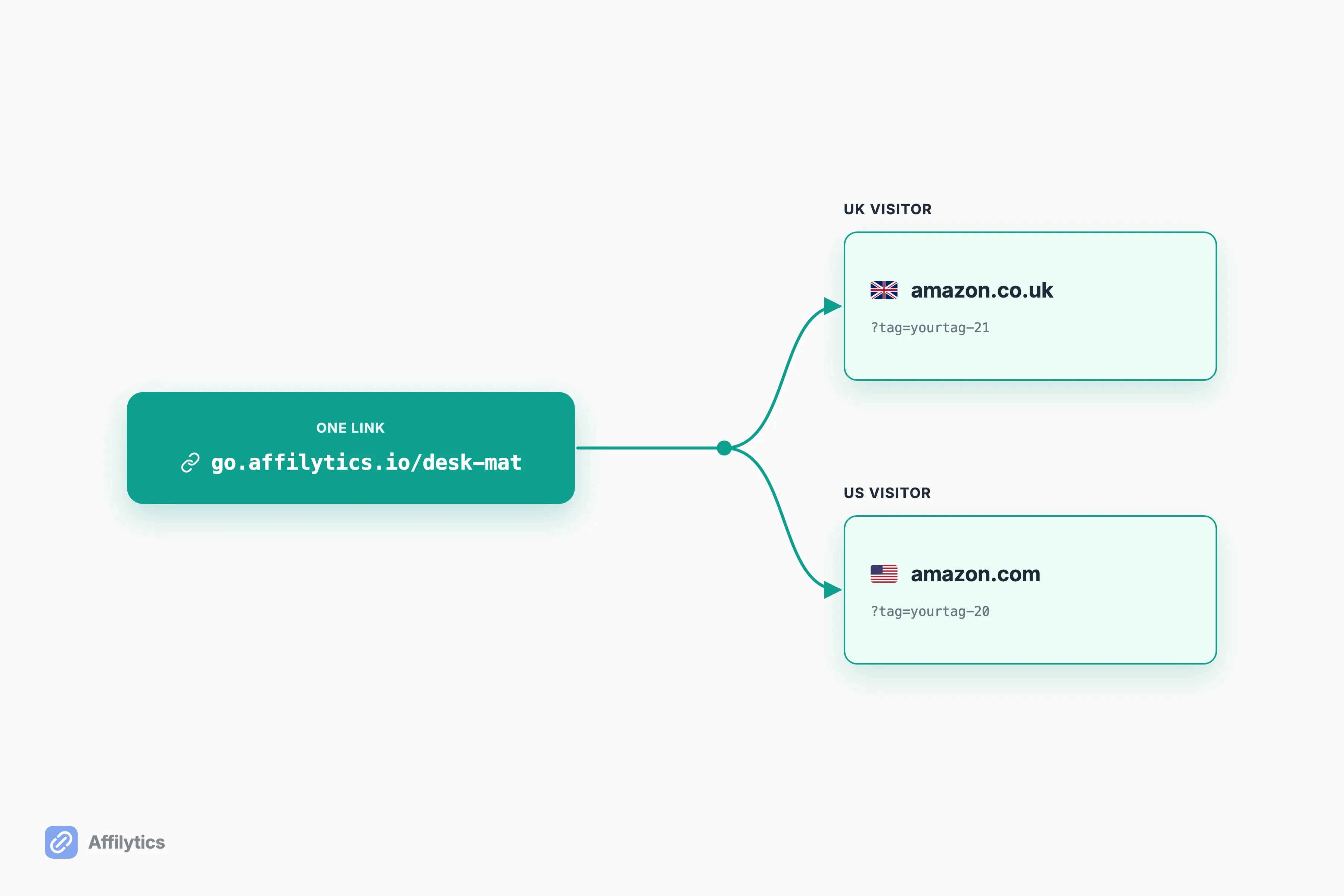
One grounding note on format: a smart link like go.affilytics.io/{slug} is just a short URL you control, so it works anywhere you paste it. Blog, link-in-bio, social post, video description. It isn’t tied to one CMS. The test below comes back yes most often for link-in-bio pages in particular, where one button carries all the traffic.
The 5-Question Test
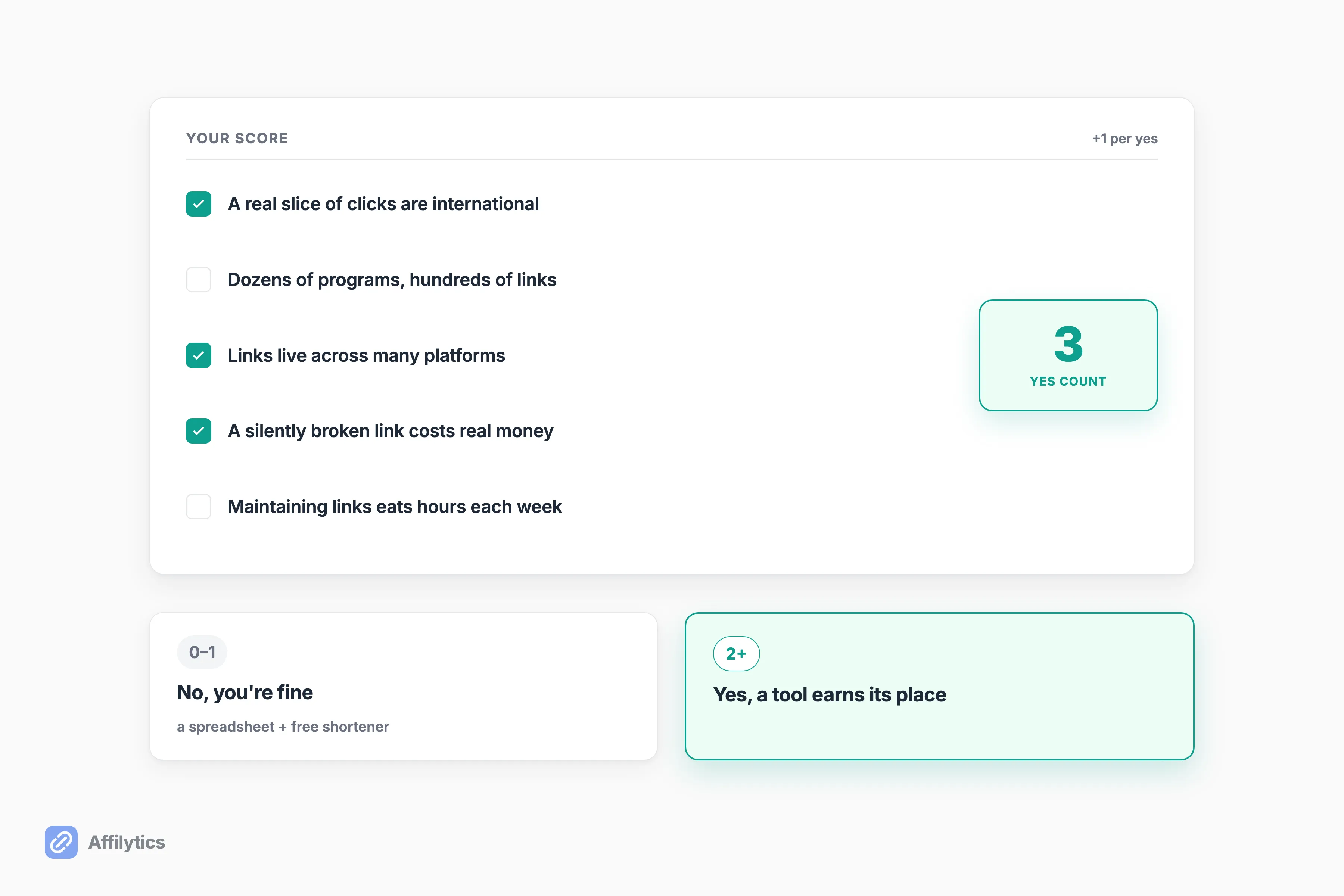
Section titled “The 5-Question Test”Score one point for every yes. Be honest with yourself here, the whole point is to land on a real answer, not the answer you want.
1. How International Is Your Audience?
Section titled “1. How International Is Your Audience?”This is the decisive trigger. If a real slice of your clicks come from outside your home country and you only link to one store like amazon.com, those overseas clicks land on the wrong storefront and often lose the commission.
One author, Rachel at BadRedhead Media, framed it bluntly: “If 30% of your clicks are from the UK but you’re only linking to Amazon.com, you’re losing sales.” You don’t need a precise percentage to feel this. If your international traffic is worth more than you think, this question alone can be a yes.
2. How Many Affiliate Links Have You Published?
Section titled “2. How Many Affiliate Links Have You Published?”Scale changes the math. A handful of links is easy to track by hand. But as Eb Gargano at Productive Blogging put it, once “you may have signed up to dozens of different affiliate schemes and have hundreds of different affiliate links,” you’re staring at “an almighty headache.”
Once you’re managing links across many programs, the manual approach stops scaling. It starts leaking.
3. How Many Platforms Do Your Links Live On?
Section titled “3. How Many Platforms Do Your Links Live On?”If your links only live in one place you control, like a single blog, a free on-site tool is usually fine. The trouble starts when they spread out. Video descriptions, social posts, a newsletter, guest articles on other sites.
That spread is exactly where the free options crack. One redditor in r/amazonaffiliate found “the links generated with OneLink don’t work on social media or other websites.” If your links live everywhere, your tool needs to work everywhere.
4. What Does a Silently Broken Link Cost You?
Section titled “4. What Does a Silently Broken Link Cost You?”Links rot. Products get discontinued, pages get redesigned, stock runs out. A year-old link can look perfectly fine and still send every click nowhere. The sneakier version is a link that still loads but quietly drops your tag along the way, so catching when a link stops getting attributed is its own kind of monitoring.
Here’s the reframe, from u/GomerPyles on r/Affiliatemarketing: “no tool is expensive if it’s making you money… If a free tool is shortening links but costing you commissions, then it ain’t free.” Productive Blogging makes the same point from the reader’s side: “readers may be clicking but not converting because the link was broken, went to an out-of-stock page, or redirected them to a different page entirely.” A free tool that quietly leaks commissions isn’t actually free.
5. How Much Time Do You Spend Maintaining Links?
Section titled “5. How Much Time Do You Spend Maintaining Links?”If keeping links current already eats real hours each week, that’s a cost too. Re-checking dead links, swapping them out, regenerating everything after a program migration. It adds up.
Productive Blogging describes the grind well: the manual loop of finding the dashboard, generating the link, then pasting it, repeated 15 or 20 times for a single roundup post. If that loop is your weekly reality, a tool that automates it pays you back in hours, not just dollars.
Add Up Your Answers
Section titled “Add Up Your Answers”Here’s the honest verdict. If you scored 0 or 1 yes, you genuinely don’t need a tool yet. A spreadsheet with three columns (affiliate scheme, dashboard, main link) plus a free shortener is a legitimate baseline, and Productive Blogging documents that DIY method in full. If you are picking that shortener now, our ranked comparison of URL shorteners covers what each one is actually good for. Don’t buy software to solve a problem you don’t have.
If you scored 2 or more, you’ve crossed into the territory where a smart-link tool earns its place. The Reddit consensus lines up with this almost exactly. As u/moxieman19 put it: “free versions of OneLink or Bitly will do just fine” if you’re not doing big revenue yet, but “if yours is a more serious operation (and especially if you have global visitors),” a paid tool “will pay for itself pretty quickly.”
When the Free Option (Amazon OneLink) Is Enough, and When It Isn’t
Section titled “When the Free Option (Amazon OneLink) Is Enough, and When It Isn’t”If you scored a yes, the first fork is the free built-in option. Amazon OneLink is free, official, and covers 12 Amazon marketplaces (Canada and the EU5 plus Japan, Singapore, Australia, and more). It geo-redirects international Amazon visitors to their local store while keeping their language, currency, and Prime account. If you’re 100% Amazon and all you need is geo-redirect, OneLink is free and redirects international visitors to their local Amazon store, and you may not need to pay for anything at all.
But OneLink has hard edges. It does only geo-redirection: no broken-link detection, no analytics beyond Associates Central, and no non-Amazon destinations. So the moment you link to Walmart, Target, or any non-Amazon retailer, it can’t help. And per that same redditor, OneLink’s links “don’t work on social media or other websites.” That’s a real wall if your audience isn’t all on your own site.
If your test landed on yes because of links sprawling across platforms or non-Amazon programs, that’s where OneLink runs out of road.
What to Look for If You Do Need One
Section titled “What to Look for If You Do Need One”If you landed on yes, it’s worth seeing how the paid smart-link tools compare before you commit, because what actually matters isn’t feature counts. It’s four things:
- Geo-routing across any retailer, not just Amazon. Your country rules should point to Walmart, Target, a brand’s own store, anywhere, not be locked to one marketplace.
- Continuous broken-link monitoring. Dead and attribution-lost links should surface on their own, not wait for you to notice the revenue dip.
- Works on every platform. One redirect link you can paste into a video description, a tweet, or a newsletter, with no CMS lock-in.
- Can find the links you’ve already published. This is the rare one. Most tools only manage links you add through them; they can’t see what’s already out there.
That last point is the gap we built Affilytics to close. It geo-routes across any retailer, monitors every link continuously, and scans your YouTube channel descriptions (and crawls your blog or website) to surface the affiliate links you’ve already published, so you can route and monitor those too. On pricing, the durable version is simple: it starts free, and paid plans unlock advanced country routing.
Run the Test on Your Own Links
Section titled “Run the Test on Your Own Links”If the test pointed to yes, the cleanest way to find out is to try it on your real links. You get two full weeks of everything unlocked, no credit card, so you can see your own country breakdown and decide from data instead of a feature list.
And even if you never upgrade, nothing breaks. Your smart links keep working through default-URL routing, so the worst case is just plain links again. Start your free trial and run the test on traffic you already have.
What’s the difference between a smart link and a regular short link like Bitly?
Section titled “What’s the difference between a smart link and a regular short link like Bitly?”A regular short link is a static redirect plus a click count: every visitor lands on the exact same page. A smart link routes each click by the visitor’s country (or device) to a different destination, so a UK reader can land on the UK store while a US reader lands on the US store. A smart link can also be monitored for breakage, which a plain shortener won’t do.
Do I need a smart-link tool if all my traffic is from the US?
Section titled “Do I need a smart-link tool if all my traffic is from the US?”Probably not yet. Geo-routing only pays off when a real share of your clicks come from outside your home country and land on the wrong storefront. If your audience is almost entirely domestic and you have a small pile of links, a spreadsheet plus a free shortener is a legitimate baseline. Revisit the question when your international traffic grows.
Is it allowed to redirect Amazon affiliate links to a visitor’s local store?
Section titled “Is it allowed to redirect Amazon affiliate links to a visitor’s local store?”Yes. It’s a normal, supported practice, and Amazon’s own free OneLink does exactly this by sending international visitors to their local Amazon store. Just keep your affiliate disclosure visible to readers, per the FTC’s endorsement guidance.
Isn’t Amazon OneLink enough?
Section titled “Isn’t Amazon OneLink enough?”If you’re 100% Amazon and only need geo-redirect, OneLink is free and rational. But it’s Amazon-only, it doesn’t monitor your links for breakage, and creators report it doesn’t work once your links live on social media or other sites you don’t own.