
Amazon Associates UK: Sign-Up, Rates, and Getting Paid
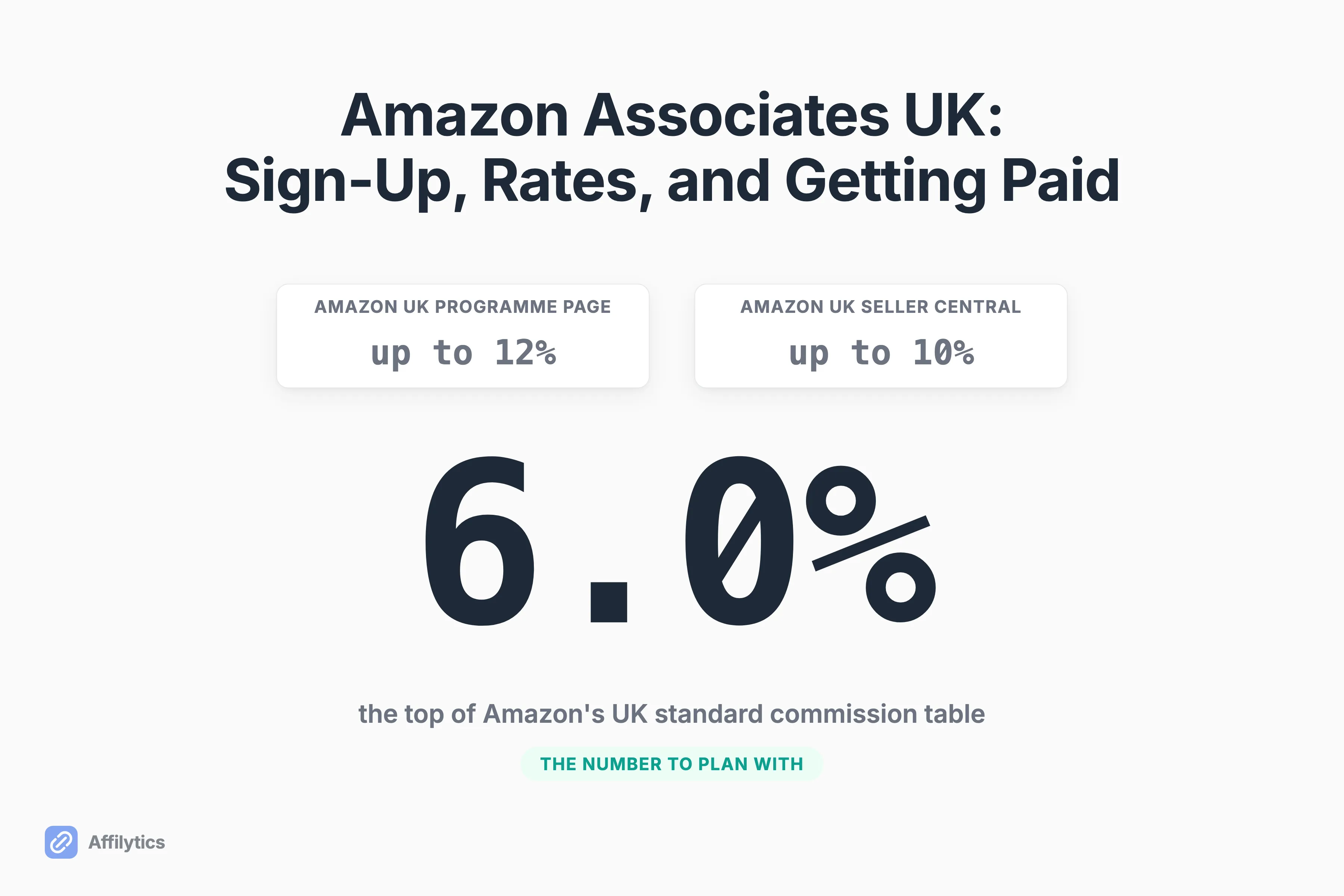
Amazon Associates UK advertises commissions of up to 12%. The rate card that actually governs what you get paid tops out at 6%, and most of your links will not sit in that band either. Both figures are Amazon’s own, published on Amazon’s own UK pages.
We build the geo-routing and link-health layer that sits underneath affiliate links, which means I spend an unreasonable amount of time in the fine print of programmes like this one.
The UK is one marketplace among many, and if you want the wider view we keep a running list of every country with an Amazon affiliate programme. Canada is the closest sibling to this one, and the Canadian programme’s own rates and payout rules are a genuinely different card. This post stays on Britain and goes deeper.
This guide covers how to join, what each category actually pays, when the money lands, and what to do about the part of your audience that never shops on amazon.co.uk.
How to Join Amazon Associates UK
Section titled “How to Join Amazon Associates UK”Amazon frames joining as three steps: sign up, recommend, earn. The step that is not really a step is the first one, because Amazon reviews your application rather than granting approval on submission.
Here is what Amazon actually asks for:
- A qualifying place to put links. Amazon’s own words: “Bloggers, publishers and content creators with a qualifying website or mobile app can participate in this programme.”
- A review. Also Amazon’s words: “We will review your application and approve it if you meet the qualifying criteria.” Nothing on that page promises approval.
- Tax information on file. Amazon will not pay you anything until it holds yours, which bites later rather than at sign-up.
Joining itself costs nothing. Amazon files the application step under a heading that reads “Participation is Easy and Free”.
If your audience lives on social platforms rather than on a site you own, Amazon points you somewhere else entirely. The programme page says: “If you are an influencer with an established social media following, learn about the Amazon Influencer Programme.” That is a separate programme with its own storefront, not a lenient version of this one.
Where does this go wrong first?
Geography, and it stops people before they even reach the form. A creator on r/AmazonFBA trying to open a UK or US account from India put it plainly: “the page does not open for me it always says sorry couldn’t load find the page… I used several vpns too but it doesn’t work.”
Don’t read that as a puzzle to solve. A VPN changes the IP address your browser presents and nothing else. The account behind it still needs tax details and a payout destination that hold up on their own, and if Amazon’s UK sign-up page will not open for you, the honest move is to apply to the programme for the country you actually live in.
What Amazon Associates UK Actually Pays
Section titled “What Amazon Associates UK Actually Pays”The number that governs your income is not on the programme’s front page. It sits in Amazon’s UK standard commission income statement, where the UK category rate table tops out at 6%.
| Commission rate | Categories |
|---|---|
| 6.0% | Amazon Fashion Private Brands, Clothing & Accessories, Luxury, Luxury stores beauty, Luxury stores fashion, Shoes, Handbags, Wallets, Watches |
| 5.0% | Amazon Instant Video, Audible Audiobooks, Automotive, Books, Digital Music, Furniture, Handmade, Home, Home Improvement, Jewelery, Kindle Books, Kitchen & Dining, Music, Power & Hand Tools |
| 4.0% | Beauty, Luggage, Personal Care Appliances, Sports & Fitness |
| 3.0% | All Other Categories |
| 2.5% | Appliances, Fire TV Devices, Mobile Electronics |
| 1.0% | Amazon Fresh, Grocery, Pantry, Video Game Consoles, Video Games |
| 0.0% | Android Apps, Gift Card, Gift Cards, Kindle Unlimited, Other Gift Card Brands, Coach Products, Wine |
Read the 3.0% row again, because “All Other Categories” is the catch-all and the named rows above it are narrower than they look.
Which row are your links actually in?
Put three of your own through the table before you answer. A phone case most likely lands in Mobile Electronics at 2.5%. A games console is 1.0%. A gift card pays 0.0%, which is to say the click is worth exactly nothing no matter how well the video performed.
The practical read is that a UK creator’s blended rate lands somewhere between the 3.0% all-other-categories line and the 5.0% band, nowhere near the headline. Fashion and luxury creators get the 6.0% row and a genuinely good deal on it. Consumer-tech creators are working the 2.5% band, where volume is the only lever there is.
The same product also pays a different rate on a different Amazon, which is why how UK rates compare with other marketplaces matters more than it sounds if any part of your audience shops abroad.
Why Amazon’s Own Pages Say 12%, 10%, and 6%
Section titled “Why Amazon’s Own Pages Say 12%, 10%, and 6%”Three of Amazon’s UK surfaces state three different ceilings for the same programme, and all three are live right now.
- The UK programme landing page invites you to earn up to 12 % in commissions income from qualifying purchases and programs.
- The UK-locale Seller Central article says you can start earning money today and earn up to 10% in referral fees.
- The standard category table tops out at 6.0%.
None of that means anyone is lying to you. The three figures are answering three different questions.
The category table covers ordinary product commission: someone clicks, buys a kettle, you get the kettle’s category rate. The headline figures reach past 6% because Amazon publishes Special Commission Income on a separate schedule, covering bounty events, special offers and promotions where a signup or a specific action pays a fixed amount or a better rate. That income is real. It just is not what a product link pays.
So which number should you plan with?
The category table, every time. Bounties and promotions come and go, and forecasting on them means forecasting Amazon’s marketing calendar instead of your own content. Treat anything above 6% as upside you did not budget for.
There is a fourth number worth naming so you do not chase it either. That same Seller Central article says Amazon sends quarterly payment to Associates. Amazon’s UK payments page says monthly. When two Amazon pages disagree, the more specific one wins, which brings us to the next part.
When and How You Actually Get Paid
Section titled “When and How You Actually Get Paid”Amazon pays monthly, and each month’s commission is paid approximately 60 days after the end of the month you earned it in. Amazon’s own worked example: January’s commission arrives in late March.
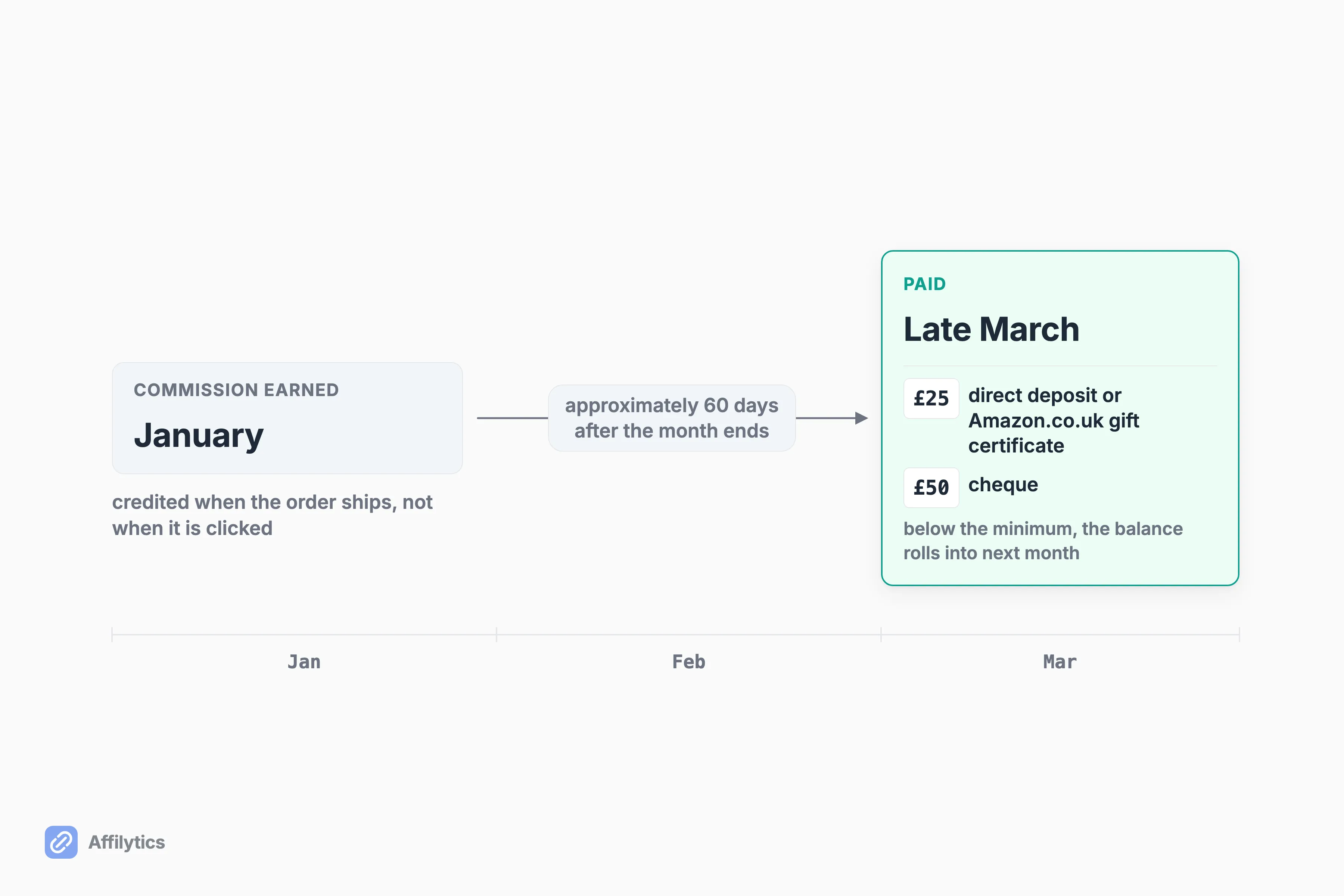
Before that clock even starts, the order has to ship. You earn commission on shipment, not on the click and not on the order, so an item that ships weeks after somebody bought it belongs to the month it shipped in.
There are three ways to get paid, and the method you pick sets your minimum:
- Direct deposit into a bank account.
- An Amazon.co.uk gift certificate, which shares the lower minimum with direct deposit.
- A cheque, which carries the higher minimum of the three.
The thresholds are £25 for direct deposit or a gift certificate and £50 for a cheque. You forfeit nothing below that: less than £25 rolls into the next month’s total and waits. Amazon also has to hold your tax information before it releases anything, and you earn nothing on orders you place yourself or that close family and friends place, which Section 7 of the Operating Agreement spells out.
Sixty days is a long time in content. What does the lag actually cost you?
Visibility, mostly. A link that quietly stopped paying in January does not show up as a smaller payment until late March, by which point the video or post carrying it has already done most of its traffic. The lag is not the problem in itself. It is a problem because it outlasts the attention most creators give any single piece of content.
One more thing UK creators ask about constantly. A creator on r/Affiliatemarketing described making “around £100-150 a month in affiliate fees and reward bonuses” while being paid in Amazon vouchers rather than cash, then asked whether that still counted for Self Assessment. A voucher payout is still a payout, and the question is a fair one. It is also a question for HMRC guidance or an accountant, not for a forum thread and not for us.
The 24-Hour Cookie, Stated Properly
Section titled “The 24-Hour Cookie, Stated Properly”Everyone calls it the 24-hour cookie. Amazon’s UK programme policies call it a session, and the gap between those two descriptions is where the money hides.
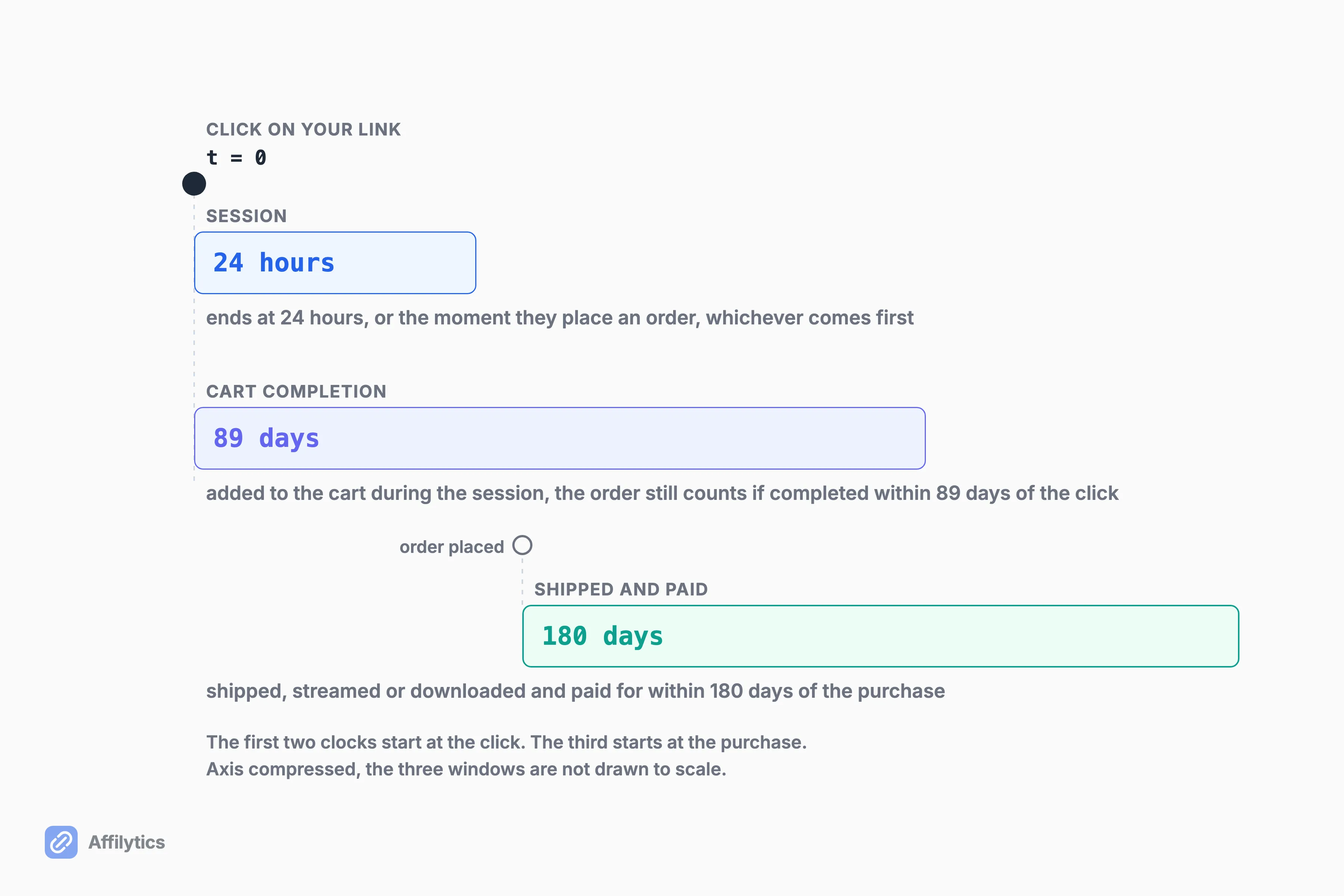
A session begins when a customer clicks a Special Link, which is Amazon’s name for any link carrying your tracking ID, and ends at the first of two events: 24 hours passing, or the customer placing an order. That second clause is the one people miss. Once they buy, the window shuts, and whatever they order three hours later that evening is not yours unless they click your link again.
Amazon’s policies are more specific than that, in three ways:
- If the customer adds the product to their cart during the session, the order still qualifies as long as they complete it no later than 89 days after the initial click.
- The product has to be shipped, streamed or downloaded and paid for within 180 days of purchase.
- Amazon’s own Creator University gives the short version, that followers’ purchases “within 24 hours of clicking on your link” earn commission. True, and incomplete.
So is it 24 hours or 89 days?
Both, doing different jobs. The 24 hours is how long you have to get somebody to act. The 89 days is how long a filled cart can sit before the sale stops counting for you. If you write gift guides or anything else people bookmark and return to, that second number is worth knowing, and Amazon’s 24-hour cookie has a catch that the shorthand hides completely.
None of these clocks start without a click. A reader who remembers your recommendation in June and goes straight to Amazon without clicking anything earns you nothing at all, which is the ordinary case and nobody’s fault.
Your Audience Is Not Only in the UK
Section titled “Your Audience Is Not Only in the UK”Your amazon.co.uk link carries a UK tracking ID. That tag pays on amazon.co.uk. Nowhere else.
A visitor from Germany clicking it gets one of two endings:
- They land on the UK storefront and do not buy, because pricing and delivery are wrong for them.
- They close the tab, open amazon.de, search for the product and buy it there, with nothing attached to the click at all.
You did the work either way. Somebody else got the credit.
That is the mechanic. How much of your traffic does it actually apply to?
Look at the country breakdown in your own analytics before you assume it is a rounding error. A UK creator with an entirely British audience genuinely has no problem here, and that is rarer than it sounds the moment a post or a video starts pulling readers who were never the target.
Creators who have noticed tend to solve it by hand. @SuperTechGuru posts a single product with six separate Amazon links stacked underneath it, for the USA, UK, Germany, France, Japan and Canada, signed off with “I am Amazon Associates”. @jamesallwinton’s published workflow reads the same way, one step at a time: “Create an affiliate link to the US and UK / Create a One Link for both marketplaces.”
That works. It is also six links to generate, six to keep alive, and six to swap out every time the product changes.
The admin does not stop at the links, either. A UK Ltd company on r/Affiliatemarketing asked how to collect from several Amazon regions without losing money to bank fees, and reported that “Amazon Germany have told me they can’t pay out to Revolut for some reason.” More marketplaces means more accounts, more payout arrangements, and more minimum thresholds to clear before any of it moves.
This is where that rate table comes back. A 6% ceiling is one thing to work with. A 6% ceiling on only part of your clicks is a different thing, which is why what your international traffic is actually worth deserves a number before you decide it is not a priority.
What to Do About It
Section titled “What to Do About It”Amazon’s own answer is OneLink, and Amazon’s own documentation is blunt about the price of entry: you will need an Amazon Associates account in each country for which you want to monetize the traffic.
Two names get used for one setup, so keep them apart. Earn Globally is the account side, and it decides whether a sale on another Amazon can be credited to your store ID at all. OneLink is the redirect, and it decides which storefront the shopper actually lands in.
The group Earn Globally covers from a single store ID is Canada, the United Kingdom, Spain, Germany, France and Italy. Everything outside that group, Japan, Singapore and Australia among them, is where the line about an account in each country actually bites.
Amazon’s UK integration guide still runs the whole flow under the OneLink name, which is why every step below says OneLink.
That page lists Associates sign-up destinations for the US, UK, Italy, France, Spain, Germany, Japan, Singapore and Australia. Amazon runs storefronts it does not name there, so treat that as a starting point rather than the full set. The setup itself is four clicks deep:
- Log in to Associates Central.
- Open Tools, then OneLink.
- Link your international accounts.
- Set a default tracking ID for each linked store.
None of that is hard. It is just per country, forever, and that is the part people underestimate when they say OneLink solves cross-border.
What is left after you finish clicking?
Three things. The accounts outside that six-marketplace group, which you still open and maintain yourself. Every merchant that is not Amazon, which OneLink does not touch at all. And the links already sitting in your published content, which do not rewrite themselves.
We took what Earn Globally does and does not fix apart in its own post, because the gaps are specific rather than vague.
The routing part is what we build. A smart link works out which country a visitor is in from their IP address, then sends each click to the storefront where your tag actually pays, with a default destination for everyone who matches no rule. It works for any merchant, not just Amazon, and it is one link in your content instead of six.
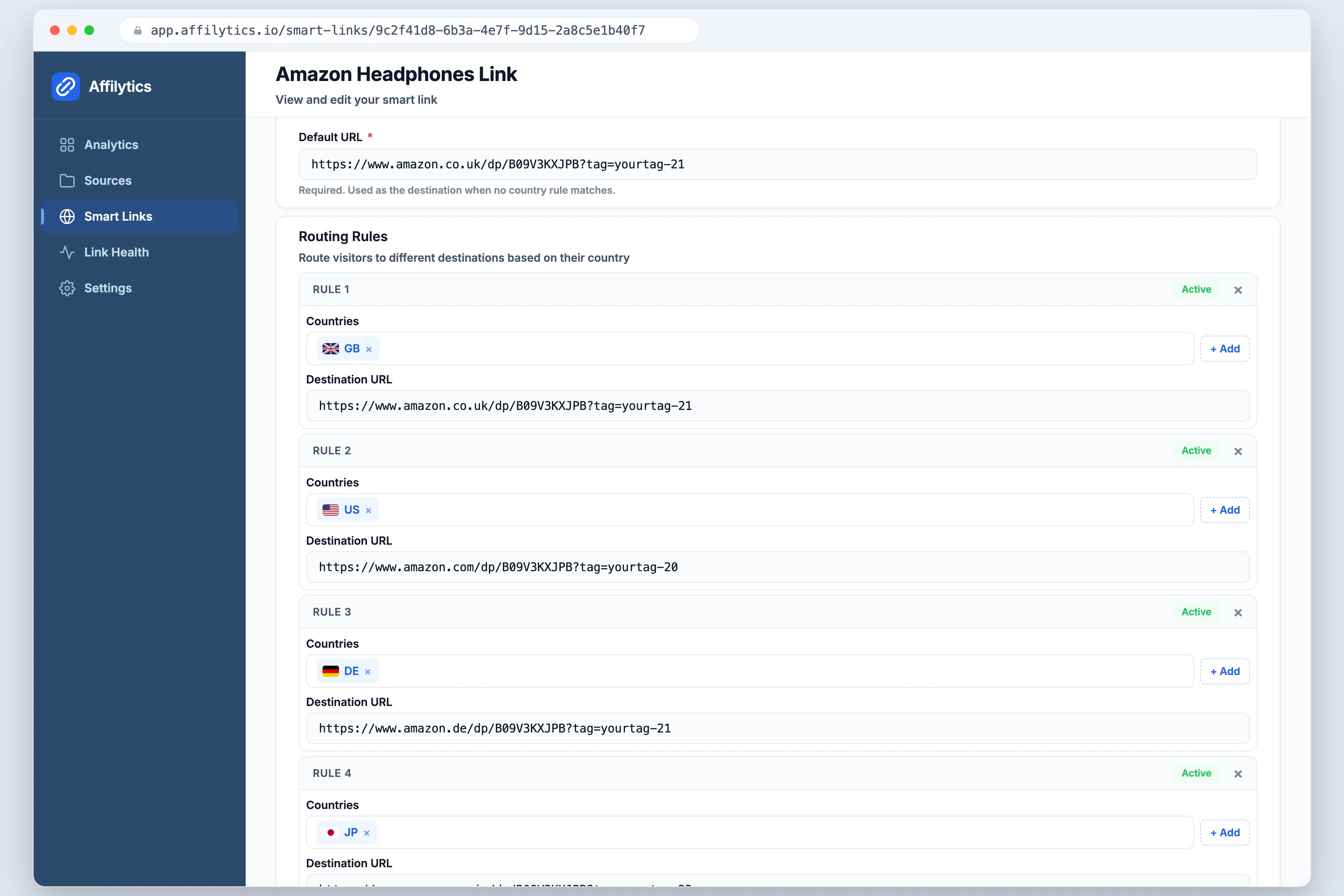
Be clear about what that is and is not. You create the smart link and swap it into your content yourself: nothing scans your channel and silently converts links you already published, and I would be suspicious of any tool claiming it does. Running several marketplaces also means more links that can quietly die on you, which is what continuous link-health checking is for.
Then the honest gap. Routing does not change what Amazon pays you, and it will not lift a 3.0% category to 6%. It does not open your Japanese account either. All it does is stop the clicks you already have from landing somewhere they cannot pay, which is a smaller claim than most tools in this space make and a more useful one.
Start With the Clicks You Already Have
Section titled “Start With the Clicks You Already Have”Before you open a second Associates account or rewrite a single link, find out where your clicks are already going. Create your free account and you get two full weeks with everything unlocked and no credit card, which is enough time to see the country breakdown behind your existing links and decide whether any of this is worth your effort.
If it turns out your audience really is entirely British, you will have learned that for free and this whole post collapses back into the rate table. Fair outcome.
Is Amazon Associates UK free to join?
Section titled “Is Amazon Associates UK free to join?”Yes. Amazon does not charge you to apply or to run an account. The word doing the work in the eligibility line is “qualifying”: Amazon asks for a qualifying website or mobile app, then reviews the application and approves it if you meet the criteria. Approval is a decision rather than a formality, and social-first creators are pointed at the separate Amazon Influencer Programme instead.
How much does Amazon Associates UK pay?
Section titled “How much does Amazon Associates UK pay?”It depends entirely on the category. Amazon’s UK standard commission table runs from 6.0% at the top, covering categories like clothing, luxury, shoes and watches, down to 0.0% for gift cards, Kindle Unlimited and wine, with 3.0% for all other categories. That 3.0% line is where most creators’ links actually sit. The higher figures Amazon advertises, up to 12% on the programme page, come from Special Commission Income: bounty events, special offers and promotions, published on a separate schedule from the category rates.
How does Amazon Associates UK pay you?
Section titled “How does Amazon Associates UK pay you?”Monthly, by direct deposit, Amazon.co.uk gift certificate or cheque, roughly 60 days after the end of the month you earned the commission in. Amazon’s own worked example is that January’s commission is paid in late March. You need at least £25 owed for direct deposit or a gift certificate, or £50 for a cheque, and anything under the threshold rolls into the next month’s total. Amazon also has to hold your tax information before it can pay you anything.
Do I need a separate account for Amazon US or Germany?
Section titled “Do I need a separate account for Amazon US or Germany?”For the US, yes. Amazon’s own OneLink guidance is direct about it: you will need an Amazon Associates account in each country for which you want to monetize the traffic. Germany is the more interesting case, because it sits in the group of marketplaces that Earn Globally lets you cover from a single store ID, alongside Canada, the UK, Spain, France and Italy. Japan, Singapore and Australia are not in that group and do still need their own account. We pulled that split apart in our Earn Globally post.
Do I pay tax on Amazon voucher payouts in the UK?
Section titled “Do I pay tax on Amazon voucher payouts in the UK?”This is one of the most common questions UK creators ask, and it is not one we can answer for you. What is clear is that a voucher payout is still a payout: Amazon lists gift certificates alongside direct deposit and cheque as one of three ways it pays commission income. Whether and how that gets declared is a matter for HMRC guidance or your accountant, not for a forum thread.