
5 Best Affiliate Link Management Tools for Creators
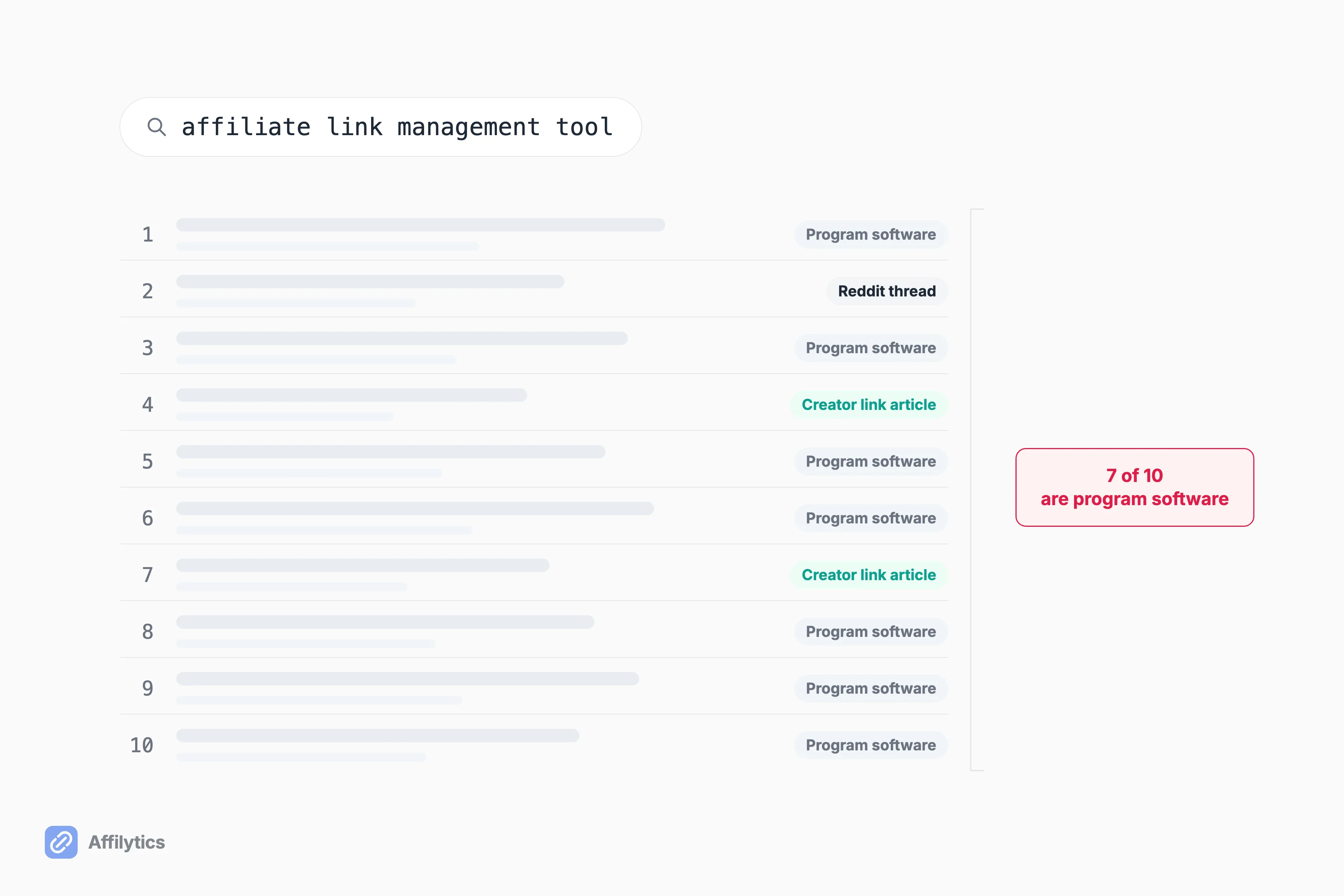
Search “affiliate link management tool” and seven of the ten results Google hands you are software for running an affiliate program, not for managing the affiliate links you publish. The one result that outranks eight of them is a Reddit thread. Its top-voted answer is a notes app.
We build the geo-routing and link-health side of this ourselves at Affilytics, so I can tell you plainly which of these jobs a given tool actually does and which it only appears to do.
If you have not yet sat down and built a list of every affiliate link you have published, start there, because the leak you find is what decides which tool you need.
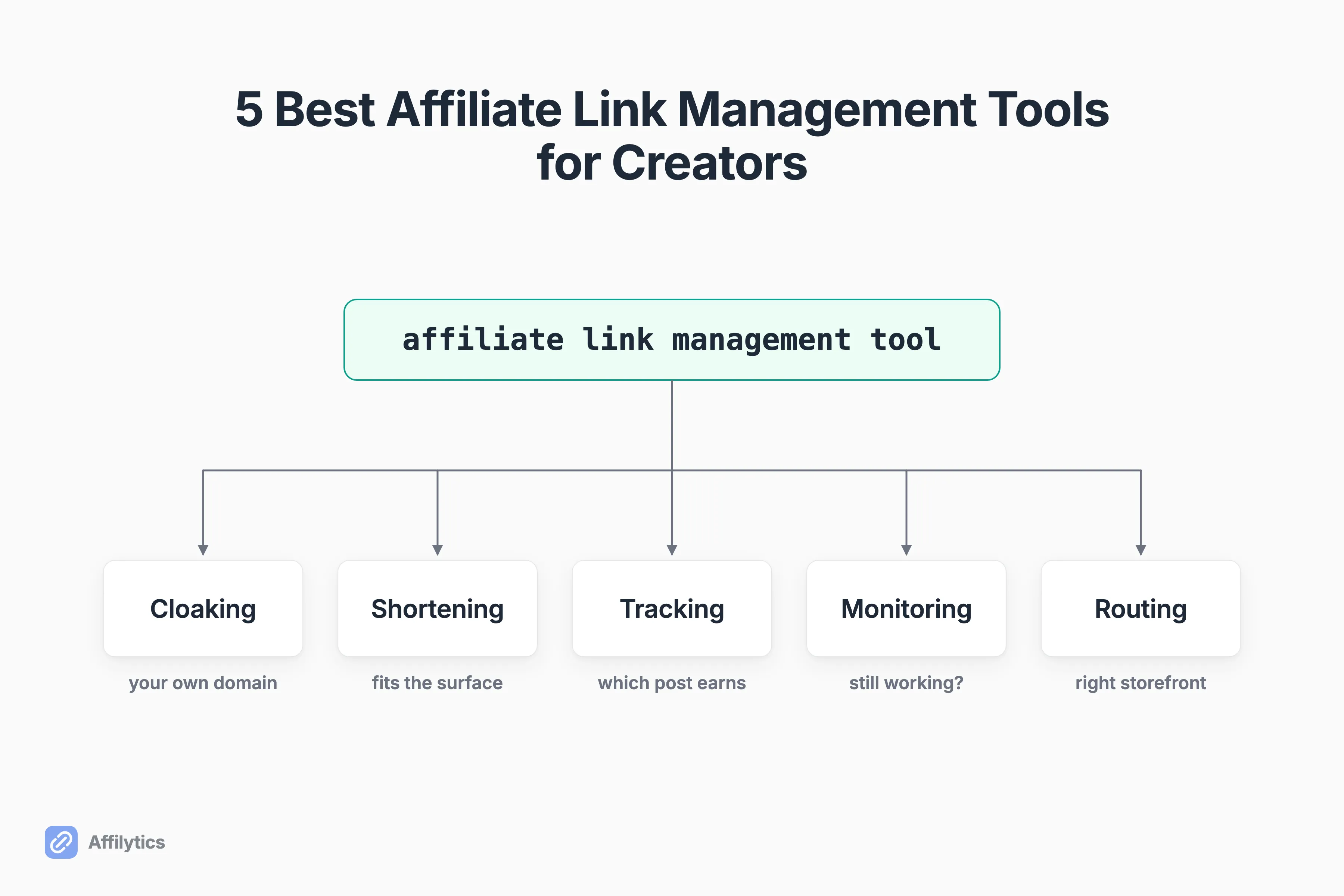
This guide splits the category into the five jobs these tools actually do, cloaking, shortening, click tracking, health monitoring, and geo-routing, and shows you which one matches the leak you have.
What does an affiliate link management tool actually do?
Section titled “What does an affiliate link management tool actually do?”Two completely different products share this phrase, and the search engine cannot tell them apart. One is software a company buys to recruit and pay its own affiliates. The other is software a creator uses to organize the links they publish. Seven of the ten live results are the first kind.
 If you landed here to run a program and pay partners, this is not your post. I wrote everything below for the person pasting links into video descriptions, blog posts, and show notes.
The sharpest evidence that the category is broken sits at position two: a Reddit thread that outranks eight of the ten results. Its most-upvoted answer is not software at all. “I use Notion. Takes some manual updating and discipline to keep it up but it’s very satisfying to do,” wrote u/Parking-Stock-4397. Another commenter in the same thread, u/HelpfulAffiliate, named the reason: “I haven’t found one that integrates all of those things into 1 platform yet.”
So which one is the best affiliate link management tool? Wrong question.
There are five jobs hiding inside that phrase, and no product does all five well:
- Cloaking. Turn a merchant URL into a link on your own domain that you can re-point later.
- Shortening and link-in-bio. Get a link into a caption, a bio, or a DM where a long URL will not fit or will not stay clickable.
- Click tracking. Find out which video or post actually sends the clicks.
- Health monitoring. Find out which of your published links quietly stopped working.
- Geo-routing. Send a reader in another country to their own storefront with your tag on it.
Creators tend to frame this better than the software does. In r/ContentCreators, the question gets asked as whether creators split this work between doing it by hand, buying a tool, or handing it to an editor. That is the right instinct. Name the job first. Then decide whether it is worth paying for.
Job 1, Cloakers: make a link tidy, swappable, and yours
Section titled “Job 1, Cloakers: make a link tidy, swappable, and yours”A cloaker is a redirect you own. Instead of pasting merchant.com/product?tag=yourname-20 into a post, you paste yoursite.com/go/product, and your own site forwards the click on to the merchant.
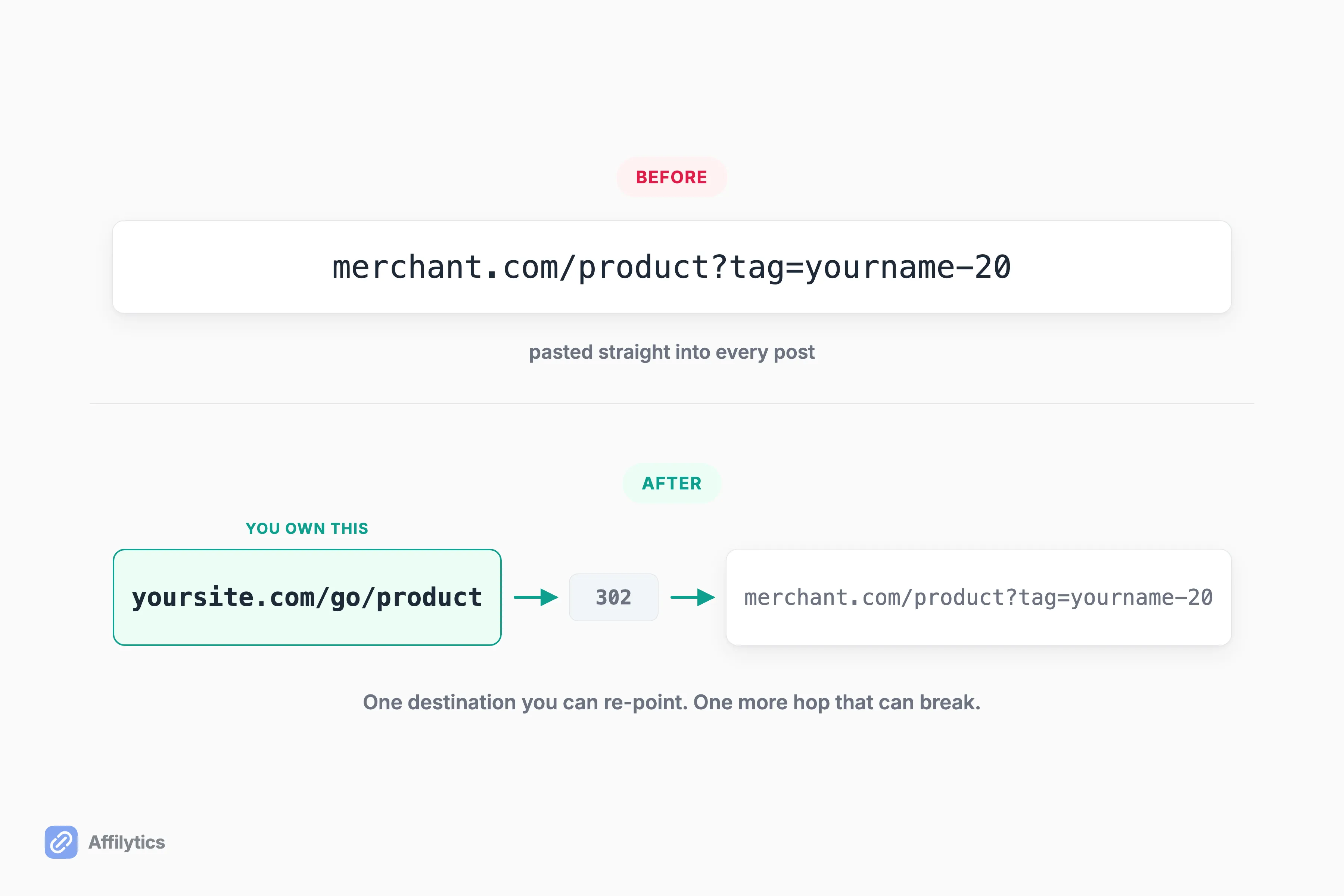 Two things that buys you:
- A readable link. It looks like part of your site instead of a tracking string bolted onto someone else’s domain.
- One place to change your mind. When the merchant rewrites their URL or you switch programs, you edit one destination instead of forty posts by hand.
The cost is a hop you now own. If the redirect breaks, every link pointing through it breaks at the same moment, and a tidy link hides a dead destination just as well as it hides the tracking parameters. Read how link cloaking actually works before you turn it on for a whole back catalogue.
Is that worth paying for? If you publish on WordPress and you have more than a handful of links, yes. We are not in this category, for the record: Affilytics is not a WordPress plugin and does not install into one.
Pretty Links
Section titled “Pretty Links”Best for: a WordPress blogger who wants cloaking plus a branded short link in the place they already publish.
Pretty Links is a WordPress plugin, installed into the site rather than run alongside it. The Beginner tier is $99.60 a year promotional for one site, and the number worth reading twice is the renewal: $249 a year. PrettyPay is the genuinely unusual piece here, letting you sell digital products (ebooks, courses, downloads) directly through the same cloaked, branded links.
The boundary is the plugin boundary. It manages links already placed in WordPress, so a YouTube description sits outside its world.
ThirstyAffiliates
Section titled “ThirstyAffiliates”Best for: the same WordPress reader, wanting the other established option.
ThirstyAffiliates is the other long-standing WordPress cloaker, and it belongs on any list where Pretty Links appears.
Job 2, Shorteners and link-in-bio: put a link where a link fits
Section titled “Job 2, Shorteners and link-in-bio: put a link where a link fits”This job has nothing to do with tracking. It is about placement.
A YouTube description will take a long URL. An Instagram caption will not make one clickable at all. A DM, a podcast show note, a printed QR code, and a bio page each allow a different amount of link. A short branded URL exists because the surface is hostile, not because short is prettier.
So why do shorteners keep getting sold as tracking products? Because a redirect is the natural place to count a click, so every shortener eventually grew an analytics tab, and the two jobs got welded together in the marketing.
Dub is the cleanest live example: short links, conversion tracking and affiliate programs, three separate jobs on one product page. That is a fair description of what they built, and it is also exactly why this category confuses people. Bitly and Linktree sit in the same lane from different angles.
Among the tools here, Pretty Links sells Link in Bio as an add-on at its Marketer tier, $149.60 a year promotional for two sites. Lasso positions itself explicitly across Link-in-Bio, WordPress, standalone sites via HTML embed, YouTube, and Instagram DMs.
One distinction to hold on to: a short link and what a smart link is are not the same object. A shortener sends every visitor to the same place. A smart link decides where to send each one.
Job 3, Click trackers: find out which content actually earns
Section titled “Job 3, Click trackers: find out which content actually earns”Clicks are yours to measure. Commissions are the network’s to report. The gap between those two records is where most creators lose the plot entirely.
A click tracker tells you which video or post sent the click. It tells you nothing about whether that click became a sale, because the merchant’s network owns that half of the record and reports it on its own schedule.
So what does paying for this actually get you? Attribution down to the piece of content:
- Which post or video sent the click: yes.
- Which country the click came from: usually yes.
- Whether the click turned into a sale: no, unless the network hands that back to you.
Lasso includes basic analytics from its Creator tier, $19 a month or $16 a month billed annually, for one property. ClickMeter and Dub sit in the standalone-tracker lane.
Here is the part a tool vendor will not volunteer: for most creators this is the job a spreadsheet genuinely covers. Every affiliate network already reports clicks in its own dashboard, free, and if you publish to one blog and one channel, checking two dashboards once a month is a click tracker. Buy one when the dashboards outnumber the hours.
Job 4, Health monitors: catch the links that die quietly
Section titled “Job 4, Health monitors: catch the links that die quietly”Most affiliate links do not die with a 404. They die serving a perfectly normal page.
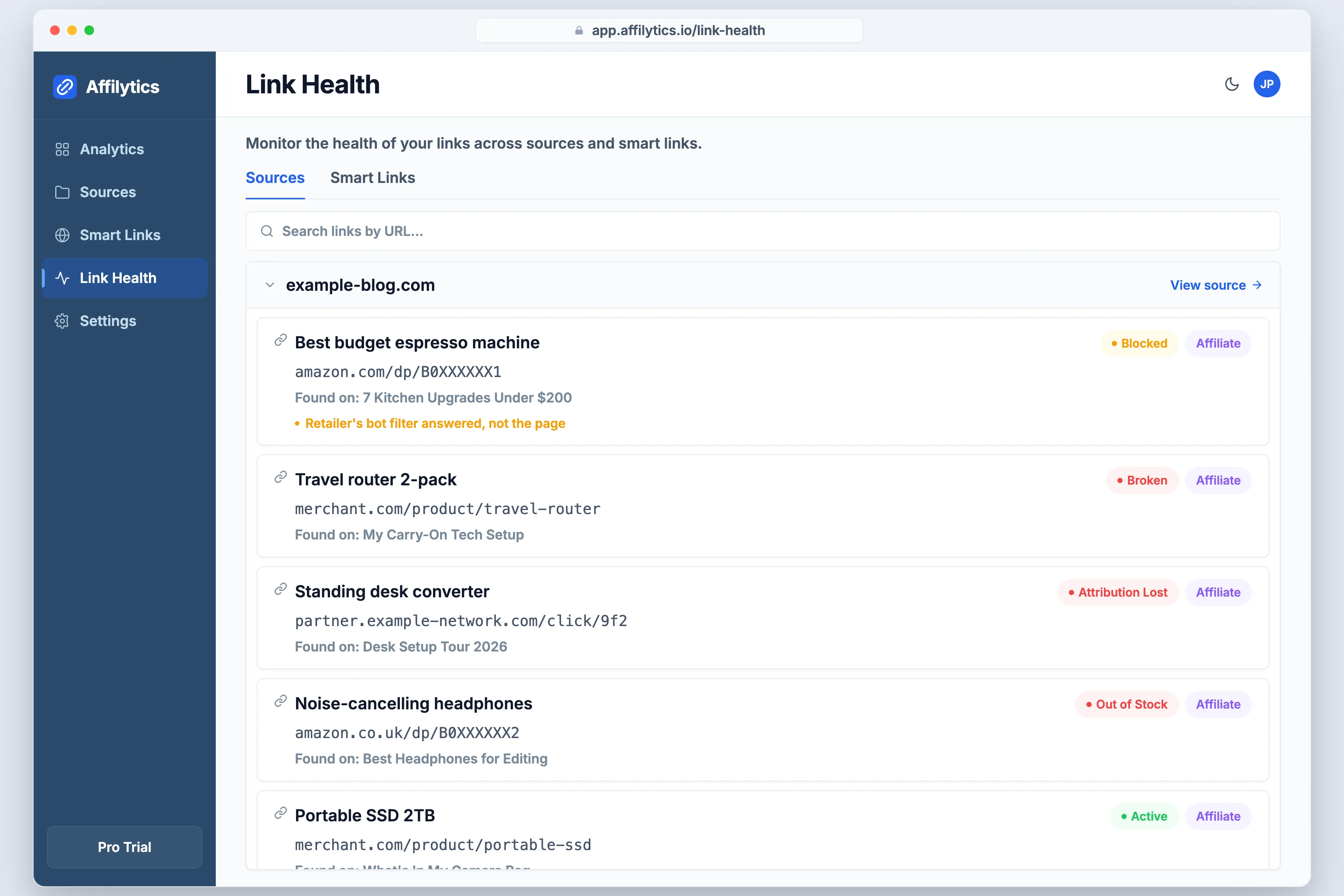 There are four common ways it happens, and a naive checker calls all four healthy:
- The product was discontinued, so the merchant now serves a category page instead.
- The merchant redesigned, and the old product URL quietly redirects to their homepage.
- The program shut down, and the network serves a generic landing page in its place.
- The item is out of stock. The page loads fine and converts nothing.
That is the honest ceiling on this entire category, and a creator in r/AffiliateMarket put it better than any vendor has. As they said, automated checks will not tell you if a program quietly stopped tracking. The full line from u/Upbeat_Quit7362: “Automated checks are great for broken URLs, but they won’t tell you if a programme has quietly changed its landing page, stopped tracking or stopped converting.”
The opposite failure is just as expensive and much more common, which is why link checkers report dead links that are not dead often enough to train creators into ignoring their own alerts.
Among the tools in this post, Lasso includes broken link alerts from its Creator tier, $19 a month, and its free Lasso Lite tier does not. Pretty Links ships LinkHealth, continuous broken-link monitoring with alerts; how deep that check actually goes is not something their marketing pages state.
Our own checking runs continuously rather than on a weekly sweep, and an alert fires when a check detects the change. The hard part was never the checking, it was not being lied to. Big retailers run a bot-blocking layer in front of their site, and it answers a plain automated request with a block page that a simple checker happily reads as dead. So we built our checks to look like a real browser at the exact point where a server tries to tell a browser from a bot, and when a page blocks us anyway it shows up as blocked, not as broken. A link also has to fail several checks in a row before an active one gets marked down, which is what stops the flapping.
Can any monitor tell you a program stopped converting? No. Nothing on this page can. Pair the automated pass with a manual look at your top pages and you have covered both halves.
Job 5, Geo-routers: stop giving away the international sale
Section titled “Job 5, Geo-routers: stop giving away the international sale”Here is the leak that pays for the whole category. A reader in Manchester clicks your amazon.com link. They either land on a US storefront that will not ship to them, or they get bounced to a UK storefront carrying a tag that store does not honor. You see a click. You see no commission. Nothing in your dashboard tells you which of the two happened.
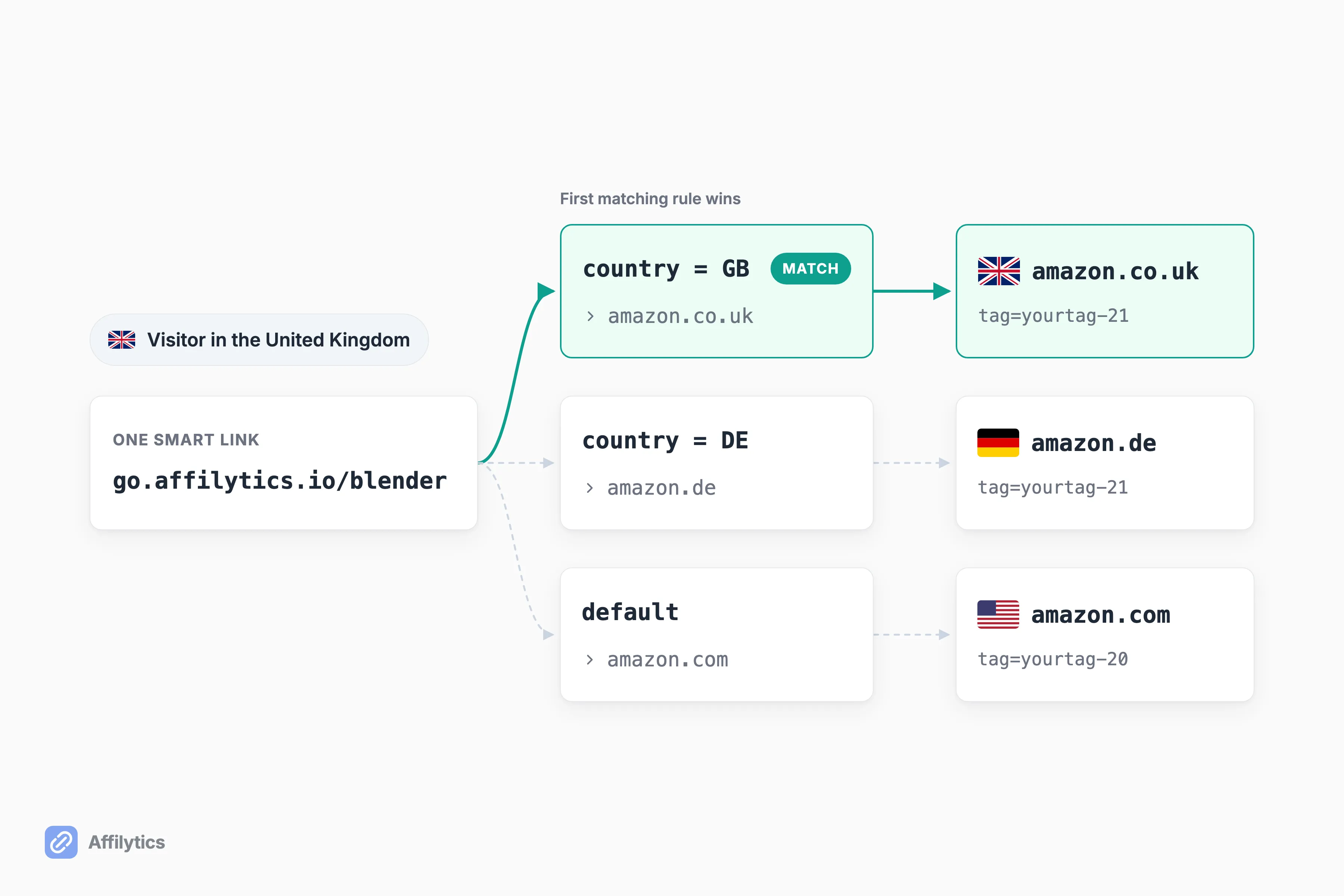 How Amazon attributes a sale is per marketplace. A tracking ID issued by one storefront is not credited by another. That is not a bug, and it is not something a cloaker or a shortener can fix, because both of those send every single visitor to the same destination.
Most creators carry a 30% to 50% international audience without realizing it. That is an assumption we write from, not a number we have measured. Your own number is sitting in the country breakdown of your analytics, and for most people it is larger than they expect.
So what is that worth to you? Multiply the international share of your clicks by the commission you would have earned on them. That is the whole calculation.
Among the tools here, Lasso gates international link localization at its Pro tier, $29 a month or $24 a month billed annually, for three properties. Pretty Links includes Geographic Redirects from its entry tier, which is genuinely generous placement, and the whole product is a WordPress plugin, so it routes the links on your WordPress site and nothing beyond it. Geniuslink and Amazon OneLink are the two other names you will meet in this sub-category. If you want the mechanics rather than the shopping list, here is the redirect path a geo-routed click takes.
Geo-routing is the primary thing we build. A smart link carries per-country routing rules, and a click resolves through them in order:
- We look up which country the visitor is in from their IP.
- The first matching rule wins.
- Anything unmatched falls through to a default destination you set.
It works for any merchant, not just Amazon. The paid plan is flat rather than per click, so the cost does not climb when a post takes off; the pricing page carries the current figures.
The other half is finding the links in the first place. Paste a channel URL or a site URL and we crawl every video description or page for the affiliate links you already published, then monitor each one. Turning any of them into a smart link stays a manual step you take. We never silently rewrite your links.
How to pick: match the tool to the leak you actually have
Section titled “How to pick: match the tool to the leak you actually have”Start from the symptom, not the shortlist.
| What you are seeing | The job | What to look for |
|---|---|---|
| International audience, clicks that never become commissions | Geo-router | Per-country rules for any merchant, not Amazon only, and pricing that does not scale with clicks |
| Links in old posts quietly dead | Health monitor | Continuous checks, blocked reported separately from broken, alerts on change |
| No idea which content earns | Click tracker | Per-content attribution, after you have checked the free network dashboards |
| The same merchant URL pasted in forty posts | Cloaker | One destination you can re-point, on a domain you control |
| Nowhere to put a link | Shortener or link-in-bio | Survives the surface you actually publish on |
Three questions worth asking any of them, because these are where the tools in this post genuinely differ:
- Does it find links you published outside it? Lasso optimizes the links you add through Lasso, and Pretty Links manages the links already sitting in your WordPress site. Neither goes looking for what you published somewhere else. That gap is the one we built for: paste a channel or site URL and the affiliate links already sitting in those descriptions and pages get discovered and monitored.
- Does one scan cover every network, or just Amazon? Ours picks up Amazon storefronts plus Impact, PartnerStack, Awin, CJ Affiliate, ShareASale, Rakuten Advertising and the other major networks in the same pass.
- Does the price move with your traffic? Flat beats per click the moment a post takes off.
And the honest gap in our own column: Lasso’s Studio tier, $59 a month or $46 a month billed annually, is where API access lives. Affilytics has no public API at all. If you need to pull your data out programmatically, we are not your tool yet.
Pick the leak, then pick the tool
Section titled “Pick the leak, then pick the tool”If the two that landed for you were geo-routing and link health, the fastest way to find out what they are worth is to look at what you have already published. Create your free account and the trial opens everything for two full weeks with no credit card, then settles into a free tier that still shows you the country breakdown of every click.
There is no single best affiliate link management tool. There is a best next fix, and you now know which one is yours.
What is an affiliate link management tool?
Section titled “What is an affiliate link management tool?”It is an umbrella term covering five different products: a cloaker that gives you a swappable link on your own domain, a shortener or link-in-bio page that gets a link into a surface that will not take a long URL, a click tracker that ties clicks back to the video or post that sent them, a health monitor that finds links that stopped working, and a geo-router that sends an international reader to their own storefront. The umbrella is the problem. A tool that does one of these well is usually thin at the other four, and the phrase makes them look interchangeable when they are five separate purchases.
Is a link shortener the same as a link cloaker?
Section titled “Is a link shortener the same as a link cloaker?”No. A shortener buys you placement: a link short enough for a caption, a bio, or a DM. A cloaker buys you a swappable destination on a domain you control, so one edit re-points every post that ever used that link. Plenty of products sell both in the same subscription, which is why the two words blur together, but you can genuinely want one without wanting the other.
Do I need a link management tool if I only have a few links?
Section titled “Do I need a link management tool if I only have a few links?”Honestly, no. Under roughly twenty links, a spreadsheet plus a calendar reminder covers cloaking, placement, click tracking and health checking well enough, and every affiliate network already reports clicks in its own dashboard for free. The threshold that changes the answer is international traffic, because no amount of discipline fixes that by hand. You cannot manually send a reader in Germany to the German storefront after the click has already happened.
Will an affiliate link management tool fix broken links automatically?
Section titled “Will an affiliate link management tool fix broken links automatically?”No tool fixes them. Monitors find them and tell you which post or video they live in, and the replacing is still your job. There is also a real ceiling on what any monitor catches. A link that returns a perfectly normal page but quietly stopped tracking looks healthy to most checkers, which is why the creators who take this seriously pair automated checks with a manual review of their highest-traffic pages.
Do I need a separate tool for international traffic?
Section titled “Do I need a separate tool for international traffic?”Only if your links point at a single country’s storefront, which most do by default. Amazon credits a sale through the marketplace that issued your tracking ID, so a reader who ends up on a different storefront generally earns you nothing even though the click looked fine on your end. A geo-router reads the visitor’s country before the redirect and sends them to the matching store with the matching tag.