
7 Best Free Pretty Links Alternatives, Sorted by Job
Nearly every free Pretty Links alternative you will find today does exactly one thing well, and it is the same thing Pretty Links already does: it makes an ugly affiliate URL look tidy. Swap one cloaker for another and you change the invoice. You don’t change much else.
We build the routing and link-health layer that sits underneath affiliate links, so we spend our days on what happens after someone clicks, not on how the URL looks before they do.
That is a different question from what cloaking actually does to a link, and it is the question that decides whether a free plugin is enough for you or a wasted afternoon.
This guide sorts seven alternatives, free and paid, by the four jobs a link tool can actually do for you, and it ends with the version that costs nothing but your own time.
What are the best free Pretty Links alternatives?
Section titled “What are the best free Pretty Links alternatives?”Here is the whole lineup, sorted by the job each tool actually does: making links tidy, sending a click to the store that will pay you, noticing when a destination dies, and telling you which links get clicked at all.
| Tool | Cloaking | Country routing | Health checks | Click data | How it charges |
|---|---|---|---|---|---|
| ThirstyAffiliates | yes | paid tier | paid tier | paid tier | annual licence per site |
| AffiliateX | not documented | yes | paid tier | yes | annual licence per site |
| Amazon OneLink | no | yes | no | no | free (nothing to pay) |
| Linkfuse | not documented | yes | not documented | yes | free, funded by a click share |
| Lasso | yes | paid tier | paid tier | paid tier | free tier plus a flat paid plan |
| Geniuslink | yes | yes | yes, Amazon only | yes | per click |
| Affilytics | yes | yes | yes | yes | free tier plus a flat paid plan |
“Not documented” means the vendor does not publish that capability on its own pricing or feature pages. Several of the comparison tables ranking for this search are written by a vendor grading itself, so where I could not check a claim, the cell says so instead of guessing.
Read a not-documented cell as a question for the vendor, not as proof the tool cannot do the job. AffiliateX documents geolocation redirects on its own feature page without publishing which tier they sit in, so its routing cell reads yes and the tier stays open.
So which one is the best free Pretty Links alternative for you?
That depends on which column you were reading, which is the honest answer and also the useful one. Read down the columns rather than across the rows and the pattern shows up on its own: no free tool here covers all four jobs.
First, work out which job you actually need done
Section titled “First, work out which job you actually need done”Four separate jobs hide inside the phrase link management, and most people shopping for a cloaker only ever needed one or two of them.
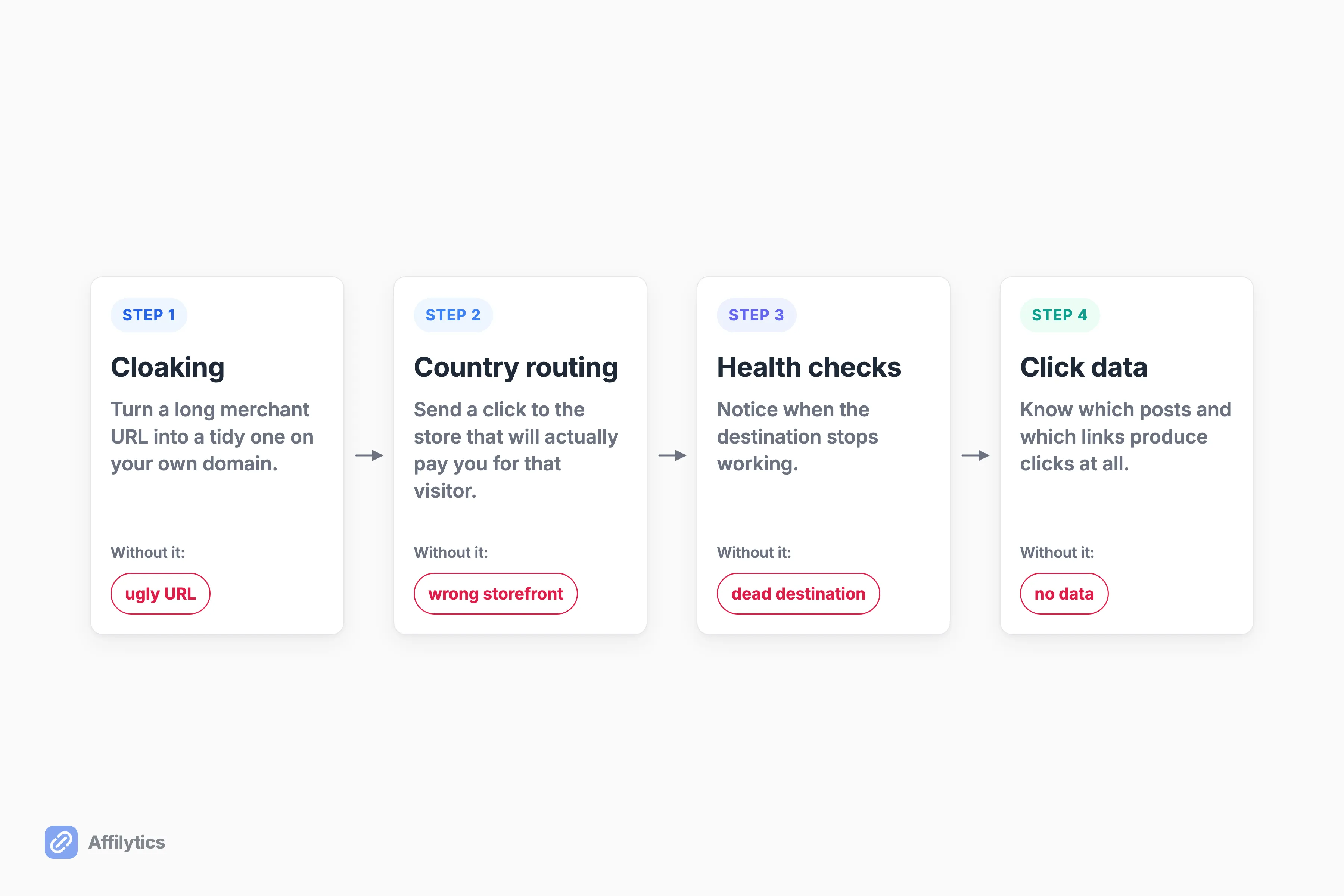
- Cloaking. Turn a long merchant URL into a tidy one on your own domain. Prevents ugly links and makes them easy to swap later.
- Country routing. Send a click to the store that will actually pay you for that visitor’s country. Prevents a UK reader landing on a US storefront and earning you nothing.
- Health checking. Notice when the destination stops working. Prevents a two-year-old post quietly sending clicks into a dead product page.
- Click data. Know which posts and which links produce clicks at all, so you know which ones are worth fixing.
So which of the four were you actually shopping for?
Almost everyone answers cloaking, because cloaking is the job the plugin ads talk about. The other three are where the money sits. A meaningful share of your readers are outside your own country whether or not you have ever checked, and every one of those clicks lands on a storefront that may not credit you.
The skew has a cause: cloaking is the only one of the four you can see. A tidy URL sits right there in your own post. A wrong-country click, a dead destination and a link nobody clicks are invisible from where you sit, and all three surface the same way, as a commission that never arrives.
Old posts also keep collecting clicks long after a product page dies, which is the whole case for catching a dead affiliate link before the commission stops. Pick the tool for the job you answered, not for the job the ads sell.
Free WordPress cloakers: the like-for-like swap
Section titled “Free WordPress cloakers: the like-for-like swap”If tidy links on your own domain are genuinely the only job you need, this lane is fine, and you can stop reading after this section with a clear conscience.
One thing worth knowing before you migrate, because nothing else ranking for this search mentions it. Pretty Links and ThirstyAffiliates are both owned by Caseproof, LLC, and their entry tiers carry the same $99.60 first-year price renewing at $249 per year. Pretty Links already has a free plugin of its own, with 8 million all-time downloads by its own count.
So is moving to the other one a change of vendor?
Not really. It is a move inside one company’s portfolio at the same price, which is worth knowing before you spend an evening migrating. We put ThirstyAffiliates and Pretty Links side by side elsewhere if you want them compared properly.
You have probably also seen ClickWhale, Easy Affiliate Links and LinkCentral pitched for this exact search. They are not rated here, and the reason is boring: I have no independently verified pricing or feature claims to stand behind for any of the three, and I do not rate tools I have not checked. The strongest listicle ranking for this keyword sorts its picks by content type. Sorting by job is a different cut.
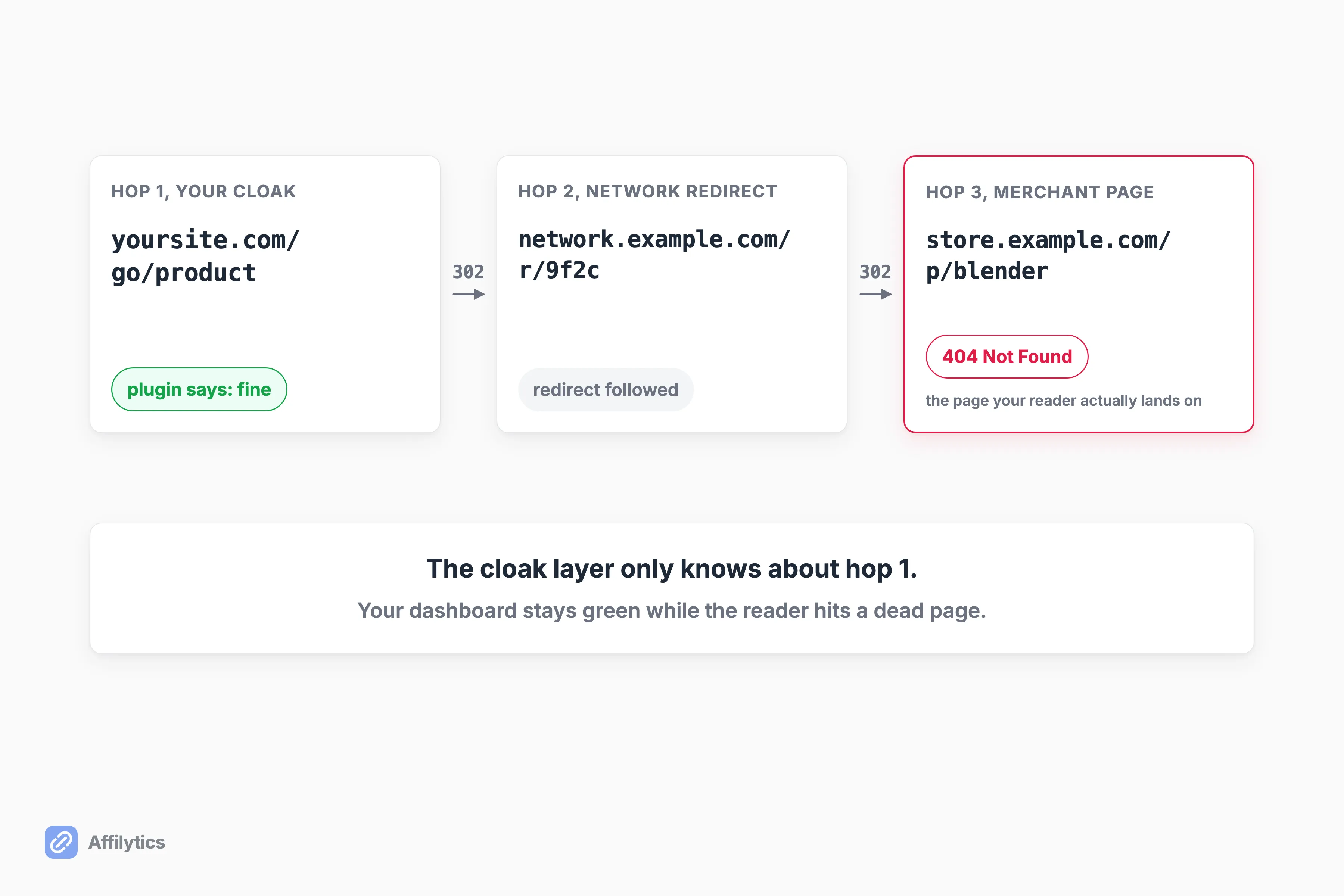
There is one structural thing a cloaker does that no sales page mentions. It puts a hop between your reader and the merchant, and that hop can fail quietly. A self-hosted site owner on r/Wordpress reported it plainly: “When I use Pretty Links plugin, the provided (cloaked) url, gives me 404 error.” They later hit the identical failure with two other cloaking plugins, and nobody in the thread suggested an automated way to have caught it.
ThirstyAffiliates
Section titled “ThirstyAffiliates”The straight swap. It is a free cloaking plugin on the official WordPress directory with 443,521+ downloads by its own count, and its smart uncloaking keeps Amazon Associates attribution intact on click.
On the paid ladder, every feature row in the plan matrix is included at the entry tier, so you upgrade for site count rather than for features. Geolocation link redirects, the automatic 404 checker and the advanced statistics reports all live on that ladder, which means the three jobs beyond cloaking are the paid part.
Best for: someone who wants a like-for-like swap and does not mind that the vendor is the same company.
AffiliateX
Section titled “AffiliateX”A genuinely substantial free tier for a WordPress plugin: 10 affiliate content blocks, ready-made templates and an analytics dashboard, all free. On Pro it ships a real Broken Link Checker with scheduled scans, email alerts and a link-health dashboard, which is more than ThirstyAffiliates documents for its own 404 checker, where the scan cadence and the alerting are not published.
The limits are narrow but real. That checker only sees the WordPress site the plugin runs on, so anything you published on YouTube or anywhere else is invisible to it. Its vocabulary is coarse, working or broken or warning, with no documented detection of a stripped tracking tag or an out-of-stock product, and it covers Amazon, eBay and AliExpress only.
Best for: a WordPress-only blogger who wants product blocks and a basic link check from one plugin.
Free country routing: where the international money actually is
Section titled “Free country routing: where the international money actually is”Routing is the job with money directly attached, and it is the job neither free WordPress cloaker documents at its free tier.
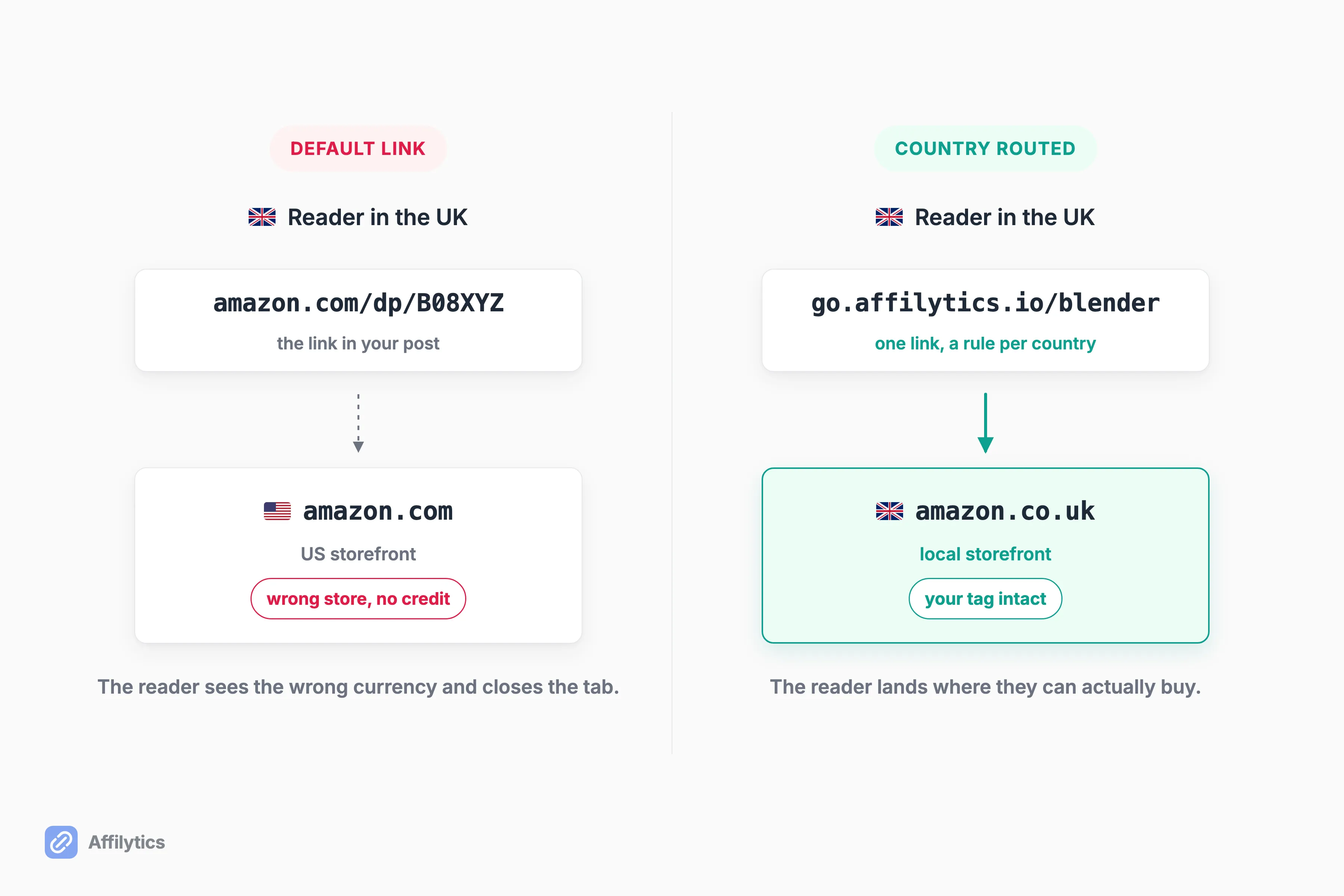
What happens to a click that leaves your post and lands in the wrong country’s store? Usually nothing at all, which is the problem. The reader sees a price in the wrong currency and a delivery estimate that makes no sense, they close the tab, and you never see a sale that was already yours.
Both genuinely free routing options below exist because Amazon wants its own traffic to convert. That is not a criticism, it just sets the ceiling on what free routing covers.
Amazon OneLink
Section titled “Amazon OneLink”Free with an Associates account, no tier, no upgrade path, nothing to cancel. Amazon’s own help docs state that OneLink and all its features are free, and it geo-redirects across 12 Amazon marketplaces.
The limits are what you would expect from a free Amazon feature: Amazon only, no broken-link detection, and no analytics beyond Associates Central. Every non-Amazon merchant you promote is untouched by it. It is also not a cloaker, which is why the table gives it a no in that column. OneLink is a redirect layer bolted onto links you already have, so your URLs stay as long and as ugly as Amazon wrote them. We wrote up how Amazon OneLink decides where to send a click if you want the mechanics.
Best for: an Amazon-only creator who wants the free routing floor and nothing more.
Linkfuse
Section titled “Linkfuse”Free forever across the whole product, with Amazon localization, integrated analytics, and native integrations beyond WordPress including Wix, Webflow and Hashnode.
Free is not the same as free of charge. Roughly 1 click in 25 routes through Linkfuse’s own affiliate tag instead of yours, 4% of your clicks, which they disclose openly on their own site. No broken-link detection is advertised, and affiliate program support is Amazon-only.
Best for: someone on a non-WordPress CMS who wants routing at no cash cost and is comfortable with the click share.
The full link stack: cloaking, routing, and health in one place
Section titled “The full link stack: cloaking, routing, and health in one place”The argument for this lane is arithmetic. When one tool does all four jobs, the four jobs stop being four separate purchases, four dashboards, and four places to forget something.
So what are you actually choosing between here?
Which part of the stack you pay for, and how the bill behaves once your traffic grows. None of the three below gives you the whole stack for free.
The broadest surface in this lineup, and explicitly not WordPress-only: it spans WordPress, YouTube, Instagram, link-in-bio pages, and HTML embeds for any site. Its Affiliate+ brand-deal marketplace is a genuinely unique economic feature, brokering higher-than-Amazon commissions on a 14-day attribution window, with 450,000+ private deals brokered. We have no equivalent to it.
The catch for a free-intent reader is precise. The free Lasso Lite tier locks exactly the two jobs this post says matter: broken-link alerts start at the Creator tier ($16/mo annual) and geo-routing at Pro ($24/mo annual).
Best for: a creator who wants product displays and brand deals sitting alongside link management.
Geniuslink
Section titled “Geniuslink”The long-running incumbent in smart links, with everything included in one tier rather than laddered, and routing that covers Amazon, iTunes/Apple and Microsoft storefronts rather than Amazon alone.
Two things to weigh. There is no free tier at all, and the pricing is per click: $6/mo base including 1,000 clicks, then $3.50 per 1,000 clicks beyond that, a published retail rate that carries undisclosed volume discounts. A bill that grows with the traffic you worked to earn is a fine trade at some volumes and a poor one at others. Its link monitoring is also confirmed Amazon-only, so the health job is narrower than the routing job.
Best for: a creator who wants routing depth and does not mind the bill scaling with clicks.
Affilytics
Section titled “Affilytics”Ours, so read the gaps at the end of this block as carefully as the rest.
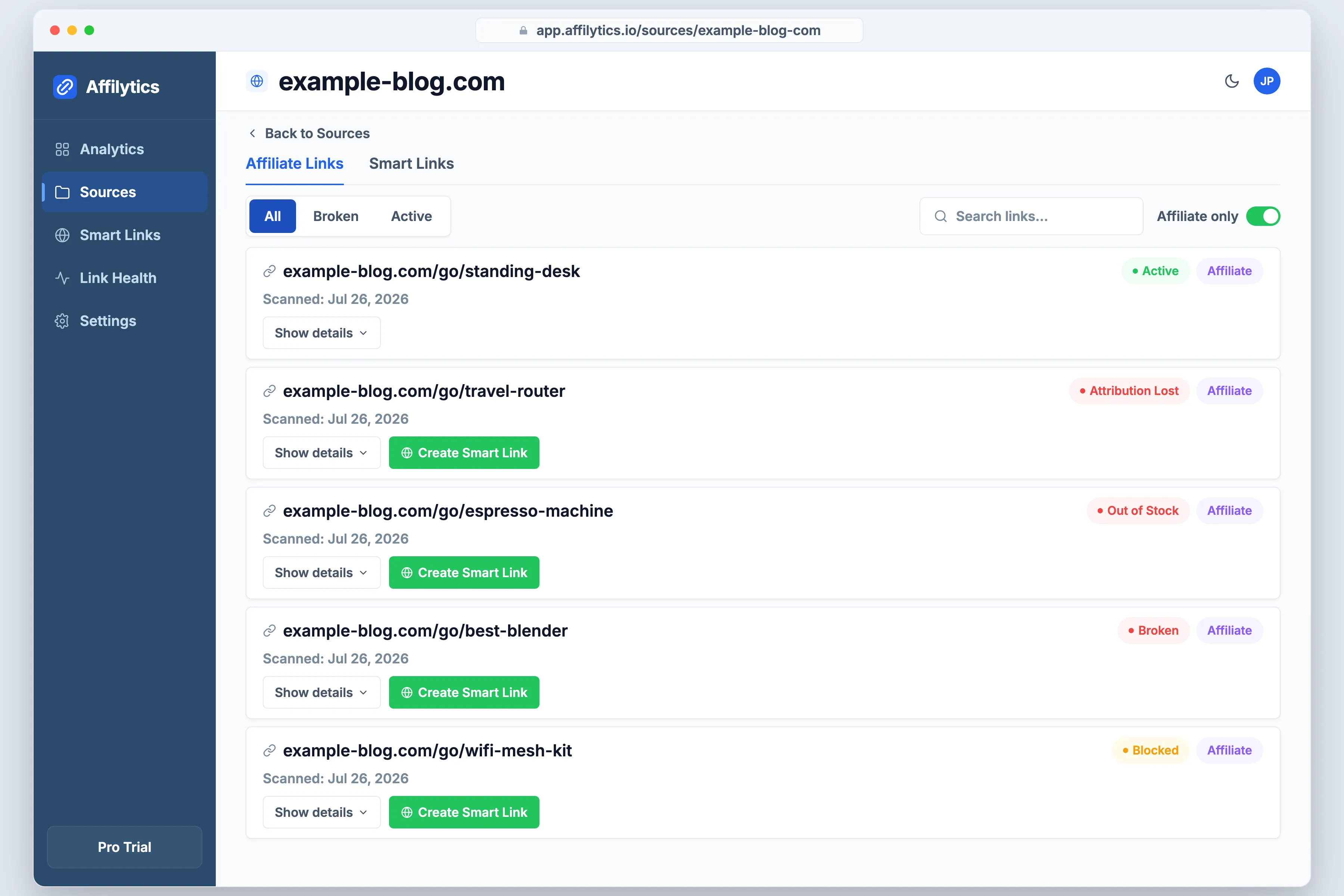
Routing is the primary job. You create a smart link, add a rule per country, and a click resolves to the store that will pay you for that visitor, falling through to a default destination when no rule matches. It works for any merchant, not only Amazon, which is what separates it from the Amazon-shaped routing in the free options above.
Health checking is second, and the result is not a yes or no. Four different answers come back, and they are four different problems with four different fixes:
- Tracking tag stripped. The sale still happens. You are just not credited for it.
- Product out of stock. The page loads perfectly, so anything watching only for errors sees nothing wrong.
- Page gone. The dead link everyone pictures when they think about this.
- Blocked by the retailer’s bot protection. Not broken at all, just a check the retailer refused to answer.
Those checks run across any merchant network you promote rather than a single retailer, which is where OneLink and Linkfuse stop, since both are Amazon-only, and where Geniuslink’s link monitoring stops too. They run through a browser-shaped client so bot blocking shows up as blocked rather than as a false dead link, and a healthy link has to fail several checks in a row before we mark it down.
Discovery is third. Paste a channel URL or a site URL and we find the affiliate links you already published, including the /go/-style cloaked paths a WordPress link manager creates, and put every one under monitoring. None of the tools above document a way to find links you did not create inside them.
Now the gaps, in the same breath rather than in a footnote. Affilytics is not a WordPress plugin and does not install into WordPress. It ships no product-display boxes and no comparison-table blocks, so if product boxes are your job, one of the plugins above is the better buy. Creating a smart link is a manual step too: scanning finds and watches the links you already have, it never converts them into smart links for you.
Best for: a creator whose links live in more than one place and who wants routing and health checking without buying them separately.
The genuinely free path: roll your own /go/ redirects
Section titled “The genuinely free path: roll your own /go/ redirects”You can skip every tool on this page. Creators who go this way reach for a generic redirect plugin, put their affiliate links behind a /go/ prefix to keep them tidy and easy to keep out of search results, and never pay a licence again. It works, and the people doing it aren’t settling.
What you get is a redirect on your own domain, a prefix you control, and nothing to renew. What you give up maps straight onto the other three jobs: no country routing, no health checking, and click counting only if you wire up something separate yourself.
Is that a bad trade? For a small library, honestly no. Price is what moves people here, not a feature comparison, and they say so out loud. One creator pricing a paid tool in r/juststart concluded: “ouch - pretty pricey. I think Ill just inject links manually - im just starting out anyways.” Another, auditing roughly 20 plugins in r/Wordpress, put it in terms any blogger recognises: “I use around 20 plugins in this project, and this link management is the smallest feature of the project, 500$/year for a simple block is a no-go.”
The moment to revisit is when your library gets old enough that you can no longer remember what you linked to. Manual works while you can still count your links. Once they run into the hundreds across years of posts, manual is a weekend you keep not spending.
What to check before you switch
Section titled “What to check before you switch”Switching cloakers rewrites the redirect layer sitting under every affiliate link you have already published. The one-click migration pitches competing for this search don’t mention that, and it’s the part that actually goes wrong.
So what is the safe order?
- Export your existing links first, before you deactivate anything.
- Keep the same slugs. The links living in old posts, old videos, and other people’s shares only keep resolving if the slug does.
- Redirect any slug that has to change rather than deleting it.
- Click a sample yourself afterwards. A cloaked link that looks healthy inside your dashboard can still 404 for a reader, which is exactly the failure that r/Wordpress thread describes.
And if the whole exercise has you wondering whether you need any of this, that is a fair question with a real answer: here is a test for whether you need a smart link tool at all.
Pick the job, then pick the tool
Section titled “Pick the job, then pick the tool”If country routing and health checking are the two jobs you have been missing, the fastest way to find out what they are worth to you is to look at the links you already published. Create your free account and the trial opens everything for two full weeks, no credit card, then settles into a free tier that keeps working.
The tidy URL was never the hard part. Pick the job you actually need done, and the tool stops being a hard decision.
Is there a completely free Pretty Links alternative?
Section titled “Is there a completely free Pretty Links alternative?”For cloaking alone, yes, several. It is a slightly odd framing though, because Pretty Links itself ships a free plugin on wordpress.org. What does not exist in this lineup is one free tool covering cloaking, country routing, health checking and click data together. Free gets you one or two of the four jobs, never all four.
Is ThirstyAffiliates a real alternative to Pretty Links?
Section titled “Is ThirstyAffiliates a real alternative to Pretty Links?”It is a capable cloaking plugin with a free version on wordpress.org and 443,521+ self-reported downloads. It is also owned by Caseproof, LLC, the same company that owns Pretty Links, and its entry tier carries the same $99.60 first-year price renewing at $249 per year. Switching is a move inside one portfolio rather than a change of vendor. Fine if you prefer the plugin. Not a way out of the annual licence.
Do I need a link cloaking plugin at all?
Section titled “Do I need a link cloaking plugin at all?”No. If tidy links on your own domain are the whole job, a plain redirect with a /go/ prefix does it for free and never renews. You give up country routing, health checking and click data, and for a small library that trade is perfectly reasonable. Revisit it when your posts get old enough that you cannot remember what you linked to.
Will switching cloakers break my existing affiliate links?
Section titled “Will switching cloakers break my existing affiliate links?”It can, because the redirect layer is exactly what you are replacing, and every link already published in old posts and other people’s shares points at it. Export first, keep the same slugs, and redirect any slug that has to change instead of deleting it. Then click a sample yourself. A link that resolves inside the dashboard can still 404 for a reader.