
Geniuslink vs Affilytics: An Honest 2026 Comparison
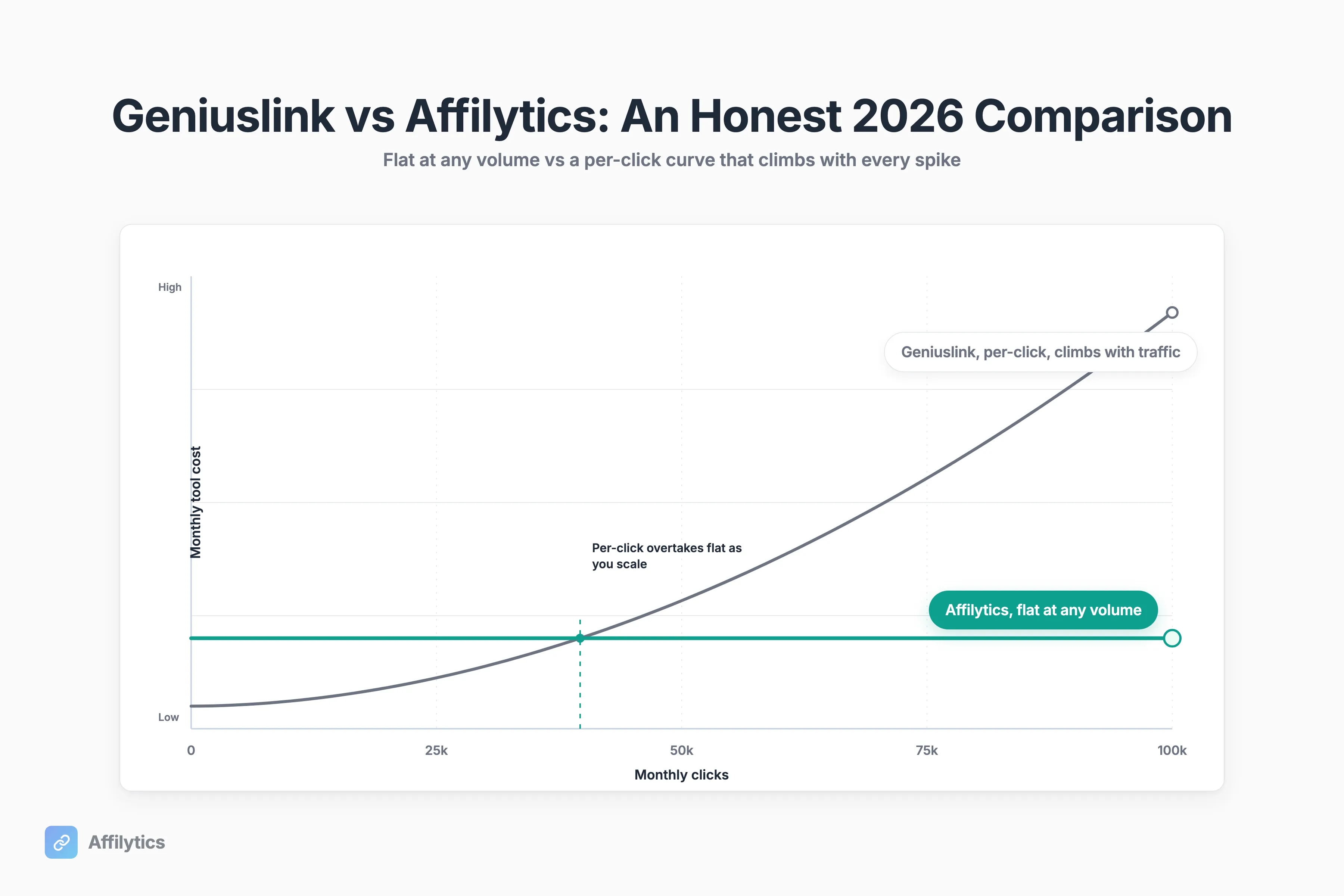
“The pricing feels pretty wild once you start getting some volume. Paying monthly + extra per click adds up really fast.” That is a real creator, u/Fareway13 in r/Affiliatemarketing, and it is the honest starting point for any Geniuslink vs Affilytics comparison, including the parts where Geniuslink wins.
We build Affilytics. The link-health checking, the country-based routing, and the stealth browser-like requests are our own code, so this is a mechanics-level comparison from the people who ship the infrastructure, not a feature-list pitch.
If you want the whole field instead of this one-on-one, we also keep a wider roundup of Geniuslink alternatives; this post is the deep head-to-head.
This compares the two on pricing model, what each actually does with your links, geo-routing, link health, Amazon safety, and who each one is genuinely the right call for.
Geniuslink vs Affilytics at a Glance
Section titled “Geniuslink vs Affilytics at a Glance”Here is the whole comparison in one table. Every later section expands one of these rows.
| Capability | Geniuslink | Affilytics |
|---|---|---|
| Pricing model | Single tier $6/mo, includes 1,000 clicks/mo, then $3.50 per extra 1,000 clicks, no flat-rate option | Flat pricing at any volume, no per-click charges |
| Free tier | No free tier; 14-day trial requires a credit card | 14-day reverse trial, no credit card, then a usable free tier |
| Scans your YouTube channel and website for links | No, optimizes links you already pasted | Yes, crawls every video description, and crawls blogs and sites too |
| All-network auto-discovery in one scan | No, smart-link-only | Yes, across major networks (Amazon, Impact, CJ, Awin, ShareASale, Rakuten, PartnerStack and more) |
| Amazon country routing | Yes, mature | Yes, configurable per-country rules |
| Routing beyond Amazon | Yes | Yes |
| Link health alerts | Yes, broken / out-of-stock alerts | Yes, deeper pipeline with attribution-loss states |
| Choice Pages (multi-destination landing) | Yes | Not currently shipped |
| Mobile deep linking | Yes, more mature | Partial |
| Multi-program auto-select at click time | Yes | Partial |
| Track record | Operating since 2010 | Daily shipping cadence, direct feedback loop |
Read it by what you actually do all day. If most of your work is pasting Amazon links into a tool and you want polished landing pages, the left column matters more. If your links are scattered across old videos and your traffic is global, the right column does.
Where Geniuslink Genuinely Wins
Section titled “Where Geniuslink Genuinely Wins”Let me get the honest part out of the way first, because it is real and it matters.
Geniuslink has been operating since 2010 and markets itself as “trusted by thousands of the world’s most successful creators and publishers for over a decade.” That is over a decade of being the default answer when someone asks “what do I use for Amazon affiliate links.” Incumbency is not nothing. It buys trust, documentation, and a feature set that years of real use have sanded smooth.
A few places it genuinely leads:
- Choice Pages. Landing pages that let a shopper pick where to buy. Geniuslink reports this drives “2x sales,” which is their own self-reported number with no published methodology, so treat it as their claim, not a fact. Affilytics does not ship Choice Pages today. That is an honest gap.
- Mobile deep linking. Geniuslink’s mobile-app deep linking is more mature than ours. If sending mobile shoppers straight into the Amazon app is the core of your strategy, that is a point for them.
- Effortless multi-program affiliation. Picking the right program at click time across several networks is something Geniuslink has refined.
- The “Amazon-safe” reputation. More on that in its own section below, but the community trusts them here, and that trust is earned.
So what is the honest counterweight on our side? Pace. We ship most days, and creator feedback turns into shipped product fast rather than landing in a quarterly roadmap. That is not a dig at a mature tool. It is a different trade: stability and breadth on one side, responsiveness and a direct feedback loop on the other.
The Pricing Model: Flat vs Per-Click, With Real Numbers
Section titled “The Pricing Model: Flat vs Per-Click, With Real Numbers”This is the core wedge, so let me be precise instead of dramatic.
Per Geniuslink’s pricing page, it runs a single public tier at $6/mo that includes 1,000 clicks per month, then charges $3.50 per additional 1,000 clicks, with no volume ceiling and no flat-rate option. Their own pricing-page calculator shows the math: 3,000 clicks in a month works out to $13.00 total ($6 base plus two more 1,000-click buckets at $3.50 each). There is also no free tier; the only on-ramp is a 14-day trial that requires a credit card on file. We published a full breakdown of Geniuslink’s pricing if you want the bill at every volume and the October 2025 rate change that moved it. If a no-cost route is what you’re after, we rounded up the free alternatives to Geniuslink separately.
At low volume that is genuinely cheap. A creator doing a few hundred clicks a month pays six dollars and barely thinks about it.
Now flip it. What happens when one video pops?
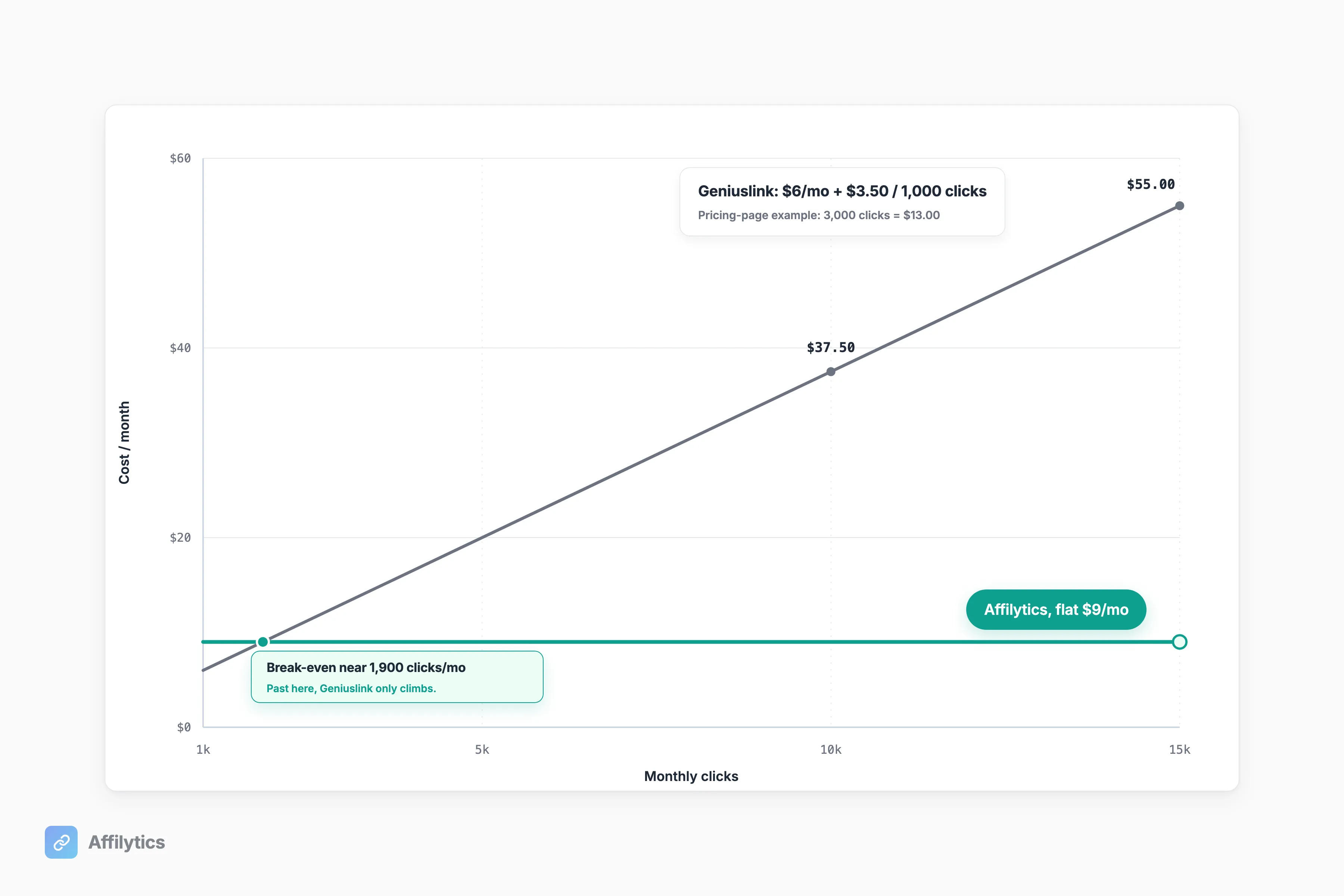
Picture a single post hitting a couple million views and driving tens of thousands of clicks in a few days. Under a per-click model, your tooling bill spikes with the traffic, exactly when you have the least control over it. The cost is tied to your best week, not your average one. That is the unpredictability creators keep coming back to: “Paying monthly + extra per click adds up really fast,” the same creator wrote in the r/Affiliatemarketing thread that opened this post.
Affilytics takes the other side of that trade with flat pricing at any volume and no per-click charges. A viral spike changes your income, not your bill. There is also a 14-day reverse trial with no credit card, and if you do not upgrade afterward nothing breaks: smart links keep routing on their default URL and the free tier still shows the per-country click breakdown so you can see what you are leaving on the table. I am keeping numbers off this page on purpose; the live pricing page carries the current figure.
The honest read: per-click is cheaper if your volume stays low and predictable. Flat wins the moment your traffic grows or spikes. Which brings up the real question behind any tooling spend, what your international Amazon traffic is actually worth, because the bill only matters relative to the income it protects.
What Geniuslink Doesn’t Do: Find the Links You Already Published
Section titled “What Geniuslink Doesn’t Do: Find the Links You Already Published”Here is the part of the comparison nobody else on the page talks about.
Geniuslink optimizes the links you put into it. You paste a link, it wraps it, it routes it. What it does not do is go look at your channel or crawl your blog and find the affiliate links you already published, which is exactly what Affilytics discovery does on both surfaces. Per Geniuslink’s features page, it does not scan YouTube channels; its YouTube tooling optimizes links in descriptions you have already pasted, not channel discovery.
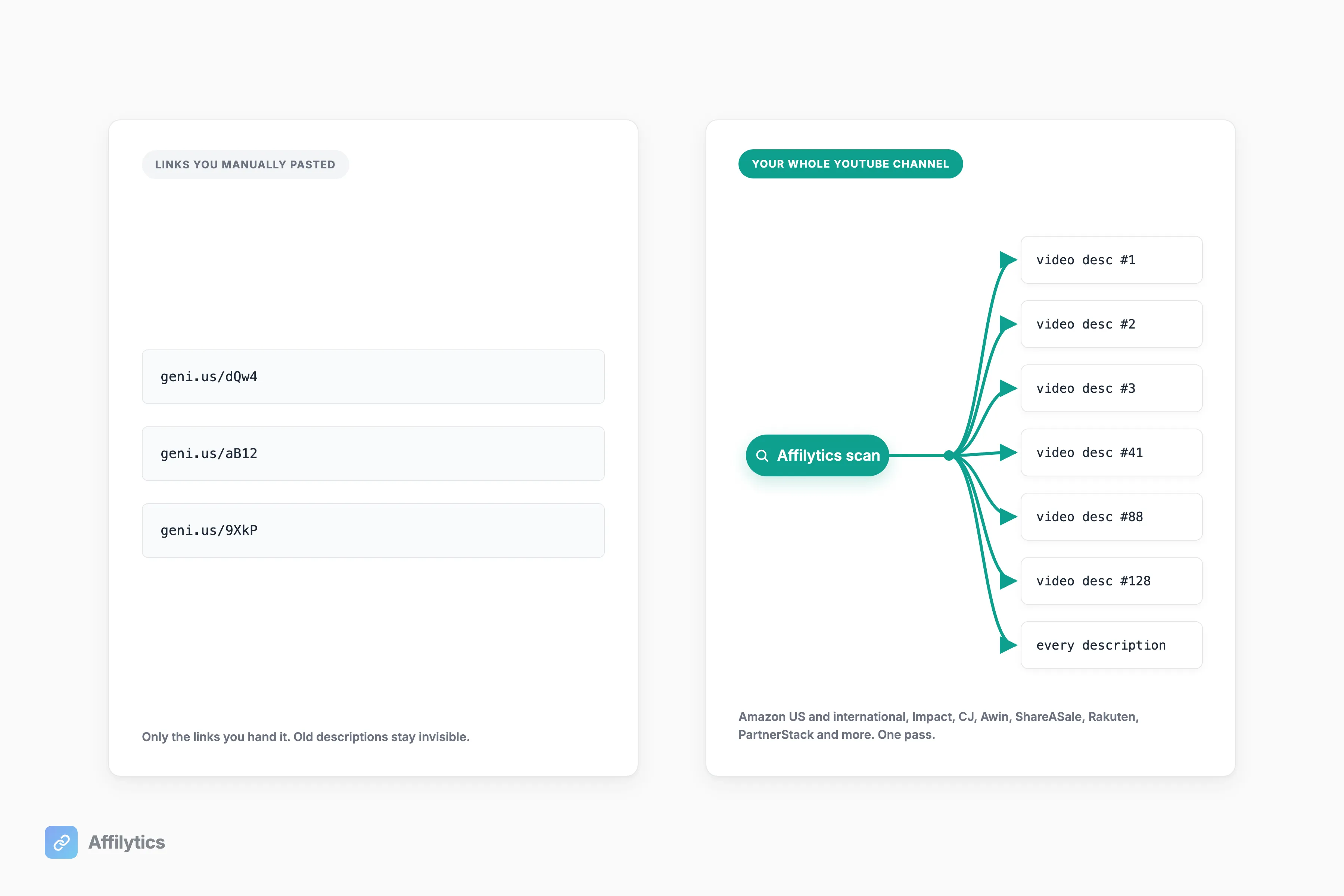
Think about what that means in practice. If you have two years of videos, every description is its own little pile of links you set and forgot. Some of those programs changed. Some of those products are gone. You are not going to re-paste a hundred old descriptions into a tool by hand.
Affilytics starts from the other end. Give it a YouTube channel URL and it crawls every video description, extracts every affiliate URL you already published, and registers each one for monitoring. It recognizes links across the major affiliate networks in a single pass, Amazon US and international, Impact, CJ, Awin, ShareASale, Rakuten, PartnerStack and more, so you are not running one scan per program. Here is how to scan a YouTube channel for affiliate links. This is the uncontested wedge: discovery is the part Geniuslink structurally does not do.
Geo-Routing and the International Income You’re Already Leaving on the Table
Section titled “Geo-Routing and the International Income You’re Already Leaving on the Table”Let me concede the obvious before I differentiate: Geniuslink’s Amazon localization is genuinely good, and the community agrees. If you only sell Amazon and your audience is international, sending each shopper to their local storefront is exactly what they are known for.
So where is the difference? Two places: scope and depth.
Affilytics is geo-routing-first by design. A smart link (go.affilytics.io/{slug}) reads the visitor’s country, matches your first routing rule, and sends a 302 redirect to the right regional retailer, with a default URL as the fallback so a click never dies. That routing is not Amazon-only; you set per-country rules to any destination you want. And it sits on top of the deeper link-health pipeline covered in the next section, so a routed link that quietly breaks does not keep bleeding clicks.
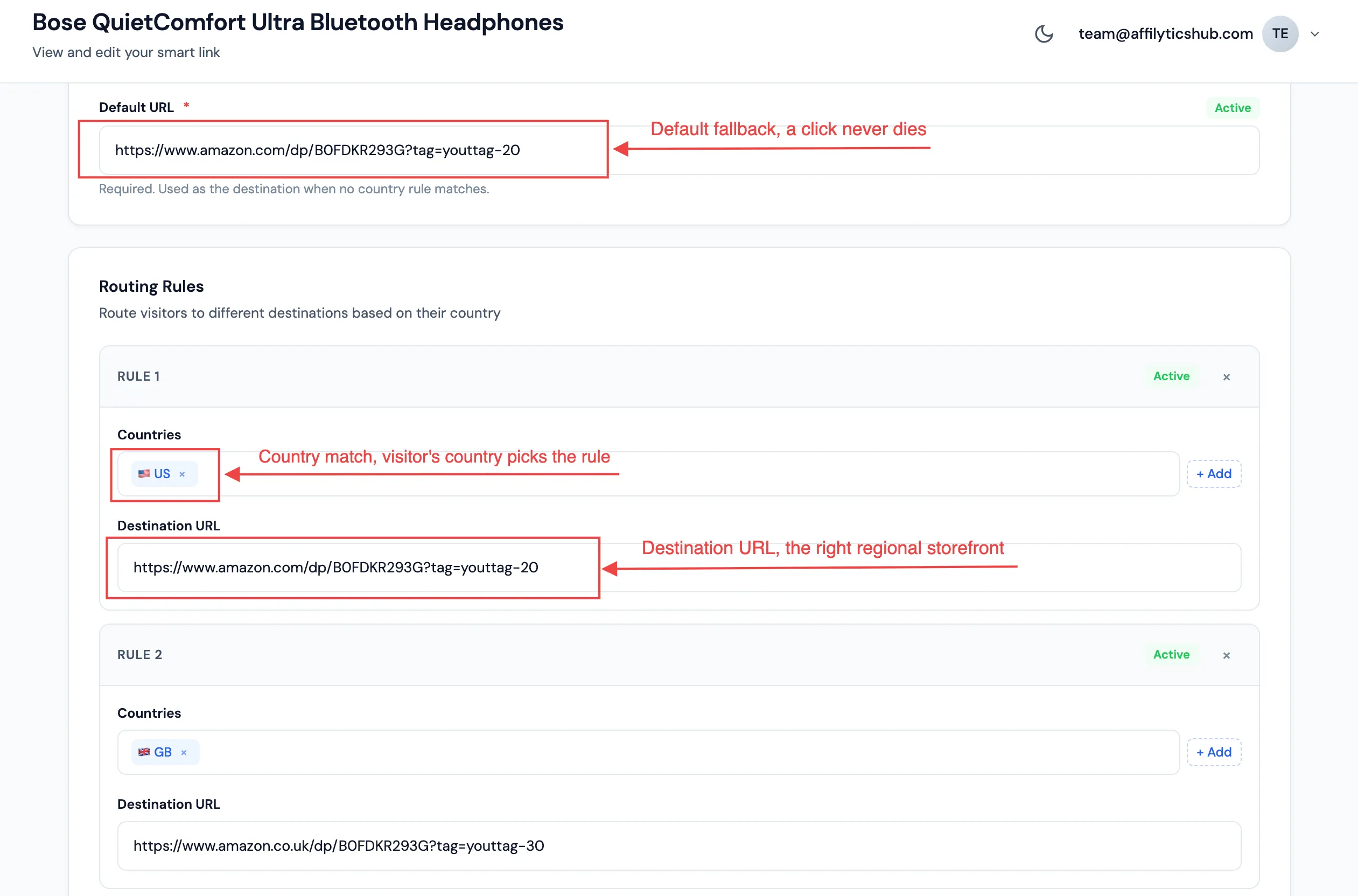
Why does this matter in money terms? For most creators, a large share of the audience is international, often without the creator ever looking closely. Those are clicks you already earned. As one creator put it in r/passive_income, “Most affiliate creators obsess over traffic volume when the conversion path is where all the money leaks out.” Geo-routing is plugging one of the biggest leaks: same traffic, correct storefront, commission that actually lands. If the concept is new to you, here is the longer explainer on how geo-routing recovers international commissions.
Link Health and Attribution: The Part Nobody Answers
Section titled “Link Health and Attribution: The Part Nobody Answers”There is a question that goes around Amazon creator threads and never gets a clean answer. One creator asked it directly: “Geniuslink’s documentation phrases it as if the original referrer is passed through, but I want to confirm this before I onboard.” Nobody in the thread gave a confident reply. Let me answer the underlying concern honestly, as a credential, not a swipe.
Geniuslink markets “Link Monitoring,” alerts when an Amazon link breaks or a product goes out of stock (per its features page). That is a useful baseline and it is real.
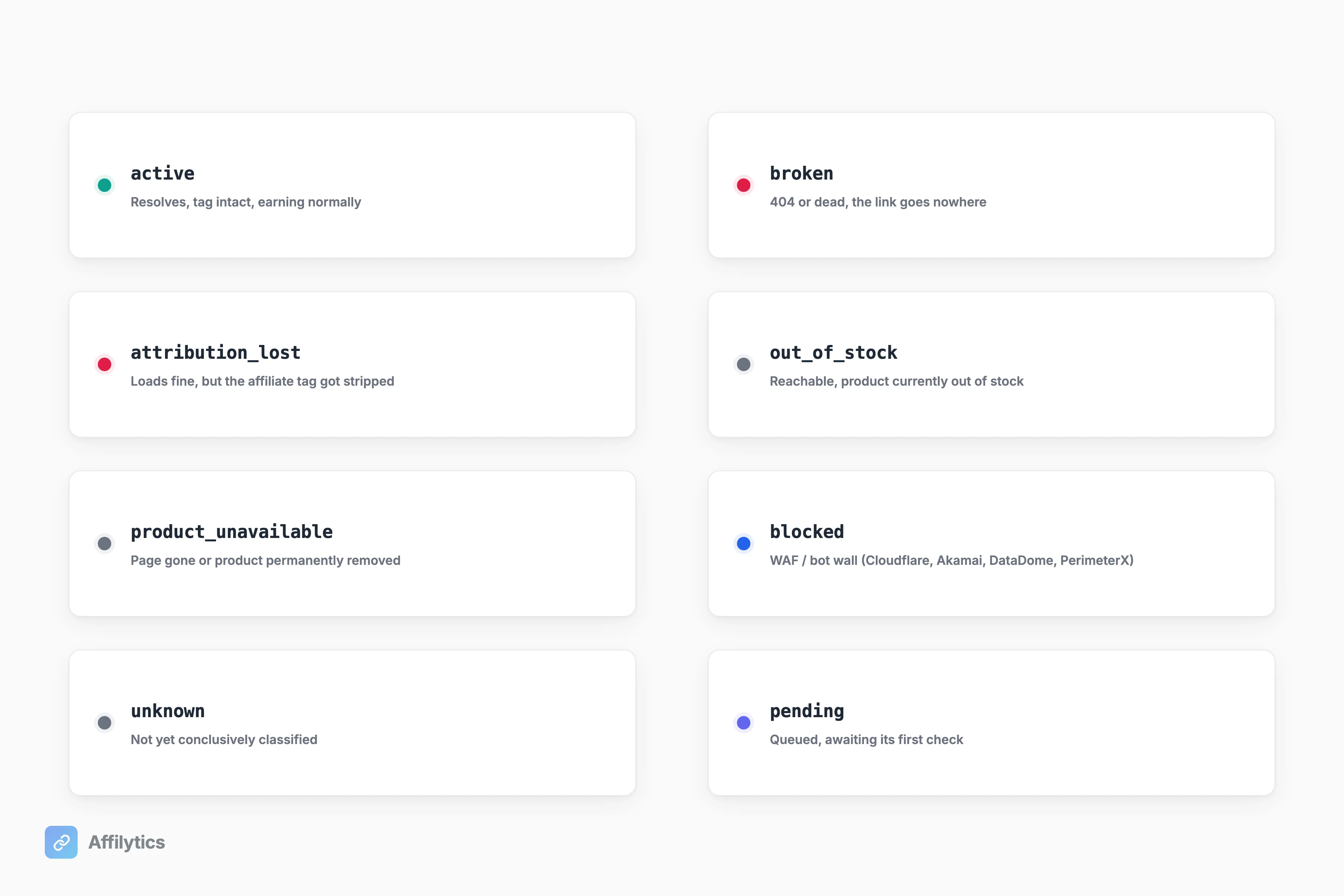
Affilytics runs a deeper pipeline underneath the same idea:
- An 8-state status model, not just “up or down”: active, broken, attribution_lost, out_of_stock, product_unavailable, blocked, unknown, pending. A link that loads fine but quietly stripped your affiliate tag is a different failure than a 404, and it should be labeled differently.
- Stealth checks with browser-like fingerprinting, so the health checker looks like a real visitor instead of a bot that gets served a fake “all good” page.
- WAF and bot-wall detection (Cloudflare, Akamai, DataDome, PerimeterX), surfaced honestly as “blocked” instead of guessed.
- A confirmation gate so a single network blip does not flap a healthy link into “broken” and spam you.
On the referrer question itself: a redirect is a hop, and what a downstream report shows depends on how the redirect is built and what each platform records. The point of our attribution tracking is to detect when a redirect chain strips the affiliate tag at all, so a “working” link that is silently losing commission gets flagged instead of trusted. Here is how to turn a raw affiliate link into a monitored smart link.
Is Geniuslink “Amazon-Safe”? And Is Affilytics?
Section titled “Is Geniuslink “Amazon-Safe”? And Is Affilytics?”This is where Geniuslink’s reputation is strongest, and I am not going to undercut it, because the underlying logic is sound.
The community comfort condition is consistent across every thread I read. One creator in r/Affiliate summed it up: “as long as you show the real Amazon link after the click and you don’t hide your Associate ID … you should be good.” Visible destination, Associate ID intact, correct localization. Geniuslink self-positions as “Guaranteed Amazon, iTunes, and Microsoft safe” (per its features page), which is their own marketing language, and they have earned the trust that backs it.
So is Affilytics held to a different standard? No, and it should not be. Affilytics preserves the real destination and the associate tag through the redirect; the shopper lands on the genuine Amazon product page, and the tag travels with them. Same bar, met the same way. Neither tool is doing anything exotic; both are ordinary redirects that keep the destination and the tag visible.
The right authority on this is not any tool’s marketing page, ours or theirs. Read Amazon’s own Associates Operating Agreement rules on link redirection and cloaking and judge any tool against that document directly. The short version the community keeps landing on: do not obscure where the click goes, and do not hide your tag. Both tools are built around exactly that.
So Which One Should You Actually Pick?
Section titled “So Which One Should You Actually Pick?”No tool wins every axis, and pretending otherwise would waste your time. Here is the honest split.
Choose Geniuslink if:
- You want Choice Pages and polished multi-destination landing pages.
- You are all-Amazon and you value 14-plus years of incumbency and a deep track record.
- Mobile-app deep linking is central to your strategy and you want the most mature version of it.
- Your click volume is low and predictable, where per-click pricing is genuinely cheaper.
Choose Affilytics if:
- You want flat pricing that does not climb as your traffic grows or spikes.
- You want your existing YouTube footprint scanned automatically instead of re-pasting old links by hand.
- You route beyond Amazon and want geo-routing as the core, not an Amazon add-on.
- You want deeper link-health and attribution detection, not just up/down alerts.
Most creators already know which paragraph they live in by the time they reach this line. If you are in the second one, the trial costs you nothing to find out.
Try the Honest Version Yourself
Section titled “Try the Honest Version Yourself”You do not have to take my word for any of this. Start your free trial: two full weeks, everything unlocked, no credit card. Point it at your channel and let it scan what you already published.
If you do not upgrade afterward, nothing breaks. Your smart links keep routing on their default URL, and you still see the per-country click breakdown, so you can decide based on your own numbers instead of a comparison table.
Is Affilytics a Geniuslink alternative?
Section titled “Is Affilytics a Geniuslink alternative?”Yes, but it is a different shape of tool. Affilytics is geo-routing-first, it scans your existing YouTube footprint to find links you already published, and it charges a flat price at any volume instead of per click. Geniuslink is the incumbent Amazon-focused smart-link tool with Choice Pages and a long track record. If you want the wider field rather than this one-on-one, see our roundup of Geniuslink alternatives.
Is Geniuslink worth it in 2026?
Section titled “Is Geniuslink worth it in 2026?”For Amazon-centric creators who value Choice Pages and a decade-plus track record, yes. Geniuslink does Amazon localization well and has earned trust since 2010. The main thing to weigh is the per-click pricing model: it is cheap at low volume and gets more expensive as your traffic grows, with no flat-rate option.
Why is Geniuslink’s pricing per-click?
Section titled “Why is Geniuslink’s pricing per-click?”Geniuslink runs a single public tier at $6/mo that includes 1,000 clicks per month, then charges $3.50 per additional 1,000 clicks with no volume ceiling and no flat-rate option. At low volume that is inexpensive. As traffic grows, the bill climbs with every extra thousand clicks, which is why creators with viral spikes find it unpredictable.
Does Geniuslink scan my YouTube channel for affiliate links?
Section titled “Does Geniuslink scan my YouTube channel for affiliate links?”No. Geniuslink optimizes links you have already pasted into its tool; it does not crawl your channel to discover what you published. Affilytics scans the whole YouTube channel and discovers affiliate links across the major networks in a single pass, then monitors each one.
Is it safe to use a smart-link tool with Amazon Associates?
Section titled “Is it safe to use a smart-link tool with Amazon Associates?”The community comfort condition is consistent: keep the destination visible after the click, do not hide your Associate ID, and localize correctly. Both Geniuslink and Affilytics are built around that condition. Read Amazon’s own Associates Operating Agreement for the authoritative rules rather than relying on any tool’s marketing page.