
Amazon Associates Earn Globally: What It Fixes and Misses
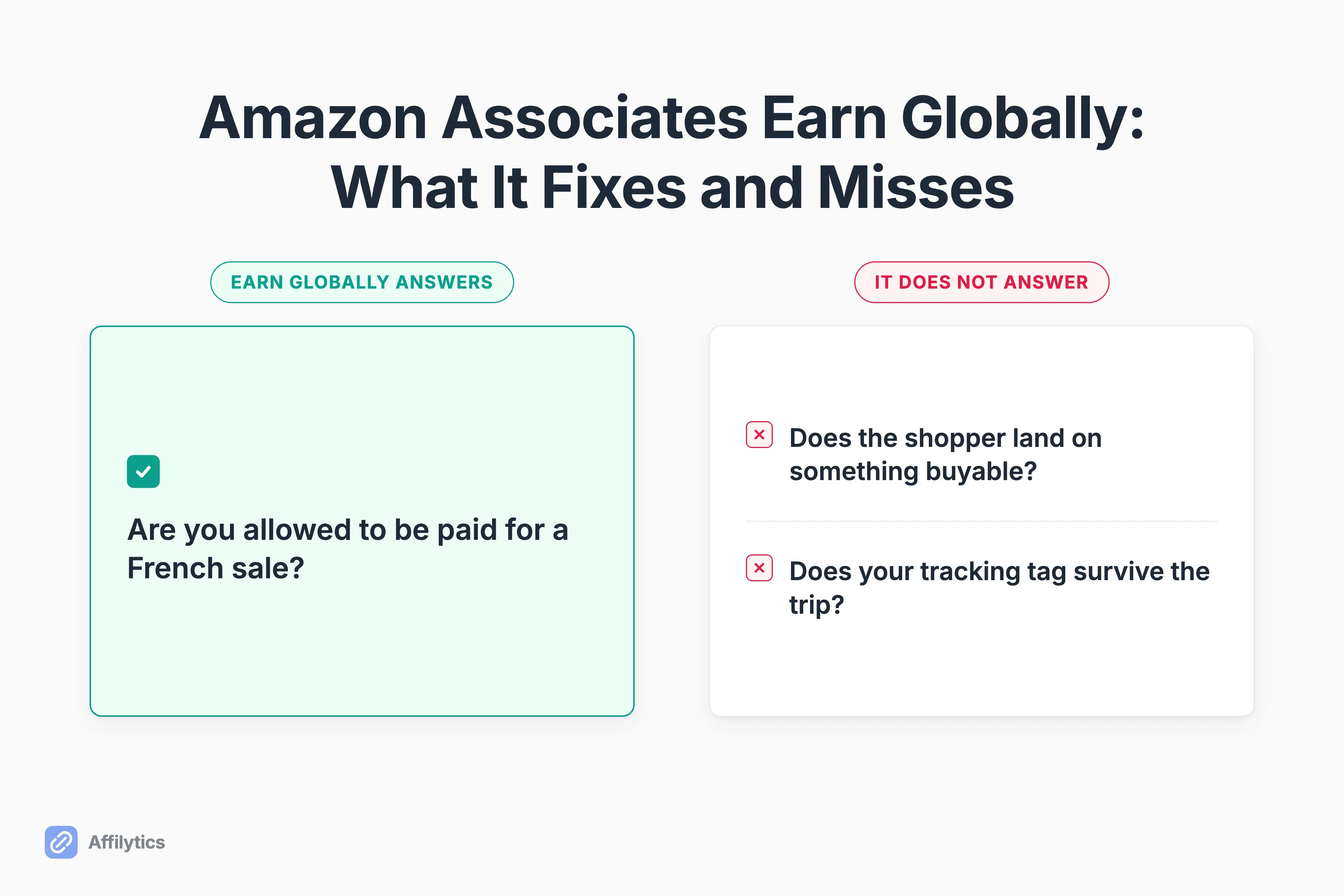
Someone in France clicks the Amazon link in your video description. Amazon Associates Earn Globally decides whether you are allowed to be paid for that sale, and that is not the same thing as deciding whether you actually get paid.
We build geo-routed smart links and affiliate link health checks, so the two things that decide this outcome, where a click lands and whether your tracking tag survives the trip, are what we work on every day.
If you have never put a number on it, it is worth knowing what your international traffic is actually worth before you change anything about how it gets routed.
This guide covers what Earn Globally pays, which account the money lands in, which six marketplaces ride on a single store ID, and the two places your commission can still go missing after you switch it on.
What Earn Globally Actually Is (and Why It Is Not OneLink)
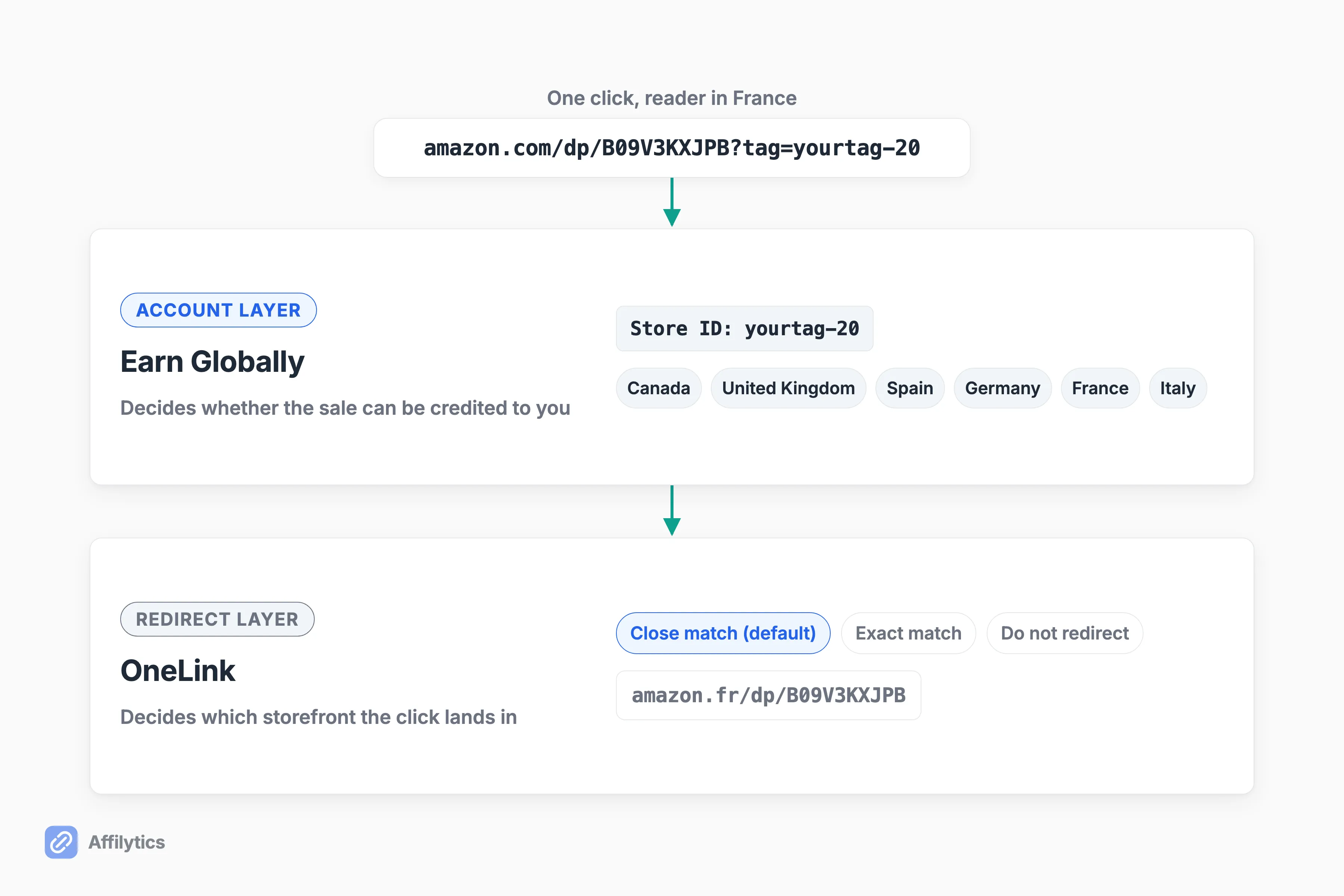
Section titled “What Earn Globally Actually Is (and Why It Is Not OneLink)”Two different things hide behind one switch. Earn Globally is the account-side change: Amazon says it has “simplified the process for you to earn across the Canada, United Kingdom, Spain, Germany, France and Italy Associates programs, by making it possible using a single store ID.” OneLink is the redirect technology that decides which storefront a shopper actually lands in.
So which one is the thing you just enabled?
Both, in the same click. Amazon sets the redirection preference to close match the moment you enable OneLink, which means flipping this on changes your eligibility and your routing at the same time. Eligibility is the question of whether a French sale can be credited to you at all. Routing is the question of whether that French shopper ever reaches the product you recommended.
Almost nobody keeps the two apart. Amazon’s own help pages use both names on the same screen, creators use them interchangeably, and that is why a thread about who gets paid so reliably turns into an argument about redirects. One creator on X called Amazon OneLink one of the most confusing parts of Amazon Associates, and the confusion is structural rather than personal.
The distinction earns its keep the moment something goes wrong. If your problem is eligibility, the fix lives in your account settings. If your problem is routing, the fix lives in a redirection preference, and no amount of account linking will touch it.
So keep them separate as you read the rest. If you want the mechanics of how OneLink’s redirect works, that is a different piece. Amazon’s guide to linking your international Associates accounts covers the setup clicks. Everything below is about what happens after you finish clicking.
What Earn Globally Pays You, and Where the Money Lands
Section titled “What Earn Globally Pays You, and Where the Money Lands”The rate you get paid is the destination’s, not yours. Amazon’s wording is that “your redirected earnings will be calculated based on the standard commission income table applicable for each Associate Program,” and it publishes the worked example to go with it: a shopper in the UK clicks your US link, gets redirected, orders on Amazon.co.uk, and you are paid at the UK program’s rate.
Is that better or worse than what you were getting?
Genuinely depends, and I would not assume it is an upgrade. Rates differ by category and by country, so the same product can pay more in one marketplace and less in another. One creator on X posted a Canadian category rate as an upside and got a fair reply that Amazon’s rates have only moved in one direction for years. Both of those are one person’s view, and neither is a forecast for your niche.
Where the money shows up splits along the same line the whole program does:
- Canada plus the five big European marketplaces: earnings accrue in the Associates account you already have, and pay out through the payment method set for each country.
- The other seven marketplaces: earnings accrue in that country’s own Associates account, which you have to open and maintain yourself.
That second line is the part that catches people out. A creator can see international commission in one report, go looking for it in a country account they never opened, and conclude something is broken when nothing is.
One creator on r/Amazon_Influencer hit that seam from the other direction: commissions visible in the global OneLink report, no conversions showing in the international accounts, and emails from Amazon warning those accounts would be closed for driving no sales. Reporting that splits across two places is not the same as money going missing, though it takes a while to be sure of that.
The Two Tiers: Six Marketplaces on One Store ID, Seven That Still Need Their Own Account
Section titled “The Two Tiers: Six Marketplaces on One Store ID, Seven That Still Need Their Own Account”This is the single most repeated confusion in every thread I read while writing this, so here it is as a table rather than a paragraph, covering the marketplaces Earn Globally and OneLink can route to.
| Marketplace | Rides on your existing store ID? | What you have to do |
|---|---|---|
| Canada | Yes | Enable Earn Globally, nothing else |
| United Kingdom | Yes | Enable Earn Globally, nothing else |
| Spain | Yes | Enable Earn Globally, nothing else |
| Germany | Yes | Enable Earn Globally, nothing else |
| France | Yes | Enable Earn Globally, nothing else |
| Italy | Yes | Enable Earn Globally, nothing else |
| Japan | No | Open an account in that country |
| Singapore | No | Open an account in that country |
| Netherlands | No | Open an account in that country |
| Saudi Arabia | No | Open an account in that country |
| Poland | No | Open an account in that country |
| Sweden | No | Open an account in that country |
| Australia | No | Open an account in that country |
For that bottom group, Amazon is blunt: you will need an Amazon Associates account in each country for which you want to monetize the traffic, and each one runs as its own Associates program with its own signup. If you want the wider view of which marketplaces exist at all, we keep a running list of every Amazon Associates marketplace.
Which list are your own readers actually in?
Possibly neither, because the routing footprint is wider than the table. Amazon’s own example is that visitors from Ireland, Greece, Georgia and Iceland get sent to Amazon.co.uk, and none of those four has its own storefront. Amazon is routing your Irish readers somewhere whether or not Ireland appears on any list.
A creator on r/Amazon_Influencer worked this split out the hard way, by contacting support, and summarized it as not needing a Canadian, UK, French, German, Italian or Spanish account because those report into the US account in the consolidated report. That is exactly right, and it took a support ticket to learn.
What Earn Globally Does Not Fix
Section titled “What Earn Globally Does Not Fix”Getting paid across borders and getting the sale are two different problems. Amazon Associates Earn Globally only solves the first one. If the UK is one of the six marketplaces you earn across, what this means for Amazon Associates UK comes down to that programme’s own rate card and payout schedule, which Earn Globally does not change. The same goes for Canada, where what the Canadian programme pays runs on its own schedule entirely. Two things stay unsolved after you switch it on, and they carry very different evidence: the first is documented by Amazon, the second is one creator’s unresolved report.
The Redirect That Ends on a Search Page
Section titled “The Redirect That Ends on a Search Page”Close match is the default, and Amazon recommends keeping it there: the exact words are that you should always leave the default option of close match to optimize conversions. That advice is reasonable. An approximate redirect converts better than dumping a French shopper on a storefront where they cannot check out.
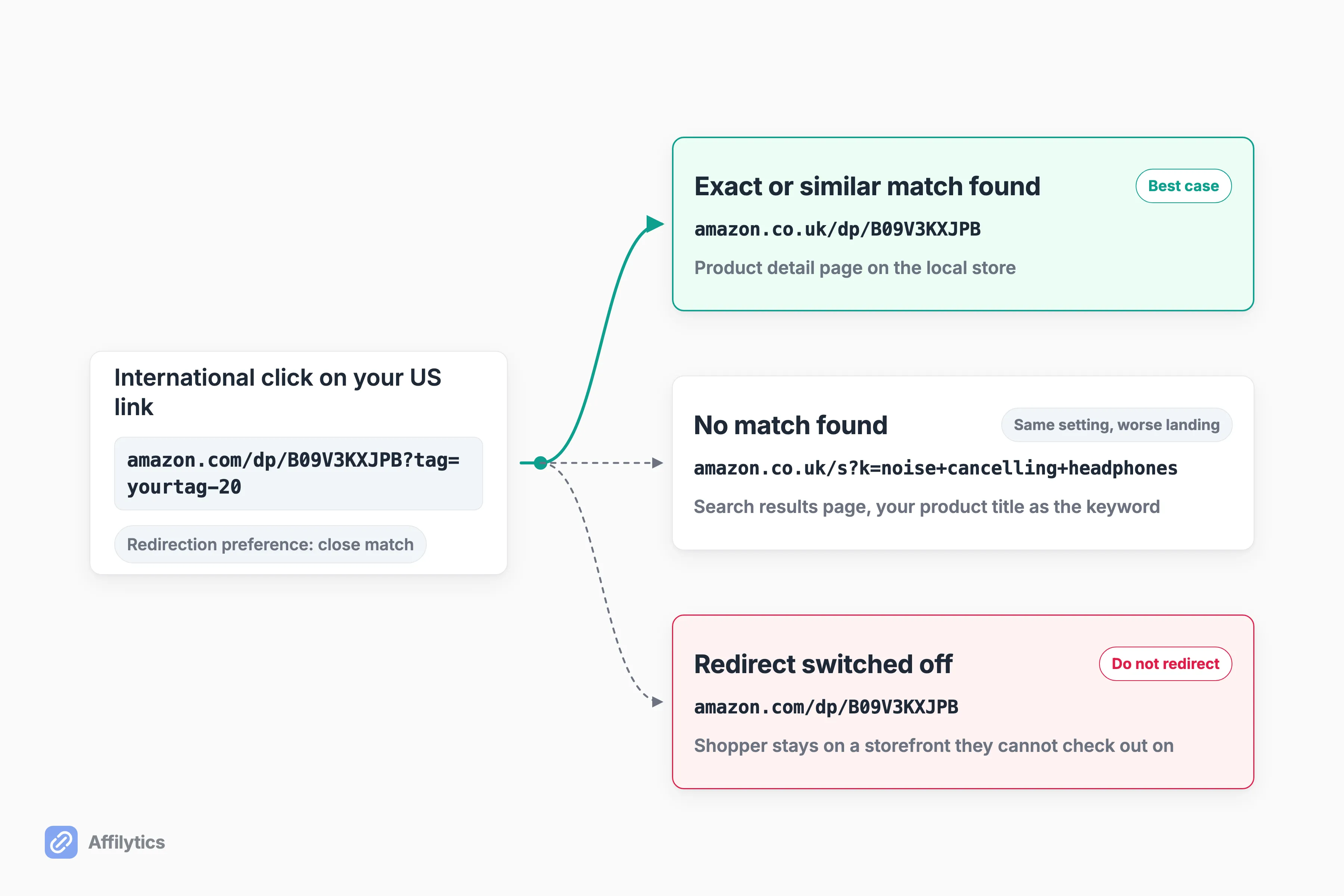
Here is the part nobody puts on a setup checklist. When Amazon cannot find a match, it will “redirect the customer to the search experience on the local Amazon website using the product title as the search keyword.” Your reader wanted the specific thing you recommended and got a search box with your product title typed into it.
Switching to exact match does not escape that. Exact match is stricter, only sending shoppers to a product page when the same product exists locally, and otherwise it still redirects to the search experience using the product title of a similar product. Stricter matching, same fallback.
How do you find out which of your links land where?
Amazon ships a preview for this. The “Check Matching Products” tool on the OneLink page shows where an international visitor would be sent for a given product link, and running your ten highest-earning links through it takes a few minutes. Do that before you change any setting. And check every tracking ID you use, because all preferences are set at a tracking ID level, so a creator with several tracking IDs can have this right on one and wrong on the rest.
The criticism here is not that close match is wrong. It is that a search results page and the product you recommended are not the same outcome, and nothing tells you when the swap happened.
When the Redirect Fires and the Tag Does Not Follow
Section titled “When the Redirect Fires and the Tag Does Not Follow”One creator on r/Affiliatemarketing described a redirect that worked and a tag that did not follow: the link correctly sent a UK visitor to Amazon.co.uk while still carrying the original US tracking ID instead of the UK one, alongside a “Linked accounts not found” error in the OneLink dashboard. That is one report, not a pattern.
So which reading is right?
Nobody in that thread established it. Another commenter offered a plausible innocent explanation: with a global US store ID, Canada, the UK and Germany legitimately share the same tracking ID, which would make the observed behavior expected rather than a lost commission. The thread ended without resolving which reading applies.
What survives either way is the framing another creator on r/Affiliatemarketing used: there are two separate leaks, one being sent to the wrong store and the other being whether that store pays you, and routing fixes the first but not the second. A link that stopped paying looks identical to a link that still pays, which is why we run continuous health checks with a distinct attribution-lost state instead of a simple up-or-down. For the redirect side of it, we catalogued the OneLink failure modes separately. Worth noting which links this even reaches: Earn Globally works on Associates product links, while an Influencer storefront is stuck in one marketplace whatever you set here.
The Links Earn Globally Quietly Skips
Section titled “The Links Earn Globally Quietly Skips”Here is the most actionable sentence in Amazon’s documentation, and I have never seen it on a setup checklist: “Shortened links created by third-party link shorteners are currently not supported and will not be redirected.” OneLink works on Amazon full links and Amazon short links. That is the whole supported set.
Which of your links does this actually apply to?
Run through your own stack for a second:
- A link running through a WordPress cloaking plugin points at
yoursite.com/go/product-name, which is your URL, not Amazon’s. Amazon’s own condition is that you “use Amazon full links or Amazon short links on your site”, and a cloaked path is neither. Whether the redirect still fires after your own hop is not something Amazon documents either way, which makes this the bucket to test rather than assume. - A branded short link from a third-party shortener. Not redirected.
- A raw
amazon.com/dp/...link, or an Amazon-generated short link. Redirected.
For a blogger who tidied up their affiliate links years ago, that is potentially a large part of the library worth checking rather than assuming. Nothing flags it either. Earn Globally reports on traffic it redirected, so links it never touched do not show up as a problem, they show up as ordinary domestic clicks. The quickest check is to look at what your reader is actually clicking: if that URL is yours rather than Amazon’s, it is outside the set Amazon says it redirects.
If you are not sure which bucket you are in, our piece on cloaked affiliate links explains what the plugin is doing to the URL. Our own website crawl follows those same cloaked redirect paths, so links a plugin rewrote still get found and monitored, whichever way Amazon’s redirect treats them.
One warning belongs in the same breath, because it is permanent: a store is not available for OneLink once it has been closed in a specific country, and closing a store is an irreversible action. If Amazon emails you about closing an inactive international account, read it twice before you agree to anything.
Amazon’s Routing, a Third-Party Router, or Both
Section titled “Amazon’s Routing, a Third-Party Router, or Both”Turn Earn Globally on first. It is free, it is first-party, and it removes the multi-account tax for six marketplaces in one setting. One commenter in a r/Affiliatemarketing thread on cross-border commission put it plainly: for Amazon specifically, use their OneLink for the geo routing instead of rolling your own, because it is safer. That argues against reaching for any tool, ours included, and for Amazon it is the right advice.
Amazon’s tool does have a ceiling, and creators name it precisely. One on r/ecommerce described OneLink as fine but a little basic for their needs, and crucially not always sending people to the exact product they wanted. That is the close match tradeoff from earlier, felt at the point where it costs a sale.
When does a third-party router earn its place on top of that?
When those gaps cost you real money. Three questions settle it:
- How much of your library is cloaked or shortened? Those links sit outside Amazon’s routing entirely.
- How much of your income is not Amazon? OneLink cannot touch a single link to any other merchant.
- How much do the approximations cost? If your top earners are the kind of product that resolves to a search page abroad, an approximate landing is an expensive one.
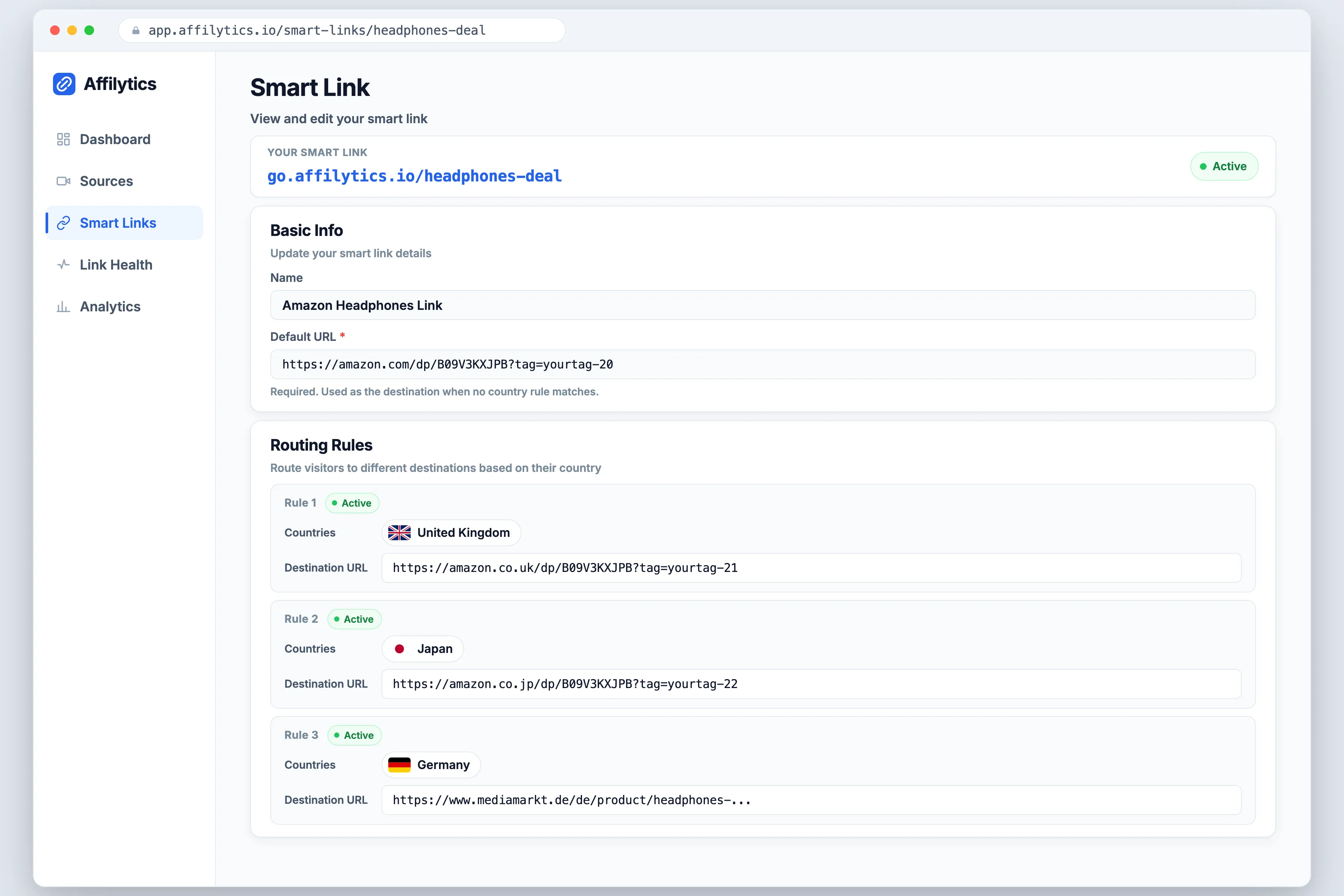
That is the case where routing you control matters, and it is what our per-country rules on a smart link do: you set the destination per country, for any merchant, including the non-Amazon half of your inventory that Amazon’s tool cannot see.
And the honest other half. If your library is small and entirely Amazon, Amazon’s free tool is enough, and I would rather say so than sell you something. Enable it, run your top links through the preview tool, and spend the afternoon on something else.
Find Out What Your International Clicks Are Worth First
Section titled “Find Out What Your International Clicks Are Worth First”Before you change anything about routing, measure the one thing that decides it: how much of your traffic Amazon is quietly routing on your behalf. Take your top-earning product, put a smart link on it, and swap that link into the content already getting the clicks. The country breakdown of every click on it tells you what share of your audience Amazon’s redirect is making decisions for.
Create your free account and you get two full weeks with everything unlocked and no credit card, which is enough time to run that on your best few links before you decide whether Amazon’s own routing covers you.
Does a US Amazon link pay me if someone in the UK buys?
Section titled “Does a US Amazon link pay me if someone in the UK buys?”Yes, once Earn Globally and OneLink are set up on your account. The shopper is redirected from your US link to Amazon.co.uk, the sale is credited to your existing account, and you are paid at the UK program’s own commission rate rather than the US one. Without that setup, a US-tagged link clicked in the UK is a click you are unlikely to be paid for.
Do I need a separate Amazon Associates account for every country?
Section titled “Do I need a separate Amazon Associates account for every country?”Not for Canada, the United Kingdom, Spain, Germany, France and Italy. Amazon runs those six on a single store ID with consolidated reporting in the account you already have. Japan, Singapore, the Netherlands, Saudi Arabia, Poland, Sweden and Australia still require an Amazon Associates account in each country you want to monetize.
Which commission rate do I get paid on an international sale?
Section titled “Which commission rate do I get paid on an international sale?”The destination marketplace’s standard rate. Amazon calculates redirected earnings using the standard commission income table applicable for each Associate Program, so a UK shopper who clicks your US link and orders on Amazon.co.uk earns you the UK rate. That can be higher or lower than your home rate depending on the category, so treat it as a different rate, not an upgrade.
Does Earn Globally work with Pretty Links, Bitly, or other shortened links?
Section titled “Does Earn Globally work with Pretty Links, Bitly, or other shortened links?”Not for third-party shorteners. Amazon states that shortened links created by third-party link shorteners are currently not supported and will not be redirected, and only Amazon’s own full links and Amazon short links get routed. So a branded short link keeps going to your home storefront after you enable Earn Globally. A WordPress cloaking plugin is a different case worth checking yourself: what your reader clicks is a URL on your own domain, not an Amazon one, so confirm where your plugin sends people before you assume Amazon’s redirect applies.
Should I change my redirection preference away from close match?
Section titled “Should I change my redirection preference away from close match?”Probably not. Amazon sets close match as the default and recommends leaving it there to optimize conversions, and redirecting approximately beats not redirecting at all. The tradeoff to understand is that when no match exists locally, the shopper lands on a search results page instead of a product page. The preference is set per tracking ID, so check every ID you use.