
Affiliate Link Tool for YouTubers: Find Buried Links
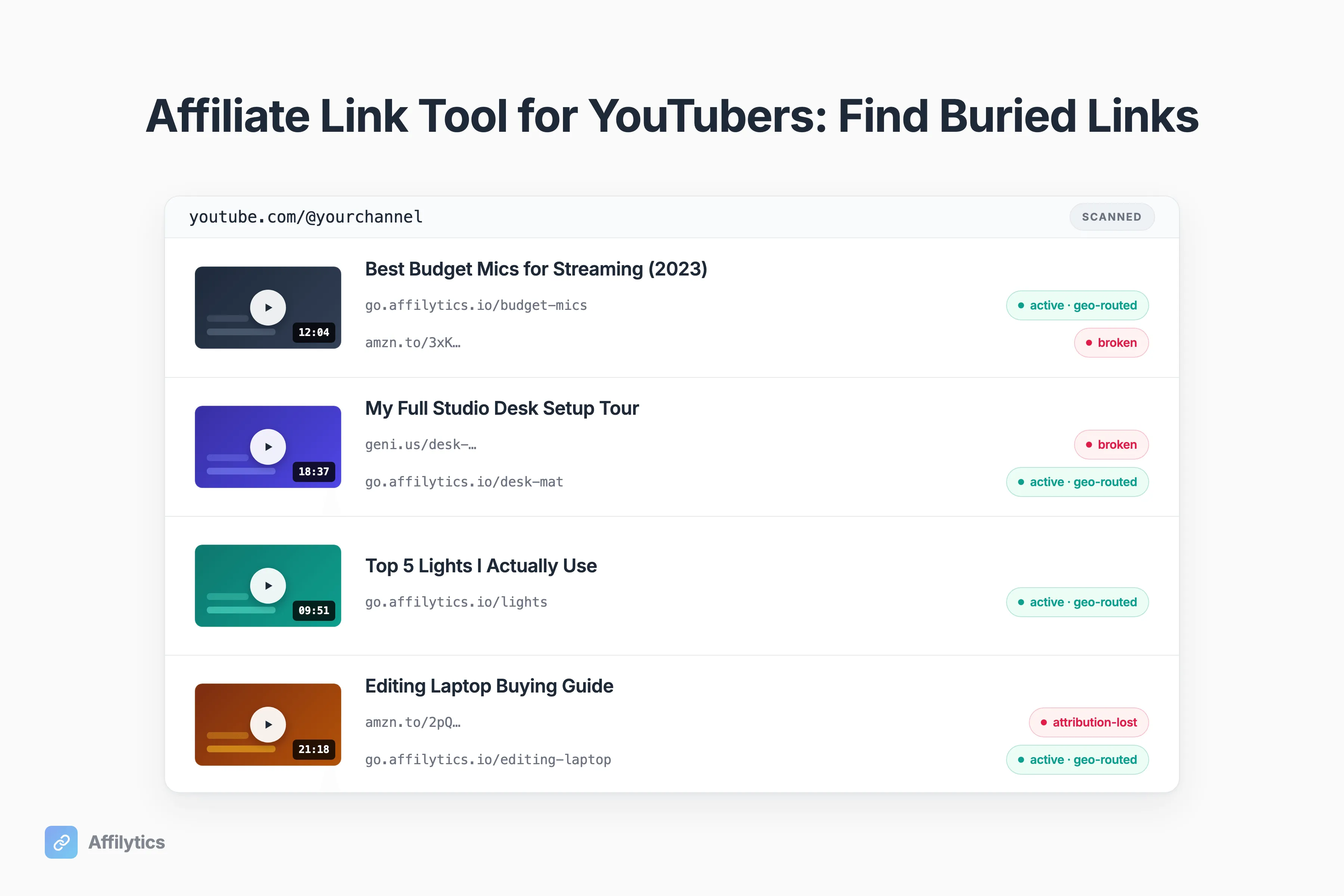
If you’ve been on YouTube a while, your old video descriptions are full of affiliate links you haven’t looked at in months. The right affiliate link tool for YouTubers should find every one of them. Most can’t.
We built Affilytics to scan a YouTube channel’s video descriptions, find every affiliate link a creator already published across the major networks, then geo-route the income and monitor each link’s health. The discovery step is the part nobody else does. (Run a blog alongside the channel? The same scanner crawls your site too.)
If you want the deeper teardown, how we stack up against Geniuslink is a separate read. This guide covers why that back-catalog leaks money, why every tool calling itself an affiliate link tool misses it, what a tool actually has to do, and how the scan works on a real channel.
The Affiliate Links You Wrote Once and Never Looked At Again
Section titled “The Affiliate Links You Wrote Once and Never Looked At Again”Here’s the pattern almost every creator falls into. You shoot a video, paste the affiliate links into the description, hit publish, and move on. The links are done. You never think about them again.
But the video isn’t done. Evergreen uploads pull search and recommended views for years, generating clicks on links you stopped looking at the day you published. One creator on r/YoutubersViews put it bluntly when asked if people audit old links: creators “don’t think about them at all… easy to forget about your backlog”. That tracks.
So what’s actually sitting back there?
- Links to products that got discontinued
- Affiliate programs that changed terms or shut down
- Amazon listings that disappeared
- Tags that quietly stopped working after a redirect
None of that shows up in your Studio dashboard. If you want a refresher on where affiliate links belong in a description, that’s worth a read, and so is the breakdown for affiliate links on YouTube Shorts if your back catalogue includes those. But placement isn’t the problem. The problem is that nobody goes back.
Why a Forgotten Affiliate Link Is Worse Than No Link
Section titled “Why a Forgotten Affiliate Link Is Worse Than No Link”A dead affiliate link is rarely a clean 404. A 404 would almost be easier, because it’s obvious if you ever click it. The real failure modes are quieter.
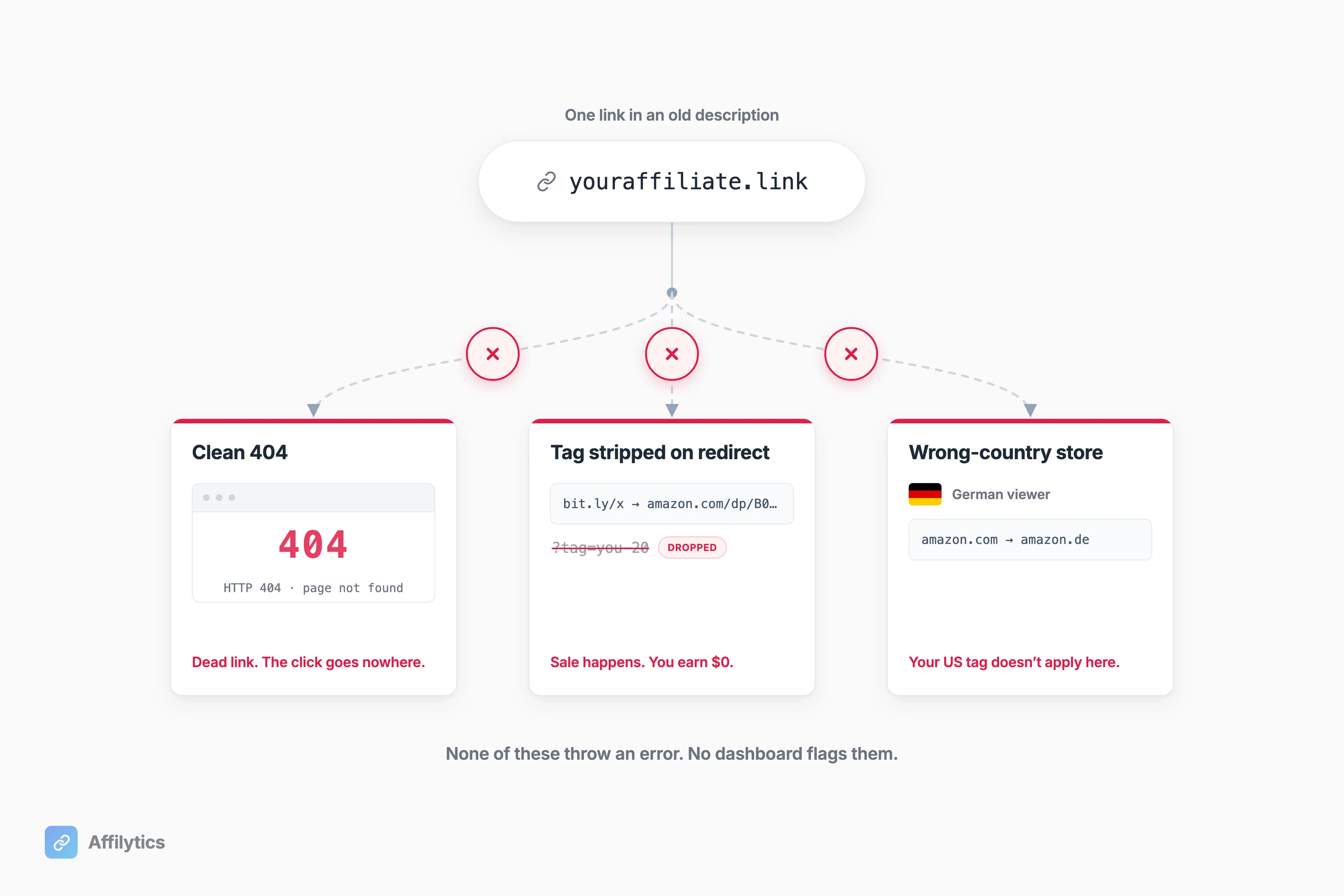
A link can strip your tag after a redirect, so the sale still happens and you get nothing, or push an international viewer to the wrong-country Amazon store where your tag doesn’t apply. A creator on r/SmallYoutubers described exactly this: “went dead or started redirecting to random pages”. The click happens, the money doesn’t.
Why is this invisible? Amazon’s 24-hour referral cookie window is short and rates change without notice, so there’s a tiny window for credit and no statement that says “you lost this.” The redirect-strips-the-tag case is exactly what Affilytics’ attribution-loss detection is built to catch, the failure creators describe over and over and the one no dashboard flags.
Why Every “Affiliate Link Tool” Misses This
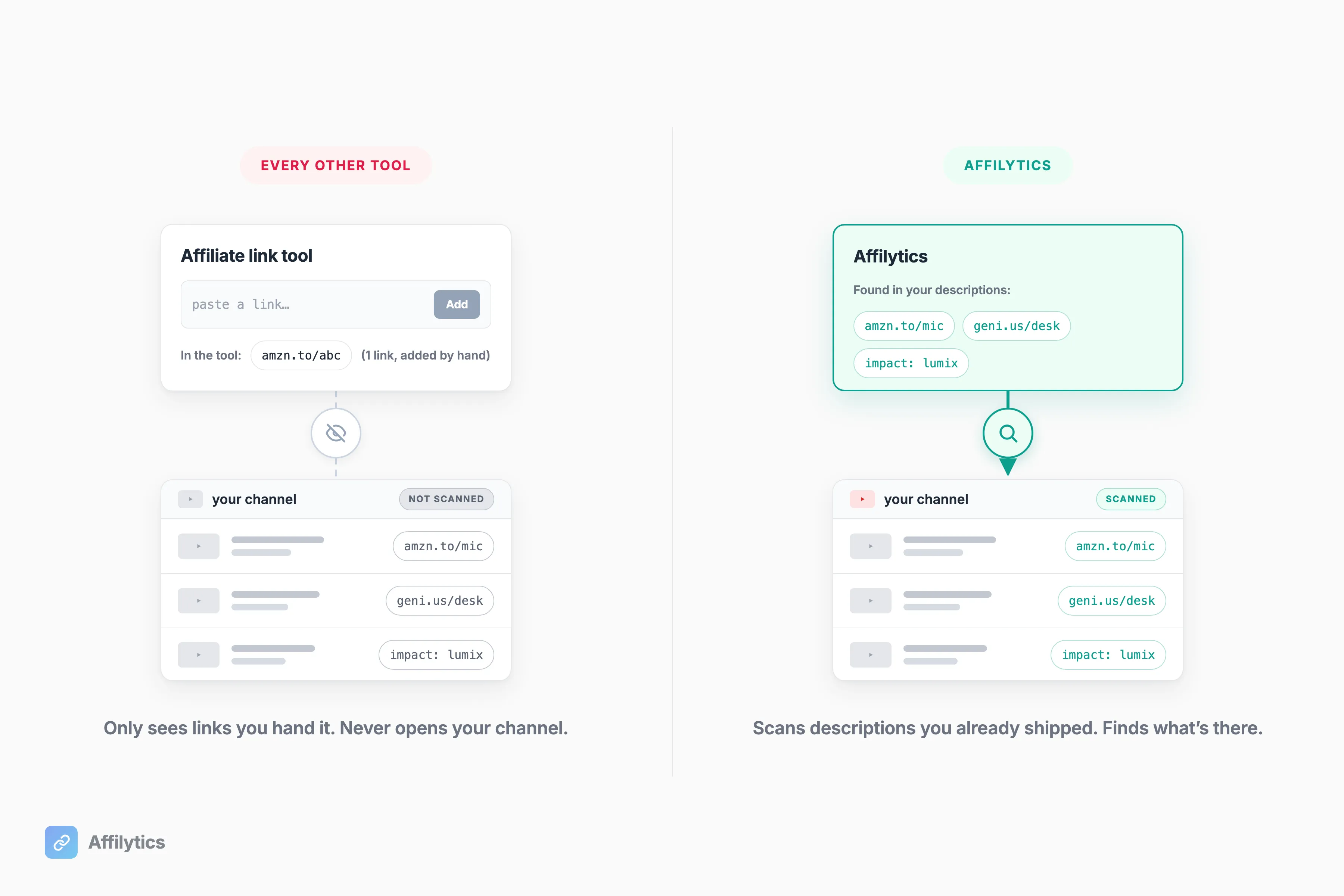
Section titled “Why Every “Affiliate Link Tool” Misses This”Here’s the honest part. Geniuslink, Lasso, and Amazon OneLink are each genuinely good at what they do. The catch is that all of them operate on links you create or paste into them. None go scan a channel’s already-published descriptions and find what’s there. URL Genius and JotURL get named in the same breath, and the same gap applies.
| Tool | What it’s genuinely good at | Finds links already in your descriptions? |
|---|---|---|
| Geniuslink | Amazon multi-country click routing; per-click pricing that flexes with traffic | No, only links managed through Geniuslink |
| Lasso | WordPress product-display boxes; multi-platform link management | No, optimizes links already pasted, doesn’t discover them |
| Amazon OneLink | Free Amazon geo-redirection across 13 marketplaces | No, geo-redirect only, no scanning |
| Affilytics | Scanning a channel’s published descriptions, then geo-routing + monitoring | Yes, that’s the starting point |
The specifics back this up. Geniuslink runs one public tier at $6/mo with 1,000 clicks included and $3.50 per 1,000 beyond, no free tier, and its Link Monitoring only covers links created or managed through Geniuslink. Lasso has a free Lite tier plus $19, $29, and $59 plans and is genuinely multi-platform, but its YouTube support optimizes links you already pasted rather than scan-discovering them; Amazon OneLink is free across 13 marketplaces and does geo-redirection only, no broken-link detection.
So who’s each one best for? Geniuslink for heavy Amazon multi-country routing, Lasso for WordPress product displays, OneLink for free basic Amazon geo. None of them is best for “audit the links I already shipped,” because none can see those links until you hand them over.
What an Affiliate Link Tool for YouTubers Actually Has To Do
Section titled “What an Affiliate Link Tool for YouTubers Actually Has To Do”Forget the brand names for a second. If you’re auditing tools, here’s the bar a real affiliate link tool for YouTubers has to clear, in order:
- Discover the links already in your descriptions. Not just manage new ones going forward. The links you forgot are the whole problem.
- Detect them across the major networks, not only Amazon. Most creators run more than one program.
- Geo-route the income. An international click should land on the right regional store, not bounce off a US listing it can’t buy from. This is the part that grows revenue.
- Keep monitoring health. A link that’s fine today breaks next quarter, and you should hear about it before months pass.
Point 3 is where most of the money is, which is why geo-routing your affiliate income deserves its own attention. It is also the line that YouTube’s own tagging surface cannot cross, since the YouTube Shopping eligibility rules limit tags to partnered merchants in a short list of countries. A click from someone in Germany on an Amazon.com link is often one you earned and then lost at the last step.
That’s the bar, and it’s the mechanic Affilytics is built around. Detection covers the major affiliate networks (Amazon US and international, Impact, ShareASale, CJ, Awin, Rakuten, PartnerStack, and more, with no fixed count), which is the whole point if you run more than just Amazon. The links don’t rewrite themselves. For the ones worth protecting, you create a geo-routed smart link at go.affilytics.io/{slug} and swap it into the description yourself, and from then on that click lands on the right regional store.
How This Works on an Actual Channel
Section titled “How This Works on an Actual Channel”The mechanic is simpler than it sounds. You paste your channel URL. Affilytics crawls every video description through the YouTube Data API and pulls out every affiliate link it finds, across networks, not just Amazon.
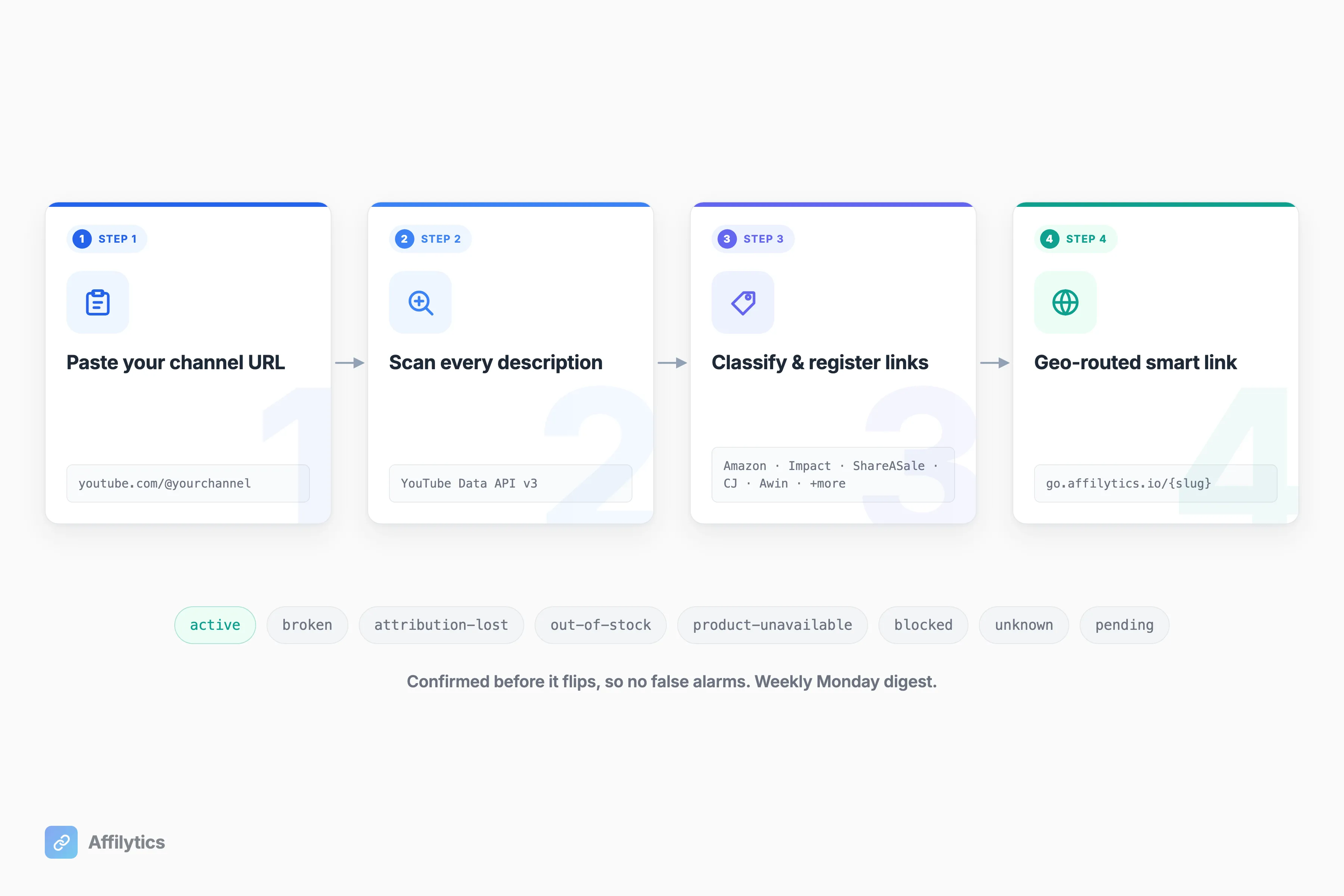
Every link it finds goes onto a health monitor with an eight-status model: active, broken, attribution-lost, out-of-stock, product-unavailable, blocked, unknown, or pending. Those checks run continuously, not once a week, so when a link breaks you hear about it then, not on a schedule. Checks use stealth HTTP so they look like a real browser, not a bot retailers would block, and a status has to confirm before it flips, so you get no false alarms. The Monday email is a separate thing: a weekly click report, not the break alert. Geo-routing is the manual step. You create a smart link at go.affilytics.io/{slug}, replace the raw link in the description with it, and that one URL sends each visitor to the right regional store.
If you want to check every affiliate link on your channel at once, that’s the workflow I built this for. Want to create a geo-routed smart link by hand instead? That walks through the smart-link side in detail.
”But My Old Links Don’t Really Matter”
Section titled “”But My Old Links Don’t Really Matter””I’ll concede the honest version of this, because some creators are right to ignore old links. One creator on r/PartneredYoutube said it plainly: “if they die, so be it because it is not worth spending time on them. I only focus on new stuff.”. If your videos are limited-window reviews that go stale anyway, or your back-catalog is tiny, or those uploads pull almost no traffic, that math is correct.
But notice the assumption baked in: that checking old links costs you an afternoon. That’s true by hand, video by video. It’s not true if the audit is one scan. For an evergreen back-catalog that still pulls views every day, the leak compounds silently and the cost of finding it drops to a paste-and-wait. The “so be it” call is rational right up until the fix stops being manual.
Find Out What’s Already Broken
Section titled “Find Out What’s Already Broken”You don’t have to guess whether your back-catalog is leaking. Start a free account, paste your channel, and let the first scan show you which links are dead, attribution-lost, or routing international viewers to a store they can’t buy from. You get two full weeks of everything unlocked, no credit card, and it degrades into a usable free tier after that, no links break.
Create your free account and run the scan. If you’re still weighing tools, the full Geniuslink alternative breakdown is the longer side-by-side.
How do I find the affiliate links in my old YouTube videos?
Section titled “How do I find the affiliate links in my old YouTube videos?”You don’t hunt them manually. You paste your channel URL and the scan crawls every video description, then surfaces every affiliate link it finds across the major networks. The point is that you never had a list of where those links are, so a tool that needs you to supply the list can’t help. A tool that reads the descriptions for you can.
Do Geniuslink or Lasso scan my existing video descriptions?
Section titled “Do Geniuslink or Lasso scan my existing video descriptions?”No. Geniuslink monitors links you created or manage through Geniuslink, and Lasso’s YouTube support optimizes links already pasted into descriptions but does not scan-discover them. Both are good at managing links you bring them. Neither goes out and finds the links already published in your channel.
What actually happens when an old affiliate link breaks?
Section titled “What actually happens when an old affiliate link breaks?”Usually nothing visible. There is no error email, no dashboard alert. The click 404s, or loses the affiliate tag after a redirect, or sends an international viewer to the wrong-country store. The commission just disappears, and you keep getting views on that video for months before anything flags it.
Does this only work for Amazon affiliate links?
Section titled “Does this only work for Amazon affiliate links?”No. Detection covers the major affiliate networks, Amazon US and international, Impact, ShareASale, CJ, Awin, Rakuten, PartnerStack, and more. Multi-network coverage matters because most creators run more than Amazon, and a tool that only sees Amazon links misses every non-Amazon link a creator ran.
Is there a free way to try it before paying?
Section titled “Is there a free way to try it before paying?”Yes. You get two weeks of full access with no credit card. After that it degrades gracefully into a usable free tier: your smart links keep working on default routing and you can still see the per-click country breakdown, so you can quantify what your back-catalog is actually leaking before you decide to upgrade.