
YouTube Shopping Affiliate Program: Who Really Qualifies
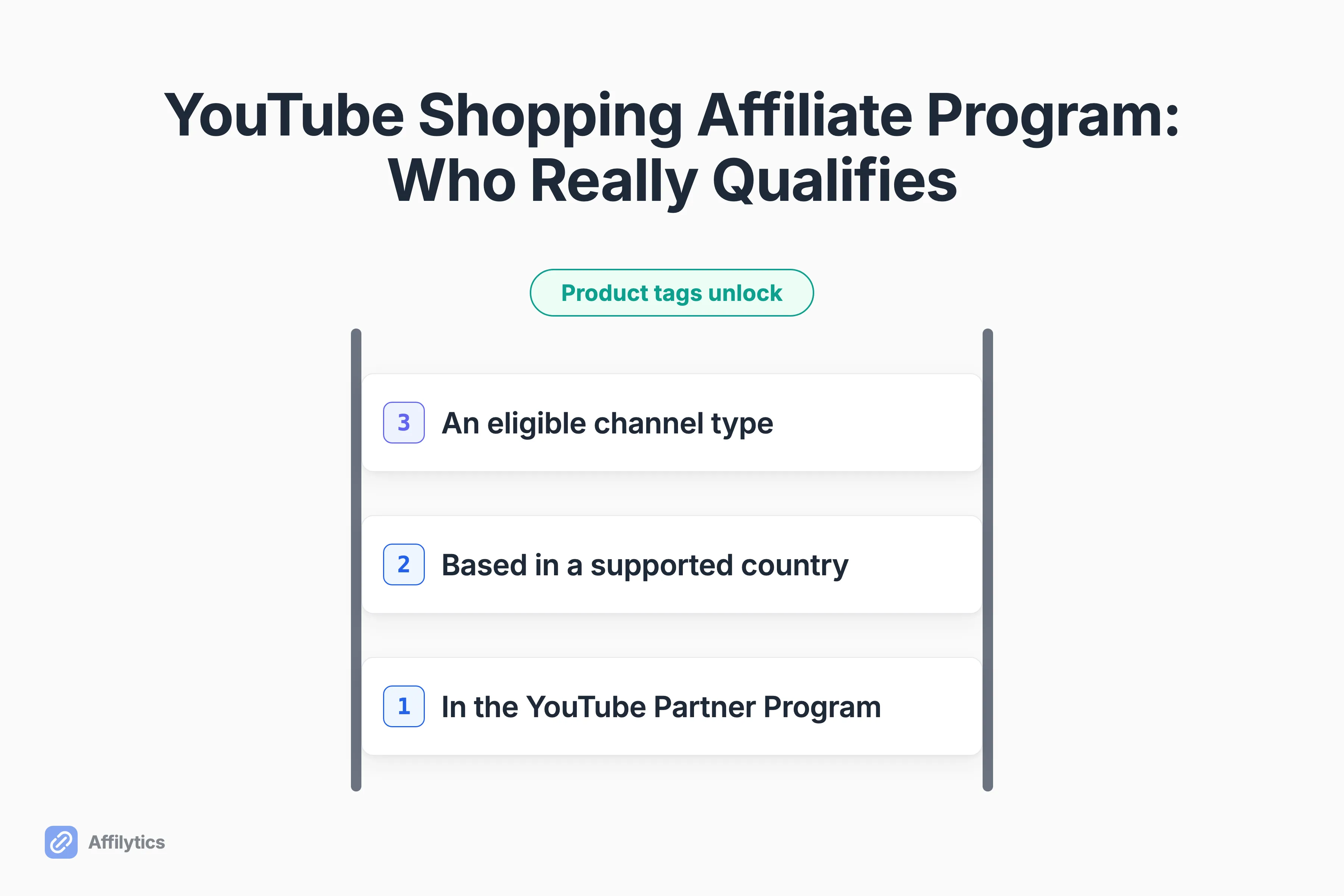
If you have heard that the YouTube Shopping affiliate program opens up at 500 subscribers, that number is real. It is also the smallest of the three gates standing between you and your first product tag, and the other two are the ones that actually stop people.
We build Affilytics. It scans a channel and finds every affiliate link already sitting in the descriptions, and it gives you smart links that send each viewer to the storefront that pays for their country. So the half of this decision that lives below the video is the part we work on every day.
If your descriptions are already carrying links, how to structure affiliate links in your descriptions is the companion piece to everything here. A good chunk of what follows is about when a tag should replace one of those links, and when it absolutely should not.
This guide walks the real eligibility rules, where the program is and is not available, what it actually pays and when, and the cases where a link in your description still earns you more than a tag inside the video.
What the YouTube Shopping affiliate program actually is
Section titled “What the YouTube Shopping affiliate program actually is”Strip the branding off and the mechanic is small enough to say in one sentence. You attach a partnered retailer’s product to your content, a viewer taps it, they buy on that retailer’s own site, and you earn a commission on the sale.
What surprises most creators is how many surfaces it covers. You can tag products on videos, Shorts, and live streams, and you are not restricted to new uploads. A video that went live two years ago can be edited today and carry tags tomorrow.
A few mechanics worth knowing before you decide whether this fits your channel:
- Up to 60 products can be tagged in a single video.
- Tags render on long-form video, on Shorts, and during a live stream.
- Older videos can be tagged retroactively, which matters enormously if you have a back catalog of reviews.
- The purchase happens on the retailer’s site, not inside YouTube.
So is this just affiliate marketing with a nicer button?
Almost. The “almost” is the whole post.
Here is the line everything below rests on. A product tag is a catalog you pick from. A description link is a URL you write.
That sounds pedantic until it costs you money. When you tag, you are choosing from the retailers YouTube has partnered with in your market, at the rate each of them set, on terms each of them can change. When you write a link, you are pointing anywhere you like: any merchant, any network, any country’s storefront, on the terms of a program you personally joined and can personally leave.
Both can live on the same video. They are not the same business.
Who really qualifies (three gates, in this order)
Section titled “Who really qualifies (three gates, in this order)”Almost every guide you will read on this says the number is 500 subscribers. That is true and incomplete, and the space between those two things is where creators lose an afternoon.
Gate 1 is the YouTube Partner Program (YPP), and this is what the 500-subscriber headline is actually describing. Admission to YPP is not one condition. It is 500 subscribers, 3 public uploads in the past 90 days, and either 3,000 public watch hours on long-form video in the past 365 days or 3 million public Shorts views in the past 90 days. All of them, at once, not whichever one you happen to clear.
Now the genuinely good news, which usually gets buried under that correction. Shopping sits in YPP’s lower tier. The 1,000-subscriber bar everyone associates with YouTube monetization belongs to the higher tier that unlocks ads and Premium revenue, and you do not need it to tag products. YouTube expanded the program to creators with at least 500 subscribers in March 2026, which pulled a whole band of channels into affiliate earnings well before they can run a single ad.
Gate 2 is where your channel is based. The program has launched in a specific list of countries and nowhere else, which is the next section and the one most likely to be your answer.
Gate 3 is what kind of channel you run. Music channels are out. So are Official Artist Channels and channels associated with a music partner, meaning labels, distributors, publishers, and VEVO. So is anything with the audience set to Made for Kids, or any channel carrying a significant number of Made for Kids videos.
| Gate | What it requires | Where you check it |
|---|---|---|
| 1. YouTube Partner Program | 500 subscribers, 3 public uploads in the past 90 days, and either 3,000 public watch hours on long-form in 365 days or 3M public Shorts views in 90 days. Concurrent, not alternatives. | Studio, Earn tab |
| 2. A supported country | Your channel is based in a country where the program has actually launched. | Studio, Earn tab |
| 3. Channel type | Not music, not an Official Artist Channel, not music-partner-associated, not Made for Kids. | Studio, Earn tab, plus your own audience settings |
So where do you check all three of these?
One place, and it is the same place for each of them. Open YouTube Studio, go to the Earn tab, and Studio tells you what you qualify for right now. Joining runs through Earn, then Programs, then Join Now, then accepting the Shopping affiliate program terms.
The reason I keep pointing at that tab instead of restating a checklist is simple. A checklist tells you what was true when it was written. The Earn tab tells you what is true for your channel today, which is a different and much more useful thing.
Where the program is available, and why that list moves
Section titled “Where the program is available, and why that list moves”When we checked YouTube’s help page, it named 14 countries where a creator can join: Argentina, Brazil, India, Indonesia, Japan, Korea, Malaysia, Mexico, the Philippines, Singapore, Taiwan, Thailand, the United States, and Vietnam.
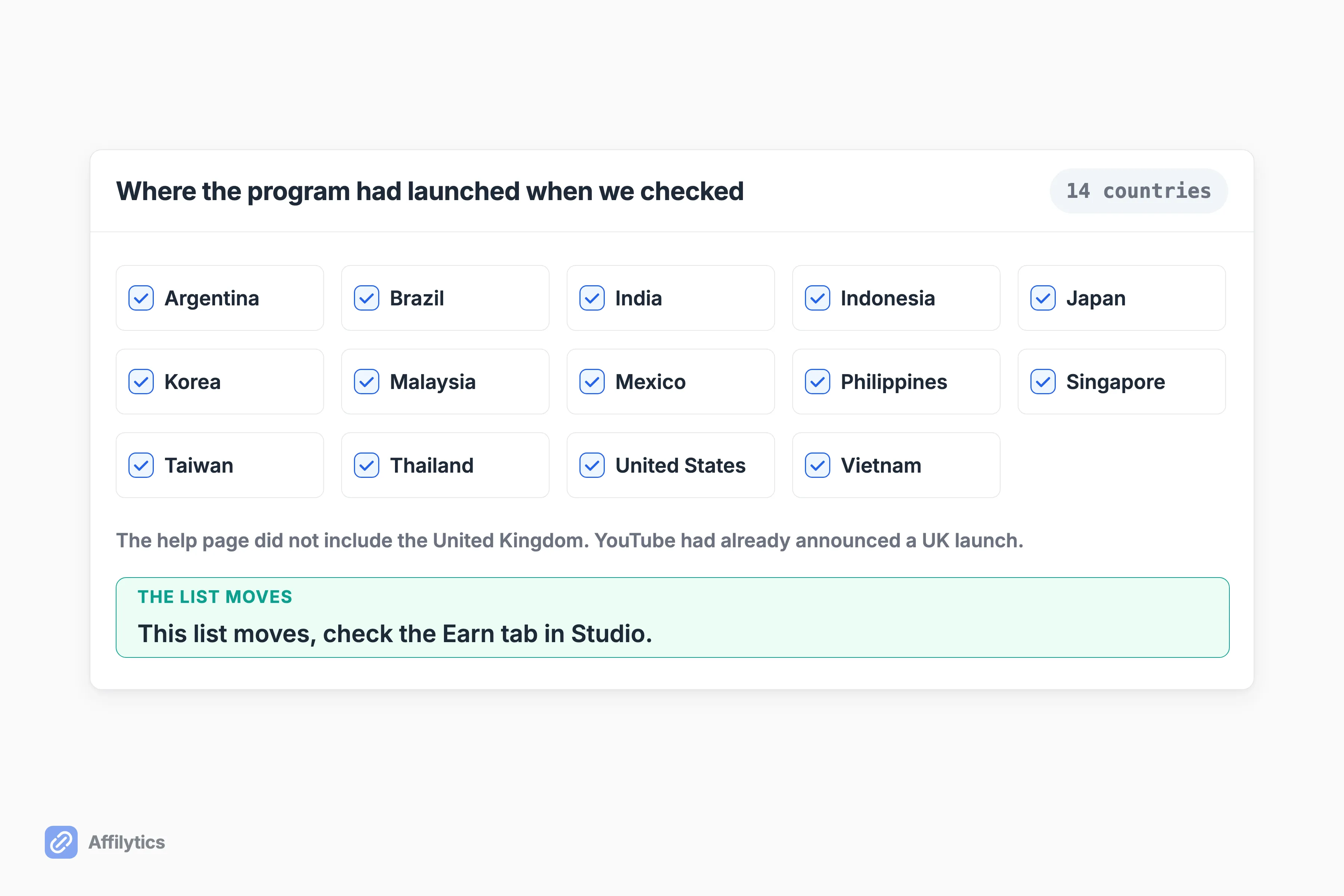
Read that list once, then stop trusting it, because it was already behind reality when we read it. YouTube announced a UK launch in July 2026, and by August a UK creator in r/PartneredYoutube was posting that access had switched on for their channel. The help page’s list did not include the United Kingdom.
I am not going to quietly slide the UK onto the list, and I am not going to present the list as final either. Both moves would be wrong in opposite directions. What the two sources say together is more useful than either alone: the help page lags the program, and neither the help page nor the announcement carries a visible last-updated date, so you cannot tell how far behind it is at any given moment.
So how do you get an answer that is true for you, today?
Open Studio and look at the Earn tab. If the Shopping affiliate program is available to your channel, it appears there as something you can join. If it does not appear and you clear the partner-program and channel-type gates, your country is almost certainly the reason. That is a one-minute check that beats any static list, including the one I just printed.
If the answer turns out to be no, that is not the end of your affiliate income, it is just the end of this particular route. Which countries each Amazon program covers is the map for the largest program that will take you regardless of where YouTube Shopping has launched.
What you actually get paid, and when
Section titled “What you actually get paid, and when”There is no single commission rate for this program, and anyone quoting you one invented it. Every participating brand and retailer sets its own commission rate and its own attribution window, which is the period after a click during which a purchase still counts as yours, per product.
The good part of that design is that you see the number before you commit. Studio’s affiliate hub, under Earn then Shopping then Explore affiliate offers, lists participating sellers, their commission percentages, and any custom rate a brand has offered your channel specifically.
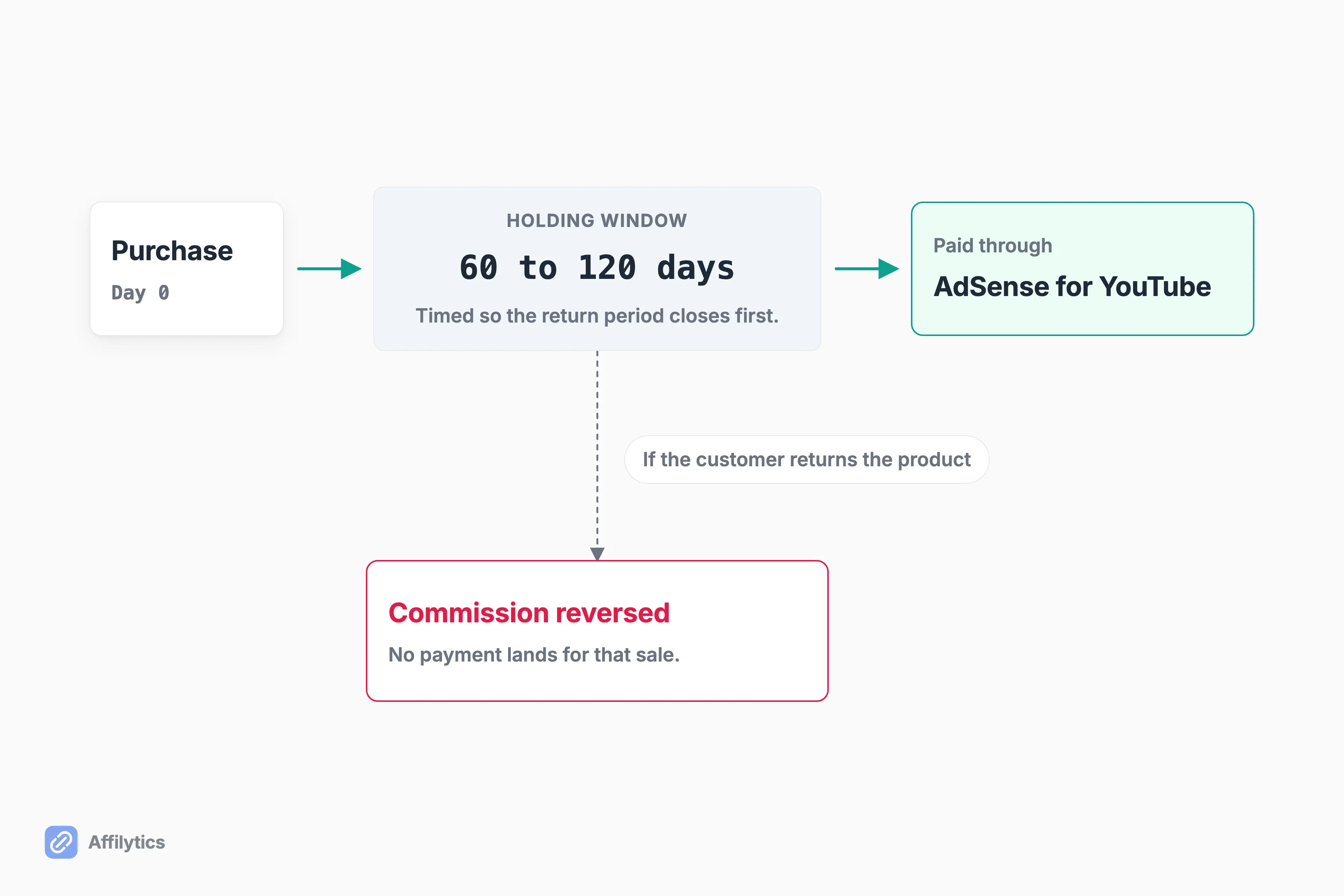
Payout runs on a slower clock than most creators expect. Commissions are paid through AdSense for YouTube within 60 to 120 days after purchase, and if the customer returns the product, the commission is reversed. That is not YouTube dragging its feet. It is the return window closing before money moves. Treat it as a second income stream on its own timetable, not a swap for whatever your networks already pay you on.
Now the question everybody actually types into Google. How much does YouTube keep?
I cannot tell you, and I would rather explain why than guess. On the Reddit thread most creators land on when they search this, the opening post names a figure YouTube supposedly takes out of every commission. The top reply says that figure is wrong, gives a different one, and adds that the fee is sometimes waived entirely. Neither cites a source, because there is none: no YouTube or Google page I could find documents a platform cut at all.
So the honest answer has three parts:
- Creators disagree openly.
- No official figure is published.
- The only number you can verify is the per-product rate sitting in your own Studio hub before you tag.
There is one documented wrinkle, and it runs in your favor. During a market launch YouTube has offered a temporary incentive routing 100 percent of affiliate-merchant commissions to creators, while saying in the same breath that the rate is temporary and may reduce. Take it while it is there. Do not plan around it.
The last thing to plan for is that merchant terms change under you, and you find out from your own earnings report. Creators in r/Amazon_Influencer described Walmart moving many of its YouTube Shopping listings from a stated commission range to the phrase “Commission may apply”, then reported making sales through those tags and seeing nothing come back. One pulled most of their Walmart tags after two weeks of sales produced no commission at all.
That is not a scandal. It is the documented mechanic working exactly as written: the merchant sets the rate, so the merchant can set it to nothing.
What an in-video tag does better than a description link
Section titled “What an in-video tag does better than a description link”I want to argue this side properly, because a post that only argues the half that suits us is not worth reading.
A tag sits inside the frame at the moment of interest. That is the whole case, and it is a strong one. The viewer who just watched you pick the thing up does not have to remember it exists, scroll down, expand a description, and find the right line among nine other lines. They tap what they are already looking at.
Three places where that gap is widest:
- Shorts. Someone swiping vertically at speed is not opening a description. Ever.
- Living-room screens. A description on a TV is technically reachable and practically not, and TV is where a lot of long-form review viewing now happens.
- Live streams. There is no good home for a link in a chat scroll, and the buying moment passes in seconds.
There is a second, quieter advantage. YouTube runs the merchant relationship for you. No per-network application, no waiting on an affiliate manager to approve a channel they have never watched, no separate payout account per program. The rate card, the tracking, and the payment plumbing all live inside a product you already open every day. For a creator who has never joined an affiliate network, that removes a genuinely annoying week of work.
Should you believe the income numbers on YouTube’s program page?
Be careful there. That page carries individually attributed creator success stories with impressive multiples attached, and every single one is footnoted “Results not typical. Earnings depend on audience size, engagement, and content type.” Those are real people. They are also selected people. Read the page as marketing, not as a forecast for your channel.
What description links still do better
Section titled “What description links still do better”Now the other side, and this is where the money question actually gets settled for most channels.
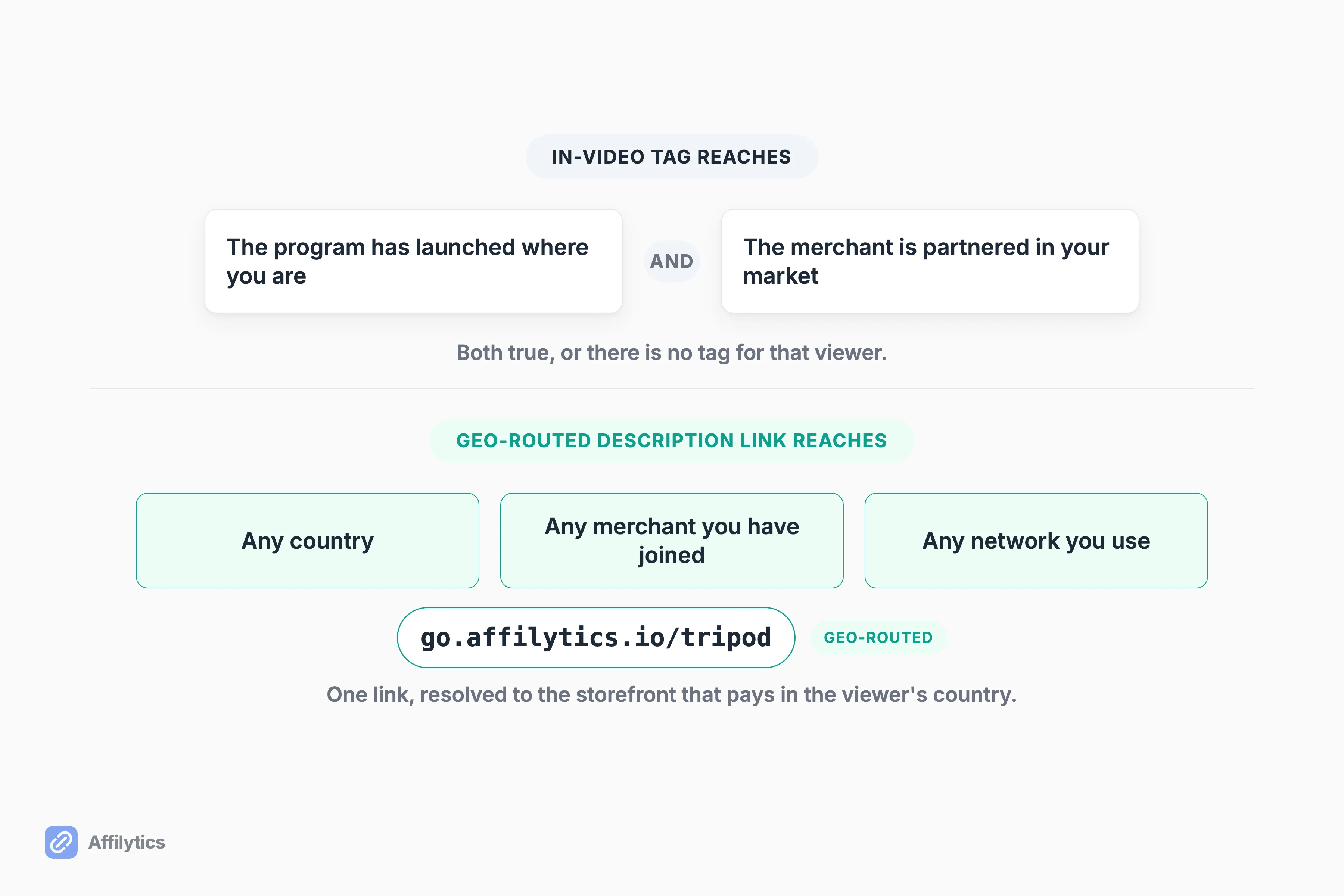
The first advantage is reach in markets the program has never heard of. A tag needs two things to line up at once: the program has to exist where you are, and the merchant has to be partnered in it. A description link needs neither. It works for any viewer, in any country, pointing at any merchant you have a relationship with.
That matters more than most creators think, because YouTube’s own analytics do not frame it as a money problem. Most creators carry a 30 to 50 percent international audience without ever having thought about it. A typical US-based channel sees roughly 60 percent United States, 12 percent United Kingdom, 8 percent Canada, 6 percent Australia, and the remainder scattered across everywhere else. Tech and gaming skew further international still.
So what happens when that 12 percent in the UK taps a link pointing at a US storefront?
That gap is the reason we built Affilytics the way we did. One link in your description can resolve which country each viewer is in and send them to the storefront that actually pays you there, so a UK viewer lands on a UK storefront and a German viewer lands on a German one instead of on a page where your commission quietly evaporates. It works for any merchant, not only Amazon.
If a real share of your audience sits outside your own country, earn from viewers outside your own country covers the mechanics of that in detail.
The other three advantages are shorter but not smaller:
- Every network, not one catalog. A description link reaches any affiliate program you have joined, across every network you use. The tag catalog is whoever YouTube has partnered with in your market, which at a fresh market launch can be a short enough list to count on your fingers.
- Multiple channels. Creators in r/Amazon_Influencer report that merchant-level registration can bind tagging to a single channel, so a creator running several channels can only tag on the one linked to their storefront. That is reported creator experience rather than a documented program rule, but it is friction a description link simply does not have.
- They are yours. You control the destination. You can change where a link points after a product is discontinued, route it by country, swap the merchant when a rate drops, or move the whole thing to a different network without touching the video. A tag is a pointer into somebody else’s catalog on somebody else’s terms.
Put plainly: the tag owns the surface inside the video, and the description link claims everything the catalog and the country list leave out. For a lot of channels, that leftover is the larger number.
How to run both without cannibalizing yourself
Section titled “How to run both without cannibalizing yourself”The answer is not to pick one. It is to know which click belongs to which, and then stop worrying about it.
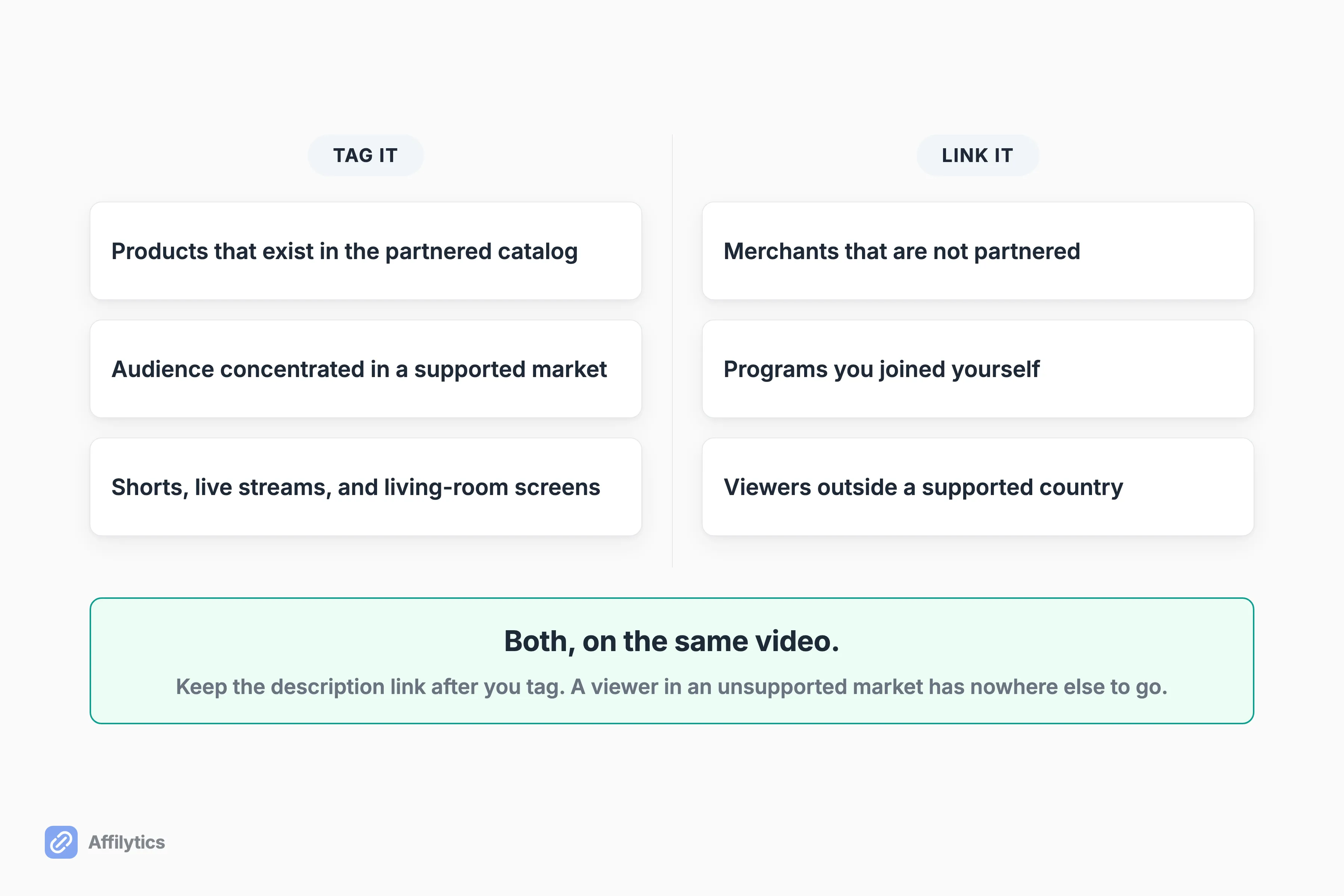
So which link goes where?
Here is the split I would run on a review channel:
- Tag the products that genuinely exist in the partnered catalog, especially when your audience is concentrated in a supported market.
- Keep description links for every merchant that is not partnered, every program you joined yourself, and every viewer outside a supported country.
- Keep the description link on the video even after you tag it. A viewer in an unsupported market has nowhere else to go, and removing that line is how you turn an international click into nothing.
Now the asymmetry nobody warns you about. YouTube maintains the tag catalog for you. Nobody maintains your description links except you.
A merchant redesigns its URLs. A product is discontinued. A program shuts down or moves networks. Your two-year-old video keeps serving views the entire time, and the link in its description keeps looking completely fine while returning exactly zero. There is no alert, no bounce, no notification. The clicks just stop converting.
This is the other half of what we do at Affilytics: every link we find gets checked continuously, so a dead destination surfaces as a problem instead of as a slow month you cannot explain. You can check every link across your channel in one pass rather than opening videos one at a time. Either way, it is worth knowing how to spot a dead description link before it quietly costs you commission, tool or no tool.
So run both, and keep the jobs straight. The tag owns the moment inside the video. The description link owns every viewer and every merchant the catalog cannot reach. And only one of those two is yours to keep alive. That is the description link, every time.
Start with what is already published
Section titled “Start with what is already published”You have just read that the description-link side of your setup is the side nobody maintains for you. The sensible next move is to find out what is actually sitting in your own channel right now, before you spend a weekend tagging.
Start your free two-week trial and get everything unlocked for two full weeks, no credit card. Paste your channel URL and see what your published links are really doing.
How do I qualify for the YouTube Shopping affiliate program?
Section titled “How do I qualify for the YouTube Shopping affiliate program?”Three gates, in this order. Your channel has to be in the YouTube Partner Program, which on its own means 500 subscribers plus 3 public uploads in the past 90 days plus either 3,000 public watch hours on long-form video in 365 days or 3 million public Shorts views in 90 days, all at the same time. It has to be based in a country where the program has launched. And it cannot be a music channel, an Official Artist Channel, a channel associated with a music partner, or a channel set to Made for Kids. The Earn tab in YouTube Studio tells you which of those you already clear.
Can I tag products in videos I already published?
Section titled “Can I tag products in videos I already published?”Yes. Tags are not limited to new uploads. You can edit a video that has been live for years and add product tags to it, which is the single biggest win available to a channel sitting on a back catalog of reviews or tutorials. It is also the slowest, because somebody has to go video by video and decide what still deserves one.
How much does YouTube take from affiliate commissions?
Section titled “How much does YouTube take from affiliate commissions?”No official figure is published. Creators openly disagree, and on the Reddit thread most creators land on when they search this, the opening post and the top reply name different numbers with no source behind either. The figure you can verify is the per-product commission rate shown in your own Studio affiliate hub before you tag. YouTube has run a temporary launch incentive routing 100 percent of affiliate-merchant commissions to creators, while calling that rate temporary and subject to reduction.
When do YouTube Shopping commissions get paid?
Section titled “When do YouTube Shopping commissions get paid?”Through AdSense for YouTube, within 60 to 120 days after the purchase. The long window exists so the return period closes first, and if the customer returns the product, the commission is reversed. Plan around it as a second income stream on a slower clock than whatever your affiliate networks already pay you on, not as a replacement for one.
Is YouTube Shopping available in my country?
Section titled “Is YouTube Shopping available in my country?”When we checked, YouTube’s help page listed Argentina, Brazil, India, Indonesia, Japan, Korea, Malaysia, Mexico, the Philippines, Singapore, Taiwan, Thailand, the United States and Vietnam. Treat that as a snapshot, not the answer, because YouTube has announced market launches the help page had not absorbed. The only current answer for you personally is the Earn tab in YouTube Studio.